
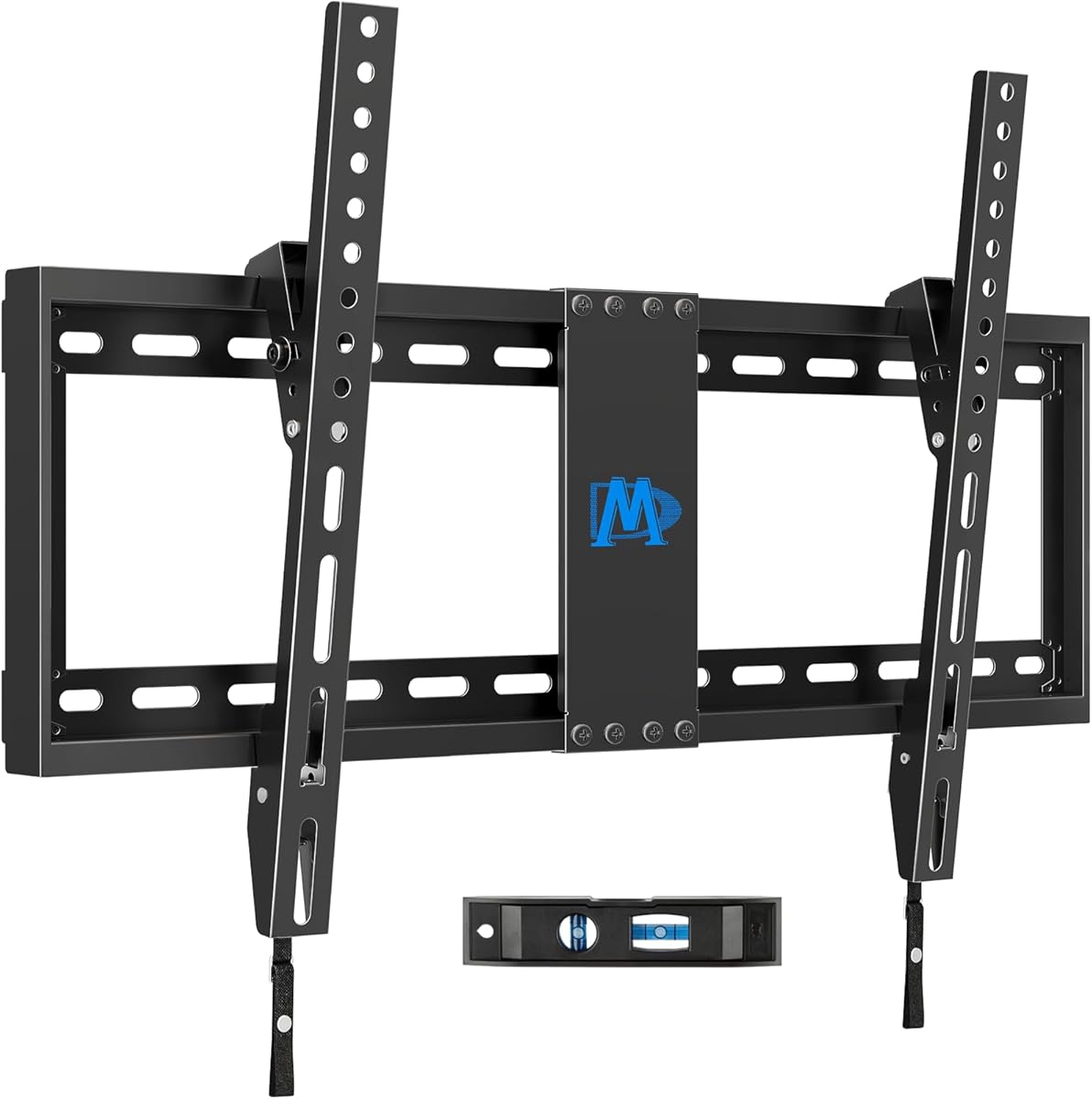
Perlegear No Drill TV Wall Mount
4.7Editor score
No drilling required for installation
Supports up to 100 pounds
Low profile 1.12 inch clearance
Finding a lightweight TV wall mount that balances strength and ease of installation is essential for modern home setups. Whether you are renting or own your home, choosing the right bracket ensures your display stays secure without damaging walls unnecessarily.
We compared ten top-rated models based on their design features, compatibility with various TV sizes, and user feedback on installation simplicity. Each product was evaluated for its ability to provide a stable, low-profile look while offering functional adjustments like tilt or swivel.
Each pick in this list highlights specific strengths such as no-drill options, full motion capabilities, or ultra-slim profiles. Please note that product availability and pricing can change over time, so verify details before making your final purchase decision.
4.7Editor score

4.8Editor score

4.8Editor score
As an Amazon Associate we earn from qualifying purchases.
This comparison table outlines the key specifications and features of the ten leading lightweight TV wall mounts available today. Use this guide to quickly identify which model best matches your TV size, wall type, and desired viewing flexibility.


This mount stands out as the top choice for users needing reliable full motion capabilities with a solid build. It holds TVs up to 110 pounds and supports sizes from 32 to 70 inches, making it versatile for most living rooms.
We may earn a commission when you buy through this link, at no additional cost to you.
The six articulating arms provide robust support while allowing the TV to pull out up to 17.5 inches. Tilt and swivel functions help reduce glare, and the robot welding technology ensures durability over long-term use.
Installation is straightforward with pre-labeled hardware bags and a paper template. However, users must note this is not designed for drywall only setups without studs, which could limit renters without drilling access.
For homeowners seeking a balance of strength and flexibility, this model delivers excellent value. Its ability to adjust viewing angles post-installation makes it a practical choice for optimizing comfort in any room layout.
The tilt and swivel options allow you to position the screen perfectly for reduced glare and comfortable viewing from different seats.
Built with heavy-duty steel and robot welding, this mount offers exceptional stability for larger TVs without compromising wall integrity.
We may earn a commission when you buy through this link, at no additional cost to you.
This mount is ideal for those who want to avoid drilling holes or finding studs manually. It supports TVs up to 100 pounds and uses a hammer to secure the wall plate onto drywall with nails.
We may earn a commission when you buy through this link, at no additional cost to you.
The low-profile design keeps the TV just 1.12 inches from the wall, creating a sleek look. Pull cord security locks ensure the TV stays safely in place during viewing or movement.
While it simplifies installation, it requires specific wall conditions like concrete brick block or compatible wood studs. Cavity walls are not suitable, so users should verify their wall type before purchasing.
For renters or DIY enthusiasts seeking ease and reliability, this model offers a compelling solution. It balances affordability with strong performance, making it a top pick for budget-conscious buyers.
You can install this mount quickly without professional help, using included hardware and a bubble level for precise placement.
Its slim profile minimizes wall space usage, perfect for modern rooms where aesthetics and space saving are priorities.
We may earn a commission when you buy through this link, at no additional cost to you.
This mount offers premium features like a tilt function and magnetic standoffs for a flush finish. It holds TVs up to 100 pounds and fits screens from 32 to 77 inches, covering a wide range of sizes.
We may earn a commission when you buy through this link, at no additional cost to you.
Installation is designed to be simple with a built-in bubble level and clear instructions. The 32 ultra-strong nails secure the mount directly to drywall, eliminating the need for studs or drills.
While it excels in ease of use, it is best suited for drywall environments. Users with other wall types may need to consider alternatives that offer broader mounting options.
For those prioritizing convenience and a modern look, this mount delivers high performance. Its ability to adjust viewing angles while maintaining a clean appearance makes it a standout choice.
The tilt feature helps reduce screen glare from windows or lights, ensuring a comfortable experience in any lighting condition.
With its slim profile and flush options, this mount blends seamlessly into contemporary decor without bulky protrusions.
We may earn a commission when you buy through this link, at no additional cost to you.
This mount is a practical solution for smaller TVs and monitors up to 55 inches. It uses a no-stud design that works directly on drywall, making it accessible for renters or those avoiding heavy tools.
We may earn a commission when you buy through this link, at no additional cost to you.
The included hardware kit covers a wide range of bolt sizes, ensuring compatibility with various devices. A graphical installation guide simplifies the process, allowing one person to complete the setup quickly.
Although it lacks tilt or swivel features, its low profile keeps the screen close to the wall. This makes it ideal for spaces where a minimalist look is preferred over flexible positioning.
For small to medium setups, this mount offers reliable support without damage. It is a great option for home offices or bedrooms where simplicity and cost-effectiveness are key priorities.
Beyond TVs, this mount works well with large computer monitors, helping to clear up desktop space for a cleaner setup.
The cold-formed steel construction provides a stable base, ensuring your device stays secure even without traditional stud support.
We may earn a commission when you buy through this link, at no additional cost to you.
This mount is designed for convenience with a single stud configuration that simplifies installation. It supports TVs up to 80 pounds and offers full motion capabilities, including a 180-degree swivel and tilt adjustments.
We may earn a commission when you buy through this link, at no additional cost to you.
The compact design makes it suitable for smaller rooms where a full bracket might be too bulky. Despite its affordability, it provides functional flexibility to optimize viewing angles from different positions.
Users should note the weight limit is lower than some competitors, so it may not suit larger or heavier displays. Always check your TV's specifications to ensure it fits within the capacity range.
For budget-friendly needs requiring articulation, this model delivers solid performance. It is an excellent choice for secondary rooms or guest areas where simplicity and cost matter most.
The full motion articulation allows you to pull the TV out and swivel it to reduce glare or change the viewing angle easily.
Its single stud requirement minimizes drilling points, making it easier to install in walls with limited stud access.
We may earn a commission when you buy through this link, at no additional cost to you.
This mount stands out for its impressive 150-pound capacity, supporting larger TVs up to 75 inches without drilling. It uses a hammer to mount the plate on drywall, making it a robust no-stud solution.
We may earn a commission when you buy through this link, at no additional cost to you.
The aluminum alloy construction adds strength while keeping the profile low at just 0.8 inches from the wall. This design saves space and ensures a clean look that complements modern interior styles.
Installation is user-friendly with clear instructions and included hardware. However, users should verify their wall type matches the requirements, as it may not suit all surfaces like brick or concrete without anchors.
For those needing a strong yet easy-to-install mount, this option is highly effective. It balances durability with aesthetics, making it a reliable choice for large screens in rental properties.
Its aluminum construction ensures stability for heavy TVs, giving peace of mind that your display is securely mounted.
The ultra-low profile design keeps the TV close to the wall, enhancing room aesthetics without unnecessary protrusion.
We may earn a commission when you buy through this link, at no additional cost to you.
This mount emphasizes safety and ease with a built-in safety latch that secures the TV after installation. It supports screens up to 55 inches and 80 pounds, ideal for standard household needs.
We may earn a commission when you buy through this link, at no additional cost to you.
The lateral shift capability allows for minor adjustments after mounting, ensuring perfect placement. Installation takes about 30 minutes and includes all necessary hardware and a bubble level for precision.
While the weight limit is moderate, the focus on security and warranty support makes it a trusted option. The Minnesota-based customer service team adds another layer of reliability for potential buyers.
For households prioritizing safety and user experience, this mount offers a well-rounded solution. Its design reduces the risk of accidental drops, making it suitable for homes with children or pets.
The safety latch ensures your TV remains firmly attached, reducing worries about accidental dislodging during use.
Lateral shift allows you to move the screen left or right after installation, offering flexibility for perfect centering.
We may earn a commission when you buy through this link, at no additional cost to you.
This mount provides effective tilt functionality to combat screen glare, making it ideal for rooms with bright lighting. It supports TVs up to 65 inches and 99 pounds, covering many common sizes.
We may earn a commission when you buy through this link, at no additional cost to you.
Constructed from high-grade steel, it exceeds safety standards with a locking mechanism for added stability. The low profile design keeps the TV close to the wall, contributing to a streamlined aesthetic.
While it lacks swivel, the tilt feature addresses many viewing comfort needs. Users should note this model is fixed, so it requires precise placement during installation for optimal results.
For buyers focused on tilt adjustment and safety, this option delivers value. Its robust build and support make it a strong candidate for standard living room setups where glare is a concern.
The smooth tilt adjustment lets you angle the screen away from light sources, ensuring a comfortable viewing experience.
Engineered with premium steel, this mount provides rock-solid security for your television, exceeding industry safety standards.
We may earn a commission when you buy through this link, at no additional cost to you.
This mount is designed for larger displays up to 90 inches, offering both tilt and swivel capabilities. It supports up to 132 pounds, making it suitable for heavy or professional-grade screens.
We may earn a commission when you buy through this link, at no additional cost to you.
The extendable design accommodates various wood stud spacing, allowing flexible centering. A low profile keeps the TV close to the wall, while full motion features ensure versatile viewing angles.
Installation is straightforward with pre-labeled hardware and a bubble level. While the cost is higher, the robust build and support for oversized TVs justify the investment for many users.
For home theaters or large living rooms, this model provides the necessary strength and flexibility. It balances aesthetics with performance, ensuring even the largest screens are mounted securely and stylishly.
Designed to hold TVs up to 90 inches, this mount ensures stability and safety for your biggest entertainment displays.
Full motion articulation allows you to extend and swivel the screen, adapting to any room layout or seating arrangement.
We may earn a commission when you buy through this link, at no additional cost to you.
This mount offers a robust solution for larger TVs up to 90 inches with a capacity of 132 pounds. Its low profile design ensures the TV sits close to the wall for a sleek appearance.
We may earn a commission when you buy through this link, at no additional cost to you.
Installation is simple with clear instructions and a level tool. The tilt feature helps reduce glare, providing better viewing comfort in various lighting conditions without complex adjustments.
While it lacks swivel movement, the tilt and stability are sufficient for fixed viewing setups. It supports wide stud spacing, making it adaptable to different wall configurations.
For users needing a strong, no-fuss mount for big screens, this model is an excellent choice. It combines reliability with ease of use, ensuring your TV is secure and well-positioned.
Designed to handle heavy screens, this mount provides secure support that prevents sagging or instability over time.
The tilt function allows you to angle the screen forward, reducing reflections from windows or lights for a clearer picture.
We may earn a commission when you buy through this link, at no additional cost to you.
Selecting the right mount involves understanding your wall type, TV size, and desired features. This guide breaks down key factors to consider for a safe and efficient installation.
Identify whether you have drywall, concrete, brick, or wood studs. Some mounts require studs for support, while others are designed for drywall without drilling. Always verify your wall's capacity to hold the TV weight securely.
Choose a mount that matches your wall type to ensure safety and prevent damage. If uncertain, consult a professional or use a stud finder to locate structural support.
Check your TV's dimensions and weight against the mount's specifications. Most mounts support specific size ranges and weight limits, so exceeding these can lead to instability or damage.
Select a model that comfortably accommodates your TV's weight to guarantee stability. Always prioritize mounts with a higher capacity than your device for added safety.
Decide between fixed, tilting, or full motion mounts. Fixed mounts are simple and low profile, while tilting options reduce glare. Full motion mounts allow swivel and extension for flexible viewing angles.
Choose the style that fits your viewing habits and room layout. Consider how much flexibility you need for seating positions and glare control.
Some mounts need professional installation or multiple tools, while others offer DIY-friendly designs with pre-labeled hardware. No-drill options are available for renters or those avoiding permanent changes.
Opt for a mount that matches your skill level and tools. Reading installation guides beforehand can help determine if a project is feasible without expert help.
Look for mounts made from durable materials like steel or aluminum alloy. High-quality construction ensures long-term reliability and safety for your expensive display.
Prioritize models with proven durability and safety ratings. Check for features like secure locking mechanisms to prevent accidental falls.
Verify your TV's VESA pattern to ensure it matches the mount's bracket holes. Mismatched patterns can prevent proper attachment or require additional adapters.
Always measure the distance between screw holes on your TV before purchasing. Most modern TVs follow standard VESA sizes, but double-check to avoid fit issues.
Consider how the mount will affect your room's look. Low-profile designs keep the TV flush against the wall, while full motion arms may protrude more.
Choose a design that complements your interior style. Sleek, minimal mounts often enhance modern decor, while functional arms suit dynamic viewing environments.
Reputable brands offer warranties and customer service to assist with installation or defects. A strong support network can be invaluable if issues arise later.
Check warranty terms and availability of help resources. Investing in a brand with good support ensures peace of mind throughout the product's life.
To install, first gather all necessary tools and verify your wall type. Follow the included instructions carefully, using the provided level to ensure alignment. Secure the bracket firmly before hanging your TV.
Adjust the TV to your preferred angle using tilt or swivel features if available. Ensure the locking mechanisms are engaged to prevent accidental movement. Regularly check bolts and screws for tightness to maintain stability.
Clean the mount and TV screen gently with a soft cloth. Avoid using harsh chemicals that could damage materials or finishes. With proper care, your mount will provide reliable support for years to come.
Yes, many lightweight mounts are designed specifically for drywall without studs. These models use specialized anchors or nail systems to secure the TV safely. Always check the product details to ensure it is rated for studless installation.
Check your TV's weight, screen size, and VESA pattern against the mount's specifications. If these match, the mount should fit. Most product pages list compatible sizes and patterns clearly.
A tilting mount allows the screen to angle up or down, while a full motion mount also swivels and extends from the wall. Choose tilting for fixed setups and full motion for flexible viewing angles.
Most mounts require basic tools like a drill, screwdriver, and level. Some no-drill options come with hammers and included hardware, making installation easier. Always check the installation requirements before purchasing.
Yes, provided you select a mount with a weight capacity exceeding your TV's weight. Heavy-duty models are engineered to support larger screens securely. Always follow installation guidelines for safety.
Many mounts allow for post-installation adjustments like tilt or swivel. Some even offer leveling features to fine-tune the screen position. Always ensure all locks are secured after adjusting.
This guide highlights ten top lightweight TV wall mounts that balance ease of use with reliable performance. From no-drill options for renters to full motion models for flexible viewing, there is a solution for every need.
Prioritize safety and compatibility when selecting a mount. Ensure it matches your wall type and TV specifications to avoid issues. A well-chosen mount enhances both the function and look of your space.
Always verify current availability and details before purchasing. Prices and stock can change, so double-check product pages to confirm the model fits your requirements. With the right choice, enjoy a secure and stylish setup.