
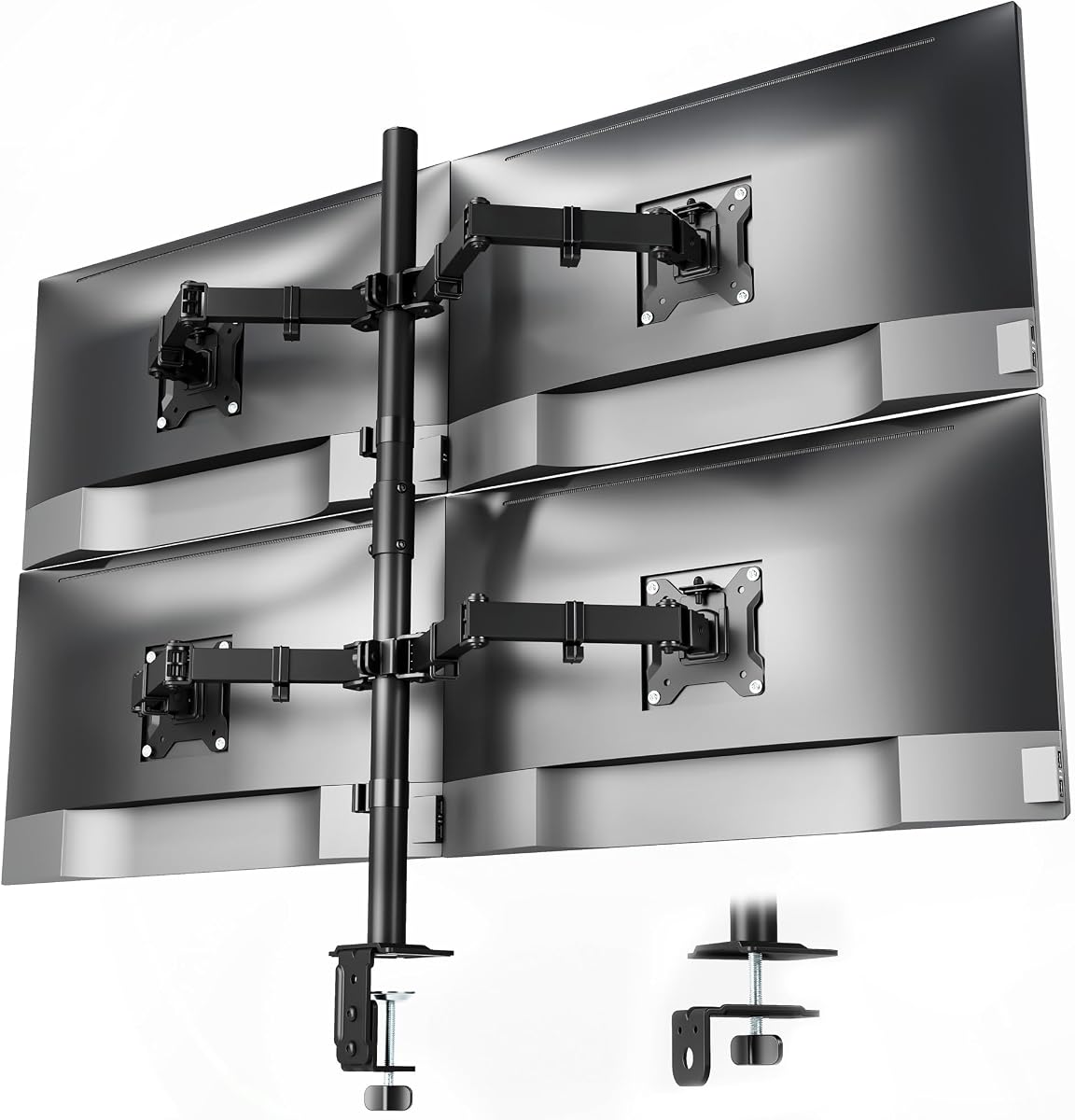
VIVO Pneumatic Arm Quad
4.5Editor score
Pneumatic height adjustment system
Fits screens up to 49 inches
Cast aluminum construction for durability
Setting up a multi-monitor workstation can transform your productivity but it often leads to cluttered desks. A solid 4 monitor mount with adjustable arms solves this by elevating screens and freeing valuable space for your daily tasks.
We evaluated ten leading quad monitor stands based on stability, range of motion, and ease of installation. Our analysis focuses on how well these mounts support various screen sizes and weights while maintaining ergonomic comfort.
Each pick highlights specific strengths like pneumatic adjustment or heavy-duty construction. Please note that availability and pricing may change over time, so verify current details before making your final purchase decision.
4.5Editor score

4.5Editor score
4.5Editor score
As an Amazon Associate we earn from qualifying purchases.
This side-by-side comparison helps you quickly identify which quad monitor stand matches your specific desk and screen requirements. We highlight key specifications like weight capacity and arm articulation for each model.


The WALI Stacked 4 Monitor Mount stands out as a reliable choice for users needing a solid quad display setup. It supports screens up to 27 inches and handles weights up to 22 lbs per arm making it suitable for most office monitors.
We may earn a commission when you buy through this link, at no additional cost to you.
Its sturdy steel construction provides excellent stability even when you adjust the arms. The integrated cable management keeps wires tucked neatly inside the arms helping you maintain a clean workspace. You can tilt swivel and rotate screens to find the perfect viewing angle.
While it lacks the pneumatic ease of higher-end models the manual adjustment is straightforward. Some users might find the height range slightly limited if they have a standing desk setup. However for standard desks it performs exceptionally well.
This mount is ideal for professionals who want a clutter-free desk without breaking the bank. If you need a dependable quad mount for general work or gaming this model offers great value and performance.
Lifting four monitors off your desk creates significant room for keyboards and documents.
Both C-clamp and Grommet bases ensure compatibility with various desk types.
We may earn a commission when you buy through this link, at no additional cost to you.
The VIVO Pneumatic Arm Quad is designed for power users who demand heavy-duty support. It can hold ultrawide monitors up to 49 inches making it unique in this category. The pneumatic system allows you to adjust screen height with a simple touch.
We may earn a commission when you buy through this link, at no additional cost to you.
Built from premium cast aluminum this mount offers exceptional durability. Each arm supports up to 44 lbs ensuring that heavy screens stay level without drooping over time. The articulation range is impressive with wide tilt and swivel options.
The main drawback is the cost which is higher than average quad mounts. You also need to ensure your desk is sturdy enough to handle the weight. But for those with large screens it is a top-tier solution.
Choose this if you have ultrawide monitors or need maximum height flexibility. The ease of adjustment and build quality justify the investment for serious workstation setups.
Gas springs counterbalance weight so you can move screens effortlessly.
Specifically engineered to handle screens up to 49 inches securely.
We may earn a commission when you buy through this link, at no additional cost to you.
The monTEK Quad Monitor Stand offers excellent performance at a very competitive price. It supports screens from 17 to 32 inches and handles 22 lbs per arm. This makes it versatile for mixed office setups.
We may earn a commission when you buy through this link, at no additional cost to you.
Its joint design ensures stability while you adjust screens. The range of motion is good with full rotation and wide tilt angles. Integrated cable organizers help maintain a clean look on your desk.
While it lacks the premium feel of expensive models it gets the job done reliably. Some users might find the tension knobs stiff initially. Overall it delivers solid value for the cost.
This is the perfect choice if you need a budget-friendly solution without sacrificing core features. If you want a simple reliable quad mount this stands out for its affordability.
Clear instructions and all hardware included allow fast assembly.
Accommodates a wide range of monitor sizes from 17 to 32 inches.
We may earn a commission when you buy through this link, at no additional cost to you.
The PUTORSEN Quad Monitor Mount is designed for users who mix ultrawide and standard screens. The top arm holds a 49-inch display while lower arms fit 27-inch panels. This creates a dynamic multi-tasking canvas.
We may earn a commission when you buy through this link, at no additional cost to you.
It uses a 3-section arm design to distribute weight evenly. The gas spring extension reaches 52 inches allowing flexible positioning. Tension adjustments ensure screens stay steady even with different weights.
Assembly is more involved than typical quad mounts due to the mixed setup. You must ensure your desk clamp is sturdy enough for the top heavy design. However the flexibility is unmatched.
Choose this if you need a dominant ultrawide screen with side monitors. It is perfect for traders or creators who need specific screen arrangements for workflow efficiency.
Remove segments to reduce extension for tighter desk setups.
Center pole adjustment ensures eye-level viewing for all screens.
We may earn a commission when you buy through this link, at no additional cost to you.
MOUNT PRO offers a straightforward quad mount that works well for lighter setups. It fits screens up to 32 inches and handles 17.6 lbs per arm. The design focuses on simplicity and value.
We may earn a commission when you buy through this link, at no additional cost to you.
The tilt range is exceptional allowing you to tilt screens almost vertical. This helps when sharing screens with others. The center pole reaches 31.7 inches which is good for most users.
While the materials are lighter than premium models it remains stable for standard use. If you have heavy monitors you might find it less ideal. But for office work it is sufficient.
This mount is great for home offices where budget is a priority. It provides all essential features without the extra cost of advanced tension systems.
Full range tilt allows portrait and landscape switching easily.
Cable clips and elevated design clear up desk surface area.
We may earn a commission when you buy through this link, at no additional cost to you.
The MOUNTUP Quad Monitor Stand simplifies setup with quick-release plates. It supports standard office monitors up to 32 inches comfortably. The single base design keeps the footprint small.
We may earn a commission when you buy through this link, at no additional cost to you.
You can assemble this mount quickly thanks to clear instructions. The arms tilt swivel and rotate to help you find the right angle. Cable clips keep wires out of sight effectively.
While it lacks advanced tension knobs it holds standard screens well. If you have very heavy monitors you might need more adjustment. But for general use it is very practical.
This is a smart choice for those who want minimal setup time. The included warranty and support add confidence to your purchase decision.
Attach monitors easily without struggling with screws.
One solid anchor point reduces desk clutter significantly.
We may earn a commission when you buy through this link, at no additional cost to you.
This VIVO model brings pneumatic convenience to a mid-range budget. It supports four 32-inch screens with smooth gas spring movement on two sides. This helps adjust height without effort.
We may earn a commission when you buy through this link, at no additional cost to you.
You can increase tension for heavier monitors or decrease for lighter ones. The build uses steel and aluminum for a good balance of strength and weight. It works well on standard desks.
The fixed center brackets might limit vertical flexibility compared to all-pneumatic models. But for most users the dual side adjustment is plenty. It offers a nice compromise.
Consider this if you want gas springs without the premium price tag. It is reliable for daily office use and reduces strain when repositioning screens.
Modify joint tension to suit different monitor weights precisely.
Side arms float freely while center stays fixed for stability.
We may earn a commission when you buy through this link, at no additional cost to you.
Pholiten focuses on ergonomics with gas spring arms. It supports up to 32-inch screens and allows forward and backward arm movement. This helps bring screens closer or further away easily.
We may earn a commission when you buy through this link, at no additional cost to you.
The tension system handles up to 10 kg per arm. You can tilt and rotate screens fully to find comfortable angles. Installation is straightforward with two base options provided.
Some users might find the weight capacity slightly restrictive for larger monitors. Also instructions may require some patience during setup. But once installed it works smoothly.
This is ideal for users who prioritize ergonomic positioning. If you adjust your setup frequently the gas springs make daily use much easier.
Slide screens closer to face for better viewing distance.
Ergonomic design reduces strain on neck and shoulders.
We may earn a commission when you buy through this link, at no additional cost to you.
The WALI Quad Monitor Desk Mount is a classic choice with broad compatibility. It supports screens from 13 to 32 inches and holds 22 lbs per arm. This makes it robust for many setups.
We may earn a commission when you buy through this link, at no additional cost to you.
Its locking system ensures the clamp stays secure on your desk. The range of motion allows full rotation and deep tilt. Wires are managed neatly along the arms.
Manual tension knobs can be stiff when first installing. But once set they hold the monitors firmly. The brand reputation adds confidence to the purchase.
Choose this if you want a proven reliable quad mount. It offers great stability for mixed screen sizes and daily professional use.
Two-stage clamp secures mount firmly to prevent sliding.
Built-in guides keep wires tidy for a clean look.
We may earn a commission when you buy through this link, at no additional cost to you.
VIVO offers a unique 3+1 design that is great for shared workspaces. The upper bracket is longer allowing better alignment with lower monitors. It supports standard 32-inch screens comfortably.
We may earn a commission when you buy through this link, at no additional cost to you.
The C-clamp includes padding to protect your desk surface. It secures firmly to thick desks without drilling. Cable clips keep the area organized and tidy.
The tilt range is somewhat limited at 15 degrees. This might restrict extreme angles compared to other models. But for standard viewing it works well.
This mount suits team projects or shared desks. If you need to adjust angles frequently for collaboration it provides a stable platform.
Three lower and one upper bracket offers distinct spacing.
Included padding ensures your desktop remains scratch-free.
We may earn a commission when you buy through this link, at no additional cost to you.
Selecting the right quad monitor mount involves considering your desk layout screen weights and ergonomic needs. Here are key factors to help you make an informed decision.
Check the mount specs for the screen sizes it supports. Some mounts handle screens up to 27 inches while others go up to 32 or even 49 inches. Ensure your monitors fit within these limits to avoid installation issues.
Verify the VESA hole pattern matches your screens. Most standard monitors use 75x75mm or 100x100mm holes. If you have non-standard mounts you may need adapters.
Each arm has a specific weight limit. Look for models that support at least 20 lbs per arm for standard office screens. Heavier screens require more robust mounts to prevent sagging.
Consider the total weight if you plan to use ultrawide displays. Higher capacity ensures stability and prevents strain on the joints over time.
Articulation refers to how much the arms move. Look for models with tilt swivel and rotation options. Better articulation allows you to adjust angles for different tasks.
Gas spring models offer smoother height adjustment than manual knobs. Decide if you need fluid motion for frequent repositioning or if static adjustments are enough.
Ensure your desk fits the clamp range. Most clamps work for desks between 1 to 4 inches thick. If your desk is too thick you might need a custom solution.
Choose between C-clamp and Grommet options based on your desk. C-clamps are easier to install while grommets offer a cleaner look.
Integrated cable management keeps wires hidden and organized. Look for mounts with clips or channels inside the arms. This reduces clutter and protects cables from wear.
Check if the mount includes necessary clips. If not you may need to buy extra cable ties to keep everything tidy.
Steel and aluminum frames provide better durability. Avoid plastic-heavy models if you need long-term stability. Heavier materials prevent wobbling during typing.
Check for protective padding on clamps to avoid damaging your desk. Quality finishes also resist scratches and wear over years of use.
The vertical reach should match your chair height. Look for poles that extend over 30 inches. This helps position screens at eye level without strain.
Adjustable poles allow you to switch between sitting and standing. This flexibility is key for maintaining good posture.
A good warranty covers defects for at least a year. Some brands offer longer support periods. Check reviews for customer service experiences.
Reliable support ensures you can get help if parts are missing. It adds value to your purchase for long-term reliability.
Start by measuring your desk thickness and VESA holes before assembly. This ensures you select the right mounting option like C-clamp or Grommet. Follow the instruction manual step by step to avoid mistakes.
After mounting adjust the tension knobs to match your screen weights. If a screen droops increase the tension slightly. If it is hard to move decrease it. This ensures smooth operation.
Regularly check the bolts and clamps for tightness. Dust the arms with a dry cloth to keep them clean. This maintains stability and appearance over time.
Yes most mounts support both flat and curved screens. Ensure the screen size and weight fit within the limits. VESA pattern is the main requirement.
Most models support between 17 to 22 lbs per arm. Some premium models go up to 44 lbs. Check the product specs for your exact needs.
Basic tools like a screwdriver are included in most boxes. Some setups may not need extra tools. Check the package contents before starting.
Many mounts support different sizes on each arm. Ensure all screens fit the mount dimensions. VESA patterns must match the brackets provided.
Adjust the tension knobs on the arms to increase resistance. Ensure the screen weight is within the limit. Check all bolts for tightness.
Heavy-duty models are designed for ultrawides. Ensure the weight capacity matches your screen. Check for extra support brackets if needed.
Check the clamp range in the specs. Some mounts work up to 4 inches thick. You may need an extension kit for very thick desks.
We reviewed ten excellent options from budget to premium. The WALI Stacked stands out for value. The VIVO Pneumatic leads for heavy-duty needs. Each has strengths depending on your setup.
Prioritize weight capacity and arm articulation. Make sure the mount fits your desk thickness. These factors ensure safety and comfort. Ergonomics are key for long work sessions.
Check current availability and pricing on the links provided. Prices and models change often. Use this guide as a reliable reference for your choice today.