
M.2 Heatsink Cooler 2280 SSD Double-Sided Heat Sink with Thermal Silicone pad for PS5/PC PCIE NVME M2 SSD(Black))
4.6Editor score
Aluminum alloy body
Double-sided clip design
Universal 2280 fit
This guide compares the top M2 2280 SSD Heatsink models for PS5 and PC to prevent thermal throttling and ensure consistent high performance during intense
Modern high-speed NVMe drives generate significant heat that can lead to performance throttling and reduced lifespans. A quality M2 2280 SSD Heatsink acts as a critical thermal barrier to keep your storage drives within safe operating limits.
We evaluated ten leading heatsink solutions based on material quality, thermal conductivity, ease of installation, and compatibility with both desktop PCs and PlayStation 5 consoles. Our analysis focuses on real-world cooling efficiency and build durability.
Each pick in this list highlights unique strengths for different user needs ranging from budget-friendly options to premium cooling systems. Please note that product availability and pricing can fluctuate regularly over time.
4.6Editor score

4.7Editor score

4.7Editor score
This side-by-side comparison highlights the key specifications and unique attributes of each selected heatsink model to help you make an informed decision for your specific system requirements.


This heatsink is an excellent entry-level solution designed to protect your NVMe SSDs from overheating during heavy loads. It features a robust aluminum alloy construction that effectively dissipates heat while maintaining a low profile suitable for most desktop cases.
We may earn a commission when you buy through this link, at no additional cost to you.
The silver plating and anodic oxidation treatments not only improve aesthetics but also help eliminate static electricity that could harm sensitive components. The included thermal silicone pads are low viscosity and ensure safe contact with your SSD without causing damage.
While it does not feature advanced technologies like heat pipes or fans, it still delivers a respectable temperature reduction ranging from 10 to 20 degrees depending on airflow. The double-sided clip design ensures a secure fit for both single and double-sided drives without complex tools.
This model is perfect for budget-conscious builders who want reliable protection without spending much. It balances performance and cost effectively making it a top choice for those upgrading multiple drives or building a basic gaming rig.
You get essential cooling performance without breaking the bank ensuring your drives run safely even during extended gaming sessions.
The clip system allows for quick mounting so you can secure your SSD in minutes without needing specialized technical knowledge.
We may earn a commission when you buy through this link, at no additional cost to you.
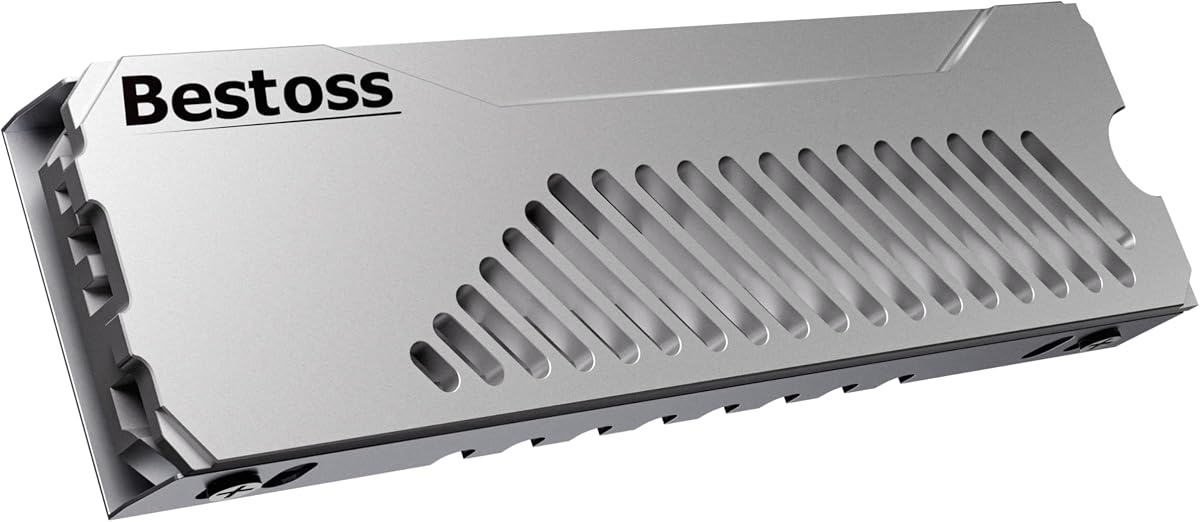
The Bestoss heatsink offers a unique hollowed-out design that maximizes surface area for passive cooling without adding bulk to your build. Its aluminum alloy body ensures efficient heat transfer from the SSD controller to the surrounding environment.
We may earn a commission when you buy through this link, at no additional cost to you.
Independent testing suggests this cooler can reduce temperatures by 8 to 13 degrees compared to stock drives during intensive read/write operations. The thermal pads provided have a conductivity of up to 3 W per meter-kelvin ensuring rapid heat movement.
Its minimalist lines and deep matte texture add a sleek look to your PC case which appeals to users who value aesthetics alongside performance. The lightweight build also helps maintain smooth airflow within your chassis without obstructing other components.
Content creators and professionals handling large data sets will appreciate the consistent performance gains. It is a solid mid-range option that delivers effective cooling for mainstream users needing reliable protection.
The hollow design increases airflow efficiency significantly helping to keep temperatures lower during sustained file transfers.
High quality silicone pads bridge air gaps effectively ensuring the heatsink pulls heat away from critical components quickly.
We may earn a commission when you buy through this link, at no additional cost to you.
Sabrent offers a specialized heatsink that combines copper and aluminum for maximum thermal performance in desktop environments. Copper provides excellent conductivity while aluminum offers lightweight durability making this a winning combination for cooling.
We may earn a commission when you buy through this link, at no additional cost to you.
This model is compatible with both single and double-sided M.2 2280 SSDs which broadens its utility for various drive types. It comes with necessary screws and a screwdriver ensuring you have everything needed for a secure and professional installation.
While it lacks the universal fit of some other models by focusing strictly on desktop computers it delivers robust cooling power. The design prioritizes function over form ensuring your high-speed drives remain stable under heavy workloads.
Gamers and power users with dedicated desktop builds will find this heatsink highly effective. It provides a reliable thermal solution that helps maintain consistent speeds without the complexity of active cooling systems.
Mixing copper with aluminum allows for rapid heat transfer while keeping the overall weight manageable for your motherboard.
The inclusion of tools and hardware means you can install it immediately without needing to source additional components separately.
We may earn a commission when you buy through this link, at no additional cost to you.
be quiet! is known for premium components and this MC1 Pro cooler delivers exceptional performance with an integrated heatpipe. This advanced feature ensures efficient heat dissipation even when the system is under extreme heavy workloads.
We may earn a commission when you buy through this link, at no additional cost to you.
The sleek matte black finish matches modern PC builds perfectly providing a high-quality look that complements high-end motherboards. It supports both single and double-sided 2280 modules giving users flexibility across different drive configurations.
By preventing thermal throttling this cooler allows your drive to maintain top read and write speeds for longer periods. The secure mounting system is simple to use ensuring a reliable fit that protects the drive long term.
This is an ideal choice for enthusiasts who demand top-tier aesthetics and cooling efficiency. The premium build quality justifies the investment for those seeking the best passive cooling solution available.
The built-in pipe moves heat away from the controller faster than standard aluminum blocks ensuring consistent performance.
The high-quality matte texture looks professional and resists fingerprints keeping your build looking clean.
We may earn a commission when you buy through this link, at no additional cost to you.
This value pack offers five aluminum fin-type heatsinks making it perfect for workstations or users installing multiple drives. Each unit comes with high-performance thermal silicone pads rated at 2.0 W per meter-kelvin for reliable heat transfer.
We may earn a commission when you buy through this link, at no additional cost to you.
Installation is tool-free as each cooler secures with silicone elastic bands that press firmly against the SSD. This design ensures close contact without requiring screws which simplifies the setup process significantly.
While the rubber bands may degrade over years of use the initial convenience is unmatched for builders needing quick deployment. The simple black design fits any case without drawing unnecessary attention to the storage components.
If you are upgrading a server or building a NAS with several drives this pack saves time and money. It provides a standardized cooling solution that ensures all your SSDs remain within safe operating temperatures.
Buying a pack ensures you have coolers ready for every slot in your motherboard without needing to purchase individually.
The elastic band system lets you install or remove the heatsink instantly without needing to handle small screws.
We may earn a commission when you buy through this link, at no additional cost to you.
Arctic has engineered this M2 Pro to meet Sony’s strict specifications making it ideal for PlayStation 5 upgrades. The added mass of the aluminum block ensures heat is transferred efficiently to the environment for faster cooling.
We may earn a commission when you buy through this link, at no additional cost to you.
Installation is simple due to a click mechanism that secures the drive without needing screws or rubber bands. This reduces the risk of damaging the SSD during the fitting process significantly for console users.
The included TP-3 thermal pads adapt perfectly to height differences on the controller and NAND ensuring consistent contact across the board. This reliability helps the PS5 maintain high performance during intensive game loading and rendering tasks.
PlayStation owners looking for a guaranteed fit will find this heatsink excellent. It offers a reliable thermal solution that protects your console storage without complicating the installation process.
The dimensions meet exact Sony requirements ensuring no interference with your PS5 Slim or console case cover.
The click system holds the heatsink firmly in place reducing vibration and ensuring stable thermal contact.
We may earn a commission when you buy through this link, at no additional cost to you.
Thermalright is a trusted name with over twenty years of history in computer accessories. This TR-M.2 model uses a double-sided approach to maximize contact area and cooling efficiency on both sides of the drive.
We may earn a commission when you buy through this link, at no additional cost to you.
The aluminum alloy with anodized sandblasting surface treatment increases the heat dissipation area significantly. This treatment also protects the cooler from corrosion and ensures a durable finish that looks professional in any build.
Compatibility is broad covering major SSDs from Samsung and other brands without interfering with adjacent PCI-E slots. The included screws allow for a tighter fit than rubber bands which can enhance thermal conductivity over time.
Users valuing brand reliability and proven performance will find this heatsink appealing. It offers a balanced solution that works well for desktop PCs without requiring complex installation steps.
With decades of experience Thermalright delivers a reliable product designed to work efficiently in various environments.
The design avoids interference with other motherboard components ensuring you can cool multiple parts simultaneously.
We may earn a commission when you buy through this link, at no additional cost to you.
This model introduces an 8mm pure copper heat pipe into a robust all-aluminum body creating a hybrid solution for better heat transfer. The solid radiator design ensures that heat moves quickly from the controller to the external fins.
We may earn a commission when you buy through this link, at no additional cost to you.
The anode sandblasting process gives the heatsink a durable and attractive silver gray finish that fits well with modern PC aesthetics. It supports 2280 specifications primarily but is partly compatible with 2260 and 2242 drives.
Double layer silicone sheets are used to ensure that both sides of the SSD are adequately cooled. This attention to detail helps maintain optimal operating temperatures even under demanding gaming or workload conditions.
If you need a step up from basic passive cooling this hybrid design is ideal. It offers enhanced thermal performance without the cost of active cooling fans making it suitable for most desktop users.
The thick copper pipe moves heat away from the source much faster than standard aluminum blocks alone.
Double layer pads ensure that any components on both sides of the drive receive adequate thermal management.
We may earn a commission when you buy through this link, at no additional cost to you.
The HR09 features a massive 4500 square millimeter heat dissipation area which is unmatched in the budget category. It uses a reverse gravity heat pipe to transfer heat effectively regardless of orientation which is unique among passives.
We may earn a commission when you buy through this link, at no additional cost to you.
Advanced nano thermal pads provide excellent ductility ensuring the cooler conforms perfectly to uneven surfaces without damaging labels. The 32 fins allow for significant airflow and heat exchange with the surrounding environment.
The stainless steel fixed bottom surface adds durability while the decorative top cover ensures a premium look. This combination of materials makes it one of the most robust cooling solutions available for high performance storage.
For users seeking the absolute best passive cooling this model is highly recommended. It delivers exceptional thermal reduction and reliability that justifies its position as a top tier product.
The large area and high fin count ensure that heat is released quickly keeping drive temps low.
Nano pads ensure perfect contact across the entire drive surface maximizing heat transfer efficiency.
We may earn a commission when you buy through this link, at no additional cost to you.
Thermaltake takes a different approach by adding an 8000 RPM micro blower fan for active cooling. This ensures that heat is physically blown away from the fins maintaining lower temperatures than passive units.
We may earn a commission when you buy through this link, at no additional cost to you.
The integrated molding high quality aluminum heatsink works in tandem with the fan to dissipate heat efficiently. The stainless steel reinforced backplate provides stability and protection for the SSD against physical damage.
This model is ideal for cases with poor airflow where passive cooling may fail. It provides a powerful solution for high end systems that need constant cooling without relying on case fans.
Gamers and professionals with high throughput demands will appreciate the active component. It guarantees low temperatures even in enclosed or poorly ventilated chassis environments.
The blower fan pushes air directly through the fins ensuring heat leaves the cooler fast.
The backplate adds physical strength to the drive protecting it during installation and transport.
We may earn a commission when you buy through this link, at no additional cost to you.
Selecting the right cooling solution requires evaluating material quality thermal efficiency and your specific system constraints.
High quality aluminum alloys are standard for most heatsinks due to their balance of cost and conductivity. Some premium models incorporate copper or heat pipes to further enhance thermal transfer rates and reduce bottlenecks.
Look for anodized or sandblasted finishes which not only look better but also protect the metal from corrosion and static discharge.
Ensure the heatsink matches your drive dimensions. Most options target 2280 drives but verify if it supports single or double-sided modules as thickness can affect fitment in tight cases.
If using a console like PS5 confirm the cooler meets the console's strict size requirements to ensure it fits inside the cover.
The interface between the drive and heatsink is critical. Thermal pads with higher conductivity ratings like 3 W per meter-kelvin or more move heat more effectively to the cooler.
Check that pads are non-corrosive and easy to clean to avoid damaging the SSD controller during installation or removal.
Some coolers use screws for a rigid secure fit while others use elastic bands for tool-free convenience. Screws generally offer better stability but bands are easier for quick swaps.
Consider your ability to access the motherboard easily and whether you prefer a permanent or removable solution.
Passive coolers rely on heat sink mass and airflow and are silent and durable. Active coolers add fans or blowers for maximum cooling but introduce noise and power cable requirements.
Choose active cooling only if you have extreme heat loads and insufficient case airflow to move heat passively.
Ensure the heatsink height does not block other components like GPU slots or RAM modules. Tall heatsinks can cause interference in compact builds.
Check your case dimensions and motherboard clearance before purchasing to avoid compatibility issues during assembly.
Look for reinforced backs or stainless steel plates that add physical protection to the drive. These features help prevent accidental bending or damage during handling.
Durable construction ensures the cooler lasts as long as your system without degradation or failure over time.
Brands with a history of thermal component expertise often deliver more reliable products with better quality control. Check reviews for consistency in manufacturing.
A solid warranty indicates confidence from the manufacturer and gives you peace of mind against product defects.
Before installation ensure your hands are grounded to prevent static discharge. Carefully align the SSD controller with the thermal pad on the heatsink to ensure full contact across the surface.
Apply firm even pressure if using elastic bands or tighten screws gently to avoid stripping the motherboard standoffs. Ensure the heatsink is seated flush with the drive to maximize cooling efficiency.
Periodically check the thermal pads for signs of drying or wear especially if you live in a hot environment. Clean any dust accumulation from the fins using compressed air to maintain airflow and performance.
Not all drives require one but high-performance NVMe models generate significant heat during sustained workloads. Using a heatsink prevents throttling and extends the lifespan of the drive significantly.
Only specific models meeting Sony's height limits fit. Check the dimensions carefully to ensure the cooler does not prevent the cover from closing securely.
Most pads are sticky and may degrade when removed. It is best to replace them with new ones to maintain optimal thermal conductivity.
Most desktop heatsinks are too tall for laptops. Laptop M.2 slots often lack the space required for bulky cooling solutions.
Fans or blowers add some noise but modern micro fans are often quiet. If you need total silence passive cooling is the better choice.
Use monitoring software to check drive temperatures. Consistent spikes above 70 degrees Celsius usually indicate that additional cooling is necessary.
Our top picks offer a range of solutions from budget options to premium thermal performance. Whether you prioritize cost efficiency or maximum cooling power there is a model suited to your needs.
Consider your system constraints and specific usage patterns when selecting a cooler. Passive cooling works well for most users while active solutions provide peace of mind for extreme performance.
Always verify current pricing and availability before purchasing as market conditions change frequently. Ensuring compatibility with your case and motherboard will help you avoid installation issues.