
ASUS Prime X470-Pro
4.6Editor score
5-Way Optimization
SafeSlot PCIe Support
Aura Sync RGB Lighting
Explore our expert guide comparing the top 10 AMD Ryzen Gen 2 X470 motherboards for performance and value in October 2026.
Selecting the right motherboard is crucial for any AMD Ryzen build. These boards support second generation Ryzen processors with robust features for gaming and productivity.
We compared ten top models based on power delivery, connectivity, and thermal design. Our analysis highlights the best options for different budgets and use cases.
Each pick shows key specs and real world performance traits. Note that prices change frequently, so check current listings before making your final purchase decision.
4.6Editor score

4.3Editor score

4.4Editor score
This side-by-side comparison shows key differences across all ten models. Use it to quickly identify the board that matches your specific processor and feature needs.


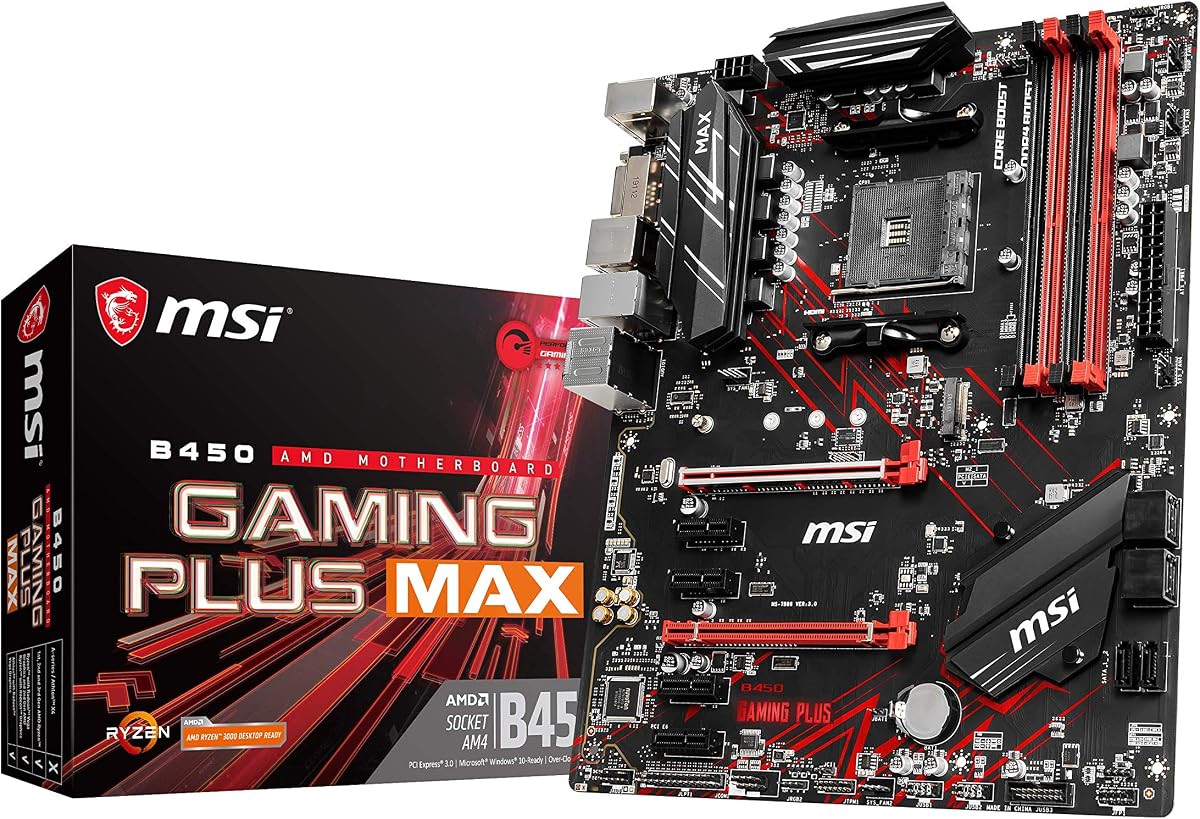
This motherboard offers excellent connectivity with WiFi 6E and PCIe 4.0. It rates 4.6 stars for reliable power delivery and robust features.
We may earn a commission when you buy through this link, at no additional cost to you.
The 12+2 power stages ensure stable performance during overclocking. Its Intel 2.5 Gb Ethernet provides fast wired networking for competitive gaming.
While it costs more than budget options, the included features justify the price. You get HDMI 2.1 and ample M.2 slots for storage.
Ideal for users building a high-end gaming PC today. It supports Ryzen 5000 series processors effectively without major compatibility issues.
WiFi 6E and 2.5Gb LAN offer superior speed and low latency for online gaming.
Teamed power stages with ProCool connectors deliver consistent power to the CPU under load.
We may earn a commission when you buy through this link, at no additional cost to you.
This board supports Ryzen 2nd Gen with a robust 10+2 phase digital PWM design. It holds a 4.3 rating for its premium build and connectivity.
We may earn a commission when you buy through this link, at no additional cost to you.
The Fins-Array heatsink with direct touch heatpipes keeps VRM temperatures low. Intel Wave 2 WIFI ensures stable wireless performance during streaming.
While it is pricier than some alternatives, the audio and power features are notable. The USB 3.1 Gen 2 Type-C adds modern convenience.
Best for users seeking high-end features on the X470 chipset. It remains a strong choice for second-generation Ryzen processors specifically.
Direct touch heatpipes and fins array keep the VRM cool during intensive workloads.
ESS 9018 audio codec delivers high-fidelity sound for an immersive gaming experience.
We may earn a commission when you buy through this link, at no additional cost to you.
This model features an 8+3 phase hybrid digital PWM design for efficient power delivery. It rates 4.4 stars for durability and multi-GPU support.
We may earn a commission when you buy through this link, at no additional cost to you.
The 2-Way CrossFire and SLI support allows flexible graphics setups. USB 3.1 Gen 2 Front Type C provides modern connectivity options easily.
While it lacks built-in WiFi, the Ultra Durable design ensures long-term stability. Its premium build quality justifies the higher cost for enthusiasts.
Perfect for users needing multi-GPU support on X470. It handles Ryzen 2nd and 1st Gen processors well with high reliability.
Supports 2-Way CrossFire and SLI setups for enhanced graphics performance.
Front USB 3.1 Gen 2 Type-C offers fast data transfer and convenient access.
We may earn a commission when you buy through this link, at no additional cost to you.
This board offers strong value with 5-Way Optimization and SafeSlot PCIe protection. It holds a 4.6 rating for reliability and essential features.
We may earn a commission when you buy through this link, at no additional cost to you.
The integrated AIO pump header supports advanced cooling setups efficiently. Realtek S1220A audio codec delivers high-quality sound for media and games.
While it has no built-in WiFi, the Aura Sync ecosystem supports extensive customization. Its budget-friendly price makes it accessible for new builders.
Ideal for budget-conscious gamers needing stable Ryzen 2 performance. It supports 7th Gen Athlon processors as well for older builds.
5-Way Optimization auto-tunes your system for enhanced performance based on hardware.
SafeSlot features an injection molding process for stronger PCIe slot anchoring.
We may earn a commission when you buy through this link, at no additional cost to you.
This Micro-ATX board supports Ryzen 5000 series with PCIe 4.0 slots. It rates 4.4 stars for its compact size and basic performance.
We may earn a commission when you buy through this link, at no additional cost to you.
The digital 3+3 VRM design provides steady power delivery for mid-range CPUs. Two M.2 slots offer ample storage options for SSDs.
While not ideal for heavy overclocking, it works well for standard gaming builds. Q-Flash allows easy BIOS updates without needing a CPU installed.
Best for small case builds or office PCs needing modern specs. It supports Ryzen 3000 and 4000 series processors efficiently.
Two M.2 slots allow for multiple high-speed NVMe SSD drives.
Q-Flash enables BIOS updates without requiring a processor installation first.
We may earn a commission when you buy through this link, at no additional cost to you.
This board pairs perfectly with 3rd Gen Ryzen CPUs with PCIe 4.0. It rates 4.5 stars for comprehensive cooling and connectivity features.
We may earn a commission when you buy through this link, at no additional cost to you.
The 8+1 DrMOS power stages ensure reliable power for high-core-count CPUs. OptiMem trace layout boosts memory frequencies with lower voltages.
While WiFi 5 is older than WiFi 6, it still covers basic wireless needs. SafeSlot Core safeguards protect your hardware from physical damage.
Great for users wanting ATX size with solid features. It supports DDR4 memory effectively and includes multiple USB Type-C options.
VRM and PCH heatsinks keep components cool during extended gaming sessions.
ASUS OptiMem layout allows memory kits to operate at higher frequencies efficiently.
We may earn a commission when you buy through this link, at no additional cost to you.
This model features a digital twin 10+3 power phase design for steady power. It rates 4.5 stars for its robust build and easy DIY features.
We may earn a commission when you buy through this link, at no additional cost to you.
Q-Flash Plus allows effortless BIOS upgrades without a CPU or RAM installed. Integrated I/O Shield simplifies assembly and protects ports during installation.
While it lacks built-in WiFi, Bluetooth 5.3 supports modern peripherals well. The refreshed BIOS UI provides intuitive control over system settings.
Best for DIY builders needing easy upgrades and strong power delivery. It supports Ryzen 5000 and 4000 series processors without major issues.
Q-Flash Plus lets you update BIOS using just a USB drive and power source.
Digital twin 10+3 power phase design ensures stable power for demanding CPUs.
We may earn a commission when you buy through this link, at no additional cost to you.
This board offers WiFi 6 and HDMI 2.1 in a compact Micro-ATX size. It rates 4.5 stars for essential modern features and reliable performance.
We may earn a commission when you buy through this link, at no additional cost to you.
The PCIe 4.0 x16 SafeSlot supports powerful GPUs without issues. Dual M.2 slots with PCIe 4.0 x4 connectivity provide fast storage speeds.
While it lacks extensive expansion options, it fits small form factor builds well. USB 3.2 Gen 2 Type-A ports ensure fast data transfer rates.
Ideal for compact gaming PCs needing modern connectivity. It supports 3rd Gen Ryzen CPUs with excellent memory performance optimization.
HDMI 2.1 supports 4K at 60Hz for high-resolution gaming experiences.
WiFi 6 delivers faster wireless speeds and reduced latency for online gaming.
We may earn a commission when you buy through this link, at no additional cost to you.
This board supports 1st, 2nd, and 3rd Gen AMD Ryzen processors. It rates 4.6 stars for solid value and gaming-focused features.
We may earn a commission when you buy through this link, at no additional cost to you.
DDR4 Boost technology delivers pure data signals for improved gaming stability. Turbo M.2 and AMD Turbo USB 3.2 Gen2 offer fast connectivity.
While it uses an older chipset, it remains a reliable choice for budget builds. Audio boost provides studio-grade sound for immersive gaming experiences.
Best for users building affordable gaming systems. It supports Ryzen processors efficiently and offers Crossfire graphics for dual GPU setups.
DDR4 Boost technology delivers pure data signals for stable high-frequency RAM.
Turbo M.2 slot provides faster data speeds for high-performance NVMe storage.
We may earn a commission when you buy through this link, at no additional cost to you.
This board supports AMD Ryzen 2nd and 3rd Gen processors on ATX size. It rates 4.6 stars for reliable performance and essential gaming features.
We may earn a commission when you buy through this link, at no additional cost to you.
Multiple USB 3 ports ensure connectivity for various peripherals and devices. Crossfire support allows you to use dual GPUs for enhanced graphics performance.
While it lacks modern WiFi or PCIe 4.0, it provides solid value for budget builds. The HDMI and DVI outputs support diverse display connections easily.
Best for budget users needing a classic ATX board. It works with Ryzen 2nd and 3rd Gen CPUs without significant issues.
HDMI and DVI ports support various monitor connections for flexible setups.
Crossfire support lets you install two graphics cards for better visual performance.
We may earn a commission when you buy through this link, at no additional cost to you.
Selecting the right motherboard requires understanding your processor needs and desired features.
Ensure the board supports your specific Ryzen processor generation. Most X470 boards support 1st and 2nd Gen Ryzen processors effectively.
Check for any required BIOS updates before purchasing for older Ryzen models.
Higher phase counts like 8+3 or 10+2 ensure stable power during intense workloads or overclocking. This is crucial for system longevity and stability.
Look for robust VRM designs if you plan on pushing your CPU beyond stock speeds.
Evaluate USB ports, M.2 slots, and networking features. Modern builds need USB 3.2 Gen 2 and fast Ethernet for optimal performance.
Check if the motherboard includes built-in WiFi if you lack an Ethernet connection.
ATX boards offer more expansion slots while Micro-ATX saves space. Choose based on your case size and component needs.
Ensure your case supports the chosen motherboard size before finalizing your build.
VRM heatsinks and chipset cooling keep temperatures low during extended use. Fins-Array heatsinks with heatpipes are particularly effective.
Better thermal design prevents thermal throttling and maintains consistent performance.
High-quality audio codecs like Realtek S1220A or ESS 9018 provide better sound. This matters for immersive gaming and media consumption.
Look for audio features if you do not use external speakers or headphones.
CrossFire or SLI support allows multi-GPU setups for heavy rendering tasks. Most modern builds no longer need this feature.
Consider your GPU needs before paying extra for multi-slot graphics support.
Balance features against cost. Budget boards provide essential functions while premium ones offer advanced connectivity and power delivery.
Decide which features matter most to your specific use case and budget constraints.
Install the motherboard into your case carefully to avoid bending pins. Secure it with standoffs provided with your case before connecting any components.
Keep the BIOS updated for latest stability improvements and CPU compatibility. Use the manufacturer tool or BIOS Flashback for easy updates.
Dust your system regularly to ensure proper cooling. Use compressed air to clean heatsinks and filters without damaging sensitive electronic parts.
Most X470 boards require a BIOS update to support Ryzen 5000 series. Always check compatibility lists before upgrading your processor to ensure support.
Not all models include built-in WiFi. Many budget and mid-range boards rely on Ethernet only, so check specs carefully if you need wireless connectivity.
Most boards offer at least two M.2 slots. This provides ample space for fast NVMe SSDs without needing expansion cards.
X470 boards support DDR4 memory up to 3600MHz or higher with overclocking. Check the QVL for specific memory kit compatibility.
A standard 500W PSU is usually sufficient. However, high-end builds with powerful GPUs need 650W or more for stability and headroom.
Some premium X470 boards support 2-Way SLI or CrossFire. Check specific model specs before buying if multi-GPU is a requirement.
We have highlighted the best options ranging from budget-friendly picks to premium boards with advanced features. Each model offers distinct strengths for different build needs.
Prioritize power delivery and thermal design if you plan on overclocking. For general use, connectivity options like USB and WiFi are key factors.
Always check current prices and BIOS support before purchasing. This guide helps simplify your decision for a successful build in November 2026.