
Adjustable Laptop Stand Portable Riser
4.5Editor score
Six level height adjustment
Ultra lightweight at 0.49 lbs
Broad laptop compatibility
Modern laptops often overheat during intensive tasks like video editing or gaming. A dedicated ventilation stand elevates your device to improve airflow and prevent thermal throttling while ensuring better posture for extended use.
We evaluated ten highly rated models based on cooling performance, sturdiness, compatibility with different laptop sizes, and overall ergonomic benefits. Our analysis focuses on real-world usability and design features that enhance your workflow.
Each pick highlights specific strengths like adjustable height or lightweight portability. Note that availability and pricing may vary over time, so always verify current details before making a final purchasing decision.
4.5Editor score

4.8Editor score

4.7Editor score
As an Amazon Associate we earn from qualifying purchases.
The following table provides a quick side-by-side look at the key specifications and features of each top-rated ventilation stand to help you compare options efficiently.




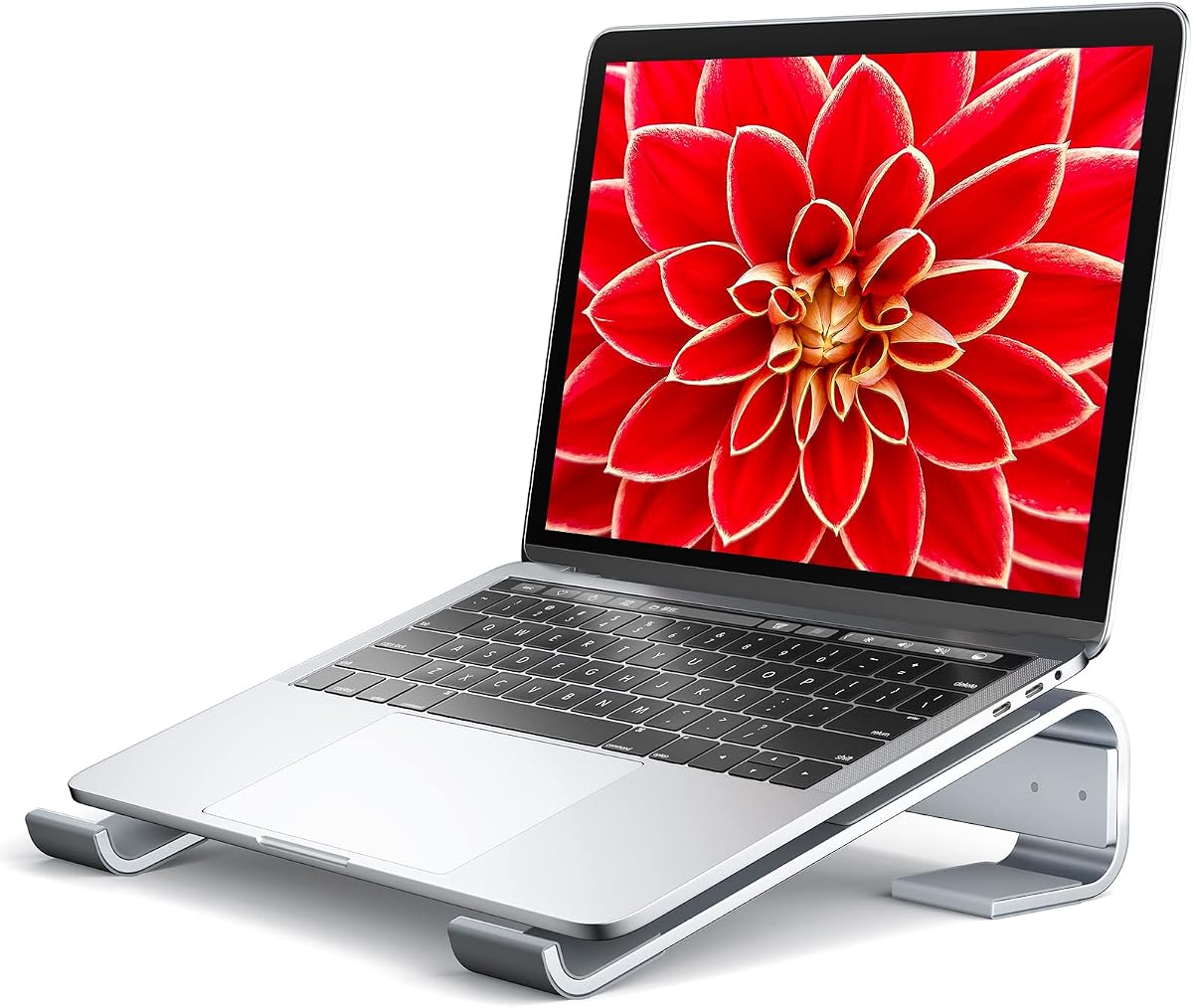

This aluminum stand is a top rated choice for cooling and ergonomics. It features a premium build that supports most laptops up to 15.6 inches comfortably. Its open design ensures your device stays cool during long sessions.
We may earn a commission when you buy through this link, at no additional cost to you.
The ergonomic elevation helps reduce strain on your neck and shoulders significantly. The detachable design makes it easy to transport and store when not in use. It is a reliable option for office or home setups.
The stand offers a fixed angle which might not suit every user preference. However, the stability and cooling benefits outweigh this minor limitation. It maintains balance well during typing.
It is ideal for users seeking a solid cooling stand. If you need a reliable desk companion that protects your laptop from heat this is a strong recommendation.
Lifting your screen to eye level reduces neck strain and improves posture during long work hours.
The open aluminum structure allows heat to dissipate faster keeping your system running smoothly.
We may earn a commission when you buy through this link, at no additional cost to you.
This compact stand offers excellent value for money with essential cooling features. It adjusts to six levels to fit your preferred viewing angle. The lightweight build makes it easy to carry around.
We may earn a commission when you buy through this link, at no additional cost to you.
The forward tilt angle promotes airflow to prevent overheating. Anti-slip pads keep your device secure during typing. It works well with laptops ranging from 10 to 15.6 inches.
While lightweight it might feel less stable on glass surfaces. The materials are simple but functional for daily use. It is a great entry level option.
Choose this if you need a portable budget solution. It delivers reliable ventilation without breaking the bank for students or travelers.
The foldable design allows you to slip it into a bag for remote work on the go.
You get core ergonomic benefits without paying a premium price for extra features.
We may earn a commission when you buy through this link, at no additional cost to you.
This heavy duty stand is designed for stability and premium cooling performance. It features a dual rod mechanism that prevents wobbling during typing. The advanced vent design maximizes airflow for better heat dissipation.
We may earn a commission when you buy through this link, at no additional cost to you.
It supports laptops up to 16 inches and heavy devices comfortably. The ergonomic height correction helps reduce fatigue during long sessions. It is built to last with quality materials.
The stand is slightly heavier than portable options which might affect travel. The cost is higher but justified by its durability and performance. It is a solid investment.
It is perfect for users needing stability and large screen support. If you prioritize build quality and cooling efficiency this stand is the top choice.
The dual rod system ensures your laptop stays steady even during vigorous typing sessions.
Advanced heat vents prevent thermal throttling keeping your device running at peak performance.
We may earn a commission when you buy through this link, at no additional cost to you.
This stand provides extensive height adjustment to suit your specific desk needs. With seven levels it helps find the perfect eye level. The design is practical and effective for daily use.
We may earn a commission when you buy through this link, at no additional cost to you.
The forward tilt enhances airflow to cool your device efficiently. Anti-slip pads protect the laptop from scratches. It is compact enough for travel and storage.
It has a simple look without advanced features like fans. This makes it less versatile for some but good for cooling. It fits most laptops well.
Choose this for adjustable height support and solid performance. It is a practical tool for reducing strain and improving airflow.
Seven height levels let you fine tune your setup for maximum comfort.
Anti-slip silicone pads keep your device secure and prevent surface damage.
We may earn a commission when you buy through this link, at no additional cost to you.
This stand is designed for quick and easy assembly right out of the box. It offers optimal airflow thanks to its ventilated metal design. The aluminum build is durable and supports most modern laptops.
We may earn a commission when you buy through this link, at no additional cost to you.
Soft rubber pads prevent scratches and add stability to your device. It fits models from 13 to 16 inches well. The minimalist look suits any desk environment.
It has a fixed angle which limits posture customization. While easy to set up it lacks adjustable height. The cooling performance is solid though.
Ideal for those wanting a hassle free cooling solution. It works well for general use and provides stable ventilation support.
No complex instructions needed the stand sets up in moments for immediate use.
Supports a wide range of laptop sizes including popular MacBook and Dell models.
We may earn a commission when you buy through this link, at no additional cost to you.
This cooling pad uses active fans to drive heat away from your laptop. It features five fans with LED indicators for monitoring. The USB hub adds extra connectivity for peripherals.
We may earn a commission when you buy through this link, at no additional cost to you.
The ergonomic stand design lets you adjust height for comfort. Fans are quiet enough not to distract during work or gaming. It fits larger laptops from 12 to 17 inches.
It needs a power connection which limits battery powered use. The size is larger than passive stands requiring more desk space. Cooling is very effective though.
Best for users needing maximum cooling power for gaming. The extra USB ports and height adjustment add functional value.
Built-in fans actively pull air to keep device temperatures low during intense tasks.
Integrated USB hub allows you to connect devices without extra cables.
We may earn a commission when you buy through this link, at no additional cost to you.
This cooling pad is slim and designed to be highly portable. It features three ultra-quiet fans that keep your device cool. The metal mesh surface provides a stable typing area.
We may earn a commission when you buy through this link, at no additional cost to you.
Extra USB ports allow for convenient peripheral connections. The ergonomic design offers two height settings for comfort. It is great for travel and home use.
It relies on USB power which can use a port. Adjustability is limited compared to adjustable stands. Cooling performance is reliable for the size.
Choose this for a portable active cooling solution. It balances quiet fans and connectivity well for travelers.
Its lightweight build makes it easy to transport for mobile work sessions.
The fans are designed to minimize noise for a distraction free environment.
We may earn a commission when you buy through this link, at no additional cost to you.
This stand offers a mix of durability and adjustability at a fair value. It allows up to seven inches of height adjustment for ergonomics. The aluminum build resists rust and supports devices well.
We may earn a commission when you buy through this link, at no additional cost to you.
The open design promotes airflow to keep your laptop cool. It folds flat for easy storage and portability. The size fits most standard laptops comfortably.
It lacks advanced features like fans or complex adjustments. This simplicity helps with reliability and ease of use. The cooling benefit is passive but useful.
Ideal for users needing an adjustable stand at a good price. It is a versatile choice for office or home desks.
Significant height range allows you to find a comfortable eye level easily.
Rust resistant aluminum ensures long lasting performance and a sleek look.
We may earn a commission when you buy through this link, at no additional cost to you.
This stand provides a solid fixed angle for ergonomic typing and cooling. The high quality aluminum ensures a sturdy support base. It prevents overheating by allowing air to flow underneath.
We may earn a commission when you buy through this link, at no additional cost to you.
The stable triangle design prevents wobble during use. Anti-slip pads protect the laptop from sliding. It is reliable for daily work sessions.
Lack of adjustability may not suit all desks or preferences. It is a simple tool focused on stability and passive cooling. It works well for static setups.
Select this for a durable stable cooling stand. It is a simple effective tool for improving airflow and posture.
Elevates your screen to a neutral viewing angle reducing wrist strain.
Solid triangle design keeps the stand firm on any flat surface.
We may earn a commission when you buy through this link, at no additional cost to you.
This wedge stand offers a simple way to elevate your laptop with quality material. It uses 6061 aluminum for durability and a sleek finish. The wide base provides stable support for your device.
We may earn a commission when you buy through this link, at no additional cost to you.
The 35 mm elevation improves airflow and typing angle. It includes a built-in ruler which adds utility. Non-slip pads protect your desk and laptop.
It has no adjustable features which limits flexibility. The fixed wedge shape works well for general cooling and typing. It is a neat minimal solution.
Choose this for a premium minimal cooling wedge. It is ideal for users wanting a simple lightweight stand.
Precision crafted 6061 aluminum ensures a durable and modern look.
Wide base design ensures the stand stays secure during typing.
We may earn a commission when you buy through this link, at no additional cost to you.
Choosing the right stand involves considering materials, design, and how it fits your workflow. We break down the key factors to help you make an informed decision.
The build material determines how well the stand handles heat and weight. Aluminum alloys are preferred for their strength and cooling properties while plastic options are lighter. A durable stand ensures your laptop remains stable over time.
Look for stands made from metal or sturdy alloys for long term reliability.
Adjustable stands let you modify height and angle to suit your posture needs. This flexibility helps reduce strain during long work sessions. Fixed stands offer simplicity but less customization.
If you need ergonomic customization choose a stand with multiple height settings.
Passive stands rely on open designs to allow air to circulate while active ones use fans. Open structures are simpler and have fewer moving parts. Fans provide stronger cooling for demanding tasks.
Select an open design for passive cooling or a fan model for maximum thermal control.
If you work from different locations a lightweight foldable stand is essential. Portable models should fit easily in a bag without adding bulk. Consider the weight and folded dimensions before buying.
Opt for lightweight and foldable options if you travel or commute often.
Ensure the stand supports your laptop's size and weight capacity. Most stands fit 13 to 16 inch models but check specifications for larger devices. Stability may vary with heavier gaming laptops.
Verify the weight limit and size range to ensure your device fits securely.
A stable stand prevents your laptop from sliding or wobbling during typing. Features like rubber pads and wide bases improve grip. Dual support rods offer better balance than single hinge designs.
Prioritize stands with rubber pads or wide bases for secure usage.
Extra features like USB hubs or built-in rulers can add value to your setup. These amenities help reduce desk clutter and increase functionality. However keep in mind they may add to the cost.
Consider extra features like USB ports only if they match your workflow needs.
Prices range from budget friendly passive stands to premium models with fans. Evaluate how often you use your stand to justify spending more. A mid-range option often balances cost and performance well.
Compare features against your budget to find the best value for your needs.
Place the stand on a flat stable surface to ensure your laptop remains secure during use. Adjust the height to align your screen with your eye level for better posture.
Regularly clean the stand and your laptop vents to remove dust that can block airflow. Use a soft cloth and compressed air to maintain performance over time.
When transporting the stand fold it carefully according to instructions to avoid bending metal parts. Store it in a protective sleeve if possible to prevent scratches.
Yes they help significantly by raising your laptop to allow air to circulate around the vents. This reduces internal heat buildup which can prevent performance throttling. The effect is stronger with elevated stands than flat surfaces.
Active stands with fans provide stronger cooling for demanding tasks like gaming. Passive stands are quieter and have fewer parts to break. Choose active for heavy load and passive for general use.
Most supports can support gaming laptops if they have sufficient weight capacity. Always check the product limits before buying to ensure safety. Look for sturdy designs with anti-slip features.
Yes but ensure the stand has rubber or silicone pads to prevent slipping. Glass surfaces can be slippery so non-slip pads are crucial. Stability is key to protecting your device.
Using a stand should not void your warranty as long as you do not modify the device. Stands are external accessories that help cooling. Check your manufacturer's policy just to be sure.
Use a soft dry cloth to wipe dust off the stand surfaces. For metal stands a damp cloth works well to remove grime. Avoid harsh chemicals that could damage the finish.
Many stands support tablets but phones may be too small for secure placement. Check the minimum size requirements before using smaller devices. Stability is better with larger laptops.
Passive stands need no power but active fan stands require a USB connection. Ensure your laptop has a free USB port for fan powered models. Some have battery options but USB is common.
Our top picks cover a range of needs from budget friendly options to premium heavy duty models. Each stands offers unique benefits like portability or active cooling for your setup.
Prioritize ergonomics and cooling efficiency when deciding on a model. Consider how often you travel to determine if portability is a must have feature.
Always check current availability and verify compatibility before buying. Your ideal stand should keep your device cool and support your comfort daily.