
ASUS ProArt PA32QCV
3.9Editor score
Factory Calibrated Color Accuracy
Dual Thunderbolt 4 Connectivity
MacBook Color Matching Mode
Finding the right 6K monitor can transform your creative workflow and productivity. These high-resolution displays offer stunning clarity and precise color reproduction essential for modern design and editing tasks.
We evaluated ten top models based on panel technology, connectivity options, and user feedback. Each selection balances performance with practical features like ergonomic stands and robust input support.
Every pick includes detailed specs, pros, and cons to guide your decision. Note that availability and pricing may shift, so verify current details before purchasing your next display.
3.9Editor score

4.6Editor score

4.5Editor score
As an Amazon Associate we earn from qualifying purchases.
This table provides a side-by-side overview of all ten selected monitors, highlighting key specifications like resolution, panel type, and connectivity to simplify your comparison process.




The ASUS ProArt PA32QCV delivers high resolution at a competitive price point. Rated 3.9 stars, it offers factory calibration for accurate color work right out of the box.
We may earn a commission when you buy through this link, at no additional cost to you.
Its 32-inch 6K IPS panel covers 98% DCI-P3 and 100% sRGB. The included KVM switch and Thunderbolt 4 connectivity make it ideal for multi-device desktop setups.
While brightness is modest, the wide viewing angles and ergonomic stand suit office use. The five-year warranty adds significant peace of mind for daily creative tasks.
This monitor fits professionals needing reliable color accuracy without premium costs. It is a strong choice for Mac users seeking seamless color matching and productivity.
Factory calibration ensures Delta E under 2 for trustworthy image reproduction.
Dedicated presets match MacBook screens for consistent workflow across devices.
We may earn a commission when you buy through this link, at no additional cost to you.
This massive Dell monitor offers an immersive 52-inch workspace with smooth motion. Rated 4.1 stars, it blends professional color accuracy with fast refresh rates.
We may earn a commission when you buy through this link, at no additional cost to you.
IPS Black technology delivers deep blacks and vivid colors. The 120Hz rate supports fluid motion for design previews. Thunderbolt 4 provides 140W charging and data.
Its size demands desk space but provides unmatched productivity. Eye comfort features reduce strain during long sessions. KVM support aids seamless switching between systems.
Ideal for creatives needing a cinematic canvas. Choose this for ultimate screen real estate, color fidelity, and a polished workstation experience.
Cinematic aspect ratio expands your workspace for multitasking and editing.
Hardware low blue light protects vision during extended daily work.
We may earn a commission when you buy through this link, at no additional cost to you.
Rated 4.6 stars, this 32-inch monitor combines 6K clarity with HDR brightness. It excels in color accuracy with a glossy IPS panel for vivid visuals.
We may earn a commission when you buy through this link, at no additional cost to you.
The 500 nit brightness ensures clear HDR highlights. 100W charging via single cable simplifies setup. The aluminum build includes cooling to maintain performance.
Glossy surfaces can show glare but boost contrast. The ergonomic stand supports all-day comfort. Blue light modes help reduce strain.
This model suits content creators prioritizing image quality. It is a balanced pick for high-fidelity work needing reliable connectivity and color precision.
Glossy finish enhances contrast and saturation for immersive viewing.
CNC machined aluminum with honeycomb cooling ensures long lifespan.
We may earn a commission when you buy through this link, at no additional cost to you.
This Samsung monitor pushes 6K gaming with dual mode options. Rated 3.7 stars, it targets high performance with smooth motion and adaptive sync tech.
We may earn a commission when you buy through this link, at no additional cost to you.
Dual mode allows 6K at 165Hz for visuals. HDR10+ optimizes contrast. Fast IPS reduces blur. Input options include DP 2.1 for modern setups.
The trade-off is cost. Yet for next-level gaming, it delivers clear details. Sync compatibility ensures fluid gameplay. The stand adjusts well for comfort.
Gaming enthusiasts will appreciate this flexibility. Consider it if you need crisp visuals and speed in one display.
3K at 330Hz mode offers extreme speed for action titles.
NVIDIA and AMD sync support prevents screen tearing.
We may earn a commission when you buy through this link, at no additional cost to you.
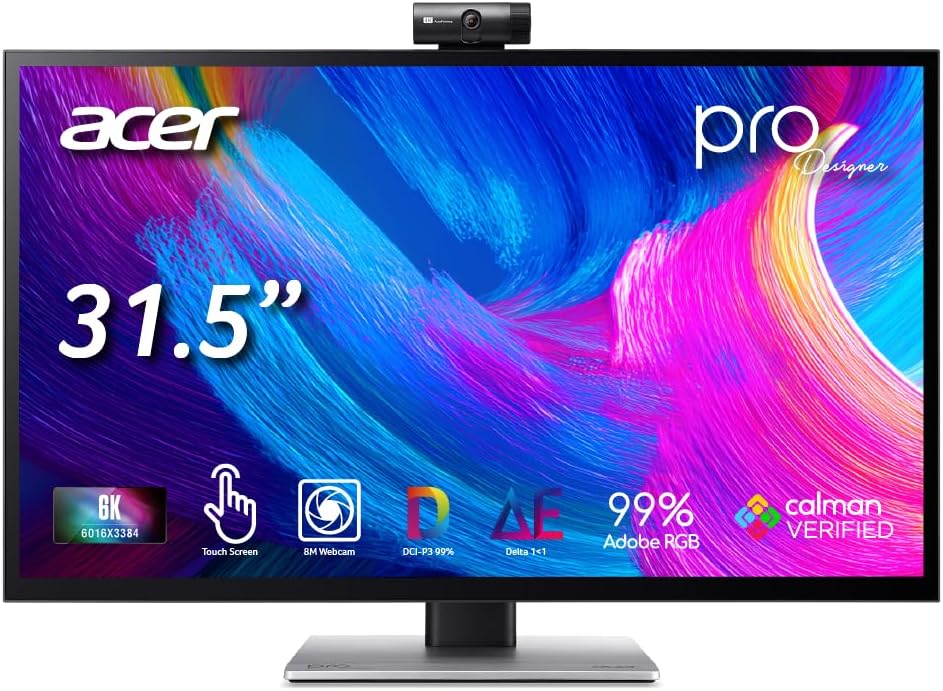
Rated 4.0 stars, this monitor enables direct drawing on a 6K display. It removes extra surfaces by letting you sketch and edit directly onscreen.
We may earn a commission when you buy through this link, at no additional cost to you.
Ten-point touch and MPP 2.0 support offer precision. Factory calibration achieves Delta E under 1. An 8MP webcam simplifies video calls for remote work.
You must buy the stylus separately. Creator Hub adds workflow features. Stand adjustments support portrait and landscape orientations for flexibility.
Designers will value this tactile control. It is the top choice for artists seeking a seamless digital canvas.
Direct interaction reduces friction in creative editing tasks.
Built-in 8MP camera eliminates need for extra hardware.
We may earn a commission when you buy through this link, at no additional cost to you.
Rated 5.0 stars, this monitor stands out for its clean design and durability. It offers 6K clarity with anti-glare coating to suit various lighting.
We may earn a commission when you buy through this link, at no additional cost to you.
The minimalist stand keeps your desk tidy. Aluminum body resists wear. Universal mounting allows flexible setups. Connectivity options include high-speed ports.
Data on color gamut is scarce but quality is implied by its score. It suits users valuing looks and robustness.
Ideal for modern office setups. It delivers sharp visuals and a sleek profile.
Reduces reflections for consistent viewing in bright rooms.
VESA compatible mounts enable flexible arm and wall setups.
We may earn a commission when you buy through this link, at no additional cost to you.
Rated 3.0 stars, this 52-inch monitor offers a broad canvas. It supports KVM workflows and 140W delivery for heavy workloads.
We may earn a commission when you buy through this link, at no additional cost to you.
IPS Black ensures decent contrast. Dual HDMI and DisplayPort inputs add flexibility. The remote simplifies settings adjustments. VESA mounting is needed.
Feedback suggests possible limitations or complexities. But the power and size suit enterprise users. KVM features streamline multi-system control.
Useful for control rooms or multi-platform workstations. Prioritize size and hub features for this purchase.
Extensive port selection and power delivery streamline connections.
Control multiple PCs with one keyboard and mouse.
We may earn a commission when you buy through this link, at no additional cost to you.
Rated 4.5 stars, this LG monitor leads with Thunderbolt 5 speed. It offers vast space and HDR fidelity for pro workflows.
We may earn a commission when you buy through this link, at no additional cost to you.
Nano IPS Black gives rich color and contrast. 80Gbps transfer supports fast data and high-res video. KVM simplifies switching. Stand ergonomics suit long work.
The cost is high but future-proofing pays off. HDR realism aids video grading. Clean cabling reduces desk clutter.
Ideal for tech-forward studios. Choose this for speed and color integrity.
Next-gen connectivity supports faster data and display output.
VESA DisplayHDR 600 ensures accurate shadow and highlight detail.
We may earn a commission when you buy through this link, at no additional cost to you.
Rated 3.3 stars, this Dell bundle emphasizes reliability. The extended protection plan adds value. Brightness suits office spaces well.
We may earn a commission when you buy through this link, at no additional cost to you.
Fast response times help motion clarity. USB-C allows quick data transfer. The 6K mode sharpens text for documents. Setup includes essential cables.
Not the flashiest but built for steady work. The protection pack helps mitigate risks. Connectivity fits standard office needs.
Ideal for corporate IT or focused office roles. Trust this for dependable daily operations.
Includes cables and protection for hassle-free setup.
5ms response supports smooth scrolling and action.
We may earn a commission when you buy through this link, at no additional cost to you.
This renewed option provides large screen space at a lower entry point. Ideal for custom builds, it includes the hub features without a stand.
We may earn a commission when you buy through this link, at no additional cost to you.
The curved display supports immersive viewing. Thunderbolt 4 offers strong connectivity. You must provide your own VESA mount for installation.
Renewed status reduces cost but may vary in condition. Check seller policies for return terms. It saves upfront cash for high resolution.
Best for builders seeking cost-efficiency. Prioritize verified sellers and warranty details before purchase.
Refurbished units offer significant savings on premium features.
Requires separate VESA mount for flexible positioning.
We may earn a commission when you buy through this link, at no additional cost to you.
Selecting the right 6K monitor requires balancing resolution with workflow needs. This guide breaks down key factors to help you make an informed choice.
6K resolution offers immense sharpness with pixel densities often exceeding 200 PPI. This clarity reduces text blur and allows detailed editing without zooming. High pixel density is crucial for print and design work.
Look for resolutions like 6144 x 3456 or similar variations. Ensure your GPU supports 6K output to avoid bottlenecks.
IPS panels remain the standard for color accuracy and wide viewing angles. Nano IPS and IPS Black variants enhance contrast and saturation. Check DCI-P3 and Adobe RGB coverage for professional tasks.
Aim for 98% DCI-P3 or more. Factory calibration with Delta E under 2 ensures reliable color right out of the box.
High refresh rates like 120Hz or 165Hz deliver smoother motion. This benefits video editing and gaming. Fast response times reduce ghosting during dynamic visuals.
Choose 60Hz for static work or higher rates for motion. Verify refresh rates match your content needs.
Thunderbolt 4 or 5 offers high-speed data and power delivery. USB-C simplifies single-cable setups. HDMI and DisplayPort options provide flexibility for various devices.
Ensure your laptop supports required ports. Check for KVM support if managing multiple systems.
Adjustable stands improve comfort and posture. Tilt, swivel, and height options reduce strain. VESA mounts offer flexibility if the stand is unsuitable.
Prioritize adjustable stands for long sessions. Consider monitor arms for better flexibility.
Brightness levels like 500 nits or higher support HDR content. HDR600 certification ensures realistic highlights. Contrast ratios affect depth in dark scenes.
Higher brightness helps in bright rooms. Check HDR support for media review workflows.
Strong build quality extends lifespan. Extended warranties reduce risk. Certified eye care features reduce fatigue over time.
Look for multi-year warranties. Check for anti-glare coatings and durable materials.
Prices vary by features and brand. Balance cost with essential needs like calibration and connectivity. Renewed options offer savings but come with caveats.
Set a budget range. Prioritize features that matter most to your specific work.
Start by connecting via Thunderbolt or DisplayPort to ensure full 6K signal. Adjust scaling in your OS settings to match resolution needs. Calibrate display settings for accurate color before working.
Clean the screen with a soft microfiber cloth and approved cleaners. Avoid harsh chemicals that could damage coatings. Keep vents clear to prevent overheating during long sessions.
Use built-in eye care features to reduce strain. Adjust brightness and color temperature based on ambient light. Regularly update firmware to maintain performance and compatibility.
No, your laptop must support 6K output via DisplayPort or Thunderbolt. Older devices may require adapters that limit resolution. Check your GPU specs before purchasing.
6K offers significantly higher pixel density and sharper text compared to 4K. This allows more screen real estate and precise editing. However, 6K demands more GPU power.
Yes if you work with HDR video or media. Look for DisplayHDR 600 or better for meaningful contrast. Basic HDR support may not justify the cost for static work.
Many models offer MacBook presets or native macOS support. Thunderbolt connections work seamlessly. Check color profiles and scaling settings for the best experience.
Generally yes due to higher brightness and panel complexity. Power delivery via USB-C can offset this by charging your laptop. Monitor specs list wattage usage clearly.
Most 32-inch 6K models need about 30 inches of width. Larger 52-inch screens require ample space. Measure your desk before buying to ensure proper fit.
Yes, especially with 120Hz refresh rates and adaptive sync. Ensure your GPU can drive 6K resolution smoothly. Dual mode monitors offer flexibility between resolution and speed.
Most offer 3 to 5 years of coverage. Some include premium support or accidental damage options. Always check warranty terms before purchase for protection.
The top picks highlight diverse strengths like budget value, premium speed, and touch integration. Each model serves specific needs from office work to creative design.
Prioritize resolution, color accuracy, and connectivity. Match these features to your daily tasks to maximize value. Consider ergonomics for long-term comfort.
Always verify current pricing and availability before purchase. These models evolve quickly with new updates. Your ideal monitor waits for your unique requirements.