
Redragon K556 Wired RGB Mechanical Gaming Keyboard
4.6Editor score
Brushed aluminum board build
Hot swappable switch sockets
RGB lighting customization options
Explore our expert guide comparing the top full metal keyboards for durability and performance in 2026 to find your perfect typing companion.
Finding a durable typing tool often leads enthusiasts toward full metal keyboard options that promise robust construction. These devices combine aesthetic appeal with long-lasting materials to resist daily wear and tear effectively over time.
We evaluated ten standout models based on build quality, switch performance, and user feedback to compile this definitive list. Each entry offers unique features tailored to gamers, professionals, and custom mechanical keyboard builders seeking reliability.
Our detailed reviews highlight strengths and trade-offs for every pick so you can choose confidently. Note that product availability and pricing may fluctuate regularly across major online retailers depending on demand and supply cycles.
4.6Editor score

4.8Editor score

4.1Editor score
This side by side comparison breaks down the core specifications of each full metal keyboard to help you decide which model fits your specific typing or gaming needs best.



The SteelSeries USB Apex 5 stands out as a top-tier option for gamers who value durability and customization. It boasts a robust aircraft-grade aluminum alloy frame that ensures sturdiness during intense sessions. With a rating of 4.6, it reflects strong user satisfaction regarding build quality and feature set.
We may earn a commission when you buy through this link, at no additional cost to you.
Its hybrid blue mechanical switches combine tactile click with smooth membrane action, promising 20 million keypresses. The OLED smart display allows users to customize gifs and game info directly on the keyboard. Dynamic per-key RGB illumination adds a stunning visual layer to your setup.
While the aluminum frame is excellent, the switches are not hot-swappable, limiting future customization. However, the magnetic wrist rest provides full palm support that enhances comfort significantly during long typing or gaming periods.
This keyboard is ideal for gamers seeking a balance of premium build and functional display features. If you prioritize a sturdy frame and unique OLED capabilities over switch customization, this is a highly recommended choice.
The frame is manufactured for unbreakable durability to withstand heavy daily use effectively over time.
Customize your workspace with real-time game info and Discord messages directly on the integrated OLED screen.
We may earn a commission when you buy through this link, at no additional cost to you.
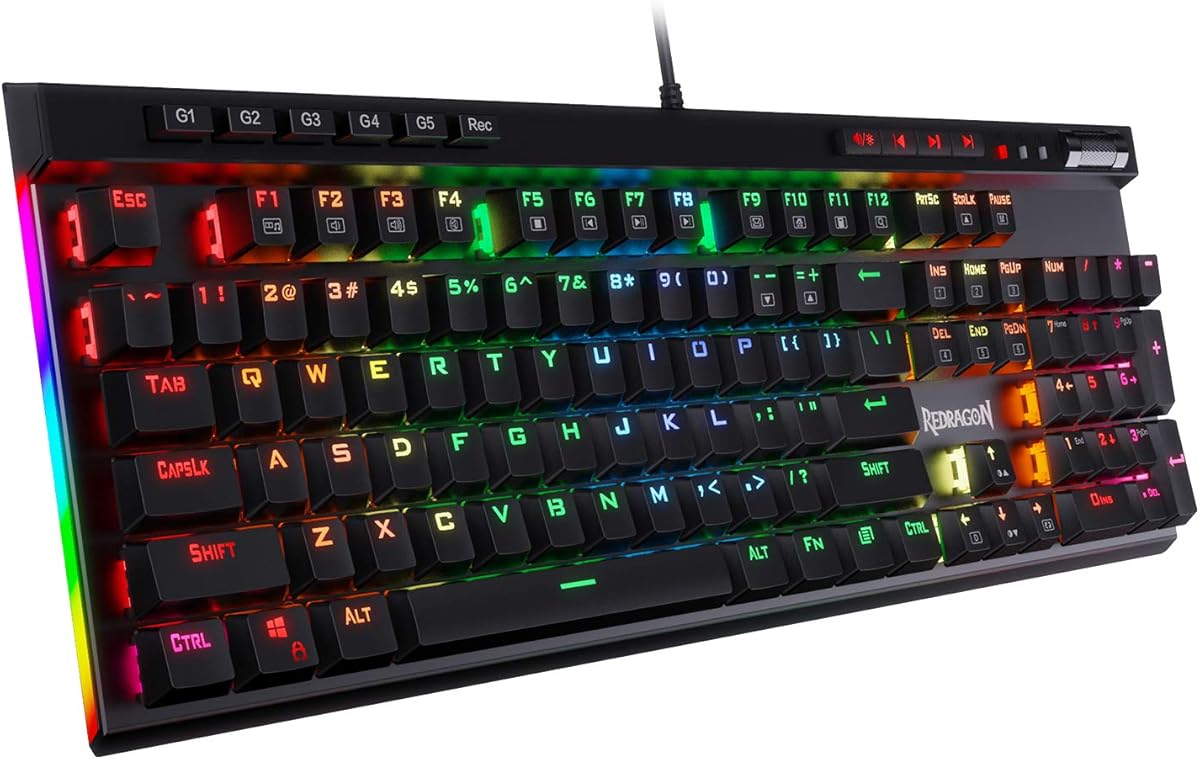
The Redragon K556 delivers impressive value with its tank-solid brushed aluminum board. It resists wobble during intense gaming sessions unlike plastic-frame alternatives. Rated 4.6, users appreciate its steady keystroke performance and vibrant RGB lighting modes.
We may earn a commission when you buy through this link, at no additional cost to you.
A key feature is the upgraded socket that accepts almost any 3-pin or 5-pin switch without soldering. This allows for easy customization over time. The stock Brown switches offer a soft tactile bump ideal for all-day typing comfort.
The lack of a wrist rest might be a downside for some users seeking ergonomic support. However, the full anti-ghosting ensures accurate registration during rapid combos which is crucial for competitive gaming.
For budget-conscious buyers who want a reliable aluminum board, this is an excellent starting point. It provides a solid foundation for enthusiasts to upgrade switches later while enjoying vibrant lighting effects.
Swap switches easily without soldering to customize the feel of your keyboard according to personal preference.
104 keys register accurately during rapid multi-key combos ensuring your inputs land exactly when pressed.
We may earn a commission when you buy through this link, at no additional cost to you.
The Keychron Q6 Pro offers a premium full-metal experience with extensive customization capabilities. Crafted from 6063 aluminum, it delivers a robust typing experience with double-gasket design to reduce noise. It supports QMK and VIA for deep customization across systems.
We may earn a commission when you buy through this link, at no additional cost to you.
Its hot-swappable sockets let you change any 3-pin or 5-pin switch easily. The KSA double-shot PBT keycaps are durable and resist shine over time. Wireless connectivity via Bluetooth adds flexibility for multi-device setups.
The price point is higher than many competitors, and the software requires some technical knowledge to configure fully. However, the acoustic performance from the gasket mount and silicone pads offers a refined typing feel.
Enthusiasts willing to invest in a high-end custom keyboard will love this model. It balances premium materials with deep programmability making it a top choice for power users seeking wireless capability.
Remap any key and create macros easily using industry standard open-source firmware solutions.
Silicone pads between cases reduce acoustic resonance for a quieter and softer typing experience.
We may earn a commission when you buy through this link, at no additional cost to you.
The OOCTPK Chilkey SF60 leads the pack with a 4.8 rating and advanced magnetic switch technology. It features a full-aluminum case and metal keycaps that produce a distinct thock sound. Its Hall Effect switches provide incredible precision for competitive gaming.
We may earn a commission when you buy through this link, at no additional cost to you.
With an 8000Hz polling rate and 0.001mm rapid trigger precision, input lag is nearly eliminated. The WS Flux Poseidon switches replicate traditional mechanical feel accurately. This keyboard is built for speed and high-level competitive performance.
The compact 60% layout saves desk space but removes dedicated arrow keys and function rows. Users may need to rely on key combinations for certain actions. The AI-driven OS requires some adaptation to utilize its full potential.
For esports players or enthusiasts wanting the fastest response possible, this is unmatched. The combination of metal construction and magnetic tech makes it a standout option for modern gaming needs.
Detect keypresses instantly with magnetic sensors allowing for ultra-fast actuation adjustments.
Aluminum keycaps create a unique acoustic chamber for a rich deep thock sound profile.
We may earn a commission when you buy through this link, at no additional cost to you.
The Keychron K10 HE brings advanced magnetic technology to a full-size wireless form. It blends classic mechanical feel with Hall Effect switches for ultra-responsive performance. The design includes natural wood sidings for a refined organic touch to any setup.
We may earn a commission when you buy through this link, at no additional cost to you.
It supports tri-mode connectivity allowing seamless switching between Bluetooth 5.2 devices or wired modes. The web configurator lets users fine-tune actuation points easily. This flexibility makes it suitable for both work and gaming environments.
The software requires clearing cache to function properly which might be a minor hassle initially. While the price is high, the combination of wireless freedom and rapid trigger technology offers unique value.
This keyboard is perfect for users who need a full layout with magnetic precision. It is highly recommended for professionals who want a sleek design that adapts to multiple devices efficiently.
Switch between Bluetooth wired and wireless modes to support up to three devices.
Customize actuation range from 0.2mm to 3.8mm to suit specific typing preferences.
We may earn a commission when you buy through this link, at no additional cost to you.
The Corsair Vanguard 96 offers a unique 96% layout that retains all essential keys in a compact frame. It features an integrated 1.9-inch LCD screen for custom animations and system specs. This design helps save desk space while maintaining full keyboard utility.
We may earn a commission when you buy through this link, at no additional cost to you.
Its 8000Hz hyper-polling ensures ultra-fast response times for gaming actions. The Elgato Virtual Stream Deck integration allows streamers to map functions directly to G-keys. This productivity feature is valuable for content creators.
The keyboard does not support hot-swappable switches limiting user customization options. The feature menu is deep and may require time to explore fully. However, the build quality feels solid and robust for daily use.
For streamers needing a compact board with visual feedback, this is ideal. It bridges the gap between gaming performance and productivity tools effectively for advanced users.
Personalize your keyboard with system stats or images on the integrated luminous screen.
Map Elgato functions to programmable G-keys to enhance workflow without extra hardware.
We may earn a commission when you buy through this link, at no additional cost to you.
The Logitech G413 SE focuses on essential gaming features with a robust design. It features a brushed aluminum-magnesium alloy top case that serves as a sturdy backbone. With a 4.5 rating, it is known for reliable performance without unnecessary complexity.
We may earn a commission when you buy through this link, at no additional cost to you.
PBT keycaps offer superior durability and resistance to shine. The tactile switches deliver uncompromising performance for gaming. White LED lighting ensures visibility in low-light environments without distracting colors.
The lack of RGB may not appeal to users who want vibrant lighting effects. It is a fixed switch design which means no future swapping of key components. However, its reliability and simple controls are highly appreciated.
This is a great choice for gamers who value function over flash. It provides a durable and solid typing experience that holds up well over years of regular gaming use.
Heat and wear resistant PBT keycaps ensure long-lasting clarity and texture.
Twelve function keys allow quick control of volume and playback without software.
We may earn a commission when you buy through this link, at no additional cost to you.
The Redragon K580 stands out with dedicated macro keys and a media wheel for quick control. It allows you to record combos on the fly without needing software. This makes it highly efficient for users who rely on macros frequently.
We may earn a commission when you buy through this link, at no additional cost to you.
Stock blue switches provide clicky feedback rated for 50 million keystrokes. The socket accepts almost any switch allowing easy customization. It is a solid option for those who want mechanical feedback at a low cost.
The build is less premium compared to full aluminum boards. The software is optional which might limit deeper customization. However, it offers great value for basic mechanical functionality.
This keyboard is suitable for gamers looking for macro efficiency without breaking the bank. It is a practical choice for users who value direct controls over complex software setups.
Save complex combos directly on the keyboard using five dedicated macro keys.
Dedicated media controls provide quick access to playback without software.
We may earn a commission when you buy through this link, at no additional cost to you.
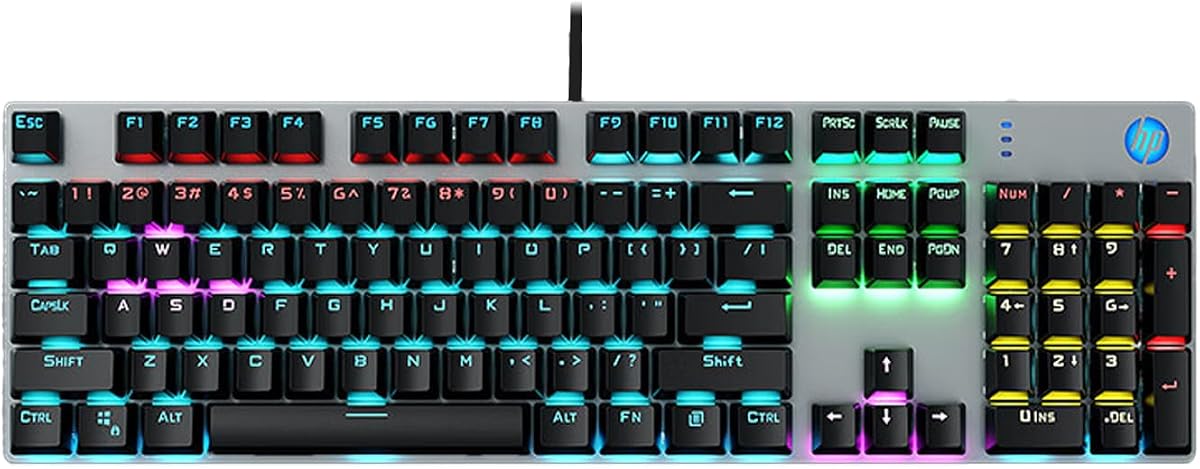
The HP GK400F is designed for both business and gaming use with a sturdy metal panel. It ensures stable structure with reliable wired USB transmission. The brown switches provide tactile feedback suitable for office typing and gaming.
We may earn a commission when you buy through this link, at no additional cost to you.
It features an ice blue backlight with 20 customizable effects for visibility. The anti-slip pads lock the keyboard in place during intense use. This model is highly compatible with mainstream desktop and laptop devices.
The ABS keycaps may show wear over time compared to PBT materials. It is not hot-swappable which limits future switch customization. However, it is a robust budget option for general office work.
For users needing a reliable mechanical keyboard for both work and play, this fits well. It offers stability and simple functionality without unnecessary complexity or high cost.
Adopts a sturdy metal panel to ensure a stable structure for daily typing.
Two-stage adjustable foot supports customize the most comfortable typing angle.
We may earn a commission when you buy through this link, at no additional cost to you.
The Cherry KC 200 MX is built for office use with an anodized metal plate for durability. It features improved CHERRY MX2A switches offering precise tactile characteristics. With over 100 million actuations per key, it is robust for heavy typing.
We may earn a commission when you buy through this link, at no additional cost to you.
Practical white status LEDs and extra keys provide quick access to calculator and volume. The keycaps are laser-etched to remain legible for years. It focuses on functionality rather than flashy features.
The non-hot-swappable design means you cannot easily change switches later. Aesthetics are simple and functional rather than decorative. However, for an office environment, it provides reliable consistency.
This keyboard is perfect for professionals seeking a durable typing tool. It delivers high-quality mechanical performance designed specifically for long-term office productivity tasks.
Built with high-quality mechanical components rated for more than 100 million actuations.
Includes extra keys for calculator access and clear white LEDs for status.
We may earn a commission when you buy through this link, at no additional cost to you.
Selecting the right full metal keyboard involves considering build materials switch type and specific use cases. This guide helps you identify factors that align with your needs.
Full metal keyboards use materials like aluminum or steel to resist flex and provide a heavy stable base. Look for 6063 aluminum or aircraft-grade alloys for better durability over time. These materials also help dissipate heat during intense gaming sessions.
Always check if the top case or frame is metal rather than plastic to ensure longevity.
Mechanical switches define typing feel and sound. Options include tactile browns clicky blues or smooth linears. Some models offer magnetic Hall Effect switches for adjustable actuation points and rapid trigger functionality.
Choose a switch that matches your preference for feedback and sound output.
Layouts vary from full-size with numpads to compact 60% or 96% options. Full metal keyboards often come in smaller formats to save desk space while maintaining premium feel.
Ensure the layout includes all essential keys you need for work or gaming.
Wired models offer zero latency but wireless versions provide freedom from cables. Some support Bluetooth for multiple devices or wired USB for stability. Consider your workflow requirements.
Wired is generally better for competitive gaming while wireless suits office productivity.
Hot-swappable sockets allow you to change switches without soldering. Software support like QMK or VIA enables deep key remapping and macro creation for advanced users.
If you want to tweak your setup often prioritize keyboards with hot-swap capabilities.
PBT keycaps resist shine and wear better than ABS. Double-shot keycaps ensure legends remain clear over time. Some models even use metal keycaps for unique sound.
Check the material to ensure it matches your durability expectations.
Features like OLED displays RGB lighting or dedicated media wheels add value. However these may increase price. Decide which extras improve your experience.
Prioritize features that solve specific problems in your daily workflow.
Full metal keyboards range from budget friendly to high-end premium prices. Set a limit based on necessary features. Higher cost often brings better switches and connectivity options.
Balance cost against build quality to find the best value.
Regularly clean your keyboard using compressed air to remove dust from keycaps. Use a soft brush to clean around switches carefully to avoid damage.
For spills disconnect the keyboard immediately and let it dry fully before reconnecting. Metal keyboards may resist moisture better but electronics need care.
Use software tools to customize keybindings and RGB lighting. Ensure firmware is updated for optimal performance and bug fixes.
Full metal keyboards offer superior durability and stability. They resist flex during intense typing and dissipate heat better. The metal construction also gives a premium aesthetic appeal.
Yes metal keyboards are significantly heavier which keeps them from sliding on the desk. This weight provides stability but makes them harder to transport frequently.
Basic functionality usually works plug and play. However customization like RGB and macros often require companion software from the manufacturer.
Only if the keyboard supports hot-swappable sockets. Otherwise you must solder new switches which requires technical skill.
For those valuing build quality and aesthetics, yes. If you seek a portable device, plastic may suffice due to weight and price.
Wipe the metal surface with a dry microfiber cloth to prevent smudges. Avoid harsh chemicals that might damage the finish.
The top picks like the OOCTPK Chilkey SF60 and Keychron Q6 Pro offer distinct advantages for different users. Whether you prioritize speed or customization, these models excel in their respective categories.
Prioritize build quality and switch type based on your primary use case. Gaming requires fast response while office work benefits from tactile comfort.
Always verify current pricing and availability as these change frequently. Choose a model that fits your budget without compromising essential features.