
Amazon Basics AC-Powered Computer Speakers
4.3Editor score
Direct wall outlet power
Simple front volume control
Built-in headphone jack
This comprehensive guide compares the top ten AC powered computer speakers for desktop setups, evaluating audio performance, connectivity options, and design
Finding the right sound system for your workspace is essential for productivity and enjoyment. AC powered computer speakers deliver consistent energy without draining your device battery, ensuring loud clear audio for hours. These systems plug directly into wall outlets, providing the power needed for rich bass and detailed highs that USB options often lack.
We evaluated ten leading models based on sound clarity, connectivity flexibility, build quality, and user controls. Our analysis focuses on how well each speaker handles music, movies, and gaming across different room sizes. We prioritized units with reliable amplification and durable construction to ensure long-term satisfaction for both casual listeners and professionals.
Each pick below highlights specific strengths like stereo separation, EQ customization, or compact design suited for tight desks. While prices vary, these selections offer diverse solutions for every budget and setup requirement. Please note that availability and costs can shift, so verify current details before making your final decision today.
4.3Editor score

4.6Editor score

4.6Editor score
The following table presents a side-by-side comparison of all ten reviewed AC powered computer speaker systems, highlighting key specifications and distinct features to help you quickly identify the model that best fits your specific audio needs and desk environment.




The Amazon Basics AC-Powered Computer Speakers offer a straightforward solution for users needing essential sound without complexity. With a solid rating, these speakers provide clear audio for everyday tasks. Their standout quality is the simplicity of operation, making them ideal for office work or casual media consumption.
We may earn a commission when you buy through this link, at no additional cost to you.
These speakers draw power directly from a wall outlet, ensuring consistent volume without draining laptop batteries. The single volume control on the front allows easy adjustment while listening. The 3.5mm jack connects to any device, and the headphone port offers private listening when needed.
Sound reproduction is functional rather than audiophile grade, focusing on clarity over deep bass. The plastic casing is lightweight which might feel less premium but keeps costs low. This trade-off is acceptable for those prioritizing budget and reliability over immersive home theater experiences.
Anyone seeking an inexpensive upgrade from built-in monitor speakers should consider this model. It fits perfectly in shared workspaces where noise levels must be managed. For basic desktop audio needs, this system delivers reliable performance at an entry-level price.
The AC power adapter ensures steady audio output without worrying about battery drain or USB port limitations.
A single knob manages power and volume, reducing clutter and making operation intuitive for all users.
We may earn a commission when you buy through this link, at no additional cost to you.
The Bose Companion 2 Series III sets a high standard for reliable computer audio. Rated highly by users, it delivers the signature clarity Bose is known for. This model stands out by balancing premium sound quality with a user-friendly design suitable for various environments.
We may earn a commission when you buy through this link, at no additional cost to you.
Users can connect multiple devices easily through the auxiliary input on the front. Whether playing from a laptop or mobile device, the sound remains balanced and crisp. The volume control is conveniently located on the right speaker, allowing quick adjustments without software interaction.
While the price reflects the premium brand, the value lies in longevity and consistent performance. The build quality feels robust compared to cheaper alternatives. Some users might miss a remote, but the physical controls are sufficient for daily desktop usage.
This system is perfect for professionals who need clear audio for calls and music. It handles voice and media well without distortion. For those seeking a dependable audio upgrade that lasts, this companion series remains a top recommendation.
The auxiliary input lets you switch between your computer and phone seamlessly for versatile listening sessions.
Bose tuning ensures voices and instruments sound natural, making these speakers great for long listening periods.
We may earn a commission when you buy through this link, at no additional cost to you.
The Bose Companion 2 Series II provides a proven audio experience for desktop users. Known for realistic sound reproduction, these speakers handle movies and music with finesse. The dual inputs allow easy switching between a computer and another audio source without unplugging cables.
We may earn a commission when you buy through this link, at no additional cost to you.
The design remains elegant and fits well in professional settings. Sound clarity is maintained even at higher volumes, avoiding the muddy bass common in cheaper systems. The front controls are intuitive, allowing quick volume changes during work or entertainment.
While it lacks modern features like Bluetooth, the wired reliability is a plus for stability. The build feels sturdy, though the design is less contemporary than newer models. This trade-off is acceptable for those who prioritize sound quality over wireless connectivity.
Ideal for users who want reliable performance without complex setups, this system delivers consistent audio. It works well in offices where distraction is minimized. For fans of traditional computer audio, this model offers a familiar and pleasing experience.
Dual inputs let you connect a desktop and a secondary device simultaneously for flexible audio routing.
The tuning focuses on midrange clarity, ensuring dialogue and vocals remain clear and natural.
We may earn a commission when you buy through this link, at no additional cost to you.
The Bose Companion 20 delivers high-end performance in a compact two-piece package. With advanced TrueSpace technology, it creates a wide soundstage from just two speakers. This system stands out for its ability to fill a room with natural sound without a separate subwoofer.
We may earn a commission when you buy through this link, at no additional cost to you.
The control pod offers convenient access to volume and mute functions. Active electronic equalization ensures balanced frequencies, providing clear highs and solid lows. The sleek design complements modern setups, saving valuable desk space while delivering impressive audio dynamics.
Users note the clarity remains consistent across different content types. The active electronics allow for dynamic performance without manual tweaking. While costly, the reduction in clutter and superior audio quality justify the investment for many audiophiles.
This system is best for those wanting top-tier audio without bulk. It suits home offices and entertainment areas equally well. For a seamless blend of style and sound, the Companion 20 is a strong choice for serious listeners.
TrueSpace technology expands the stereo image, creating a spacious sound without requiring large speakers.
The two-piece design removes the need for a subwoofer, simplifying cabling and saving floor space.
We may earn a commission when you buy through this link, at no additional cost to you.
The Edifier R1280T brings studio-quality sound to the desktop. Known for its 13mm silk dome tweeter, it delivers natural reproduction suitable for critical listening. The dual aux inputs allow connecting two devices without unplugging cables, enhancing workflow efficiency.
We may earn a commission when you buy through this link, at no additional cost to you.
Side panel controls provide precise bass and treble adjustment. A remote control allows convenient volume management from a distance. The classic wood finish adds a touch of elegance, complementing both home and office decor. Build quality is robust with heavy MDF enclosures.
Soundstage imaging is precise, making vocals and instruments stand out clearly. Some users may need to adjust EQ settings to suit room acoustics. The lack of Bluetooth is a minor trade-off for those prioritizing wired fidelity and stability.
Music enthusiasts and creators looking for accurate monitoring will appreciate these speakers. They perform exceptionally well for mixing and casual listening. For high-fidelity audio in a compact form, the R1280T is a top contender in its class.
The silk dome tweeter ensures crisp highs, allowing details in complex tracks to be heard clearly.
Dual inputs let you connect your computer and a phone simultaneously, switching sources effortlessly.
We may earn a commission when you buy through this link, at no additional cost to you.
The Edifier R980T combines powerful performance with a classic aesthetic. With 24W RMS power, these speakers deliver rich audio that fills a room. The wooden enclosures minimize resonance, resulting in a cleaner sound compared to plastic alternatives.
We may earn a commission when you buy through this link, at no additional cost to you.
Inputs include both RCA and 3.5mm, offering flexibility for various devices. A flared bass reflex port enhances low-frequency response without distortion. The universal power supply simplifies travel and setup for international users. Cables are included for immediate use.
The sound signature is balanced, suitable for movies and music. While controls are basic, they are effective for volume adjustment. The immersive sound creates an engaging environment for entertainment sessions. The compact design fits easily on smaller desks.
This model is ideal for users wanting strong bass without a subwoofer. It offers great value for the price. For a versatile and reliable setup, the R980T is a solid choice for everyday audio enjoyment.
24W RMS ensures loud enough output for small rooms without sacrificing clarity or detail.
Wooden enclosures reduce unwanted vibrations, delivering a warm and natural listening experience.
We may earn a commission when you buy through this link, at no additional cost to you.
The Cyber Acoustics CA-2014 offers practical audio for small spaces. With a compact design, it fits easily on workstations without clutter. The simple wired connection via 3.5mm jack ensures compatibility with any device. AC power ensures steady volume during long sessions.
We may earn a commission when you buy through this link, at no additional cost to you.
Controls on the front include power and volume, plus a headphone jack for privacy. LED indicators show status clearly. The 4W power provides clear sound for video calls and casual listening. This system is lightweight yet durable enough for daily office use.
While bass is limited compared to larger models, the clarity in mids and highs is adequate. The build is functional rather than premium. This trade-off is acceptable for users prioritizing desk space and budget over deep audio dynamics.
Ideal for students or office workers needing basic sound, these speakers perform reliably. They handle voice applications exceptionally well. For tight desks and essential audio, this model offers a straightforward and effective solution.
The slim design maximizes desk real estate, keeping your workspace organized and functional.
Tuned for speech clarity, these speakers make conference calls and video meetings easy to follow.
We may earn a commission when you buy through this link, at no additional cost to you.
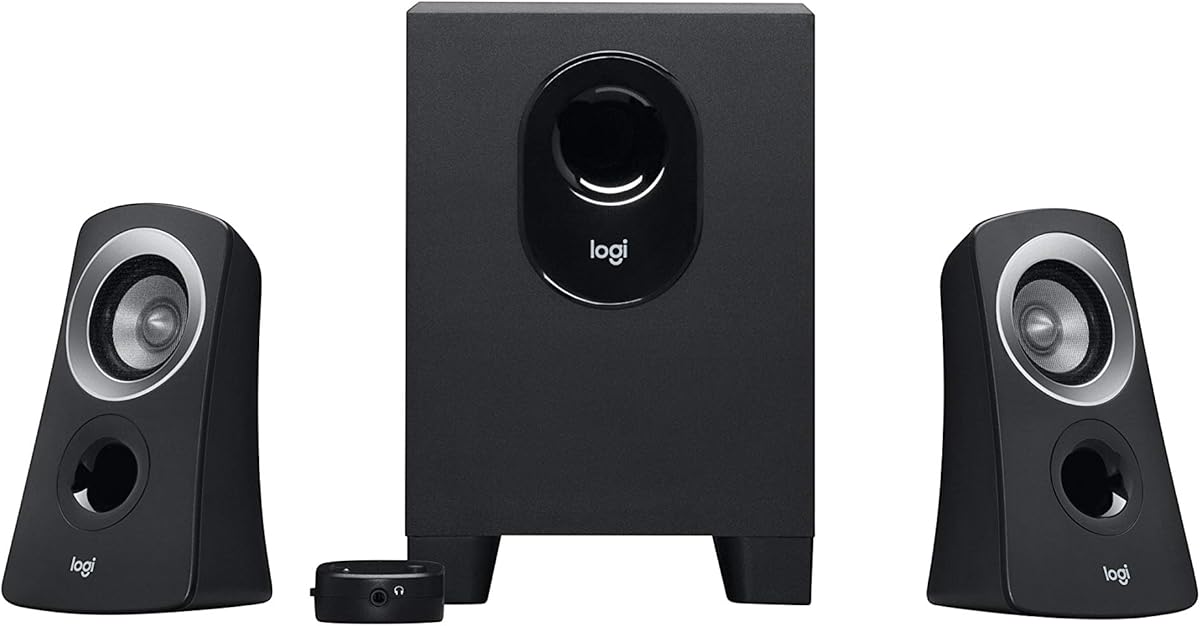
The Logitech Z313 introduces a dedicated subwoofer to the desktop audio experience. With 25 Watts RMS output, it delivers powerful sound that resonates through a room. The compact subwoofer sits on the floor, freeing desk space while adding depth to audio.
We may earn a commission when you buy through this link, at no additional cost to you.
A convenient control pod allows easy volume adjustment and muting. This setup is perfect for gaming and movies where bass impact matters. The satellite speakers are small and stylish, blending well with modern black aesthetics. Wires are manageable with a clean layout.
While the subwoofer requires floor space, the enhancement in low frequencies is noticeable. The sound remains balanced for music as well. Users appreciate the added power without sacrificing clarity. This system is robust enough for entertainment centers.
Gamers and movie fans looking for immersion will love this 2.1 system. It brings a cinematic feel to desktop setups. For those wanting more punch than stereo speakers provide, the Z313 is a practical and powerful choice.
The subwoofer adds depth to music and sound effects, enhancing the emotional impact of content.
A separate control pod keeps essential adjustments within easy reach, simplifying user interaction.
We may earn a commission when you buy through this link, at no additional cost to you.
The Nylavee Computer Speakers blend performance with visual appeal. Featuring Bluetooth 5.0 and AUX inputs, they offer flexible connectivity for phones and PCs. The 14W RMS output ensures sound that cuts through background noise effectively. Four speaker units and passive radiators enhance clarity.
We may earn a commission when you buy through this link, at no additional cost to you.
RGB lighting adds atmosphere to gaming setups, with an off mode for focused work. One-button EQ modes simplify sound customization for music or movies. Controls are intuitive, with physical buttons and a volume knob on the front. The compact size fits any desk easily.
The sound is balanced with clear mids and highs, suitable for daily use. While not audiophile grade, the audio quality exceeds many budget options. The visual effects appeal to those wanting a customized desk environment without complex software.
Gamers and streamers will appreciate the combination of sound and style. The wireless option reduces cable clutter significantly. For a fun and functional setup, this model delivers excellent value and performance.
Bluetooth and AUX inputs let you switch between devices instantly, keeping your workflow smooth.
RGB lights transform your desk, creating an immersive environment that matches gaming or work themes.
We may earn a commission when you buy through this link, at no additional cost to you.
The LITTOAK Bluetooth PC Speakers offer extensive features for a competitive price. With 30W total output, they deliver powerful audio suitable for large rooms. The three EQ modes allow quick switching between movie, music, and gaming profiles. Bluetooth and AUX inputs ensure broad compatibility.
We may earn a commission when you buy through this link, at no additional cost to you.
Six RGB lighting modes enhance the visual experience, adjustable via front controls. A USB port adds extra connectivity options for media. The sound is dynamic and loud enough for immersive entertainment. Setup is quick with included adapters and cables.
Build quality is functional with a focus on utility and style. While not refined like premium brands, the performance is impressive for the cost. The controls are intuitive, making customization easy. This system is designed for flexibility and fun.
Ideal for gamers wanting a complete package with sound and light, these speakers deliver value. They handle multimedia well with strong bass. For a feature-rich setup that keeps the room energized, the LITTOAK is a strong contender.
The 15W dual drivers provide enough volume to fill a room with rich stereo sound easily.
EQ presets and RGB modes let you tailor the look and sound to match any activity or mood.
We may earn a commission when you buy through this link, at no additional cost to you.
Selecting the right computer speakers requires balancing audio quality, connectivity, and physical space. This guide helps you navigate key factors to find a system that enhances your workspace.
AC powered speakers draw energy directly from a wall outlet, ensuring consistent volume without draining laptop batteries. Higher wattage generally translates to louder sound and better bass response in larger rooms. Look for RMS ratings to understand true power output rather than peak claims.
Prioritize AC adapters for all-day listening to avoid interruptions or device overheating.
Most computer speakers use a 3.5mm auxiliary jack, which is standard for desktops and laptops. Some models include USB ports or Bluetooth for wireless freedom. Consider your devices to ensure easy connection without extra dongles.
Choose dual inputs if you frequently switch between a computer and a mobile device.
Audio clarity depends on driver quality and tuning. Models with separate tweeters for high frequencies deliver clearer vocals. Frequency range indicates how deep the bass goes; 68Hz covers standard needs for most media.
Prioritize balanced sound over extreme bass for professional or mixed usage.
Desk space varies, so measure your available area before purchasing. Wooden enclosures reduce resonance better than plastic, offering a warmer tone. Ensure the height and width fit under your monitor or alongside other peripherals.
Select compact models for shared workspaces to avoid clutter and noise issues.
Physical volume knobs are reliable and fast to access during use. Some systems include control pods or remotes for convenience from a distance. Look for mute buttons and headphone jacks if privacy is needed.
Simple interfaces reduce frustration and allow focus on your work or entertainment.
2.0 systems provide balanced stereo sound for most desktop tasks, while 2.1 systems add a subwoofer for deep bass. Decide based on your need for impact versus space savings. Subwoofers require floor space but enhance movie experiences.
Stick to 2.0 designs if desk and floor space are limited constraints.
Some speakers include side panels or buttons for adjusting bass and treble. This helps tailor sound to your preferences without software. It is useful for different content types like music or gaming.
Check for dedicated EQ buttons if you want quick audio adjustment options.
Build materials impact longevity. Metal grilles and robust plastics resist wear better than fragile components. A warranty offers protection against manufacturing defects, which is common in electronics.
Review warranty terms to ensure support if issues arise after purchase.
Connect the power adapter to a wall outlet and the speakers to your device via the 3.5mm jack. Adjust the volume knob to a safe level before playing media to protect your hearing. Ensure the cables are not pinched or under tension.
Keep speakers away from water and dust to maintain performance. Regularly wipe dust from the grilles with a soft cloth. Avoid placing heavy items on top of the units to prevent damage to the drivers.
Use the headphone jack for private listening if needed. Turn off the speakers when not in use to save energy and extend lifespan. If using Bluetooth, pair devices according to the manual to avoid connection issues.
AC powered speakers draw consistent energy from a wall outlet, ensuring steady volume and avoiding drain on your computer or laptop battery. This prevents performance drops during long sessions and reduces heat buildup on your device.
Yes, most models use standard 3.5mm jacks that are compatible with Macs and other devices. Just ensure your computer has a headphone port or use a USB-C adapter if needed.
Look for speakers with dual inputs like the Edifier R1280T. You can plug both devices into the inputs simultaneously and use the volume knob to switch sources without unplugging cables.
Models with higher RMS wattage like the LITTOAK or Logitech Z313 can fill larger spaces. For very large rooms, a 2.1 system with a subwoofer will provide better coverage than compact stereo units.
Yes, speakers with flat frequency response like the Edifier R1280T are ideal for accurate monitoring. Ensure the sound remains clear at low volumes to catch details in your mix without distortion.
Check if the volume is set too high on the speakers or your device. Ensure cables are fully plugged in and not damaged. Adjust the EQ settings to balance the bass and treble levels.
We reviewed ten models ranging from basic budget options to premium systems like the Bose Companion 20. Whether you need simple audio or immersive sound, there is a fit for your needs. The Edifier R1280T offers a balanced choice for audiophiles.
Prioritize power source and connectivity first to ensure they match your setup. Consider desk size and build quality to avoid future replacement. For most users, a reliable 2.0 system provides the best value for daily tasks.
Prices and availability can change quickly, so check current offers before buying. Verify that your device matches the input requirements of your chosen model. Selecting the right system today ensures a better audio experience tomorrow.