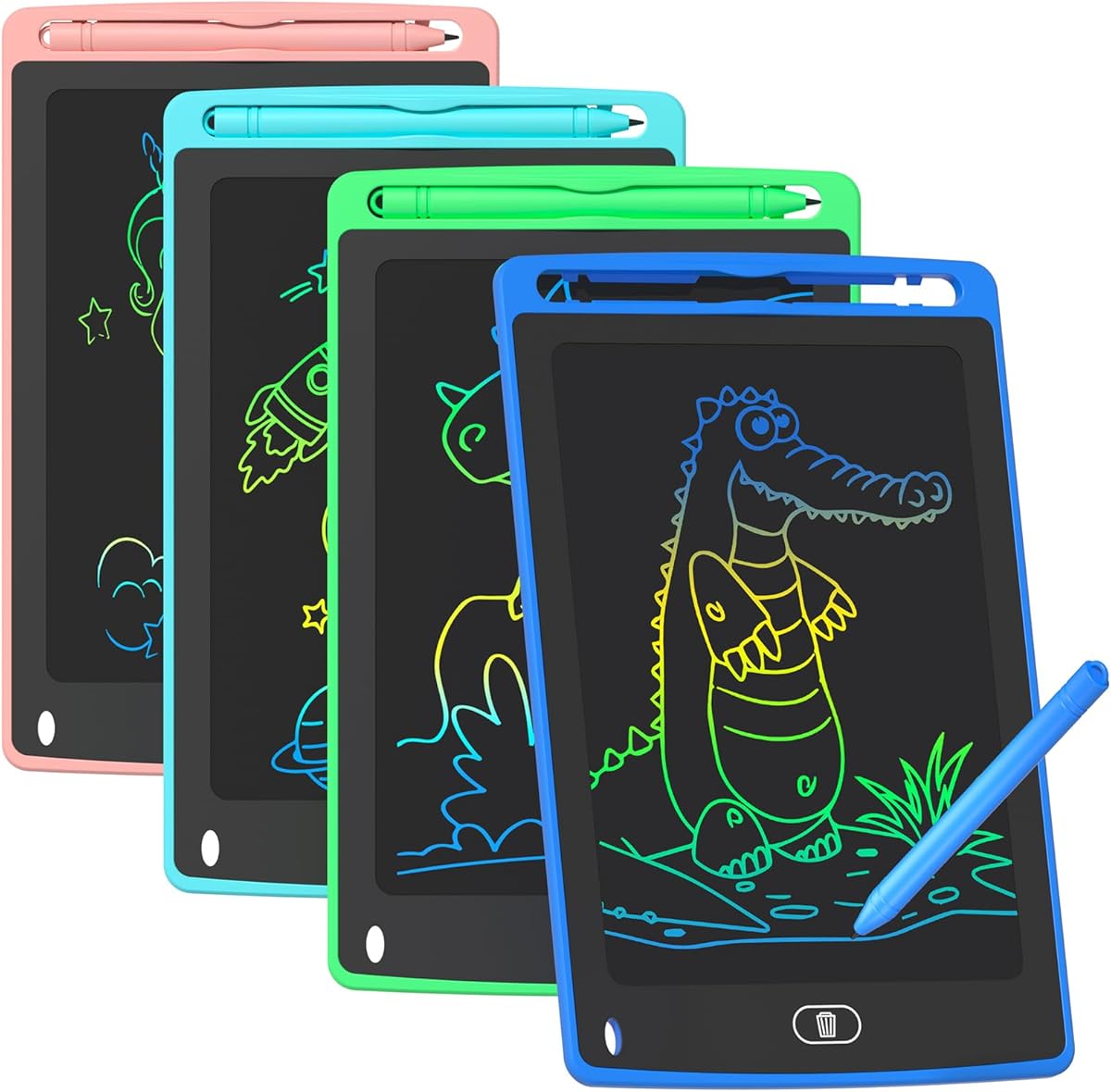
4 Pack LCD Writing Tablet for Kids
4.5Editor score
Value-packed four tablet set
Colorful 8.5-inch screens
Durable and portable design
Discover the top LCD writing tablets for kids with this comprehensive guide comparing screen size, battery life, durability, and features to find the best
LCD writing tablets for kids have transformed how children express creativity without the mess of paper or ink. These electronic doodle boards offer a safe, reusable canvas for drawing, writing, and learning. Parents love them for travel and quiet time, while kids enjoy the colorful screens and endless erasing possibilities.
We evaluated ten top-rated models based on screen size, battery efficiency, build quality, and user-friendly features. Our analysis focused on pressure sensitivity, eye protection, and portability to ensure each pick meets diverse needs. From compact travel sizes to large creative canvases, this list covers the best options available today.
Each product review highlights key strengths, potential trade-offs, and ideal use cases for different age groups. We included detailed specifications and real-world performance notes to help you make an informed decision. Remember that prices and availability can change, so check current listings before purchasing to secure the best value.
4.5Editor score

4.5Editor score

4.5Editor score
This side-by-side comparison highlights key specifications across all ten models to help you quickly identify the best fit for your child's needs and your budget constraints.


This four-pack bundle stands out as the most economical choice for families with multiple children. With a 4.5 star rating, it delivers reliable performance for preschoolers and early elementary kids. Each tablet features an 8.5-inch screen that is bright enough for indoor and outdoor use without glare.
We may earn a commission when you buy through this link, at no additional cost to you.
The pressure-sensitive technology allows kids to draw lines of varying thickness based on how hard they press, mimicking real pen experience. The front erase button clears the screen instantly, while the lock switch prevents accidental deletion of masterpieces. The stylus fits snugly on top to avoid loss during play.
While the screen size is compact compared to premium models, it is perfect for small hands and tight spaces like car seats. The only trade-off is the reliance on button batteries rather than rechargeable ones, but replacements are cheap and easy to find for long-term use.
Families looking for an affordable way to introduce digital drawing without mess will love this set. It is ideal for siblings sharing or for keeping multiple children occupied during long trips. We highly recommend it as a first doodle board for young artists aged three to eight.
Having four distinct colors means each child can claim their own tablet without fighting over tools during shared play sessions.
The lightweight design and included stylus tether make it easy to pack for flights, restaurants, or waiting rooms without losing parts.
We may earn a commission when you buy through this link, at no additional cost to you.
The Kayoubi model offers a massive 14.5-inch screen that provides ample room for detailed artwork and writing practice. Rated 4.5 stars, it balances size and portability better than most competitors. The display is specifically designed to protect little eyes with zero harsh blue light or glare.
We may earn a commission when you buy through this link, at no additional cost to you.
Kids can doodle for hours without worrying about mess or cleanup since the board erases with a single click. The lock function is crucial for preserving complex drawings before sharing them with parents or teachers. Its paperless design supports environmental values while teaching creativity.
The main limitation is the pink color option which might not appeal to all children, but the performance is strong regardless. Battery life is decent but requires occasional replacement which is a minor inconvenience. Overall it is a robust choice for home use.
We recommend this for parents who want a balance between screen real estate and manageability. It is excellent for homeschooling activities, storyboarding, or quiet time in the classroom. The eye-friendly features make it a safe alternative to standard tablets for long sessions.
The large area allows children to draw full pages of art or write complete stories without running out of space mid-drawing.
With zero blue light and non-illuminating technology, it reduces eye strain during extended periods of drawing and writing tasks.
We may earn a commission when you buy through this link, at no additional cost to you.
This 16-inch model offers a truly large canvas that grows with your child as their skills develop. With a 4.5 star rating, it is praised for its USB rechargeable battery that lasts six to nine months on a single charge. The screen brightness is enhanced to be 60% brighter than many market alternatives.
We may earn a commission when you buy through this link, at no additional cost to you.
Pressure-sensitive technology ensures lines vary in thickness based on writing intensity, giving a realistic paper-like feel. The built-in lithium polymer battery is hidden inside an impact-resistant ABS shell to prevent accidental swallowing by toddlers. An anti-lost rope keeps the stylus attached securely.
The main downside is the weight and size compared to compact travel options, which might make it less ideal for small bags. Charging via Micro-USB is convenient but the port should be covered when not in use to avoid dust damage. Despite this it remains a top pick for home use.
Parents seeking a durable educational toy that supports detailed creativity will appreciate this board. It is perfect for homeschooling spelling or math practice where larger space helps focus. We recommend it for children who need more room to express complex artistic ideas.
The upgraded screen technology provides vivid colors that remain visible even in bright indoor lighting conditions without eye fatigue.
The hidden internal battery ensures children cannot access internal components while still providing reliable long-term power for daily use.
We may earn a commission when you buy through this link, at no additional cost to you.
KOKODI delivers a robust 16-inch drawing tablet that balances size with durability for daily use. Rated 4.5 stars, it is designed to save up to 1,000 sheets of paper per child making it an eco-friendly option. The replaceable battery can run for three to six months before needing a swap.
We may earn a commission when you buy through this link, at no additional cost to you.
The colorful lines vary in depth based on pressure intensity offering a sensory experience similar to writing on real paper. An erase button clears the screen in one second while the lock feature protects artwork from accidental deletion. The shell is tough enough to withstand drops and bumps.
While the battery is not easily accessible to young children due to screw fixation, this adds safety but may complicate replacement for some parents. The price is slightly higher than budget options but justified by the build quality and screen size. It is a reliable long-term investment.
This board is ideal for families who value sustainability and want a tool that supports both creativity and learning. It works well for drafting notes in meetings or homework for teens too. We recommend it for households looking for a durable and thoughtful gift.
Replacing paper usage with a reusable tablet saves money over time and reduces waste for more sustainable household habits.
Screwed battery compartments prevent curious toddlers from opening the device while allowing adults to replace batteries easily when needed.
We may earn a commission when you buy through this link, at no additional cost to you.
This rechargeable model stands out for its incredible battery life lasting up to nine months on a single charge. Rated 4.5 stars, it uses the flexible LCD tech to provide sharp bright lines without needing constant charging. The included two styluses allow parents and kids to share the device easily.
We may earn a commission when you buy through this link, at no additional cost to you.
The child-safe ABS body keeps the battery securely sealed so little hands cannot access it. It is portable enough for travel yet sturdy enough for home play without staining walls or clothes. The front erase button makes clearing work fast while the back lock saves favorite drawings.
The screen is non-luminous which is safer for eyes but can look dimmer in low light compared to backlit screens. The weight is slightly higher due to the battery but it is still manageable for older kids. Overall it offers a hassle-free power experience.
Families looking for a low-maintenance device that won't die during a long car ride will love this pick. It is great for teaching handwriting and spelling without the distraction of screens. We recommend it for parents who want convenience and reliability in one package.
With nearly a year of use per charge, this tablet eliminates the need for frequent battery replacements or charging interruptions.
Including two styluses encourages parent-child interaction during learning sessions or artistic activities at home.
We may earn a commission when you buy through this link, at no additional cost to you.
The BUKEBU 10.5-inch tablet is praised for its lightweight build at only 200 grams making it easy for toddlers to hold. With a 4.6 star rating, it offers excellent eye protection with no blue light or glare. The durable ABS shell features rounded corners to prevent injury during play.
We may earn a commission when you buy through this link, at no additional cost to you.
It supports up to 100,000 uses which ensures long-term usability as a reusable paperless board. The erase function works instantly and the lock key prevents accidental loss of art. It is ideal for hand-eye coordination and color perception exercises for preschoolers.
The pink color is popular for girls but may not suit all preferences though performance remains excellent regardless. Replacement parts are covered by an 18-month service which adds peace of mind. The battery is replaceable though it may wear down after heavy use.
We recommend this for parents prioritizing portability and safety in a compact size. It fits easily into small bags for school or travel without adding bulk. This model is a reliable choice for young children who need a safe and simple drawing tool.
At just 200 grams, children can hold and draw on this tablet for extended periods without hand fatigue or discomfort.
Premium ABS material and rounded corners protect both the device and the child from bumps and falls during active use.
We may earn a commission when you buy through this link, at no additional cost to you.
FLUESTON offers an ultra-thin 0.26-inch profile that makes this tablet incredibly portable and easy to carry anywhere. Rated 4.5 stars, it weighs only 6 ounces so children can hold it effortlessly during long trips. The writing experience is smooth with color lines that respond to pressure intensity.
We may earn a commission when you buy through this link, at no additional cost to you.
The built-in CR2025 button battery can last up to 12 months of regular use before replacement. It includes one stylus and is ideal for teaching numbers and spelling phrases at home or in transit. The lock feature ensures drawings stay on screen until manually cleared.
The main limitation is the smaller 10-inch screen which might feel tight for large-scale projects. Battery life is decent but replacement is needed annually which is a minor maintenance task. Despite this it is a strong contender for travel-focused buyers.
This tablet is perfect for keeping kids occupied on planes or in cars without taking up space in bags. We recommend it for parents who need a lightweight solution for on-the-go learning and entertainment. It is a reliable tool for preschoolers and early learners.
The slim design ensures it fits in any small pocket or bag making it the perfect travel companion for busy parents.
High pressure sensitivity allows for varied line thickness creating a realistic pen-on-paper feel that enhances creativity.
We may earn a commission when you buy through this link, at no additional cost to you.
This 20-inch model offers the largest canvas in our comparison allowing for truly expansive creativity and detailed work. Rated 4.5 stars, it is designed for toddlers to unleash imagination with vibrant colors and smooth erasing. The electronic pad is durable and built to withstand enthusiastic play.
We may earn a commission when you buy through this link, at no additional cost to you.
The screen size encourages kids to draw larger images which can boost motor skills and confidence. Its reusable nature makes it a cost-effective choice over time compared to buying paper repeatedly. The design is simple with no complex menus or distractions.
The weight is higher than smaller models so it is better suited for stationary use at a table or desk. The price is a premium but justified by the generous screen real estate and build quality. It remains a top choice for serious young artists.
We recommend this for families with older toddlers or children who love to draw on a grand scale. It is also great for home offices to jot down quick notes without mess. This is the best option for maximum creative space and comfort.
The 20-inch display offers the most room for detailed projects allowing children to explore ideas without feeling restricted.
Bright colors and simple erasing make it an intuitive tool that encourages early drawing and writing development.
We may earn a commission when you buy through this link, at no additional cost to you.
ORSEN delivers a remarkably light 150g tablet that is easy for children to carry in backpacks or handbags. With a 4.6 star rating, it features a built-in battery lasting up to six months and a stylus lanyard to prevent loss. The anti-fall case protects it from drops.
We may earn a commission when you buy through this link, at no additional cost to you.
The 10-inch screen is bright and colorful making it easy to see drawings without eye strain. The erase button clears the screen fully while the lock keeps artwork safe. It supports spelling and counting practice making it a great educational tool for early learners.
The main limitation is the color choice which is limited to pink for this model. The screen size is smaller than premium options but sufficient for basic writing and doodling. The lanyard is a thoughtful touch that ensures the stylus is always ready for use.
This model is ideal for parents who prioritize portability and durability in a small package. It is perfect for travel and everyday practice at home. We recommend it as a reliable and light choice for children aged three to eight.
Weighing only 150 grams, this tablet is one of the lightest options available making it easy to take anywhere.
The included lanyard ensures the stylus stays attached to the board preventing loss during play or transport.
We may earn a commission when you buy through this link, at no additional cost to you.
The KOKODI 12-inch model hits a sweet spot between size and portability making it a versatile choice for many families. With a 4.6 star rating, it features an anti-lost lanyard and waterproof anti-drop design. The battery lasts three to six months and is replaceable via screws.
We may earn a commission when you buy through this link, at no additional cost to you.
The 12-inch display provides enough room for most creative tasks without being too large to carry. It works well for both kids and adults needing a quiet note-taking tool. The rounded corners ensure safety while the durable plastic shell withstands daily wear and tear.
The weight is manageable at 240 grams though it is heavier than the lightest models on the list. The lanyard design is excellent for preventing stylus loss during travel. The price is reasonable given the quality and features included.
We recommend this for parents looking for a reliable mid-range option that balances cost and performance. It is great for school, travel, or home use. This model stands out as a strong all-rounder for most needs.
The 12-inch display offers a perfect middle ground for creativity without the bulk of larger tablets.
A secure lanyard ensures the stylus stays with the board at all times reducing the risk of loss or frustration.
We may earn a commission when you buy through this link, at no additional cost to you.
Selecting the right doodle board depends on several factors that impact usability and longevity for your child.
Screen size determines how much creative space your child has. Larger screens like 16 or 20 inches support detailed art but may be less portable. Smaller screens like 10 inches are easy to carry but might feel cramped for older kids. Look for high-resolution colorful displays that make lines vivid and clear.
Choose a size that fits your storage space and usage needs.
Power sources vary between replaceable button batteries and rechargeable lithium units. Rechargeable batteries reduce waste and cost over time but add weight. Button batteries are easy to swap but may run out unexpectedly. Check estimated battery life ranging from 6 months to 9 months per charge or swap.
Rechargeable is generally better for frequent use to save money long-term.
Build quality impacts how well the tablet handles drops and rough play. Look for ABS plastic shells with rounded corners and drop-resistant features. Hidden batteries prevent tampering and swallowing. Check for protective features like stylus tethers to avoid losing parts.
Durability ensures the board lasts through multiple children or active play.
Eye safety is crucial for children spending hours drawing. Non-luminous screens with no blue light or glare reduce eye strain. Look for models that advertise eye protection materials or tests. A paper-like display is safer than backlit digital screens for extended sessions.
Prioritize non-glare screens for regular or long-term use.
Erase speed matters for workflow. Quick one-click erase buttons clear the screen instantly. Lock features prevent accidental deletion so kids can share work before clearing. Ensure the lock is easy for children to operate. These features improve usability and reduce frustration.
Look for both instant erase and secure lock options.
The included stylus should fit small hands comfortably. Anti-lost designs like tethers or rings are essential for younger kids. Some models include multiple styluses for sharing. Check if the stylus is ergonomic and easy to replace if broken.
A well-designed stylus improves comfort and prevents loss.
Reusable tablets reduce paper waste significantly over time. Choosing a reusable board saves money on supplies. Check if the materials are eco-friendly or recyclable. Rechargeable units further reduce environmental impact compared to disposable batteries.
Reusable tablets are cost-effective and eco-friendly choices.
Price varies by size and features from budget packs to premium single units. Consider long-term value like replaceable batteries and durability. Multi-packs can be cheaper per unit. Check warranties and replacement policies before buying to ensure support if issues arise.
Balance upfront cost with durability and features.
To start using your tablet, insert the battery or charge it fully if rechargeable. Ensure the stylus is attached and the battery compartment is secured. Teach your child how to press the erase button to clear the screen and use the lock to save drawings.
For long battery life, keep the device in a cool dry place when not in use. Avoid leaving it in hot cars or near water. Clean the screen with a soft dry cloth. Do not use harsh chemicals as they may damage the LCD surface.
Regularly check the battery level and replace or recharge as needed. If the stylus tip wears out, consider buying replacements. Encourage kids to return the stylus to its slot after use to prevent loss. Store the tablet flat or in a protective case when traveling.
Yes, most LCD tablets use non-luminous technology that does not emit blue light or radiation. They are designed to reduce eye strain compared to backlit screens. Always ensure the screen has glare protection for added safety.
Battery life varies by model but typically ranges from 6 to 9 months on a single charge or swap. Rechargeable models last longer before needing a top-up while button batteries need periodic replacement.
Yes, many adults use these for notes, brainstorming, or office memos due to their reusable nature. The lock function is helpful for keeping reference notes visible before erasing.
Most models include a lanyard or tethers to attach the stylus to the board. Some higher-end units have dedicated slots while others use elastic loops. Check product specs before buying for specific anti-lost features.
Options include both types. Some use CR2025 button batteries while others have built-in lithium polymer batteries. Rechargeable units are more eco-friendly but button batteries are easier to swap for some users.
The screens are designed to display colorful lines based on pressure sensitivity. The lines are visible and vibrant but not dynamic like standard digital screens. They are meant for drawing and writing tasks rather than multimedia.
Choosing the right LCD writing tablet for kids depends on balancing size, battery life, and durability. Our top picks offer a range of options from budget-friendly multi-packs to premium large screens.
For most families, we recommend the Kayoubi 14.5 Inch for its balanced size and eye protection features. If budget is a priority, the 4 Pack bundle offers excellent value for multiple children.
Remember to check current prices and availability before purchasing as deals can change quickly. We hope this guide helps you find the perfect doodle board to inspire creativity and learning.