
Acer Nitro V 16S
4.4Editor score
AMD Ryzen 7 260
32GB DDR5 RAM
180Hz WUXGA Display
Finding the right gaming laptop for Baldurs Gate 3 requires balancing raw power with portability. You need a machine that handles complex dialogue and expansive maps without lagging during critical moments.
We compared ten top models based on processor strength, graphics capabilities, and display refresh rates. Our analysis focuses on how well each system runs demanding RPGs with high fidelity settings.
Each pick highlights key strengths and potential trade-offs for gamers. Prices and availability change frequently, so verify details before purchasing to ensure you get the latest configuration.
4.4Editor score

4.4Editor score

4.8Editor score
As an Amazon Associate we earn from qualifying purchases.
This side-by-side comparison highlights the core specifications of each laptop to help you decide which model fits your specific gaming needs and budget constraints.



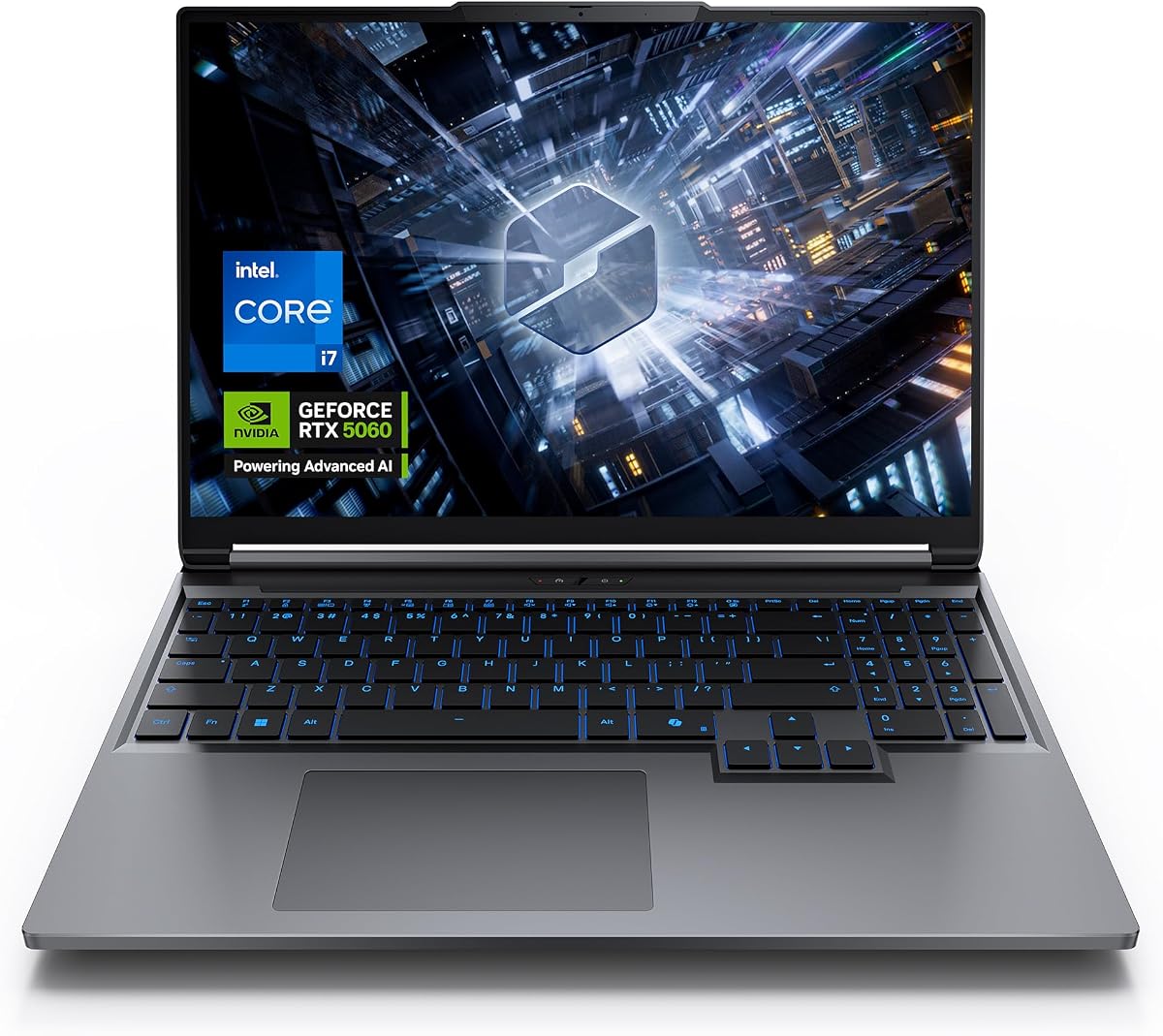


This laptop stands out as a top choice for Baldurs Gate 3 players seeking balance between performance and visual clarity. It delivers solid frame rates while maintaining consistent temperatures during long exploration sessions.
We may earn a commission when you buy through this link, at no additional cost to you.
The Intel Core i7 processor paired with the RTX 5060 ensures smooth handling of complex combat mechanics and dialogue trees. The 16GB DDR5 RAM supports seamless multitasking without stuttering in the game.
Trade-offs include a weight that may be burdensome for frequent travelers and moderate battery endurance when unplugged. These issues are acceptable given the desktop-class performance delivered within a portable chassis.
Buyers looking for a reliable machine to tackle demanding RPGs with high fidelity graphics will find this model highly recommended for both casual and competitive gaming needs.
The 165Hz refresh rate ensures fluid animations during fast-paced combat sequences.
Tri-fan technology keeps the system quiet even under heavy gaming loads.
We may earn a commission when you buy through this link, at no additional cost to you.
This model offers exceptional value for players needing ample memory for multitasking while running Baldurs Gate 3. The 32GB RAM allows for streaming or other apps to run alongside the game smoothly.
We may earn a commission when you buy through this link, at no additional cost to you.
The AMD Ryzen 7 processor provides robust performance for the price, handling AI-driven tasks and gaming with equal efficiency. The 180Hz display ensures motion remains clear during fast combat turns.
Drawbacks include a plastic chassis that feels less premium than aluminum options and older Wi-Fi standards. These compromises are minor considering the raw power offered at this price tier.
Budget-conscious gamers seeking high specifications without breaking the bank should strongly consider this laptop for an immersive role-playing experience.
32GB of RAM allows heavy multitasking without performance drops.
High refresh rate ensures smooth visuals during action sequences.
We may earn a commission when you buy through this link, at no additional cost to you.
This premium option delivers a top-tier experience with high-resolution visuals and robust processing power ideal for detailed game worlds. The build quality ensures durability over years of daily use.
We may earn a commission when you buy through this link, at no additional cost to you.
The WQXGA display provides crisp text and vivid environments essential for exploring the intricate landscapes in Baldurs Gate 3. Windows 11 Pro adds enterprise features for power users.
Trade-offs involve a higher price tag and weight that limits portability compared to slim ultrabooks. These issues are acceptable for those prioritizing raw performance and display fidelity above all else.
Gamers seeking a premium device that balances style with high-end performance will find this model a worthy investment for immersive role-playing.
High resolution screen renders intricate game environments with clarity.
Anodized aluminum lid offers premium feel and lasting durability.
We may earn a commission when you buy through this link, at no additional cost to you.
This laptop offers a surprisingly large screen in a light chassis making it ideal for desktop-like immersion without sacrificing portability. It handles complex game mechanics with ease during long sessions.
We may earn a commission when you buy through this link, at no additional cost to you.
The 17.3 inch display expands your field of view significantly which enhances exploration in open world RPGs. Wi-Fi 6E ensures low latency for multiplayer interactions and streaming.
Trade-offs include a translucent design that attracts fingerprints and a chassis that may feel less rigid than thicker competitors. These are minor issues given the unique balance of screen size and weight.
Players wanting a larger visual area without carrying a bulky machine will appreciate the unique design and performance capabilities of this model.
17.3 inch display provides expansive viewing for detailed game worlds.
Wi-Fi 6E ensures stable internet for online features.
We may earn a commission when you buy through this link, at no additional cost to you.
This laptop brings significant graphics horsepower with the RTX 5070 enabling high fidelity visuals and ray tracing effects in demanding titles. The slim design ensures it fits easily into modern bags.
We may earn a commission when you buy through this link, at no additional cost to you.
The powerful GPU handles high resolution textures and complex lighting scenarios ensuring immersive experiences during exploration. The hinge allows for flat usage on laps or desks comfortably.
Trade-offs include an older CPU generation which might bottleneck extreme performance compared to newer chips. This is acceptable for users prioritizing raw graphical rendering over CPU-heavy tasks.
Players focused on visual fidelity and portability will find this model a strong contender for running modern RPGs with maximum graphical settings.
RTX 5070 delivers high fidelity visuals and ray tracing.
GiMATE AI assistant enhances system management and usage.
We may earn a commission when you buy through this link, at no additional cost to you.
This model receives high marks for reliability and consistent performance which is essential for long RPG sessions. It offers plenty of memory for multitasking without needing upgrades.
We may earn a commission when you buy through this link, at no additional cost to you.
The AMD Ryzen 7 processor provides stable performance for general gaming and streaming tasks. The high memory capacity ensures smooth switching between applications during gameplay.
Trade-offs involve a lower tier graphics card that may limit ultra settings compared to newer models. This is acceptable for players prioritizing stability and overall system balance over extreme visuals.
Users seeking a dependable laptop with great user feedback and solid multitasking capabilities will find this model highly suitable for gaming.
High user rating reflects stable daily performance and durability.
32GB RAM ensures smooth multitasking and large game files.
We may earn a commission when you buy through this link, at no additional cost to you.
This powerhouse offers the fastest refresh rate available making it ideal for competitive gaming and smooth visual transitions. The high resolution screen ensures every detail in game textures is visible.
We may earn a commission when you buy through this link, at no additional cost to you.
The combination of top tier CPU and GPU delivers unmatched performance for demanding tasks and streaming. Wi-Fi 7 ensures future proof connectivity for online gaming with minimal latency.
Trade-offs include a high price point and weight that makes it less portable than other options. These are acceptable for users prioritizing ultimate speed and display quality above portability.
Gamers demanding the absolute fastest screen and processing power will find this model a top choice for an immersive gaming setup.
240Hz refresh rate delivers unmatched motion clarity and responsiveness.
Top tier CPU and GPU ensure smooth heavy gaming loads.
We may earn a commission when you buy through this link, at no additional cost to you.
This laptop stands out for its extensive connectivity options allowing multiple external monitors and peripherals to connect easily. The cooling system ensures performance stays stable during long play sessions.
We may earn a commission when you buy through this link, at no additional cost to you.
The dual M.2 slots offer flexibility for future storage expansion which is helpful for growing game libraries. Metal chassis construction adds durability compared to standard plastic options.
Trade-offs include higher costs for storage upgrades and average battery life under load. These are minor issues given the robust connectivity and durability features offered.
Users needing extensive connectivity for multi-monitor setups or complex peripheral needs will find this model a very capable choice for gaming.
Multiple video outputs support complex monitor configurations.
Dual fans and heat pipes keep system cool under load.
We may earn a commission when you buy through this link, at no additional cost to you.
Known for military grade testing this laptop offers exceptional durability for users who travel frequently or use it in varied environments. The keyboard provides a solid typing experience for long sessions.
We may earn a commission when you buy through this link, at no additional cost to you.
The AMD processor offers efficient power usage and strong multitasking capabilities suitable for gaming and productivity. Thermal design ensures stable performance without throttling during heat spikes.
Trade-offs include a smaller SSD size compared to competitors and a build that feels utilitarian rather than premium. These are acceptable for users prioritizing ruggedness over luxury features.
Users needing a durable machine that can withstand frequent transport will find this model a reliable companion for gaming on the go.
MIL-STD tested chassis ensures rugged reliability in varied environments.
AMD processor delivers efficient power usage and strong multitasking.
We may earn a commission when you buy through this link, at no additional cost to you.
This model features an advanced AI interface designed to streamline system management and improve workflow efficiency. The slim design makes it easy to carry while maintaining robust processing power.
We may earn a commission when you buy through this link, at no additional cost to you.
The powerful GPU handles demanding tasks with ease ensuring smooth performance during complex game mechanics. The hinge allows for flat usage which is versatile for various working angles.
Trade-offs include limited port options and average screen brightness for outdoor use. These are minor compromises given the strong performance and AI integration features.
Users interested in smart system features and a sleek design will find this model a compelling option for modern gaming needs.
GiMATE AI interface simplifies system management and usage.
Thin chassis ensures easy portability without compromising performance.
We may earn a commission when you buy through this link, at no additional cost to you.
Selecting the right laptop requires evaluating several technical factors to ensure optimal performance for this specific title.
The central processing unit handles dialogue logic and world calculations so aim for at least six cores for stable performance during intense battles.
Higher clock speeds ensure that complex menus load quickly without lag.
A dedicated GPU with ray tracing support enhances lighting and shadows making the game world look more realistic.
Look for models with at least 6GB of dedicated video memory to handle high texture settings.
16GB of RAM is the minimum for smooth multitasking but 32GB offers headroom for streaming or background apps.
Choose a fast solid state drive to reduce load times when traveling between zones in the game.
A high refresh rate screen ensures smooth motion which is critical during fast combat encounters.
Prioritize a display with good color accuracy to appreciate the detailed art design and environments.
Strong cooling systems prevent overheating during long gaming sessions ensuring the CPU and GPU stay within safe limits.
Look for laptops with multiple fans and efficient heat pipes for sustained performance.
Ensure the laptop has enough USB ports for peripherals like mice and controllers along with HDMI for external monitors.
Modern Wi-Fi standards help reduce latency when playing in online multiplayer modes.
To get the best experience from Baldurs Gate 3 download the game launcher and ensure your graphics drivers are up to date before starting.
Adjust the in-game settings to match your hardware capabilities ensuring a balance between visual fidelity and smooth frame rates.
Keep the vents clear of dust and use a cooling pad to extend the lifespan of your device during extended gaming sessions.
While integrated graphics can run the game at low settings you will likely experience lag and frame drops during complex scenes. A dedicated graphics card is highly recommended for a smooth and enjoyable experience.
16GB RAM is generally sufficient for playing Baldurs Gate 3 smoothly. However having more memory can help with background applications and multitasking without impacting performance.
Most players find 1080p or 1440p to be the sweet spot for balance between visual quality and performance. Higher resolutions may require significant GPU power to maintain high frame rates.
A higher refresh rate ensures smoother animations and menus which can improve the overall responsiveness of the game. While not critical for turn-based mechanics it enhances visual fluidity.
The game runs well on Windows 11 but is also compatible with Windows 10. Ensure you have the latest updates installed for optimal compatibility and performance.
Split screen multiplayer is supported but requires significant hardware resources. A laptop with a strong GPU and good cooling is recommended to maintain performance in this mode.
The models reviewed here offer a range of options from budget-friendly choices to high-performance machines capable of handling intense graphical loads.
Prioritize a strong graphics card and fast memory to ensure the game runs smoothly during long adventures.
Always check current pricing and availability as these details can change frequently in the dynamic hardware market.