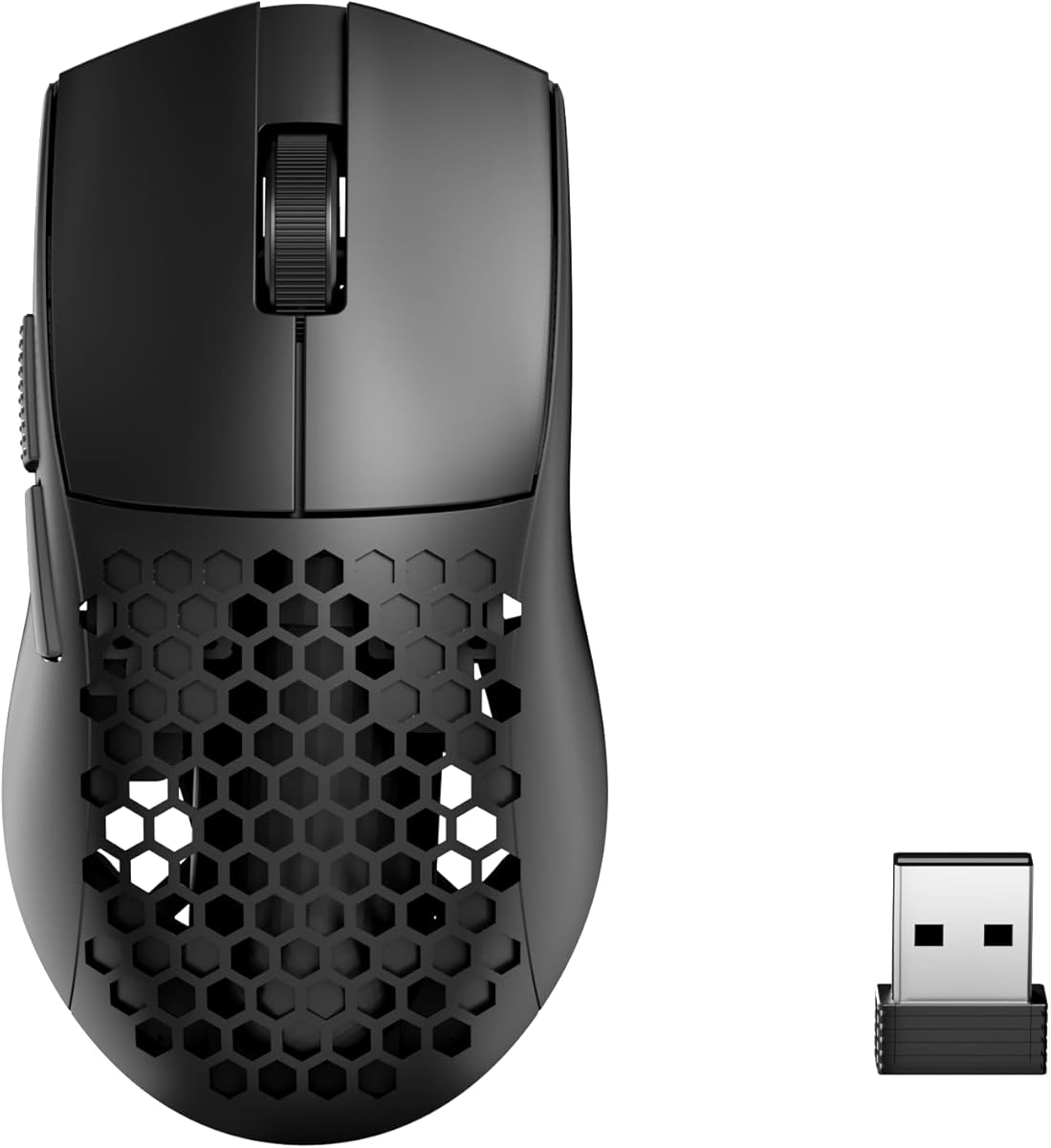
Redragon M725 Honeycomb Shell
4.4Editor score
49g ultra-lightweight build
Tri-mode connectivity options
Programmable macro buttons
Discover the top 10 lightweight gaming mice under 60 grams for FPS in October 2026. We compare sensors, build quality, battery life, and features to help you
Finding the perfect lightweight mouse under 60 grams for FPS gaming can transform your aim and reduce fatigue during long sessions. These mice are engineered for speed, precision, and comfort, making them ideal for competitive players who demand the best gear.
We evaluated ten top-rated models based on sensor performance, build quality, battery life, and ergonomic design. Each product offers unique features tailored to different grip styles and playstyles, ensuring you find the right fit for your specific needs.
Each pick highlights key strengths and trade-offs to help you make an informed decision. Remember that prices and availability can change, so check the latest details before purchasing to ensure you get the best value for your investment.
4.4Editor score

4.5Editor score

4.6Editor score
Here is a side-by-side comparison of all ten lightweight mice to help you quickly identify the right model for your FPS gaming needs based on key specifications and features.


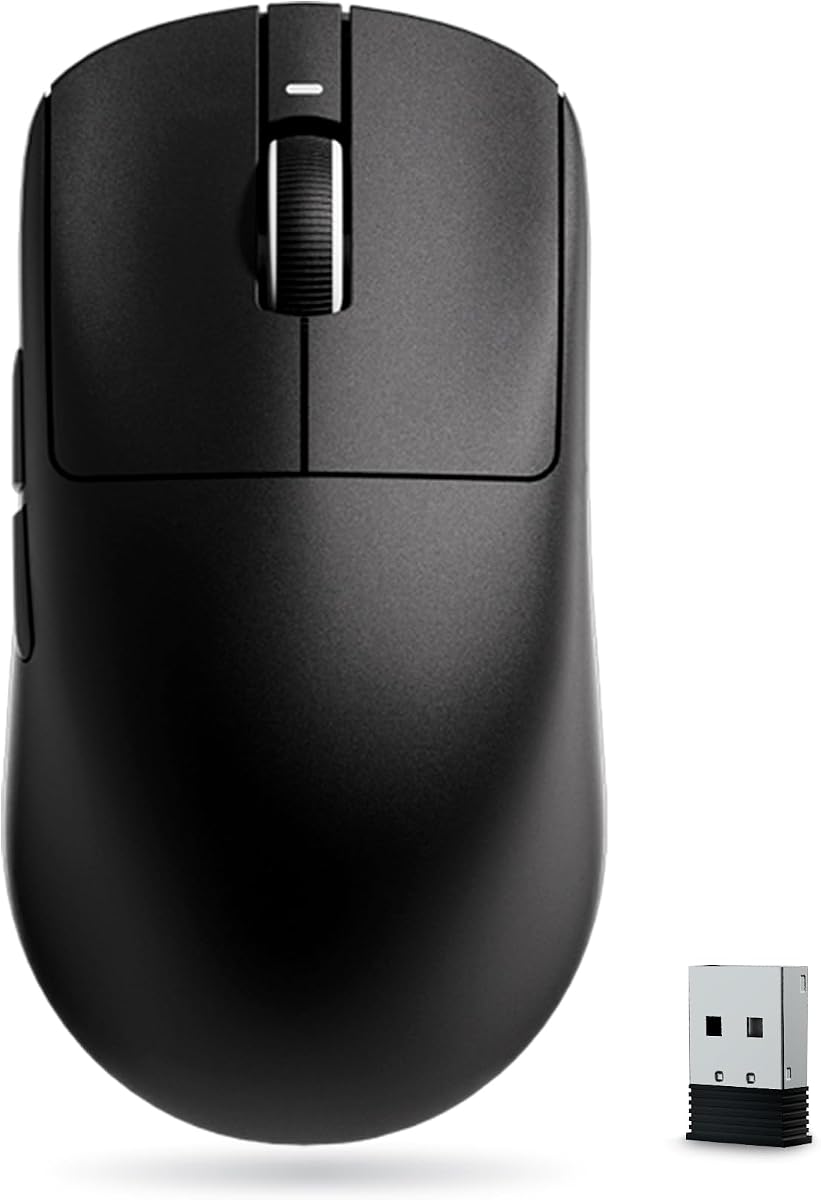

The Logitech G PRO X Superlight 2 stands out as a top-tier choice for FPS gamers seeking precision without extra weight. With a rating of 4.5 stars, it delivers championship-winning performance that aligns with professional esports standards.
We may earn a commission when you buy through this link, at no additional cost to you.
Its HERO 2 sensor tracks movement with zero smoothing or acceleration, ensuring pixel-perfect accuracy even at high speeds. The mouse maintains a solid shell design without honeycomb holes, which reduces dust buildup and enhances durability while keeping weight at 60 grams.
While the price is higher than many alternatives, the reliability and performance justify the investment for serious players. The absence of RGB lighting helps maintain the lightweight build and extends battery life significantly.
If you prioritize competitive performance and build quality over flashy features, this mouse is an excellent choice. It is ideal for players who want a durable, high-performance tool that supports their skills during intense matches.
The HERO 2 sensor ensures your movements are tracked accurately without any input lag or filtering issues.
The symmetrical shape fits comfortably in most hand sizes for extended gaming sessions without causing fatigue.
We may earn a commission when you buy through this link, at no additional cost to you.
The Redragon M725 Honeycomb Shell offers incredible value for gamers on a budget who still want a lightweight competitive mouse. Rated at 4.4 stars, it combines essential features like tri-mode connectivity and programmable macros at a very accessible price point.
We may earn a commission when you buy through this link, at no additional cost to you.
Weighing only 49 grams, this mouse allows for fast flicks and reduces arm strain during long gaming marathons. The honeycomb design improves air circulation to keep hands dry, though it may require occasional cleaning to prevent dust accumulation.
While the sensor is not as advanced as high-end models, it performs reliably for casual and competitive gaming needs. The ability to switch between Bluetooth, 2.4GHz, and wired modes adds versatility for different setups.
This mouse is perfect for budget-conscious players who need a reliable, light mouse for FPS games. It provides a strong foundation for improving aim without breaking the bank or compromising on essential wireless features.
You can easily switch between three connection types to match your specific device or gaming setup requirements.
The symmetric design ensures a natural grip for both left and right-handed users during extended play sessions.
We may earn a commission when you buy through this link, at no additional cost to you.
The Razer Viper V4 Pro represents the pinnacle of lightweight esports mice, offering top-of-the-line features for competitive FPS players. With a 4.6-star rating, it excels in speed, reliability, and precision thanks to its Focus PRO 50K DPI sensor.
We may earn a commission when you buy through this link, at no additional cost to you.
Its 49-gram weight makes it one of the lightest wireless options available, allowing for rapid movements without fatigue. The optical switches and scroll wheel ensure consistent performance with a click lifespan of 100 million clicks.
Battery life is impressive, lasting up to 180 hours at 1000Hz polling, though switching to 8000Hz reduces this significantly. The inclusion of optical scroll wheels adds durability and precision for scrolling actions during gameplay.
For professional or aspiring pro players, this mouse offers unmatched performance and features. While it is expensive, the build quality and sensor accuracy make it a worthy investment for those seeking the absolute best in FPS gaming equipment.
The HyperSpeed Wireless technology ensures minimal latency for real-time reactions during competitive matches.
Optical switches eliminate mechanical debounce issues, providing consistent clicks over years of heavy use.
We may earn a commission when you buy through this link, at no additional cost to you.
The ASUS ROG Harpe Ace Mini is designed specifically for players with smaller hands who need precision in a compact form factor. Rated at 4.4 stars, it offers a semi-symmetrical shape optimized for claw and fingertip grips in competitive FPS environments.
We may earn a commission when you buy through this link, at no additional cost to you.
Weighing just 49 grams, it ensures swift movements and minimal strain during intense gaming sessions. The AimPoint Pro sensor delivers pixel-perfect accuracy, while the tri-mode connectivity allows flexible use across multiple devices.
Though it is right-handed only, the shape fits well for those needing a smaller mouse that doesn't sacrifice performance. The build quality is robust, and the battery life supports extended play without frequent charging interruptions.
This mouse is ideal for gamers with smaller hands who struggle to find lightweight options that fit comfortably. It provides a professional-grade experience tailored to specific ergonomic needs without compromising on wireless reliability or sensor precision.
The compact shape is refined for small hands, ensuring better control and comfort during long gaming sessions.
Switching between wired, 2.4GHz, and Bluetooth modes allows you to adapt to different gaming scenarios easily.
We may earn a commission when you buy through this link, at no additional cost to you.
The ZORNHER X Mloong MX301 PRO stands out with its premium carbon fiber texture and high user satisfaction rating of 4.7 stars. It combines lightweight design with a stable feel that avoids the floating sensation common in ultra-light mice.
We may earn a commission when you buy through this link, at no additional cost to you.
Weighing around 60 grams, it provides quick movements while maintaining control and accuracy for precise aiming. The PAW 3315 sensor ensures reliable tracking for FPS and daily use, while the included grip tape helps prevent slippage during play.
The web-based driver makes customization easy without needing heavy software installations. This simplifies the setup process and reduces system load, making it convenient for users who want quick adjustments.
This mouse is perfect for players looking for a lightweight option with a premium feel and excellent value. The included accessories and sturdy design make it a great gift or reliable daily driver for FPS gaming on various devices.
The carbon fiber texture offers a unique tactile experience that improves grip and reduces fatigue during extended use.
A lightweight web-based driver allows quick settings adjustments without requiring bulky software installations.
We may earn a commission when you buy through this link, at no additional cost to you.
The INPHIC IN10P Superlight offers an impressive 8000Hz polling rate for its price point, appealing to gamers who want responsive tracking. Rated at 4.1 stars, it features a solid shell design that protects internals while maintaining a lightweight 60-gram profile.
We may earn a commission when you buy through this link, at no additional cost to you.
Equipped with the PAW3395 sensor, it delivers reliable tracking for FPS and other gaming genres. The fully programmable buttons allow for customizable macros and DPI settings tailored to individual playstyles and game requirements.
The 400mAh battery supports up to 120 hours of use, providing long sessions without frequent recharging. However, some users note that the software may take time to master for full customization of its capabilities.
This mouse is a strong contender for budget gamers seeking high polling rates and solid build quality. If you prioritize responsive tracking and programmable features, it offers excellent value without compromising on essential performance metrics.
The 8000Hz polling rate ensures your inputs are registered quickly for split-second reactions in competitive games.
A solid shell design prevents dust accumulation and protects internal components while keeping weight low.
We may earn a commission when you buy through this link, at no additional cost to you.
The Redragon M916 is praised for its ultra-light 49-gram design and Nordic flagship chip, which delivers stable low-latency wireless performance. With a rating of 4.5 stars, it offers a comfortable natural grip that reduces fatigue during long gaming sessions.
We may earn a commission when you buy through this link, at no additional cost to you.
Its 26K DPI sensor allows for easy sensitivity adjustments via dedicated software, making it versatile for different playstyles. The 4000Hz report rate ensures smooth tracking and quick response times for competitive FPS action.
Users appreciate the fully programmable buttons that enable custom tactical keybinds for any game or workflow. The lightweight build makes it effortless to control without extra physical effort during intense matches.
This mouse is an excellent choice for players wanting a light, stable mouse with strong wireless reliability. Its ergonomic shape and programmable features make it suitable for both gaming and daily use on various devices.
The Nordic chip ensures stable signal transmission with low latency for seamless gameplay without interruptions.
Program buttons to suit your specific game strategies or workflow for better efficiency and control.
We may earn a commission when you buy through this link, at no additional cost to you.
The ATK VXE Dragonfly R1 SE+ is a lightweight symmetrical mouse designed to fit small and medium hands comfortably. With a rating of 4.4 stars, it offers stable wireless performance and smooth tracking thanks to the PAW3395 SE sensor.
We may earn a commission when you buy through this link, at no additional cost to you.
Weighing just 55 grams, it reduces hand fatigue during extended sessions while maintaining precise control. The standard PTFE feet ensure effortless glide across different surfaces, enhancing accuracy during critical in-game moments.
Users can adjust DPI and polling rates via dedicated driver software to suit their preferences. The battery supports up to 70 hours at 1000Hz, though higher polling rates will reduce runtime slightly.
This mouse is ideal for players needing a small, light mouse with reliable wireless features. Its symmetrical design and solid build quality make it a great option for both gaming and work on various devices.
Standard PTFE mouse feet provide consistent and smooth movement across different types of mouse pads.
Fine-tune DPI and polling rate via software to match your preferred gaming style and hardware setup.
We may earn a commission when you buy through this link, at no additional cost to you.
The Razer Orochi V2 is renowned for its incredible battery life, offering up to 950 hours on Bluetooth for extended use without frequent changes. Rated at 4.4 stars, it is a compact portable design perfect for travel or limited desk space.
We may earn a commission when you buy through this link, at no additional cost to you.
With dual wireless connectivity, you can choose Bluetooth for productivity or Razer HyperSpeed for competitive gaming with low latency. The 18K DPI sensor provides responsive tracking and zero spinouts for precise aiming across various game types.
Weighing under 60 grams excluding the battery, it enables quick swipes and reduced fatigue during long sessions. The mechanical switches are rated for 60 million clicks, ensuring reliability over years of use.
This mouse is ideal for users who prioritize battery endurance and portability over extended gaming performance. Its small size and robust features make it a versatile companion for gaming on the go or at a primary desk setup.
The hybrid battery slot and optimized power use allow for incredibly long battery life between replacements.
Razer HyperSpeed technology delivers reliable low-latency performance for competitive gaming and everyday use.
We may earn a commission when you buy through this link, at no additional cost to you.
The GLORIOUS Model O Eternal provides a lightweight wired option for gamers who prefer direct connection without battery worries. Rated at 4.4 stars, it features a 55-gram honeycomb shell that ensures fast movements and reduced arm fatigue during play.
We may earn a commission when you buy through this link, at no additional cost to you.
Its dual-zone RGB lighting allows for customization to match your setup aesthetic while maintaining a clean look. The 12K DPI optical sensor delivers accurate tracking, and the mechanical switches are rated for 80 million clicks.
Six remappable buttons can be customized through Glorious CORE software to enhance your workflow or gaming efficiency. The symmetrical design ensures a natural grip for users with different hand sizes and preferred grip styles.
This mouse is ideal for players who want a light, reliable wired mouse with style and customization. It combines performance and aesthetics for those who prefer avoiding wireless concerns or battery replacements.
Dual-zone RGB lighting offers vibrant color options to match your setup or personal style preferences.
Wired connection ensures consistent input without latency or battery issues for uninterrupted gaming sessions.
We may earn a commission when you buy through this link, at no additional cost to you.
Selecting the right lightweight mouse requires balancing weight, sensor performance, battery life, and ergonomic fit. This guide breaks down the key factors to help you find the ideal model for your FPS setup.
Aim for a mouse under 60 grams to reduce fatigue and increase movement speed. Solid shell designs are more durable and collect less dust than honeycomb models, while hollow designs maximize weight savings but may compromise longevity.
Look for sensors with high DPI and IPS (Inch Per Second) ratings for accurate tracking during rapid movements. Ensure the sensor supports zero smoothing or acceleration for consistent performance across different surfaces and speeds.
Wireless mice should use 2.4GHz RF for low latency. Tri-mode connectivity adds versatility by allowing wired and Bluetooth options, which is useful if you switch between multiple devices or need wired backup.
Check battery life ratings for wireless models to avoid frequent charging interruptions. Higher polling rates reduce battery runtime, so consider your preferred polling frequency when evaluating power specifications.
Ensure the mouse shape suits your hand size and grip style. Symmetrical designs work well for fingertip and claw grips, while ergonomic right-handed shapes provide better palm support for long sessions.
Optical switches offer durability and consistent feedback without double-click issues. Programmable buttons allow customization for macros and DPI changes, which is essential for complex FPS gameplay.
Check if the mouse comes with intuitive software for adjusting DPI, lighting, and button mappings. Simple web-based drivers reduce system load, while full suites offer deeper customization for competitive players.
Review the expected lifespan of switches and overall build materials. A solid warranty indicates manufacturer confidence and ensures support if the mouse develops issues over time.
Start by calibrating your DPI settings to match your preferred sensitivity level. Use software tools to adjust polling rate and RGB lighting, ensuring your mouse is configured for optimal performance before starting gameplay.
Clean the mouse regularly to remove dust and sweat that can affect tracking. Use compressed air for sensor vents and gently wipe the surface with a dry cloth to maintain grip and prevent debris from interfering with performance.
Store the mouse in a safe place when not in use to avoid physical damage. If using a wireless model, recharge or replace batteries regularly to ensure consistent performance and prevent unexpected power loss during critical moments.
Yes, a mouse under 60 grams reduces arm fatigue and allows faster movements, which is crucial for quick aim adjustments in FPS games. Lighter mice are preferred by professionals because they minimize strain during long sessions and improve overall control.
Modern wireless mice with 2.4GHz connectivity offer latency comparable to wired options, making them reliable for competitive play. Top models use proprietary technologies to ensure stable connections and eliminate lag during critical in-game moments.
Charging frequency depends on the battery capacity and polling rate settings. With typical usage at 1000Hz polling, many mice last weeks on a single charge, but higher rates like 4000Hz may require charging every few days.
Most lightweight mice work well on various surfaces, but optical sensors perform best on smooth mouse pads. Using a consistent surface ensures optimal tracking accuracy and prevents unexpected sensor drift during gameplay.
Yes, most models feature multiple programmable buttons for macros and DPI settings. Software tools allow customization to suit specific games and playstyles, enhancing your efficiency and control during matches.
Avoid excessive force on clicks and store the mouse safely to prevent internal damage. Regularly clean dust from vents and update firmware when available to ensure consistent performance and extend the device lifespan.
Solid shell mice generally offer better protection against dust and physical damage compared to honeycomb designs. While honeycomb models reduce weight further, solid builds provide greater long-term durability without sacrificing much performance.
DPI settings depend on personal preference and in-game sensitivity, but most FPS players use between 800 and 3200 DPI. A lightweight mouse allows easier control at higher DPI settings because reduced weight makes rapid movements smoother.
Choosing a lightweight mouse under 60 grams can significantly improve your performance and comfort during FPS gaming. The models highlighted in this guide offer a range of features tailored to different budgets, hand sizes, and play styles.
Prioritize sensor quality, build durability, and ergonomic fit to ensure the mouse meets your long-term needs. Investing in a reliable model from a reputable brand will provide consistent performance and reduce the need for frequent replacements.
Remember to check current prices and availability before purchasing as deals often change. Whether you choose a budget option or a premium esports model, selecting the right lightweight mouse will elevate your gaming experience and help you stay competitive.