
Replacement TV Remote Control for All Fire Series
4.3Editor score
Compatible with many Fire devices
Voice command support included
Affordable price point
This guide compares the top Fire Stick Replacement Remote options available in October 2026 to help you choose the right voice remote for your streaming device
Finding a reliable Fire Stick Replacement Remote is essential when your original controller fails or gets lost. A good remote should offer seamless voice control, intuitive button layout, and strong compatibility with your specific Fire TV device model to ensure uninterrupted streaming.
We have evaluated ten top-rated replacement remotes based on user feedback, compatibility ranges, and feature sets. Our comparison covers budget-friendly third-party options alongside official Amazon models to help you find the best value for your setup.
Each pick highlights key strengths, potential drawbacks, and setup requirements to guide your decision. Please note that product availability and pricing can change frequently, so verify details on the manufacturer page before making your final purchase decision.
4.3Editor score
4.5Editor score

4.5Editor score
The following table provides a quick overview of the key specifications and compatibility details for each of the ten replacement remotes evaluated in this guide to help you compare them side by side.


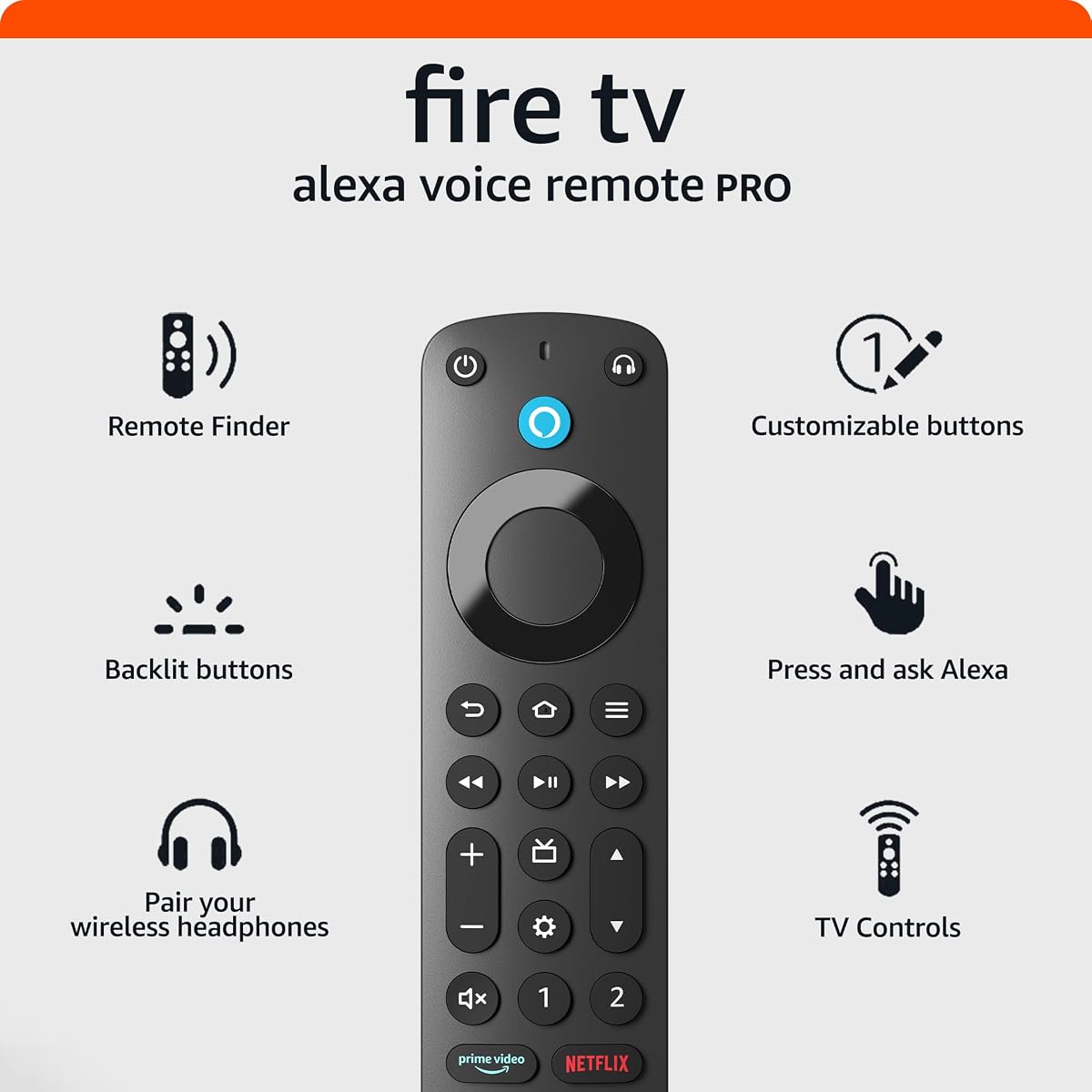
The Amazon Fire TV Alexa Voice Remote Pro stands out as the premium choice for users who want enhanced functionality beyond basic navigation. With a high rating of 4.5 stars, it offers unique features like a remote finder and backlit buttons that are not found on standard remotes.
We may earn a commission when you buy through this link, at no additional cost to you.
Its standout qualities include the motion-activated backlight that illuminates buttons in dark rooms and the dedicated headphone button for quick Bluetooth pairing. The customizable buttons allow you to create shortcuts for your favorite apps, significantly speeding up your streaming workflow.
While the remote is more expensive than third-party alternatives, the added convenience and build quality justify the cost for frequent users. The only notable downside is its incompatibility with very old Fire TV models which might require you to check your device generation before purchasing.
This remote is ideal for anyone seeking the best possible control experience with their Fire TV ecosystem. If you value premium features like remote finding and backlighting, this model is the top recommendation for your setup.
The remote finder feature helps you locate the device quickly by emitting a ring when activated via Alexa or the Fire TV app.
Two customizable buttons let you program shortcuts to favorite channels or commands reducing the number of steps needed to access content.
We may earn a commission when you buy through this link, at no additional cost to you.
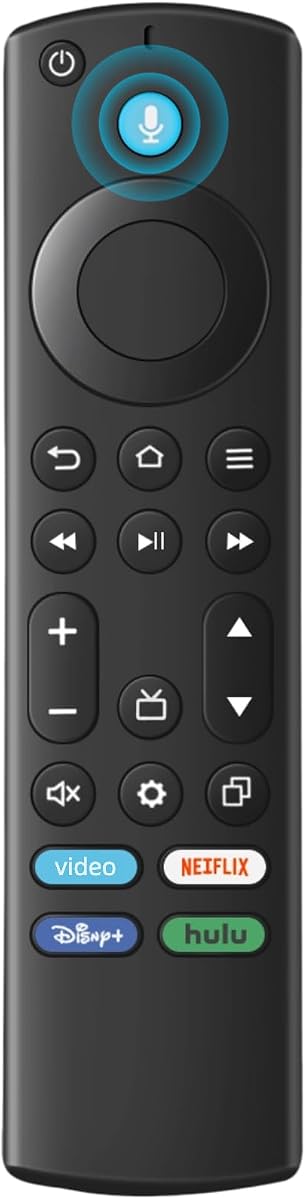
For budget-conscious shoppers, the Replacement TV Remote Control for All Fire Series offers an excellent balance of functionality and cost. It supports voice control and works with a wide array of Fire TV devices including the 3rd Gen Smart TVs and Cube models.
We may earn a commission when you buy through this link, at no additional cost to you.
This remote delivers strong value by providing essential features like voice commands and playback controls without the premium price tag. The pairing process is straightforward, guiding you to hold the Home button until the LED flashes which ensures quick setup for most users.
The main trade-off is the lack of included batteries and a simpler build quality compared to official Amazon remotes. However, for those who just need a reliable replacement to get back to streaming, these compromises are often acceptable given the low cost.
We recommend this option for anyone looking for a functional replacement remote that covers most current Fire TV models. It is a practical choice for households needing a spare remote or a quick fix for a lost or broken original device.
Ensure your device is not a 1st or 2nd Gen model as this remote is designed for newer generations of Fire TV devices.
The voice function allows you to find content launch apps and control smart home devices using simple spoken commands.
We may earn a commission when you buy through this link, at no additional cost to you.
The Amazon Fire TV Alexa Voice Remote is the official replacement that ensures full compatibility and reliable performance with your Fire TV setup. With a 4.5 star rating it includes essential features like preset app buttons and dedicated TV control buttons for volume and power.
We may earn a commission when you buy through this link, at no additional cost to you.
Its key strengths include the inclusion of two AAA batteries right out of the box allowing immediate use without additional purchases. The voice control is robust enabling easy content search and smart home management through simple spoken commands.
While it lacks some premium features like backlighting or a remote finder it remains a solid and trustworthy choice for most users. The only minor drawback is the limited customization compared to the Pro version which may matter for power users wanting more shortcuts.
This remote is best for users who want a direct official replacement without hunting for third-party compatibility details. It offers peace of mind with consistent performance and the convenience of having batteries included for instant use.
The package includes 2 AAA batteries which saves time and cost compared to third-party options that require separate battery purchases.
Dedicated power volume and mute buttons allow you to control your TV and soundbar without needing separate remotes.
We may earn a commission when you buy through this link, at no additional cost to you.
The Replacement Voice Remote for Fire Stick is a versatile option that supports a wide range of devices including the Fire TV Cube and various smart TVs. It allows users to find content quickly using voice commands making navigation more efficient.
We may earn a commission when you buy through this link, at no additional cost to you.
This remote performs well for everyday tasks like launching apps and adjusting volume. The voice function is responsive and works well with smart TVs that support voice commands reducing the need to type out search queries.
Users should note that pairing may require following specific instructions as methods differ between streaming devices and smart TVs. Additionally the lack of backlighting means it may be harder to use in dark environments compared to premium models.
This option is recommended for users with compatible Fire Cube or Smart TV setups who need a straightforward voice remote. It provides good value for those who prioritize voice search functionality over advanced customization features.
It is designed for Fire Stick 4K and Cube models from specific generations so check your device model before ordering.
Voice commands help you find content faster than typing improving the overall streaming experience significantly.
We may earn a commission when you buy through this link, at no additional cost to you.
This replacement remote stands out with a high 4.5 rating and includes convenient customization options like 4 shortcut buttons and 2 customizable keys. It supports a broad range of Fire TV models including Cube and various smart TV series.
We may earn a commission when you buy through this link, at no additional cost to you.
The customization buttons allow users to program quick access to favorite streaming services which enhances usability. The voice function is activated via manual pairing ensuring hands-free control once set up properly.
While the remote offers great features the pairing process requires following instructions to activate voice function and batteries are not included. These are minor inconveniences considering the strong feature set and positive user feedback.
Ideal for users who want a bit more control over their remote layout this option delivers high satisfaction. It balances cost and functionality well making it a top contender among third-party replacements.
Press and hold customization buttons to program your preferred apps or services for one-tap access.
Follow the manual to activate the voice function ensuring you can control content without buttons.
We may earn a commission when you buy through this link, at no additional cost to you.
The Replacement for Fire Stick Remote offers reliable performance with a range of up to 12 meters and includes 4 shortcut buttons for quick app access. It supports voice control and comes with a 60-day satisfaction guarantee providing peace of mind.
We may earn a commission when you buy through this link, at no additional cost to you.
Users appreciate the range and the ability to control devices from across the room. The voice control is enabled after pairing which follows a clear process of disconnecting power and installing batteries.
While it requires manual setup and does not include batteries the guarantee and support make it a trustworthy choice. The support team promises a response within 12 hours which is helpful for troubleshooting.
This remote is a solid pick for users needing a dependable replacement with good range. The combination of features and after-sales support makes it a low-risk purchase for many households.
The 12 meter range allows you to control your device from further away than typical remotes.
The 60-day satisfaction guarantee and 12-hour response time add value to the purchase.
We may earn a commission when you buy through this link, at no additional cost to you.
This remote emphasizes simplicity with automatic syncing and no complex configuration required. It works with a variety of smart TVs and streaming devices offering voice search and instant access shortcuts.
We may earn a commission when you buy through this link, at no additional cost to you.
The automatic sync feature reduces setup time significantly which is convenient for tech-shy users. The 4 pre-programmed buttons provide easy access to popular streaming apps enhancing daily usability.
Despite lacking backlighting and batteries it delivers consistent performance for standard streaming needs. The compatibility with brands like Insignia and Toshiba expands its utility beyond just Amazon devices.
Recommended for users who want a straightforward remote without extra steps this option fits well. It is a practical choice for general use where advanced features are not a priority.
Automatic syncing eliminates the need for complex configuration making setup fast and easy.
Pre-programmed buttons let you access favorite apps instantly without navigating menus.
We may earn a commission when you buy through this link, at no additional cost to you.
The Replacement Firestick Voice Remote Control offers a straightforward pairing process using the Home button for about 10 seconds. It supports voice commands and works with multiple Fire TV models including the Cube series.
We may earn a commission when you buy through this link, at no additional cost to you.
Users can easily tell when pairing is in progress via the LED indicator which flashes rapidly during setup. The voice function allows for effortless content control without needing to press multiple buttons.
Occasional manual matching may be needed if the remote does not connect immediately but troubleshooting steps are clear. Checking battery levels is important as weak batteries can prevent successful pairing.
This remote is a good choice for those needing a reliable voice controller for newer Fire TVs. The clear LED feedback simplifies the setup process and improves the overall user experience.
Hold the Home button for about 10 seconds and wait for the LED to flash to enter pairing mode.
Say commands like volume up or turn on TV to operate your device without pressing buttons.
We may earn a commission when you buy through this link, at no additional cost to you.
This remote is notable for its compatibility with Hisense Insignia and Pioneer Smart TVs in addition to Amazon devices. It includes voice function and 4 app button shortcuts for quick access to content.
We may earn a commission when you buy through this link, at no additional cost to you.
The pairing process is clear with the LED indicator flashing to show pairing mode which helps confirm connection. Users can ask the remote to find content or jump to scenes using standard navigation controls.
It is important to check your device model before ordering and remove old batteries before pairing to avoid conflicts. These steps ensure a smooth setup process and prevent common connectivity issues.
Recommended for users with compatible Hisense or Insignia TVs this remote extends control capabilities. Its voice features and shortcuts make it a versatile addition to any home entertainment setup.
Compatible with Hisense Insignia and Pioneer Smart TVs which broadens its utility beyond Amazon devices.
Remove old batteries before pairing the new remote to avoid interference during the setup process.
We may earn a commission when you buy through this link, at no additional cost to you.
This remote offers voice control and 4 shortcut buttons for easy access to favorite apps. It supports a wide range of devices including Omni Toshiba and Insignia Smart TVs making it versatile for mixed setups.
We may earn a commission when you buy through this link, at no additional cost to you.
The seller provides a dedicated support team ready to assist with setup or troubleshooting which adds confidence to the purchase. Pairing is straightforward using the Home button and LED indicators.
While batteries are not included the pairing instructions are clear and the remote becomes automatic after setup. The support team availability ensures that any issues can be resolved quickly.
Ideal for users who value customer support alongside functionality this remote delivers a complete experience. It is a great choice for those needing a voice remote that works across multiple TV brands.
A dedicated support team is available for pre-purchase questions and product setup assistance.
Hold the Home button for 10 seconds until the LED blinks to enter pairing mode.
We may earn a commission when you buy through this link, at no additional cost to you.
Selecting the right replacement remote requires attention to device compatibility feature needs and budget constraints.
The most critical factor is ensuring the remote works with your specific Fire TV device model or smart TV. Models vary by generation so check if your device is 1st 2nd or 3rd Gen before purchasing.
Always verify your device model number against the product compatibility list to avoid buying an incompatible remote.
Voice control allows you to search for content launch apps and control smart devices hands-free. Not all remotes have this feature so confirm that voice commands are included and activated.
Prioritize remotes with easy voice activation for a smoother and more convenient streaming experience.
Consider the number and placement of buttons such as shortcuts to popular apps or customizable keys. Some remotes offer dedicated buttons for TV volume power or headphones.
Choose a layout that matches your daily usage to reduce the number of steps needed to reach content.
Most remotes require 2 AAA batteries which are often not included in third-party packages. Check if batteries are included to avoid extra costs and setup delays.
If you prefer rechargeable options confirm if the remote supports that or if it uses replaceable batteries only.
Higher quality remotes may feature backlighting more durable materials or longer wireless range. Premium models often include extra features like remote finding or motion-activated lights.
Invest in a sturdy remote if you expect frequent daily use or require advanced features beyond basic navigation.
Some remotes require manual pairing steps such as holding the Home button while powering on the device. Others sync automatically when inserted and paired with the TV.
Select a remote with a clear and straightforward pairing process to minimize setup frustration.
Budget remotes offer essential functions at lower prices while premium models cost more for added convenience. Consider what features matter most to you before deciding on a price tier.
Balance cost against necessary features to find the best value for your specific streaming needs.
Look for remotes that come with a satisfaction guarantee or customer support in case of issues. Some sellers provide quick response times and helpful troubleshooting assistance.
A good warranty or support policy protects your purchase and ensures help is available if problems arise.
To pair your new remote disconnect power from your Fire TV device then reconnect it after 15 seconds. Insert fresh batteries into the remote and press the Home button for about 10 seconds until the LED flashes.
Keep the remote away from direct sunlight and moisture to prevent damage to the internal circuits. Use soft cloths for cleaning and avoid applying liquids directly on the buttons or body.
If the remote stops responding remove the batteries for a few minutes and reinstall them to reset the connection. This simple reset often resolves temporary pairing or connectivity issues.
No compatibility varies by device generation and model. Remotes generally support 3rd Gen Fire Stick and newer models but not 1st or 2nd Gen devices. Always check the compatibility list before purchasing to ensure fit.
Voice activation usually requires following the manual's pairing steps. Press and hold the Home button while powering on the device then wait for the LED to flash. Once paired press the microphone button to use voice commands.
Some third-party remotes support TVs like Insignia Toshiba and Hisense. However official Amazon remotes may not work with non-Amazon smart TVs unless explicitly stated. Check product details for TV brand compatibility.
Ensure batteries are fresh and correctly inserted. Remove batteries from any old remotes nearby that might interfere. Try unplug and replugging your Fire TV and holding the Home button again until the LED flashes.
Most third-party remotes do not include batteries so you will need to purchase 2 AAA batteries separately. Official Amazon remotes often include batteries in the package.
Only some remotes feature customizable shortcut buttons. Check the product specifications for details on shortcut or customization buttons before buying if you need this feature.
Replacement remotes can last several years with regular use depending on build quality and care. Avoid drops and moisture to extend the device's lifespan and maintain performance.
Official remotes guarantee full compatibility and include batteries. Third-party options may offer lower prices and additional features but require careful compatibility checking. Choose based on your budget and feature preferences.
Choosing the right replacement remote depends on your specific device model and feature needs. The Amazon Fire TV Alexa Voice Remote Pro leads with premium features like backlighting and remote finding.
Budget options like the Replacement TV Remote Control for All Fire Series provide excellent value with voice support at a lower price. For those seeking official quality the standard Fire TV Alexa Voice Remote is reliable.
Remember to check current pricing and availability as these details can change over time. Verify compatibility with your device before ordering to ensure a smooth and successful replacement experience.