
TECKNET Wired Keyboard
4.5Editor score
Quiet membrane typing
RGB backlight modes
Spill-resistant design
This comprehensive guide compares the top ten backlit illuminated keyboard models for visibility, comfort, and performance in diverse work and home environments
Finding the right backlit illuminated keyboard can transform your computing experience by ensuring visibility in low light and reducing eye strain during long sessions.
We evaluated ten leading models based on backlight quality, key layout, durability, and specific features like large print or silent typing to help you choose wisely.
Each pick below highlights key strengths and trade-offs so you can match a model to your needs while keeping in mind that availability and costs may shift.
4.5Editor score

4.9Editor score

4.1Editor score
The following table provides a side by side overview of key specifications for each model so you can quickly spot the best match for your needs.



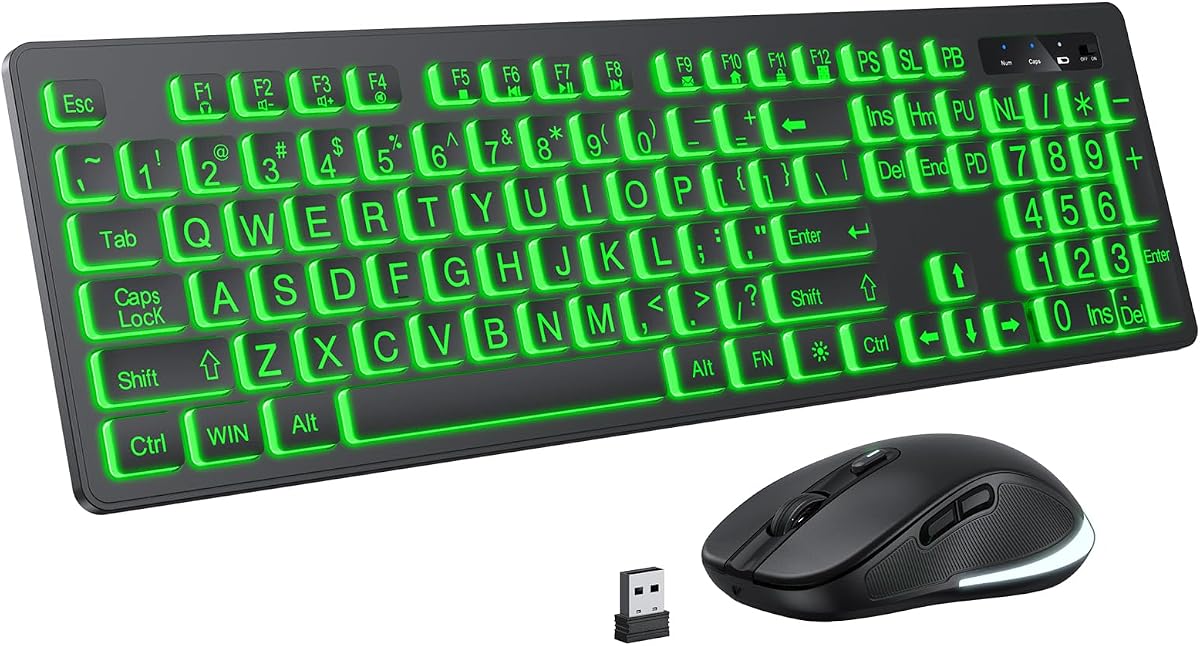


This model is the top pick for users who need clear visibility while typing. It has a high rating and combines large fonts with reliable backlighting.
We may earn a commission when you buy through this link, at no additional cost to you.
The oversized keys are four times larger than standard layouts which helps reduce errors and strain. The backlight offers seven brightness levels for comfort.
While the lighting is uniform and bright there is no per zone customization. The silent membrane is quiet but some may prefer tactile feedback.
It is ideal for seniors or shared workspaces where visibility and low noise are priorities. We recommend it for anyone seeking a comfortable wired option.
The large print design ensures keys are easy to distinguish even in dimly lit environments without needing to squint.
The membrane structure reduces noise significantly making this keyboard suitable for quiet offices or late night work.
We may earn a commission when you buy through this link, at no additional cost to you.
This keyboard offers an excellent balance of features and cost for general users. It provides solid build quality and versatile lighting options.
We may earn a commission when you buy through this link, at no additional cost to you.
The RGB backlight allows for seven colors and two modes to match your desk setup. The keys are quiet and comfortable for long typing sessions.
While the build is lightweight the spill resistance adds durability. The lifetime warranty provides peace of mind for daily usage at home or work.
It is a strong choice for budget conscious buyers who want style and reliability. We suggest it for students or casual users seeking value.
Seven color options and breathing modes let you personalize your workspace lighting to suit any mood or time of day.
A lifetime warranty with registration ensures that defects are covered for years giving you confidence in your purchase.
We may earn a commission when you buy through this link, at no additional cost to you.
This model from HP is designed for users who value portability and professional aesthetics. It offers a slim profile and warm lighting.
We may earn a commission when you buy through this link, at no additional cost to you.
The warm white LED helps reduce eye strain while working. Programmable keys allow you to set shortcuts for frequent tasks and improve efficiency.
While the rating is slightly lower the build quality is good for travel. The sanitizable surface is a unique benefit for shared workspaces.
It is ideal for commuters or those with limited desk space. We recommend it for professionals who need a reliable compact keyboard.
The slim profile makes it easy to pack for travel or use on small desks without sacrificing full functionality.
The surface is designed to be sanitizable making it a hygienic choice for shared offices or public spaces.
We may earn a commission when you buy through this link, at no additional cost to you.
This keyboard is tailored for seniors or those needing larger fonts for clear visibility. It offers a full size layout and easy setup.
We may earn a commission when you buy through this link, at no additional cost to you.
The large print keys help you find the right button every time with ease. Backlighting with multiple colors adds a modern touch to your desk.
While it is bulky the solid build handles daily use well. The plug and play setup requires no extra software for immediate use.
It is a practical solution for home offices needing better visibility. We suggest it for users prioritizing readability over compact design.
The oversized font makes characters stand out clearly reducing the effort needed to type accurately and comfortably.
Seven colors and four brightness settings let you adapt the lighting to your environment and visual preferences.
We may earn a commission when you buy through this link, at no additional cost to you.
This model is a robust choice for users who work in environments where spills are a risk. It combines large print with durable materials.
We may earn a commission when you buy through this link, at no additional cost to you.
The spill proof design protects against accidental splashes ensuring longevity. White LED backlighting provides clear visibility in low light.
While the lighting is simple it works well for practical use. The large keys help reduce errors and make typing less frustrating.
It is a solid pick for shared spaces or labs where durability matters. We recommend it for users needing a rugged accessible keyboard.
The spill proof design adds a layer of protection against liquids extending the life of the keyboard in busy settings.
Large printed characters ensure you can type accurately without needing to pause to locate keys.
We may earn a commission when you buy through this link, at no additional cost to you.
This combo kit offers the convenience of wireless connectivity with large print keys. It includes a matching mouse and rechargeable power.
We may earn a commission when you buy through this link, at no additional cost to you.
The wireless connection provides freedom from cables while the large keys ensure clarity. Rechargeable batteries reduce the need for frequent replacements.
While the auto sleep mode saves power it may interrupt work if you pause briefly. The included mouse adds value for a complete setup.
It is a great choice for those needing mobility without sacrificing visibility. We suggest it for users wanting a full wireless package.
The 2.4GHz wireless link offers a stable connection that keeps your workspace clutter free and organized.
Including a matching mouse and keyboard in one package simplifies setup and ensures consistent usability.
We may earn a commission when you buy through this link, at no additional cost to you.
This model stands out for its included cover and wrist support which add comfort and protection. It is designed for clarity and ease of use.
We may earn a commission when you buy through this link, at no additional cost to you.
The large print keys are easy to read and the backlight helps in dim environments. The cover shields against dust and spills when not in use.
While the backlight behavior in standby may be annoying the overall value is strong. The wrist rest helps reduce fatigue during long sessions.
It is a thoughtful choice for those needing extra accessories. We recommend it for seniors or anyone wanting added comfort.
The included cover keeps dust and spills away extending the life of the keyboard when not in use.
The foldable wrist rest promotes a comfortable typing angle helping to reduce strain over long periods.
We may earn a commission when you buy through this link, at no additional cost to you.
This keyboard combines large print with colorful backlighting and a built-in wrist rest for comfort. It is simple to use and versatile.
We may earn a commission when you buy through this link, at no additional cost to you.
The wrist rest helps maintain a natural hand position reducing strain. Colorful lighting options allow for a vibrant desk setup.
While it lacks advanced media keys it covers the basics well. The plug and play setup ensures it works right out of the box.
It is a great pick for casual users wanting comfort and style. We suggest it for home office setups needing a friendly interface.
The integrated wrist rest provides support that helps keep your wrists aligned and reduces fatigue.
Seven color options let you customize the look of your keyboard to match your personal style.
We may earn a commission when you buy through this link, at no additional cost to you.
This keyboard offers a sleek slim profile with large print and white LED backlighting. It is designed for comfort and readability.
We may earn a commission when you buy through this link, at no additional cost to you.
The large keys make finding characters easy while the quiet operation suits shared spaces. The slim design saves desk space effectively.
While the backlight disables scroll lock it is a minor tradeoff. The long cable allows flexible placement on desks.
It is a solid choice for those wanting a minimalist yet functional keyboard. We recommend it for clean and tidy setups.
The slim design helps keep your desk organized while still offering a full size layout.
Low profile keys produce minimal noise allowing you to type without disturbing others nearby.
We may earn a commission when you buy through this link, at no additional cost to you.
This keyboard is notable for its ultra thin profile while retaining full size functionality. It offers multiple backlight colors and media keys.
We may earn a commission when you buy through this link, at no additional cost to you.
The thin design makes it easy to carry or stack under other devices. Media hotkeys add convenience for quick volume and playback control.
While it lacks a wrist rest the low profile keys help with ergonomics. The multiple colors add a nice touch to basic setups.
It is a good option for those wanting portability and color. We suggest it for users who value a slim and stylish keyboard.
The slim design saves space and makes the keyboard easy to transport or store in small areas.
Dedicated media keys allow quick control over audio and video tasks without leaving your typing flow.
We may earn a commission when you buy through this link, at no additional cost to you.
Choosing the right illuminated keyboard involves weighing factors like visibility, comfort, and connectivity to suit your daily tasks.
Look for models with adjustable brightness and color options to suit your environment. Warm white helps reduce strain while RGB allows customization.
Prioritize models with adjustable brightness to match your lighting conditions.
Large print keys are essential if you struggle with standard fonts. Four times larger characters help reduce errors and increase typing confidence.
Choose large print if visibility is a primary concern.
Wired keyboards provide reliable connections without needing battery changes while wireless options reduce clutter. Select based on your workspace needs.
Decide between wired reliability and wireless freedom.
Spill resistant designs and protective covers add longevity to your device. This is especially useful in shared spaces or kitchens.
Look for spill resistance and covers for added protection.
Wrist rests and low profile keys help maintain comfortable typing angles. Ergonomic features reduce fatigue during long work sessions.
Prioritize ergonomic support for long typing sessions.
Silent membrane keys are ideal for shared spaces. If you work in libraries or offices noise can be a major factor.
Opt for silent typing if you work in shared environments.
Programmable keys and media shortcuts increase workflow efficiency. These add-ons can save time and enhance your productivity.
Check for programmable keys to enhance productivity.
Ensure the keyboard works with your OS. Windows and Mac support vary especially for multimedia keys.
Confirm compatibility with your operating system before buying.
Connect the keyboard using the USB port and allow the system to recognize it automatically for plug and play use.
Use the function keys to adjust backlight brightness and color to suit your visual needs throughout the day.
Keep the keyboard clean by using the protective cover when not in use and avoiding liquids to maintain its lifespan.
Yes backlit keyboards reduce the need to squint in dim environments helping to lower eye strain during long typing sessions.
Yes many large print keyboards offer full size layouts and responsive keys suitable for casual gaming and everyday use.
Unplug the keyboard and wipe it gently with a soft damp cloth. Allow it to dry fully before reconnecting to prevent damage.
Most models work with Mac but multimedia keys may have limited functionality. Check product details for Mac OS support.
Some use replaceable batteries while others are rechargeable via USB. Check the specific model to see which power method it uses.
A wrist rest helps maintain a neutral hand position which can reduce strain during long typing sessions but is optional based on preference.
Our top three picks offer a range of benefits from budget friendly features to premium design and specialized large print options.
Consider your specific needs such as visibility mobility or durability to find the model that fits your workflow best.
Prices and availability may change so verify details before purchase to ensure you get the best value for your setup.