
2pcs Keyboard Stands Mini Laptop Stand
4.6Editor score
Aluminum alloy construction
Improves typing angle
Prevents overheating
Choosing the right laptop kickstand can transform your workspace into a healthier and more efficient environment. A good stand elevates your screen to eye level reducing strain on your neck and shoulders while improving airflow to keep your device cool during intense tasks.
We evaluated ten top rated models based on durability portability and ergonomic benefits. Our analysis focused on materials build quality and how well each stand supports various laptop sizes without adding bulk to your daily carry or desk setup.
Each pick below highlights unique features from invisible adhesive mounts to robust adjustable frames. While prices may fluctuate over time these selections represent the best value and performance available for enhancing your computing experience today.
4.6Editor score

4.6Editor score

4.7Editor score
As an Amazon Associate we earn from qualifying purchases.
The following table provides a side-by-side comparison of all ten laptop kickstand options reviewed in this guide to help you quickly identify the best fit for your needs.



The Hagibis Laptop Stand stands out as a top performer for users seeking a reliable cooling solution without sacrificing stability. With a solid 4.6 rating it delivers consistent performance across a wide range of laptop models including MacBook Air and Dell XPS.
We may earn a commission when you buy through this link, at no additional cost to you.
Its aluminum alloy body acts as thermal pads to draw heat away from your device while the forward tilt angle promotes continuous airflow underneath. The ability to switch between three height settings allows you to find the perfect ergonomic position for typing or viewing.
While the adhesive is strong it may leave some residue if you plan to remove it frequently. The fixed angles are functional but lack the granular control of fully adjustable stands which might matter for specific ergonomic needs.
This stand is ideal for professionals who need a permanent cooling solution that blends seamlessly into their desk setup without adding bulk. Its combination of material quality and thoughtful design makes it a strong candidate for daily use.
The aluminum construction actively aids in heat dissipation keeping your laptop cooler during demanding tasks like video editing or gaming.
Three distinct height options let you tailor the screen position to your seated posture reducing strain on your neck and back.
We may earn a commission when you buy through this link, at no additional cost to you.
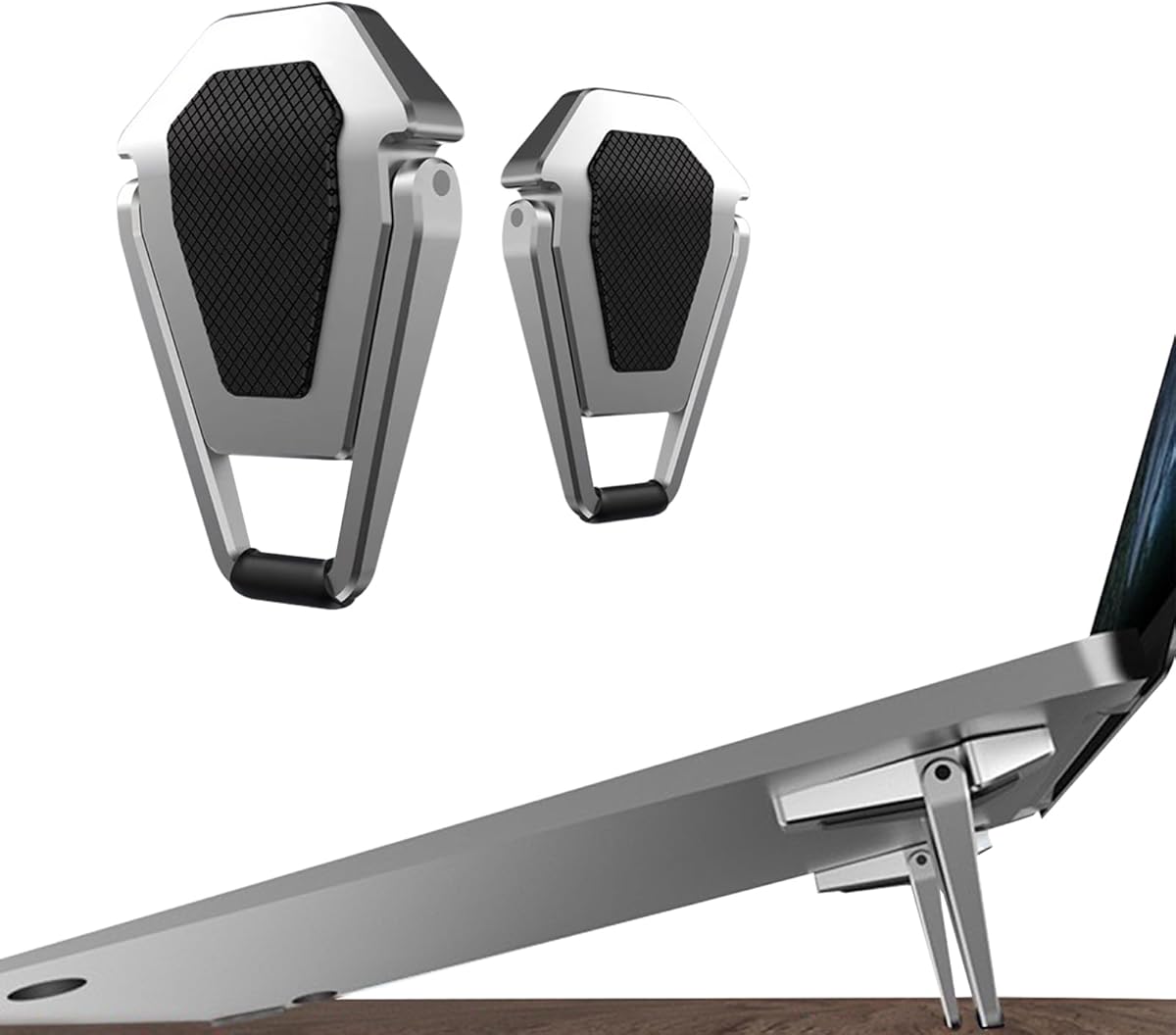
For those seeking value without compromising on material quality the 2pcs Keyboard Stands offer an excellent entry point into ergonomic computing. These mini risers are crafted from aluminum alloy ensuring they remain durable even with frequent handling.
We may earn a commission when you buy through this link, at no additional cost to you.
The primary benefit lies in the improved viewing angle which helps align your screen with your natural line of sight. This simple elevation also lifts the laptop base allowing air to circulate and prevent overheating during long sessions.
Lack of adjustment mechanisms means you must find the right placement manually. However for users who need a straightforward solution the performance and build quality justify the minimal investment required.
This option is perfect for students or budget conscious buyers who need to protect their laptop from overheating without spending much. The pack of two provides flexibility for multiple devices or a spare for your desk and home office.
Despite the low price point these stands deliver the core ergonomic benefits of screen elevation and better airflow management.
Aluminum alloy construction ensures these small risers can withstand daily use without bending or breaking under the weight of your device.
We may earn a commission when you buy through this link, at no additional cost to you.
The Ringke Laptop Stand exemplifies premium design with its zinc alloy construction that feels substantial yet remains portable. It carries the highest rating among its peers reflecting user satisfaction with its stability and finish.
We may earn a commission when you buy through this link, at no additional cost to you.
The non-slip TPU pads provide exceptional grip ensuring your laptop stays secure even on smooth surfaces. Three height levels offer enough variation to suit different viewing preferences while the clean installation process keeps your device looking sleek.
While it comes at a higher price point the quality of materials and attention to detail justify the investment for many users. The limited angle range may be a constraint for those needing precise ergonomic tuning.
This stand is best suited for professionals who prioritize aesthetics and build quality in their workspace accessories. Its versatility across tablets and smartphones also adds value if you use multiple devices throughout your day.
Zinc alloy provides a robust yet lightweight structure that resists wear and tear over years of regular use.
TPU pads on both the base and contact points ensure your device remains stable and scratch free during operation.
We may earn a commission when you buy through this link, at no additional cost to you.
This invisible laptop stand is designed for travelers who need ergonomic support without the bulk of a traditional riser. Weighing just 24 grams it folds down to a tiny size that fits easily into pockets or laptop sleeves.
We may earn a commission when you buy through this link, at no additional cost to you.
The adjustable tilt angle between 15 and 25 degrees gives users some control over their viewing position. Despite its small footprint it supports up to 10kg ensuring it can handle heavier laptops without bending or failing.
The adhesive backing is strong but may lose effectiveness if exposed to high temperatures for prolonged periods. Users should ensure the surface is clean before application to maximize stability and longevity.
Ideal for remote workers who move between locations this stand provides essential cooling and posture benefits on the go. Its discretion and minimal weight make it a practical choice for anyone prioritizing portability.
Foldable mechanics and featherlight weight make this stand the ultimate companion for business trips and coffee shop sessions.
Despite its small size the zinc alloy construction supports heavier devices ensuring reliability for 15 inch or larger laptops.
We may earn a commission when you buy through this link, at no additional cost to you.
This portable stand distinguishes itself with a built-in privacy feature that adds significant value for security conscious users. The inclusion of a free webcam cover means you can protect your digital privacy alongside your physical posture.
We may earn a commission when you buy through this link, at no additional cost to you.
The dual-angle design allows instant switching between casual browsing and ergonomic typing modes without tools. ABS plastic construction keeps costs down while still providing sufficient support for most standard laptop models.
While the build quality is solid it lacks the premium feel of metal alternatives. The lower rating suggests some users may find stability varies depending on desk surface conditions.
This stand is a great choice for students or home office users who want a budget-friendly solution with added security benefits. The privacy cover alone makes it a compelling option for those concerned about surveillance.
The included webcam cover offers a simple effective way to block unauthorized access to your camera without extra cost.
Instantly toggle between two distinct angles to match your current task whether it is watching videos or typing reports.
We may earn a commission when you buy through this link, at no additional cost to you.
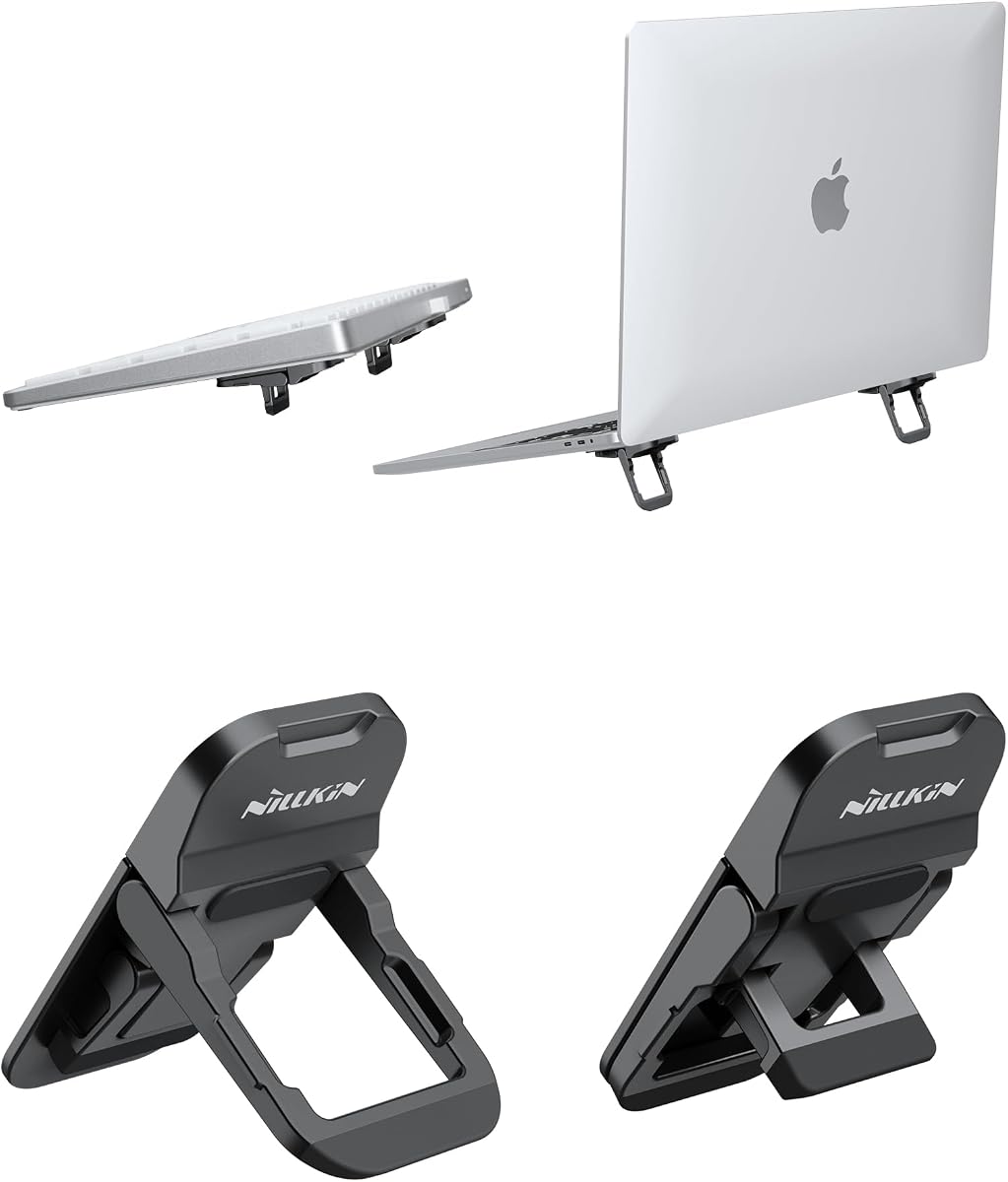
The Nillkin Portable Laptop Stand offers three precise angle settings that cater to different working styles and tasks. Its zinc alloy construction ensures durability while the triangular support design provides a stable base for your device.
We may earn a commission when you buy through this link, at no additional cost to you.
One of its standout features is the nano traceless adhesive which allows for secure attachment without leaving marks on your laptop. This makes it a preferred choice for users who want to preserve the aesthetics of their device.
Note that the adhesive requires about an hour to reach full strength so patience is key during installation. Repeated removal and reapplication may compromise the adhesive performance so plan your placement carefully.
This stand is ideal for professionals who need consistent ergonomic support without worrying about residue or damage to their hardware. The inclusion of two pieces allows for use across multiple devices or locations.
Three specific angles give you the flexibility to tailor your setup for specific tasks like coding or video conferencing.
Nano adhesive technology ensures your laptop remains pristine even after the stand is removed or relocated.
We may earn a commission when you buy through this link, at no additional cost to you.
The Penitue stand is engineered for maximum portability with a foldable design that slips easily into pockets or bags. Despite its compact size it is built from zinc alloy which ensures it remains durable over time.
We may earn a commission when you buy through this link, at no additional cost to you.
The package includes anti-slip stickers and double-sided tape making installation straightforward for various surfaces. Its primary function is to lift the laptop enough to improve airflow and posture without adding significant weight to your setup.
While the folding mechanism is convenient it can sometimes collect dust or debris that may affect performance. Users should clean the hinges occasionally to maintain smooth operation and stability.
This is an excellent choice for travelers who need a lightweight solution that can be set up anywhere. The multi-device compatibility also makes it useful for tablets or mobile phones in addition to laptops.
Foldable design ensures you can carry the stand with you wherever you go without noticing its presence in your bag.
Included accessories like anti-slip stickers ensure you can mount the stand securely on a variety of desk surfaces.
We may earn a commission when you buy through this link, at no additional cost to you.
This versatile stand replaces multiple accessories by functioning as a laptop riser tablet easel and phone holder. Its aerospace aluminum build ensures it can handle heavy gaming laptops without wobbling during use.
We may earn a commission when you buy through this link, at no additional cost to you.
The MagSafe magnetic mount is a standout feature for iPhone users allowing for quick dual-screen setups without clamps. Eight distinct height slots provide precise ergonomic tuning to match your natural line of sight.
The price is higher than basic models but the functionality and build quality justify the cost for power users. The folding baton design makes it surprisingly compact for travel despite its robust construction.
Ideal for creators and professionals who need a single solution for multiple devices this stand offers unmatched versatility. The inclusion of a travel pouch adds value for those who frequently move between work locations.
Convert seamlessly between laptop support and tablet easel modes to adapt to different tasks throughout your day.
Eight adjustment slots give you granular control over screen height to eliminate neck strain during long work sessions.
We may earn a commission when you buy through this link, at no additional cost to you.
The Aulumu G07 stands out for its innovative spring-loaded design that pops up in just 0.1 seconds. This rapid deployment is perfect for spontaneous work sessions where you need to elevate your screen immediately.
We may earn a commission when you buy through this link, at no additional cost to you.
At only 4mm thick it remains nearly invisible when closed allowing you to keep it attached to your laptop permanently. The zinc alloy construction ensures it holds your device securely without wobbling during typing.
The satisfying click sound provides auditory feedback that the stand is locked and secure. However mechanical parts like springs may wear out over time depending on frequency of use.
This stand is ideal for tech enthusiasts who appreciate clever mechanical designs and speed. Its slim profile ensures it adds zero bulk to your daily carry while providing essential ergonomic support.
One handed operation allows you to raise your screen in less than a second for immediate workflow adjustment.
The ultra-slim folded design ensures the stand is virtually unnoticeable when not in active use.
We may earn a commission when you buy through this link, at no additional cost to you.
This Ringke model focuses on simplicity and slimness ensuring it integrates seamlessly into any workspace. The 3M adhesives provide a strong hold while soft pads prevent scratching on both your desk and laptop.
We may earn a commission when you buy through this link, at no additional cost to you.
It is compatible with any device larger than 9 inches making it a versatile choice for tablets and laptops alike. The folding mechanism keeps the profile low so it does not interfere with other desk accessories.
Repeated removal can reduce adhesive effectiveness so it is best to plan your placement carefully before sticking it down. The single angle is fixed which limits ergonomic flexibility but ensures stability.
Ideal for users who want a set it and forget it solution this stand offers reliable support without complexity. Its sleek design ensures it does not distract from the minimalist aesthetic of modern desks.
Soft pads on contact points ensure your valuable devices remain free of scratches during regular use.
Broad device compatibility means you can use this stand across multiple gadgets without needing separate accessories.
We may earn a commission when you buy through this link, at no additional cost to you.
Selecting the right laptop kickstand depends on several factors including material durability portability and ergonomic benefits. Understanding these elements will help you find a stand that suits your workflow and device.
The material of your stand determines its durability and heat dissipation capabilities. Aluminum alloy and zinc alloy are popular choices because they are sturdy lightweight and help draw heat away from your laptop. Avoid cheaper plastic stands if you plan to use them daily as they may bend or crack over time.
Look for stands made from metal alloys to ensure long-lasting performance and effective cooling for your device.
If you travel frequently or work from different locations a portable kickstand is essential. Foldable or invisible designs that weigh less than 50 grams are ideal for slipping into a laptop bag. Ensure the folded dimensions are small enough to fit your carry-on or backpack.
Choose a compact foldable stand if you need to carry your laptop accessories on the go without added bulk.
Many modern kickstands use adhesive backing to stay attached to your laptop. Ensure the adhesive is removable without residue if you plan to switch devices. Friction-based stands that rest on the back of the laptop are reusable but may require adjustment.
Prefer adhesive mounts that are residue-free if you want to keep the stand permanently attached to your device.
Adjustable stands offer different height and angle settings to suit your posture. Look for multiple levels of adjustment to find the perfect eye level and typing angle. Fixed stands are simpler but may not provide the same ergonomic relief.
Select a stand with multiple angle or height options to tailor the setup to your specific ergonomic needs.
Ensure the kickstand is compatible with your laptop size and weight. Most stands support 10 to 17 inch laptops but some may have limits. Check the load capacity to ensure it can hold your device securely without slipping.
Verify the size and weight limits before buying to ensure the stand fits your specific laptop model.
An effective kickstand should elevate your laptop to allow air to circulate underneath. Open designs with gaps between the stand and device promote better cooling than solid bases. This helps prevent overheating during intensive tasks like gaming or video rendering.
Choose a stand with an open design to maximize airflow and keep your laptop temperature stable.
Some stands include extra features like privacy shields webcam covers or magnetic mounts. These add value if you need them but can increase the price. Consider what extras are useful for your specific workflow before paying for them.
Decide if bonus features like privacy covers or magnetic mounts are worth the added cost for your needs.
Kickstands range from budget friendly to premium priced. Higher price often correlates with better materials and adjustability. However basic models can offer significant ergonomic benefits without breaking the bank.
Balance your budget with the features you need to find the best value for your specific situation.
To install an adhesive stand clean your laptop surface thoroughly with alcohol and let it dry completely. Apply the stand and press firmly for 30 seconds then wait an hour before use to ensure full adhesion.
For friction-based stands ensure the rubber pads are clean and free of dust. Place the stand at the center of your laptop's back base to maintain balance and prevent tipping.
Regularly wipe down your stand with a microfiber cloth to remove dust and dirt. If the adhesive loses grip over time reapply the included tape or replace the stand if necessary.
Most adhesive stands do not void warranties if they use residue-free glue. Check your manufacturer's policy regarding surface modifications before applying adhesive. Friction-based stands are safest as they do not alter the device surface.
High quality nano or 3M adhesives are designed to leave no residue upon removal. Test a small area first to ensure compatibility with your device material. Avoid aggressive removal techniques to prevent scratching.
Some stands work better with magnetic cases while others require direct contact. If your stand relies on friction the case may reduce grip. Adhesive stands usually work fine but ensure the adhesive sticks to your specific case material.
Most kickstands support up to 10kg or 22 pounds which covers most laptops. Always check the manufacturer's load capacity specifications before use. Exceeding weight limits may cause bending or failure of the stand.
Yes elevating your laptop allows air to circulate underneath which reduces heat buildup. This prevents thermal throttling and can improve performance during heavy tasks. Ensure the stand does not block existing air vents on your device.
Yes but ensure the stand has a high load capacity to handle the weight of gaming laptops. Look for sturdy metal construction to support the extra mass. Cooling is especially important for gaming laptops so airflow is key.
Quality adhesive can last months or even years if kept clean. Over time or in hot environments the adhesive may weaken. If you notice slipping reapply the tape or consider replacing the stand to maintain safety.
Many universal stands support devices from 9 to 20 inches which covers both laptops and tablets. Check the compatibility range to ensure it fits your specific device size. Multi-mode stands often include adjustable features for different form factors.
The ten kickstands reviewed here offer a wide range of options for different budgets and needs. From the value-focused 2pcs Keyboard Stands to the versatile Laptop Stand Portable Tablet Riser there is a solution for everyone.
Prioritize material quality and ergonomic adjustability to ensure long term comfort and device protection. A good stand should improve airflow and reduce strain without adding unnecessary weight to your workflow.
Prices and availability may change so check current listings before making your purchase. With the right laptop kickstand you can transform your daily computing experience into something healthier and more productive.