
SANSUI 24 Inch Curved 160Hz Gaming Monitor
4.4Editor score
160Hz Refresh Rate
1500R Curvature
110% sRGB Color
Finding the right curved 160Hz gaming monitor can transform your gaming setup into a high-performance arena. These displays offer smooth motion and deep immersion through their screen shapes. We look at key specs like refresh rates and color accuracy to guide your choice.
We evaluated ten distinct models based on panel technology, connectivity options, and overall build quality. Each product brings unique strengths whether you prioritize budget pricing or premium visual fidelity. Our comparison highlights real-world performance metrics relevant to modern gaming demands.
Every pick in this list showcases specific strengths ranging from ultra-wide screens to compact designs. You will see detailed breakdowns of what each monitor offers for different play styles. Note that pricing and availability can shift quickly so verify details before buying.
4.4Editor score
4.5Editor score

4.5Editor score
As an Amazon Associate we earn from qualifying purchases.
This table compares all ten selected monitors side by side. You can see how each model stacks up on screen size resolution refresh rate and key features to make an informed decision.






The SANSUI 24 Inch Curved 160Hz Gaming Monitor delivers strong entry-level performance for gamers needing smooth visuals. It holds a 4.4-star rating and features a fast VA panel with a 160Hz refresh rate and 1500R curve for focused immersion.
We may earn a commission when you buy through this link, at no additional cost to you.
Its standout qualities include accurate color reproduction with 110% sRGB coverage and versatile connectivity via HDMI 2.0 and DP 1.4. The included game modes and crosshair overlays enhance competitive play while the 1ms MPRT response time reduces motion blur during action scenes.
Trade-offs include the absence of built-in speakers and limited ergonomic adjustments beyond tilt. These are acceptable for the price range allowing you to allocate budget to other peripherals. VESA compatibility also lets you use third-party mounts for flexible setups.
This monitor is ideal for budget-conscious gamers seeking high refresh rates in a compact form. It balances performance and cost effectively. We recommend it for FPS and RTS players who prioritize speed and immersion over extra features.
The 1500R curvature wraps around your field of view reducing eye strain during extended sessions and enhancing focus on in-game details.
At 160Hz this monitor delivers fluid motion handling ideal for fast-paced games where split-second reactions matter for competitive advantage.
We may earn a commission when you buy through this link, at no additional cost to you.
The SANSUI 27 Inch Curved 160Hz Gaming Monitor offers a bigger display for those wanting more workspace without breaking the bank. It carries a 4.4-star rating and features a 1500R curve with 160Hz refresh rate for engaging gameplay.
We may earn a commission when you buy through this link, at no additional cost to you.
Key strengths include an HDR mode accessible via HDMI and robust color coverage with 110% sRGB. The game assistant tools like black level adjustment and timers help customize viewing for different titles while low blue light settings protect your eyes.
A downside is the lack of speakers and the limitation of FHD resolution on a 27-inch panel which may appear less sharp up close. However these trade-offs are common in budget segments and allow for significant cost savings compared to larger models.
This monitor suits gamers needing a larger footprint who prioritize refresh rates over pixel density. It is a solid choice for casual to intermediate players seeking immersive curves and smooth motion at an accessible price point.
Built-in features like crosshair overlays and shadow boosters give players tactical advantages and better visibility in dark game environments.
Low blue light and flicker-free technologies help reduce eye fatigue during long gaming marathons or daily work sessions.
We may earn a commission when you buy through this link, at no additional cost to you.
The SANSUI 24 Inch Curved Gaming Monitor blends business reliability with gaming speed. Its 4.5-star rating reflects strong user satisfaction and it offers DCI-P3 97% color coverage for vibrant visuals alongside a 160Hz refresh rate.
We may earn a commission when you buy through this link, at no additional cost to you.
Its standout qualities include robust connectivity via HDMI 2.0 and DP 1.4 and security features like the Kensington lock slot. The VA panel delivers strong contrast at 3000:1 while HDR support adds depth to compatible content for richer viewing experiences.
Trade-offs involve the lack of speakers and limited ergonomic adjustments beyond tilt. These are acceptable for users who use external audio or wall mounts. The high color coverage makes it versatile for creative tasks too.
This monitor is perfect for dual-purpose setups needing color accuracy and fast response times. It is recommended for users who value security features and wide color gamuts in a compact affordable curved form.
97% DCI-P3 coverage ensures vivid and accurate colors suitable for photo editing and multimedia consumption alongside gaming.
The Kensington lock slot allows secure mounting in shared or public environments protecting your investment from unauthorized removal.
We may earn a commission when you buy through this link, at no additional cost to you.
The CRUA 32 Inch 4K UHD 160Hz Curved Gaming Monitor brings high-resolution clarity to immersive play. With a 4.3-star rating it delivers 3840×2160 pixels with a 160Hz refresh rate and 1500R curvature for expansive views.
We may earn a commission when you buy through this link, at no additional cost to you.
Its standout features include integrated speakers and HDMI 2.1 support which connects well with next-gen consoles. The 120% sRGB color accuracy ensures rich visuals for streaming and photo editing while AMD FreeSync minimizes screen tearing during gameplay.
Trade-offs include higher power consumption due to the larger 4K panel and a premium price compared to FHD models. These are acceptable if you prioritize image quality and convenience. It serves well for minimalist workspaces needing fewer cables.
This monitor is ideal for users seeking 4K immersion without flat screens. We recommend it for multimedia enthusiasts and console gamers who value resolution and audio convenience in a single curved display.
HDMI 2.1 ports support high bandwidth needed for 4K gaming at high refresh rates on modern consoles and PCs.
Integrated speakers reduce desktop clutter while the 4K panel delivers sharp details for both work and entertainment.
We may earn a commission when you buy through this link, at no additional cost to you.
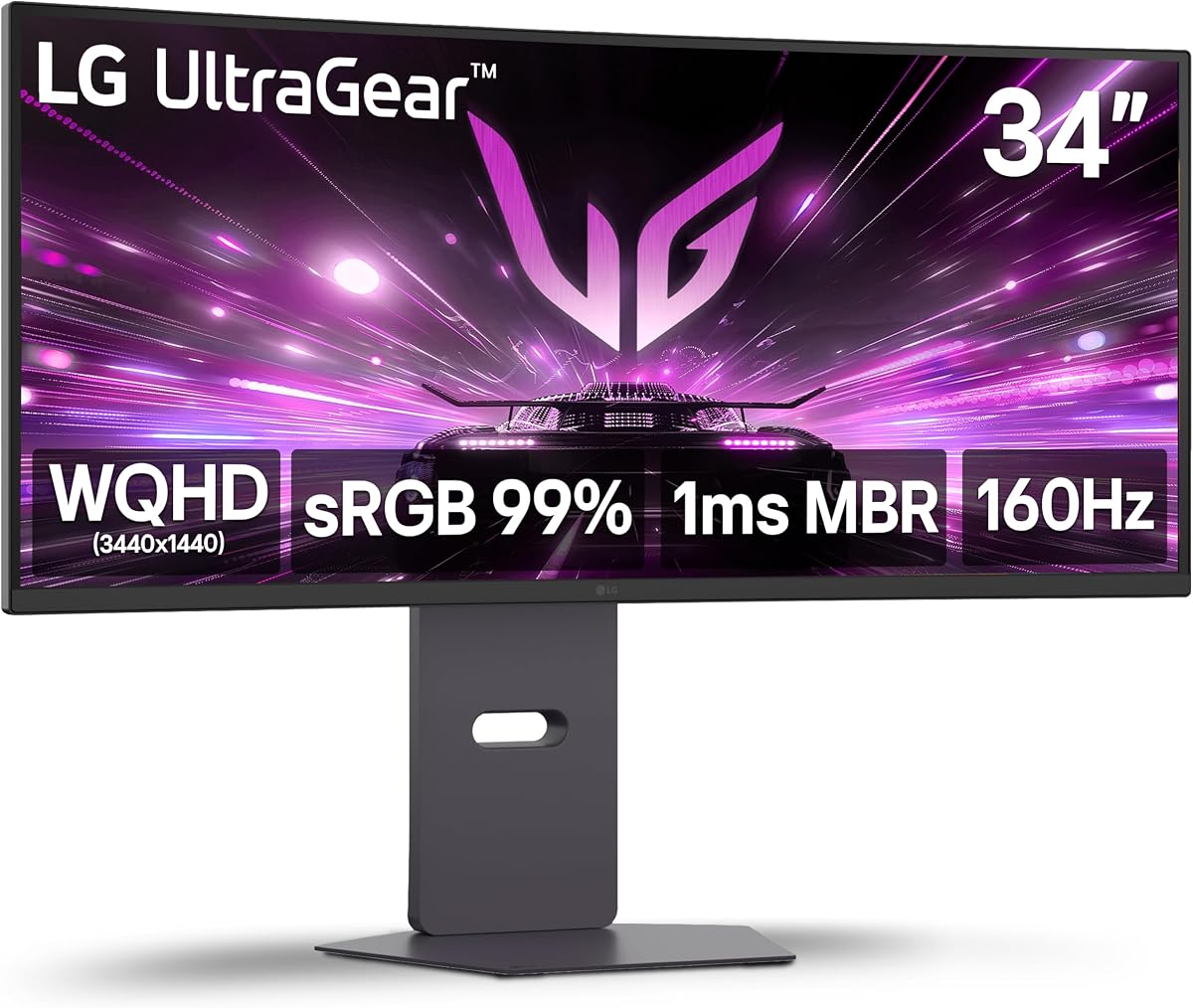
The LG 34G600A-B stands out as a premium pick with its ultrawide WQHD panel and advanced features. It holds a 4.5-star rating and delivers 160Hz refresh rates alongside HDR10 and AMD FreeSync Premium for tear-free action and vivid colors.
We may earn a commission when you buy through this link, at no additional cost to you.
Its key strengths include a fully ergonomic stand with height and swivel adjustments and specialized gaming tools like Black Stabilizer and Crosshair. The Waves MaxxAudio speakers provide rich sound while the 1800R curvature expands your field of view for deeper immersion.
Trade-offs involve the higher price and the need for a powerful GPU to drive WQHD at 160Hz. These are acceptable for competitive gamers who want top-tier performance and comfort. Reader Mode also makes it suitable for productivity tasks.
This monitor is ideal for enthusiasts needing a balance of comfort and speed. We recommend it for competitive players seeking accurate ergonomics and smooth motion with premium build quality.
Full tilt height and swivel adjustments ensure optimal viewing angles for long sessions reducing physical strain and neck pain.
Dynamic Action Sync and Black Stabilizer help reduce input lag and brighten dark scenes for faster reactions in battles.
We may earn a commission when you buy through this link, at no additional cost to you.
The LG 34G600A-B Renewed offers the same premium build and features as the new model at a better price. It holds a perfect 5.0-star rating and features 160Hz refresh rates HDR10 support and a versatile ergonomic stand for comfortable use.
We may earn a commission when you buy through this link, at no additional cost to you.
Its standout qualities include WQHD resolution with AMD FreeSync Premium ensuring smooth visuals without tearing. The renewed process ensures high performance making it a smart choice for budget-conscious buyers seeking top-tier hardware without the premium cost.
Trade-offs involve potential variations in cosmetic condition and limited stock compared to new units. These are acceptable given the savings and rigorous testing. It maintains the same connectivity and ergonomic benefits as its new counterpart.
This monitor is ideal for buyers wanting flagship specs without the full price. We recommend it for gamers seeking high refresh rates and ultrawide immersion at a value-friendly price point.
Each unit undergoes thorough testing to ensure it meets high performance standards similar to new products with reliable operation.
Retains the original height and swivel adjustments to maintain comfort during long sessions regardless of renewed status.
We may earn a commission when you buy through this link, at no additional cost to you.
The Samsung 32 Inch Odyssey G55C brings the deepest curvature available for true surround-style immersion. It holds a 4.4-star rating and features a QHD panel with 165Hz refresh rate and HDR10 support for vibrant visuals.
We may earn a commission when you buy through this link, at no additional cost to you.
Its standout qualities include the 1000R curve which matches the human eye curvature to reduce strain. Eye Saver Mode minimizes blue light while AMD FreeSync ensures smooth gameplay with minimal input lag during intense competitive matches.
Trade-offs involve the deep curve requiring more desk space and higher power draw. These are acceptable for users seeking maximum immersion. It pairs well with powerful systems to leverage QHD and high refresh rates effectively.
This monitor is ideal for users seeking maximum immersion in a mid-range budget. We recommend it for fans of deep curves who want QHD sharpness and eye protection.
The 1000R curve wraps tightly around your field of view making game elements feel closer and more engaging.
Eye Saver Mode and flicker-free tech help keep eyes relaxed during long gaming sessions or daily computer use.
We may earn a commission when you buy through this link, at no additional cost to you.
The Sceptre 34-inch Curved ultrawide WQHD Monitor delivers wide-screen gaming value. It holds a 4.2-star rating and offers a 21:9 aspect ratio with up to 180Hz refresh rate for smooth action and multitasking capabilities.
We may earn a commission when you buy through this link, at no additional cost to you.
Its standout qualities include luminous backcover lights and built-in speakers adding modern flair and audio convenience. Dual DisplayPort inputs allow flexible connections while the 1ms response time ensures crisp imagery during fast-paced scenes.
Trade-offs include limited customization for lighting and a slightly lower rating due to build nuances. These are acceptable for cost-conscious buyers. The wide aspect ratio provides significant screen real estate for productivity and gaming alike.
This monitor is ideal for users wanting ultrawide immersion without high cost. We recommend it for those seeking high refresh rates and modern aesthetics on a budget.
The 21:9 aspect ratio provides 30% more workspace than standard monitors helping productivity and gaming immersion.
Luminous backcover lights add a unique visual touch enhancing your setup ambiance during low-light gaming sessions.
We may earn a commission when you buy through this link, at no additional cost to you.
The Alienware 34 Curved Gaming Monitor AW3425DWM brings elite design and high performance. It holds a 4.6-star rating and features WQHD resolution with 180Hz refresh rate and hardware-based low blue light for eye comfort.
We may earn a commission when you buy through this link, at no additional cost to you.
Its standout qualities include DCI-P3 95% color coverage and VESA DisplayHDR 400 certification ensuring vivid visuals and deep contrast. The dedicated console mode optimizes performance for game consoles making it versatile for multi-device setups.
Trade-offs involve a higher price and fewer input options compared to some competitors. These are acceptable given the premium build and performance. Its hardware low blue light is more effective than software-based solutions.
This monitor is ideal for users seeking top-tier design and color quality. We recommend it for those wanting a premium experience with reliable eye protection and high refresh rates.
The hardware low blue light solution reduces eye strain more effectively than software adjustments preserving true color.
The dedicated console mode optimizes visuals for game consoles making it easy to switch between PC and console play.
We may earn a commission when you buy through this link, at no additional cost to you.
The AOC 34 Inch Curved Gaming Monitor UWQHD 200Hz VA offers exceptional speed for competitive gamers. It holds a 4.5-star rating and features a 200Hz refresh rate with 0.3ms MPRT response time ensuring the smoothest motion handling available.
We may earn a commission when you buy through this link, at no additional cost to you.
Its standout qualities include Adaptive-Sync technology and a height adjustable stand for comfort. The HDR Ready support enhances contrast while the VA panel maintains strong contrast ratios and wide viewing angles for vibrant colors.
Trade-offs involve the need for a high-end GPU to utilize 200Hz and basic HDR implementation. These are acceptable given the speed advantage. The ergonomic adjustments ensure you can position the screen optimally.
This monitor is ideal for competitive gamers seeking the highest refresh rates. We recommend it for those prioritizing speed and smooth visuals over high-end HDR features.
200Hz refresh rates deliver the smoothest motion handling for competitive gaming where every frame counts.
Height adjustment ensures optimal positioning reducing neck strain during extended gaming sessions or work.
We may earn a commission when you buy through this link, at no additional cost to you.
Choosing the right curved 160Hz gaming monitor involves balancing specs with budget and needs. We outline key factors to help you make an informed decision tailored to your setup.
Refresh rate measures how many frames per second your monitor displays. Higher rates like 160Hz or more reduce motion blur and improve smoothness. Response time indicates how quickly pixels change color. Low response times like 1ms minimize ghosting.
Look for refresh rates matching your hardware and low response times for competitive play.
Curvature is measured in radius with lower numbers indicating deeper bends. Common options are 1500R or 1000R. Screen size ranges from 24-inch to 34-inch ultrawide panels. Larger sizes offer more immersion but require more desk space.
Select curvature and size that fit your workspace and viewing distance for comfort.
Resolution determines pixel density. FHD is standard but WQHD or 4K offer sharper visuals. Panel types like VA provide high contrast while IPS offers better color. VA panels are common for curved gaming monitors.
Prioritize resolution that your GPU supports and panel type that suits your visual needs.
Adaptive sync like AMD FreeSync or NVIDIA G-Sync matches monitor refresh rate to GPU output. This reduces screen tearing and stuttering during gameplay. It ensures smooth visuals especially in fast-paced games.
Ensure the monitor supports adaptive sync compatible with your graphics card.
Ports like HDMI and DisplayPort determine which devices you can connect. HDMI 2.1 or DP 1.4 support higher refresh rates. Check if the monitor includes audio jacks or USB hubs for convenience.
Verify connectivity matches your PC or console requirements for full performance.
Adjustable stands allow tilt height and swivel adjustments. Ergonomic features reduce strain during long sessions. VESA mounting options provide flexibility to use third-party mounts.
Choose stands with sufficient adjustments for your posture and desk setup.
Color accuracy matters for creative work and immersion. High sRGB or DCI-P3 coverage ensures vivid colors. HDR support adds contrast and brightness but quality varies by model.
Look for wide color gamuts and HDR certification if visual fidelity is a priority.
Extra features like built-in speakers or game modes enhance usability. Warranty terms protect your investment. Technical support availability helps resolve issues quickly.
Evaluate these extras based on how much they add to your specific use case.
Connect your monitor to your PC or console using the correct HDMI or DisplayPort cable to enable high refresh rates. Verify display settings are configured for maximum refresh rate in your operating system.
Use the built-in OSD menu to adjust settings like brightness contrast and game modes. Enable adaptive sync features to reduce screen tearing and improve visual stability during gameplay.
Clean the screen gently with a soft microfiber cloth avoiding harsh chemicals. Ensure proper ventilation to prevent overheating and use ergonomic adjustments to maintain good posture.
160Hz provides smoother motion compared to standard 60Hz monitors. It is ideal for competitive gaming where quick reactions matter. While not mandatory it enhances visibility and reduces motion blur.
Curved refers to the screen bending inward to match your natural field of view. This reduces distortion and strain during long sessions. It creates a more immersive and focused viewing experience.
Choose size based on desk space and viewing distance. 24-inch fits small setups while 34-inch ultrawide offers more immersion. Ensure your GPU can handle the resolution at high refresh rates.
Use HDMI 2.0 or DisplayPort 1.4 to achieve 160Hz refresh rates on most monitors. Check your graphics card capabilities to ensure they support these bandwidth requirements.
Yes they reduce peripheral distortion allowing your eyes to relax more. The uniform distance to all screen areas minimizes strain. Combined with flicker-free technology they are gentler on your eyes.
Absolutely curved monitors offer more screen space for multitasking. WQHD resolution provides sharp text clarity. Many models include Reader Mode for comfortable reading and coding sessions.
Adaptive sync matches the monitor refresh rate to your graphics card output. This eliminates screen tearing and stuttering. It ensures smooth visuals without needing expensive dedicated G-Sync modules.
Use a soft microfiber cloth to clean the screen gently. Avoid spraying cleaners directly on the display. Ensure the monitor has adequate ventilation to prevent overheating during long use.
This guide highlighted ten top curved 160Hz gaming monitors offering varied sizes and features. Our top picks include budget-friendly SANSUI options and premium LG and AOC models.
Prioritize refresh rates and resolution that match your hardware to ensure smooth gameplay. Consider ergonomic features and connectivity to suit your workspace.
Prices and availability change regularly so verify current details before purchasing. Check our links for the latest options to secure the best value for your setup.