
Power Strips with Surge Protection Flat Plug Power Strip Tower
4.8Editor score
12 AC outlets plus 4 USB ports
0.35 inch slim flat plug design
1080 Joules surge protection rating
This guide compares the top desk mounted outlet towers for power capacity, safety features, and design to help you find the perfect charging station for any
Desk mounted outlet towers are essential for modern workspaces needing organized power solutions. These vertical units combine multiple AC outlets and USB ports into a compact footprint saving valuable desk real estate while keeping cables tidy and accessible.
We evaluated ten leading models based on total port count, surge protection ratings, cord length, and build quality. Our analysis considers real-world usability factors like flat plug design, clamp stability, and smart charging capabilities for various devices.
Each pick highlights specific strengths for different budgets and needs without endorsing any single brand. Prices and availability change frequently so verify current details before purchasing. This guide ensures you select a tower matching your specific power requirements and spatial constraints.
4.8Editor score

4.5Editor score

4.8Editor score
This side-by-side comparison outlines key specifications across all ten reviewed towers including outlet counts, USB capabilities, cord lengths, and safety certifications to simplify your selection process.


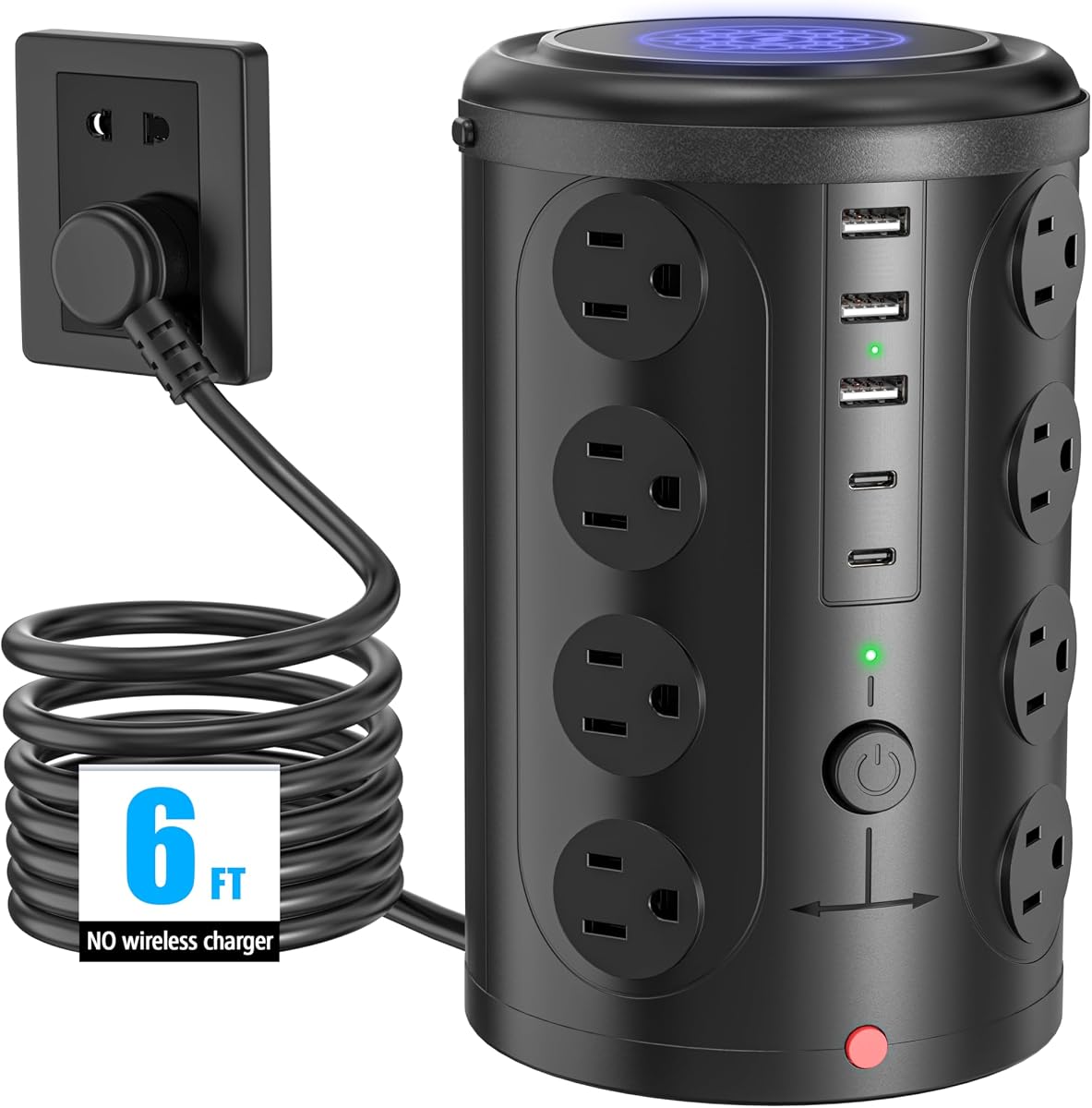


The TenTrend Power Strip Tower offers exceptional value by combining twelve charging points in a single vertical unit. With a 4.5 star rating it stands out for its ability to handle multiple high-wattage devices simultaneously without overcrowding your desk surface.
We may earn a commission when you buy through this link, at no additional cost to you.
Its standout feature is the inclusion of two 65W USB-C ports capable of charging laptops directly without bulky bricks. The remaining six USB-A ports and six AC outlets provide ample flexibility for phones monitors and peripherals keeping your workspace tidy and efficient.
While the five-foot cord works for most desk setups it might feel limiting for users with power sources further away. Additionally the lack of individual outlet switches means you cannot turn off specific devices without unplugging them entirely which may impact energy usage.
This tower is ideal for students and professionals needing high-density charging in tight spaces. Its flat plug design ensures it sits flush against walls preventing obstruction of adjacent outlets making it a practical choice for shared environments like dorms or home offices.
Two orange USB-C ports deliver up to 65W allowing quick charging for laptops and tablets without separate adapters.
The ultra-slim 0.31 inch plug fits snugly against walls saving space and preventing interference with neighboring power sources.
We may earn a commission when you buy through this link, at no additional cost to you.
This budget-friendly tower delivers impressive capacity with twelve AC outlets and four USB ports at a competitive price. Its 4.8 star rating reflects user satisfaction with its reliability and ability to handle everyday charging needs for multiple devices without breaking the bank.
We may earn a commission when you buy through this link, at no additional cost to you.
The wide spacing between outlets allows you to plug in large adapters without blocking adjacent sockets. The braided fabric cord adds a touch of durability and style while resisting tangles better than standard rubber cables found on cheaper models.
While it lacks high-wattage USB-C ports for laptops it covers essential needs for phones tablets and small appliances effectively. The surge protection rating is adequate for home use but might not suit sensitive professional equipment requiring higher joule ratings.
Choose this tower if you need maximum plug count on a tight budget. It works well for dorm rooms family rooms or workspaces where standard device charging is the priority and cost efficiency matters most to your purchasing decision.
Twelve AC outlets are spaced widely to prevent bulky adapters from blocking neighboring ports keeping your setup functional.
The braided fabric cord resists wear and tangles offering better longevity than typical plastic coated extension wires.
We may earn a commission when you buy through this link, at no additional cost to you.
The Anker Nano Power Strip redefines desk organization with its innovative clamp design that mounts directly to desk edges. Rated 4.8 stars it combines premium materials with advanced GaN technology for efficient high-speed charging in a compact form factor.
We may earn a commission when you buy through this link, at no additional cost to you.
Its 70W USB-C port can power most laptops directly reducing cable clutter significantly. The dual zone layout separates AC and USB outlets logically making it easier to manage cables and maintain a clean professional workspace appearance daily.
The adjustable clamp fits desks between 0.6 and 1.8 inches thick but may not work with curved or uneven edges. While the price is higher it justifies cost through superior build quality and unique mounting that frees up valuable vertical surface area.
Ideal for professionals seeking a premium desk solution this unit eliminates floor or desk footprint entirely. It is best suited for those who value clean aesthetics and reliable fast charging capabilities willing to invest in a high-end organizational tool.
The clamp secures the unit to desk edges freeing up desk space and allowing one-hand device plugging easily.
Powered by GaN technology this port charges laptops and tablets quickly without bulky power adapters taking up room.
We may earn a commission when you buy through this link, at no additional cost to you.
This model stands out for its unique retractable cord mechanism that automatically rewinds when released preventing messy cable coils. With a perfect 5.0 star rating users appreciate the innovation and stability it brings to desk power management solutions daily.
We may earn a commission when you buy through this link, at no additional cost to you.
The cube design is compact and features mountable feet allowing it to be fixed to desks or walls for maximum versatility. Four USB ports including two USB-C meet modern charging needs while keeping the total footprint minimal and attractive.
Limited AC outlets mean it may not suit heavy hardware setups needing many plugs simultaneously. The lower surge protection rating is adequate for general use but might not protect sensitive electronics against significant power spikes effectively.
Buy this if you prioritize cable organization and clean aesthetics over maximum outlet count. Its automatic retraction feature solves a common pain point making it ideal for users who value tidy workspaces and simple efficient power access.
The retractable six-foot cord winds back automatically reducing tripping hazards and keeping floor areas neat.
Feet allow wall or workbench mounting reclaiming desk space and providing flexible placement options.
We may earn a commission when you buy through this link, at no additional cost to you.
This SMALLRT tower delivers twelve AC outlets and four USB ports ideal for users with extensive device collections. With a 4.7 star rating it balances functionality and build quality making it a strong contender for home offices and college dorms requiring extensive power access.
We may earn a commission when you buy through this link, at no additional cost to you.
The six-point-five-foot cord offers greater reach than many competitors allowing placement further from wall outlets. Four independent switches let you control specific outlet groups reducing energy consumption when devices are not in use actively.
With only one USB-C port it may not support multiple laptop chargers efficiently. The vertical design is efficient but occupies more base area than ultra-slim models which might impact tight desk arrangements.
Select this if you need maximum plug availability and control over power zones. Its robust build and longer cord make it a reliable choice for shared workspaces where multiple users need simultaneous access to power points without constant plugging.
Four separated switches allow you to turn off specific outlet groups easily saving energy when devices are idle.
The six-point-five-foot cord provides flexibility to place the tower where needed without reaching wall sockets.
We may earn a commission when you buy through this link, at no additional cost to you.
This affordable unit offers sixteen total charging points with twelve AC outlets and four USB ports. Its 4.8 star rating highlights satisfaction with its reliability and safety features making it a popular choice for students and budget-conscious users needing many outlets.
We may earn a commission when you buy through this link, at no additional cost to you.
The pure copper extension cord ensures efficient power delivery and reduces heat buildup. Built-in overload protection automatically cuts power if risks are detected safeguarding connected devices from electrical hazards effectively and automatically.
The USB-C port supports standard charging speeds which may not be ideal for laptops requiring higher wattages. While it has an energy-saving switch it controls all outlets together rather than individual groups limiting granular power management.
Choose this for high-capacity needs at a low cost. It works well for family rooms or dorms where many devices share one power source and safety certifications like flame retardant shells provide essential peace of mind.
Pure copper conductors reduce resistance and heat ensuring efficient power delivery to all connected devices.
Auto overload protection and flame retardant shell keep your devices and home safe from electrical fires.
We may earn a commission when you buy through this link, at no additional cost to you.
Designed for heavy users this tower offers sixteen wide-spaced AC outlets to accommodate bulky adapters without blocking neighbors. With a 4.6 star rating it proves reliable for offices or studios needing extensive power connectivity in a single dedicated unit.
We may earn a commission when you buy through this link, at no additional cost to you.
Five USB ports including two USB-C provide versatile charging options for mobile devices simultaneously. The high wattage capacity supports demanding setups like monitors and computers while 10A overload protection ensures electrical safety during peak usage times.
Its larger footprint may be cumbersome on small desks or nightstands. While it offers great capacity the physical size means it requires dedicated floor or desk space which might not suit compact living environments.
Buy this for maximum outlet density in dedicated workspaces. If you have many devices requiring large power bricks and high power capacity this model ensures every device has room to plug in without interference.
Sixteen outlets are spaced widely to prevent large adapters from blocking each other during heavy use.
Supports up to 3600W power allowing for demanding devices like monitors and high-performance PCs safely.
We may earn a commission when you buy through this link, at no additional cost to you.
TESSAN's flat plug design makes this unit ideal for placement against walls without blocking adjacent outlets. With a 4.8 star rating users praise its seamless integration into home or office environments while providing essential power access for multiple devices.
We may earn a commission when you buy through this link, at no additional cost to you.
The 45 degree right angle plug creates extra space below for additional wall outlets allowing efficient wall socket usage. Eleven AC outlets and three USB ports cover most standard needs while the slim profile reduces visual clutter significantly.
Standard USB charging speeds may be slower than newer PD-enabled options. The compact design is excellent but provides fewer ports than high-density alternatives which might limit large device collections.
Choose this for wall integration and space saving. It works perfectly in living rooms or offices where wall access is limited and keeping plugs flush against the wall is a priority for a clean aesthetic.
Ultra thin plug fits tight spots and hides behind furniture preventing wall outlet obstruction.
Angle design creates space below for other plugs maximizing wall outlet utility efficiently.
We may earn a commission when you buy through this link, at no additional cost to you.
This model offers a dual layer design allowing both desktop and under-desk mounting. With a 4.4 star rating it appeals to users needing versatile installation options without permanent modifications to furniture or work surfaces.
We may earn a commission when you buy through this link, at no additional cost to you.
Ten AC outlets and three USB ports cover standard device needs effectively. The clamp secures firmly allowing one-hand device plugging while saving valuable desk space for monitors or keyboards during active work sessions.
Surge protection is lower than premium models which might not suit expensive equipment. The clamp fits desks up to 1.6 inches thick limiting use on very thick or uneven surfaces common in industrial settings.
Buy this for versatile non-invasive mounting. It suits temporary offices or rented spaces where drilling is not allowed and having multiple power levels accessible simultaneously improves workflow efficiency.
Supports both desktop and under-desk placement for flexible power access without drilling into furniture.
Simple clamp setup allows quick installation and removal without tools or damage to your desk.
We may earn a commission when you buy through this link, at no additional cost to you.
This mini tower combines twelve AC outlets and four USB ports in a compact footprint designed for small desks. With a 4.7 star rating it balances portability and power efficiently making it a strong choice for limited workspace environments.
We may earn a commission when you buy through this link, at no additional cost to you.
The 1800 Joules surge protection offers strong safeguards for electronics against power fluctuations. Smart USB ports deliver optimized charging speeds for phones and tablets ensuring devices charge efficiently without needing dedicated adapters for each gadget.
While it offers many outlets it lacks high-wattage USB-C for laptops. The slim plug design ensures it sits flush against walls but users with laptops may still need separate chargers.
Choose this for compact and safe power management. It works well in dorm rooms or home offices where desk space is limited and you need reliable surge protection for valuable electronics without bulky equipment.
Small vertical footprint minimizes desk usage while still providing twelve AC outlets and four USB ports.
High surge protection rating keeps connected electronics safe from voltage spikes and electrical irregularities.
We may earn a commission when you buy through this link, at no additional cost to you.
Selecting the right tower requires balancing port count, safety ratings, and mounting options to fit your specific workspace needs.
Evaluate how many devices you need to charge simultaneously. Look for a mix of AC outlets and USB ports including at least one USB-C if you need to charge laptops efficiently.
Choose a tower with enough ports to cover all devices without overloading the unit or requiring multiple adapters.
Surge protection safeguards your electronics against voltage spikes caused by storms or grid fluctuations. Higher joule ratings indicate greater capacity to absorb energy before failing.
Select at least 1000 joules for standard office equipment and higher ratings for sensitive electronics like computers or consoles.
Determine whether a standalone tower or clamp-on unit suits your desk better. Standalone units offer portability while clamps save desk space but require specific edge compatibility.
Ensure the chosen mounting method fits your desk thickness and material securely to prevent tipping or slipping.
Measure the distance from your outlet to where the tower will sit. Longer cords offer more placement flexibility while flat plugs prevent wall socket blocking.
Opt for flat plugs and cords longer than five feet to ensure comfortable placement without tangling or strain.
Look for built-in overload protection short-circuit safeguards and fire-resistant materials like PC or ABS shells. These features protect users and property from electrical hazards.
Prioritize models with clear safety certifications and automatic shut-off features for peace of mind.
USB-C ports with Power Delivery support can charge laptops and tablets faster than standard USB-A ports. Check wattage ratings to ensure compatibility with your devices.
Select at least one high-wattage USB-C port if you rely on USB charging for laptops or larger tablets.
Independent switches allow you to power off specific groups of outlets without unplugging devices. This feature improves energy efficiency and convenience during downtime.
If you manage many devices regularly choose a tower with multiple switches for granular power management.
Durable materials like reinforced plastic and braided cords ensure longevity and resistance to wear. Avoid models with flimsy construction that might fail under daily use.
Choose robust build quality with anti-slip feet to maintain stability over years of regular use.
Position your tower on a flat stable surface or clamp it securely to a desk edge away from high-traffic areas to prevent tipping. Ensure the cord is not stretched tightly which could strain the plug connection.
Plug the tower directly into a wall outlet rather than daisy-chaining with another extension cord to avoid overloading circuits. Keep flammable materials away from the unit to maintain safe operating temperatures.
Regularly inspect the cord and outlets for damage like fraying or discoloration and clean the surface with a dry cloth to prevent dust buildup that could interfere with contacts.
Yes many towers include USB-C ports with Power Delivery that can charge laptops directly. Look for models with at least 65W USB-C output to support most modern laptops efficiently without bulky bricks.
Most modern towers include automatic overload and overheat protection making them safe for overnight use. Ensure the unit has proper surge protection and is placed on a non-flammable surface.
Yes many models include extension cords ranging from five to six and a half feet providing flexibility. Flat plug designs also help fit tight wall spaces without blocking adjacent sockets.
Standalone towers sit on surfaces offering portability while clamp towers mount to desk edges saving space. Clamp units require compatible desk thickness usually under two inches for secure attachment.
Check the wattage rating which indicates total power capacity. Sum the wattage of all plugged-in devices to ensure it stays below the rated limit preventing overloads.
Yes but avoid plugging multiple towers into a single outlet to prevent circuit overload. Distribute them across different wall outlets to maintain electrical safety and stability.
Quality towers can last several years with proper care. Regular inspection for wear and avoiding overloading helps extend their lifespan and ensures consistent performance over time.
An off indicator usually means the surge protection has been compromised. Unplug the device and contact the manufacturer for replacement as safety features may no longer be active.
The TenTrend Power Strip Tower Uncaged Ergonomics Retractable and Anker Nano Power Strip top our list for their blend of capacity safety and innovative design suited to various workspaces.
Prioritize models with high wattage USB-C ports and surge protection above 1000 joules to ensure longevity and device safety. Choose based on whether you value space saving or maximum outlet count.
Prices and availability change frequently so always verify current product details and customer reviews before finalizing your purchase. These towers are essential for modern efficient workspaces needing organized power access.