
BENFEI USB C to HDMI Adapter
4.4Editor score
4K at 60Hz output
Compact portable design
Broad device compatibility
This guide compares the top 10 Flash Drive to HDMI Adapter options for 2026, evaluating compatibility, resolution, and performance for seamless video output.
Finding the right Flash Drive to HDMI Adapter can transform your laptop into a powerful workstation. These devices allow you to connect external monitors using USB ports, enabling extended displays without opening your computer case.
We evaluated ten top-rated adapters based on compatibility, video resolution, driver requirements, and build quality. Our analysis focuses on how well each model supports modern operating systems and delivers stable performance for work and entertainment.
Each pick highlights key strengths and limitations to help you choose the best fit for your setup. Please note that pricing and availability change frequently, so verify current details before purchasing your preferred adapter.
4.4Editor score

4.5Editor score

4.4Editor score
The following table provides a side-by-side comparison of all ten adapters evaluated in this guide. Review each model’s key specifications to determine which one aligns best with your specific connectivity needs and operating system requirements.





The Reborn USB to HDMI Adapter offers an affordable entry point for users needing to connect external displays via USB. With a rating of 4.1, it delivers 1080P video at 60Hz, making it suitable for everyday tasks and multimedia consumption. Its compact design ensures portability while maintaining sturdy construction for long-term use.
We may earn a commission when you buy through this link, at no additional cost to you.
This adapter stands out for its wide compatibility with both Windows and macOS systems. It supports mirror and extended modes, allowing users to enhance productivity by extending their desktop. The installation process is straightforward with no CD-ROM required, and once installed on a specific computer, it functions without reinstalling.
However, users should be aware that driver installation is mandatory before first use. Additionally, this adapter cannot function in BIOS mode, which may limit utility for system diagnostics. Despite these limitations, the balance of features and cost makes it a strong contender for budget-conscious buyers.
Buyers seeking a cost-effective solution for secondary displays will find this adapter appealing. It works well for office work and entertainment provided driver setup is completed. For reliable performance at a lower price, this model is a recommended choice among budget adapters.
This adapter supports both Windows and macOS, offering flexibility for users across different operating systems without needing separate hardware.
The driver setup requires no CD-ROM and is completed via removable disk, simplifying the initial connection process for most users.
We may earn a commission when you buy through this link, at no additional cost to you.
The StarTech USB-A 3.0 to HDMI Converter earns top marks with a 4.5 rating for its reliable performance and productivity benefits. It allows users to extend their desktop using a USB-A port, making it ideal for office or home workstation setups. The adapter supports 1080p60 video output ensuring smooth visuals for presentations and media.
We may earn a commission when you buy through this link, at no additional cost to you.
Key strengths include its lightweight compact design and USB bus-powered functionality. This means no extra power supply is needed, enhancing portability for professionals on the go. The adapter works with various Windows platforms including Intel AMD and Snapdragon X systems offering broad compatibility within the ecosystem.
Limitations involve its exclusivity to Windows systems without support for macOS or Linux. Administrator rights are also required to install drivers which may be a hurdle for restricted environments. Despite this, the stability and productivity gains justify these constraints for Windows users seeking dependable external display options.
This converter is best suited for Windows professionals needing a stable extra screen for multitasking. Its plug-and-play design once drivers are installed ensures minimal setup time. For reliable productivity enhancement on Windows machines, this adapter remains a top recommendation in its category.
Users can extend their desktop by adding an HDMI monitor which significantly boosts workflow efficiency for multitasking and detailed work.
The USB bus-powered design eliminates the need for external power supplies making it easy to carry and use anywhere.
We may earn a commission when you buy through this link, at no additional cost to you.
The USB to HDMI Adapter for Monitor provides a straightforward solution for connecting PC images to TVs or projectors. With a rating of 3.8 it offers 1920×1080 resolution support through either USB 2.0 or 3.0 ports. This flexibility makes it accessible for users with older or newer computer systems.
We may earn a commission when you buy through this link, at no additional cost to you.
One significant advantage is its support for hot-plugging allowing users to connect or disconnect the adapter without restarting the computer. The included 36-month warranty adds confidence to the purchase protecting against potential defects over a long period. It enables both synchronization and desktop expansion improving overall work efficiency.
However the lower rating suggests potential variability in user satisfaction or performance consistency. Driver installation is also necessary before use which adds a step to the setup process. Users should weigh these factors against the value proposition of the extended warranty and broad port support.
This adapter suits users looking for a budget-friendly option with long-term protection via warranty. It is effective for basic display expansion tasks on Windows systems. For those prioritizing warranty coverage and port versatility this model offers solid value despite mixed user reviews.
Users can connect or remove the adapter at any time without rebooting allowing for seamless switching during work sessions.
A 36-month unconditional return and warranty period provides extended protection ensuring long-term peace of mind for buyers.
We may earn a commission when you buy through this link, at no additional cost to you.
The WAVLINK USB 3.0/USB C to HDMI adapter stands out with premium capabilities including support for up to six total monitors. Rated at 4.4 it offers a universal approach compatible with Windows macOS and ChromeOS. This makes it ideal for complex workstation environments requiring multiple displays for enhanced multitasking.
We may earn a commission when you buy through this link, at no additional cost to you.
Key features include built-in audio ports for microphone and earphone which add convenience for calls and media. The adapter includes an LED status indicator and compact size for easy setup and monitoring. It supports resolutions up to 2048×1152 at 60Hz ensuring clear visuals across connected screens.
Trade-offs involve the need for DisplayLink driver installation which adds initial setup steps. The price is higher than basic adapters reflecting its advanced functionality and broader compatibility. Users should ensure their systems meet requirements to avoid issues particularly with macOS M1-M5 chips.
This adapter is best for power users needing extensive multi-monitor setups across different operating systems. Its robust feature set justifies the cost for professional environments. For those prioritizing scalability and cross-platform support this premium option delivers exceptional versatility.
Up to six monitors can be connected on PCs providing massive workspace expansion for demanding professional tasks.
Compatibility extends to Windows macOS and ChromeOS allowing seamless integration regardless of the primary operating system used.
We may earn a commission when you buy through this link, at no additional cost to you.
The StarTech USB-A 3.0 to Dual HDMI Adapter is designed for users needing two external displays from one USB port. With a 4.5 rating it offers 4K support at 30Hz plus 1080p at 60Hz for mixed resolution setups. This makes it a powerful tool for IT professionals or power users requiring extensive screen real estate.
We may earn a commission when you buy through this link, at no additional cost to you.
Its strengths lie in the dual HDMI configuration which increases productivity by enabling extended desktops without multiple adapters. The adapter supports Windows platforms including Intel and AMD systems and includes a three-year warranty with technical assistance. This level of support ensures reliability for long-term deployments.
However it is limited to Windows environments and does not support macOS or Linux. The 4K refresh rate is capped at 30Hz which may not suit high-refresh gaming but is adequate for work. Users must weigh platform restrictions against the benefit of dual external display support.
This adapter is ideal for Windows workstations where dual monitor efficiency is critical. It simplifies cabling and power requirements compared to separate single adapters. For IT professionals seeking robust dual-output solutions this model is a highly recommended choice.
Users can extend their desktop by adding up to two HDMI monitors maximizing workspace for complex tasks.
Backed by a three-year warranty and lifetime technical assistance ensuring reliable long-term performance and support.
We may earn a commission when you buy through this link, at no additional cost to you.
The StarTech.com USB-A to HDMI Adapter leverages DisplayLink certification for assured compatibility with various systems. Rated at 4.4 it delivers 1080p video and supports 5.1ch audio through HDMI for quality multimedia experiences. Automatic driver installation on Windows and Chrome simplifies setup significantly for most users.
We may earn a commission when you buy through this link, at no additional cost to you.
Key advantages include its compact design and bus-powered functionality which eliminates the need for extra power supplies. This makes it highly portable for travelers or office workers moving between desks. The adapter ensures stable performance and reliable connections thanks to rigorous certification standards.
Trade-offs involve a higher price compared to non-certified models and resolution capped at 1080p. While adequate for office use this may not satisfy users needing higher resolution displays. However the convenience of automatic drivers and proven reliability often outweigh these drawbacks for professional environments.
This adapter is best for users prioritizing stability and ease of setup over maximum resolution. It fits well into corporate or enterprise settings where reliability is paramount. For hassle-free extended display capabilities this certified option remains a trusted choice.
Automatic driver installation reduces manual steps making the connection process quick and accessible for all users.
Certification ensures compatibility with any USB-A laptop or desktop providing dependable performance across different hardware.
We may earn a commission when you buy through this link, at no additional cost to you.
The Kinhaly USB C to HDMI adapter offers a convenient 2-in-1 solution for mobile users needing both video output and charging. Rated at 4.2 it supports 4K at 60Hz ensuring crystal-clear audio and video on TVs or projectors. Its plug-and-play functionality means no drivers or apps are needed for connection.
We may earn a commission when you buy through this link, at no additional cost to you.
It works seamlessly with iPhone 15/16 series iPads MacBooks and various Android devices. The included charging port allows users to charge their device while using the adapter which prevents battery drain during extended sessions. This design makes it ideal for presentations and entertainment on the go.
Notably the adapter does not support apps with HDMI video copyright protection like Netflix or Prime Video. This limitation restricts streaming options despite high video quality. Users should be aware of this restriction before purchase to ensure it meets their streaming needs.
This adapter is best suited for mobile professionals or travelers wanting simple screen sharing and charging. Its compatibility with multiple devices and high resolution make it versatile. For straightforward mirroring without extra software this model offers excellent functionality.
The adapter provides both HDMI output and a charging port enabling continuous device usage without battery loss.
No driver installation is needed making setup instantaneous and accessible for all users without technical expertise.
We may earn a commission when you buy through this link, at no additional cost to you.
The USB 3.0 to HDMI Adapter transforms USB-A ports into high-definition HDMI outputs with 1080P at 60Hz resolution. Rated at 4.3 it ensures lag-free sync for movies and presentations while offering 3D display support. This makes it a solid option for entertainment and basic office multitasking.
We may earn a commission when you buy through this link, at no additional cost to you.
It supports seamless resolution and dual display modes allowing users to switch between extended and mirrored screens easily. Driver installation is intuitive with local execution ensuring privacy by not accessing internet or data. This balance of performance and privacy appeals to security-conscious users.
Limitations include lack of support for older Windows versions like 8 or 8.1 which may restrict compatibility. The need for driver setup can be a minor hurdle compared to plug-and-play devices. Users should verify system compatibility before purchasing to avoid setup issues.
This adapter is ideal for users needing standard 1080P output with additional 3D features. It is effective for home entertainment and office work. For those prioritizing privacy and reliable sync this model offers dependable performance at a reasonable price.
Drivers run locally without internet access ensuring user data privacy and security during operation.
Built-in support for 3D displays adds versatility for users seeking immersive visual experiences on compatible monitors.
We may earn a commission when you buy through this link, at no additional cost to you.
The BENFEI USB C to HDMI Adapter connects USB-C devices to HDMI displays with high resolution and stability. Rated at 4.4 it supports 4K at 60Hz and works with various laptops and phones. Its compact design allows users to carry it easily for business presentations or travel.
We may earn a commission when you buy through this link, at no additional cost to you.
Key strengths include an advanced IC chip for signal conversion ensuring reliable performance and durability. The plated USB-C connector resists corrosion improving signal transmission over time. It supports multiple resolutions including 2K and 1080P catering to different monitor capabilities and user preferences.
Users must ensure their USB-C device supports DP Alt Mode for proper function which is standard but worth checking. The 18-month warranty is good but shorter than some enterprise options. Despite this the balance of price and performance makes it a favorite among general users.
This adapter is best for travelers and professionals needing high quality portable connectivity. Its broad compatibility and solid build ensure it works with most modern devices. For reliable screen sharing on the go this model is a highly recommended option.
Built-in IC chips ensure consistent signal conversion reducing glitches for seamless video output.
Molded strain relief and plated connectors increase cable durability and protect against corrosion over time.
We may earn a commission when you buy through this link, at no additional cost to you.
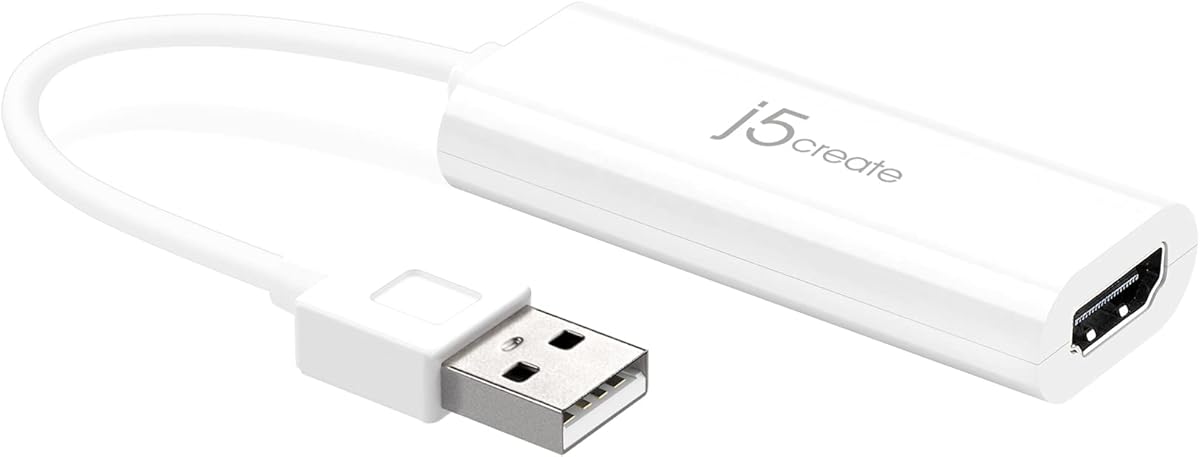
The j5create USB to HDMI Display Adapter adds an extra monitor without needing an expensive internal video card. Rated at 4.5 it delivers 1080P conversion and supports hot-swappable USB for flexible connections. This makes it ideal for users needing to expand screens dynamically.
We may earn a commission when you buy through this link, at no additional cost to you.
Hot-swapping allows adding or removing monitors without rebooting which significantly boosts productivity for multitasking. It enables moving large spreadsheets or files across screens without overlapping windows. This feature is particularly valuable in fields like graphic design accounting and stock markets.
Users must install the driver for the display adapter which adds an initial setup step. While this is standard for USB video solutions it may be inconvenient for immediate use. However once configured the performance and reliability justify this process for most professionals.
This adapter is best for multitasking professionals needing quick and reliable screen expansion. Its ability to handle multiple monitors efficiently makes it a practical choice. For reliable productivity enhancement without hardware upgrades this model stands out as a strong option.
Users can add or remove monitors without restarting the system keeping workflows uninterrupted and efficient.
Adds external display capability without purchasing an internal video card saving costs while maintaining performance.
We may earn a commission when you buy through this link, at no additional cost to you.
Selecting the right adapter requires considering compatibility resolution and additional features to ensure seamless connectivity.
Check whether the adapter supports your OS such as Windows macOS or Linux. Some models are Windows-only while others offer cross-platform support.
Ensure your system meets requirements like DP Alt Mode for USB-C devices to avoid connectivity issues.
Decide between 1080p and 4K based on your display needs. Higher resolutions provide clearer visuals but may require stronger hardware support.
Look for refresh rates like 60Hz for smooth motion especially if viewing videos or using the adapter for presentations.
Some adapters require driver installation which adds setup time but enables more features. Others offer plug-and-play functionality for immediate use.
Consider if your environment restricts driver installation due to security policies or administrative controls.
Determine if you need single HDMI or multiple outputs for dual monitor setups. USB-A and USB-C options vary by device type.
Ensure the adapter includes necessary ports such as charging connectors if you plan to charge devices simultaneously.
Look for sturdy materials like aluminum or nylon braiding to protect against wear during travel or frequent use.
Check warranty terms to ensure long-term protection against defects or performance degradation over time.
Confirm if the adapter supports audio output via HDMI or includes separate jacks for microphone and earphones.
Audio capabilities are crucial for video conferencing or media consumption on external displays.
Compare prices relative to features offered such as multi-monitor support or 4K resolution to find the best value.
Avoid overpaying for unnecessary features if basic 1080p functionality meets your current requirements.
Choose reputable brands known for reliability and customer support to minimize risks of faulty hardware or poor service.
Read user reviews to gauge real-world performance and compatibility issues not listed in specifications.
First plug the USB end of the adapter into your computer's available port then connect the HDMI cable to your monitor or TV. Ensure your display input source matches the connected HDMI port.
If drivers are required install them before connecting the adapter to avoid errors. Restart your system if prompted and select the desired display mode via system settings.
Store the adapter in a cool dry place when not in use to prevent moisture damage. Avoid bending the cables excessively to maintain signal integrity and prolong cable lifespan.
No only some models support macOS while others are Windows-only. Always check the product specifications for OS compatibility before purchasing to ensure it works with your device. Some adapters require DisplayLink drivers for Mac support.
Only adapters supporting 4K resolution at 60Hz can play high-definition 4K video smoothly. Basic models may limit output to 1080p. Verify resolution specs and your device capabilities before buying to ensure desired quality.
Many adapters require driver installation for full functionality. Some offer plug-and-play for basic use. Check product details to see if drivers are mandatory for your operating system and desired features.
Most standard adapters do not support DRM-protected content like Netflix. They may work for other streaming apps or mirroring. Check DRM limitations in the product description before purchase.
Only adapters with a dedicated charging port allow simultaneous charging and display output. Standard models usually do not support this. Look for 2-in-1 designs if charging while in use is required.
Most single adapters support one external monitor. Dual monitor adapters exist but cost more. You can connect multiple adapters if your computer has enough USB ports and driver support.
Most adapters recommend USB 3.0 for optimal performance though some work with USB 2.0 at lower resolutions. For 1080p or higher always use USB 3.0 to avoid lag or resolution limits.
Warranties range from 18 months to 3 years depending on brand and model. Higher-priced adapters often offer longer coverage. Check terms to ensure protection against defects during expected usage periods.
Choosing the right Flash Drive to HDMI Adapter depends on your specific needs regarding operating system resolution and budget. Whether you require a simple 1080p connection or advanced multi-monitor capabilities there is a model designed for your setup.
Prioritize compatibility and driver requirements to ensure smooth integration with your devices. High-rated options like StarTech or BENFEI offer proven reliability across various user scenarios and professional demands.
Always verify current pricing and availability before purchase as these can change frequently. By carefully evaluating features against your workflow requirements you can confidently select an adapter that enhances productivity and visual experience.