
BENGOO Gaming Mouse Wired with RGB Backlit
4.6Editor score
Four adjustable DPI levels
Six ergonomic buttons
Multi-color RGB lighting
Discover the top 10 Light Up LED Mouse models compared by performance, comfort, and lighting features to help you choose the perfect gaming or office accessory
Finding the right Light Up LED Mouse can transform your daily computing experience by adding style and functionality to your setup. Whether you need precise tracking for gaming or quiet clicks for office work, these devices offer versatile options. The best models combine ergonomic design with customizable lighting to reduce fatigue and enhance productivity during long sessions.
We evaluated ten leading Light Up LED Mouse options based on durability, connection stability, and user comfort. Our comparison focuses on key features like DPI adjustability, battery life, and silent click mechanisms. Each product was assessed for compatibility across Windows and Mac systems to ensure seamless integration with your existing hardware without requiring complex software installations.
Every pick in this guide highlights specific strengths such as wireless freedom, RGB aesthetics, or budget-friendly value. You will find detailed insights into how each mouse performs under real-world conditions. Note that prices fluctuate regularly, so check current listings before purchasing to secure the best deal for your specific needs and preferences.
4.6Editor score

4.3Editor score

4.5Editor score
This side-by-side comparison showcases the top ten Light Up LED Mouse models available today. Each entry highlights essential specifications to help you quickly identify the right fit for your workflow or gaming rig without sifting through lengthy technical manuals.




The BENGOO Gaming Mouse Wired offers exceptional value for users seeking a Light Up LED Mouse without breaking the bank. With a solid 4.6 rating, it delivers reliable performance for both gaming and daily tasks. Its customizable RGB backlighting adds a vibrant touch to any desk setup.
We may earn a commission when you buy through this link, at no additional cost to you.
Key strengths include four adjustable DPI settings ranging from 1200 to 3600, allowing precise control over cursor speed. The six-button layout supports quick navigation in games or workflows, while the ergonomic design ensures comfort during extended use. The skin-friendly material prevents slipping and reduces hand fatigue effectively.
While the wired USB connection limits mobility compared to wireless options, it ensures zero lag and consistent power. The lack of dedicated Mac software means full feature access is best on Windows systems. These trade-offs are acceptable given the low cost and immediate plug-and-play usability.
This mouse is ideal for students or budget-conscious gamers who prioritize function over advanced wireless features. It stands out as a practical entry point into illuminated peripherals. We recommend it for those needing a dependable, colorful mouse at a minimal investment.
The multi-color lights match personal style and create an immersive gaming environment that enhances visual appeal during late-night sessions.
Designed to fit naturally under the palm, this mouse reduces strain and promotes a relaxed hand posture for hours of use.
We may earn a commission when you buy through this link, at no additional cost to you.
This Wireless Gaming Mouse Rechargeable balances functionality and convenience with a robust 4.3 rating. Its standout feature is the ability to switch between wireless and wired modes while charging, ensuring uninterrupted use. The seven-color LED light provides a visually stunning workspace experience.
We may earn a commission when you buy through this link, at no additional cost to you.
The silent click buttons make it perfect for quiet environments like libraries or offices where noise can be disruptive. Adjustable DPI levels up to 2400 cater to varied precision needs, and the ergonomic shape minimizes hand fatigue during long sessions. The included USB receiver stores neatly inside the mouse body.
Battery life drops when lights are on, but users can toggle them off for extended periods up to 25 days. The receiver placement requires careful handling to avoid loss. These minor issues are outweighed by the flexibility and modern features offered for the price.
Ideal for professionals or gamers who value silence and portability, this model excels in hybrid work setups. It is a top pick for those needing a reliable Light Up LED Mouse that adapts to different daily demands without sacrificing performance.
Noiseless clicks ensure you can work or game without disturbing others around you, making it suitable for shared spaces.
Advanced power management allows weeks of use on a single charge, reducing downtime and the need for frequent recharging.
We may earn a commission when you buy through this link, at no additional cost to you.
The RGB Light up Wired Gaming Mouse stands out with premium build quality and a 4.5 rating. Its unique laser carving and four-layer surface coating provide a distinctive look and tactile feel. The seven-color breathing light adds a dynamic flair to any desk.
We may earn a commission when you buy through this link, at no additional cost to you.
Constructed with metal flanking and chassis, this mouse resists drops and shocks better than standard plastic alternatives. The ergonomic design ensures a comfortable palm fit, while four adjustable DPI settings up to 3200 allow fine-tuned control for precision tasks or gaming.
As a wired device, it lacks wireless freedom but guarantees stable tracking with no signal dropouts. The weight might feel heavy for some users, but it contributes to stability. These features justify its premium positioning for those prioritizing durability and aesthetics.
Perfect for enthusiasts wanting a rugged, stylish Light Up LED Mouse, this model delivers long-term reliability. It is an excellent choice for gamers and professionals who need a dependable mouse that withstands heavy use while maintaining high performance.
Metal components and laser carving enhance durability and provide a unique aesthetic that sets it apart from common plastic models.
Up to 3200 DPI allows rapid cursor movement and precise targeting, ideal for fast-paced gaming or detailed design work.
We may earn a commission when you buy through this link, at no additional cost to you.
The HOTLIFE Wireless Mouse Slim combines portability with LED lighting, earning a 4.4 rating. Its dual-mode connectivity supports both Bluetooth and 2.4G wireless, offering flexibility across devices. The slim design makes it easy to slip into a laptop bag for travel.
We may earn a commission when you buy through this link, at no additional cost to you.
A dedicated desktop return button enhances navigation efficiency, while silent clicks prevent distractions during meetings. The rechargeable battery lasts up to 10 days, balancing performance with convenience. The LED lights add a touch of fun without overwhelming the minimalist look.
DPI options are more limited than gaming models, suiting general office use rather than intense gaming. Users must remember to charge it via the included cable. These factors make it a strong contender for mobile professionals needing style and simplicity.
Ideal for frequent travelers or office workers, this Light Up LED Mouse delivers clean design and reliable connectivity. It is recommended for users who value portability and a clutter-free workspace with essential modern features.
Switch between Bluetooth and USB receiver effortlessly to connect to various devices without compatibility issues or driver needs.
A slim profile ensures the mouse fits easily into bags, making it perfect for users on the go who need consistent performance.
We may earn a commission when you buy through this link, at no additional cost to you.
This Gaming Mouse Wired offers a balanced mix of performance and affordability with a 4.5 rating. The unique breathing light design creates an immersive atmosphere for gaming sessions. Four adjustable DPI settings provide precise control tailored to different tasks.
We may earn a commission when you buy through this link, at no additional cost to you.
Six buttons support versatile functionality, allowing quick mapping for shortcuts or game actions. The ergonomic shape fits comfortably in the hand, reducing strain during long periods of use. It works seamlessly across Windows and Mac systems without additional software.
While the build is standard plastic and the cable limits mobility, the performance remains consistent and responsive. Some users may find the cord slightly long for smaller desks. These are minor inconveniences given the overall value and feature set.
Great for gamers or casual users wanting a Light Up LED Mouse with solid specs at a reasonable price. It is a practical choice for those seeking reliability and aesthetic appeal without complicated setup requirements.
The breathing LED effect enhances focus and enjoyment during games by creating a dynamic visual environment that matches game intensity.
Plug and play functionality means no drivers are needed, allowing instant use across multiple operating systems and devices.
We may earn a commission when you buy through this link, at no additional cost to you.
VersionTECH delivers a versatile gaming mouse with a 4.4 rating and colorful RGB lighting. The 2.4G wireless connection ensures smooth signal transmission with minimal lag during gameplay. Silent clicks make it suitable for shared workspaces or quiet study areas.
We may earn a commission when you buy through this link, at no additional cost to you.
Three DPI levels offer flexibility for different tasks, while the ergonomic shape enhances comfort over time. The rechargeable battery reduces environmental waste compared to disposable cells. Auto sleep mode helps conserve power when the device is idle.
The LED lights consume more battery life, so turning them off extends usage time significantly. Users with USB-C only devices need an adapter, which is not included. These small caveats are manageable for the functionality and style provided.
This Light Up LED Mouse suits gamers or office workers needing a quiet, colorful wireless option. It is recommended for those valuing reliability and modern aesthetics in a budget-friendly package.
Quiet buttons prevent distractions for others around you, allowing focused work or gaming without noise interruptions.
Advanced wireless technology ensures consistent performance up to 33 feet, making it reliable for various setups.
We may earn a commission when you buy through this link, at no additional cost to you.
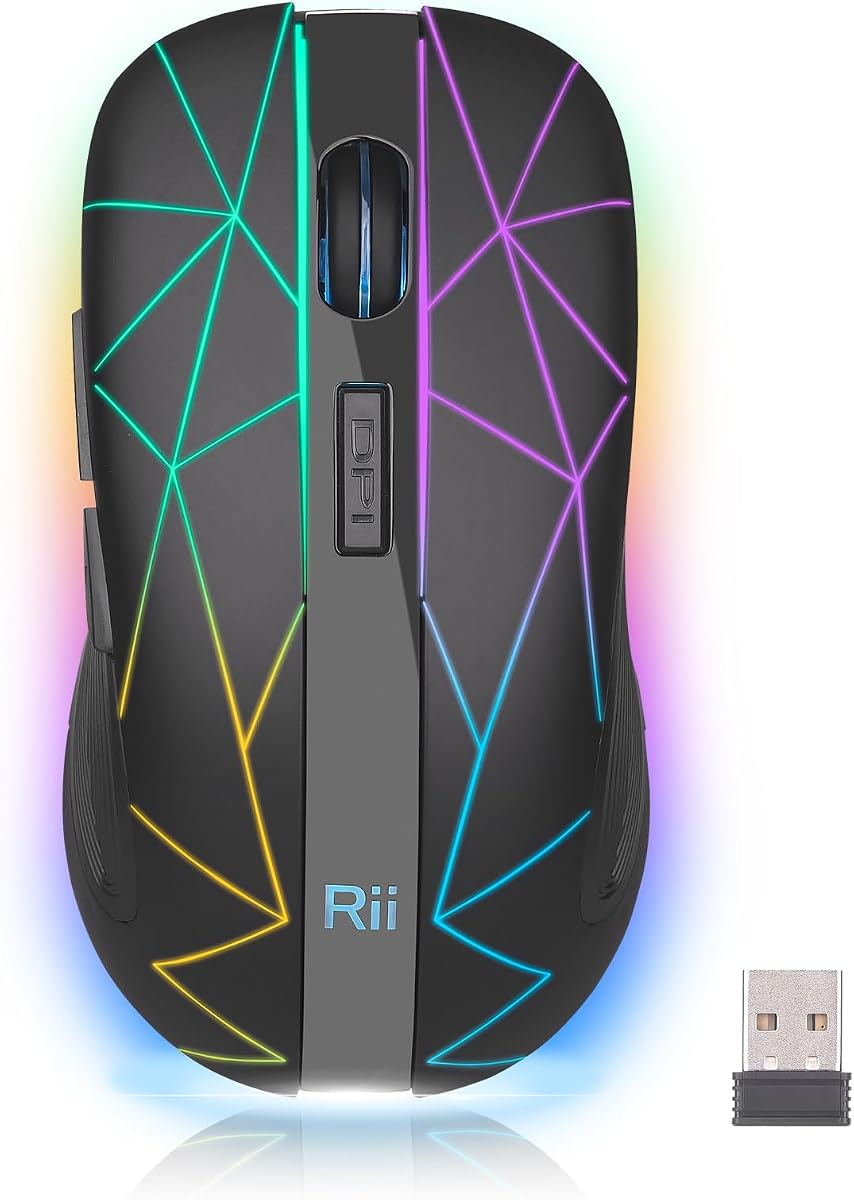
The Rii Wireless Mouse combines portability with RGB lighting, rated 4.4 for performance. Its compact size makes it ideal for travel or small workspaces. The ergonomic contour fits naturally in the hand for comfort.
We may earn a commission when you buy through this link, at no additional cost to you.
A seven-color RGB backlight changes randomly to create a fancy atmosphere. Adjustable DPI levels support various tasks from browsing to gaming. The lithium battery lasts long thanks to intelligent sleep mode activation after five minutes of inactivity.
The small form factor may feel cramped for users with large hands. Battery drains faster when lights are active, but the auto-sleep feature mitigates this. These trade-offs are acceptable for a highly portable solution.
Perfect for travelers or minimalist setups, this Light Up LED Mouse offers great mobility. It is recommended for users needing a small, stylish mouse that delivers reliable performance wherever they go.
Compact dimensions ensure the mouse fits in any bag, making it convenient for mobile professionals and students.
Auto sleep mode extends battery life significantly, ensuring the device is ready for use when needed without frequent charging.
We may earn a commission when you buy through this link, at no additional cost to you.
The TENMOS M2 Wireless Gaming Mouse provides a smooth user experience with a 4.4 rating. Its soft LED lighting creates a cool atmosphere without being too bright for work areas. Silent clicks help maintain focus by reducing noise.
We may earn a commission when you buy through this link, at no additional cost to you.
Three CPI levels up to 2400 ensure precise tracking across different surfaces. The ergonomic shape supports long sessions without hand fatigue, and the skin-friendly material enhances grip. It connects reliably via 2.4G wireless technology.
Users must manually toggle the light switch if they prefer no illumination, which adds a small step. The mouse can be used while charging but requires a cable. These minor details do not detract from its solid overall performance.
Ideal for quiet environments and daily tasks, this Light Up LED Mouse blends style and comfort. It is a strong choice for users who prioritize silent operation and ergonomic support in a wireless device.
Noiseless clicking is perfect for shared workspaces, ensuring your actions do not disturb colleagues or family members.
Designed to fit the natural curve of the hand, reducing strain during extended periods of computer use.
We may earn a commission when you buy through this link, at no additional cost to you.
TENMOS V7 delivers vibrant visuals and functionality with a 4.5 rating. The rainbow breathing light adds a dynamic element to your workspace. Silent clicks ensure a quiet environment for focused work.
We may earn a commission when you buy through this link, at no additional cost to you.
Three CPI settings up to 2400 provide precise cursor control for various needs. The rechargeable battery supports long-term use, with power-saving sleep mode after ten minutes of inactivity. Universal compatibility covers most laptop and computer systems.
Turning off the light requires toggling the switch rather than a dedicated off button, which some users may find less intuitive. Initial charging takes time before first use, but this ensures full battery health. These factors are minor relative to the value offered.
Best for users wanting colorful lighting without sacrificing silence, this Light Up LED Mouse is practical and stylish. It is recommended for those seeking a reliable wireless option with excellent tracking performance.
Rainbow LED effects transform any desk into a lively gaming environment, enhancing visual engagement.
Auto sleep mode conserves battery energy, ensuring longer usage between charges without user intervention.
We may earn a commission when you buy through this link, at no additional cost to you.
The Guiheng Dual Mode Bluetooth Mouse offers versatility with a 4.4 rating and unique lightning crackle design. It supports both Bluetooth and 2.4G wireless for flexible device connections. Silent buttons ensure quiet operation suitable for all environments.
We may earn a commission when you buy through this link, at no additional cost to you.
Adjustable DPI levels and ergonomic design provide comfort and control for various tasks. The rechargeable battery and auto-sleep feature extend usage time efficiently. It works well with Windows and Mac systems seamlessly.
The battery drains faster when lights are on, so managing settings is key. The DPI range is more basic compared to dedicated gaming models. These are manageable compromises for a device focused on general use and connectivity.
This Light Up LED Mouse is ideal for users needing multi-device compatibility and a stylish build. It is a smart pick for those wanting a reliable wireless mouse that adapts to different systems without hassle.
Dual connectivity options allow easy switching between laptops and desktops, improving workflow efficiency.
The crackle LED design sets it apart from standard mice, adding a cool visual touch to any desk setup.
We may earn a commission when you buy through this link, at no additional cost to you.
Selecting the right Light Up LED Mouse involves evaluating connectivity, design, and features that match your workflow. This guide breaks down essential factors to simplify your decision.
Decide between wired and wireless based on your needs. Wired mice offer zero lag and constant power but limit movement range. Wireless options provide freedom but require charging and can occasionally experience interference if not properly shielded.
Choose wired for competitive gaming or wireless for office mobility and cleaner desk setups.
DPI determines cursor speed and precision. Higher DPI like 3200 suits gaming or large screens, while lower DPI offers better control for detailed design work. Ensure the mouse allows on-the-fly switching to adapt to different apps quickly.
Look for adjustable DPI buttons for flexibility across various use cases without software changes.
Light Up LED Mouse models vary from fixed colors to programmable RGB. If aesthetics matter, choose customizable options that let you pick patterns or turn lights off to save battery. Breathing or static lights reduce distraction for focus tasks.
Consider lighting modes if battery life or quiet environments are priorities for your daily routine.
Ergonomic shapes reduce hand strain during long sessions. Curved designs fit naturally under the palm, while lightweight mice minimize fatigue. Check if the surface material is skin-friendly to prevent slipping or discomfort.
Prioritize ergonomic designs if you use a mouse for many hours daily to prevent repetitive strain injuries.
Rechargeable wireless mice are more sustainable than disposable battery models. Look for devices offering at least 10 days of usage on one charge. Power-saving features like auto-sleep help extend battery performance between charges.
Select a rechargeable option with smart power management to ensure uninterrupted use without frequent charging.
Silent click technology prevents noise disturbances in quiet environments. If you work in shared spaces or study areas, choose a mouse with noiseless buttons. Standard mechanical clicks provide tactile feedback but can be loud for others.
Opt for silent clicks if you need to maintain a peaceful environment while working or gaming.
Ensure the mouse works with your operating system. Most models support Windows and Mac but check if drivers are needed for full features. Plug-and-play devices save time and avoid software installation complications on your device.
Choose a mouse labeled as universal to ensure smooth operation across Windows, Mac, and Linux platforms.
Price often correlates with build quality and feature depth. Budget-friendly options may have plastic casings, while premium models include metal parts or better materials. Balance cost with expected lifespan and warranty terms for long-term value.
Invest in a model with sturdy construction if you handle your equipment heavily to avoid early replacements.
Start by connecting the device via USB or pairing it using Bluetooth to your computer. Adjust DPI settings immediately to match your preferred cursor speed for daily tasks. Test the scroll wheel and buttons to ensure all functions work before beginning work.
Keep the mouse surface clean to maintain smooth movement and longevity. Wipe the bottom gently with a soft cloth to remove dust that could obstruct the sensor. Store it in a dry place to avoid moisture damage that can affect internal electronics.
Recharge regularly to ensure battery health remains optimal. If using a wireless model, toggle off the LED lights when not needed to extend runtime. Replace the mouse if tracking issues persist after cleaning to avoid frustration during critical tasks.
Battery life varies by model and usage patterns. Rechargeable wireless mice typically last up to 25 days with lights off and about 20 days with lights active. Using power-saving features like auto-sleep helps maximize this duration.
Most models listed support macOS without requiring additional drivers. However, some features like custom software may work best on Windows systems. Check product details to confirm full compatibility with your specific Mac version.
Yes, most Light Up LED Mouse options include a switch to toggle lights off. Disabling the lights significantly extends battery life on wireless models. Some devices may still show a small indicator for status purposes.
DPI levels between 800 and 1600 are ideal for standard office tasks. These settings provide balanced speed and precision for browsing or document editing. Adjustable DPI allows quick shifts when you need more control.
Silent click mice use rubber dampeners to reduce sound but maintain tactile feedback. The physical motion feels similar, making them comfortable for daily use. Some users prefer the soft click feel for extended sessions.
Use a soft, dry cloth to gently wipe the sensor on the bottom of the mouse. Avoid liquids or abrasive materials that could damage the surface. Keeping the sensor clean ensures accurate tracking on various surfaces.
Wireless mice with Bluetooth support can connect to many tablets and smartphones. Check that your device has USB OTG or Bluetooth capabilities for pairing. Some models may require a USB-C adapter for direct connections.
We highlighted ten top Light Up LED Mouse models ranging from budget picks to premium options with unique features. Each delivers reliable performance, vibrant lighting, and ergonomic comfort suitable for diverse users. Whether you need silent clicks or high DPI precision, there is a fit for every setup.
Prioritize factors like connectivity, battery life, and build quality when narrowing down choices. A mouse matching your workflow ensures better productivity and comfort over time. Consider your specific needs like portability or durability before making a final selection.
Prices for these accessories change often, so review current listings before buying. Checking recent reviews helps confirm compatibility with your system and ensures you get the best value available. With the right choice, your daily tasks become more efficient and enjoyable.