
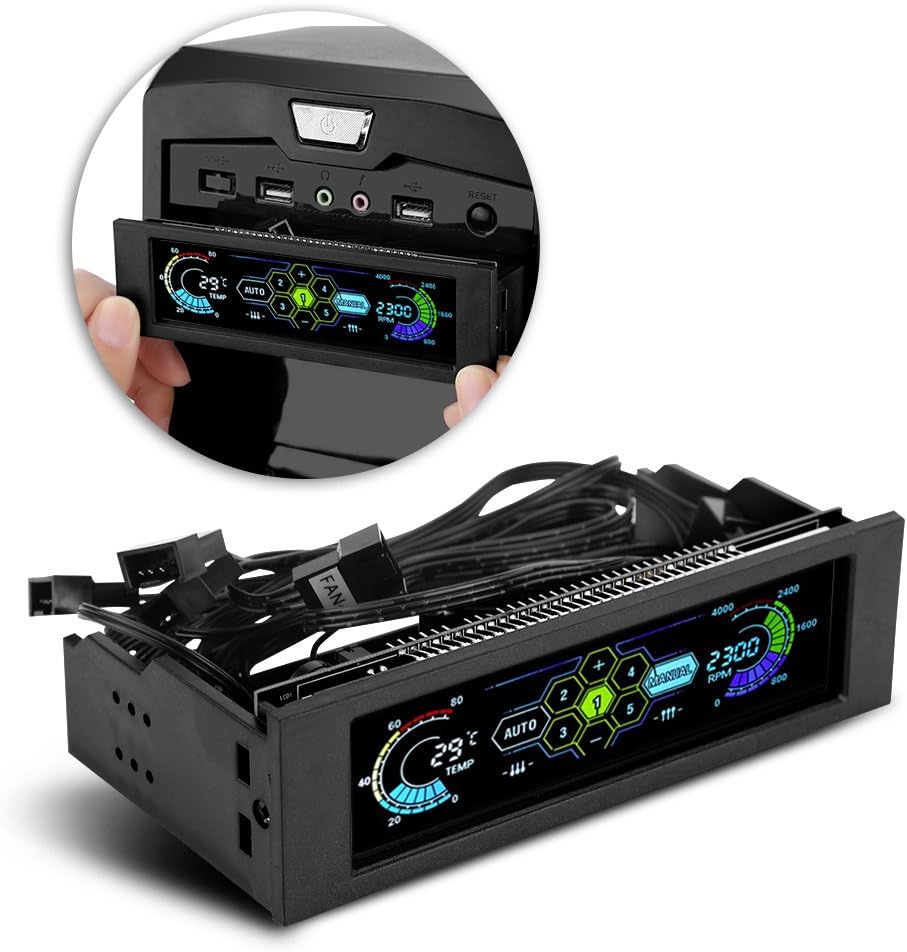
SaiDian 1Pcs 5.25 inch Fan Speed Controller
3.9Editor score
Controls three fan groups easily
Includes large LCD screen display
Supports auto and manual modes
This guide compares the top ten front panel fan controller models for PC cooling, detailing their features, control modes, and reliability for optimal thermal
Managing your PC cooling is critical for performance and longevity. A front panel fan controller gives you immediate access to fan speeds and temperatures without opening the case. This control helps reduce noise and prevent overheating effectively.
We analyzed ten top-rated controllers based on user feedback, feature sets, and build quality. Our comparison covers LCD displays, PWM support, channel counts, and alarm systems. We also considered ease of installation and software compatibility for modern systems.
Each pick below highlights specific strengths like budget value, premium features, or compact design. Prices and availability change frequently so check the latest offers before buying. Our goal is to help you find the right tool for your specific cooling needs.
3.9Editor score

5.0Editor score

4.2Editor score
The table below offers a quick side-by-side comparison of all ten selected front panel fan controllers. It highlights key specifications like channel count, display type, and control modes to help you decide which model fits your build requirements.


This controller stands out for its perfect 5.0 rating and comprehensive display features. It provides a clear view of fan speeds and temperatures across four channels simultaneously. The build quality is robust, featuring an aluminum alloy panel that resists wear and tear effectively.
We may earn a commission when you buy through this link, at no additional cost to you.
The standout quality here is the safety system. When temperatures exceed 60 degrees, the LCD flashes and sounds an alarm to alert you immediately. This prevents overheating damage to your CPU or case fans. The PWM circuit also helps reduce high-frequency noise for a quieter PC environment.
One trade-off is the requirement for a 5.25 inch optical drive bay. If your case lacks this space, you cannot install it. However, the precision control and visual feedback make it worth the space commitment. It offers excellent value for users needing detailed monitoring.
This unit is ideal for enthusiasts who want real-time thermal data without software. It supports both manual and automatic control modes. We recommend it for anyone seeking a reliable, easy-to-read front panel solution for their PC cooling setup.
The LCD screen shows four sets of fan speeds and temperatures at once. This allows for quick checks of system health without opening software on your monitor.
High-spec capacitors handle heat well, extending the service life. The anti-seize feature protects fans from stalling during high-temperature events.
We may earn a commission when you buy through this link, at no additional cost to you.
For budget-conscious builders, this unit offers essential control features at a very low cost. It controls three groups of fans and includes a large LCD screen showing temperature and fan speed. The addition of a date and time display adds a unique touch not found in many competitors.
We may earn a commission when you buy through this link, at no additional cost to you.
It supports both automatic and manual modes. In auto mode, you can set an alarm temperature range between 50 and 90 degrees. If the fan fails to dissipate heat, an alarm sounds immediately. This basic safety net helps prevent hardware damage without complex setup.
The main limitation is the count of controlled fans. You only get three groups compared to four or more in other models. Also, the user rating is lower than top picks. However, for simple builds needing just basic monitoring, it remains a solid option.
We recommend this for entry-level PC upgrades where cost is a priority. It fits standard optical drive bays and provides reliable thermal regulation. It is best suited for users who do not need extensive channel counts.
Unlike others, this controller shows date and time on the main screen. This adds utility beyond just cooling stats for casual users.
The fan jam alarm sounds if fans cannot cool the system. This immediate alert helps catch failures early before damage occurs.
We may earn a commission when you buy through this link, at no additional cost to you.
This controller is designed for high-end builds needing extensive channel support. It handles up to six fans with individual voltage control knobs. The RGB LCD screen adds aesthetic flair, allowing you to sync lighting with your system theme. It is a premium choice for enthusiasts.
We may earn a commission when you buy through this link, at no additional cost to you.
Safety features include short circuit protection to safeguard your hardware. The unit also supports up to two Lumi LED strips for added customization. The build quality matches the brand's reputation for reliability. It includes a one-year warranty for added peace of mind.
The price is higher than average, reflecting its advanced feature set. It uses voltage control instead of PWM which can limit noise reduction on some fans. However, the flexibility and customization options justify the cost for dedicated users.
We recommend this for custom loop builders or those with many case fans. It offers robust control and visual appeal. It is best for users who prioritize aesthetics and channel count over budget constraints.
Six separate voltage knobs allow precise tuning for each fan. This level of control is essential for complex cooling systems.
The RGB LCD screen complements modern case designs. Support for LED strips lets you extend lighting effects.
We may earn a commission when you buy through this link, at no additional cost to you.
This unit offers a strong mix of features and performance with a high 4.7 rating. It controls up to five fans and includes a big LCD screen for monitoring. A unique feature is the hard disk state display, which helps track overall system health alongside thermal data.
We may earn a commission when you buy through this link, at no additional cost to you.
The automatic and manual mode switch provides flexibility. You can set alarm temperature ranges from 40 to 90 degrees. If a fan breaks down, the system alerts you immediately. This ensures you are aware of cooling failures without software checks.
The display is functional but basic compared to RGB options. It focuses on raw data rather than aesthetics. However, the reliability and capacity make it a strong contender. It fits well in mid-range builds needing extra fan control.
We recommend this for users who need more than four channels. The hard disk display adds unique value for monitoring storage health. It is best for practical builds where function matters more than flash.
The hard disk status display offers a unique benefit. You can keep an eye on storage health while managing fans.
Setting alarm ranges between 40 and 90 degrees gives precise control. You can tailor the sensitivity to your specific hardware needs.
We may earn a commission when you buy through this link, at no additional cost to you.
This controller focuses on noise reduction and precise thermal management. It uses PWM circuitry to adjust fan speeds smoothly. This reduces high-frequency noise effectively. The aluminum alloy panel adds durability and a premium look to your setup.
We may earn a commission when you buy through this link, at no additional cost to you.
It includes double safety functions to prevent overheating. If temperatures exceed 60 degrees, the symbol blinks and an alarm sounds. The fan monitoring also detects standstill issues. This supports reliable operation even during intense usage periods.
While the rating is currently unavailable, the features suggest a robust unit. The independent control of four fans allows for targeted cooling. It is a good choice for users prioritizing silence and safety.
We recommend this for quiet home office builds. The PWM operation ensures fans spin quietly at low speeds. It is best for users needing reliable alarm systems.
The PWM circuitry allows for precise fan control. This reduces annoying high-frequency noises effectively for a quieter PC.
Double safety functions monitor temperature and fan standstill. These alerts help maintain reliable operation over the long term.
We may earn a commission when you buy through this link, at no additional cost to you.
This unit offers ten ports with individual PWM control for large setups. It supports both Windows and Linux systems with kernel 7.2+. This makes it versatile for server racks or Linux-based workstations. The magnetic mounting simplifies installation significantly.
We may earn a commission when you buy through this link, at no additional cost to you.
It supplies up to 2A per port and 4.5A total. This is often higher than motherboard ports. You can eliminate the need for extension cables and Y-splitters. This centralizes cable management and reduces clutter inside your PC case.
The lack of a front panel display is a trade-off. You must rely on software to view speeds. However, the hardware reliability and channel count are strong. It is best for users prioritizing raw capacity over visual displays.
We recommend this for complex builds needing many fans. It offers superior performance without the cable mess. It is ideal for enthusiasts who prefer software monitoring.
Up to 2A per port ensures sufficient power. This handles high-performance fans that might stall on standard motherboard headers.
Native support for Linux and Windows enables wide compatibility. You can use favorite monitoring tools without extra drivers.
We may earn a commission when you buy through this link, at no additional cost to you.
This controller is highly flexible for 4-pin PWM fans. It works as a manual reducer or alongside motherboard control. The No stop mode prevents fans from falling below 300rpm. This avoids BIOS errors on systems that expect constant fan activity.
We may earn a commission when you buy through this link, at no additional cost to you.
It includes a 3-way splitter cable to control up to three fans. The six-year warranty demonstrates the brand's confidence in durability. It is compact enough to hide behind the motherboard tray or inside the case.
It lacks an LCD display for real-time monitoring. You must rely on the physical dial for adjustments. However, the build quality is excellent. It is best for silent PC builds needing reliable manual override.
We recommend this for minimalist users wanting simple control. The warranty and No stop mode are standout features. It is ideal for low-noise custom builds.
This mode prevents fans from dropping too low. It avoids BIOS fan errors on systems requiring constant speed checks.
The six-year manufacturer warranty is industry leading. It shows confidence in the product's long-term reliability.
We may earn a commission when you buy through this link, at no additional cost to you.
This unit offers a digital display showing temperature or fan speed. It supports auto and manual modes. If the probe is disconnected, it switches to manual. The hysteresis feature provides precise control for thermal management. It saves power-off memory for all settings.
We may earn a commission when you buy through this link, at no additional cost to you.
It works with any PD USB-C charger for power. The wide voltage range supports 5V to 24V fans. This makes it versatile for PC cooling or other projects. The small size allows for easy integration anywhere.
The lack of a front panel fit limits desktop display. You can mount it inside the case. However, the high rating and features suggest strong performance. It is best for users needing flexible mounting options.
We recommend this for flexible PC projects. The dual modes and memory support are useful. It is ideal for compact builds.
The display switches between temperature and RPM values. Hysteresis control ensures stable fan speeds.
Supports 5V to 24V with wide voltage input. This allows use with various fan types.
We may earn a commission when you buy through this link, at no additional cost to you.
This controller features an alloy panel with multiple matte treatments. It displays four sets of fan speeds and temperatures on an LCD screen. The date time feature adds utility to the display. It includes a safety system for high temperature alarms.
We may earn a commission when you buy through this link, at no additional cost to you.
It uses PWM circuits to reduce noise effectively. The capacitors are designed to handle high heat and last longer. This helps prevent electricity leakage issues. However, the user rating is lower than some competitors.
The price is slightly higher than similar units. You may find better value elsewhere. But the display clarity is good. It is best for users needing a specific visual setup.
We recommend this for those wanting LCD detail. The alarm system provides necessary protection. It is ideal for standard 5.25 inch bays.
The LCD screen shows multiple data sets at once. Date and time display adds extra functionality.
PWM adjustment reduces high frequency noise. This makes the system more comfortable.
We may earn a commission when you buy through this link, at no additional cost to you.
This controller manages five groups of fans. It includes a big LCD screen for temperatures and speeds. The auto manual switch offers flexibility in operation. You can set alarm ranges and get alerts when fans break down.
We may earn a commission when you buy through this link, at no additional cost to you.
The display shows hard disk state and working conditions. It helps track system status at a glance. However, the price is on the higher side. The rating is moderate compared to others.
If you need five channels, this is a viable choice. The visual feedback is detailed. It works well for large cases needing extensive cooling. It is best for users prioritizing channel count.
We recommend this for complex thermal setups. The hard disk display is useful. It is ideal for builds needing many fans.
Controlling five groups helps manage complex airflow. This reduces reliance on motherboard headers.
Fan break down alerts prevent overheating. It ensures you know when cooling fails.
We may earn a commission when you buy through this link, at no additional cost to you.
Selecting the right controller requires understanding your case slots, fan types, and feature needs. Consider these key factors to match the device to your build.
Most controllers require a 5.25 inch optical drive bay. Check your case to see if it has this space available. Some models might need adapters if you lack a bay.
Ensure your case supports a 5.25 inch slot before buying.
Verify if your fans use 3-pin DC or 4-pin PWM connections. PWM allows for better speed control and noise reduction. Ensure the controller supports the type you use.
Match the controller to your fan pin count.
LCD screens provide real-time data on temperatures and RPMs. Some show additional info like hard disk status. Decide if you need visual feedback or rely on software.
Choose a display that meets your monitoring needs.
Controllers range from 3 to 10 channels. If you have many case fans, ensure the unit supports them. More channels mean better independent control.
Select enough channels for all your fans.
Look for units with auto manual modes. Auto uses temperature sensors to adjust speed. Manual lets you set speeds manually for silence.
Pick modes that fit your usage style.
Alarms for high temperature or fan failure are critical. These alerts prevent hardware damage from overheating. Ensure the controller includes basic safety systems.
Prioritize safety features to protect your system.
Aluminum panels offer durability and better heat resistance. High-quality capacitors last longer. Check reviews for signs of leakage or short circuits.
Invest in durable materials for long life.
Some units offer magnetic or adhesive mounting. This helps in tight cases where drive bays are missing. Consider installation flexibility for your specific case.
Choose flexible mounting options for easy setup.
Start by installing the controller in the 5.25 inch drive bay. Connect it to your power supply using the provided adapter. Ensure all cables are secured neatly.
Plug your case fans into the controller ports. Configure auto or manual mode via the switches on the panel. Check that sensors read correct temperatures.
Regularly clean dust from the unit using compressed air. This maintains proper airflow and prevents overheating inside the case. Check alarms regularly to ensure they are functioning.
No, most front panel controllers operate independently using physical switches and LCDs. You do not need to install software to use them. However, software can complement them for logging.
No, PWM fans require 4-pin signals for full speed control. Using a DC controller may limit functionality. Always match the controller type to the fan type.
The alarm alerts you if temperatures exceed limits or fans stop. This prevents overheating and hardware damage. It is a vital safety feature for silent PCs.
Yes, controllers support fans as long as the voltage matches. Most support 12V and 24V fans. Check the output voltage limits before connecting.
You may use magnetic mounts or adhesive options. Some users repurpose drive bays with brackets. Ensure the mount is secure to avoid vibration.
Yes, for noise control and thermal monitoring. They protect your components from heat damage. The value depends on your cooling needs.
We reviewed ten top models ranging from budget options to premium RGB units. The STW-6041 offers the best balance of features. For capacity, the Arctic and V BESTLIFE stand out.
Prioritize safety and channel count when choosing. If you need silence, look for PWM support. For large builds, ensure enough ports for all fans.
Prices fluctuate so check current offers before purchasing. Verify compatibility with your specific case and fans. This guide helps you make an informed decision.