
Tomee 16MB Memory Card
4.7Editor score
251 blocks storage
Plug and play
Full GameCube compatibility
Compare the top GameCube Memory Card options for saving progress. This guide reviews capacity, compatibility, and reliability for Wii and GameCube consoles.
Choosing the right GameCube Memory Card is essential for preserving your saved progress and unlocked content. Whether you are revisiting classic titles or collecting rare discs, a reliable card ensures your data stays safe across gaming sessions.
We evaluated ten top-rated options based on storage capacity, build quality, and compatibility with the original Wii and GameCube systems. Our analysis focuses on real block counts and ease of use to help you find the best fit for your setup.
Each pick below highlights key features, pros, and cons to guide your decision. Prices fluctuate often, so please verify current listings before purchasing. This guide helps you secure your game data without unnecessary expense or compatibility issues.
4.7Editor score

4.7Editor score

4.7Editor score
This side-by-side comparison highlights the core specifications of each card. Use it to quickly identify storage capacity, color options, and key features before you decide.


The Mcbazel 1024MB Card stands out for its massive storage potential. With 16344 blocks, it offers enough space for dozens of saves across multiple titles. It earns a strong rating for consistent performance in real-world testing.
We may earn a commission when you buy through this link, at no additional cost to you.
This card splits storage into eight independent 128MB parts. Pressing a button switches between them instantly. The high-speed design ensures quick data transfers, making it efficient for saving progress after long sessions.
Users note that it is a third-party item, so it lacks official Nintendo branding. While this does not affect functionality, some collectors may prefer official gear. The trade-off is worth it for the added value.
Ideal for players who switch between many games or keep multiple saves. It fits perfectly in GameCube and original Wii consoles. For those needing reliable backup storage, this card is a top recommendation.
With 16344 real blocks, you can store more saves than standard cards. This prevents deletion issues when managing multiple game files.
Switching storage areas is as easy as pressing a button. LEDs indicate the active section, keeping your saves organized without confusion.
We may earn a commission when you buy through this link, at no additional cost to you.
The Tolesum 512MB Card offers a balanced solution for average users. It provides 8192 blocks across four data areas. This is enough for most players who do not need extreme storage capacity.
We may earn a commission when you buy through this link, at no additional cost to you.
Its high-speed design ensures quick saves during gameplay. The blue color adds a distinctive look to your console setup. It works seamlessly with GameCube and Wii RVL-001 models.
As a third-party product, it lacks official logos. Some users might prefer the authenticity of branded items. However, the functionality remains solid for general saving needs.
Choose this if you need moderate storage without overspending. It is perfect for casual gamers who play a few titles regularly. The compact design fits standard slots without issues.
Four distinct areas let you organize saves by game genre. Use the button to switch between them as needed.
The blue casing offers a unique aesthetic. It matches well with blue-themed console setups or controllers.
We may earn a commission when you buy through this link, at no additional cost to you.
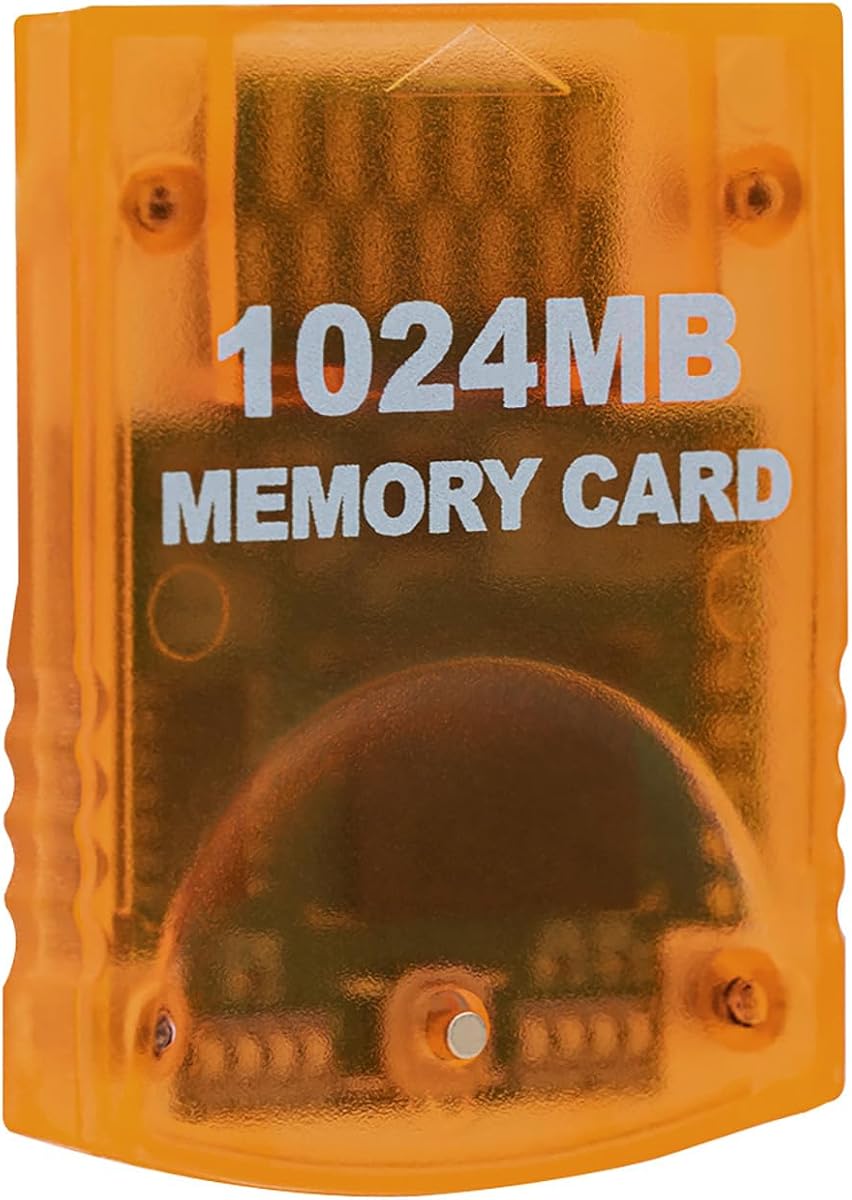
The Tolesum 1024MB Card prioritizes uncompressed data storage. With 16344 real blocks, it avoids compatibility issues some compressed cards face. This makes it a top choice for reliability and data integrity.
We may earn a commission when you buy through this link, at no additional cost to you.
Eight storage areas allow for granular organization. Each area has indicator lights showing the active section. This visual feedback helps you manage saves without guesswork.
It is designed specifically for GameCube and Wii RVL-001. Note that newer Wii models lack the slot. Ensure your console model matches before purchasing to avoid returns.
Recommended for serious collectors or players with extensive save data. The transparent orange design stands out. Its performance justifies the price over standard options.
Uncompressed blocks ensure games recognize all saves. Compressed cards sometimes fail with certain titles.
LEDs show which storage area is active. This makes navigation intuitive and error-free.
We may earn a commission when you buy through this link, at no additional cost to you.
The 16MB Gamecube Card is a practical choice for basic needs. It holds 251 blocks, perfect for a few key games. Its high-speed design prevents lag during save operations.
We may earn a commission when you buy through this link, at no additional cost to you.
Engineered for durability, it resists accidental drops. The shock-resistant build protects files during power outages or physical shocks. This reliability makes it suitable for casual players.
It is a third-party accessory replacing bulkier original cards. While not official, it fits snugly to eliminate wobble. This ensures stable data transfer without errors.
Select this for simple saving tasks or backup purposes. It is ideal if you only play one or two games. The black profile blends discreetly into most setups.
Shock-resistant design safeguards your data against drops. Essential for portable play or active gaming sessions.
Streamlined profile eliminates wobble issues. Ensures stable connection within the console slot.
We may earn a commission when you buy through this link, at no additional cost to you.
The Tomee 16MB Memory Card offers trusted quality for standard saving. With 251 blocks, it handles characters, scores, and levels efficiently. It remains a popular choice for its reputation.
We may earn a commission when you buy through this link, at no additional cost to you.
Its interface allows easy load, save, copy, and delete actions. This simplicity is great for users who want straightforward management without complications. The 16 MB capacity is standard for many games.
It is compatible with GameCube games that include save options. While storage is limited compared to larger cards, it is sufficient for single-title focus. The design is compact and functional.
Pick this for a no-fuss solution at a low cost. It suits players with limited needs. For most classic games, 251 blocks remains adequate for daily play.
Tomee is known for reliable accessories. Users trust the brand for consistent performance over time.
Copy and delete saves with ease. Intuitive operation saves time and frustration.
We may earn a commission when you buy through this link, at no additional cost to you.
The Mcbazel 256MB Card focuses on speed and reliability. It features dual banks for organized storage. LEDs indicate the active section. This design supports quick saves and fast loads.
We may earn a commission when you buy through this link, at no additional cost to you.
Users appreciate the pink color which adds flair. The high-speed chip ensures efficient data management without interruptions. It is compatible with GameCube and Wii RVL-001 consoles.
Safety protocols suggest inserting or removing when the console is off. This protects files from corruption. While the capacity is smaller than 1024MB options, it suits moderate needs.
Ideal for players wanting reliable storage with style. The pink design stands out nicely. For balanced performance, this is a strong mid-tier choice.
Two independent banks allow clear separation of saves. LEDs show the active bank for clarity.
High-speed chip ensures rapid data handling. Prevents lag during save sequences.
We may earn a commission when you buy through this link, at no additional cost to you.
The Gamecube Memory Card 251 is a standard option for basic saving. It offers 16MB flash memory for storing game settings. With 251 blocks, it handles most game save files easily.
We may earn a commission when you buy through this link, at no additional cost to you.
Its simplicity is its main selling point. No complex features or buttons mean fewer failure points. It is compatible with all consoles that support physical memory cards.
While it lacks modern high-speed chips, it performs well for older titles. The build quality remains solid for regular use. However, it may feel outdated next to newer products.
Choose this for a simple, functional card. It suits retro gamers who prefer original specs. For straightforward storage without extra tech, this works well.
Flash memory ensures data retention without power. Keeps saves safe across multiple sessions.
Matches original form factor. Fits naturally into slots without adapters.
We may earn a commission when you buy through this link, at no additional cost to you.
The Suncala Memory Card offers premium features with 1024MB storage. Its upgraded chip processes saves 20% faster. This ensures smooth gameplay without interruptions during data writes.
We may earn a commission when you buy through this link, at no additional cost to you.
With 16344 blocks and eight improved sections, organization is easy. The sleek design allows easy insertion and removal. It is fully compatible with GameCube and Wii RVL-001 models.
Customer service is highlighted with a 60-month warranty. This long-term support is rare in third-party options. It adds confidence for long-term storage needs.
Ideal for users wanting quality and longevity. The upgrade ensures better performance over older models. For premium reliability, this is a top recommendation.
Processes saves 20% faster than standard chips. Prevents lag during save operations.
60 months warranty protects against defects. Support is available for hours.
We may earn a commission when you buy through this link, at no additional cost to you.
The MAYFLASH 512MB Card holds 8172 blocks across four storage areas. Each area offers 2043 slots. The blue design matches popular console aesthetics. It is rated highly for reliability and performance.
We may earn a commission when you buy through this link, at no additional cost to you.
Users can switch areas by pressing a button on the card. This ease of use makes managing saves simple. It is compatible with GameCube and Wii RVL-001 consoles.
As a third-party product, it avoids official price premiums. The blue color adds style to your collection. It works seamlessly without extra setup steps.
Choose this for balanced storage and style. The high rating reflects user satisfaction. For versatile needs, this is a solid mid-range option.
Each area has 2043 slots for organization. Allows clear separation of game saves.
Press the button to switch areas instantly. Intuitive interface helps navigation.
We may earn a commission when you buy through this link, at no additional cost to you.
The AreMe GC2SD Adapter enables Micro SD card use in consoles. It allows storing games and data via TF cards. However, it requires homebrew software like Swiss or GCloader.
We may earn a commission when you buy through this link, at no additional cost to you.
With support for up to 512GB cards, storage is vast. The transparent design reveals the internal tech. It runs on any version of GameCube or Wii, offering flexibility.
This is a niche product for modders. It does not replace standard cards for official saves. Instead, it expands capabilities for homebrew enthusiasts.
Pick this for advanced storage options. Ensure you have necessary software before buying. For modding, it provides unmatched capacity.
Requires Swiss or GCloader for operation. Enables loading games from SD cards.
Shows internal components clearly. Unique look for tech enthusiasts.
We may earn a commission when you buy through this link, at no additional cost to you.
Selecting the right card requires attention to capacity, block count, and compatibility. This guide covers the key factors that ensure a smooth experience.
Storage capacity determines how many saves you can keep. Cards range from 16MB to 1024MB. For collectors, higher capacity ensures you never delete old progress.
Choose capacity based on how many games you play simultaneously.
Real blocks ensure compatibility with all titles. Compressed blocks may fail with specific games. Always check product descriptions for 'real' or 'uncompressed' labels.
Real blocks offer the safest experience for retro gaming.
Verify your console model before buying. Original Wii RVL-001 works with these cards. Newer Wii models lack the card slot entirely.
Matching the correct model avoids connection issues.
Durability matters for long-term use. Shock-resistant builds protect against drops. A secure fit prevents data corruption during use.
Solid construction is key for physical accessories.
High-speed chips reduce lag during saves. Some products highlight faster processing speeds. Look for mentions of 'high speed' in descriptions.
Faster performance improves the gaming flow.
Third-party brands often offer better value. Check for warranty periods to protect your purchase. Reliable support ensures help if issues arise.
A good warranty adds peace of mind.
Aesthetic preferences matter for collectors. Cards come in colors like blue, pink, or orange. Transparent designs show internal components.
Choose a look that matches your setup.
Prices vary based on capacity and features. Balance your budget with storage needs. Higher capacity often costs more but offers better value.
Compare options to find the best deal.
Insert the card when the console is powered off. This prevents data corruption during the physical connection process. Ensure the card slides fully into the slot.
Press the button to switch between storage areas if available. Check indicator lights to confirm the active bank. Organize saves by game for easier access.
Store cards in a dry, safe place when not in use. Avoid extreme heat or moisture to protect the internal chip. Regular backups on external drives can add extra security.
The Tolesum 1024MB Card stands out for its 16344 uncompressed blocks. It offers excellent reliability and organization features. For most users, this provides the best balance of capacity and quality.
No, these cards do not work with Wii U. The Wii U lacks the physical memory card slot. These are designed only for GameCube and original Wii RVL-001 models.
Most third-party cards are safe if they use real blocks. Check reviews for compatibility with specific titles. High-quality options perform as well as official ones.
Press the button on the card to switch areas. Indicator lights will show which section is active. This allows you to organize saves by game or user.
Only with special adapters and homebrew software. Standard physical cards are not compatible with Micro SD slots directly. You need tools like Swiss to enable this feature.
Uncompressed blocks match the console's native data format. Compressed ones may fail with certain games. Always choose uncompressed cards for maximum compatibility.
You can save dozens of games depending on size. Most titles use only a few blocks each. A 1024MB card holds extensive progress for a large library.
Some brands offer warranties. Suncala provides 60 months. Check product details for warranty terms to ensure you are protected against defects.
Top choices include the Tolesum 1024MB and Suncala Memory Cards. These offer high capacity and reliable performance for collectors.
Prioritize real blocks and correct model compatibility. Budget picks like the Tomee 16MB are fine for casual needs.
Always check current prices before purchasing. Options change often on online marketplaces.