
ASUS ROG STRIX X870-I GAMING WIFI
4.2Editor score
110A Per Stage Power
USB4 and WiFi 7 Support
Dynamic OC Switcher Tech
This guide compares the top Itx Motherboards for Amd available in October 2026, evaluating power delivery, connectivity, and thermal performance for small form
Building a compact PC requires careful component selection, especially when choosing Itx Motherboards for Amd. These miniature boards must balance performance with size, offering robust power delivery and essential connectivity without sacrificing speed. Selecting the right model ensures your system runs efficiently within tight thermal constraints.
We analyzed ten leading options based on chipset compatibility, VRM design, and feature sets. Our comparison highlights models supporting the latest AMD Ryzen processors alongside legacy AM4 platforms. Each entry includes detailed specifications to help you match the board to your specific build requirements and budget constraints.
Every pick showcases key strengths and potential trade-offs for small form factor enthusiasts. You will find options ranging from budget-friendly AM4 solutions to high-end AM5 boards with PCIe 5.0 support. Please note that prices and availability change frequently, so verify current listings before purchasing your next build.
4.2Editor score
4.3Editor score

4.3Editor score
This table provides a side-by-side comparison of all ten selected Itx Motherboards for Amd, highlighting their core specifications to help you make an informed decision for your small form factor project.


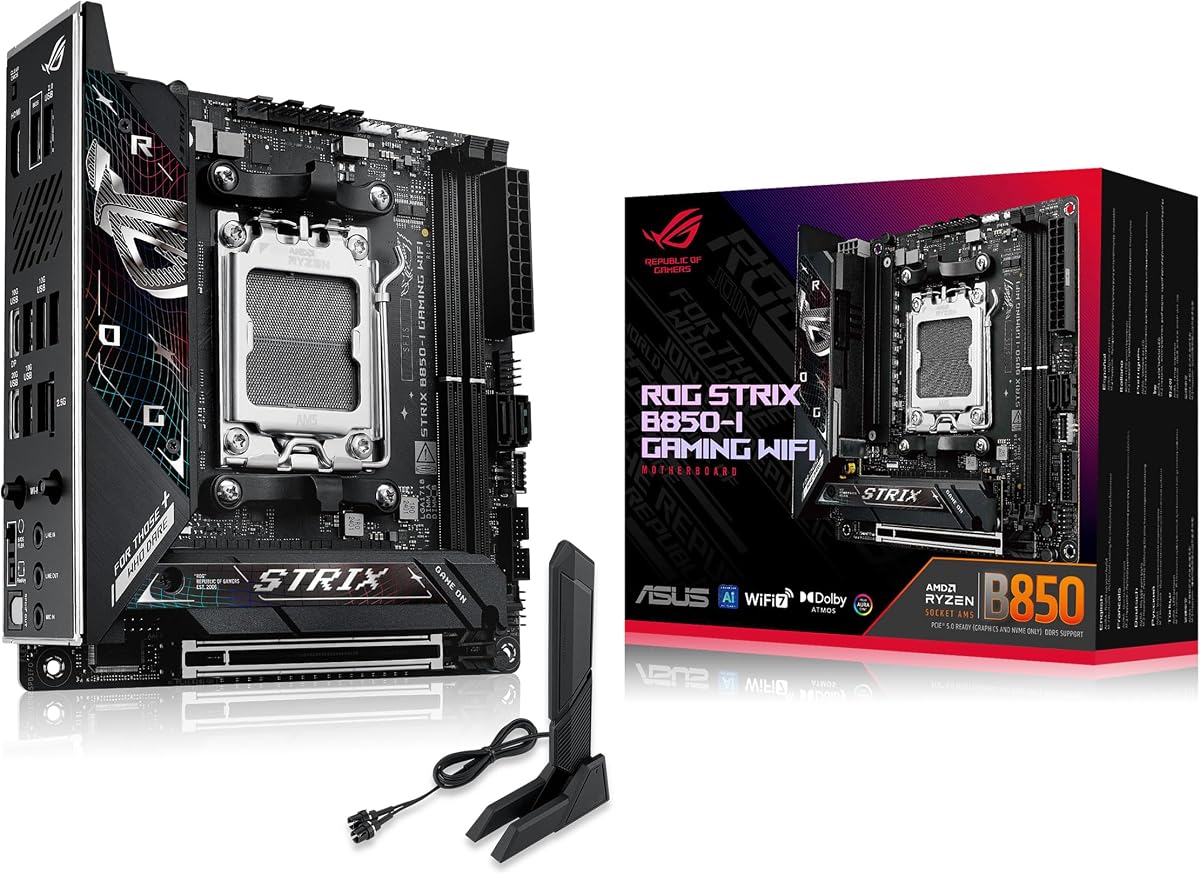
The ASUS ROG Strix B850-I Gaming WiFi stands out as a top choice for enthusiasts seeking high performance in a compact chassis. With a 4.3 star rating from users, it delivers reliable stability and robust features tailored for next-generation Ryzen processors.
We may earn a commission when you buy through this link, at no additional cost to you.
Its 10+2+1 power solution ensures stable voltage delivery even under heavy loads. The inclusion of AI Overclocking and AI Networking II simplifies tuning while maximizing throughput. Two PCIe 5.0 M.2 slots provide ample storage bandwidth for high-speed NVMe SSDs.
Trade-offs include a higher price tag compared to budget options and potential excess features for casual users. However, the premium build quality and future-proof connectivity justify the investment for serious small form factor builders.
This board is ideal for gamers and creators needing top-tier performance without sacrificing desk space. If you prioritize speed and advanced controls, this model warrants strong consideration for your next upgrade.
The robust power stage design supports high-end Ryzen processors efficiently, ensuring consistent performance during intensive tasks.
Dual M.2 slots with PCIe 5.0 support allow for blazing-fast data access and expandability in confined spaces.
We may earn a commission when you buy through this link, at no additional cost to you.
This model represents the pinnacle of AM5 mini-ITX offerings with its X870 chipset and extensive feature set. Designed for advanced AI PCs, it offers cutting-edge connectivity and power management that rivals full-size boards.
We may earn a commission when you buy through this link, at no additional cost to you.
The 10+2+1 power solution rated for 110A per stage provides exceptional stability. Features like Dynamic OC Switcher and Core Flex allow precise control over performance. USB4 support ensures fast data transfer and versatile peripheral connections.
Users may find the price steep and the array of options overwhelming for simple builds. However, those needing maximum bandwidth and future compatibility will appreciate the engineering depth.
Buy this if you demand the latest tech for a compact system. It excels for high-performance workstations and gaming rigs where space is limited but power cannot be compromised.
USB4 and WiFi 7 provide unprecedented speed and wireless performance for modern peripherals and network demands.
AI-driven tools simplify tuning, enabling users to extract maximum performance with minimal manual intervention.
We may earn a commission when you buy through this link, at no additional cost to you.
The ASRock B550M-ITX/AC offers excellent value for builders working with AM4 processors. It supports a wide range of Ryzen CPUs and provides essential features for a compact gaming or office system.
We may earn a commission when you buy through this link, at no additional cost to you.
Its VRM design handles mid-range processors well, and DDR4 speeds up to 4733+ (OC) allow decent memory performance. The board includes DisplayPort and HDMI outputs for versatile display options.
While it lacks the newest AM5 features, its cost-effectiveness makes it a strong contender for budget-focused builds. It balances functionality and affordability effectively.
Choose this board if you are upgrading an existing AM4 system or building a low-cost entry point. It delivers reliable performance without breaking the bank.
This board delivers solid mid-range performance at a fraction of the cost of newer AM5 alternatives.
Support for multiple Ryzen generations ensures you can use existing CPUs or upgrade later without changing the board.
We may earn a commission when you buy through this link, at no additional cost to you.
GIGABYTE B550I AORUS PRO AX brings premium features to the AM4 platform with its advanced thermal design. The 6+2 power phase ensures stable performance for Ryzen 5000 series processors.
We may earn a commission when you buy through this link, at no additional cost to you.
With two M.2 slots and PCIe 4.0 support, storage speed is well-covered. Features like Q-Flash Plus simplify BIOS updates without a CPU installed. RGB Fusion allows customization to match your aesthetic.
The board excels in thermal management and build quality. It is best for those who prefer DDR4 or need an upgrade path for existing AM4 rigs.
Recommended for balanced builds focusing on stability and features. Its combination of connectivity and thermal design makes it a reliable choice for compact PCs.
Extended VRM heatsink and aluminum backplate ensure efficient heat dissipation even in cramped cases.
Dual M.2 slots and 2.5GbE LAN provide ample bandwidth for fast storage and networking.
We may earn a commission when you buy through this link, at no additional cost to you.
ASRock B650I Lightning WiFi offers an accessible entry point into the AM5 ecosystem. It supports Ryzen 9000 series processors and provides high-speed memory and storage options.
We may earn a commission when you buy through this link, at no additional cost to you.
The board features a capable power phase design and PCIe 5.0 M.2 support for future storage upgrades. WiFi 6E ensures reliable wireless connectivity for online gaming and streaming.
While it lacks the extensive feature set of higher-end boards, it delivers core AM5 performance at a competitive price. This makes it ideal for budget-conscious builders looking for longevity.
Select this if you need AM5 compatibility without overspending. It balances performance and value well for standard gaming and productivity tasks.
This board lowers the barrier to entry for AM5 builds, making new processor support accessible.
DDR5 and PCIe 5.0 support ensure the system remains relevant as software and hardware evolve.
We may earn a commission when you buy through this link, at no additional cost to you.
MSI MPG B850I Edge TI WiFi targets enthusiasts with its strong VRM and advanced connectivity. It supports extreme memory overclocking speeds for high-performance computing needs.
We may earn a commission when you buy through this link, at no additional cost to you.
Features like WiFi 7 and 5Gbps LAN ensure the system stays ahead of network trends. The Frozr Guard cooling system maintains thermal efficiency under load.
This board is suitable for those who demand top-tier networking and memory performance. Its premium build quality justifies the cost for serious users.
Invest in this if you need maximum bandwidth and future-proofing. It is an excellent choice for high-end SFF gaming or workstation setups.
5Gbps LAN and WiFi 7 deliver ultra-fast data transfer speeds ideal for large file handling and streaming.
With support up to 8200+ MT/s, this board unlocks full potential for high-speed DDR5 kits.
We may earn a commission when you buy through this link, at no additional cost to you.
GIGABYTE B850I AORUS PRO is designed for users seeking reliability and warranty protection on the AM5 platform. It includes essential modern features like WiFi 7 and PCIe 5.0.
We may earn a commission when you buy through this link, at no additional cost to you.
The board's power design is rated for high-end processors, though thermal management might require careful case selection. EZ-Latch mechanisms simplify installation and maintenance significantly.
While some user feedback suggests thermals could be better, the overall feature set remains competitive. The warranty provides added peace of mind for long-term use.
This is a solid option for those prioritizing manufacturer support and warranty. It suits builders who value stability and service over absolute top-tier specs.
A 5-year warranty offers significant confidence in the board's longevity and manufacturer support.
EZ-Latch mechanisms reduce effort when installing M.2 drives and graphics cards in tight cases.
We may earn a commission when you buy through this link, at no additional cost to you.
GIGABYTE X870I AORUS PRO ICE combines strong power delivery with distinct aesthetics. The ICE edition features a white aesthetic ideal for high-contrast builds.
We may earn a commission when you buy through this link, at no additional cost to you.
With 110A Smart Power Stages, it supports demanding Ryzen processors effectively. Front USB-C allows for convenient peripheral access, adding usability to compact systems.
User ratings are mixed, possibly due to price-to-performance balance. However, the warranty and build quality remain strong selling points for dedicated enthusiasts.
Choose this for a visually striking system with robust power. It suits users who value aesthetics alongside technical performance.
The ICE edition offers a premium look that stands out in transparent cases and builds.
Front USB-C provides quick access for peripherals like webcams or drives.
We may earn a commission when you buy through this link, at no additional cost to you.
Gigabyte A520I AC serves as a reliable entry-level option for AM4 systems. It supports Ryzen 3000 series and provides essential connectivity without unnecessary complexity.
We may earn a commission when you buy through this link, at no additional cost to you.
With Intel WiFi and Bluetooth integrated, it eliminates the need for add-in cards. Three display outputs offer flexibility for multi-monitor setups.
While it lacks advanced features like PCIe 4.0, it remains a cost-effective choice for basic workloads and media centers.
This board is perfect for budget builds or office PCs. It delivers stable performance where cost is a primary concern.
Built-in Bluetooth and WiFi simplify cabling and setup for wireless peripherals.
Multiple video ports allow for various monitor configurations without needing extra hardware.
We may earn a commission when you buy through this link, at no additional cost to you.
ASRock A520M-ITX/AC provides a stable foundation for budget AM4 builds. It supports 3rd Gen Ryzen processors and offers DDR4 speeds sufficient for most tasks.
We may earn a commission when you buy through this link, at no additional cost to you.
Audio quality is handled by a capable codec, ensuring decent sound for media consumption. Display connectivity includes both HDMI and DisplayPort for versatility.
Although limited by PCIe 3.0, it remains a solid choice for systems not needing extreme storage speeds. Its cost-effectiveness is a major advantage.
Select this for simple office or home theater builds. It balances price and functionality well for non-gaming scenarios.
DDR4 support and stable power stages ensure smooth operation for daily computing tasks.
Future processor support allows for upgrades without replacing the motherboard immediately.
We may earn a commission when you buy through this link, at no additional cost to you.
Selecting the right motherboard involves balancing performance features with physical constraints and budget.
Ensure the motherboard matches your CPU generation. AM5 supports Ryzen 7000 and newer, while AM4 is for older models. Mismatched sockets will prevent the system from booting.
Check the CPU list before buying to confirm your processor is supported. BIOS updates might be needed for newer CPUs on older boards.
VRM quality impacts stability and overclocking. Higher-end boards have more phases to sustain load. Compact boards must manage heat carefully to avoid throttling.
Look for robust VRM designs if using powerful processors. Better cooling and phases mean more stable performance under stress.
AM5 requires DDR5 while AM4 uses DDR4. This choice affects both cost and performance. Check supported speeds to match your RAM kit.
Select memory that aligns with your budget. Higher speeds offer performance gains but may cost more and require better cooling.
PCIe 5.0 M.2 offers the fastest speeds. Ensure your board has enough slots for your needs. SATA ports add flexibility for larger drives.
Prioritize slots based on your usage. Gamers benefit from fast system drives while archivists need more capacity.
USB ports and LAN speeds vary across models. WiFi 7 and USB-C are modern standards to consider. These features impact how you connect peripherals.
Choose boards with ports that match your setup. Enough ports and high speeds reduce the need for extra hubs.
Mini-ITX boards face thermal challenges. Heatsinks and thermal pads protect VRMs. Airflow in your case also matters for long-term stability.
Ensure the board has adequate passive cooling. A well-ventilated case helps maintain performance during long sessions.
Codecs like ALC897 offer decent sound. Audiophiles might prefer dedicated DACs. Integrated audio works well for general use.
Consider your audio needs before buying. Most users will be satisfied with onboard solutions for multimedia.
Prices range from entry-level to premium. Balance features against cost to find value. Expensive boards may offer unnecessary features for basic use.
Determine your priorities before buying. Spend more only on features you will actually utilize.
Install the motherboard carefully to avoid bending pins or dropping screws into the board. Use an anti-static mat to protect components during assembly. Ensure all standoffs are in place to prevent short circuits.
Update BIOS regularly to maintain compatibility with newer CPUs and fixes. Use tools like BIOS Flashback to update safely without a CPU installed. Keep the update file ready on a USB drive.
Monitor temperatures using software tools to detect overheating. Clean dust from heatsinks and case filters regularly. Adequate airflow prevents thermal throttling and extends the motherboard lifespan.
AM4 supports older Ryzen processors using DDR4 RAM. AM5 supports newer Ryzen models using DDR5 RAM and offers PCIe 5.0. AM5 provides better future-proofing but often costs more. Your CPU generation dictates which socket you need.
Most B and X series ITX boards support CPU overclocking. However, thermal limits might restrict high-performance tuning. Check specific board specs to confirm features like unlocked multipliers and VRM cooling.
Two M.2 slots are common and usually sufficient. High-end boards might offer more for massive storage setups. Consider your storage needs and whether you plan to expand later.
Yes, all these boards support standard PCIe GPUs via x16 slots. Ensure your case fits the graphics card you plan to install. Some mini cases limit GPU length significantly.
AM5 performs well with DDR5-6000 speeds. Faster kits exist but offer diminishing returns. Match your RAM speed to your processor profile for best stability.
WiFi is valuable since small cases often lack ethernet ports. WiFi 6E and WiFi 7 provide better speeds and connectivity. Wired LAN is still preferred for gaming latency.
Many boards feature BIOS Flashback to update without a CPU installed. Download the file to a USB drive and follow the manual steps. Check compatibility before starting to avoid bricking.
Yes, cables and components are tighter in small cases. Plan cable routing beforehand to avoid stress. Using flexible cables helps manage airflow and installation.
The ASUS ROG Strix B850-I Gaming WiFi leads as the top choice for balanced high-end performance. Other picks like the GIGABYTE B850I AORUS PRO offer strong value for AM5 users looking for warranty and modern specs.
Prioritize power delivery and compatibility with your CPU to avoid bottlenecks. Thermal management is also critical in small form factor systems to maintain performance.
Always verify current prices and availability before buying as market conditions shift. The right motherboard ensures your compact build runs reliably and stays relevant for years.