
SCRIB3D P1 3D Printing Pen with Display
4.4Editor score
Temperature adjustable for PLA or ABS
Stepless speed control slider
Includes starter colors and stencil book
Discover the top 3D printing pens for kids in 2026. This guide compares safety, ease of use, features, and value to help you choose the perfect creative tool.
Finding the right 3D printing pen for kids can spark creativity and teach valuable STEM skills. These tools transform 2D drawings into tangible objects, encouraging imagination and problem-solving abilities in a fun way.
We evaluated ten leading 3D printing pens based on safety features, ease of use, filament compatibility, and included accessories. Our goal is to highlight options that balance performance with child-friendly design for various age groups.
Each pick below highlights specific strengths like temperature control, nozzle safety, or included project guides. Prices and availability may change over time, so check current listings before making your final purchase decision for your child.
4.4Editor score
4.4Editor score
4.5Editor score
This side-by-side comparison highlights key specifications across all ten selected 3D printing pens. Focus on safety features, filament type compatibility, control displays, and included accessories to find the best match.


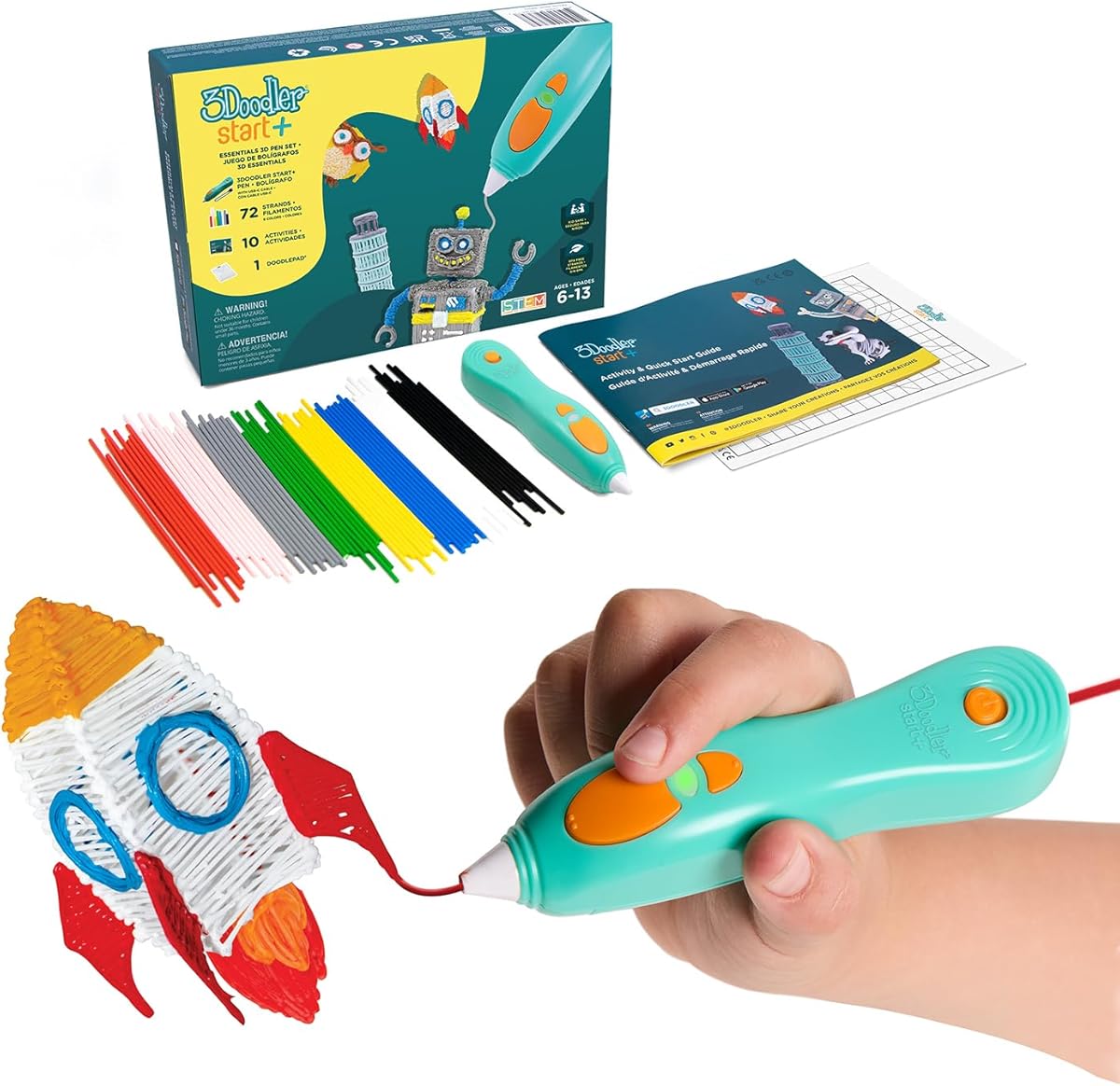
The 3Doodler Start+ Essentials stands out as the safest option for younger kids aged 6 and up. With no hot parts, it eliminates burn risks entirely while encouraging creative 3D art at home.
We may earn a commission when you buy through this link, at no additional cost to you.
This kit includes everything needed to start immediately, featuring 72 strands of mixed-color filament and a DoodlePad for practice. The upgraded experience offers 50% faster charging and more stencils for varied projects.
While it uses proprietary filament which might limit variety, the safety features make it worth the trade-off. The stand-by mode helps save battery life during pauses in creative sessions.
Parents seeking a worry-free introduction to 3D printing will find this the top choice. It bridges the gap between digital screen time and hands-on STEM learning effectively.
The nozzle and plastic can be touched safely without burn risks, making it ideal for children who may accidentally touch hot surfaces.
Includes activity guides and mixed-color plastics so kids can start learning STEM concepts instantly without needing extra purchases.
We may earn a commission when you buy through this link, at no additional cost to you.
The SCRIB3D P1 offers an accessible entry point for families wanting a reliable 3D printing pen without a high price tag. It balances cost with features that improve spatial thinking and creativity.
We may earn a commission when you buy through this link, at no additional cost to you.
With a stepless speed slider, users can adjust flow precisely for intricate projects or faster infill work. The ceramic nozzle ensures safety and performance while preventing common clogging issues.
The warm-up period requires a few minutes before use, which is typical for this class. It comes with 3 starter colors and a guide to ensure immediate fun upon arrival.
Budget-conscious buyers looking for a versatile pen that grows with skill levels should consider this model. It supports both PLA and ABS filaments for expanded future possibilities.
The stepless slider allows optimal speed adjustment whether you are doing slow intricate detailing or faster infill work.
Designed for quality family time, this pen helps improve artistic skills and creativity for the whole household.
We may earn a commission when you buy through this link, at no additional cost to you.
The MYNT3D Professional brings advanced control to kids ready for more detailed 3D projects. Its OLED display lets users monitor temperature closely to achieve wide variety of effects.
We may earn a commission when you buy through this link, at no additional cost to you.
Temperature is adjustable in 1-degree increments from 140 to 230 C, providing fine-tuning capabilities. This precision helps in mastering different material behaviors and textures.
The adjustable feed lets you regulate speed and flow for optimal control while drawing. However, this complexity might be better suited for older kids or adults guiding them.
For those seeking high performance and control, this pen delivers exceptional results. It is an excellent tool for serious budding engineers or artists wanting detailed outputs.
Adjustable increments allow optimal fine-tuning to help achieve different effects and material consistency.
A large OLED display helps you monitor temperature of material to ensure smooth creation processes.
We may earn a commission when you buy through this link, at no additional cost to you.
The MYNT3D Super focuses on durability with its ultrasonic sealed nozzle that resists clogging. This makes it reliable for extended creative sessions without interruption.
We may earn a commission when you buy through this link, at no additional cost to you.
Stepless speed slider allows you to regulate flow for optimal control of material while drawing. It is designed for kids, artists, and engineers alike due to its versatile build.
Without a display screen, users rely on presets but gain simplicity in daily use. The slim ergonomic touch pen ensures comfort during long periods of 3D drawing.
This pen is a solid choice for those valuing reliability and ease of maintenance. It offers a balanced experience for turning ordinary drawings into 3D art.
The ultrasonic sealed nozzle provides market leading durability and is nearly clog-proof for seamless operation.
Great for kids, artists, and engineers of all ages who want consistent performance.
We may earn a commission when you buy through this link, at no additional cost to you.
The SCRIB3D Advanced is designed for making accurate and creative 3D models and structures. It features variable speed control and a large LCD screen to monitor heat settings.
We may earn a commission when you buy through this link, at no additional cost to you.
The soft touch surface is designed for optimal comfort while holding the pen. It ensures you have the correct settings to make sure you produce accurate models.
While it offers 8 different speed options for regulation, it may require time to master compared to simpler pens. The range of engineering enhancements ensures a smooth and accurate experience.
Creative kids ready for more precise work will appreciate the control this pen offers. It is a practical tool for moving beyond basic doodling into structured design.
Ergonomic curvature intended to fit your hand for the most comfortable 3D drawing experience on the market.
Large LCD screen helps monitor heat and ensure you have the correct settings for quality results.
We may earn a commission when you buy through this link, at no additional cost to you.
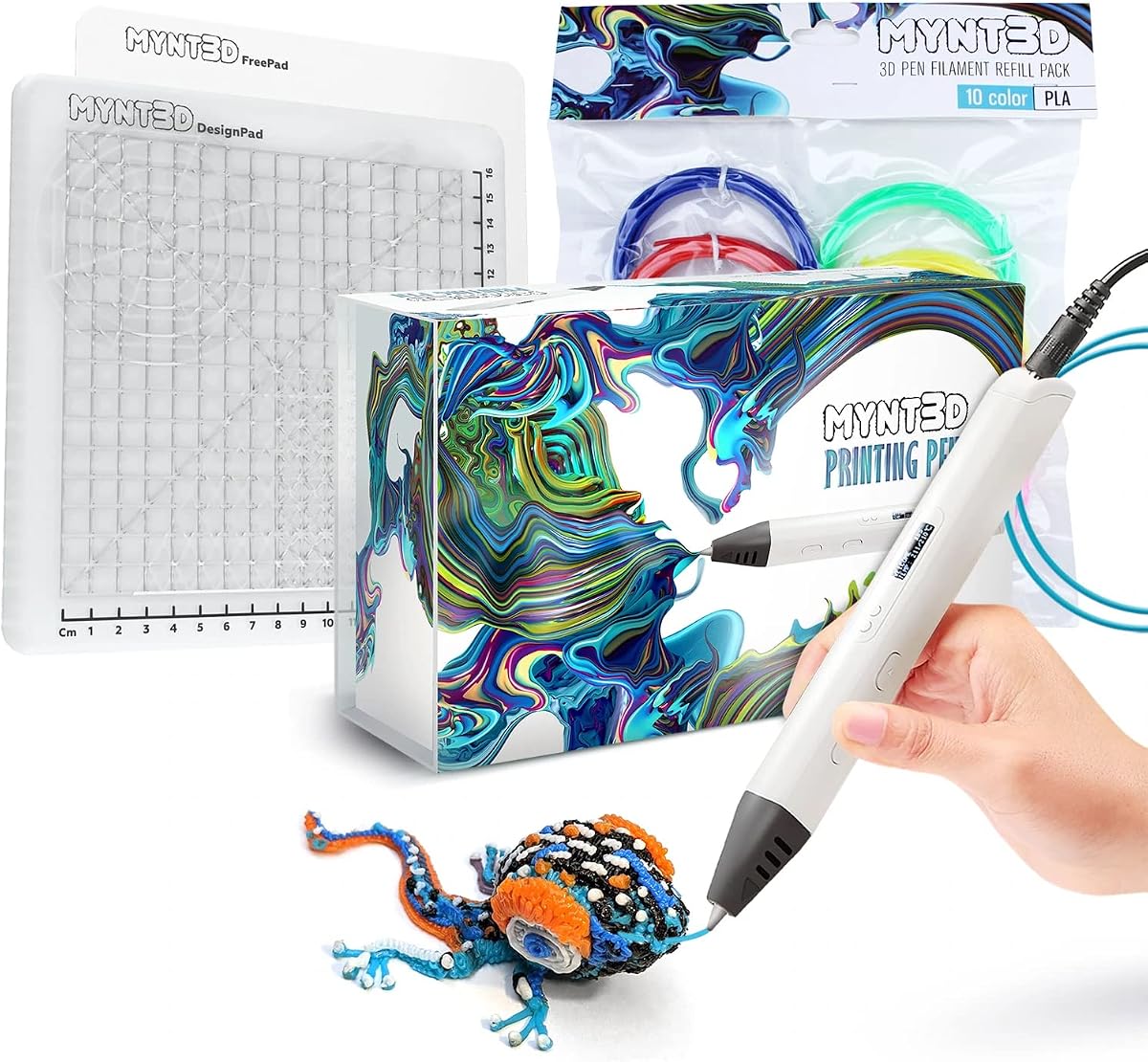
This bundle provides everything needed to create like a pro, combining the Pro 3D Pen with refills and a DesignPad mat kit. It is a great value for sustained creativity.
We may earn a commission when you buy through this link, at no additional cost to you.
The PLA filament refills come in 10 colors including blue, green, red, yellow, orange, pink, black, tan, brown and gold. Vacuum sealed to ensure highest quality and durability.
The DesignPad features double sided silicone surface with channels for perfect geometric shapes. Plus a custom transparent FreePad for tracing and ideal adhesion.
Ideal for serious hobbyists who want premium accessories and a wide color palette. The replaceable sealed nozzle ensures long lasting operation for many projects.
Highest quality vacuum sealed PLA in 10 colors ensures you have vibrant materials for diverse projects.
The DesignPad mat includes channels that let you design and create perfect geometric shapes easily.
We may earn a commission when you buy through this link, at no additional cost to you.
The Super bundle offers material adjustability for ABS or PLA, expanding creative options. It includes the Super 3D Pen, 10 color refills, and the DesignPad mat kit.
We may earn a commission when you buy through this link, at no additional cost to you.
Stepless speed control enhances flow regulation while temperature adjustability provides versatility for different plastic types. The replaceable sealed nozzle ensures clog free operation.
The DesignPad and FreePad offer versatile surfaces for tracing and creating geometric shapes. This supports more structured designs beyond freehand drawing.
This kit is perfect for those who want durability alongside variety. It brings a professional touch to your creative workspace with robust accessories.
Temperature adjustability accommodates multiple types of filament for broader creative possibilities.
Replaceable sealed nozzle design ensures long lasting operation without frequent interruptions.
We may earn a commission when you buy through this link, at no additional cost to you.
The 3Doodler Flow is designed for teens and creators looking for reliability and multi-functional compatibility. It works with 1.75 plastic filaments like PLA, ABS, and wood.
We may earn a commission when you buy through this link, at no additional cost to you.
The integrated LCD provides real-time temperature monitoring to ensure smooth 3D printing without guesswork. This is an excellent resource for learning practical skills.
It is compact and light-weight so you can take your Flow on-the-go. This portability makes it convenient for classrooms or workshops.
Creators seeking a dependable tool for both art and repairs will find this pen valuable. It supports screen-free play and tactile creative engagement.
Compatible with 1.75 plastic filaments such as PLA, ABS, and wood for versatile projects.
Compact and light-weight so you can take your Flow on-the-go to different creative spots.
We may earn a commission when you buy through this link, at no additional cost to you.
This bundle includes the P1 3D printing pen plus a two-sided silicone mat for tracing and cleaner projects. The mat features built-in shapes to help guide designs.
We may earn a commission when you buy through this link, at no additional cost to you.
The flexible practice surface is smooth and heat-resistant, making it reusable for repeated sessions. It supports more consistent 3D pen work during practice.
Designed for use with SCRIB3D P1 pens, it is a practical addition to your creative workspace. You can begin creating right out of the box with included starter PLA.
For beginners who need extra guidance on their drawings, this bundle offers excellent value. The mat helps in tracing and maintaining consistency during learning phases.
Silicone mat features built-in shapes and patterns to help guide designs and support consistent work.
The mat is easy to wipe clean and built to handle repeated use during drawing sessions.
We may earn a commission when you buy through this link, at no additional cost to you.
This bundle includes over 1250 ft. of additional plastic filament for extended creative fun. It starts with the safe 3Doodler Start+ pen that has no hot parts.
We may earn a commission when you buy through this link, at no additional cost to you.
Compatible with the free 3Doodler app which provides stencils, templates, and step-by-step instructions. This digital resource supports screen-free play through guided learning.
Includes 72 strands of mixed color filament, DoodlePad, and activity guide. The bundle ensures you have enough supply for many projects without refills.
Ideal for households committed to long-term creative learning. The app integration adds value for teaching basic design principles and structure.
Over 1250 ft. of additional plastic filament ensures more 3D doodling fun and creativity.
Compatible with free app that provides stencils, templates, and step-by-step instructions for learning.
We may earn a commission when you buy through this link, at no additional cost to you.
Choosing the right 3D printing pen involves understanding safety, material compatibility, and control features. Use this guide to identify the model that best suits your child's age and skill level.
Safety is the top priority for kids. Look for pens with no hot parts or cooled nozzles that prevent burns. Many models designed for younger children use low-temperature plastic that remains cool to the touch.
Prioritize pens with safety modes and no risk of burning if touched accidentally. This ensures worry-free play for younger kids without parental supervision.
Filament compatibility determines what materials you can use. Some pens work only with proprietary plastics, while others support standard 1.75mm PLA or ABS. Check what refills are available locally or online.
Standard compatible pens offer more flexibility and cost savings. Proprietary options are easier but might limit variety over time.
Models with OLED or LCD screens provide visual feedback on temperature and settings. This helps users monitor material status for consistent output. Pens without displays are simpler but require manual memory for settings.
Digital displays are useful for older kids needing precision. Basic buttons are better for younger children starting out.
Speed control affects how smoothly you can draw. Look for pens with stepless sliders or adjustable dials that allow fine-tuning flow. This prevents blobs and uneven lines during creation.
Precise flow regulation supports intricate designs. Basic speed settings are fine for simple shapes.
Comfort matters during long sessions. Slim ergonomic pens with soft touch surfaces reduce hand fatigue. Consider weight and grip shape when selecting for smaller hands.
Ergonomic designs improve user experience and accuracy. A comfortable grip ensures longer creative play.
Accessories like stencils, mats, and guides add immediate value. Check if bundles include extra filament, pads, or activity books. These extras help kids start creating without extra purchases.
A complete kit reduces initial setup time. Ensure the bundle includes enough filament to begin.
Durability is key for long use. Pens with sealed or ceramic nozzles resist clogs better. Look for replaceable nozzles if available to maintain performance over time.
Clog-resistant designs save frustration. Replaceable parts extend the lifespan of the pen.
Check whether the pen requires a direct power connection or rechargeable battery. USB-C charging is common in newer models for convenience. Ensure the charging speed fits your needs.
Battery powered offers portability. Wired power ensures consistent heat without interruptions.
To start using your 3D pen, plug it into the power adapter and wait for it to heat up. Most models indicate readiness with a light or display. Insert the filament from the back and feed it forward until it exits the nozzle.
Once heated, press the forward button to begin extruding plastic. Draw on heat-resistant mats to protect surfaces and avoid burns. Hold the pen steady for clean lines and avoid moving too fast to prevent gaps.
After use, press the reverse button to retract remaining filament and prevent clogging. Clean the nozzle periodically with a soft brush. Store the pen upright or in its stand to avoid bending during cooling.
Many models designed for children use low-temperature materials that stay cool to touch. Always check that the pen has safety features like no hot parts or auto-shutdown to prevent burns.
Most kids pens use PLA which is easy to handle. Some advanced models support ABS. Always check compatibility before buying refills to avoid waste or errors.
Typically a bundle includes 30 to 100 feet of filament depending on the model. Kids may use more for larger projects so consider buying extra refills later.
Most pens come ready to use out of the box. You may need to insert the filament manually and wait for heat-up time to begin drawing.
Yes, clean the nozzle periodically to prevent clogs. Use a soft brush to remove residue. Some models have replaceable nozzles for easy maintenance.
Most pens are recommended for ages 6 and up. Younger children should be supervised especially when heat is involved. Safety models are designed for ages 6+ specifically.
The 3Doodler Start+ Essentials stands out for safety with no hot parts ideal for younger kids. SCRIB3D P1 offers a budget friendly option with reliable performance. MYNT3D Pro brings precision for serious hobbyists.
Prioritize safety features and material compatibility based on age. Pens with guides and mats help kids start easily without needing extra purchases immediately.
Check current listings for the best deals as prices change regularly. Each pick offers unique strengths so choose based on your child's skill level and creative goals.
