
22MP Film & Slide Scanner with 5 LCD LCD
4.3Editor score
Affordable price point
Large 5 inch screen
USB and HDMI output
Built in memory storage
This expert guide compares the top 35mm slide scanners for digitizing old film and negatives into digital files with ease and clarity for home use.
Preserving family memories requires converting old film and slides into digital formats. A high-quality 35mm slide scanner makes this process simple and efficient for everyone.
We compared ten leading models based on resolution, ease of use, screen size, and compatibility with various film types to find the best options for archiving.
Each pick highlights unique features like standalone operation, editing tools, and connectivity. Prices may change so check current offers before purchasing your scanner.
4.3Editor score

4.3Editor score

5.0Editor score
The following table offers a side-by-side look at key specifications for each scanner to help you identify the best match for your specific needs.


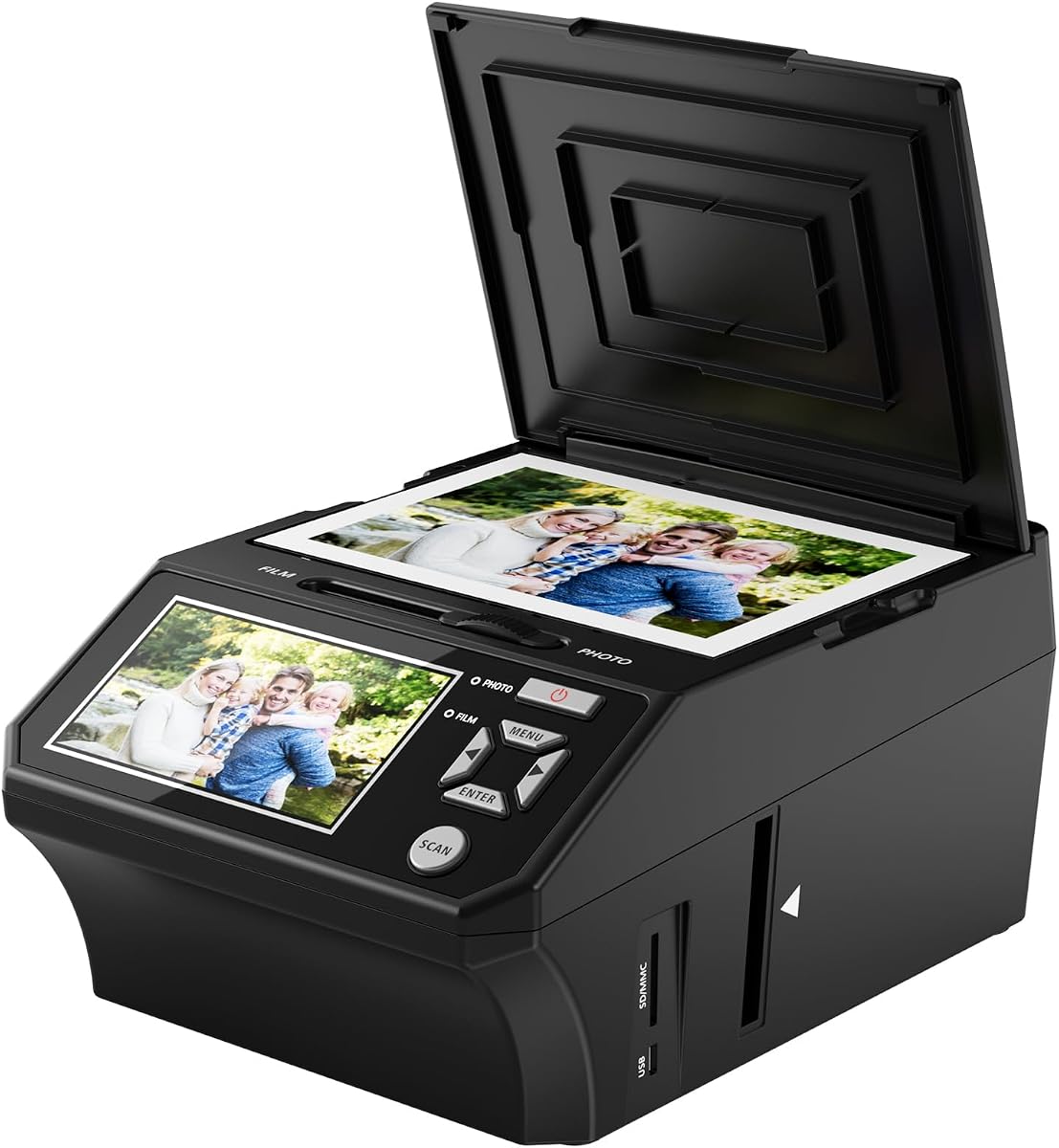




This versatile digital film scanner lets you view and convert old color and black-and-white negatives into digital files. It features a large 5-inch LCD screen that makes previewing and editing photos effortless for all users.
We may earn a commission when you buy through this link, at no additional cost to you.
The device includes adapters for 135, 110, and 126mm films as well as 50mm slides. Quick-feeding tray technology allows continuous loading action which speeds up the scanning process significantly.
While the interface is simple the built-in software lets you adjust color brightness and assign date time metadata. The lack of a included SD card means you must buy one separately to start.
Anyone looking to digitize family archives without a computer will find this model ideal. Its elegant design blends well with home decor while delivering reliable conversion results.
The simple interface ensures that even those new to scanning can get started immediately without reading complex manuals.
Support for multiple film types means you can consolidate your entire collection of slides and negatives into one digital library.
We may earn a commission when you buy through this link, at no additional cost to you.
This scanner converts 35mm negatives and slides into high resolution 24MP digital JPEG files quickly. The large 5 inch LCD screen lets you view images directly on the device or connect to a TV.
We may earn a commission when you buy through this link, at no additional cost to you.
It handles 35mm 126 and 110 negatives as well as 135 126 and 110 slides. The setup is frustration free with simple fast loading film trays for each type of media.
You can adjust brightness and color directly on the scanner without needing external software. The HDMI option allows for big screen viewing though the cable is sold separately.
Families wanting to display scanned photos on a large television will appreciate this feature. It is a solid choice for high quality archiving without a computer.
Connecting to a TV allows entire families to gather and view the scanned memories together on a big screen.
The fast loading trays and lack of driver installation make it easy to start scanning right out of the box.
We may earn a commission when you buy through this link, at no additional cost to you.
This film negative scanner features a smooth moving tray that feeds film without constant repositioning for seamless operation. It handles 135mm 110mm and 126mm slides and negatives efficiently.
We may earn a commission when you buy through this link, at no additional cost to you.
The device captures images with up to 4208×3120 resolution using a 13MP CMOS sensor with 22MP interpolation. This ensures detailed and crisp digital files for your archives.
One touch editing allows you to resize and adjust images without complex menus. Direct SD saving up to 32GB enhances portability and makes the workflow simpler.
If you need a compact device that works without a computer this model is a strong contender. It balances performance and ease of use effectively.
The continuous feed tray reduces the hassle of manually adjusting film between scans saving time for large batches.
High resolution interpolation ensures that even older or smaller slides produce clear and detailed digital images.
We may earn a commission when you buy through this link, at no additional cost to you.
This versatile photo scanner converts 35mm slides 135 and 110 negatives and printed photos into high-quality JPEGs. The 5-inch LCD screen with wide viewing angles lets you preview edits instantly.
We may earn a commission when you buy through this link, at no additional cost to you.
It operates entirely offline with no software or drivers needed making it perfect for grandparents or parents. The kit includes an 8GB SD card and cleaning brush so you can start immediately.
Scanning speeds are fast capturing images in seconds for immediate archiving. You can transfer files via USB or use the device as a digital frame.
Those who want a bundle with everything included will value the 3-year warranty and accessories. It is a thoughtful gift for family photo digitization.
The inclusion of an SD card and accessories removes the initial hurdles of setup and configuration.
The offline capability ensures you can digitize photos without needing a computer connected.
We may earn a commission when you buy through this link, at no additional cost to you.
Easily digitize old memories with this all-in-one scanner supporting various formats including Super 8. It offers a built-in 128MB memory or an external SD card option up to 64GB.
We may earn a commission when you buy through this link, at no additional cost to you.
The 5-inch large LCD display offers a wide viewing angle for real-time preview. You can adjust color and brightness with built-in software easily.
HDMI and USB outputs let you view scans on a TV or transfer to a PC. The accessory kit includes everything needed to start scanning right away.
If you need an affordable option with a large screen this scanner is ideal. It simplifies the process for those with limited technical experience.
The budget-friendly price makes digitizing old slides accessible without a significant financial commitment.
HDMI connectivity allows for immediate sharing of photos on a television screen.
We may earn a commission when you buy through this link, at no additional cost to you.
The HP FilmScan features a 7-inch color LCD touch display for seamless preview and editing. It transforms color and black-and-white negatives into vivid digital memories without needing a computer.
We may earn a commission when you buy through this link, at no additional cost to you.
The quick-feed tray paired with a 50mm adapter simplifies scanning of 135 126 and 110 formats. This enhances efficiency for processing mixed slide collections.
Built-in editing tools let you crop and adjust scans directly on the display. Gallery mode turns the device into a digital picture frame for continuous viewing.
Users preferring a modern touch interface will appreciate the ease of use. It is a premium choice for those wanting advanced controls on the device.
The touch screen allows for intuitive navigation that mimics using a tablet.
On-device tools streamline the workflow by removing the need for external editing software.
We may earn a commission when you buy through this link, at no additional cost to you.
The HP FilmScan 5 Touch Screen Film Scanner offers professional-quality results with ease. It uses a 13MP CMOS sensor and 22MP interpolation to deliver exceptional image clarity.
We may earn a commission when you buy through this link, at no additional cost to you.
The quick-load tray allows seamless scanning of 135 126 and 110 film negative strips and positive slides. This ensures versatile use across different film formats.
Powered through USB Type-C the scanner functions efficiently from a PC USB or external adapter. Save scanned images directly to an SD card to simplify the process.
Users wanting a modern power standard with reliable performance will find this scanner appealing. It balances functionality with contemporary connectivity.
USB-C power ensures compatibility with modern adapters and laptops for easy charging.
The sensor quality ensures sharp details in both color and black and white scans.
We may earn a commission when you buy through this link, at no additional cost to you.
This scanner converts old negatives and slides to JPEG digital files in seconds. It features a 3.5 TFT LCD display with adjustable brightness for easy viewing.
We may earn a commission when you buy through this link, at no additional cost to you.
Multiple film inserts and adapters are included for fast and flexible operation. One-touch buttons allow for one-step scan and save operations without complex menus.
The scanner is Mac and PC compatible with USB power and HDMI cable included. Use the included brush to clean the light box for better image quality.
If you need a smaller device that still handles multiple formats this is a good option. It is convenient for casual scanning sessions.
The inclusion of cleaning brush and HDMI cable adds immediate value to the package.
Adjustable brightness on the LCD helps with visibility in different lighting conditions.
We may earn a commission when you buy through this link, at no additional cost to you.
This portable scanner works as a standalone slide viewer and film viewer. Adjust brightness and color correction directly on the device without a computer.
We may earn a commission when you buy through this link, at no additional cost to you.
High-speed batch scanning for 135 film allows you to process multiple slides quickly. It transforms negatives to digital JPEG to preserve your family legacy.
Features TV-out and USB interfaces for big-screen viewing or file sharing. Compatible with Mac and PC for easy transfer of digital files.
Those wanting a simple lightweight solution for 35mm slides will find it useful. It is a thoughtful gift for rediscovering forgotten memories.
The lightweight design makes it easy to carry and use anywhere without setup.
TV-out capability allows you to share scanned photos on a larger display easily.
We may earn a commission when you buy through this link, at no additional cost to you.
The BEONGLUX ClearScan T7 features a large 7-inch touch screen for easier previewing and saving. It is designed to reduce button confusion for parents and grandparents.
We may earn a commission when you buy through this link, at no additional cost to you.
You can scan 35mm 135 126 110 and Super 8 negatives into digital JPEG photos. The included 16GB SD card lets you preview and save without a computer.
The touch interface helps beginners digitize old film at home comfortably. Scan quality may vary depending on the condition of the original film.
Families seeking a user-friendly interface without complex setup will love this model. It simplifies the archiving process significantly.
The touch screen makes navigating menus and adjusting settings intuitive for all ages.
The standalone workflow ensures you do not need a laptop to save your memories.
We may earn a commission when you buy through this link, at no additional cost to you.
Choosing the right scanner involves considering resolution screen size and connectivity options to match your archiving needs.
Resolution determines the clarity and detail of your scanned images. Look for scanners offering at least 22MP to ensure high-quality digital outputs for printing or zooming.
Higher resolution is essential for preserving fine details in old slides and negatives.
A larger screen like a 5-inch or 7-inch LCD makes it easier to preview and edit photos without connecting to a computer.
Standalone scanners with large screens are convenient for those who want to avoid complex setups.
Ensure the scanner supports your specific film types such as 35mm 126 110 or Super 8. Some models include adapters for multiple formats making them more versatile.
Choosing a scanner with universal adapters saves you from buying separate devices for each film type.
Check for USB HDMI and SD card slots to facilitate easy file transfer. HDMI allows viewing on TVs while USB lets you transfer to PCs directly.
Connectivity features are key for sharing your digital photos across multiple devices efficiently.
Look for one-touch scanning and intuitive interfaces especially for seniors or beginners. Standalone devices that do not need software installation are often preferred.
Simple operation ensures you can scan your photos without frustration or technical barriers.
Built-in editing tools let you adjust color and brightness directly on the device. This feature is helpful for enhancing faded images without additional software.
On-device editing saves time and keeps your workflow streamlined and efficient.
A good warranty indicates a manufacturer stands behind their product quality. Reliable customer support is important if you encounter technical issues during use.
Longer warranties provide peace of mind and protection for your investment.
Check what is included like cleaning brushes SD cards or adapters. Having everything in the box means you can start scanning immediately.
Included accessories reduce extra costs and simplify the initial setup process.
Before scanning always clean the film and the scanner's light box using the provided brush to remove dust and specks. Place the slide or negative carefully into the adapter tray ensuring it is flat and stable.
Connect the device to a power source or computer via USB. Use the screen to preview the image and adjust settings like brightness or color correction if needed.
Press the scan button and save the file to an SD card or your computer. Regularly clean the lens and exterior to maintain image quality over time.
Most standalone scanners do not require a computer to operate. You can save images directly to an SD card and preview them on the device's built-in screen.
Most scanners support 35mm 126 and 110 negatives and slides. Some models also include adapters for Super 8 or 8mm film formats.
Yes many models include an HDMI port or TV-out cable. This allows you to display your scanned photos on a larger television screen for family sharing.
A resolution of at least 22MP is recommended for high-quality archiving. This ensures you can zoom in or print your photos without losing detail.
Use the included soft brush to clean the light box and lens gently. Avoid using harsh chemicals or liquids directly on the device surface.
Many scanners include basic editing tools on their screen. You can adjust color brightness and apply simple edits without needing a computer.
Most devices support SD cards up to 128GB. Some models also have internal memory for temporary storage of scanned images.
Yes standalone scanners with one-touch buttons and large screens are very senior-friendly. They eliminate the need for complex software installations.
The top picks in this guide offer excellent options for turning old film into digital memories. Whether you prefer a large screen or a touch interface there is a model for your needs.
Prioritize features like standalone operation and easy editing tools if you want to avoid computer setups. Consider connectivity options that suit your sharing habits.
Check current prices and availability before purchasing to ensure you get the best value. Preserving your family history is worth the investment in a reliable scanner.