
Sonnet Breakaway Box 850 T5
4.5Editor score
850W power supply
Built-in dock ports
Triple wide GPU support
This guide compares the top Egpu Enclosures for gaming and creative work, detailing performance, compatibility, and features to help you choose the right
External GPU enclosures allow laptop users to connect desktop graphics cards, transforming portable devices into powerful workstations. These docks provide essential connectivity and power to run demanding applications smoothly.
We evaluated ten leading models based on bandwidth speed, power supply capacity, and build quality. Our analysis covers Thunderbolt 5 options and budget-friendly choices for various system configurations.
Each pick highlights specific strengths like AI training support or compact design. Prices fluctuate frequently, so verify current costs before purchasing to ensure you get the best value available today.
4.5Editor score

4.0Editor score

3.8Editor score
This comparison table outlines key specifications for all ten selected enclosures to help you quickly identify the best fit for your needs and budget constraints.


The Razer Core X V2 stands out as a top contender in the external GPU enclosure market. With a rating of 4.0, it offers reliable performance for users seeking significant graphical boosts. Its compatibility with Thunderbolt 5 ensures future-proof connectivity for modern laptops and devices.
We may earn a commission when you buy through this link, at no additional cost to you.
This enclosure features a spacious chassis designed to fit PCIe desktop graphics cards up to four slots wide. It supports both NVIDIA and AMD GPUs, providing flexibility for gamers and creative professionals. The built-in 120mm fan ensures active cooling to sustain maximum performance during heavy loads.
While it offers 140W Power Delivery to charge compatible laptops, users should note that graphics cards and power supplies are sold separately. Additionally, Mac devices with M1 or later chipsets do not support eGPUs with this unit. These limitations are acceptable given its high bandwidth capabilities.
Ideal for Windows 11 users with Thunderbolt 4 or 5 ports, this enclosure transforms laptops into powerful workstations instantly. Whether you need it for gaming or creative apps, the Razer Core X V2 delivers the smoothest performance available today.
Featuring an ultra-fast bandwidth of up to 80 Gbps, this enclosure easily manages the most demanding creative apps and AAA games without bottlenecks.
Connect via the included Thunderbolt 5 cable to get a graphical boost when needed and simply unplug when done for seamless mobility.
We may earn a commission when you buy through this link, at no additional cost to you.
The Sonnet Breakaway Box 850 T5 is a premium choice for users requiring maximum power and connectivity. With a 4.5 rating, it unlocks near-desktop GPU power for Thunderbolt 5 Windows 11 laptops. Its 850W power supply supports the most power-hungry modern graphics cards effortlessly.
We may earn a commission when you buy through this link, at no additional cost to you.
Beyond graphics performance, this unit includes a built-in Thunderbolt 5 dock with multiple USB ports and an Ethernet port. This reduces cable clutter and provides additional peripherals connectivity. It supports triple-wide NVIDIA and AMD cards, making it versatile for high-end builds.
While it comes at a higher price point, the included dock and robust cooling system justify the cost for professionals. It is designed primarily for Windows systems, so Mac users should check compatibility before purchasing. The variable-speed fan ensures quiet operation even under load.
Perfect for editing, rendering, and AI-driven applications, this enclosure accelerates workflows significantly. It is a top pick for those who need a complete, high-performance external graphics solution with expanded connectivity.
Delivers 80 Gbps of bi-directional bandwidth ensuring blazing-fast performance for GPU-accelerated workflows and professional creative tasks.
Includes one Thunderbolt 5 peripheral port, three USB Type A ports, and a Gigabit Ethernet port for super-fast wired network connectivity.
We may earn a commission when you buy through this link, at no additional cost to you.
The ANQ-L336 Mini eGPU offers a budget-friendly entry point for external graphics expansion. Rated at 3.8, it provides excellent performance for gaming and AI training with a certified JHL7440 controller. Its compact size makes it ideal for users needing mobility.
We may earn a commission when you buy through this link, at no additional cost to you.
It supports USB4/TB3/TB4 interfaces and works well with handheld consoles like ROG Ally X and MSI Claw 8. The unit supports ATX, SFX, and FLEX power supplies, giving users flexibility in power setup. It also features 85W PD fast charging for compatible laptops.
While it has slightly lower ratings than premium models, its compatibility with handheld devices is a standout feature. Limited support for RTX 50 series may be a constraint for future-proofing. The multiple Thunderbolt ports allow it to function as a hub.
This enclosure is a strong choice for budget-conscious users or handheld gamers seeking portable desktop-grade graphics. It balances cost and performance effectively for casual gaming and general productivity tasks.
Experience seamless 32Gbps data transfer with PCIe 4.0 x4 connectivity, ideal for USB4 equipped handheld consoles and mini PCs.
Supports ATX, SFX, FLEX, and DC 12V power supplies, enabling ROG Ally X Turbo Mode directly through the eGPU connection.
We may earn a commission when you buy through this link, at no additional cost to you.
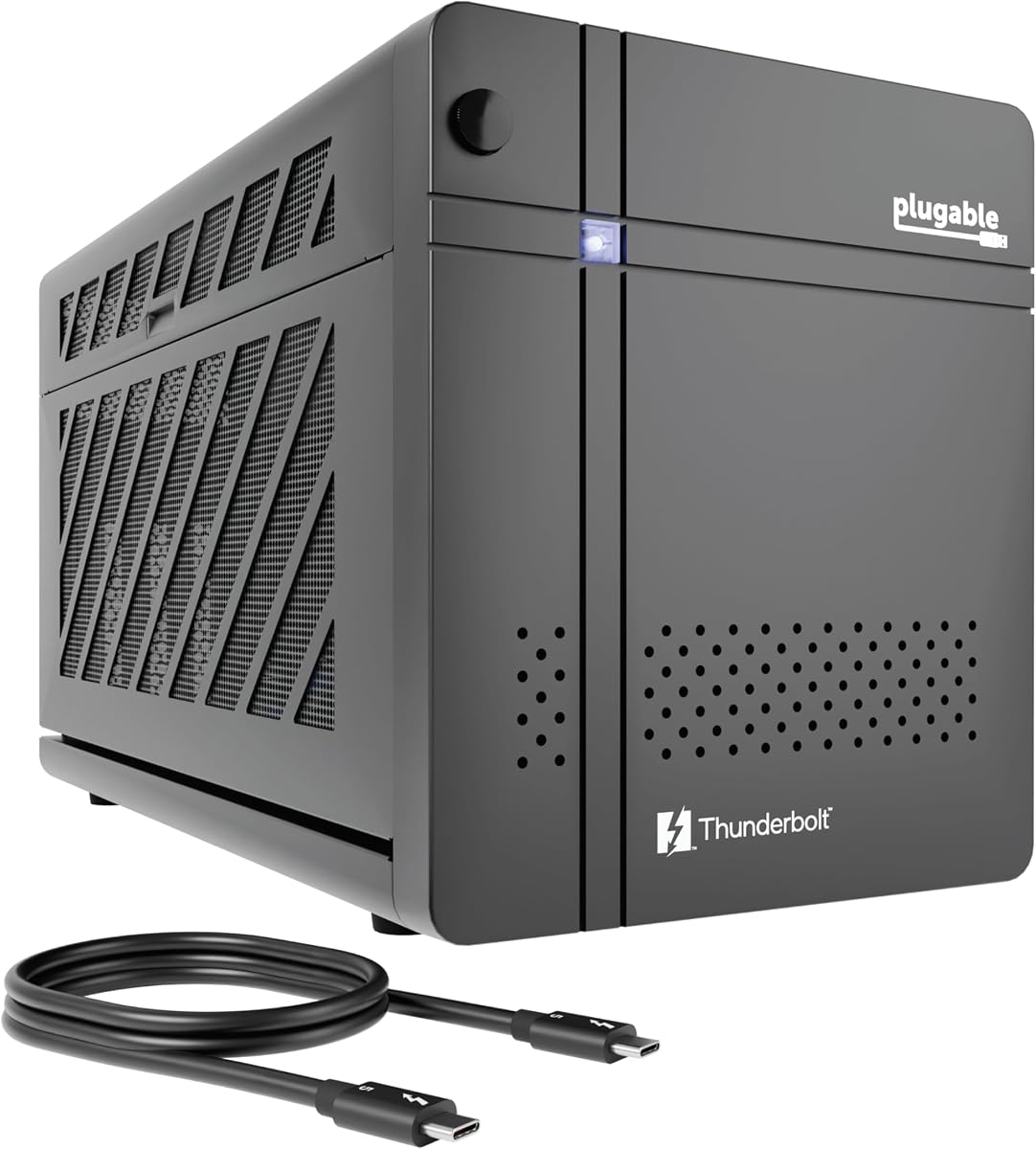
The Plugable TBT5-AI is designed for secure AI model execution with privacy in mind. It holds a perfect 5.0 rating due to its TAA compliance and robust build. It resolves privacy issues by running local AI models without sending data to the cloud.
We may earn a commission when you buy through this link, at no additional cost to you.
This enclosure supports Thunderbolt 5 and 4 with 80Gbps bandwidth. It includes a dedicated 850W PSU that provides 600W to the GPU, ensuring stable performance for large models. The modular design scales with workflow needs effectively.
Users should note that macOS and Linux are not compatible, limiting this to Windows 11 systems. The higher cost is justified by enterprise-grade security and lifetime support. It is a niche but valuable tool for data-sensitive environments.
Ideal for developers needing offline AI capabilities, this enclosure offers peace of mind and high performance. Check GPU dimensions before purchase as it supports cards up to 346mm length and 3.5 slots wide.
Resolve the innovation vs. privacy deadlock by running models like Llama 3 with an air gap to ensure data never leaves your perimeter.
This TAA-compliant enclosure has been designed with reliability and includes lifetime support from a North American team of connectivity experts.
We may earn a commission when you buy through this link, at no additional cost to you.
This enclosure is a complete kit offering everything needed to start external graphics immediately. With a 4.5 rating, it provides a lightweight yet robust aluminum shell. The package includes a 240W PSU and a custom carrying case for portability.
We may earn a commission when you buy through this link, at no additional cost to you.
It supports NVIDIA and AMD graphics cards up to 205mm in length and 55mm in width. The unit features one Thunderbolt port with 85W charging and another with 15W. A DisplayPort is also included for direct video output capabilities.
The main limitation is the shorter GPU length limit compared to full-sized enclosures. It works well with NUCs and laptops with Thunderbolt interfaces. It supports Windows and Linux but requires compatible hardware to function.
Great for users wanting a ready-to-go solution without buying extra accessories, this dock boosts graphics for editing instantly. Verify card dimensions carefully before purchasing to ensure fit within the compact enclosure.
Compatible with NUC laptop and handheld game console with Thunderbolt 4/3 USB4 interface for instant graphics power boost.
Featuring a lightweight yet robust anodized aluminum shell, this enclosure combines portability with premium protection and includes a case.
We may earn a commission when you buy through this link, at no additional cost to you.
The VK-Y900 is designed to support future graphics cards and offers broad compatibility. It features an official Intel JHL7440 controller for stable data transfer. It supports RTX up to 50 series and AMD up to 9000 series, making it future-proof.
We may earn a commission when you buy through this link, at no additional cost to you.
Built with high-grade ENIG PCB, it ensures superior conductivity and oxidation resistance. The unit has dual Thunderbolt ports with different power options and one DisplayPort. It allows single-cable solutions for clean workspace setups.
While it is optimized for handhelds like ROG Ally X, Mac users should be aware of specific AI compatibility only. The specialized team offers fast assistance for connectivity issues which adds value. Setup may require driver tweaks for some users.
Choose this enclosure if you want stability and support for next-gen cards. It balances performance and durability, providing peace of mind with professional technical guidance and prompt response.
Future-proof your setup for desktop-level gaming and professional rendering with support for RTX up to 50 series and AMD up to 9000.
Dual Thunderbolt ports and DP allow you to charge laptop at 85W while utilizing the external GPU keeping workspace clean and efficient.
We may earn a commission when you buy through this link, at no additional cost to you.
This model is a classic choice for users with Thunderbolt 3 ports needing reliable performance. It features a 750W power supply designed to handle high power requirements. Compatible with Mac and Windows, it is versatile for different environments.
We may earn a commission when you buy through this link, at no additional cost to you.
The 750ex model adds four USB ports and an RJ45 Ethernet port for connectivity. It supports many latest GPU cards including NVIDIA GeForce and AMD Radeon models. GPU acceleration significantly improves editing and rendering times.
However, M1 Macs are not compatible with this unit. Thunderbolt 3 bandwidth is slower than newer standards which may limit top-end performance. Still, it offers stable connectivity for professional workflows and creative tasks.
Ideal for existing Thunderbolt 3 users, this enclosure provides a stable and robust graphics expansion solution. Ensure your Mac model is compatible before purchase to avoid issues with Apple Silicon devices.
Connects a high-performance GPU card to your computer with Thunderbolt 3 ports enabling GPU acceleration for editing and rendering tasks.
Adds four 5Gb/s USB Type A ports to connect peripherals plus an RJ45 Gigabit Ethernet port for wired network connectivity.
We may earn a commission when you buy through this link, at no additional cost to you.
This mini enclosure offers a small form factor for users needing portability. It uses an officially certified JHL7440 controller module for stable and efficient expansion. It works with NUCs and laptops with USB4/TB3/TB4 interfaces.
We may earn a commission when you buy through this link, at no additional cost to you.
The unit includes a USB A port and a second TB3 port to act as a hub. You can attach additional Thunderbolt devices downstream. It supports ATX and SFX power supplies giving you flexibility on power setup.
Before purchasing check your system hardware support in Device Manager to ensure compatibility. Handheld gaming consoles are not recommended for use with this dock. Some knowledge is needed for setup and driver configurations.
A solid budget option for compact desktops and mini PCs this enclosure provides basic GPU expansion. Contact brand customer service if unsure about compatibility before making your purchase to ensure support.
Inclusion of both a USB A port and a second TB3 Port enables user to use GPU DOCK as a hub and attach additional devices.
Compatible with SFX ATX FLEX and DC power supplies Please prepare the power supply according to the power of the PCIe card.
We may earn a commission when you buy through this link, at no additional cost to you.
This docking station offers dual-link interfaces supporting speeds up to 80Gbps with Thunderbolt 5 and 64Gbps with OCuLink. It includes a built-in M.2 2280 slot for storing AI models directly on the dock. A hardware switch allows instant mode switching.
We may earn a commission when you buy through this link, at no additional cost to you.
Enhanced signal stability via built-in re-drive booster minimizes latency during high-bandwidth tasks. It supports standard ATX and SFX power supplies ensuring compatibility with various GPUs. Single-cable desktop workflow simplifies connection with automatic power-on.
Users should note that switching modes requires toggling the hardware switch for best performance. This makes it versatile for different use cases like inference or rendering. The NVMe slot adds storage convenience for project files.
An excellent hybrid solution for users wanting flexibility between Thunderbolt and OCuLink speeds. Check system compatibility to ensure optimal use of both protocols for best performance.
Dual-link interfaces support transfer speeds up to 80Gbps for TB5 and 64Gbps for OCuLink allowing instant switching between modes.
A built-in M.2 2280 slot allows direct storage of AI models and project files on the dock for synchronized workspace.
We may earn a commission when you buy through this link, at no additional cost to you.
This kit provides all essentials for external graphics including a 240W PSU and carrying case. With a perfect 5.0 rating, it offers reliable performance for editing and gaming. The aluminum shell combines portability with durable protection.
We may earn a commission when you buy through this link, at no additional cost to you.
It supports NVIDIA and AMD cards up to 205mm length and 55mm width. Features include one Thunderbolt port with 85W charging and another with 15W plus a DisplayPort. It works with NUCs and laptops with Thunderbolt interfaces.
The inclusion of a custom carrying case adds value for mobile users. Make sure your device supports Thunderbolt 3/4 or USB4 protocols as Type-C ports alone will not work. Verify compatibility before purchasing to ensure proper function.
Best for users needing a quick setup with essential accessories included. Check current prices and ensure your host device meets the required protocol standards for optimal performance and stability.
Includes everything you need a GPU Enclosure Box, 240W external power supply, Thunderbolt 4 cable, 8-pin PCIe power cable, and a custom carrying case.
Compatible with NUC/laptop/handheld game console with Thunderbolt 4/3 USB4 interface and package does not contain the graphics card.
We may earn a commission when you buy through this link, at no additional cost to you.
Selecting the right external GPU enclosure requires understanding your laptop compatibility and performance needs to ensure a smooth setup.
Ensure your laptop supports Thunderbolt 3, Thunderbolt 4, or USB4 to achieve high-speed data transfer. Older ports or standard USB-C will not support eGPU functionality and may result in no performance gain.
Check Device Manager or system specs for Thunderbolt or USB4 controllers before purchasing any enclosure to avoid compatibility issues.
Higher-end graphics cards require more wattage so choose an enclosure with a PSU matching your GPU needs. A power supply that is too weak may prevent the card from powering on or cause instability.
Look for PSUs rated at least 600W for modern high-performance cards to ensure reliable power delivery during heavy workloads.
Measure your GPU's length, height, and width to ensure it fits inside the enclosure's chassis. Many compact enclosures limit card size so oversized GPUs will not fit properly and can cause damage.
Always check the supported dimensions listed by the manufacturer before buying to confirm your card will fit securely within the enclosure.
A solid metal chassis with active cooling fans is essential to dissipate heat generated during high-performance tasks. Plastic or poorly ventilated designs may lead to thermal throttling and reduced GPU lifespan.
Opt for enclosures with steel or aluminum construction and adjustable fan control to maintain optimal temperatures under sustained loads.
Windows offers the broadest support for external GPUs while macOS compatibility remains limited. Linux support varies by distribution and driver versions so verify compatibility before investing in any enclosure.
Confirm that the specific enclosure model supports your operating system version to avoid driver headaches and connection problems after purchase.
Enclosures with built-in USB and Ethernet ports reduce cable clutter by acting as a hub for other peripherals. Having these ports can streamline your workspace setup significantly when using external devices.
Consider models with multiple Thunderbolt or USB ports if you need to connect several accessories alongside your graphics card for a clean desk.
Choose an enclosure with support for newer standards like Thunderbolt 5 to ensure longevity with future hardware upgrades. Older enclosures may become obsolete as graphics technologies advance and bandwidth demands increase.
Prioritize models with high bandwidth and ample power capacity to accommodate next-generation graphics cards without needing another enclosure soon.
Reliable customer support and warranty protection are crucial for troubleshooting connectivity issues that can arise with external graphics. Look for brands offering lifetime or multi-year support to ensure long-term reliability and peace of mind.
Verify the warranty terms and support availability before purchasing to protect your investment against defects and technical problems.
Always install the enclosure drivers on your host system before connecting the external GPU to ensure proper recognition. This step prevents common detection issues and ensures smooth operation from the first boot.
Position the enclosure in a well-ventilated area with at least a few inches of clearance around fans to avoid overheating. Dust buildup can reduce cooling efficiency so clean vents regularly with compressed air to maintain performance.
When disconnecting, safely eject the device from the system to prevent data corruption or hardware faults. Proper shutdown procedures extend the lifespan of both the enclosure and the internal graphics card significantly.
No, an external GPU requires your laptop to have a Thunderbolt 3, Thunderbolt 4, or USB4 port. Standard USB-C ports without these protocols cannot support external graphics connections so check your device specs first.
Most enclosures do not include a graphics card so you must purchase one separately to use the enclosure. Only certain complete kits include power supplies but the GPU itself is typically sold independently for flexibility.
Compatibility depends heavily on your Mac model. Older Macs with Intel chips may work but newer M1 or M2 chips often do not support eGPUs. Always check Apple's official compatibility list before buying.
Yes, Thunderbolt 5 offers higher bandwidth up to 80 Gbps compared to 40 Gbps with Thunderbolt 4. This extra speed can reduce bottlenecks and improve performance significantly especially with high-end graphics cards.
Using an eGPU typically requires the laptop to be plugged in because external graphics consume significant power. Running on battery alone is often impossible or extremely limited due to power delivery requirements.
Overheating can cause the GPU to throttle performance or shut down to protect hardware. Ensure proper ventilation and do not block the enclosure fans. Using high-quality thermal pastes helps dissipate heat efficiently too.
Yes, many users use eGPUs specifically to boost gaming performance on lightweight laptops. Ensure your game supports the graphics card and drivers are updated for best frame rates and stability.
Enclosures generally last as long as the host hardware if maintained properly. Regular cleaning and avoiding physical damage ensure longevity but internal components like fans may need occasional replacement.
The top picks range from the powerful Razer Core X V2 to the budget-friendly ANQ-L336 Mini offering options for every need. These selections represent the best balance of performance and value currently available on the market.
Prioritize Thunderbolt 5 support and sufficient power capacity if you plan to use high-end graphics cards for professional work. Matching the enclosure to your specific workflow will ensure you get the most performance out of your investment.
Always verify current pricing and availability before purchasing since costs fluctuate frequently. Check your laptop compatibility and GPU dimensions carefully to avoid returns and ensure a smooth setup experience from day one.