
MAYFLASH F300 Arcade Fight Stick
4.5Editor score
Compatible with Switch and Xbox
Supports Sanwa Components
XINPUT and DINPUT Support
Find the best fight stick for console fighting games with our detailed guide comparing top models for Switch, PS5, Xbox, and PC to elevate your gameplay.
Finding the right fight stick for console fighting games is essential for serious players who demand precision and durability during intense matches.
We compared ten top-rated models based on compatibility, build quality, customization options, and user feedback to help you make an informed decision.
Each pick highlights key features and pros cons to show why it stands out, but remember that availability and prices may change over time.
4.5Editor score

4.6Editor score

4.2Editor score
This side-by-side comparison highlights the key specifications and features of all ten products to help you quickly identify the right fit for your setup.




The HORI PlayStation 5 Fighting Stick Alpha is a top-tier option for serious players seeking a tournament-grade fight stick. With a high rating of 4.6, it stands out for its official licensing and premium components that ensure reliable performance during competitive play.
We may earn a commission when you buy through this link, at no additional cost to you.
Its standout feature is the inclusion of HORI's proprietary Hayabusa buttons and joystick, which are known for their crisp response and longevity. The open design allows users to easily swap parts or replace artwork, making it highly adaptable to individual preferences over time.
While it is a premium investment, the durability and performance justify the cost for those who practice daily. The only trade-off is its focus on PlayStation consoles, though PC compatibility broadens its reach for multi-platform gamers.
If you want a reliable and licensed stick for PS5 or PS4, this model is an excellent choice that balances quality with usability. It remains a top recommendation for anyone serious about mastering fighting games.
The Hayabusa joystick and buttons offer a responsive feel that enhances input accuracy during complex combos and rapid movements.
The open design allows easy access to internal components, making maintenance or upgrades simple without needing specialized tools.
We may earn a commission when you buy through this link, at no additional cost to you.
The MAYFLASH F300 is an excellent entry-level fight stick for those who want quality without breaking the bank. With a 4.5 rating, it offers broad compatibility across Switch, Xbox, and PC, making it a versatile choice for multi-platform gamers.
We may earn a commission when you buy through this link, at no additional cost to you.
Its main strength lies in its compatibility with Sanwa Denshi buttons and joystick, allowing users to upgrade components later. The support for both XINPUT and DINPUT on PC ensures it works seamlessly with various fighting games and emulators.
While it lacks the polished look of premium sticks, its functionality is robust. The only drawback is the need for an adapter to use it on PS5, which adds a small step to setup but does not hinder performance.
For beginners or budget-conscious players, this model delivers great value and reliability. It is a smart starting point for anyone looking to transition from standard controllers to an arcade setup.
The F300 works with nearly every major console and PC, ensuring you can use it across your entire gaming library without restrictions.
Its standard mounting system allows for easy replacement with Sanwa parts, extending the life and improving the feel of the stick over time.
We may earn a commission when you buy through this link, at no additional cost to you.
The Nacon Daija Arcade Fight Stick offers premium features tailored for serious PlayStation fans who demand customization and comfort. It holds a 4.2 rating and is officially licensed, ensuring seamless integration with PS4 and PS5 titles.
We may earn a commission when you buy through this link, at no additional cost to you.
Its standout features include full button mapping via dedicated software and a 3.5mm audio jack for direct headset connection. The inclusion of two joystick heads allows players to choose their preferred height and feel for optimal control.
While the price is higher than many competitors, the build quality and features justify the investment. The software might require some learning, but once configured, it provides a highly tailored experience for specific games.
This stick is ideal for players who value deep customization and comfort during long sessions. It is a strong contender for those willing to invest in a high-end tool for competitive gaming.
The intuitive software allows you to map buttons and create game profiles, giving you a competitive edge tailored to your specific playstyle.
The textured palm rest provides sturdy support, reducing fatigue and allowing you to maintain precision even during intense matches.
We may earn a commission when you buy through this link, at no additional cost to you.
The 8Bitdo Arcade Stick stands out for its versatile connectivity options, supporting Bluetooth, 2.4G, and wired connections. With a 4.6 rating, it is a favorite among Switch and Windows users who value wireless freedom without sacrificing performance.
We may earn a commission when you buy through this link, at no additional cost to you.
Its dynamic button layout changes based on the mode, making it intuitive for different games. The ultra-moddable design supports Sanwa arcade sticks, allowing for easy customization to match your preferences.
The included receiver has a hidden compartment for safe storage, adding a thoughtful touch to the design. While it is primarily built for Nintendo systems, its performance and features make it a top pick for those platforms.
If you need a reliable wireless fight stick for Switch, this model delivers quality and convenience. It balances modern features with classic arcade feel for a great user experience.
The support for Bluetooth and 2.4G wireless ensures you can play anywhere without cables while maintaining responsive input quality.
The universal mounting plate allows you to swap in high-quality Sanwa components, enhancing the overall feel and durability of the stick.
We may earn a commission when you buy through this link, at no additional cost to you.
The MAYFLASH F700 is designed for wireless play across a wide range of systems including PS5, Switch, and PC. With a 4.6 rating, it provides excellent flexibility for gamers who prefer untethered setups.
We may earn a commission when you buy through this link, at no additional cost to you.
Its firmware updates ensure compatibility with new consoles like Switch 2 via Bluetooth. The support for wired headsets on PS5 and PC enhances the experience by allowing audio and chat directly through the stick.
While it does not support Xbox Series S or X wirelessly, it covers most other major platforms. The turbo functions add extra utility for players who enjoy rapid attack sequences.
This stick is a great choice for those who want wireless freedom without compromising on build quality. It is well-suited for casual and competitive players alike.
With Bluetooth and 2.4G options, you can enjoy a cable-free experience on most modern consoles and computers with ease.
The ability to connect headsets directly to the stick ensures you can hear game audio and communicate during online matches.
We may earn a commission when you buy through this link, at no additional cost to you.
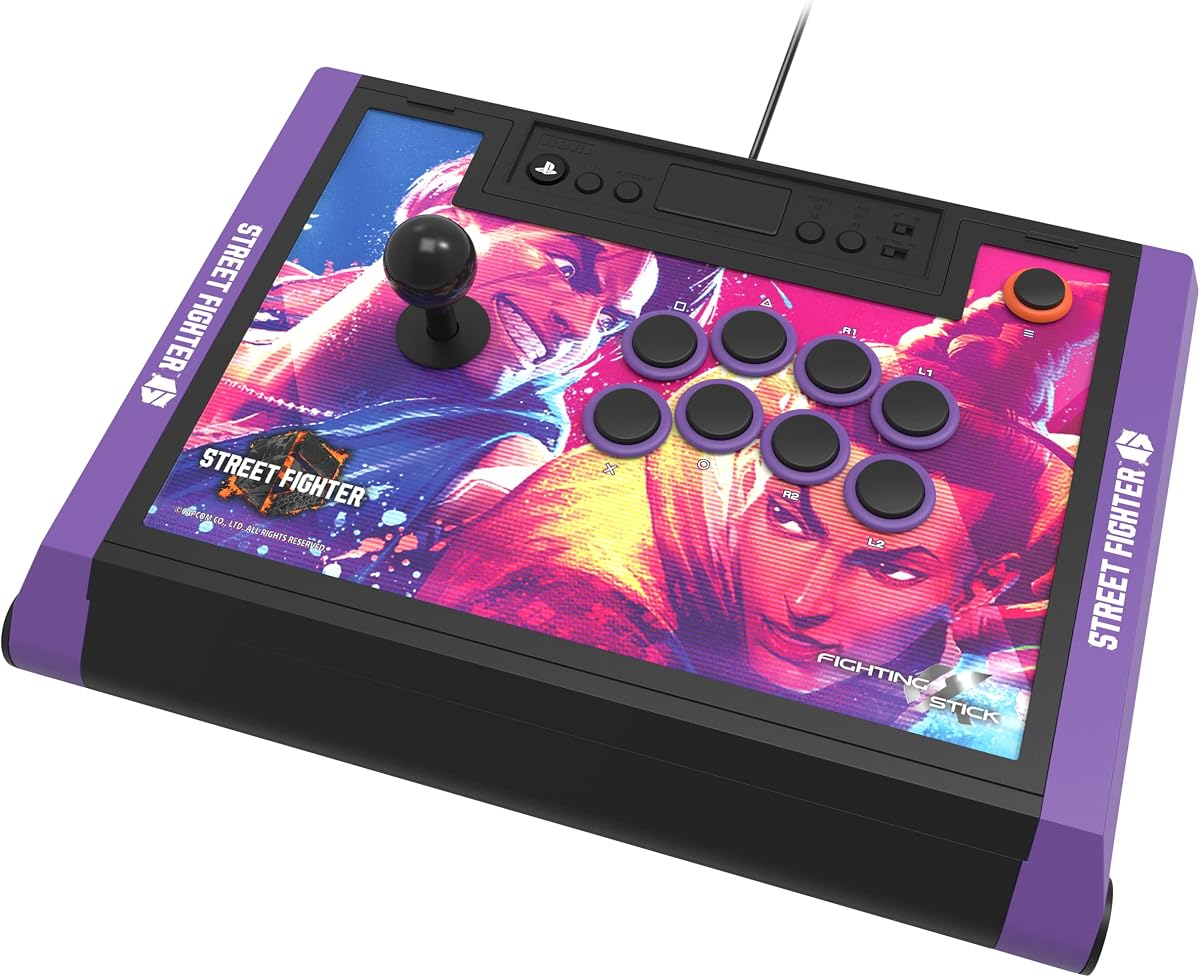
The HORI Street Fighter 6 Edition brings a unique thematic touch to the proven Fighting Stick Alpha design. It holds a 4.5 rating and is officially licensed by both Sony and Capcom, making it a must-have for fans of the franchise.
We may earn a commission when you buy through this link, at no additional cost to you.
Its standout feature is the exclusive artwork and downloadable character images for the top panel. This allows you to customize the look while retaining the high-quality Hayabusa joystick and buttons.
While the art style might not appeal to everyone, the underlying hardware is top-tier. The open design ensures that you can still upgrade or change parts whenever you wish.
For Street Fighter enthusiasts, this edition offers both aesthetic appeal and performance. It is a perfect choice if you want a stick that reflects your favorite game.
The Street Fighter 6 branding and exclusive images create a unique look that celebrates the game on your setup.
Despite the themed art, the stick remains open for upgrades, allowing you to tailor the hardware to your specific needs.
We may earn a commission when you buy through this link, at no additional cost to you.
The Qanba Sapphire S1 offers a unique leverless design that appeals to players seeking a different control style. With a 4.6 rating, it stands out for its 18 adjustable buttons compatible with Cherry MX switches, allowing for deep customization.
We may earn a commission when you buy through this link, at no additional cost to you.
Its Street Fighter 6 Juri Edition theme gives it a bold look that complements its tournament-grade build. The detachable wrist rest and shoulder strap make it easy to transport to local events.
Because it is leverless, it requires a learning curve for those used to traditional sticks. However, the precision and speed it offers can be a game-changer for specific games.
This model is ideal for gamers who want to explore alternative inputs without sacrificing quality. It is a solid choice for those looking to stand out in competitive settings.
The leverless layout allows for quick directional inputs, which can improve speed and precision in specific game scenarios.
With 18 buttons and compatible switches, you can tailor the controller layout to match your unique fighting style and preferences.
We may earn a commission when you buy through this link, at no additional cost to you.
The MAYFLASH F500 Bundle provides a complete solution for PS5 players needing a dedicated stick. It holds a 3.8 rating and includes Magic Boots that allow it to work directly with PS5 without a controller.
We may earn a commission when you buy through this link, at no additional cost to you.
Its compatibility with Xbox Series S and X via specific setup adds to its versatility. The support for headsets ensures you can communicate during online play without extra accessories.
While user ratings are slightly lower due to setup nuances, the value is high for those needing broad compatibility. The turbo functions add extra utility for fighting games that require rapid inputs.
This bundle is great for gamers who want a ready-to-go setup for PS5 and other platforms. It is a practical option for multi-console households.
The included Magic Boots allow you to use the stick directly on PS5, eliminating the need for a secondary controller during gameplay.
With audio output capabilities, you can connect your headset directly to the stick for clear communication during matches.
We may earn a commission when you buy through this link, at no additional cost to you.
The HORI Tekken 8 Edition combines tournament-grade performance with a unique thematic design. With a 4.6 rating, it is an excellent choice for fans of the Tekken franchise looking for a high-end stick.
We may earn a commission when you buy through this link, at no additional cost to you.
It features the same premium Hayabusa joystick and buttons as the standard Alpha, ensuring top-tier performance. The artwork and downloadable alternates allow you to customize the look to match the game or your preferences.
While it carries a higher price tag, the build quality and licensing justify the cost. It is a limited edition release that captures the essence of Tekken in both form and function.
This stick is perfect for dedicated Tekken players who want a premium setup. It stands as a tribute to the game while delivering reliable competitive performance.
The exclusive artwork celebrates the latest installment of Tekken, giving your setup a bold and professional look.
Using the same high-quality parts as other Alpha models ensures you get tournament-grade reliability and responsiveness during matches.
We may earn a commission when you buy through this link, at no additional cost to you.
The PXN X8 Arcade Stick offers a unique approach with mechanical buttons and a keyboard-like directional layout. It holds a 4.7 rating, making it a surprising standout for its durability and responsiveness.
We may earn a commission when you buy through this link, at no additional cost to you.
Its mechanical buttons provide a tactile feel that many keyboard users will appreciate. The turbo function and broad platform support ensure it works well across Xbox, Switch, and PC systems.
Because it uses a directional pad layout, traditional stick users might need time to adjust. However, this design allows for precise inputs that can improve execution in certain games.
For those who prefer mechanical switches, this stick delivers an affordable and durable option. It is a great choice for players seeking a modern take on arcade controls.
The blue-switch mechanical buttons offer a sharp tactile feel and clear feedback for precise and confident inputs.
Support for Xbox, Switch, and PC ensures you can use this controller across most of your favorite gaming platforms.
We may earn a commission when you buy through this link, at no additional cost to you.
Selecting the right fight stick involves considering compatibility, build quality, and customization options to match your specific gaming needs.
Ensure the stick supports your primary console such as PS5, Xbox Series X, or Switch. Many models are console-specific, so verify licenses and adapters for broader use.
Look for official licensing or support for adapters like Magic-S to expand compatibility across multiple systems.
Check for high-quality components like Sanwa or Hayabusa parts that are known for longevity and responsive feedback during intense play.
Durable construction ensures the stick withstands heavy use without requiring frequent replacements or repairs.
Wired sticks provide the lowest latency which is critical for competitive play. Wireless options offer convenience but may introduce slight input lag depending on the connection method.
Decide based on your play environment. wireless mobility or wired reliability is more important for your specific use case.
Open designs allow for easy swapping of buttons and joysticks to match your preferences over time. Some models also include software for button remapping and profiles.
A stick that supports upgrades extends its lifespan and lets you adapt to different games or play styles.
A comfortable palm rest and appropriate button layout reduce fatigue during long sessions. Consider whether you prefer a traditional or leverless design based on your hand size.
Ergonomic features help maintain precision and comfort when practicing for tournaments or extended online matches.
Audio jacks enable direct headset connection for chat and game audio without extra accessories. USB connectivity ensures stable data transfer for inputs.
Integrated audio features simplify your setup and reduce cable clutter during gameplay sessions.
Set a budget that balances cost with performance. Entry-level sticks offer great value, while premium models deliver specialized features and better components.
Prioritize models that meet your core needs without overpaying for unnecessary extras.
Software that allows button mapping and profile creation enhances flexibility. Ensure any software is user-friendly and regularly updated for compatibility.
Good software support improves usability and lets you customize the stick to your exact preferences.
To begin, connect the stick to your console using a USB cable or wireless receiver. Ensure it is recognized by the system and select the appropriate input mode if applicable.
Practice basic moves regularly to get accustomed to the joystick tension and button feel. This helps you refine your timing and execution for complex combos over time.
Keep the stick clean by wiping down buttons and joystick with a soft cloth. Store it in a dry place to avoid moisture damage and extend its lifespan significantly.
Not all fight sticks are universal. While some support multiple platforms like PC and Xbox, others are exclusive to PlayStation or Nintendo. Always check compatibility details and consider adapters for broader support.
In most cases, a fight stick functions as a standalone input device. However, some consoles like PS5 require an adapter or controller pairing for initial setup before the stick takes over controls.
Use a soft cloth to wipe buttons and the joystick to remove dust and oils. For deeper maintenance, you can open the stick to clean internal parts or replace worn components if the design allows.
Sanwa parts are industry standards known for durability and responsiveness. Non-Sanwa parts may vary in quality. Many sticks support upgrades to Sanwa components for better performance over time.
Yes, wireless connections can sometimes introduce slight latency. Wired options are preferred for competitive play to ensure minimal delay, while wireless is suitable for casual setups.
Many modern sticks support button remapping via software or hardware switches. Check the product details to ensure customization is possible before purchasing.
For those serious about improving, a fight stick offers better precision than standard controllers. Entry-level models provide an affordable way to start without overspending.
Choosing the best fight stick depends on your console, budget, and how serious you are about competitive play. Our top picks offer something for every type of player.
Prioritize build quality and compatibility to ensure your stick performs well and lasts long. Features like customization and comfort are secondary but still worth considering.
Remember to check current availability and prices before buying since models and offers may change over time. Invest wisely to enhance your fighting game experience.