
Digital Calendar 10.1" Touchscreen
4.4Editor score
Compact 10.1 inch screen size
No subscription required for features
Interactive chore list for kids
Finding the right digital touchscreen organizer can transform how your household manages schedules and chores. These devices blend calendar syncing, task tracking, and photo displays into one central hub for modern families.
We evaluated ten top models based on screen quality, sync capabilities, ease of use, and overall value. Our analysis highlights features that matter most for keeping busy homes coordinated without monthly fees.
Each pick in this list offers unique strengths for different family needs and budgets. Prices and availability can change frequently, so check current details before making your final selection decision today.
4.4Editor score

4.4Editor score

4.6Editor score
As an Amazon Associate we earn from qualifying purchases.
This side-by-side comparison highlights key specifications across all ten models to help you identify the best fit for your specific home organization needs and technical requirements.


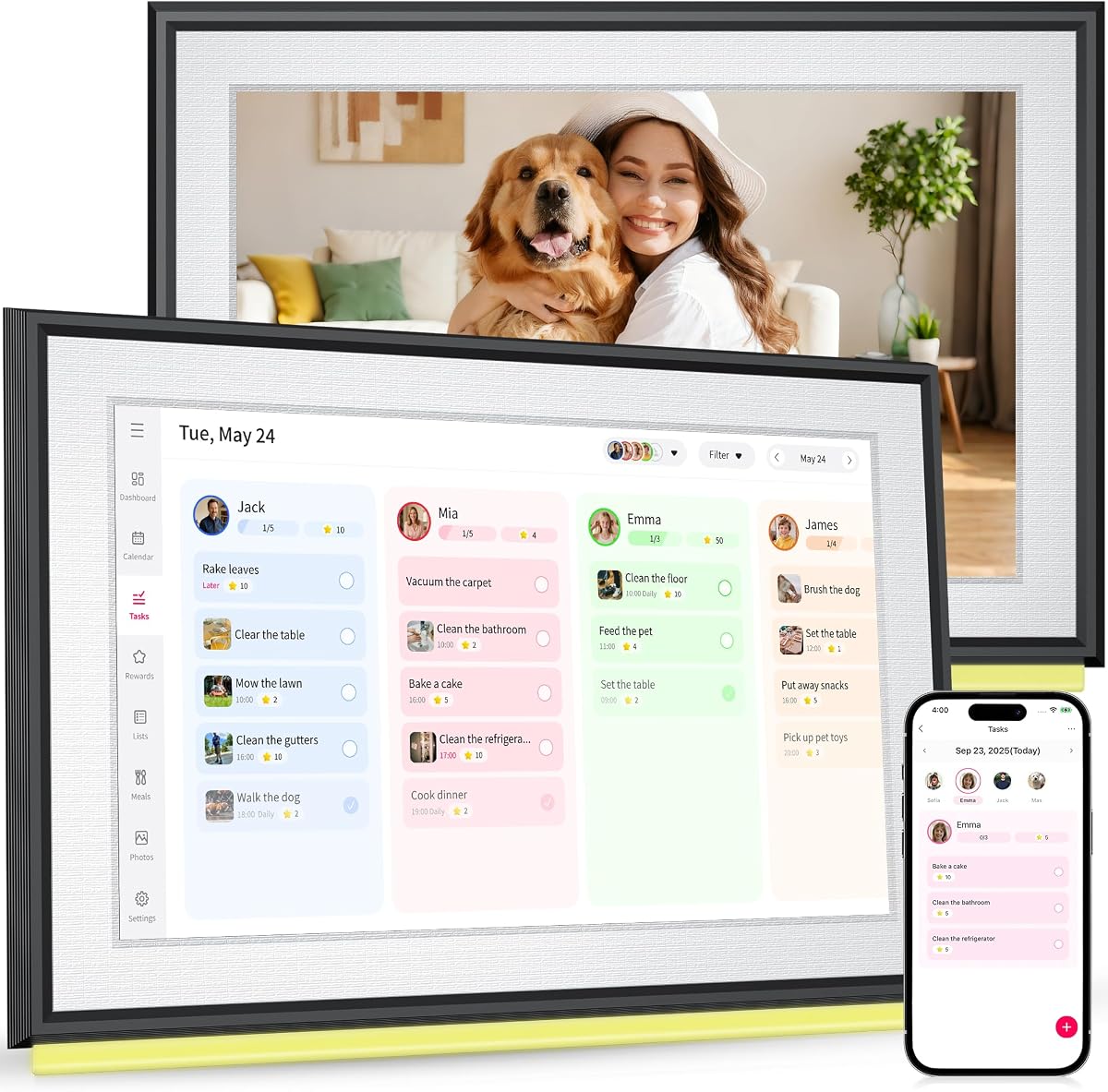

This 15.6 inch digital calendar stands out as a top choice for families needing a comprehensive command center. It earns high marks for integrating chore tracking meal planning and photo displays into one sleek touchscreen interface.
We may earn a commission when you buy through this link, at no additional cost to you.
The standout quality lies in its real-time sync capabilities with major calendar platforms without requiring any monthly fees. This model allows multiple family members to edit schedules simultaneously keeping everyone coordinated effortlessly and efficiently.
While the display is vibrant and the interface is intuitive some users may find the initial setup of mounting hardware slightly involved. These are minor trade-offs for the robust functionality and long-term reliability this unit provides.
If you need a reliable hub for managing household tasks and schedules this organizer is an ideal purchase for busy multi-generational homes. It transforms chaos into coordination with thoughtful features that benefit every age group.
Real-time syncing ensures that schedule changes made on one device appear instantly across all linked calendars.
Kids can check off tasks to earn reward points turning daily responsibilities into a fun gamified experience.
We may earn a commission when you buy through this link, at no additional cost to you.
Skylight offers a polished experience with its 15.4 inch touchscreen wall planner designed specifically for busy families. It ranks well for its ease of setup and ability to keep daily schedules readable at a glance.
We may earn a commission when you buy through this link, at no additional cost to you.
Key strengths include robust syncing with multiple platforms like Google iCloud Outlook and Yahoo. The customizable design allows it to fit naturally into kitchen or hallway layouts serving as a permanent electronic wall calendar.
Some advanced features such as the Disney mode and photo screensaver require a premium plus subscription which adds to the cost. However the base functionality remains strong for those who prefer optional paid enhancements.
Families seeking a high-end aesthetic with reliable performance will find this organizer worthwhile. It bridges the gap between a simple calendar and a full smart home hub effectively.
Connect to Wi-Fi in minutes and sync effortlessly with Google iCloud Outlook Cozi and Yahoo.
The digital wall calendar displays weekly meal plans to reduce daily stress of what is for dinner.
We may earn a commission when you buy through this link, at no additional cost to you.
This 10.1 inch digital calendar delivers essential smart features at an accessible price making it ideal for budget-conscious families. It stands out for providing a full set of organizational tools without hidden monthly costs.
We may earn a commission when you buy through this link, at no additional cost to you.
The key strengths include real-time sync with Google Calendar iCloud and Outlook fully unlocked. Kids love the interactive chore list that turns routines into a fun game building responsibility through rewards.
While the screen is smaller than premium options it remains clear and functional for daily tasks. The trade-off is acceptable for those who prioritize value over large display real estate or advanced customization.
For households needing a straightforward no-nonsense organizer this model is a smart choice. It effectively centralizes schedules and chores without breaking the bank.
Every schedule chore list and meal plan feature comes fully unlocked with zero hidden fees.
The visual weekly meal manager displays menus beautifully while automatic grocery list generation makes shopping effortless.
We may earn a commission when you buy through this link, at no additional cost to you.
This 10.1 inch model offers a balanced mix of features including a 1080P HD touchscreen and generous storage for photos. It functions as a true all-in-one family organizer without recurring costs.
We may earn a commission when you buy through this link, at no additional cost to you.
Key strengths include shared calendar sync with Google iCloud Outlook and Yahoo allowing updates from phone or device. The star-based reward system encourages kids to complete tasks maintaining consistent family routines.
Some users may find the app setup slightly involved initially but the long-term usability is solid. The ability to store thousands of photos adds significant value for families wanting a memory display.
This organizer is perfect for those wanting a compact yet capable solution for home management. It keeps everyone on the same page with clear visual planning.
Works seamlessly with major platforms so everyone stays on the same page without effort.
The 10.1 inch 1080P HD touchscreen doubles as a digital photo frame when idle.
We may earn a commission when you buy through this link, at no additional cost to you.
With a perfect five star rating this 15.6 inch smart calendar is a standout choice for reliability and user satisfaction. It transforms family routines with its simple interface and essential organizational tools.
We may earn a commission when you buy through this link, at no additional cost to you.
The key strengths lie in its plug and play setup and seamless sync with major calendar platforms. Users appreciate the built-in weather display and customizable task chart that color codes activities for everyone.
While it lacks some advanced dashboard features the straightforward design makes it simple for kids and seniors to use. The sleep wake mode helps save energy keeping the screen ready when needed.
This organizer is ideal for those wanting a large clear display without complexity. It effectively eliminates paper planners and missed appointments for busy households.
Make daily routines easier with a customizable task chart that helps build responsibility through positive habits.
Stay prepared with up-to-date weather information displayed right alongside your daily schedule.
We may earn a commission when you buy through this link, at no additional cost to you.
This 10.1 inch planner stands out for its professional color classification system and robust feature set. It serves as an ultimate family command center to replace messy paper notes efficiently.
We may earn a commission when you buy through this link, at no additional cost to you.
Key strengths include real-time data sync with mainstream platforms and a scientific approach to chore management. The built-in recipe function and remote photo sharing help bond distant family relationships.
While the warranty is shorter than some competitors the overall value remains high due to its comprehensive toolset. Users appreciate the sleek look that matches various home decoration styles well.
For families needing detailed task and recipe management this unit offers significant utility. It streamlines scattered trivial matters into an organized daily routine.
Adopts exclusive color markers to distinguish plans and chores for different family members scientifically.
Upload and sync precious family photos with just a few taps allowing members to view remotely.
We may earn a commission when you buy through this link, at no additional cost to you.
This 21.5 inch model offers the largest screen in its class and a unique dual mode capability for full customization. It ranks highly for those who want a smart home dashboard beyond just calendar management.
We may earn a commission when you buy through this link, at no additional cost to you.
Key strengths include switching between simple calendar mode and Android mode to download Google Play apps. The built-in Google Gemini voice assistant allows control of smart home devices directly from the screen.
The size may not fit smaller kitchens but provides unmatched clarity for detailed dashboards. It is a robust choice for tech-savvy families seeking maximum connectivity and control.
Families wanting a premium experience with advanced capabilities will find this organizer unparalleled. It truly transforms a wall into a living family control center.
Switch easily between Calendar Mode for scheduling and Android Mode for a fully customizable dashboard.
Use the built-in Google Gemini voice assistant to check schedules set reminders and control smart devices.
We may earn a commission when you buy through this link, at no additional cost to you.
This 15.6 inch version offers the same premium features as its larger counterpart in a slightly more compact form. It is perfect for families wanting the Apolosign system without the extra bulk.
We may earn a commission when you buy through this link, at no additional cost to you.
Key strengths include the switchable Calendar and Android modes plus the included stand for desktop placement. The anti-glare HD touchscreen ensures comfortable viewing in any lighting condition.
While it lacks the massive size of the 21.5 inch model it retains all core features like voice assistant and widgets. It is a versatile choice for kitchens home offices or living rooms.
Users wanting a robust smart home hub in a smaller footprint will appreciate this option. It keeps family life organized with high-end tech.
Turn your wall into a living family display with photos and videos from Google Photos.
Includes a stand for desk use or can be mounted on the wall for versatile home setups.
We may earn a commission when you buy through this link, at no additional cost to you.
This 10.1 inch smart calendar provides essential digital hub features without wall mounting options. It simplifies family scheduling with intuitive tools and automatic calendar syncing.
We may earn a commission when you buy through this link, at no additional cost to you.
Key strengths include support for Google Calendar iCloud Outlook and Yahoo plus color-coded task assignments. The interactive chore chart builds healthy habits and meal planning ends daily dinner stress.
The inability to mount on walls limits placement but the stand makes it portable. Users should allow time for system updates after initial startup to avoid rapid operations.
For families needing a simple digital planner with photo capabilities this unit is effective. It ends chaos by centralizing schedules and chores efficiently.
Simplify scheduling with color-coded tasks and visual coordination for the whole family.
Turn moments into memories by sharing photos and videos directly from your phone using the app.
We may earn a commission when you buy through this link, at no additional cost to you.
This 21.5 inch digital calendar is ideal for busy households needing a large central command center. It combines wall calendar desk planner and chore chart into one elegant touchscreen device.
We may earn a commission when you buy through this link, at no additional cost to you.
Key strengths include a crisp 1920x1080P IPS display and a grandparent-friendly interface with customizable font sizes. Sync with Google iCloud and Outlook is seamless through the free app.
While some customization is premium the basic features remain free forever. It offers a reliable solution for visual coordination with ample space for detailed family planning.
Families wanting a big screen for easy visibility will find this model practical. It helps keep busy homes organized and connected.
Featuring a 1920x1080P IPS touchscreen this electronic calendar delivers vibrant colors and wide angles.
Turn your schedule into a photo display while motivating family with reward points for tasks.
We may earn a commission when you buy through this link, at no additional cost to you.
Selecting the right organizer depends on your family size screen preferences and connectivity needs. This guide breaks down key factors to consider before making a purchase.
Screen size dictates visibility and placement options. Larger screens like 21.5 inches work well as wall command centers while smaller 10-inch units suit compact kitchens or desks. Resolution affects clarity for text and photos.
Choose a size that fits your wall or desk space comfortably without overwhelming the room.
Ensure the organizer syncs with your existing calendar platforms like Google iCloud Outlook or Cozi. Real-time sync ensures updates made on phones appear immediately on the display.
Verify the app supports all tools services you use daily.
Many models offer core features without monthly fees while others charge for advanced tools like AI photo restoration or specialized themes. Check which features require a premium plan.
Select a model that meets your needs without hidden costs.
Interactive chore charts with reward systems can motivate kids to complete daily tasks. Look for features like color-coding and star rewards to build habits.
Prioritize organizers that make routine management fun and consistent.
Most organizers double as digital photo frames. Storage capacity and slideshow customization matter if you want to display family memories.
Check photo and video support to ensure it fits your sharing habits.
Wall mounting hardware is often included but verify stability and ease of installation. Some units are desk-only or require a separate stand.
Confirm mounting options match your preferred location before buying.
Higher-end models may integrate voice assistants like Google Gemini for hands-free control. This adds convenience for checking schedules or controlling smart devices.
Consider if voice control is important for your household.
Reliable customer support and warranty coverage provide peace of mind for electronic devices. Look for models with US-based support and at least one year of coverage.
Ensure you have backup support if setup or usage issues arise.
Setup usually involves plugging the unit into power connecting to Wi-Fi and logging into your calendar accounts. Follow on-screen prompts to sync services and customize themes for your family needs.
To maintain the touchscreen use a soft microfiber cloth to wipe away smudges and dust. Avoid harsh chemicals or abrasive materials that could damage the display coating.
Regularly update software via the companion app to access new features and performance improvements. Reset settings or clear cache if you notice slowness or syncing issues.
Many models offer core scheduling and chore features without monthly fees. Some may charge for advanced customization photo screensavers or AI tools. Always check the subscription details before purchasing.
Most require Wi-Fi to sync calendars and access cloud photos. Offline modes may display stored schedules but updates will not sync until you reconnect.
Most come with mounting hardware but some models are desk-only. Check product specifications to confirm if wall mounting is supported for your chosen unit.
Use the companion app to upload photos directly from your phone. Many support remote access so family members can share moments instantly.
Yes intuitive interfaces and large touchscreens make them easy for children to navigate. Reward systems help engage kids in checking tasks and calendars.
Most devices reset via the app or email recovery options. Keep your account credentials safe to avoid losing synced schedule data.
Most models use their own app rather than Alexa. Some premium units may support smart home controls through other integrated assistants.
Warranty periods vary typically from one to two years. Check the product listing for specific coverage terms and customer support details.
This guide reviewed ten top models ranging from compact 10-inch units to large 21.5 inch command centers. Each offers unique strengths for managing family schedules and tasks effectively.
Prioritize screen size subscription needs and sync capabilities to match your household requirements. A well-chosen organizer can reduce clutter and keep everyone coordinated.
Remember to check current prices and availability before purchasing since details change regularly. Invest in a model that provides long-term value for your home.