
darkFlash V92
4.1Editor score
9.2 inch ultra-wide panel
Station Space software included
Flexible case mounting options
Modern PC builders increasingly seek ways to showcase system stats and personalize their setups. An LCD Screen for PC Case offers a dedicated display for hardware monitoring and custom visuals. These panels transform ordinary builds into interactive showcases without needing extra GPU ports.
We evaluated ten leading models based on resolution, software features, and mounting flexibility. Our analysis covers screens ranging from compact 6 inch units to expansive 12 inch bars. Each product was assessed for ease of installation and compatibility with common case designs.
Every pick highlights specific strengths like touch support or magnetic mounting options. Readers will find detailed breakdowns of software capabilities and connectivity methods. Please note that availability and pricing may change so verify details before purchasing.
4.1Editor score

4.4Editor score

4.5Editor score
As an Amazon Associate we earn from qualifying purchases.
This side-by-side comparison highlights key specifications and unique features across all ten models. We examine resolution sizes connectivity methods and software ecosystems to help you make an informed decision for your specific build requirements.


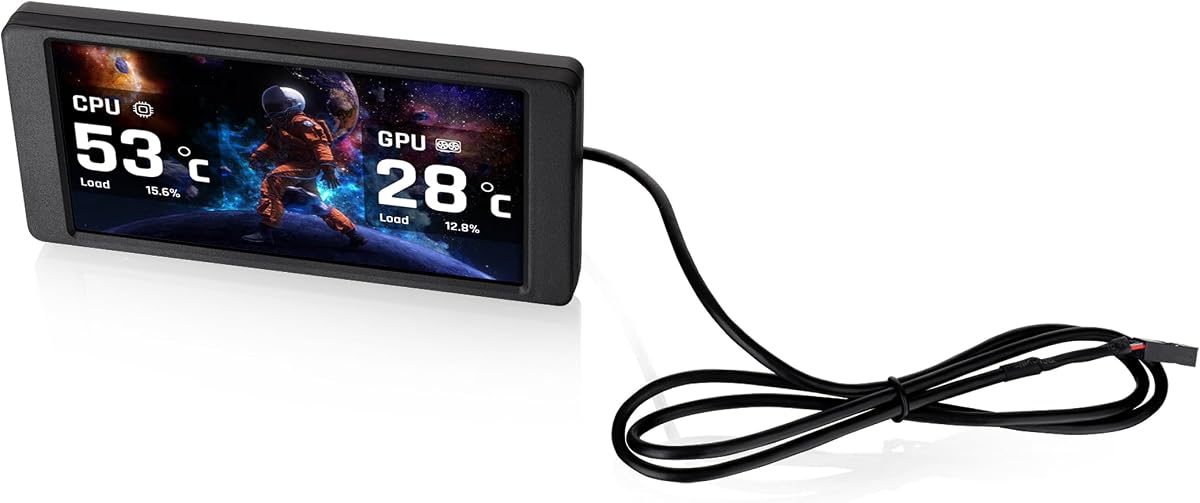


The Lian Li SM088X stands out as a top contender with its 8.8 inch universal display. It offers a 4.4 rating for its balance of performance and aesthetics. The built-in ARGB strip ensures it blends seamlessly with modern RGB ecosystems.
We may earn a commission when you buy through this link, at no additional cost to you.
Its software suite allows for deep customization of themes and data layouts. Users can upload personal videos or photos to create unique visuals. The plug-and-play USB connection means it works without draining GPU resources.
While installation requires attention to screw selection the flexibility is unmatched. You can mount it on fan frames or case panels easily. The only minor drawback is relying on the software for dynamic content updates.
This screen is ideal for builders wanting a polished look without complexity. It delivers vibrant visuals and reliable monitoring out of the box. We recommend it for those seeking a premium universal solution.
The diffused ARGB lighting strips sync with your existing system effects for a cohesive aesthetic.
It functions as a secondary display via USB freeing up valuable HDMI ports for other monitors.
We may earn a commission when you buy through this link, at no additional cost to you.
The darkFlash V92 offers an impressive 9.2 inch screen at a competitive price point. It delivers crisp visuals with a 1920×462 resolution perfect for data widgets. The slim aluminum design fits neatly inside most standard cases.
We may earn a commission when you buy through this link, at no additional cost to you.
Station Space software provides a range of plugins and themes without extra cost. You can monitor temps fan speeds and weather simultaneously. The USB-C option adds modern convenience for cable management.
Its limitation to Windows systems may exclude some users on Linux or Mac. Keeping Station Space running is required for the display to function properly. However the value it provides is hard to beat for budget builders.
This model is perfect for entry-level enthusiasts wanting a wide display. It combines functionality with an affordable price tag effectively. We suggest it for those prioritizing screen real estate over premium features.
The V92 delivers high resolution visuals without breaking the bank for budget-conscious builders.
Choose between USB-C or internal headers to suit your motherboard layout preferences.
We may earn a commission when you buy through this link, at no additional cost to you.
The WOWNOVA 8 Inch boasts a leading 4.5 rating for its versatility and quality. Its standout feature is the ability to act as an extended desktop screen. This flexibility allows for broader use cases beyond just hardware monitoring.
We may earn a commission when you buy through this link, at no additional cost to you.
Dynamic video themes bring the display to life with smooth animations and visuals. The single cable setup simplifies installation significantly inside tight cases. The aluminum housing ensures durability and a premium feel.
While the white color might not suit all builds it offers a clean look. You need to configure the software to enable extended mode properly. These minor points do not detract from its overall high performance.
This screen is best for users needing extra workspace or unique visuals. The quality and feature set justify its premium positioning well. We highly recommend it for those seeking top-tier performance.
Switch to extended screen mode for additional workspace beyond standard hardware stats.
Enjoy custom video themes that add motion and personality to your build.
We may earn a commission when you buy through this link, at no additional cost to you.
The wisecoco 12.6 Inch offers a massive bar style display perfect for large cases. Its 1920×515 resolution provides ample space for detailed monitoring widgets. The built-in speakers add audio capabilities without extra hardware.
We may earn a commission when you buy through this link, at no additional cost to you.
Designed specifically for the Hyte Y60 it fits the panel with ease. HDMI connectivity makes it compatible with various sources for flexibility. The slim profile ensures it does not clutter the interior space.
Relying on HDMI means you might need to use a dedicated port. The size is best suited for larger chassis to avoid obstruction. These considerations ensure it works best in specific build scenarios.
This model is ideal for Y60 owners wanting maximum visibility and audio. The sheer size makes it a centerpiece for gaming setups. We recommend it for those prioritizing display area above all.
Dual speakers provide sound for system alerts or media directly from the screen.
The included bracket ensures a perfect fit for the Hyte Y60 case design.
We may earn a commission when you buy through this link, at no additional cost to you.
The Hosyond 8.8 Inch brings interactive touch capabilities to PC case displays. Its capacitive touchscreen allows for direct control of menus and settings. The 1920×480 resolution ensures text remains sharp during interaction.
We may earn a commission when you buy through this link, at no additional cost to you.
It supports multiple operating systems including Windows and various Linux distributions. The HDMI input offers an alternative to USB connections for flexibility. This versatility makes it useful for Raspberry Pi projects as well.
Users need to install AIDA64 separately to monitor PC stats effectively. Touch calibration might require some time to perfect on the panel. These hurdles are manageable given the unique input method it provides.
This screen is best for interactive builds or multi-device setups. The touch feature adds a layer of control rarely seen in this category. We suggest it for tech enthusiasts wanting hands-on access.
Capacitive touch allows you to adjust settings directly on the panel surface.
Works with Windows Linux and Raspberry Pi for diverse project applications.
We may earn a commission when you buy through this link, at no additional cost to you.
The Thermalright Trofeo Vision delivers a balanced 9.16 inch display with a compact form. It focuses on simplicity with a straightforward software interface for monitoring. The slim build ensures it fits inside tight spaces without obstruction.
We may earn a commission when you buy through this link, at no additional cost to you.
Plug and Play USB-C connection makes setup quick and cable management easy. The TRCC software provides essential themes and DIY customization options. This simplicity appeals to users who prefer hassle-free functionality.
Some users might find the software interface basic compared to competitors. Mounting options are limited to specific case locations without extra tools. Despite this the reliability and design make it a strong choice.
This screen suits users prioritizing a clean look and ease of use. The compact size works well for smaller builds or radiators. We recommend it for those seeking a reliable plug-and-play display.
USB-C power and data streamlining cable management for cleaner interiors.
The slim design ensures it fits in tight spots without compromising airflow.
We may earn a commission when you buy through this link, at no additional cost to you.
The Thermaltake 6.0 Inch is designed specifically for View 370 and 390 series cases. Its TT RGB Plus 3.0 software allows for extensive theme customization and control. The standalone mode means it can display content without a PC connection.
We may earn a commission when you buy through this link, at no additional cost to you.
While the rating is lower it offers unique features like standalone media playback. The 1480x720p resolution ensures sharp graphics for custom uploads. This makes it a great fit for existing Thermaltake owners.
If you do not own a View series case this kit is less useful. Some users report software bugs that require updates to resolve. These factors contribute to its mixed reception in the market.
This screen is ideal for Thermaltake chassis owners seeking deep integration. The standalone feature adds a unique utility for media displays. We suggest it for those invested in the Thermaltake ecosystem.
Seamlessly integrates with View cases to enhance their glass panel aesthetics.
Display content even when the PC is off using standalone operation capabilities.
We may earn a commission when you buy through this link, at no additional cost to you.
The GeeekPi 12.6 Inch is a high-resolution touch display built for the Hyte Y60. It features a 10-point multi-touch panel that feels responsive and modern. The IPS technology ensures colors remain accurate from various angles.
We may earn a commission when you buy through this link, at no additional cost to you.
Built-in dual speakers provide audio directly from the display unit. Plug and Play functionality works across both Windows and macOS systems easily. This cross compatibility expands its usefulness for different user needs.
The Y60 specific design limits its use in other case models significantly. The price is higher than non-touch options but justifies the feature set. These factors make it a niche but powerful tool for Y60 users.
This model is best for Y60 owners wanting a large touch interface. The screen size and audio make it a robust solution for monitoring. We recommend it for those prioritizing interaction and size.
The 12.6 inch touch screen provides a desktop-like interaction experience.
Engineered specifically to slot into the Hyte Y60 case panel perfectly.
We may earn a commission when you buy through this link, at no additional cost to you.
The Thermalright TV 9.16 simplifies installation with its magnetic suction design. It attaches firmly to metal surfaces without needing screws or brackets. The 9.16 inch panel delivers a bright and accurate color display.
We may earn a commission when you buy through this link, at no additional cost to you.
Software control via TRCC allows for theme switching and dynamic content. The magnetic nature means you can reposition it easily if needed. This flexibility is a key benefit for dynamic build environments.
It relies on a metal surface which restricts where it can be mounted. Non-metal areas require additional steps or adapters for placement. These constraints are minor given the overall convenience of the mount.
This screen is ideal for quick setups or temporary displays. The magnetic mount offers a unique advantage over traditional screws. We suggest it for users valuing flexibility in placement.
Magnets allow for tool-free installation on compatible metal case surfaces.
Move the screen easily to find the perfect angle for viewing.
We may earn a commission when you buy through this link, at no additional cost to you.
The Thermalright Trofeo 6.86 is a compact option for limited case space. Its magnetic panel allows for flexible mounting on coolers or cases easily. The software enables dynamic images and simple theme customization.
We may earn a commission when you buy through this link, at no additional cost to you.
It supports USB Type-C connectivity for straightforward power and data transfer. The 6.86 inch screen is enough for basic monitoring without clutter. This makes it suitable for small builds where space is critical.
Resolution is lower than larger panels which might affect text clarity. Some users report connectivity issues that require careful cable management. These factors contribute to its slightly lower rating in our list.
This screen is best for tight spaces or small form factor builds. The magnetic feature makes it versatile for various mounting points. We recommend it for those needing a small and easy display.
Fits into tight spaces without obstructing airflow or components.
Specifically designed to attach to CPU liquid cooler radiators.
We may earn a commission when you buy through this link, at no additional cost to you.
Choosing the right LCD Screen for PC Case involves balancing size connectivity and software features. This section breaks down the key factors to ensure your selected display fits your build and workflow.
Screen size determines how much information you can display at once. Larger panels like 12 inch bars offer more real estate for complex widgets. Resolution impacts text readability and image clarity on the display.
Select a size that fits your case interior without blocking airflow components.
Most screens use USB-C or motherboard headers to draw power and data. HDMI options allow for secondary display functions without motherboard dependencies. Check which ports your case or motherboard provides before buying.
Verify your system has available ports to avoid installation conflicts.
Software controls themes monitoring data and dynamic content capabilities. Proprietary apps vary in features from basic stats to video playback. Open options often offer more flexibility for customization.
Look for software that supports your preferred themes and data sources.
Mounting methods include brackets magnetic panels or adhesive pads. Magnetic options provide flexibility but might restrict placement to metal surfaces. Brackets ensure stability but require precise case clearance.
Assess your case material and available space before deciding on a mount type.
Touchscreen panels allow direct interaction with menus and settings. They add utility but increase cost and complexity of setup. Non-touch displays remain simpler and more reliable for static monitoring.
Decide if you need direct input or just visual feedback for your needs.
Some screens are optimized for specific case models like the Hyte Y60. Universal screens offer broader fit but may need extra adapters or screws. Ensure the dimensions match your chosen location.
Check case clearance requirements to avoid physical interference with parts.
Support for JPG MP4 and custom widgets enriches the display experience. Some screens allow uploads of your own GIFs or video loops. This feature helps personalize your build uniquely.
Verify the file types supported if you plan to upload custom media.
Most tools support Windows but Linux or Mac options are rare. Ensure the software runs on your OS for full functionality. Some screens work standalone without needing PC drivers.
Confirm OS compatibility to avoid software issues after purchase.
First ensure you have the correct cables included in the package. Connect the power and data lines to your motherboard headers or USB ports securely. Verify the screen powers on and displays the default logo correctly.
Next download the official software from the manufacturer's website. Install the application and launch it to configure your desired widgets. Adjust brightness and contrast settings to match your ambient lighting.
Finally protect the screen from dust and excessive heat. Use a soft cloth to clean the panel gently without scratching the surface. Restart your PC if the display stops updating to refresh the data stream.
Not all screens fit every case due to size and mounting differences. Universal models offer flexibility but specific ones target certain chassis. Always check clearance requirements and mounting options before purchasing to ensure compatibility.
No special GPU is required as these screens use USB or motherboard headers. They do not consume GPU resources for rendering which frees up ports. This makes them efficient for hardware monitoring setups.
Some standalone models can display content even when the PC is off. However most require a PC signal to update data like temperatures. Check the specs for standalone mode features if this is important to you.
Installation involves connecting power and data cables to internal headers. Mount the screen using brackets screws or magnets as specified. Secure the cables to avoid contact with fans to ensure safety.
Most screens display CPU GPU temperatures fan speeds and usage stats. Some support weather widgets clock apps and custom video playback. Software customization lets you tailor the info to your needs.
Yes these screens are designed to consume minimal power for PC builds. They typically draw from USB headers which provide low wattage. This keeps energy usage low compared to main monitors.
The Lian Li SM088X darkFlash V92 and WOWNOVA 8 Inch lead our picks for quality and features. They balance resolution mounting and software support to enhance your build aesthetics and monitoring.
Prioritize connectivity and case compatibility to ensure a smooth installation process. Consider whether touch or standalone features are necessary for your workflow before buying.
Verify current pricing and availability on retailer sites since they change frequently. These screens offer a unique way to elevate your PC setup visually and functionally.