
BENFEI USB 3.0 Switch
4.1Editor score
4 USB 3.0 ports
5Gbps data transfer speed
Plug and play setup
This guide compares the top keyboard and mouse switch for 2 computers, analyzing features, speed, and compatibility to help you choose the right USB switcher.
Managing multiple computers often requires constant cable swapping for peripherals like keyboards and mice. A dedicated switch solves this by allowing seamless control of two systems with a single set of inputs. This guide explores the best options available to streamline your dual-PC workflow.
We evaluated ten leading USB switches based on data transfer speeds, port configurations, and build quality. Our comparison includes models from reputable brands like UGREEN and BENFEI, focusing on reliability and ease of use. Each product was assessed for compatibility with modern operating systems and specific use cases.
Each pick highlights specific strengths such as budget-friendly pricing or high-speed data transfer capabilities. Note that prices and availability can fluctuate over time. We recommend checking current listings before purchasing to ensure you get the best deal for your specific setup needs today.
4.1Editor score

4.6Editor score

4.3Editor score
The following table provides a side-by-side comparison of all ten products featured in this guide. It highlights key specifications such as port counts, data speeds, and included accessories to help you quickly identify the model that best fits your connectivity requirements.


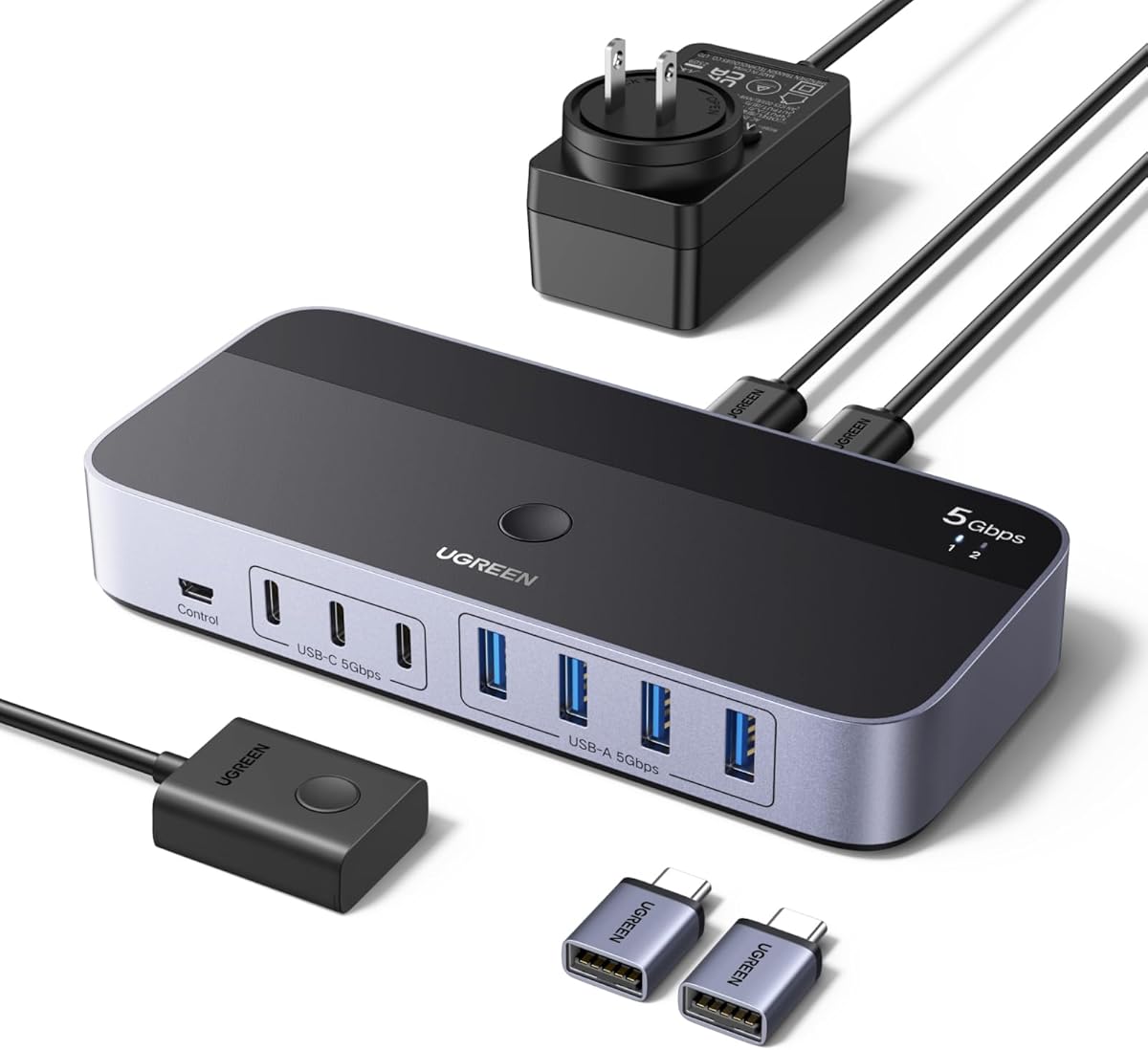

This UGREEN USB switch is a versatile solution for users needing to share peripherals between two computers. With a 4.0 rating, it offers robust connectivity options including both USB C and A ports. Its ability to handle multiple devices like printers and keyboards makes it a strong contender for modern setups.
We may earn a commission when you buy through this link, at no additional cost to you.
The switch supports data transfer speeds up to 5Gbps ensuring quick file exchanges between systems. It includes a controller and button modes for switching allowing you to hide the unit on your desk for a cleaner look. The optional power supply port ensures stability when using high power devices like hard drives.
While it is not a KVM switch and does not support video transmission its focus on peripheral sharing is efficient. Users should note that USB C input devices may require an adapter. The lack of video support limits it to data and input sharing but that is acceptable for its specific use case.
Anyone needing to share a keyboard and mouse along with other USB devices will find this switch highly effective. It is ideal for office environments where efficiency is key. We recommend this for users who prioritize flexible port options and reliable data transfer speeds.
The mix of USB C and A ports allows connection to a wide range of modern and legacy devices without extra hubs.
Using the external controller keeps the main switch hidden reducing cable clutter and improving workspace aesthetics.
We may earn a commission when you buy through this link, at no additional cost to you.
The BENFEI USB switch offers excellent value for those needing a reliable way to share peripherals between two PCs. With a 4.1 rating it provides four USB 3.0 ports allowing connection of keyboards, mice, and printers. Its straightforward design makes it easy to set up and use immediately.
We may earn a commission when you buy through this link, at no additional cost to you.
It supports data transfer speeds of up to 5Gbps making it efficient for moving files between computers. The LED indicator clearly shows which computer is active eliminating guesswork during switching. It is compatible with Windows, Mac, and Linux systems ensuring broad usability across different environments.
One consideration is that the power adapter is sold separately which might be an extra cost for some users. The build is functional but not premium so it may not withstand heavy daily handling as well as metal options. However for the price it delivers solid performance.
This switch is perfect for home offices or students on a budget who need basic peripheral sharing. It simplifies the workflow between work and personal computers without breaking the bank. We suggest this for users prioritizing cost effectiveness and essential functionality.
This model delivers core switching functionality at a very competitive price point making it accessible for budget conscious buyers.
The LED indicator provides immediate visual confirmation of the active computer reducing confusion during frequent switching.
We may earn a commission when you buy through this link, at no additional cost to you.
This UGREEN USB switch stands out with its impressive 10Gbps transfer speed and seven port configuration. Rated at 4.3 it is designed for power users who need to connect multiple devices across two computers. The inclusion of a power adapter and USB C support makes it a complete high end solution.
We may earn a commission when you buy through this link, at no additional cost to you.
The switch supports both USB A and C devices making it future proof for modern laptops and older peripherals. With 10Gbps speeds file transfers are significantly faster than standard USB 3.0 models. The power adapter ensures stable performance even when connecting high draw devices like external drives simultaneously.
The main trade-off is the higher price which may be steep for casual users. The unit is also larger due to the extra ports and power requirements. These factors are acceptable given the performance and connectivity options it provides for demanding workflows.
Ideal for professionals managing complex setups with many USB devices this switch offers top tier performance. It is suitable for those who need to share a wide range of peripherals without running out of ports. We recommend it for users who value speed and connectivity above all.
At 10Gbps this switch enables rapid file transfers saving valuable time for users who frequently move large datasets between systems.
The included power adapter and USB C support ensure all connected devices receive stable power without external adapters.
We may earn a commission when you buy through this link, at no additional cost to you.
This 2 port USB switch is a simple and reliable option for sharing a keyboard and mouse between two computers. With a 4.6 rating it is highly favored by users for its ease of use and sturdy build. The aluminum shell provides excellent heat dissipation and longevity compared to plastic models.
We may earn a commission when you buy through this link, at no additional cost to you.
It features one-button switching with a clear LED indicator making operation intuitive. The included 3.28ft USB 3.0 cables are convenient for immediate setup. It supports data speeds up to 5Gbps ensuring smooth performance for typical peripheral tasks and file sharing.
The limited two port configuration means it is best suited for essential devices only. If you need to share more than a keyboard and mouse you will need a different model. However for basic dual PC setups this limitation is often acceptable and cost saving.
This switch is ideal for users who want a no fuss solution for shared input devices. The high rating suggests strong reliability and customer satisfaction. We recommend it for home users with simple dual computer needs.
The aluminum alloy shell not only looks professional but also helps dissipate heat for longer operational life.
Included cables mean you can start sharing devices right out of the box without additional purchases.
We may earn a commission when you buy through this link, at no additional cost to you.
This UGREEN switch is a compact solution for sharing input devices between two PCs. Rated at 4.1 it offers straightforward functionality with two USB 3.0 ports. The 5ft cables provide flexibility in placement ensuring you can position the switch conveniently on your desk.
We may earn a commission when you buy through this link, at no additional cost to you.
It supports data speeds of 5Gbps which is sufficient for most peripherals. The one-button switching with LED indicator makes it easy to see which computer is active. It works seamlessly with Windows, Mac, and Linux systems without needing drivers.
Lack of an external controller means the switch unit must be within reach. With only two ports you cannot share additional devices like printers simultaneously. However for a dedicated keyboard and mouse setup this is often a non issue.
This model is great for users who want a clean simple setup without extra controls. The long cables are a nice touch for cable management. We suggest this for those with basic sharing needs.
The included 5ft cables allow the switch to be placed further away from computers reducing desk clutter.
Plug and play compatibility ensures you can start using the switch immediately on any modern operating system.
We may earn a commission when you buy through this link, at no additional cost to you.
This Hearvo KVM switch is unique because it includes HDMI video switching in addition to USB peripherals. With a 4.0 rating it allows you to control two computers with one monitor and one set of inputs. This makes it ideal for tight desk spaces where two monitors are not feasible.
We may earn a commission when you buy through this link, at no additional cost to you.
It supports 4K resolution at 60Hz ensuring sharp visuals. The four USB 3.0 ports allow sharing of keyboards, mice, and other devices. A wired remote switch is included so you can place the main unit out of sight while keeping control handy.
The main difference from standard switches is the need for HDMI cables from each computer to the unit. This adds some complexity to setup compared to USB only models. However the video support adds significant value for users with single monitor setups.
This is perfect for users who need to share both video and USB devices. It simplifies the desk footprint significantly. We recommend it for those who want a true KVM experience without buying separate video switches.
By including HDMI switching this unit eliminates the need for a separate video switch saving desk space.
The wired remote allows easy access to switching controls without reaching for the main unit.
We may earn a commission when you buy through this link, at no additional cost to you.
This UGREEN switch uses USB 2.0 technology which is slower but adequate for basic peripherals. With a 4.4 rating it offers four ports for sharing multiple devices between two computers. It is a solid choice for users who do not need high data transfer speeds.
We may earn a commission when you buy through this link, at no additional cost to you.
The micro USB power port allows for an optional power supply improving stability with high power devices. It includes two USB A to A cables for quick setup. The one-button swapping mechanism is intuitive and requires no software installation.
USB 2.0 speeds are limited to 480Mbps which is slower than USB 3.0 models. For simple keyboard and mouse sharing this is fine but file transfers will be slower. The build is functional and reliable for light office use.
This model is best for those on a tight budget who have older computers. It provides essential sharing features without the cost of faster technology. We suggest it for basic office environments.
The micro USB power port ensures that high draw devices like scanners stay connected without interruption.
Included cables allow immediate connection to computers so you can start sharing peripherals right away.
We may earn a commission when you buy through this link, at no additional cost to you.
This UGREEN USB 3.0 switch provides four ports for sharing multiple devices between two computers. Rated at 4.3 it supports data speeds up to 5Gbps ensuring efficient file transfers. The design is straightforward with a one-button switch and LED indicator.
We may earn a commission when you buy through this link, at no additional cost to you.
It includes a USB C power port which is useful for connecting high power devices like hard drives. The included cables allow immediate setup. Compatibility with Windows, Mac, and Linux makes it versatile for mixed environments.
The lack of an external controller means the switch sits on your desk. For users who want to hide the unit this might be a drawback. However for most setups the functionality is sufficient for daily use.
This switch is a reliable choice for those needing four ports at a reasonable price. The USB C power port adds utility for power hungry peripherals. We recommend it for office users with multiple shared devices.
The USB C power port ensures stable operation for devices that draw significant power like external hard drives.
No drivers are needed which simplifies setup on any modern operating system.
We may earn a commission when you buy through this link, at no additional cost to you.
This UGREEN switch offers an extensive seven port configuration for complex setups. With a 4.3 rating it allows sharing of multiple USB A and C devices between two computers. The inclusion of a power adapter and controller makes it a comprehensive solution.
We may earn a commission when you buy through this link, at no additional cost to you.
It supports 5Gbps speeds which are fast for most peripherals. The USB C ports are particularly useful for modern laptops. The external controller allows you to hide the switch unit under your desk for a cleaner look.
The size and cost are higher than standard switches. If you do not need seven ports this might be overkill. But for power users with many devices it provides great flexibility and future proofing.
Ideal for users with many peripherals this switch ensures you never run out of ports. The mix of A and C supports covers almost any device. We recommend it for those with complex connectivity needs.
Having both USB A and C ports allows connection to a wide range of legacy and modern devices without adapters.
The external controller enables you to keep the main switch out of sight maintaining a tidy workspace.
We may earn a commission when you buy through this link, at no additional cost to you.
This basic switch provides a simple way to share a keyboard and mouse between two computers. With a 4.2 rating it is a functional entry-level option for shared peripherals. The external controller allows you to switch devices easily.
We may earn a commission when you buy through this link, at no additional cost to you.
It is powered directly from the computer USB port removing the need for an extra power adapter. The two included cables help with initial setup. It supports most operating systems without requiring drivers.
It is limited to two ports so sharing additional devices is not possible. There is no separate power port for high draw devices. For basic input sharing these limitations are often acceptable.
This switch is a cost effective choice for those who only need to share input devices. The external controller adds convenience. We suggest it for home users with simple needs.
The external desktop controller keeps switching accessible without reaching for the main unit.
Powering directly from the USB port reduces cable clutter and simplifies setup.
We may earn a commission when you buy through this link, at no additional cost to you.
Choosing the right USB switch involves considering port counts, speeds, and power requirements. This section details the factors to evaluate before making a decision.
Check how many devices you need to share. A 2 port switch is enough for a keyboard and mouse but a 4 port model allows printers or scanners. Ensure the switch has the right mix of USB A and C ports for your devices.
Select a switch with enough ports for your current needs plus one or two extra for future devices.
USB 3.0 switches offer 5Gbps speeds which are fast for file transfers. USB 2.0 models are slower but adequate for keyboards and mice. If you move large files frequently choose a USB 3.0 or higher model.
Prioritize USB 3.0 speed for better performance when transferring data between computers.
High power devices like external hard drives may require an external power adapter. Switches with optional power ports ensure stable connection for these devices. If you only share input devices bus power may be sufficient.
Look for switches with power ports if you plan to share high demand peripherals.
Some switches have a button on the unit while others include an external controller. Controllers allow the switch to be hidden under your desk. Choose based on your preference for accessibility and aesthetics.
Select an external controller if you want to minimize visible cables on your desk.
Most switches work with Windows, Mac, and Linux without drivers. Verify compatibility with your specific OS version. Driver-free models ensure easy setup across different environments.
Ensure the switch lists compatibility with all your computers operating systems.
Metal enclosures dissipate heat better than plastic and offer more durability. Consider the build material if you will be using the switch daily. A sturdy design prolongs the lifespan of the device.
Opt for metal or high quality plastic builds for long term reliability.
KVM switches allow sharing a monitor along with peripherals. USB only switches are cheaper but require separate video connections. Decide if you need video sharing or just input device sharing.
Choose a KVM switch if you also need to share a monitor between computers.
Check what cables and adapters are included. Some models come with USB 3.0 cables saving you extra costs. Adapters for USB C ports may be necessary for newer laptops.
Confirm that all necessary cables are provided in the package for immediate use.
Begin by connecting the switch to both computers using the included USB cables. Ensure the cable is plugged into the USB port on the computer. Connect your keyboard and mouse to the device ports on the switch. Turn on the switch if it has a power button.
Press the button on the switch or controller to select the active computer. The LED indicator will show which system is currently receiving input. You can now use your keyboard and mouse on either computer seamlessly. Test each device to ensure it responds correctly.
For care keep the switch away from liquids and dust. Use a soft cloth to wipe down the exterior occasionally. Avoid bending the cables excessively to prevent internal damage. Store the switch in a cool dry place when not in use for extended periods.
Yes many USB switches allow you to share a printer between two computers. This eliminates the need for network setup. Simply connect the printer to the switch and toggle between computers when needed. Most models support standard printers without issues.
Most USB switches are plug and play and do not require software. They work automatically with Windows, Mac, and Linux. Drivers are typically not needed for basic devices like keyboards and mice. Just connect the cables and start switching.
A KVM switch allows sharing a monitor along with USB devices. A USB switch only shares peripherals like keyboards and mice. KVM switches are more versatile but also more expensive. Choose based on whether you need video sharing.
Yes some switches support USB C directly or with an adapter. Check the product details for USB C port availability. If your computer only has USB C you may need a converter cable. Verify compatibility before purchasing.
Not always. Basic switches powered by the computer USB port work for low power devices. If you connect hard drives or many devices a power adapter helps stability. Check if the switch has an optional power port.
Most switches support two to four devices per computer. Some advanced models offer more ports for larger setups. Ensure the switch has enough ports for all your shared devices. Exceeding port limits may cause connection issues.
Yes gaming keyboards and mice work with most switches. However ensure the switch has low latency and USB 3.0. High speed models reduce input lag. Test your specific devices for best performance.
Check that the switch is connected to both computers properly. Verify the power source is active if applicable. Ensure cables are undamaged and securely plugged in. Try using a different USB port on the computer.
We highlighted the top options including the UGREEN USB 3.0 Switch for versatility and the BENFEI switch for budget users. Each model offers distinct benefits suited to different needs. Your choice depends on your specific device count and speed requirements.
Prioritize switches with enough ports and power options for your setup. A switch that grows with your needs saves money long term. Consider build quality and included accessories as well when comparing models.
Prices and availability change frequently so verify current listings before buying. We hope this guide helps you find the perfect switch for your workflow. Check the latest deals to get the best value today.