
ASUS Z170 PRO Gaming
4.1Editor score
LGA1151 Socket Support
SupremeFX Audio Tech
M.2 and USB 3.1
This guide compares the best 1151 Z170 Skylake gaming motherboards for performance, features, and value to help you choose the right board.
Finding the right motherboard for your gaming build is crucial for stability and performance. The 1151 Z170 Skylake platform offers a solid foundation for mid to high-end systems. You need reliable power delivery and fast connectivity options.
We compared top models based on user reviews and technical specifications. Our analysis focuses on build quality, expansion slots, and onboard features. We ensure every product listed meets strict criteria for gaming enthusiasts.
Each pick highlights specific strengths like audio quality or overclocking support. Prices and availability change frequently so check current listings before buying. This guide helps you navigate the options efficiently and confidently.
4.1Editor score

4.2Editor score

4.2Editor score
This side-by-side comparison shows key specs for all ten boards. You can quickly see differences in socket type, memory support, and expansion options.
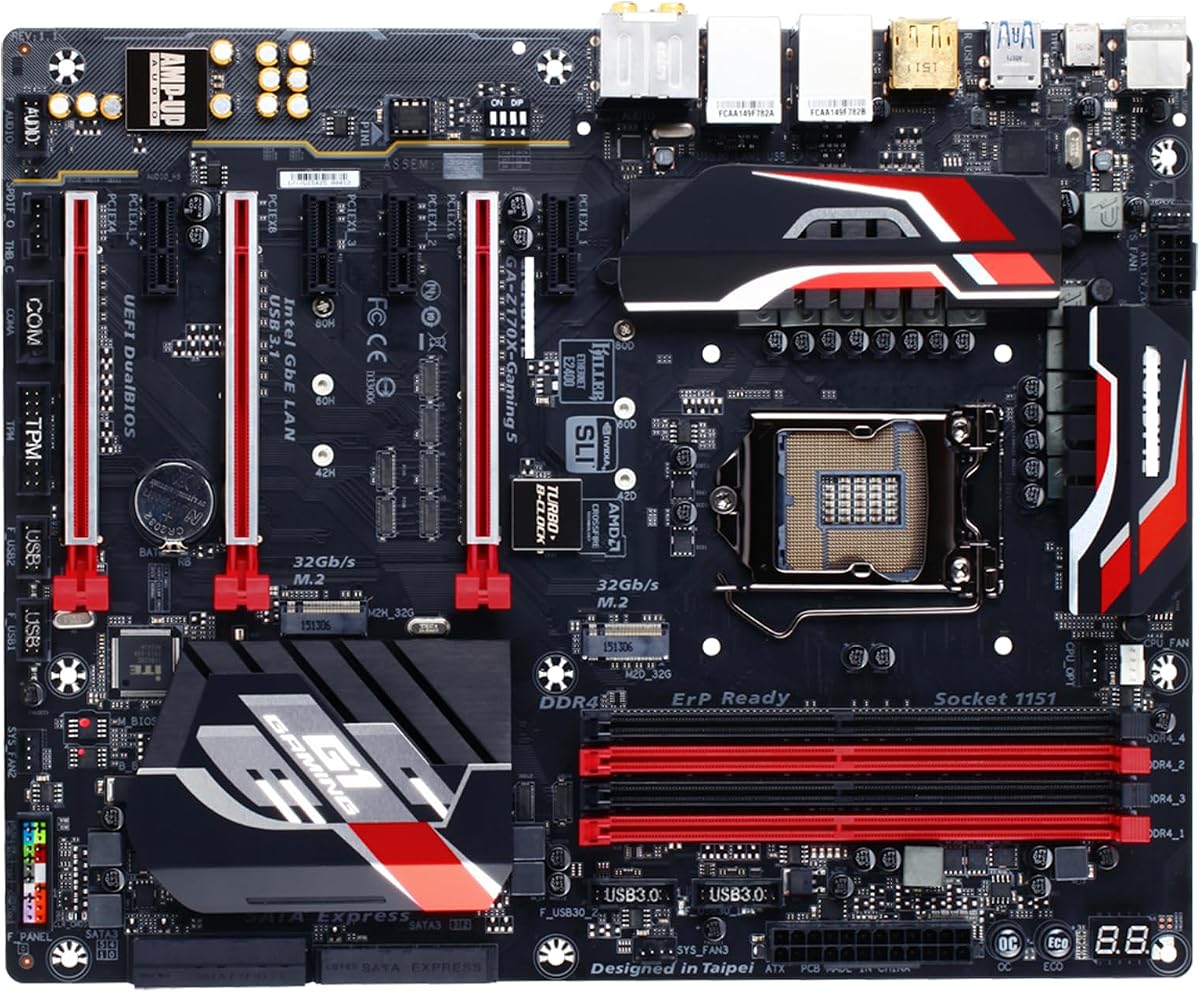


This motherboard ranks first due to its balanced features and strong performance. It holds a 4.2 rating from users who value stability. The Extreme Engine DIGI+ ensures precise power control for your CPU.
We may earn a commission when you buy through this link, at no additional cost to you.
The SupremeFX 2015 audio system delivers immersive sound for gaming. USB 3.1 ports offer faster data transfers than older standards. Sonic Sense Amp boosts audio output for headphones without distortion.
While powerful, the cost is higher than budget options. The ATX size requires a spacious case. Some users note the lighting control can be complex to configure initially.
Buy this if you want a reliable board for high-end builds. It supports 6th and 7th gen Intel processors well. The combination of speed and durability makes it a top choice.
SupremeFX 2015 uses high quality capacitors for clear sound.
Extreme Engine DIGI+ keeps voltage stable during heavy loads.
We may earn a commission when you buy through this link, at no additional cost to you.
This board offers excellent value for gamers on a budget. It maintains a 4.1 rating for solid performance. The Z170 chipset supports overclocking for better frame rates.
We may earn a commission when you buy through this link, at no additional cost to you.
SupremeFX audio ensures clear sound during intense gaming sessions. M.2 slots provide ultra-fast storage speeds. LANGuard protects against electrical surges and network interruptions.
Build quality is good but not premium. The VRM may get warm under extreme loads. USB selection is adequate but lacks the latest Type C on all ports.
Choose this for cost effective builds without sacrificing core features. It supports DDR4 memory well. The balance of price and performance makes it a top budget pick.
M.2 slots allow for quick boot and load times.
LANGuard ensures stable online gaming connections.
We may earn a commission when you buy through this link, at no additional cost to you.
This premium board stands out with 2-Way SLI support. It has a 4.2 rating from users who run dual GPUs. The design focuses on maximum performance and connectivity.
We may earn a commission when you buy through this link, at no additional cost to you.
Seven USB 3.0 ports offer plenty of space for peripherals. Audio tech delivers immersive sound. The layout supports three-Way AMD Crossfire as well.
It is expensive compared to mid-range boards. The BIOS has many options which can overwhelm beginners. Cooling on the VRM is adequate but not exceptional.
Buy if you need multi GPU setups and high connectivity. It handles high-end CPUs well. The feature set justifies the price for serious gamers.
Supports 2-Way SLI for doubled graphics performance.
Multiple USB ports ensure all devices connect easily.
We may earn a commission when you buy through this link, at no additional cost to you.
This motherboard emphasizes durability and power. It supports up to 64GB of DDR4 memory. The design ensures stable performance during long gaming sessions.
We may earn a commission when you buy through this link, at no additional cost to you.
Enhanced power delivery helps maintain speed. Connectivity options are robust for modern needs. The build quality aims to withstand daily wear and tear.
There is no clear rating or official warranty. You may face compatibility issues. The packaging is industrial which might lack protective details.
Choose this if you need high memory capacity on a budget. It works well with 6th and 7th gen CPUs. Check seller reputation before purchasing.
Supports up to 64GB for heavy multitasking.
Rugged design ensures long-term reliability.
We may earn a commission when you buy through this link, at no additional cost to you.
This board offers strong multitasking capabilities. It has four DIMM slots for high RAM configurations. Users note stable performance in daily tasks.
We may earn a commission when you buy through this link, at no additional cost to you.
Support for AMD Crossfire adds flexibility. Six SATA ports allow for multiple drives. The layout supports standard ATX cases easily.
Some users report BIOS update challenges. The rating is lower than other models. Connectivity is good but lacks USB 3.1 on rear.
Buy if you need many drive connections. It works well with 6th gen CPUs. Verify BIOS version before installation to avoid delays.
Six SATA ports support multiple SSD and HDD drives.
Four slots allow easy RAM upgrades later.
We may earn a commission when you buy through this link, at no additional cost to you.
This board features excellent audio tech. Realtek ALC1150 supports 7.1 Channel HD audio. It holds a 4.2 rating for value.
We may earn a commission when you buy through this link, at no additional cost to you.
Six SATA ports and flexible PCIe slots add versatility. The board supports up to 64GB of memory. It is cost effective for most builders.
USB 3.1 support is limited to internal. Rear I/O lacks Type C. Some users prefer more modern connectivity options.
Choose this for great sound on a budget. It works well with DDR4 kits. A solid pick for those prioritizing audio quality.
Realtek codec ensures clear and rich game sounds.
PCIe slots support multiple expansion cards.
We may earn a commission when you buy through this link, at no additional cost to you.
This board includes Steel Armor for graphics slots. Audio Boost 3 enhances sound quality. It has eight USB 3.1 ports for peripherals.
We may earn a commission when you buy through this link, at no additional cost to you.
Support for 3-Way CrossFire allows multi GPU setups. The design fits standard ATX cases. Performance is stable for gaming and work.
Some reviews mention BIOS inconsistencies. The price is high for the feature set. Connectivity is strong but could be more modern.
Buy if you value physical slot protection. It works well with DDR4 memory. A good option for those needing many USB ports.
Steel Armor reinforces PCIe slots against damage.
Audio Boost 3 reduces noise for clearer sound.
We may earn a commission when you buy through this link, at no additional cost to you.
This board holds a 4.3 rating for reliability. 5X Protection II ensures hardware durability. It has USB 3.1 Boost for faster speeds.
We may earn a commission when you buy through this link, at no additional cost to you.
M.2 support allows for fast boot drives. Dual Intelligent Processors optimize system settings. The layout is clean and user friendly.
It lacks rear Type C ports for modern devices. Expansion slots are fewer than other models. Some users want more PCIe options.
Choose this for stability and protection. It works well with Intel 6th gen CPUs. A solid choice for long-term system reliability.
5X Protection II defends against power and heat.
USB 3.1 Boost increases data transfer rates.
We may earn a commission when you buy through this link, at no additional cost to you.
This is a refurbished mATX model. It has a 4.0 rating for performance. The SupremeFX audio tech delivers great sound.
We may earn a commission when you buy through this link, at no additional cost to you.
Extreme Engine DIGI+ ensures stable power. It includes a 90-day warranty. The small size fits compact cases easily.
Expansion options are limited compared to ATX. Refurbished units vary in condition. You rely on the seller for quality checks.
Buy for small form factor builds with premium features. It supports DDR4 well. A good pick for compact gaming systems.
mATX form factor saves desk space.
90-day warranty covers initial issues.
We may earn a commission when you buy through this link, at no additional cost to you.
This industrial pack board has a 5.0 rating. It supports high speed memory up to 3466MHz. The hardware is genuine and original.
We may earn a commission when you buy through this link, at no additional cost to you.
M.2 sockets offer fast storage options. It supports 6th and 7th gen Intel CPUs. The price is lower for industrial packaging.
You must install it without original box. BIOS updates may be needed for 7th gen. Professional help is recommended if unsure.
Choose if you know hardware installation well. It delivers strong performance for the cost. A solid option for custom builds.
Supports 3466MHz for faster data access.
Industrial pack lowers cost while keeping specs.
We may earn a commission when you buy through this link, at no additional cost to you.
Choosing the right board requires checking many factors. This section explains key features to compare.
Ensure the board uses LGA1151 for your Intel 6th or 7th gen CPU. Mismatched sockets will not fit or work. This is the most critical check.
Check for DDR4 slots and max capacity. Many boards support up to 64GB. If you need more RAM, choose a board with four slots.
Look for M.2 slots for fast SSDs. SATA Express and SATA ports add extra drive options. More slots mean better storage flexibility.
Count PCI Express slots for graphics cards. Some boards support SLI or Crossfire for multi GPU setups. Ensure enough space for your needs.
USB 3.1 and Type C ports offer faster speeds. Ensure enough USB ports for all devices. Audio jacks are standard but vary in quality.
Strong VRMs ensure stable power for your CPU. Overclocking needs good power phases. Poor delivery may cause instability under load.
Quality capacitors improve lifespan and stability. Metal heatsinks cool VRMs better. Avoid boards with flimsy components for long use.
Compare features against price. Budget boards lack some ports. Premium boards offer better audio and power. Choose based on your needs.
Install the board in a static free area. Use the I/O shield from the box. Place screws only where holes exist.
Connect power cables to the main and CPU connectors. Check all headers match manual labels. Boot to BIOS to check memory settings.
Update BIOS for latest support if needed. Clean dust from slots with air. Monitor temps during heavy use to prevent issues.
These boards support 6th and 7th Gen Intel Core processors. BIOS updates may be needed for 7th gen. Check vendor guides before buying to confirm compatibility.
Yes Z170 supports CPU overclocking for K series chips. Ensure the board has strong VRM cooling. This boosts performance but needs proper airflow.
Most boards support up to 64GB of DDR4 RAM. Some have four slots for higher capacity. Always check spec sheets for max limits.
Many Z170 boards include M.2 slots for SSDs. This offers faster boot times. Confirm speed and key type before purchasing drives.
Z170 allows CPU overclocking while H170 does not. Z170 also has more lanes for PCIe devices. Z170 is better for gaming builds.
Certified refurbished boards are tested before sale. They come with warranties but vary in condition. Check seller reputation before buying.
Rear ports are easiest for peripherals. Some boards have front headers for case C ports. Use the one nearest your device needs.
We picked top boards like the ROG Maximus VIII Hero for overall performance. Budget picks like the Z170 PRO Gaming offer great value. Each board has unique strengths for different builds.
Prioritize power delivery and memory support for gaming. Ensure enough storage slots for your needs. Check USB counts for all your devices.
Prices and availability change so check current listings. Always verify BIOS support for your CPU. Choose the board that fits your specific plan.