
Dell SE2426HG
4.7Editor score
240Hz Refresh Rate
0.5ms Response Time
AMD FreeSync Premium
Competitive Valorant demands precision and speed, making your monitor choice critical for success. A high refresh rate display ensures smooth motion and minimal input lag, giving you an edge in fast-paced duels. Selecting the right screen can transform your gameplay experience significantly.
We evaluated ten top-rated 240Hz monitors based on panel technology, response times, and gaming features. Our analysis focuses on models that deliver crisp visuals and reliable performance under intense gaming conditions. Each product was assessed for its ability to support competitive play standards.
Each pick highlights key strengths like color accuracy, adaptive sync, and ergonomic design. Prices and availability may change, so verify details before purchasing. We aim to provide clear, factual insights to help you invest wisely in your gaming setup.
4.7Editor score
4.5Editor score

4.6Editor score
As an Amazon Associate we earn from qualifying purchases.
Compare key specifications across all ten models to find the perfect fit for your setup. This side-by-side overview highlights resolution, panel type, and unique features to simplify your decision-making process.


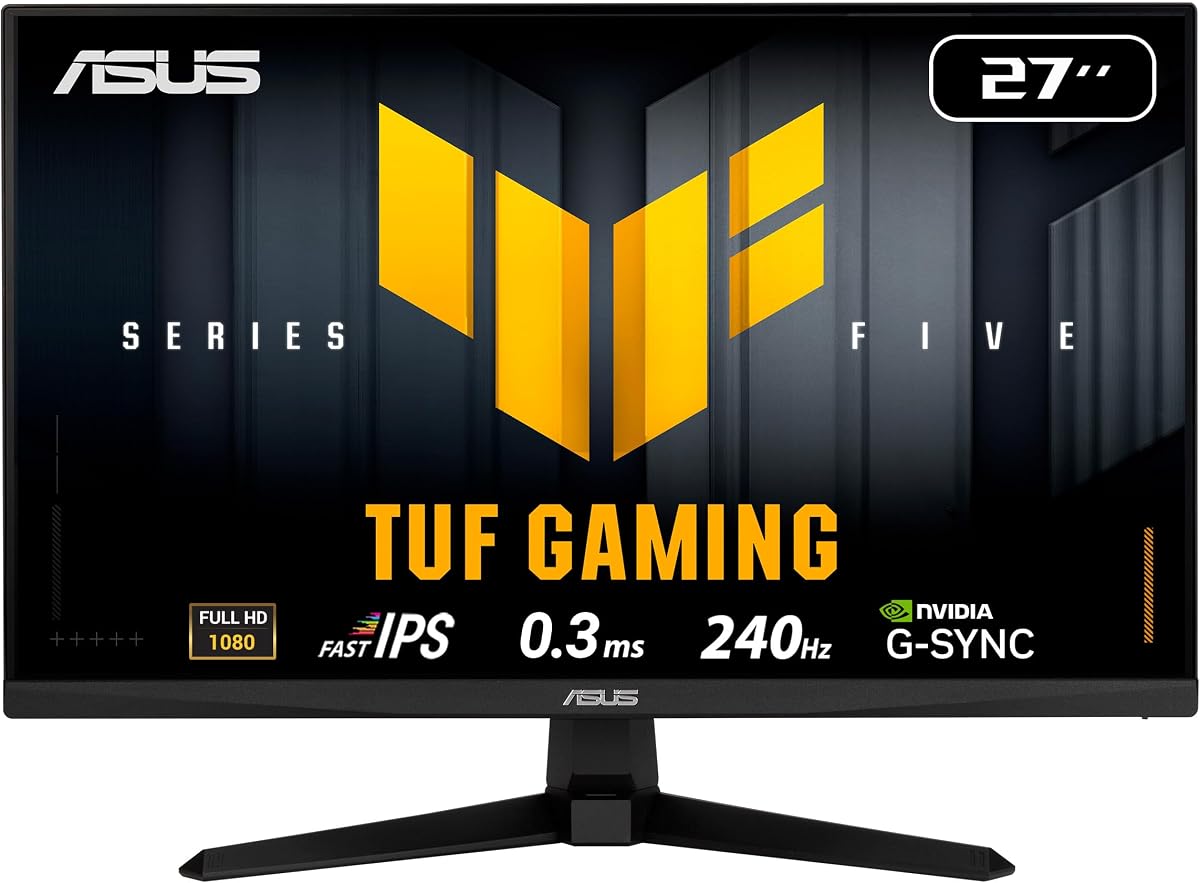
The ASUS TUF VG279QM5A stands out as a top choice for Valorant players seeking speed and reliability. With a 240Hz refresh rate and Fast IPS panel, it delivers smooth visuals and vibrant colors. Its 0.3ms response time ensures minimal blur during fast movements.
We may earn a commission when you buy through this link, at no additional cost to you.
Key strengths include ASUS Extreme Low Motion Blur Sync technology, which combines ELMB with variable refresh rates. This eliminates ghosting and tearing simultaneously. The G-SYNC compatibility ensures seamless synchronization with NVIDIA GPUs, enhancing fluid gameplay significantly.
While it offers excellent performance, it limits resolution to Full HD. Some users might prefer higher pixel density for sharper details. However, for competitive gaming where frame rates matter more, this trade-off is acceptable and often preferred.
This monitor is ideal for serious competitive gamers who prioritize response time and motion clarity. Its robust design and comprehensive warranty provide long-term value. Choosing this model ensures you have the tools needed to perform at your best.
The 0.3ms response time minimizes pixel transitions, reducing blur and ensuring targets remain clear during rapid flick shots.
ELMB SYNC merges motion blur reduction with adaptive sync, allowing tear-free images without compromising visual sharpness during intense battles.
We may earn a commission when you buy through this link, at no additional cost to you.
The Dell SE2426HG offers incredible value for those seeking high refresh rates without breaking the bank. Its Fast IPS panel ensures excellent color accuracy and wide viewing angles. With a 240Hz refresh rate and 0.5ms response time, it handles fast-paced gameplay effectively.
We may earn a commission when you buy through this link, at no additional cost to you.
FreeSync Premium support eliminates tearing for smooth gameplay across AMD and NVIDIA GPUs. The TÜV Rheinland certification lowers blue light, preserving eye comfort during long sessions. This balance of performance and health considerations makes it a strong contender.
While the stand lacks height adjustment, the tilt functionality helps achieve a comfortable viewing angle. Some users may need a VESA mount for better ergonomics. However, the core gaming performance remains uncompromised at this price tier.
Ideal for budget-conscious players or newcomers to competitive gaming, this monitor delivers essential features reliably. It proves you do not need to spend heavily to get smooth motion and responsive controls. It is a smart investment for immediate gameplay improvement.
Achieving 240Hz at a budget price makes this model accessible to many players aiming to upgrade from lower refresh rate screens.
The TÜV 3-Star certification reduces blue light while maintaining color quality, helping prevent strain during extended Valorant matches.
We may earn a commission when you buy through this link, at no additional cost to you.
The AOC Q27G41ZE elevates the experience with QHD resolution and overclocked 260Hz refresh rates. This extra pixel density sharpens enemy models and textures significantly. Its 0.3ms MPRT response time ensures crisp movement without blur, essential for tracking targets in Valorant.
We may earn a commission when you buy through this link, at no additional cost to you.
NVIDIA G-SYNC compatibility ensures seamless synchronization, reducing stutter and tearing even with variable frame rates. The IPS panel provides vibrant colors and wide viewing angles, enhancing immersion. Game modes and shadow control allow fine-tuning for competitive scenarios.
Running QHD at high refresh rates demands a powerful graphics card. Users with mid-range systems might struggle to maintain high frame rates consistently. However, for those with high-end rigs, the visual payoff is substantial and worth the investment.
This monitor suits players who want both speed and visual fidelity. It offers a premium experience with reliable performance for competitive titles. Choosing this ensures you have the best blend of resolution and speed available in its class.
The 2560×1440 resolution provides sharper details than FHD, helping you spot enemies and read text more easily during gameplay.
Overclocking to 260Hz via DisplayPort gives extra smoothness beyond the standard 240Hz, offering a marginal but noticeable edge in speed.
We may earn a commission when you buy through this link, at no additional cost to you.
The SANSUI 24.5 Inch monitor pushes refresh rates up to 300Hz, offering potential extra smoothness for fast-paced games. Its Fast IPS panel delivers vibrant colors and wide viewing angles. The 1ms MPRT response time minimizes motion blur, aiding in quick reactions.
We may earn a commission when you buy through this link, at no additional cost to you.
Features like CrossHair and RTS assistants provide on-screen overlays to aid aim and timing. This adds utility beyond standard gaming modes. The wide sRGB coverage ensures accurate color reproduction, which helps in identifying enemy positions correctly.
While highly capable, warranty and support experiences vary compared to established brands. Some users report issues with build quality over time. Prospective buyers should consider the warranty terms carefully before committing to this option.
This is a strong choice for enthusiasts pushing hardware limits to maximize refresh rates. It offers unique features that assist in tactical gameplay. Just ensure your setup supports the high refresh rates to fully utilize its capabilities.
Supporting up to 300Hz provides ultra-smooth motion, giving a slight edge in tracking fast-moving targets during critical duels.
On-screen crosshair and game mode presets offer tactical advantages by helping players maintain better focus and precision during matches.
We may earn a commission when you buy through this link, at no additional cost to you.
The Amzfast 24 Curved monitor offers an immersive experience with its curved VA panel design. A 3000:1 contrast ratio produces deep blacks, enhancing visual depth. The 240Hz refresh rate and 1ms MPRT ensure smooth motion, suitable for competitive action.
We may earn a commission when you buy through this link, at no additional cost to you.
Its ultra-slim base maximizes desk space, making it ideal for compact setups. Game modes like FPS optimize black levels to reveal details in shadows. These features help players spot enemies hiding in darker areas of the map.
VA panels sometimes exhibit slower gray-to-gray transitions, which can cause ghosting in fast scenes. While the refresh rate helps, IPS monitors generally handle motion better. This trade-off is acceptable for those prioritizing contrast and immersion over pixel speed.
This monitor is great for players who want a unique form factor on a budget. It delivers high performance for its price point without sacrificing essential gaming specs. Choosing this provides a distinct visual experience with deep contrast levels.
The curvature wraps the display slightly around the viewer, creating a more engaging visual field that reduces peripheral distraction.
The 3000:1 contrast ratio delivers deep blacks, making dark areas on screen more detailed and easier to scan during low-light scenes.
We may earn a commission when you buy through this link, at no additional cost to you.
The ASUS TUF VG279QM5A combines performance with durability, designed to withstand rigorous gaming schedules. Its Fast IPS panel offers vibrant colors and wide viewing angles. With 240Hz refresh and 0.3ms response, it ensures rapid, blur-free motion during intense moments.
We may earn a commission when you buy through this link, at no additional cost to you.
AI-powered features enhance the gaming experience by optimizing settings dynamically. DisplayWidget Center simplifies adjustments using a mouse, avoiding OSD menu diving. This convenience allows quick tweaks without interrupting gameplay or focus on the screen.
While robust, it sticks to FHD resolution. Users seeking ultra-sharp pixels might find this limiting. However, for pure speed and responsiveness, this resolution ensures higher frame rates. The trade-off is favorable for competitive FPS titles.
This monitor suits gamers valuing durability and ease of use alongside high performance. The extended warranty offers peace of mind for long-term use. It is a reliable choice for those who want consistent, high-quality output daily.
TUF Gaming AI technology optimizes display settings automatically, ensuring you always have the best visual setup without manual tweaking.
Software control via mouse simplifies settings adjustments, making it easy to change modes or brightness without accessing physical buttons.
We may earn a commission when you buy through this link, at no additional cost to you.
The msi MAG 274CF X24 stands out with AI Vision technology that enhances visibility in dark areas. This feature helps reveal details in shadows, crucial for tactical advantage. The 240Hz refresh rate and 0.5ms response time ensure smooth, clear motion during gameplay.
We may earn a commission when you buy through this link, at no additional cost to you.
With a 0.5ms GtG response time, it minimizes ghosting effectively. The software reduces blue light emissions, protecting eyes during long sessions. Its high user rating indicates strong satisfaction and reliability across the user base.
VA panels may show minor black smearing in fast dark transitions. While acceptable for many, competitive players sensitive to motion blur might prefer IPS. However, the contrast benefits often outweigh this for general gaming and content consumption.
This monitor is great for players wanting AI-assisted visuals on a budget. It offers solid specs with unique features that enhance visibility. Choosing it provides a balanced mix of performance and innovative technology for everyday use.
AI Vision reveals hidden details in dark areas and boosts brightness, ensuring you don't miss enemies hiding in shadows.
A software solution reduces blue-violet light emission, helping reduce eye strain during extended gaming marathons.
We may earn a commission when you buy through this link, at no additional cost to you.
The AOC 27G51Z offers overclocking up to 260Hz for those with powerful GPUs. This provides extra fluidity beyond standard 240Hz standards. Its IPS panel ensures vibrant colors and wide viewing angles, making visuals appealing and accurate during play.
We may earn a commission when you buy through this link, at no additional cost to you.
Adaptive-Sync technology guarantees smooth, tear-free gameplay with synchronized refresh rates. Flicker-Free and Low Blue Light technologies reduce eye fatigue over time. The frameless design suits multi-monitor setups and modern aesthetics seamlessly.
Overclocked rates depend on specific GPU performance. Not all systems may achieve stable 260Hz consistently. Users should test their setup to confirm if the overclock is viable for their configuration before relying on it daily.
This is an excellent choice for hardware enthusiasts pushing performance boundaries. It balances speed with color accuracy effectively. Choosing this monitor ensures you have room to optimize refresh rates for maximum smoothness in games.
The ability to overclock to 260Hz provides extra smoothness for users with high-end GPUs seeking the highest possible frame rates.
Adaptive-Sync keeps visuals fluid and synchronized with your GPU, eliminating screen tearing and stuttering for seamless gameplay.
We may earn a commission when you buy through this link, at no additional cost to you.
The SANSUI 24 Curved monitor offers strong value with its immersive 1500R curvature. This design wraps visuals around the viewer, enhancing focus. A 240Hz refresh rate and 1ms MPRT response ensure fluid, responsive gameplay for competitive titles.
We may earn a commission when you buy through this link, at no additional cost to you.
With 93% DCI-P3 coverage, it delivers vibrant and accurate colors. Game modes and shadow boosters help optimize visibility in different scenarios. These tools assist in targeting and tracking enemies effectively during fast-paced matches.
Ergonomic adjustments are limited, primarily offering tilt. Users may need a VESA mount for better height or angle customization. However, the core performance and visual features remain robust for the price point offered.
This monitor suits players wanting a curved screen without high costs. It delivers strong visuals and refresh rates suitable for gaming. Choosing it provides an immersive experience with solid specs at a budget-friendly price.
The 1500R curvature matches the human eye, creating a natural field of view that enhances immersion and reduces neck strain.
Covering 93% of the DCI-P3 space ensures rich, vibrant colors that make game environments look more lifelike and detailed.
We may earn a commission when you buy through this link, at no additional cost to you.
The ASUS TUF VG249QML5A fits smaller desks with its 24-inch form factor. Despite the size, it delivers 240Hz refresh and 0.3ms response for high-performance gaming. Fast IPS technology ensures sharp visuals and wide viewing angles for consistent colors.
We may earn a commission when you buy through this link, at no additional cost to you.
A height-adjustable stand allows ergonomic customization without needing a third-party arm. ELMB SYNC combines motion blur reduction with variable refresh rates, eliminating ghosting. This keeps action clear and responsive during rapid gameplay moments.
While 24 inches is compact, it is ideal for tight setups. Some players prefer larger screens for peripheral vision. However, for focused competitive play, this size keeps the entire view within direct sight lines effectively.
This monitor is perfect for those with limited desk space but high performance needs. Its ergonomic features and fast response make it a practical choice. Choosing it ensures you have a reliable, space-saving option for competitive gaming.
A built-in height-adjustable stand lets you customize viewing position, improving posture and comfort during long sessions.
ELMB SYNC eliminates ghosting and tearing simultaneously, ensuring sharp visuals even with variable refresh rates enabled.
We may earn a commission when you buy through this link, at no additional cost to you.
The ASUS TUF VG259QM5A offers a 25-inch size that balances desk space and visibility. With 240Hz refresh and 0.3ms GTG response, it delivers sharp visuals. Fast IPS ensures accurate colors, crucial for identifying enemy movements in Valorant.
We may earn a commission when you buy through this link, at no additional cost to you.
G-SYNC compatibility keeps the experience seamless. DisplayWidget Center simplifies adjustments via mouse. A 3-year warranty ensures long-term reliability. These features make it a robust choice for daily competitive play and content creation.
The standard stand lacks pivot and height adjustment. Some users may need VESA mounting for full ergonomics. However, the screen quality and speed compensate well for these minor setup limitations in most cases.
Ideal for players seeking a middle ground between 24 and 27 inches, this monitor performs reliably. Its fast response and color accuracy suit competitive needs perfectly. Choosing it provides a balanced experience for varied gaming styles.
The 25-inch screen offers a perfect middle ground, providing more space than 24 inches without the demands of 27-inch panels.
G-SYNC compatible technology ensures a tear-free experience, synchronizing refresh rates with your GPU for smooth visuals.
We may earn a commission when you buy through this link, at no additional cost to you.
Selecting the right monitor involves balancing performance, ergonomics, and budget. This guide explains key factors to consider.
Refresh rate determines how many frames display per second. Aim for 240Hz to ensure fluid motion. Response time, ideally 1ms or less, minimizes ghosting. Lower latency ensures faster reaction times during crucial moments in Valorant.
Always prioritize high refresh rates and fast response times for competitive play.
IPS panels offer better colors and viewing angles. VA panels provide higher contrast but may suffer slower transitions. For Valorant, IPS is preferred for motion clarity. VA might suit players prioritizing deep blacks over speed.
Choose IPS for reliable color consistency and faster pixel transitions.
Full HD (1920×1080) remains the standard for competitive gaming. It ensures higher frame rates on most hardware. QHD offers sharper detail but demands more GPU power. For pure esports performance, stick with Full HD.
Focus on Full HD for maximum frame rates and performance stability.
G-SYNC and FreeSync prevent screen tearing. They align refresh rates with GPU output. This ensures smoother visuals without stutter. Both work well, but G-SYNC offers premium performance for NVIDIA users.
Look for compatible adaptive sync to ensure tear-free, seamless gameplay.
Adjustable stands help maintain proper posture. Height and tilt adjustments reduce strain during long sessions. VESA compatibility allows mounting on arms. Comfortable positioning prevents fatigue over extended gaming hours.
Ensure the monitor offers ergonomic adjustments for long-term comfort.
DisplayPort 1.4 is essential for 240Hz. HDMI 2.0 may limit refresh rates on some models. Ensure your cables match the monitor's ports. Missing connections can restrict performance significantly.
Verify DisplayPort support for full 240Hz performance on all models.
High sRGB coverage ensures accurate visuals. Accurate colors help identify enemies and objects. Poor color performance may hide visual cues. Look for 99% sRGB coverage for best results.
Prioritize monitors with high sRGB coverage for better visual clarity.
Long warranties protect against defects. Reliable customer support is crucial for hardware issues. Check terms for coverage duration and responsiveness. This adds value and peace of mind over time.
Choose brands with strong warranties and responsive support teams.
Install drivers and update firmware regularly to ensure optimal performance. Connect via DisplayPort to unlock full refresh rates. Adjust in-game settings to match the monitor's capabilities for the best experience.
Clean the screen with microfiber cloths to avoid scratches. Avoid harsh chemicals that damage coatings. Dust the bezels and stand regularly. Proper maintenance extends the lifespan of your display.
Calibrate colors and brightness for eye comfort. Use built-in presets to optimize for FPS games. Adjust height and tilt to maintain good posture. Consistent setup helps maintain performance over time.
While 144Hz is common, 240Hz provides extra smoothness. For competitive players, every frame counts. It helps track enemies faster. If your PC supports it, upgrading to 240Hz is worth the investment.
IPS panels are best for color and motion. They minimize ghosting and offer wide viewing angles. VA panels have higher contrast but slower response. For FPS, IPS is the superior choice.
G-SYNC prevents tearing, enhancing smoothness. FreeSync works similarly for AMD. If you use NVIDIA, G-SYNC offers premium sync. It is optional but beneficial for competitive visuals.
Most 240Hz monitors need DisplayPort for full speed. Some support 240Hz on HDMI 2.0. Check specific model details. DisplayPort is generally the safer choice for max refresh.
Full HD remains standard for competitive play. It allows higher frame rates on average hardware. QHD offers sharper visuals but lowers FPS. For ranked play, prioritize speed over pixel density.
Enable Game Mode on your monitor. Disable unnecessary image enhancements. Ensure high refresh rates are active. Using a wired connection also helps maintain stable performance.
Curved screens offer immersion, but flat is standard. For FPS, flat is generally preferred. Curvature can distort aiming lines slightly. Choose based on personal preference and setup.
Use DisplayPort 1.4 for 240Hz. Ensure cables support bandwidth. Check included cables or buy certified ones. Proper cabling ensures you get full performance.
This guide highlighted top models balancing speed, color, and value. The ASUS TUF VG279QM5A offers excellent speed. The Dell SE2426HG provides budget value. Each model brings unique strengths to competitive setups.
Prioritize response times and refresh rates for edge. Ergonomics and warranty matter too for comfort. Your choice should match your hardware and desk needs. Speed remains key for tactical advantage.
Prices shift quickly in the monitor market. Check current deals before deciding. Use our comparisons to save time. Choosing the right monitor now ensures long-term competitive success.