
Akai Professional LPK25
4.7Editor score
Plug and play setup
Built-in arpeggiator
Compact and lightweight
This guide compares the top 25 Key MIDI Controllers for producers and musicians, evaluating keybed quality, software bundles, and DAW integration to help you
Finding the right 25 Key MIDI Controller is essential for musicians who need portability without sacrificing creative control. These compact devices fit easily into bags while offering enough keys for melodies, bass lines, and chord progressions in any production setup.
We evaluated ten leading models based on keybed responsiveness, control surface features, software in, and overall build quality. Our analysis focuses on how each controller integrates with popular digital audio workstations and supports various music production workflows.
Each product entry details specific strengths, potential trade-offs, and ideal use cases to help you match a controller to your needs. Remember that availability and pricing change frequently, so verify current details before making a final purchase decision.
4.7Editor score

4.7Editor score

4.6Editor score
The following table provides a quick side-by-side overview of the ten controllers analyzed in this guide, highlighting their most distinctive features and intended user groups.



The Arturia MiniLab 3 stands out as the top choice for musicians seeking a balanced mix of control and portability. With a rating reflecting widespread user satisfaction, this controller delivers expressive playing through its high-quality velocity-sensitive keys and intuitive layout.
We may earn a commission when you buy through this link, at no additional cost to you.
Its standout quality lies in the integration of eight faders and four knobs alongside eight pads, allowing for deep control over DAW mixing and instrument parameters. The redesigned keybed feels significantly better than previous generations, offering a playing experience that rivals full-sized keyboards.
While the lack of Bluetooth connectivity is a minor drawback compared to some newer competitors, the reliability of the USB connection ensures stable performance. The keys also do not feature aftertouch, which limits dynamic modulation options for some synth players.
This controller is ideal for producers who value hands-on mixing capabilities without needing a larger desk footprint. We recommend it for anyone looking for a reliable, expressive tool that adapts to various music styles and workflows seamlessly.
The eight faders provide precise control over volume and pan, making it easy to balance tracks without touching a mouse or trackpad.
The updated keybed offers a more natural feel with better spring tension, allowing for dynamic performances that respond accurately to your touch.
We may earn a commission when you buy through this link, at no additional cost to you.
For musicians on a tight budget, the Akai Professional LPK25 offers an excellent entry point into MIDI control. Its high rating confirms that users find significant value in its simple design and reliable performance for everyday songwriting tasks.
We may earn a commission when you buy through this link, at no additional cost to you.
The built-in arpeggiator is a standout feature that helps users create complex patterns quickly without needing deep software knowledge. Additionally, the eight programmable preset slots allow you to save different mappings for various instruments or DAWs on the fly.
The trade-off for the low cost is a more basic set of controls compared to higher-end models, with no pads or knobs for mixing. The keybed is functional but lacks the nuanced response found in premium controllers, which might limit expressive dynamic playing.
This controller is perfect for beginners or travelers who need a simple tool to capture ideas quickly. We recommend it for students and hobbyists who prioritize portability and ease of use over advanced control features.
The onboard arpeggiator lets you create musical patterns instantly, which is great for generating ideas when you do not have a full keyboard setup.
With USB power and plug-and-play compatibility, you can start making music immediately without installing drivers or configuring complex settings on your computer.
We may earn a commission when you buy through this link, at no additional cost to you.
The Novation Launchkey Mini 25 MK4 represents the premium tier of this guide, offering advanced features for serious producers. Its robust build and deep integration with major DAWs make it a powerful tool for complex production workflows.
We may earn a commission when you buy through this link, at no additional cost to you.
Key strengths include the sixteen FSR drum pads which support polyphonic aftertouch, allowing for expressive finger drumming and modulation. The Scale Mode feature ensures you never hit a wrong note by locking keys to a selected musical scale, which simplifies composition.
While the price point is higher than basic models, the included software bundle and superior build quality justify the investment for many users. However, the deep integration software is currently optimized primarily for Mac, which might limit utility for PC users seeking full feature parity.
This controller is best suited for professional producers who demand advanced control and seamless workflow integration. We recommend it for anyone serious about music production who wants a controller that grows with their skills and project complexity.
The FSR pads respond to pressure after being pressed, offering a layer of expression that is rare in this price class and perfect for dynamic drumming.
By locking the keyboard to specific scales, you can experiment freely without worrying about dissonance, making it ideal for beginners and songwriters alike.
We may earn a commission when you buy through this link, at no additional cost to you.
The Akai MPK Mini Play MK3 offers a unique versatility by functioning as a standalone keyboard or a USB controller. This dual nature allows users to compose anywhere without needing a laptop connected, making it great for travel or quick idea sketching.
We may earn a commission when you buy through this link, at no additional cost to you.
It features a built-in speaker and internal instrument sounds, which means you can hear your performance immediately. The OLED display provides clear feedback on settings and notes, enhancing the user experience compared to models without visual feedback.
While the internal sounds are useful for quick demos, they are not as detailed as full software instruments, which may limit production quality for final tracks. The unit is also slightly heavier due to the internal battery and speaker components compared to pure USB controllers.
This model is ideal for musicians who want a portable practice tool or a standalone recorder. We recommend it for travelers or students who need a flexible device that works both on the go and in a studio setup.
You can play and record ideas without a computer, making it an excellent tool for capturing inspiration while traveling or away from a desk.
The OLED screen displays notes and parameters clearly, helping you adjust settings quickly without guessing which mode the controller is currently in.
We may earn a commission when you buy through this link, at no additional cost to you.
The Akai MPK Mini MK3 is a staple in many home studios, known for its robust build and industry-standard layout. Its popularity is reflected in its high rating, as users appreciate its balance of features and portability for daily production work.
We may earn a commission when you buy through this link, at no additional cost to you.
Key features include the eight backlit velocity-sensitive pads and a 4-way thumbstick for pitch and modulation. This layout provides comprehensive control over virtual instruments, making it easy to manipulate sounds during a live performance or recording session.
Some users find the keys slightly stiff compared to other modern controllers, which might require an adjustment period. Additionally, the touch-sensitive pads may need calibration over time to maintain consistent response, though this is a minor maintenance task.
This controller is best for producers who need a reliable, all-in-one solution for beats and melodies. We recommend it for hip-hop artists and electronic music producers who rely heavily on the MPC pad workflow and need robust DAW integration.
The 4-way thumbstick offers precise pitch and modulation control, which is essential for adding expression to synth lines and leads during performance.
Native Instruments integration allows you to browse and control presets directly from the controller, streamlining the workflow for those using Komplete software.
We may earn a commission when you buy through this link, at no additional cost to you.
The Akai APC Key 25 MK2 is specifically designed for Ableton Live users, offering a workflow that mirrors the software's session view. Its design prioritizes clip launching and scene control, making it a favorite among live performers and producers using Ableton.
We may earn a commission when you buy through this link, at no additional cost to you.
The fifty-eight RGB pads provide clear visual feedback for clip launching, while the arrow buttons allow for easy navigation through tracks and scenes. This integration is seamless out of the box, reducing the setup time significantly compared to generic controllers.
The main limitation is that the mapping is optimized primarily for Ableton, which can make it less versatile for other DAWs without custom programming. Additionally, the lack of a dedicated pitch wheel means you rely on the keyboard keys for pitch bends, which can feel awkward.
This controller is ideal for live performers and producers who use Ableton Live exclusively. We recommend it for anyone who values quick access to clips and automation while prioritizing a streamlined live set workflow.
The grid of RGB pads makes launching clips instant and intuitive, allowing you to trigger loops and samples in real time during a live set.
The directional arrows let you scroll through large projects without touching your mouse, keeping your hands on the controller for a continuous workflow.
We may earn a commission when you buy through this link, at no additional cost to you.
The M-VAVE 25 Key stands out for its robust Bluetooth connectivity, which allows for true wireless production on mobile devices. This feature is rare in this price range, making it an excellent choice for iPad or Android tablet users.
We may earn a commission when you buy through this link, at no additional cost to you.
With a built-in battery lasting up to sixteen hours, you can work for extended periods without needing a power source. The capacitive touch strips add a unique layer of control for pitch and modulation that distinguishes it from standard keyboards.
Wireless connections can occasionally introduce slight latency depending on the device and app, which may affect real-time recording accuracy. The build quality feels somewhat light compared to metal chassis units, which might require careful handling.
This controller is perfect for mobile producers who need to create without cables. We recommend it for those who use iPad or smartphones for production and value the freedom of wireless connectivity over absolute build weight.
Bluetooth MIDI support allows you to connect directly to tablets and phones, enabling you to play away from your desk or laptop entirely.
The smart chord feature helps beginners play complex harmonies by mapping chords to single keys, simplifying the process of writing lush progressions.
We may earn a commission when you buy through this link, at no additional cost to you.
The Rhymo 25 Key is designed for extreme portability, featuring a slim profile that fits easily into a backpack or laptop case. Its USB-C connectivity ensures compatibility with modern computers and tablets without the need for dongles.
We may earn a commission when you buy through this link, at no additional cost to you.
An X-Y joystick provides intuitive control for pitch and modulation, which adds a creative dimension to performance. The loop function and arpeggiator offer tools to build tracks quickly, making it a useful tool for idea generation on the go.
The construction is utilitarian and basic, which keeps costs low but may not withstand heavy daily use as well as premium models. The software bundle is minimal compared to competitors, meaning you may need to source your own VSTs and samples.
This controller is best for travelers or students who prioritize weight and size above all else. We recommend it for those who need a compact backup keyboard that takes up minimal space in a crowded bag.
The USB-C port connects directly to modern devices, eliminating the need for adapters and ensuring a faster and more reliable data connection than older USB standards.
The built-in loop function allows you to record and layer ideas quickly without needing external software, which is helpful for quick demos and jams.
We may earn a commission when you buy through this link, at no additional cost to you.
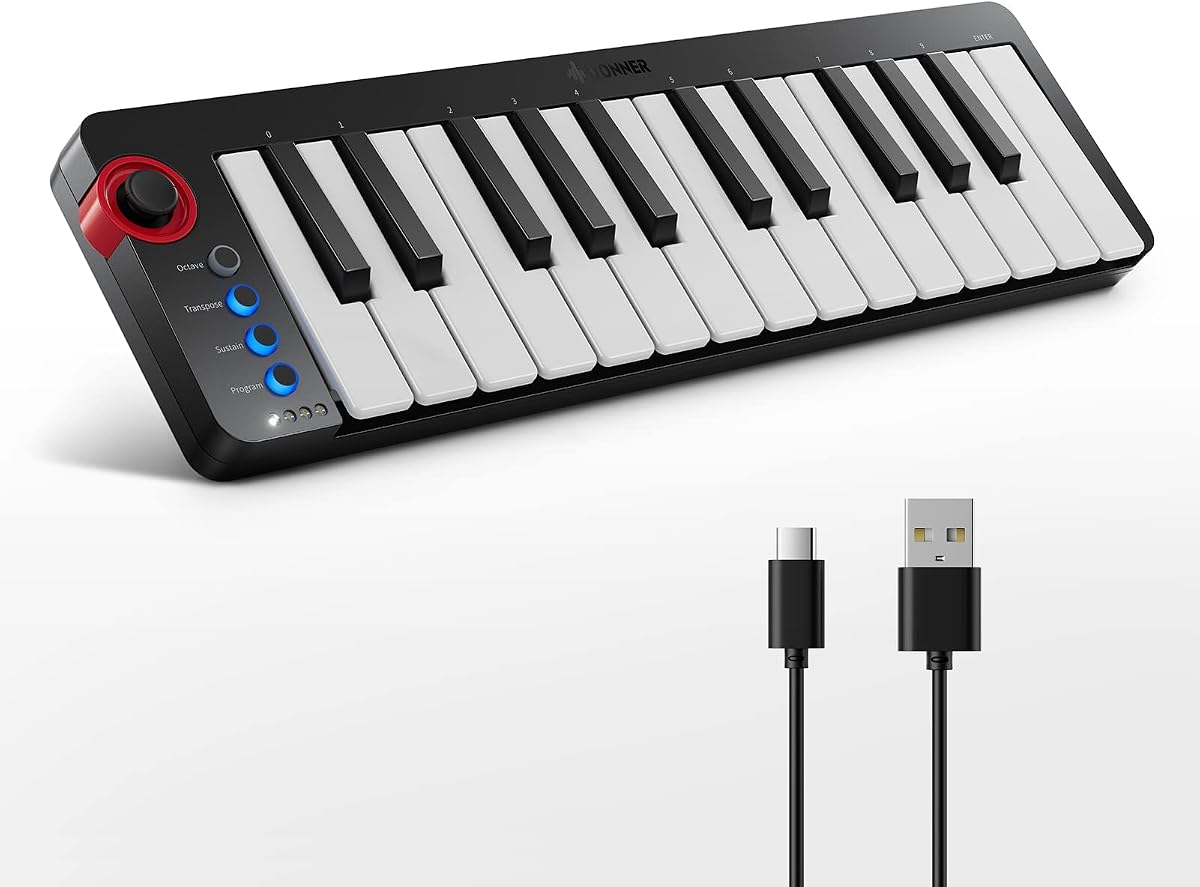
The Donner Mini MIDI N-25 is tailored for beginners, offering included lessons and visual aids to guide new users. This approach helps lower the barrier to entry, making music production accessible to those without formal training.
We may earn a commission when you buy through this link, at no additional cost to you.
A light-up rocker provides visual feedback, which is great for learning notes and keys while playing. The inclusion of forty keyboard-teaching courses adds value to the purchase by providing structured learning resources alongside the hardware.
The build quality is basic, which is expected at this price point but means it may not last as long under heavy use. Users might find the keys less responsive over time, but for learning purposes, this is usually acceptable.
This controller is ideal for absolute beginners and parents buying for children. We recommend it for anyone who wants a complete starter kit with educational resources to support their initial music learning journey.
The included 40 courses cover essential skills, providing a structured way to learn music theory and production basics alongside using the hardware.
Light-up buttons help you identify notes and keys visually, which is particularly helpful for beginners who are still learning the layout of a keyboard.
We may earn a commission when you buy through this link, at no additional cost to you.
The Akai MPK Mini MK3 Black is the same trusted model as the standard version, offering consistent performance for studio work. Its high rating reflects its reliability and the value added by the Splice sample subscription included with purchase.
We may earn a commission when you buy through this link, at no additional cost to you.
Full Level mode allows you to trigger samples at consistent volumes, which is crucial for drum programming. The eight assignable knobs provide extensive control over synth parameters and DAW effects, enhancing its utility in a full production environment.
The key feel remains standard for this model, which is functional but may not satisfy players seeking a piano-like experience. It does not offer new features over previous MK3 versions, which may deter those looking for the latest innovations.
This controller is ideal for producers who want a reliable, standard tool for beats and synths. We recommend it for anyone who values a stable workflow and appreciates the added value of the included Splice sample library.
The included Splice subscription provides access to thousands of high-quality samples, adding significant value to the hardware by enhancing your sound library immediately.
Full Level mode ensures that drum hits trigger at a consistent volume, which is essential for programming tight and reliable drum patterns in a mix.
We may earn a commission when you buy through this link, at no additional cost to you.
Selecting the right MIDI controller involves weighing several factors that align with your specific workflow, software choices, and budget constraints.
The quality of the keybed determines how expressive your playing can be. Look for velocity sensitivity to ensure the software responds to how hard you press the keys. While 25 keys are compact, they restrict your range to two octaves, so check for octave up and down buttons to access full melodic range.
Prioritize controllers with good key travel and weight to ensure comfortable playing over long sessions.
Control features like pads, knobs, and faders expand what you can do beyond simple note entry. Pads are essential for drum programming and launching clips, while knobs and faders help you mix tracks and tweak synth parameters without touching the screen.
Choose a layout that matches your primary activities, such as drumming or mixing, to maximize efficiency.
Many controllers come pre-mapped for specific digital audio workstations like Ableton Live or Logic Pro. This pre-mapping saves setup time and allows for immediate control over transport functions and clips. Check if the controller supports your preferred software out of the box.
Deep integration often means better workflow and less manual configuration before you start producing.
Software bundles often include free versions of DAWs, virtual instruments, and effects plugins. These additions can save significant money compared to buying them separately. Verify if the software is compatible with your operating system and meets your production needs.
High-quality software bundles add substantial value to the hardware purchase and help you get started quickly.
USB connectivity is standard, but some controllers offer Bluetooth MIDI or USB-C for modern devices. Bluetooth allows for wireless use with tablets and smartphones, while USB-C ensures faster data transfer and charging. Ensure the connection type matches your devices.
Versatile connectivity options future-proof your setup for mobile production needs.
A sturdy build ensures the controller can withstand regular transport and use. Consider the weight and size if you plan to travel frequently, as a lightweight unit fits easier in a backpack. However, balance this with the need for durable materials like metal chassis.
Portable controllers should still feel solid enough to provide a stable playing surface during performance.
Prices vary based on features, build, and software included. Entry-level models are affordable but may lack advanced features like Bluetooth or high-quality pads. Mid-range controllers often offer the best balance of features and cost for most users.
Set a clear budget that accounts for the hardware and any necessary accessories like cables or stands.
Visual feedback such as LEDs, OLED screens, or light-up buttons helps you understand the current state of the controller. This feedback is crucial during live performances when you cannot look at a computer screen. Ensure the display is clear and readable.
A user-friendly interface reduces confusion and helps you focus on creativity rather than technical settings.
Connect your controller to your computer using the provided USB cable or via Bluetooth if supported. Install any required drivers or software from the manufacturer's website, though many modern controllers are class-compliant and do not need extra drivers.
Open your preferred DAW and select the MIDI controller from the input settings. Map the controls like knobs and pads to specific parameters within your software to customize the workflow to your needs.
Keep the controller clean by wiping it with a soft, dry cloth to remove dust. Store it in a protective case when transporting to prevent scratches or impact damage, and avoid exposing it to extreme temperatures or moisture.
Most standard controllers require a computer or tablet to function as they send MIDI data to software. However, some models like the Akai MPK Mini Play include internal sounds and speakers, allowing them to work standalone without a computer connected.
Yes, many professionals use 25 Key controllers for idea sketching and specific tasks. While they are less suitable for recording full piano parts due to limited range, they are excellent for synth leads, basslines, and programming drums.
USB MIDI provides a wired connection with stable data transfer and no need for pairing. Bluetooth MIDI allows for wireless connectivity with tablets and phones, offering more freedom of movement but potentially introducing slight latency.
Yes, most controllers include free versions of DAWs and plugins as part of the purchase. These are often 'Lite' versions, but they provide enough features to start producing music without additional cost.
Check your connection and ensure the device is selected in your DAW settings. Restart your computer and the controller, and install any necessary drivers. If the issue persists, try a different USB port or cable to isolate the problem.
Yes, knobs can be mapped to various parameters like reverb, delay, and synth filters in your DAW. This allows you to tweak sound effects and instrument settings dynamically during performance or recording.
We have reviewed ten distinct options ranging from the versatile Arturia MiniLab 3 to the affordable Donner Mini MIDI N-25. Each model offers unique strengths, whether it be deep DAW integration or exceptional portability, catering to a wide variety of creative needs.
When selecting your next controller, prioritize features that align with your most common tasks, such as drum programming or live performance. Balancing your budget with the necessary control features ensures a tool that supports your workflow efficiently.
Prices and stock levels fluctuate regularly, so be sure to verify current availability before finalizing your purchase. This guide serves as a reference to help you make an informed choice that supports your musical journey.