
Belkin SCSI Internal Adapter
5.0Editor score
Premium quality construction
Outstanding value saving
Excellent product reliability
This guide compares the top 50 Pin Scsi Adapter options for industrial and server applications, evaluating build quality, compatibility, and reliability for
Connecting legacy storage devices to modern systems often requires specific adapters to bridge interface gaps. A reliable 50 Pin Scsi Adapter ensures stable data transfer between older SCSI hardware and contemporary server environments without signal degradation.
We evaluated ten top-rated adapters based on build quality, connector plating, and compatibility with various SCSI standards. Our analysis focuses on devices suitable for industrial servers rather than consumer-grade personal computers to ensure accurate recommendations.
Each pick highlights specific use cases ranging from hard disk connections to tape drive integrations. Note that pricing fluctuates frequently so verify current costs before purchasing to secure the best value for your specific infrastructure needs.
5.0Editor score

4.8Editor score

4.7Editor score
The following table presents a side-by-side comparison of all ten adapters evaluated in this guide. Each entry details key specifications to help you identify the most suitable connector for your specific legacy hardware infrastructure requirements.



This adapter provides a precise conversion from a 68-pin HPDB male interface to a 50-pin IDE male interface. It is engineered specifically for industrial and server applications where legacy storage devices require reliable connectivity to modern systems.
We may earn a commission when you buy through this link, at no additional cost to you.
The build quality stands out with a high-thickness gold-plated connector layer that enhances conductivity and reduces signal loss. This ensures a stable and corrosion-resistant connection which is critical for long-term reliability in demanding server environments.
While the adapter supports a wide range of devices including hard disks and tape drives it is limited to 50-pin IDE ports. Users must ensure their motherboard supports this specific interface as it cannot be used with standard 40 or 44-pin IDE connections.
This adapter is ideal for IT professionals managing legacy infrastructure who need a reliable bridge between old SCSI hardware and server motherboards. It offers a cost-effective solution for maintaining critical data storage systems without requiring expensive hardware replacements.
The gold-plated contacts ensure minimal signal degradation over time which is essential for data integrity in archival storage setups.
Supports various old devices including CD-ROMs and rewritable optical drives making it versatile for different industrial server configurations.
We may earn a commission when you buy through this link, at no additional cost to you.
This adapter is designed to convert an HPDB 68pin connection into an IDE 50pin connection specifically for hard drivers. It features a high-thickness gold-plated layer on the IDE connector seat to ensure more conductive and stable connections.
We may earn a commission when you buy through this link, at no additional cost to you.
Users can connect old hard drives or other devices with SCSI interfaces to newer tape drives or similar equipment. It is suitable for a wide array of devices including disks tapes CD-ROMs and rewritable optical drives.
The adapter is restricted to industrial server IDE 50-pin interface motherboards and cannot be used in ordinary computers. This limitation ensures it is used in appropriate environments where the specific pin configuration is available and supported.
Ideal for IT specialists managing legacy data centers this adapter offers a reliable way to maintain older hardware. Its high-quality construction ensures that data transfer remains consistent and free from signal interruptions.
The gold-plated layer reduces resistance and improves signal stability which is vital for reliable data transfer in server environments.
Compatible with communication equipment scanners and printers allowing one adapter to serve multiple integration needs in a rack.
We may earn a commission when you buy through this link, at no additional cost to you.
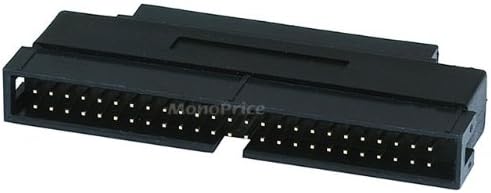
This internal SCSI adapter converts 50 pin to 68 pin male to male configurations for connecting SCSI devices. It is a standard adapter often used in server racks to bridge interface differences between internal components.
We may earn a commission when you buy through this link, at no additional cost to you.
The product is manufactured in China and may have slight variations in specs or photos upon receipt. Despite this the core function remains consistent for users needing a straightforward male to male conversion.
It is a basic adapter that focuses on functionality without extra features. The simplicity makes it easy to install in tight spaces where more complex adapters might not fit.
IT professionals looking for a no-fuss solution to connect 50 pin devices to 68 pin ports will find this adapter useful. It provides a cost-effective way to maintain older SCSI infrastructure.
The direct male to male design ensures a secure physical connection without the need for additional cable extensions or couplers.
We may earn a commission when you buy through this link, at no additional cost to you.
Belkin offers a high-quality SCSI internal adapter that converts HD-68 female to 50 Pin IDC female. This adapter is known for its premium build and outstanding value saving for organizations managing large fleets of legacy hardware.
We may earn a commission when you buy through this link, at no additional cost to you.
The product delivers excellent reliability and comes with a 100% satisfaction guarantee which highlights the manufacturer's confidence in its quality. It is designed for internal use within server cases to connect standard SCSI devices.
While specific technical specs are minimal the brand reputation for durability suggests it will withstand the rigors of 24/7 server operation. The value proposition is strong given the typical costs associated with enterprise hardware components.
Organizations prioritizing reliability and brand reputation should consider this adapter for their critical infrastructure. It provides a secure connection point for internal drives without sacrificing quality for cost.
The adapter is built to maintain signal integrity over long periods of continuous operation which is crucial for server uptime.
We may earn a commission when you buy through this link, at no additional cost to you.
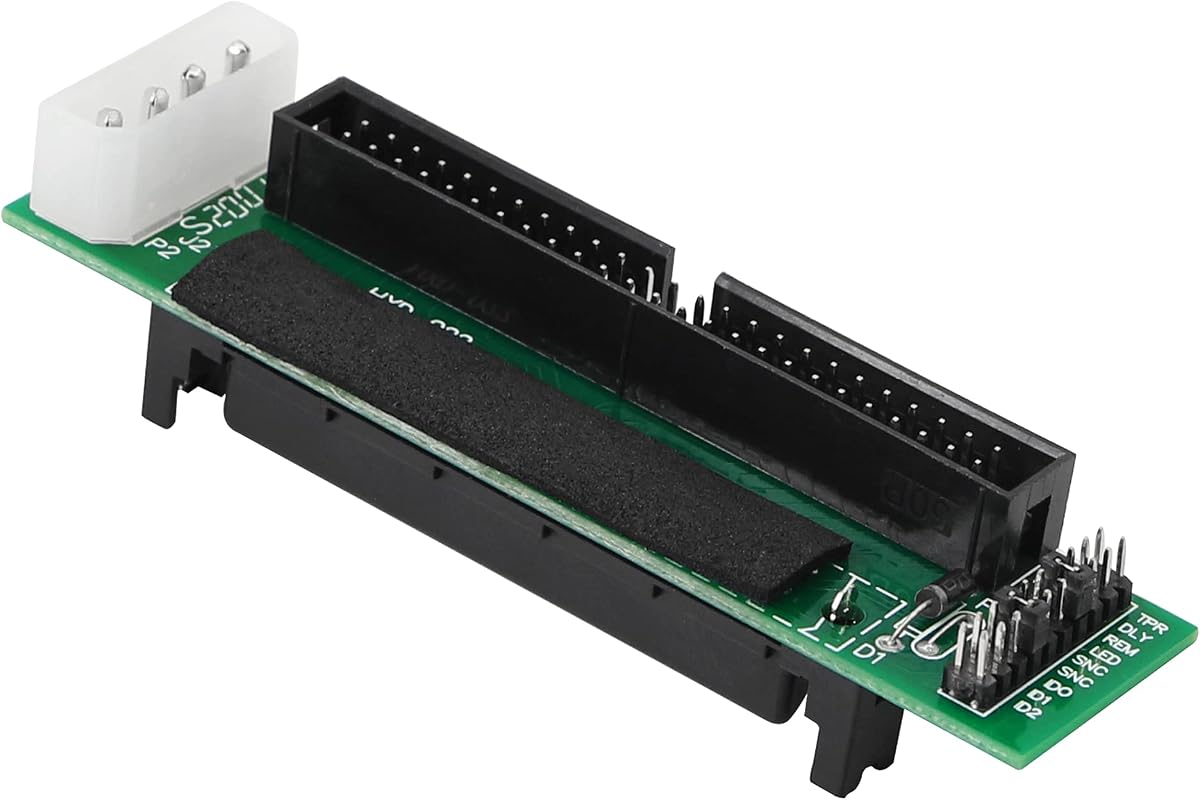
This adapter converts the 50-pin interface to the 80-pin interface allowing 50-pin low-speed SCSI devices to connect to 80-pin SCSI interfaces. It is useful for bridging modern SCA ports with older SCSI hardware.
We may earn a commission when you buy through this link, at no additional cost to you.
To power the hard drive users need to connect a molex 4 pin power connector separately. This adapter is recommended for direct data transfers or backups where speed is less critical than compatibility.
The adapter is restricted to industrial server IDE 50-pin interface motherboards and cannot be used in ordinary computers. It supports a wide range of equipment including communication devices and scanners.
IT staff managing mixed environments with SCA and IDE systems will find this adapter practical for legacy data migration. It ensures older drives can still be accessed through modern interfaces.
This adapter allows older low-speed devices to function in newer high-pin slot configurations without needing a full drive replacement.
We may earn a commission when you buy through this link, at no additional cost to you.
This adapter converts a SCA 80 Pin Hard Drive Interface to SCSI I/II/III (UW) HD 50/68 Pin Connector. It is compatible with both SCA and SCA-2 80 Pin standards which are common in enterprise storage systems.
We may earn a commission when you buy through this link, at no additional cost to you.
The adapter features jumper settings for 16 SCSI IDs along with status LED connector pins. It also supports spindle synchronous delay start and remote start functions which provide control over drive operations.
Setting up this adapter requires careful attention to jumper configurations to avoid ID conflicts on the SCSI bus. The 80 Pin connector is female which simplifies connection to SCA drives.
System administrators needing fine-grained control over legacy SCSI drives will appreciate the advanced features of this adapter. It offers a robust solution for integrating SCA drives into older SCSI II or III environments.
Status LED pins and spindle synchronization allow for better monitoring and management of drive health and startup sequences.
We may earn a commission when you buy through this link, at no additional cost to you.
This male-to-female adapter effortlessly connects and extends 50-pin HPCN50 devices. It is designed to act as a compact port extender and gender changer for professional setups where standard cables might not fit.
We may earn a commission when you buy through this link, at no additional cost to you.
The adapter features durable construction with gold-plated contacts and a secure locking mechanism. This ensures a vibration-proof reliable connection during critical operations which is vital for data integrity.
Its compact mini design makes it a versatile problem-solver for tight equipment racks. It can relieve strain in tight setups or serve as a low-profile coupler to maintain an organized rack environment.
Professionals needing to extend a port or fix a gender mismatch without running a new cable should use this adapter. It offers instant connectivity and seamless integration with professional equipment.
The mini design ensures it does not protrude into airflow paths which helps maintain optimal cooling in dense server racks.
We may earn a commission when you buy through this link, at no additional cost to you.
The IDC 50 connector used here is a 50-pin 8-bit SCSI header connector used for internal-type ribbon cables. It is also known as the Alternative 2 connector which is standard for many SCSI-2 devices.
We may earn a commission when you buy through this link, at no additional cost to you.
It has parallel 25-pin rows and resembles an older ATA/IDE drive cable but is wider with more pins. This specific width ensures the correct alignment and contact for 50-pin internal SCSI connections.
The HPDB 68 connector is a 68-pin 16-bit SCSI-2 connector used for both internal and external connections. It has parallel 34-pin rows but with pins much closer together making it narrower than the IDC 50.
This adapter is excellent for IT professionals who need to distinguish between IDE and SCSI connectors to prevent installation errors. The detailed design ensures compatibility with legacy SCSI-2 drives.
The distinct physical differences from IDE cables prevent accidental connection which could damage the drive or motherboard.
We may earn a commission when you buy through this link, at no additional cost to you.
This SCSI terminator supports the CEN50M/F standard and is compatible with hard drives SSDs and tape drives. It uses passive termination technology which helps stabilize the SCSI bus by preventing signal reflections.
We may earn a commission when you buy through this link, at no additional cost to you.
The terminator is a single-end type which means you will need two for a complete bus setup to ensure both ends are terminated properly. It is designed for indoor use to protect against environmental factors.
SCSI buses require termination to avoid data corruption and read errors. This device provides a reliable solution to meet that requirement for legacy storage systems.
IT technicians working with legacy SCSI arrays should keep this terminator on hand to maintain bus health. It ensures consistent performance across all devices on the SCSI chain.
Proper termination prevents signal reflections that can cause data errors and device malfunctions on the SCSI bus.
We may earn a commission when you buy through this link, at no additional cost to you.
This adapter converts internal IDC50 SCSI male to external HPDB50 female with a bi-directional design for seamless data transfer. The PCB SCSI-2 connector provides a secure and reliable connection for high-speed data transfer operations.
We may earn a commission when you buy through this link, at no additional cost to you.
The nickel-plated HPDB50 bracket connector offers a durable and reliable connection point for external cables. It is designed to provide a secure connection that withstands repeated plugging and unplugging cycles.
Users can connect internal SCSI cards to external devices such as tape drives or external hard drives. This adapter bridges the gap between internal slots and external ports in a server or workstation.
Technicians needing to extend internal SCSI capability to external peripherals will find this adapter useful. It ensures a secure connection point for external devices while maintaining signal integrity.
The bi-directional nature allows for flexible routing of data which simplifies cable management in complex rack setups.
We may earn a commission when you buy through this link, at no additional cost to you.
Selecting the right adapter requires careful attention to pin configuration, gender, and the specific server environment you are working in.
Ensure the adapter matches the exact pin count required by your hardware such as 50-pin vs 68-pin. Mismatched pin counts will physically prevent connection or damage the connector.
Always verify the target port type is specifically 50-pin IDE for industrial servers before purchasing.
Check whether your source and target ports are male or female to select an adapter that corrects any gender mismatch. Incorrect gender selection will prevent a physical connection between devices.
Use gender changers when cables and ports do not align to ensure a secure fit.
Look for high-thickness gold-plated contacts to ensure stable conductivity and resistance to corrosion over time. This feature is critical for preventing signal loss in server environments with poor airflow.
Gold plating extends the lifespan of the adapter significantly compared to standard tin-plated connectors.
Verify that the adapter supports industrial server IDE 50-pin interface motherboards as many units will not work with standard 40-pin IDE ports. Using the wrong adapter in a consumer PC will lead to incompatibility.
Choose products explicitly marketed for industrial or server use to ensure they match the required hardware specifications.
Determine if you need an internal adapter for ribbon cables or an external adapter for shielded connections. Internal adapters usually rely on IDC connectors while external ones use HPDB or Centronics interfaces.
Consider the physical length required to reach between components without creating tension on the connectors.
Ensure the adapter does not include a terminator if the device is not at the end of the SCSI bus. Termination must only exist at the physical ends of the bus to avoid signal reflection.
Use dedicated terminator adapters if you need to close off an unused SCSI port properly.
Consider manufacturers that offer satisfaction guarantees or proven track records in server hardware to minimize risk of failure. Reliable brands often use better quality control and more durable materials.
A warranty or guarantee provides peace of mind when purchasing critical infrastructure components for data centers.
Check the adapter profile to ensure it fits within tight server racks without obstructing airflow or adjacent components. Compact mini designs are preferable for high-density environments where space is limited.
Low-profile adapters help maintain organized cabling which simplifies future maintenance and troubleshooting.
Before installing the adapter power down the server completely to avoid electrical shorts. Align the adapter pins carefully with the port ensuring no force is used to prevent bending any contacts during insertion.
Secure the adapter firmly by locking any available latches or screws to maintain a stable connection. Use strain relief cables to prevent pulling on the adapter during routine maintenance or cabling adjustments.
Store unused adapters in static-free bags to prevent electrostatic discharge from damaging the sensitive electronics. Periodically inspect connectors for dust accumulation and clean with compressed air to ensure consistent signal quality.
No, these adapters are designed for industrial server IDE 50-pin interface motherboards and will not fit standard 40-pin or 44-pin IDE ports found on most consumer PCs. Using them on standard ports may cause physical damage or failure to connect.
The primary difference is the pin count and spacing which dictates compatibility with different SCSI generations. 50-pin is typically used for older SCSI-I or IDE-50 interfaces while 68-pin is used for Ultra Wide SCSI-II and later standards.
Terminators are needed only at the physical ends of a SCSI bus. If your adapter connects a device at the end of the chain you may need a separate terminator or ensure the device itself has internal termination enabled.
Gold-plated contacts prevent corrosion and ensure stable conductivity over time which is critical for reducing signal loss in server environments. This build quality extends the lifespan of the connection compared to standard tin plating.
Most 50-pin adapters are designed for standard legacy speeds which are suitable for archival storage but may bottleneck modern high-speed arrays. Check specifications for data transfer rates if performance is a priority.
Most adapters have keying or physical guides to prevent incorrect orientation but forcing it can bend pins and damage the motherboard. Always align the keys and ensure a snug fit before applying any pressure.
The top picks offer reliable solutions for bridging legacy hardware with modern server infrastructure. Whether you need a budget-friendly converter or a premium branded adapter there is a suitable option for your specific data center requirements.
Prioritize build quality and compatibility to ensure stable connections for your legacy storage systems. Focus on adapters with gold plating and verified server compatibility to minimize potential failure points in your setup.
Remember to verify current pricing and availability as costs fluctuate frequently on Amazon. Check the latest details before purchase to ensure the product meets your current infrastructure needs.