
ARCTIC P9 PWM PST
4.5Editor score
Zero dB mode support
High static pressure
Wide RPM range
This guide compares the top 92mm case fans for quiet cooling and high performance to help you choose the right fan for your compact PC build.
Finding the right 92mm case fan is essential for maintaining optimal temperatures in small form factor builds. These compact fans deliver powerful airflow while keeping noise levels low for a comfortable environment.
We evaluated ten leading models based on their bearing technology, noise output, PWM control capabilities, and overall cooling performance. Each entry offers distinct advantages depending on your specific system requirements and budget constraints.
Every selection includes detailed specifications and real-world performance insights to help you make an informed decision. Note that product availability and pricing may fluctuate over time so check current listings before purchasing.
4.5Editor score

4.8Editor score

4.8Editor score
This side-by-side comparison highlights the key specifications and features of each model to help you quickly identify the best fit for your cooling needs.


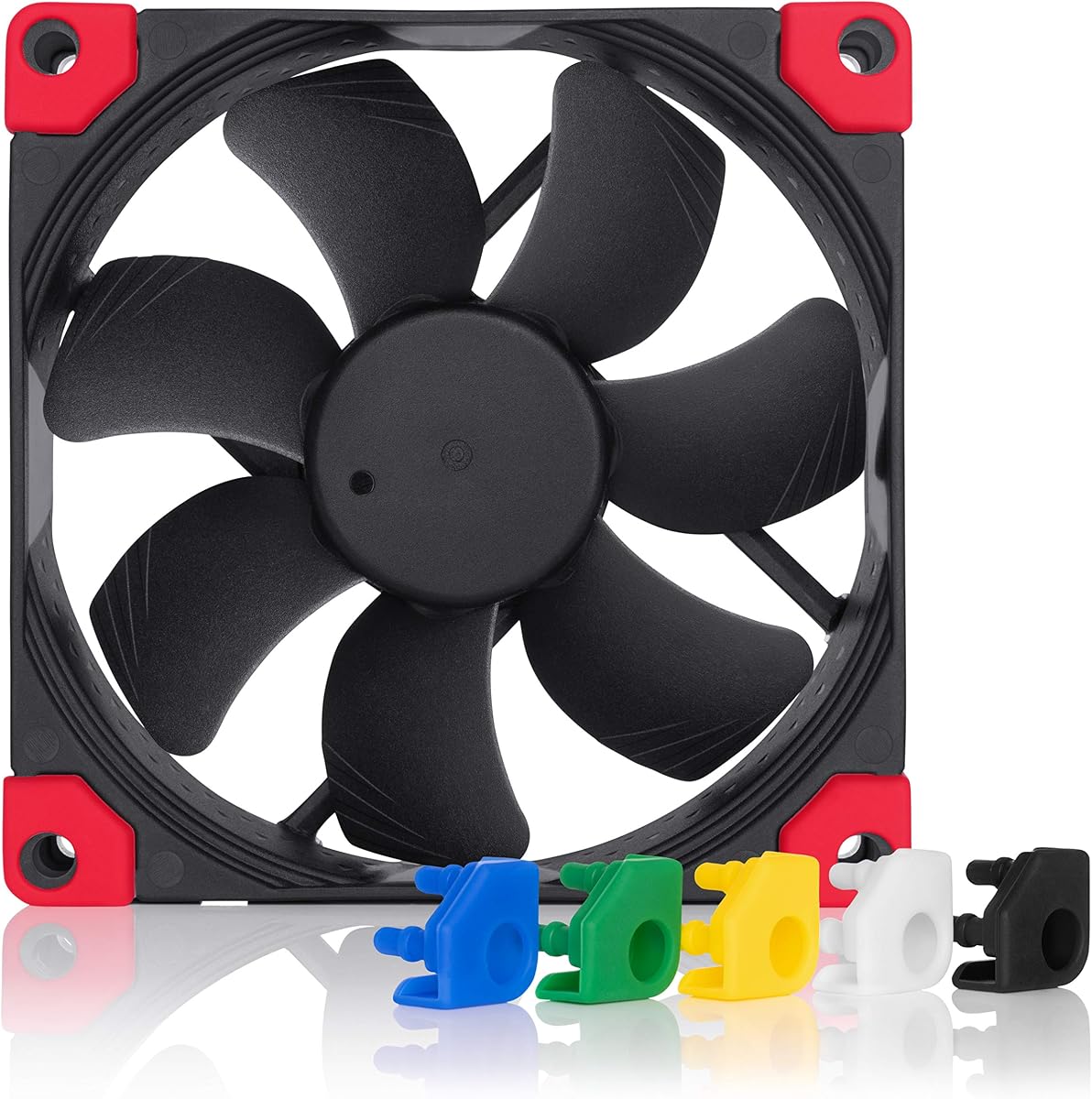


The Noctua NF-A9 PWM stands out as the premier choice for users seeking reliable and silent cooling in compact systems. With a high rating and extensive testing data it delivers consistent performance across diverse thermal loads.
We may earn a commission when you buy through this link, at no additional cost to you.
Its Flow Acceleration Channels and Advanced Acoustic Optimisation frame ensure that air moves efficiently while minimizing turbulence and noise. The 4-pin PWM interface allows precise speed control based on system temperatures.
While the cost is higher than many alternatives the included accessories like extension cables and y-cables add significant value. The Low-Noise Adaptor further extends quiet operation when maximum airflow is not required.
This fan is ideal for enthusiasts building small form factor PCs or upgrading NAS devices where silence and longevity are paramount. It remains the top recommendation for those prioritizing quality over budget.
The frame design reduces resonance and ensures smooth airflow even at high speeds.
Automatic speed regulation via PWM ensures optimal cooling without manual intervention.
We may earn a commission when you buy through this link, at no additional cost to you.
The ARCTIC P9 PWM PST offers exceptional value for builders needing efficient cooling without breaking the bank. It combines high static pressure with a flexible speed range to suit various radiator and heat sink setups.
We may earn a commission when you buy through this link, at no additional cost to you.
Its 0dB mode allows the fan to stop completely at low temperatures ensuring absolute silence during idle periods. The included splitter makes daisy-chaining multiple fans straightforward for larger cooling loops.
Although it lacks the premium feel of top-tier models it performs admirably under load. The bearing technology minimizes friction which helps maintain consistent performance over years of use.
This is the smart choice for budget-conscious users or secondary cases where cost efficiency is key. It delivers solid cooling power with features typically found on more expensive fans.
Fan stops below 5 percent PWM for silent operation when cooling demands are minimal.
Blade geometry pushes air through dense fins effectively for better heat dissipation.
We may earn a commission when you buy through this link, at no additional cost to you.
Designed for tight spaces the Noctua NF-A9x14 HS-PWM chromax.Black.swap delivers premium cooling in an ultra-slim profile. Its 14mm thickness makes it perfect for low-profile CPU coolers and compact ITX enclosures.
We may earn a commission when you buy through this link, at no additional cost to you.
The HS-PWM version supports semi-passive operation allowing the fan to stand still when temperatures are low. This feature reduces noise significantly during light workloads without compromising thermal safety.
The chromax.black.swap edition allows users to customize the look with different colored anti-vibration pads. While more expensive than standard fans the unique form factor justifies the price for specific builds.
Enthusiasts building mini PCs or needing clearance for RAM modules will find this fan indispensable. It balances style and performance with the renowned reliability expected from Noctua products.
Only 14mm thick allowing clearance in systems with limited height constraints.
Swappable pads let you match your build theme with red green blue yellow white or black.
We may earn a commission when you buy through this link, at no additional cost to you.
The Noctua NF-A9x14 PWM is a versatile option for users needing a slim fan without sacrificing cooling power. It uses the same proven blade geometry as the standard A-series but in a reduced height profile.
We may earn a commission when you buy through this link, at no additional cost to you.
With speeds up to 2500 RPM it moves significant air through dense radiators or heatsinks. The SSO2 bearing ensures smooth operation and long term durability with minimal maintenance requirements.
While it lacks the color customization of the chromax version it remains highly effective for pure performance. The PWM control allows dynamic speed adjustment to match system thermal demands efficiently.
This fan suits builders who need extra clearance for components or prefer minimalist designs. It delivers consistent quiet cooling with the trusted engineering behind the Noctua brand.
Reduces overall case height while maintaining the same cooling efficiency as standard fans.
SSO2 bearing reduces friction for stable operation and extended service life.
We may earn a commission when you buy through this link, at no additional cost to you.
The Thermalright TL-P9 offers a compelling balance of silence and performance at an entry-level price point. Its 7-blade design focuses on reducing noise while maintaining effective airflow for CPU coolers and case vents.
We may earn a commission when you buy through this link, at no additional cost to you.
Built with S-FDB bearings it runs smoothly with minimal vibration. The included silicone feet further dampen contact noise ensuring a quiet environment during normal computing tasks.
Users appreciate its ability to operate quietly without requiring external controllers or complex wiring. The speed control adjusts automatically based on motherboard settings simplifying setup for most systems.
This model is ideal for casual users or secondary builds where budget is a priority. It proves that silent cooling does not need to come with a high price tag.
Soft silicone feet reduce frame vibration and noise transmission to the case.
Seven blades optimize air movement for better cooling with less noise than standard fans.
We may earn a commission when you buy through this link, at no additional cost to you.
The ARCTIC P9 Silent is designed for users who prefer a straightforward reliable fan without complex controls. It operates at a fixed 1900 RPM providing consistent airflow for quiet cooling needs.
We may earn a commission when you buy through this link, at no additional cost to you.
Its high static pressure rating makes it well suited for pushing air through radiators or dense heat sinks. The bearing combination reduces friction ensuring smooth operation over long periods.
While it lacks PWM flexibility the fixed speed ensures predictable performance. Voltage control can still adjust speeds if needed though it requires manual configuration on the motherboard.
This fan is perfect for systems where simplicity and reliability are valued over dynamic speed changes. It delivers steady quiet cooling for entry-level and budget builds.
Operates at a consistent speed reducing the need for software configuration or monitoring.
Blade shape forces air through restrictive barriers for better cooling efficiency.
We may earn a commission when you buy through this link, at no additional cost to you.
The Noctua NF-A9 chromax.Black.swap combines top tier performance with aesthetic flexibility for custom PC builds. Its all-black design complements modern case layouts while delivering superior acoustic performance.
We may earn a commission when you buy through this link, at no additional cost to you.
It features Flow Acceleration Channels and an AAO frame that minimize turbulence and noise. The swappable pads allow users to match their build theme with various color options.
PWM control ensures automatic speed adjustment based on temperature readings. This dynamic control helps maintain low noise levels without sacrificing cooling when needed.
This fan suits enthusiasts who value both looks and function. It delivers the classic Noctua quality with the added benefit of personalization for unique system designs.
Unified black color scheme blends seamlessly with dark themed PC builds.
Includes pads in multiple colors for users to customize the look easily.
We may earn a commission when you buy through this link, at no additional cost to you.
The TL-9015B delivers impressive performance for its slim 15mm profile. With speeds up to 2700 RPM it provides robust cooling for compact systems where space is limited.
We may earn a commission when you buy through this link, at no additional cost to you.
It features vibration damping pads to reduce noise and ensure smooth operation. The airflow rating shows strong potential for dissipating heat efficiently in tight enclosures.
Its high-speed capability makes it suitable for CPU coolers that demand rapid air movement. The low noise level despite high RPM suggests effective engineering for quiet environments.
This model is an excellent choice for budget builds requiring high performance in a small form factor. It competes with more expensive options without compromising on cooling power.
Up to 2700 RPM ensures rapid air movement for demanding thermal loads.
15mm thickness allows fit in cases with minimal clearance between components.
We may earn a commission when you buy through this link, at no additional cost to you.
The Noctua NF-A9 FLX offers a traditional 3-pin connection for systems that do not support PWM headers. It focuses on delivering ultra-quiet operation through manual speed control adaptors.
We may earn a commission when you buy through this link, at no additional cost to you.
With included adaptors you can set speeds to 1600 1250 or 1050 RPM. This flexibility allows users to prioritize silence when thermal demands are low.
Its noise level drops to 17.1 decibels at the lowest setting making it one of the quietest options available. The anti-vibration mounts further enhance this silent performance.
This fan is ideal for older systems or specific builds requiring 3-pin headers. It ensures reliable and exceptionally quiet cooling with simple plug-and-play installation.
Works with legacy motherboards and older power supplies using Molex or 3-pin headers.
Adaptors provide fixed low speeds for near-silent operation without complex setup.
We may earn a commission when you buy through this link, at no additional cost to you.
The ARCTIC P9 Max pushes performance limits with an incredible RPM range up to 4300. It is designed for high pressure scenarios requiring maximum airflow through dense radiators or heatsinks.
We may earn a commission when you buy through this link, at no additional cost to you.
Its static pressure rating is among the highest available for 92mm fans. This ensures that air penetrates deep into thermal components for efficient heat dissipation.
The Fluid Dynamic Bearing supports high speed operation while maintaining longevity. The 0dB mode ensures silence during idle periods despite the high maximum capabilities.
This fan suits extreme performance builds needing top tier cooling power in small spaces. It delivers unmatched pressure and speed at a competitive price point.
Pressure rating allows effective air movement through restrictive radiator fins.
450 to 4300 RPM covers silent idle to max cooling with single unit.
We may earn a commission when you buy through this link, at no additional cost to you.
Selecting the right 92mm fan involves balancing noise levels performance requirements and budget constraints.
Speed measured in RPM determines how much air the fan can move. Higher speeds generally yield better cooling but increase noise levels. Look for models with adjustable speeds to balance performance with comfort.
Prioritize fans with RPM ranges suitable for your specific cooling needs.
Noise is measured in decibels and impacts your computing environment. Quiet fans operate below 25 dB while standard models might exceed this. Consider your tolerance for noise in quiet home offices.
Select a fan with low noise output for undisturbed work sessions.
Bearings affect the lifespan and smoothness of the fan. Fluid dynamic and sleeve bearings offer good longevity. Avoid cheap ball bearings that may fail quickly over time.
Choose fans with high-quality bearings for reliable long-term operation.
PWM fans provide automatic speed control via 4-pin headers while Molex offers fixed speeds. PWM allows dynamic adjustment based on temperature changes. Ensure your motherboard supports the connector type you choose.
Opt for PWM if your motherboard supports intelligent speed control.
Frame designs influence noise and airflow efficiency. Look for anti-vibration mounts to reduce frame rattling. Slim designs suit compact builds while standard frames offer better airflow.
Pick a design that fits your case dimensions and build goals.
Static pressure matters when pushing air through radiators or dense heatsinks. High pressure fans perform better in restrictive environments. Check pressure ratings to ensure compatibility with coolers.
Choose high static pressure fans for radiator and heatsink cooling.
Premium brands offer better build quality and quieter operation. Budget models often sacrifice accessories and acoustic tuning. Determine your priority to allocate funds effectively.
Balance performance needs with cost to find the right fan.
Accessories like splitters and adaptors add value and versatility. Fans with multiple speed options provide more flexibility. Ensure the package includes what you need for setup.
Look for bundles that offer extension cables or low noise adaptors.
Install the fan with the arrow showing airflow direction toward the CPU or case rear. Use provided screws or mounts to secure it firmly without over-tightening to avoid frame stress.
Connect the PWM wire to the motherboard header for automatic speed control. If using Molex connect directly to the power supply for constant speed operation.
Clean dust periodically using compressed air to maintain airflow efficiency. Avoid touching blades directly to prevent imbalance or damage to the bearings.
Measure your available space carefully to ensure the fan width and depth match your mounting points. Most 92mm fans are square but thickness varies. Check your case manual for exact clearance.
PWM fans use a 4-pin connector for automatic speed control while FLX fans use a 3-pin connector with fixed speed adaptors. PWM offers dynamic adjustments whereas FLX relies on manual settings.
Yes if you use a splitter cable designed for PWM or Molex connections. Ensure the total power draw does not exceed the header limit to avoid damage to the motherboard.
Static pressure measures the fan's ability to push air through resistance. High pressure fans are essential for radiators and heatsinks where airflow is restricted by dense fins.
Most quality fans last several years but bearing wear may increase noise. Replace if you notice grinding sounds or performance drops. Regular cleaning helps extend the lifespan.
Fans rated below 20 dB at low speeds are considered extremely quiet. The Noctua NF-A9 series is renowned for minimal noise output during normal computing tasks.
Selecting the best 92mm case fan depends on your priorities for noise performance and budget. The Noctua NF-A9 PWM leads in overall quality while budget options offer value.
Focus on matching the fan type to your system needs whether it is low profile high static pressure or silent operation. Quality bearings and proper connector types ensure long-term reliability.
Always verify current availability and pricing before buying to ensure you get the best deal. These models represent proven solutions for effective cooling in compact computer builds.