
HP OmniBook 3 14 inch Next Gen AI PC
4.4Editor score
Snapdragon X Processor
Up to 41 hours 45 min battery
2K OLED Display
AI laptops are transforming how we work and create by embedding powerful neural processing units directly into consumer devices. These machines offer faster responses and smarter workflows without needing cloud connections.
We evaluated ten leading models focusing on processor capabilities display quality and real-world AI tool integration. Our analysis covers diverse needs from budget-friendly options to premium workstations.
Each pick highlights specific strengths and target users so you can match a device to your workflow. Note that pricing fluctuates frequently so verify current costs before purchasing.
4.4Editor score
4.8Editor score

5.0Editor score
As an Amazon Associate we earn from qualifying purchases.
This side-by-side comparison highlights the key specifications and unique selling points of each selected AI laptop to help you quickly identify the best fit.


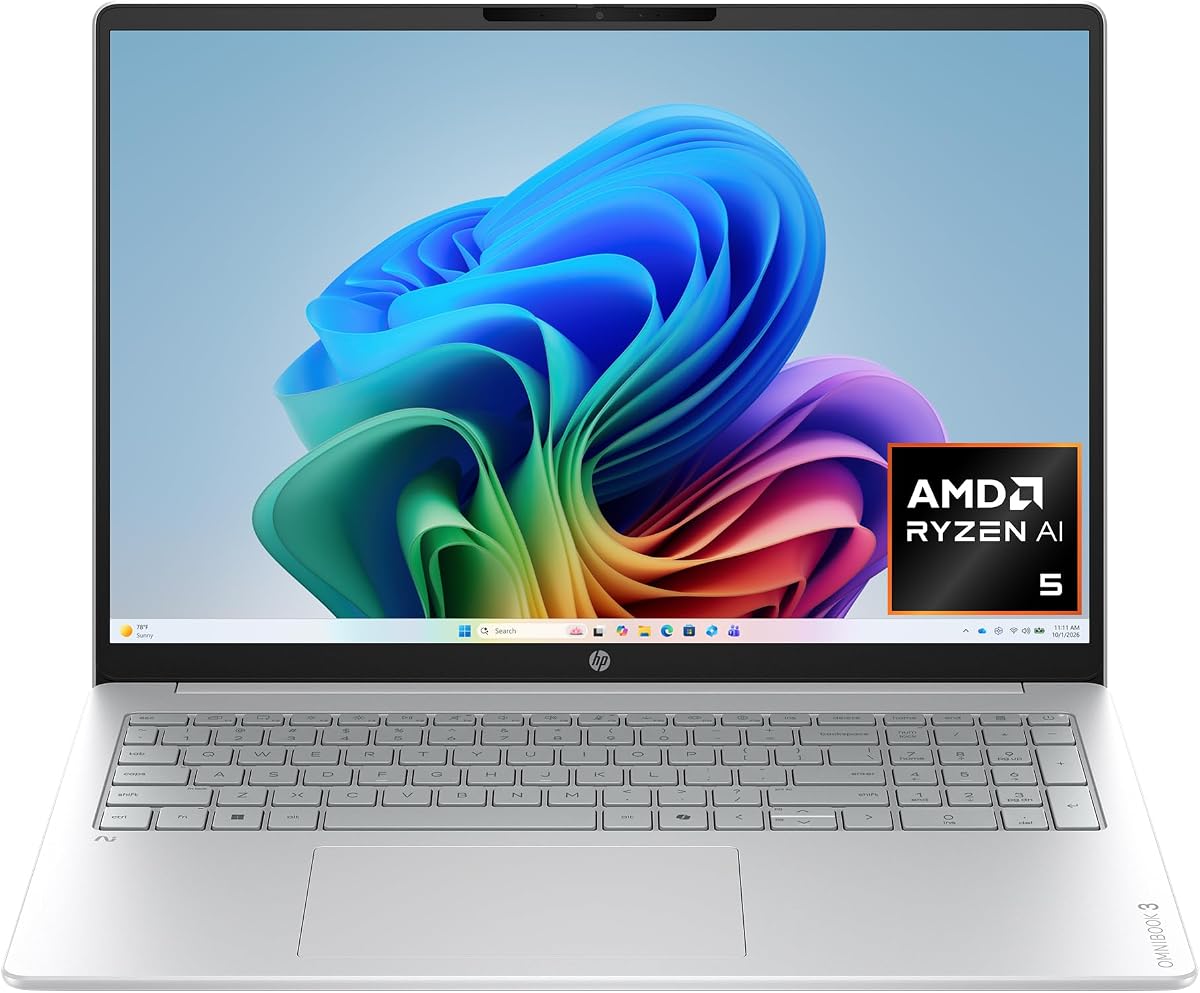
The HP OmniBook 3 16 inch Next Gen AI PC stands out with its robust AMD Ryzen AI processor and impressive battery life. Users praise its clear display and efficient noise cancellation for professional meetings.
We may earn a commission when you buy through this link, at no additional cost to you.
Its Copilot+ PC experience offers new AI features that streamline daily tasks. The AMD Radeon 840M GPU provides smooth visuals for media and light creative work while maintaining power efficiency.
While the storage is adequate for most users power heavier file loads might require external solutions. The integrated GPU is not designed for demanding 3D rendering or high-end gaming.
This laptop is ideal for students and professionals needing reliable performance without breaking the bank. Its balance of features makes it a top contender in the current AI laptop market.
The Ryzen AI 5 430 processor enhances creativity and simplifies workflows with hardware accelerated AI capabilities.
Enjoy up to 19 hours and 30 minutes of battery life with fast charge restoring half capacity in 45 minutes.
We may earn a commission when you buy through this link, at no additional cost to you.
The Lenovo ThinkBook 16 Gen 8 targets business users with strong performance and security features. Its 32GB RAM and 1TB SSD ensure smooth operation across multiple enterprise applications.
We may earn a commission when you buy through this link, at no additional cost to you.
The Intel 16-Core Ultra 7 255H processor handles complex spreadsheets and video calls effortlessly. Windows 11 Professional adds layer of protection and management options for IT departments.
Portability is slightly compromised by the robust build and larger chassis. The design prioritizes durability and functionality over sleek aesthetics which may not suit all tastes.
This model suits corporate professionals needing secure and powerful mobile workstations. Its reliability and specs justify the investment for demanding business workflows.
Fingerprint reader and Windows 11 Professional protect sensitive business data with advanced security features.
The 16 inch FHD+ display provides ample screen real estate for presentations and multitasking.
We may earn a commission when you buy through this link, at no additional cost to you.
The HP OmniBook X 14 inch Next Gen AI PC delivers exceptional visual quality with its 3K OLED touchscreen. Colors are vibrant and contrast is deep making it ideal for creative tasks.
We may earn a commission when you buy through this link, at no additional cost to you.
Intel Core Ultra 7 processor ensures efficient performance and long battery life. Smart Sense technology adjusts fan noise and temperature automatically to maintain comfort.
The high price reflects the premium screen and build quality. Integrated graphics limit this model from handling heavy gaming or rendering workloads efficiently.
Content creators and professionals who prioritize screen fidelity will appreciate this device. Its long battery life adds flexibility for travel and remote work.
OLED display brings deeper blacks for richer contrast enhanced color depth and more power efficiency.
Enjoy up to 27 hours and 30 minutes of battery life with fast charge capability.
We may earn a commission when you buy through this link, at no additional cost to you.
The HP OmniBook 5 16 Touchscreen AI Laptop offers strong specs at a competitive price. Its 1TB SSD and 16GB RAM handle daily tasks smoothly without slowdowns.
We may earn a commission when you buy through this link, at no additional cost to you.
Intel Core Ultra 7 processor provides AI acceleration for productivity and creative workloads. Windows 11 with Copilot AI helps users work smarter with intelligent suggestions.
Build quality is functional but not premium which is expected at this price point. Battery life is adequate but not exceptional compared to newer Snapdragon models.
This laptop suits budget conscious buyers needing reliable performance and storage. It balances features and cost effectively for home and office use.
Runs Windows 11 with Copilot AI support helping you work smarter with intelligent suggestions and enhanced security.
Equipped with 16GB high-speed RAM and 1TB SSD ensuring smooth multitasking and fast boot times.
We may earn a commission when you buy through this link, at no additional cost to you.
The HP OmniBook 5 16 inch Next Gen AI PC shines with its Snapdragon processor and impressive battery longevity. It is ideal for frequent travelers and remote workers.
We may earn a commission when you buy through this link, at no additional cost to you.
Qualcomm Adreno GPU provides efficient graphics performance for media and UI rendering. Otter.ai integration offers valuable tools for meeting management and note taking.
Running Windows on ARM may require checking specific app compatibility before purchase. The 512 GB SSD is standard but may not suffice for large media libraries.
Efficiency conscious users will love the endurance and connectivity features. It delivers a robust AI experience with minimal power consumption.
Enjoy up to 34 hours and 45 minutes of battery life with fast charge from zero to 50 percent in 30 minutes.
Otter.ai assistant records audio writes notes and generates meeting summaries to save time.
We may earn a commission when you buy through this link, at no additional cost to you.
The HP OmniBook 3 14 inch Next Gen AI PC is a budget friendly option with exceptional battery life. Its lightweight design makes it perfect for students and daily commuters.
We may earn a commission when you buy through this link, at no additional cost to you.
Snapdragon X processor ensures efficient performance and connectivity. The 2K OLED display provides vivid visuals despite the smaller 14 inch form factor.
The 256 GB SSD is limited but sufficient for cloud users. Performance may be less flexible for heavy multitasking compared to larger RAM models.
This model is perfect for users prioritizing portability and cost. It delivers core AI capabilities without the premium price or weight.
Enjoy up to 41 hours and 45 minutes of battery life with fast charge capability.
2K OLED display delivers rich colors crisp visuals and 300 nits of brightness.
We may earn a commission when you buy through this link, at no additional cost to you.
The Dell 16 Plus Touchscreen Laptop offers top-tier specs with its Intel Core Ultra 9 processor. It targets power users needing raw speed and future-proof connectivity.
We may earn a commission when you buy through this link, at no additional cost to you.
Wi-Fi 7 support ensures ultra-fast wireless speeds for large file transfers. The 32GB RAM handles demanding workflows with ease for professionals.
The premium price may limit its appeal to budget buyers. The modular design and bulkier chassis reduce portability for frequent travel.
Tech enthusiasts and power users will appreciate its performance and modern connectivity. It is a robust workstation for demanding tasks.
Wi-Fi 7 (2×2/160) Gig+ ensures unprecedented wireless performance and enhanced connectivity.
32GB LPDDR5X memory at 8533MT/s enables rapid multitasking and quick data access.
We may earn a commission when you buy through this link, at no additional cost to you.
The ASUS Vivobook S16 Laptop (2026) combines premium build quality with powerful AI capabilities. Its 50 TOPS NPU offers fast on-device AI processing for creative workflows.
We may earn a commission when you buy through this link, at no additional cost to you.
The OLED display delivers deep contrast and vivid detail for an immersive viewing experience. A lightweight chassis ensures comfort during extended carrying periods.
The high price is justified by the performance and visual quality. Missing Thunderbolt ports may limit compatibility for some high-speed external drives.
Creators and professionals seeking top-tier visuals and AI power should consider this model. It offers a refined experience with excellent battery endurance.
Copilot+ PC performance delivers fast on-device AI with up to 50 NPU TOPS for seamless tasks.
16 inch WUXGA OLED display provides deep contrast vivid detail and smooth immersive viewing.
We may earn a commission when you buy through this link, at no additional cost to you.
The acer Aspire 16 AI Copilot+ PC delivers strong connectivity with Wi-Fi 7 and a high refresh rate display. Its Snapdragon processor balances efficiency and power for daily tasks.
We may earn a commission when you buy through this link, at no additional cost to you.
The 45 TOPS NPU enables effective on-device AI processing. AcerSense AI solutions streamline settings and optimize video presence for calls.
Build quality is standard for the price range lacking premium materials. The mid range RAM is sufficient for most but limits heavy virtualization work.
Buyers looking for modern wireless tech and responsiveness will find it compelling. It offers solid features for a competitive price.
16 inch 120Hz WUXGA ultra-high-resolution touchscreen display provides sharp detail and fluid visuals.
Qualcomm AI Engine with Hexagon NPU delivers transformative experiences for creativity and productivity.
We may earn a commission when you buy through this link, at no additional cost to you.
The HP Omnibook 16 2K Touchscreen Laptop offers high-end specifications including 32GB RAM and 50 TOPS NPU. It is tailored for users needing enterprise security and power.
We may earn a commission when you buy through this link, at no additional cost to you.
The AMD Ryzen AI 7 processor handles heavy multitasking with ease. Windows 11 Pro brings advanced security features suitable for small business environments.
The design is functional rather than innovative which may not appeal to trend-focused buyers. The weight is a consideration for frequent travelers.
This laptop suits professionals who value raw specs over portability. It delivers a reliable high-performance experience for creative and business work.
Windows 11 Pro offers enterprise-grade security and AI-powered Windows Studio Effects for collaboration.
2K IPS Touch display with anti-glare finish and AMD FreeSync ensures fluid visuals.
We may earn a commission when you buy through this link, at no additional cost to you.
Selecting the right AI laptop requires understanding key factors like processor type memory and AI specific features.
AI laptops rely on Neural Processing Units (NPU) to run local AI models efficiently. Look for models with high TOPS ratings for faster responses.
Prioritize a processor with strong NPU capabilities for seamless AI workflows.
AI applications require significant RAM to manage large datasets and multitasking smoothly. Aim for at least 16GB with 32GB recommended for creators.
Ensure the RAM is DDR5 or faster for optimal performance speed.
High resolution screens enhance detail for creative work and productivity. OLED displays offer better contrast and color accuracy.
Select a display size and resolution that matches your visual needs.
Mobile users need long battery life to handle tasks away from power sources. Check real-world estimates rather than just marketing claims.
Opt for models with fast charging capabilities for quick top-ups.
Fast SSDs reduce boot times and application loading speeds. NVMe Gen4 SSDs are standard for modern AI laptops.
Choose storage capacity that fits your file size requirements.
Wi-Fi 6E or Wi-Fi 7 ensures stable connections for large data transfers. USB-C ports with power delivery add versatility.
Verify the ports match your existing peripherals.
Windows 11 includes Copilot+ features for better AI integration. Professional editions offer added security for business users.
Ensure the OS supports your preferred software suite.
Start by familiarizing yourself with the Copilot key and AI settings to optimize workflows. Customize privacy features to suit your comfort level.
Keep drivers updated to ensure AI components function correctly. Regularly clean the screen and keyboard to maintain longevity.
Use the provided battery care features to extend lifespan. Avoid extreme temperatures and use a case for travel to prevent damage.
A Copilot+ PC is a device optimized for Windows AI features like Recall and advanced Studio Effects. It relies on high-performance NPUs for on-device processing.
Yes they offer faster rendering and better AI tools for design. The dedicated NPUs help manage complex visual tasks efficiently.
Many features work offline thanks to the local NPU. Cloud tools may require internet but core AI functions do not.
AMD Ryzen AI and Intel Core Ultra processors with high TOPS are leading options. Qualcomm Snapdragon also offers efficient performance.
16GB is minimum for standard use while 32GB is ideal for multitasking. More RAM ensures smooth AI tool operation.
They handle casual and light gaming well. Dedicated GPUs are still needed for high-end gaming titles.
The HP OmniBook 3 leads overall with its balance of performance and battery life. The HP OmniBook 3 14 inch offers excellent budget value.
Prioritize NPU speed and RAM if you plan on using AI tools heavily. Match the display to your visual needs for maximum productivity.
Always verify current prices before purchasing as deals change frequently. Choose the model that best aligns with your daily workflow.