
Antelope Audio Zenith 2
4.8Editor score
USB C bus powered design
Synergy Core FX included
Dual independent headphone mixes
This guide compares the top audio interfaces with built in DSP for low latency monitoring and professional effects processing in studio and live workflows.
Audio interfaces with built in DSP are essential for creators who need real time processing without taxing their computer. These devices offer hardware based effects and monitoring that ensure zero latency during recording sessions.
We evaluated ten top models based on conversion quality, DSP power, connectivity, and software bundles. Each entry was selected for its ability to deliver professional results in diverse recording environments.
Every pick includes detailed specs and practical insights to help you choose the right tool. Note that pricing and availability can shift quickly so always verify current offers before buying.
4.8Editor score
4.7Editor score

4.0Editor score
The following table provides a side by side overview of all ten interfaces analyzed in this guide. It highlights key technical specifications and primary use cases to streamline your decision making process.




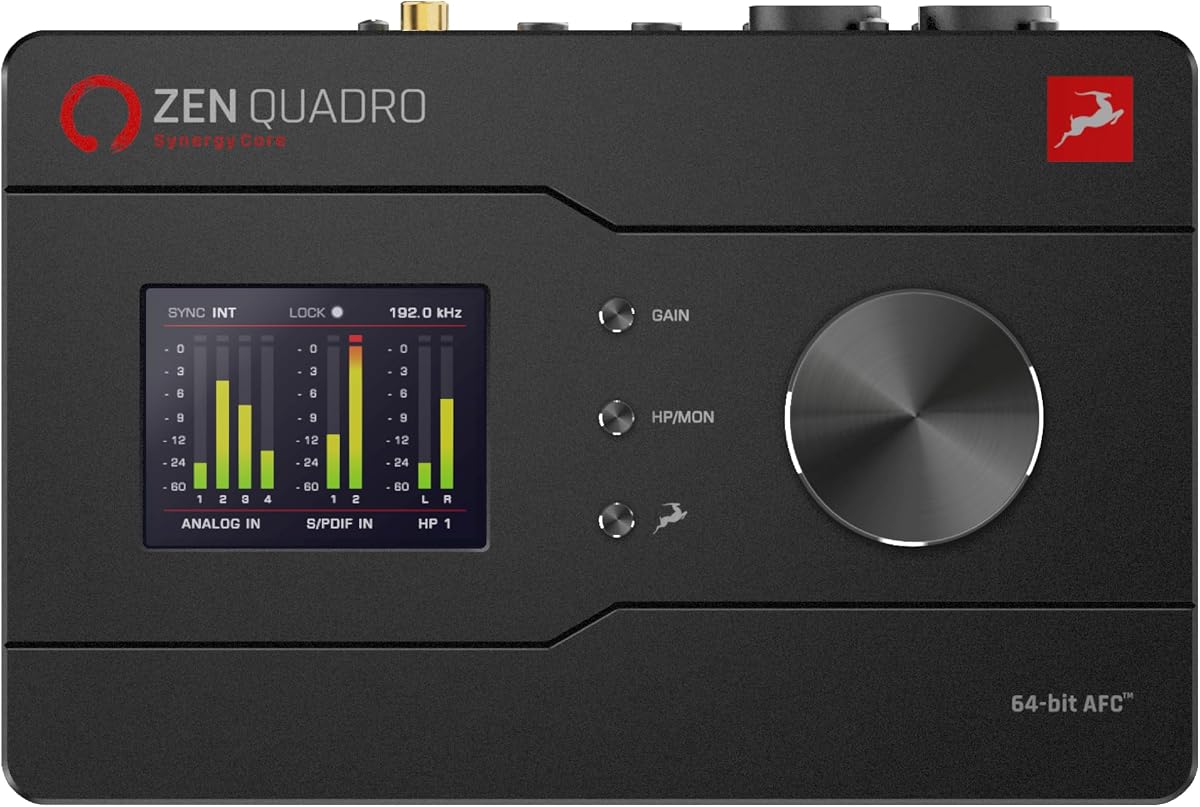
The Antelope Audio Zen Quadro stands out as the top choice for serious creators needing real-time DSP power. It combines flagship analog circuitry with a robust effect suite to deliver professional results without lag.
We may earn a commission when you buy through this link, at no additional cost to you.
Its four Discrete preamps provide clean gain up to 75 dB while the dedicated FPGA hardware runs over 37 included effects. This allows for complex routing and live monitoring that does not rely on your CPU.
While the price is significant, the 130 dB dynamic range and 64-bit clocking justify the cost for those who demand pristine audio. The dual USB-C setup also adds versatility for modern multi-device workflows.
This interface is ideal for home studios and small live setups where high fidelity and flexible processing are paramount. If you want a portable hub that rivals larger rack units this is the one to choose.
The Synergy Core architecture ensures effects run on dedicated hardware so your computer stays free for other tasks.
The 64-bit AFC clocking and high dynamic range converters guarantee accurate timing and noise-free recordings.
We may earn a commission when you buy through this link, at no additional cost to you.
Universal Audio Apollo Twin X QUAD represents the gold standard for DSP equipped audio interfaces. It grants access to an extensive library of emulated gear that sounds authentic when recording through Unison preamps.
We may earn a commission when you buy through this link, at no additional cost to you.
The inclusion of over 200 DSP plug-ins means you can apply professional compression EQ and reverb before the signal even hits your DAW. This drastically reduces mixing time and ensures consistent tone.
While it comes with a high price tag the value lies in the sheer quality of the sound and software ecosystem. The Monitor Correction feature also helps you trust your mixes in any acoustic environment.
This unit is perfect for producers who want to emulate vintage consoles without the bulk. If you need top-tier sonic shaping and are ready to invest this Quad version delivers unmatched versatility.
Unison preamps interact with specific plug-ins to physically change the preamp impedance for true analog modeling.
You gain entry to a vast library of award-winning plugins that run entirely on the onboard DSP engine.
We may earn a commission when you buy through this link, at no additional cost to you.
The Antelope Audio Zenith 2 brings elite DSP processing to a budget friendly form factor. It offers a complete virtual studio experience that is ideal for streamers podcasters and solo musicians.
We may earn a commission when you buy through this link, at no additional cost to you.
With built-in DSP you can record vocals and instruments through premium effects without any latency. The Studio Wizard screen lets you tweak settings directly on the device without needing a computer.
While it has only two inputs and simpler connectivity it makes up for it with exceptional sound quality and flexibility. The dual independent headphone outputs are a rare find at this price level.
This interface is best for creators who want professional sound without complexity. If you need a reliable portable unit that handles effects well on a tight budget this is the top pick.
Plug a guitar into the Hi-Z input to access amps cabs and pedals directly on the interface for zero lag.
You can adjust mixes and presets on the device screen or use the optional software panel on your computer.
We may earn a commission when you buy through this link, at no additional cost to you.
The MOTU UltraLite-mk5 is a powerhouse for those who need to track multiple sources at once. It supports 40 simultaneous audio channels and features a dedicated DSP system for flexible routing.
We may earn a commission when you buy through this link, at no additional cost to you.
Its CueMix 5 app allows you to create unique headphone mixes for each musician in the room. The OLED display provides clear visual feedback on signal levels which is vital during live tracking.
While it is larger than typical desktop units the expansion capability via ADAT makes it a scalable solution for growing studios. The low latency performance ensures smooth collaboration between performers.
This interface is perfect for bands and recording studios that need multiple inputs without sacrificing quality. If you plan to record ensembles this unit offers the necessary connectivity and control.
Six separate mix busses allow you to route any input to any output pair with onboard reverb and EQ.
It works with Mac Windows and iOS devices using a standard USB 2.0 port for broad compatibility.
We may earn a commission when you buy through this link, at no additional cost to you.
The Elgato Wave XLR MK.2 is tailored specifically for content creators who stream or record voiceovers. Its built-in DSP ensures your voice sounds polished before it even reaches your broadcasting software.
We may earn a commission when you buy through this link, at no additional cost to you.
Wave Link app integration gives you precise control over your audio mix including system sounds and microphone levels. The touch controls with LED feedback allow for instant adjustments during live sessions.
While it focuses primarily on voice the high gain preamp supports a wide range of microphones. This makes it versatile for podcasters who need consistent volume and clarity in noisy environments.
If you are a streamer looking for a dedicated hardware mixer that simplifies your setup this is the best option. It bridges the gap between simple mixers and complex audio interfaces effectively.
The onboard Wave FX Processor handles compression and EQ to keep your voice clear without lag.
You can mute or adjust levels with a simple tap while the LEDs show your status clearly.
We may earn a commission when you buy through this link, at no additional cost to you.
The Solid State Logic 2 MKII Plus brings legendary SSL sound to modern home studios. Its Legacy 4K Analog Enhancement adds harmonic presence that makes recordings cut through a mix.
We may earn a commission when you buy through this link, at no additional cost to you.
Even though it is compact it delivers 32-bit/192 kHz conversion quality that rivals much larger units. The zero-latency monitoring ensures you can hear yourself clearly without delay while tracking.
While it lacks extensive DSP effects the analog quality is its main selling point for engineers who want color. The included software bundle provides a complete starting point for production tasks.
This interface is ideal for singer songwriters who want a touch of classic studio character. If you value tone and simplicity over complex routing this unit delivers high fidelity with style.
A classic SSL EQ circuit that adds rich harmonics to give your tracks more punch and presence.
The 32-bit/192 kHz converters capture subtle details with precision for professional sounding files.
We may earn a commission when you buy through this link, at no additional cost to you.
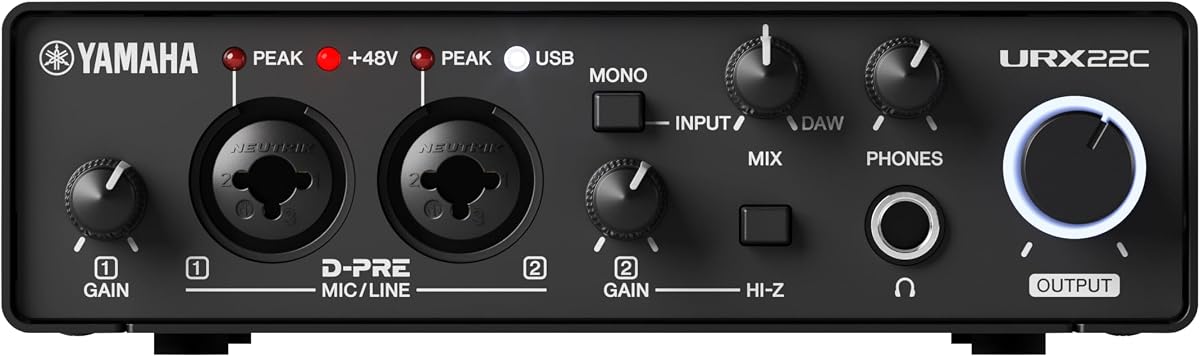
The Yamaha UR22C offers a reliable entry into DSP equipped interfaces at an affordable price point. It features Class-A D-PRE preamps that deliver low noise and high headroom for diverse microphones.
We may earn a commission when you buy through this link, at no additional cost to you.
DSP powered monitoring allows you to add reverb and compression before recording which reduces the load on your computer. The rugged metal housing ensures durability for those who travel to gigs.
While it does not have as many effects as premium units it covers the essentials well. The inclusion of Cubase AI makes it a complete package for beginners just starting their music production.
This interface is perfect for students and hobbyists who need solid performance without breaking the bank. If you want a tough unit that sounds great and comes with software this is a top choice.
Built-in effects like REV-X reverb let you hear your mix with added depth while you record.
You receive Cubase AI and Steinberg Plus so you can start producing immediately after setup.
We may earn a commission when you buy through this link, at no additional cost to you.
The Universal Audio Apollo Twin X DUO offers a balanced mix of performance and features for mid level producers. It provides access to the same UAD library as the Quad version at a lower cost.
We may earn a commission when you buy through this link, at no additional cost to you.
Unison preamps allow you to emulate classic hardware and apply effects in real time. Auto-Gain simplifies setup by setting optimal levels across inputs automatically which saves time during sessions.
While it is still a premium product the sound quality and software integration are unmatched in its class. The bass management feature also helps you integrate subwoofers for better low-end accuracy.
This interface is ideal for those who want a serious production tool without the highest price tag. If you need reliable DSP and classic tones the DUO version offers excellent value.
This feature sets optimal levels across multiple inputs in seconds so you never miss a take.
Record through authentic emulations of Neve and API preamps using dedicated DSP for realistic tone.
We may earn a commission when you buy through this link, at no additional cost to you.
The Yamaha URX22 distinguishes itself with a 4.3-inch touchscreen that simplifies control and routing. It includes four inputs and a robust DSP engine for professional sound and latency-free monitoring.
We may earn a commission when you buy through this link, at no additional cost to you.
The touchscreen allows you to tweak levels and effects directly on the device without reaching for a mouse. Dual USB ports provide multi-stream capabilities which are useful for complex setups or streaming workflows.
While the touch interface is innovative it adds to the cost and complexity compared to traditional knobs. However for those who prefer visual control the screen offers a clear and intuitive way to manage audio.
This interface is great for podcasters and streamers who need to manage multiple sources easily. If you want a modern look with tactile feedback this unit stands out in the market.
Adjust levels and presets with a swipe on the 4.3-inch display for a modern and easy experience.
Dual USB ports allow you to connect multiple computers or route audio to different devices effortlessly.
We may earn a commission when you buy through this link, at no additional cost to you.
The Focusrite Scarlett Solo 4th Gen is a top choice for beginners entering the world of home recording. It offers studio-quality sound with a 120dB dynamic range that rivals much more expensive gear.
We may earn a commission when you buy through this link, at no additional cost to you.
Its improved Air mode adds presence and harmonic drive to vocals and guitars making them sit better in a mix. The included software bundle provides all the tools needed to start recording and producing right away.
While it has limited inputs and fewer advanced features it excels at simplicity and reliability. The USB-C connection ensures modern compatibility and fast data transfer for smooth workflow.
This interface is perfect for solo artists and songwriters who want a simple and effective solution. If you need a trusted start point for your production journey this unit is a top pick.
Air mode lifts vocals and guitars to the front of the mix adding rich harmonic drive instantly.
Includes Pro Tools Intro and Ableton Live Lite so you have everything needed to record immediately.
We may earn a commission when you buy through this link, at no additional cost to you.
Choosing the right interface requires evaluating several factors to ensure it meets your specific recording and performance needs.
DSP processing power determines how many effects you can run simultaneously without lag. Higher DSP capacity allows for complex chains of compression EQ and reverb during recording.
Look for dedicated hardware like FPGA or DSP chips rather than relying solely on your computer CPU.
Latency is the delay between input and monitoring which can disrupt performance if too high. Built-in DSP ensures near-zero latency by processing audio on the device itself.
Check for features like Zero-Latency Monitoring to guarantee a seamless recording experience.
The number of inputs and outputs determines how many instruments or mics you can connect at once. Ensure the interface has enough channels for your current setup and future growth.
Consider expandability via ADAT or S/PDIF if you plan to scale up your studio.
Connectivity options such as USB-C or Thunderbolt affect data speed and power delivery. USB-C is versatile and often bus powered while Thunderbolt offers faster speeds for larger interfaces.
Choose a port that matches your computer's capabilities to avoid bottlenecks.
Preamps amplify low level signals from microphones so their quality impacts noise and clarity. Look for units with high dynamic range and low noise floor for professional results.
Clean gain without distortion is essential for capturing subtle nuances in audio.
Software bundles like DAWs and plugins add value by providing tools for production. Ensure the interface supports your operating system and preferred audio software.
Check if the DSP software is updated regularly to access new features and effects.
Budget determines the range of features you can access from entry-level to professional units. Assess what features are essential versus nice-to-have to maximize your return on investment.
A higher cost often brings better build quality and sound fidelity but ensure it fits your needs.
Build quality affects durability and stability during transport or daily use. Metal housings and robust knobs ensure the unit withstands frequent handling.
A clear display or intuitive controls can significantly improve your workflow efficiency.
Connect the interface to your computer using the recommended cable such as USB-C or Thunderbolt. Install the latest drivers and control panel software to access all DSP features.
Set your monitoring levels using the onboard knobs to avoid sudden volume spikes. Use the direct monitor or DSP monitor to hear your input with effects applied during recording.
Keep the unit in a cool dry place to prevent overheating. Regularly clean the ports and controls with a soft cloth to maintain performance and longevity.
Built-in DSP stands for Digital Signal Processing which handles audio effects on the device instead of your computer. This reduces latency and frees up your CPU for other tasks like running your DAW.
DSP generally improves computer performance because it offloads heavy audio processing to the interface. This means your system can handle larger projects with more plugins without slowing down.
Most modern interfaces are class compliant and work without drivers but using official drivers unlocks full DSP features. Always check if your specific model needs proprietary software for effects.
USB-C is standard on newer computers but older models may need adapters. Ensure your port supports data transfer and power delivery to avoid connection issues.
Monitoring is listening to your audio input while mixing is balancing tracks after they are recorded. DSP interfaces allow you to mix inputs with effects during monitoring for a polished sound.
Yes Thunderbolt interfaces require a specific Thunderbolt cable to function correctly. Standard USB cables will not provide the necessary speed or bandwidth for these models.
This depends on the interface DSP power but most allow multiple effects simultaneously. Check the specs for DSP slots to know how many plugins you can run without overload.
Gain range determines how much amplification the preamp can provide without distortion. A wide range ensures you can handle quiet mics and loud instruments cleanly.
The ten interfaces listed here offer a range of features suitable for every type of creator. From budget options to premium studio units each provides reliable DSP for low latency monitoring.
Prioritize your core needs such as I/O count and DSP power when making a final decision. A unit that aligns with your workflow will save time and improve your results.
Remember that prices and availability change frequently so check current offers before purchasing. This guide aims to provide a clear path to finding the right tool for your setup.