
4K Vlogging Camera Pocket Digital
4.4Editor score
4K video recording
330° rotating lens
Built-in WiFi transfer
Discover the top cameras for social media content creators. This guide compares 10 models for vlogging, streaming, and high-quality video production needs.
Creating engaging content for social media requires the right tools to capture stunning visuals. A reliable camera ensures your videos and photos stand out on platforms like TikTok, YouTube, and Instagram. Whether you are a beginner or a seasoned creator, choosing the perfect device can elevate your storytelling and audience engagement significantly.
We evaluated ten top-rated cameras and kits based on performance, features, and user feedback. Our comparison focuses on resolution, stabilization, ease of use, and connectivity options essential for modern creators. Each product offers unique strengths tailored to different content styles, from travel vlogs to live streaming setups for diverse audiences.
Each pick in this list highlights specific advantages to help you decide quickly. We explain key specs, pros, cons, and ideal use cases for every model. Please note that prices and availability change frequently, so verify current details before purchasing to ensure you get the best value for your creative projects today.
4.4Editor score

4.5Editor score
5.0Editor score
This side-by-side comparison helps you evaluate key specs across all ten options. We highlight resolution, stabilization, screen features, and connectivity to simplify your decision process for creating professional-quality social media content efficiently.


The DJI Osmo Pocket 3 Creator Combo stands out as the top choice for creators seeking professional quality in a portable form. With a 1-inch CMOS sensor and 4K/120fps recording, it delivers crisp visuals even in challenging lighting. Its rating reflects high satisfaction for its ease of use and advanced features tailored for social media production.
We may earn a commission when you buy through this link, at no additional cost to you.
Key strengths include its 3-axis mechanical stabilization which ensures ultra-smooth footage while moving or running. The rotating 2-inch touch screen makes framing shots effortless in both horizontal and vertical orientations. ActiveTrack 6.0 keeps you centered automatically, ideal for solo vlogging or dynamic travel content without needing a second person.
Trade-offs involve the premium pricing compared to basic options, which may stretch budgets for beginners. Storage can fill quickly with high-resolution files, so investing in additional memory cards is recommended. These are acceptable compromises given the exceptional image quality and workflow efficiency it offers to serious content creators.
Buy this if you prioritize cinematic quality and reliability for daily vlogging or Instagram reels. It suits those willing to invest in gear that grows with their skills. The included accessories like the DJI Mic 2 Transmitter make it a complete package for starting professional social media content production immediately.
The large sensor captures detailed images with natural color depth, perfect for YouTube videos and high-end social posts.
The rotating screen and touch controls simplify complex shots, allowing creators to focus on storytelling rather than technical settings.
We may earn a commission when you buy through this link, at no additional cost to you.
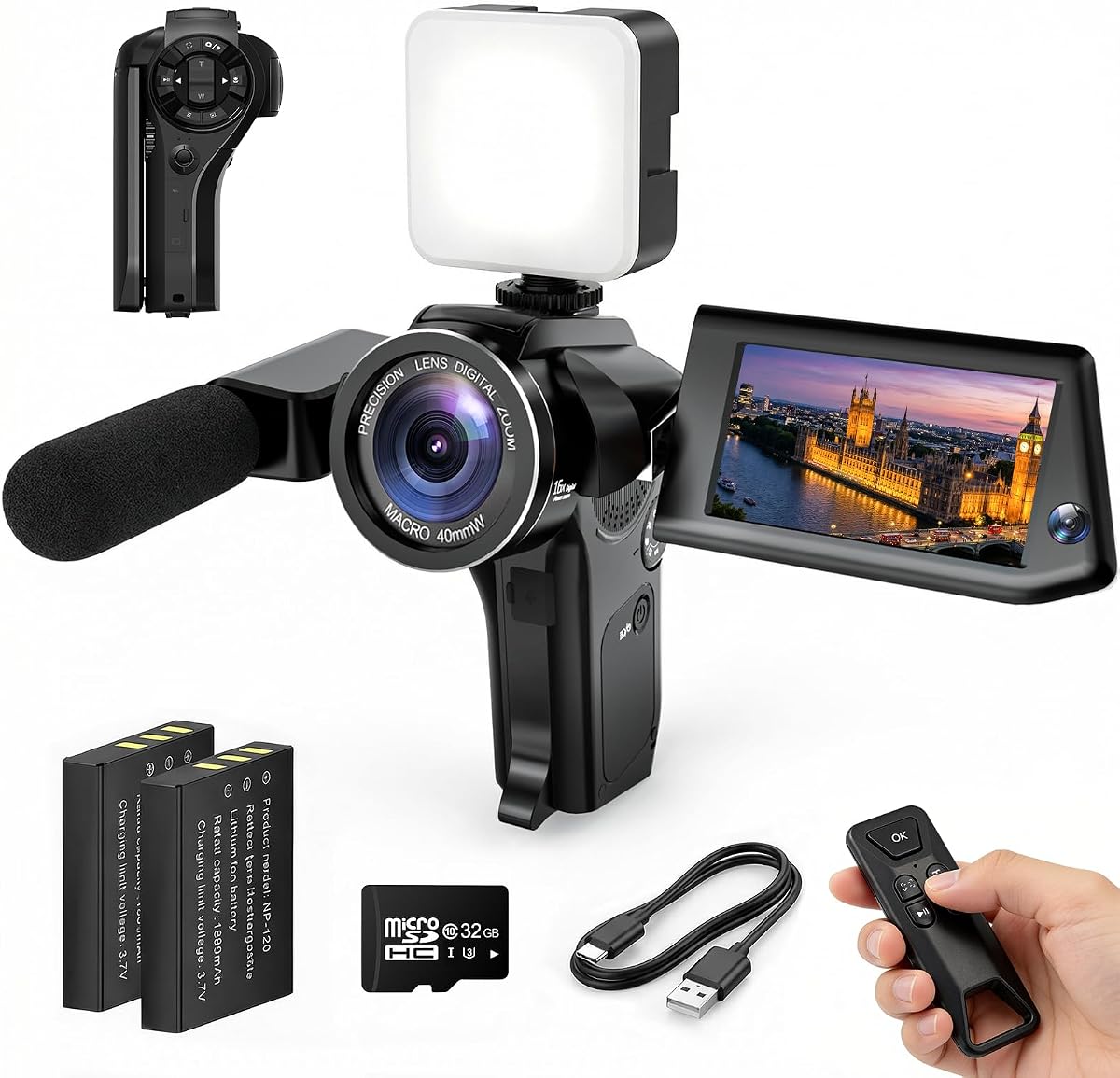
This 4K Vlogging Camera is designed specifically for beginners needing simple yet capable tools for social media. It records stunning 4K video and captures 75MP photos, offering clear shareable content without complex settings. Its rating indicates high value for first-time creators looking to start YouTube or TikTok channels affordably.
We may earn a commission when you buy through this link, at no additional cost to you.
The unique 330° rotating lens enables effortless solo vlogging by framing yourself while recording. Built-in WiFi allows quick transfers to smartphones for immediate editing and posting. It supports time-lapse and slow motion for creative storytelling, making it versatile for travel and daily life videos.
Trade-offs include a plastic body and basic autofocus compared to premium models. These limitations are minimal for the price, ensuring you get essential features without overspending. It balances affordability with functionality, perfect for those starting out or needing a backup camera for spontaneous shoots.
Buy this for travel vlogs, daily updates, or practice sessions. It suits beginners wanting a complete kit with accessories included right out of the box. The 1-year warranty and support provide peace of mind while you learn to produce engaging social media content confidently.
Comes with everything needed to start filming immediately, removing barriers like separate purchases of memory cards or tripods.
WiFi transfer streamlines the workflow from capture to upload, ensuring you never miss posting timely content trends.
We may earn a commission when you buy through this link, at no additional cost to you.
The Vlogging Camera with Picture-in-Picture offers a unique dual-view recording feature that captures both the scene and your reaction simultaneously. This makes it perfect for family moments, tutorials, and reviews where personal engagement adds value. Its perfect rating highlights exceptional user satisfaction and ease of use for specific content types.
We may earn a commission when you buy through this link, at no additional cost to you.
Key strengths include the ability to show children milestones while capturing your joy in real-time. The WiFi flip screen aids framing for selfies and vlogs without extra gear. It supports high-resolution output suitable for detailed close-ups in cooking or product reviews where both hands and results matter.
Trade-offs involve fewer manual controls compared to DSLR-style cameras. Battery performance may vary with heavy use. These are acceptable for casual creators focusing on storytelling over technical adjustments. The simplicity ensures you spend time creating rather than fiddling with complex menus.
Buy this for family vlogs, tutorials, or reaction videos. It suits creators prioritizing emotional connection with audiences. The 8K Creator Kit ensures you have the tools to produce memorable content that stands out on social platforms through authentic and engaging visual storytelling.
Showing your face alongside the content creates a personal connection with viewers, enhancing retention on social platforms.
Auto features and intuitive screens reduce technical barriers, letting you focus entirely on the content and message.
We may earn a commission when you buy through this link, at no additional cost to you.
The FlyFrost 8K Video Camera stands out for its infrared night vision and high digital zoom. It records 8K resolution video and 88MP photos, offering versatility for varied environments. Its rating reflects strong performance in low light and zoom capabilities essential for nature and wildlife content.
We may earn a commission when you buy through this link, at no additional cost to you.
Strengths include the IR night vision allowing clear capture in dark settings. The external microphone reduces background noise effectively for interviews. It supports webcam functions for live streaming on computers. Remote control and stabilizer accessories enhance usability for dynamic outdoor recording.
Trade-offs involve a bulky form factor not ideal for pocket travel. Menus may require learning for new users. These are acceptable given the specialized features. The included batteries ensure extended recording without frequent charging stops during adventures.
Buy this for nature documentaries or low-light events. It suits creators needing zoom reach without carrying extra lenses. The comprehensive kit including stabilizer and remote makes it ready for complex shoots where lighting varies or distance to subject changes.
IR night vision ensures visibility when light fails, expanding your shooting times beyond typical daylight hours.
High digital zoom allows framing distant subjects clearly, reducing the need to move closer to wildlife or events.
We may earn a commission when you buy through this link, at no additional cost to you.
This 8K Digital Camera targets hybrid creators needing both high-res photos and video. It captures 96MP stills and supports HDR for vibrant images. The 3.5-inch flip screen simplifies framing. Its rating shows solid satisfaction for users needing still photography alongside social media videos.
We may earn a commission when you buy through this link, at no additional cost to you.
Strengths include anti-shake for smooth handheld video and 20X digital zoom. Two batteries ensure you never miss shots during events. Filters allow creative edits in-camera. The eco-friendly build appeals to conscious consumers seeking reliable tools for school projects and family gatherings.
Trade-offs involve slower autofocus compared to dedicated vloggers. Video features are basic compared to cinema cameras. These are acceptable for hybrid needs where image detail matters. The included SD card aids immediate use without extra purchases.
Buy this for events, portraits, and travel photos. It suits those balancing photography with light video content. The versatile kit supports students and aspiring photographers needing quality without complex setups.
High MP counts ensure crisp stills perfect for Instagram feeds where photo quality drives engagement more than video.
Two batteries provide extended shoot time, crucial for all-day events or travel where charging is hard.
We may earn a commission when you buy through this link, at no additional cost to you.
The Mini Camcorder is designed for extreme portability. It fits easily in pockets and weighs little. One-button recording removes setup time. Its rating shows users value its simplicity for travel. It captures daily moments without carrying heavy equipment.
We may earn a commission when you buy through this link, at no additional cost to you.
Strengths include a 7-hour battery allowing all-day use. The rotating lens aids selfies. It supports continuous recording. The simple design ensures anyone can use it immediately without tech knowledge. The lifetime technical support offers security for basic needs.
Trade-offs include lower image quality compared to higher-end models. Manual rotation may be awkward. These are acceptable for its intended use of capturing quick spontaneous moments. It complements other cameras by handling casual shoots.
Buy this for casual recording or as a backup. It suits travelers who want simplicity over technical specs. The warranty and support ensure it remains a reliable tool for everyday memories without frustration.
Fits in any pocket, ensuring you always have a recording option without weighing down your travel gear.
Extended battery ensures long days of filming without worrying about finding outlets to recharge mid-event.
We may earn a commission when you buy through this link, at no additional cost to you.
This 4K Vlogging Camera is optimized for quick social content. It shoots 4K video and 75MP photos for platforms like TikTok. The rotating lens helps framing. Its rating reflects high usability for creators who prioritize ease over advanced settings.
We may earn a commission when you buy through this link, at no additional cost to you.
Strengths include WiFi for fast sharing and included accessories. The kit has a mini tripod and strap. It supports time-lapse for engaging clips. The lightweight design allows carrying it everywhere. It suits daily challenges or travel updates.
Trade-offs include basic audio and limited manual options. These are acceptable for quick vertical content. The focus on simplicity ensures you spend time filming rather than configuring settings. It is reliable for consistent daily posting.
Buy this for daily TikTok or Instagram updates. It suits creators needing a ready-to-go device. The included kit provides immediate value for producing high-quality short-form videos without extra costs.
Designed with vertical shooting and quick sharing to match the workflow of modern short-form video platforms.
Accessories like tripods and memory cards mean you can start filming straight out of the box without extra shopping.
We may earn a commission when you buy through this link, at no additional cost to you.
This Vlogging Kit provides everything needed to upgrade a smartphone setup. It includes wireless mics and tripods. The RGB light enhances video quality. Its rating shows high satisfaction for improving audio and stability. It turns basic phone recording into professional content.
We may earn a commission when you buy through this link, at no additional cost to you.
Strengths include the wireless mic for clear voice. The flexible tripod allows creative angles. The light offers brightness control. The remote supports easy operation. It suits YouTubers starting out who want polished results.
Trade-offs involve needing a smartphone camera. Multiple parts require organization. These are acceptable given the cost savings versus buying separately. The bundle ensures quality audio and video without expensive camera purchases.
Buy this for phone-based creators. It suits those needing audio and lighting upgrades. The comprehensive kit removes barriers to professional production, making social media content look and sound high-quality.
Wireless microphones ensure clear voice capture, a key factor in retaining viewer attention during videos.
Multiple tripod options ensure steady shots from any angle, improving production quality without camera equipment.
We may earn a commission when you buy through this link, at no additional cost to you.
This Vlogging Kit features auto face tracking for hands-free recording. It includes wireless mics and lights. The gesture control simplifies operation. Its rating reflects high utility for solo creators. It tracks you automatically during filming without extra help.
We may earn a commission when you buy through this link, at no additional cost to you.
Strengths include real-time face tracking and dual mics. The LED lights ensure bright footage. Low latency syncs audio to video. It suits tutorials or live streams where movement is key. The remote supports easy control during recording.
Trade-offs include reliance on gesture logic. The stand adds weight to carry. These are acceptable for the convenience of hands-free. It ensures consistent framing regardless of your position in the room.
Buy this for tutorials and solo streaming. It suits creators needing movement freedom. The tracking ensures viewers see you clearly while you demonstrate or discuss topics interactively.
Face tracking keeps you in frame automatically, allowing dynamic movement during recording without losing focus.
Built-in LEDs provide consistent illumination, eliminating shadows and ensuring your subject remains clear.
We may earn a commission when you buy through this link, at no additional cost to you.
The Logitech Brio 101 webcam is perfect for live streaming and meetings. It offers 1080p HD quality with auto light balance. Its rating shows high reliability. It ensures you look clear even with variable room lighting conditions.
We may earn a commission when you buy through this link, at no additional cost to you.
Strengths include the privacy slide cover and built-in mic. It connects via USB easily. You can adjust framing using the app. It supports popular platforms like Zoom. The design is durable and modern.
Trade-offs include fixed focus which may blur moving subjects. Low light is not ideal. These are acceptable for desk setups. The ease of use ensures minimal setup time for daily streaming or calls.
Buy this for streaming and online classes. It suits creators needing reliable computer-based video. The privacy and audio features make it ideal for professional daily use without complexity.
The slide cover ensures your camera is physically blocked when not in use, protecting your privacy during work.
Plug-and-play USB connectivity ensures immediate use with any platform without driver installations or software conflicts.
We may earn a commission when you buy through this link, at no additional cost to you.
Choosing the right camera involves balancing resolution, stabilization, and budget. We detail the most critical factors to ensure your investment matches your content goals.
Resolution determines how sharp your video and photos appear. For platforms like Instagram and YouTube, 4K is ideal for clarity. Higher resolution allows cropping in post without losing detail. Ensure the camera supports your preferred output quality.
Look for models with at least 4K video and 75MP stills for future-proofing.
Stabilization prevents shaky footage which ruins viewer experience. Optical or mechanical stabilization is best for travel vlogs. Check if the camera includes gimbal-like features to smooth movement during handheld recording.
Prioritize models with 3-axis stabilization or electronic image stabilization for dynamic content.
A flip screen allows you to see yourself while recording. Touch screens simplify focus and settings. For self-recording, a 180-degree flip screen is essential. Avoid fixed screens if you vlog alone.
Ensure the camera features a rotating touch screen for easy self-framing.
Audio quality is as critical as video. Clear sound keeps viewers engaged. Check if the camera supports external microphones or includes decent built-in options. Wireless audio integration helps in interviews.
Look for external mic support or bundled wireless mics to ensure clear voice capture.
Fast sharing to social platforms is key. WiFi transfer allows quick file transfers to phones. This reduces workflow time. Ensure compatibility with editing apps for seamless post-production.
Choose cameras with built-in WiFi for instant transfers and quick social media posting.
Long battery life prevents interruptions. Recording sessions should last at least 5 to 7 hours. Check if dual batteries are included. Extra power ensures uninterrupted shoots during travel or events.
Opt for models with extended battery life and optional spare batteries.
A compact design ensures you carry the camera everywhere. Lightweight materials reduce fatigue. Durability matters for outdoor or travel use. Pocket-sized options are best for spontaneous content.
Select a lightweight, durable model that fits easily in your daily carry bag.
A complete kit saves money. Look for included memory cards, tripods, or lights. Bundles allow immediate start without extra purchases. Ensure warranties and support are available for troubleshooting.
Prioritize kits that include essential accessories like memory cards and tripods.
Always check battery charge and memory card space before starting a shoot. Fully charged batteries ensure you don't miss key moments. Properly inserted cards prevent data loss. Test the camera for 30 seconds to confirm functionality.
Keep lenses clean to maintain image quality. Use a microfiber cloth to wipe dust gently. Store the camera in a dry, cool place. Avoid direct sunlight to prevent overheating or screen damage during storage.
Update firmware regularly to access new features. Follow manufacturer guidance for software updates. This improves performance and stability. Regular maintenance ensures your device lasts longer and captures quality content consistently.
For social media, 1080p is the minimum, but 4K provides better clarity and future-proofing. Platforms like Instagram and YouTube support 4K. Higher resolution allows cropping without quality loss. Choose based on your editing capacity.
External microphones greatly improve audio quality over built-in options. For interviews or outdoor vlogs, a wireless mic reduces noise. Good audio keeps viewers engaged more than visuals alone. Consider a kit with audio options.
Mechanical stabilization like 3-axis gimbals offers the smoothest footage. Electronic stabilization works for stillness. For moving shots, optical is superior. Prioritize cameras with advanced stabilization to avoid shaky videos while walking.
Flip screens help beginners frame themselves accurately. Without them, self-recording is trial-and-error. A rotating screen simplifies vlogging. Even entry-level cameras with flips improve usability for solo creators.
Use WiFi transfer features built into modern cameras. Download the manufacturer's app to connect devices. This allows instant sharing to social platforms. Cable transfers are slower but reliable for large files.
8K offers extreme detail but requires high-end editing. Most platforms compress videos, lowering the need for 8K. Consider 4K for a balance of quality and storage. Use 8K for future-proofing specific projects.
A stable tripod, external microphone, and extra batteries are essential. Lighting improves indoor videos. Ensure the camera includes these. A complete kit removes initial barriers for new creators to focus on content.
A good camera should last at least 5 hours of continuous recording. Longer life suits travel vlogs. Spare batteries ensure you never run out. Check battery specs before buying to match your needs.
We recommend the DJI Osmo Pocket 3 Creator Combo for those seeking premium quality and the 4K Vlogging Camera for budget-conscious beginners. Each option offers distinct features that cater to specific needs. Consider your goals when choosing a device.
Prioritize stabilization, audio, and ease of use in your final decision. These factors directly impact viewer experience. Choose a camera that fits your lifestyle. The best tool is the one you will use consistently.
Check current prices and availability before purchasing as they change frequently. Visit product pages for up-to-date details. Ensuring you get the latest offers helps maximize value. Invest wisely in equipment that grows with your skills.