
Corded Landline Phones for Seniors
4.2Editor score
Photo speed-dial buttons
110dB loud ringer
No battery required power
Discover the best captioned telephone options for hearing impaired seniors with real-time captions, amplified sound, and easy dialing features to stay
Finding the right captioned telephone can transform how you communicate with loved ones. These devices combine voice calls with real-time text captions to ensure you never miss important conversations. Whether you have mild hearing loss or need amplified sound, the right phone makes calls clearer and more confident.
We compared ten top-rated phones based on user feedback, technical specifications, and ease of use. Our list includes models with large touchscreens, photo dialing, amplified volume, and hands-free calling. Each product offers unique features tailored to seniors, individuals with memory impairments, or those needing visual and auditory support during calls.
Each pick highlights key strengths, pros, cons, and ideal users to help you decide quickly. Note that prices and availability can change frequently due to market conditions or stock levels. Always check the current listing before purchasing to ensure you get the best deal and the latest features available for your needs.
4.2Editor score

4.3Editor score
4.5Editor score
This side-by-side comparison shows key features across all ten products to help you choose quickly.


The Hamilton CapTel 2400iSPNBT leads our list with its large touchscreen and real-time captioning. Rated highly by users, it transforms phone calls into clear experiences where you can both hear and read conversations effortlessly.
We may earn a commission when you buy through this link, at no additional cost to you.
This model features up to 40dB amplified gain for seniors needing louder sound. You can choose between auto captions or assisted captions with live operator support. The built-in answering machine displays voicemail captions directly on the screen for clarity.
While the captioning service is free and available 24/7, it requires high-speed internet and is limited to US residents. Some users may need help setting up the Wi-Fi connection initially but the setup process is straightforward with guidance.
If you want a captioned telephone that ensures you never miss words, this is the top choice. It suits anyone with hearing loss who values visual confirmation of speech during calls with family or healthcare providers.
The large touchscreen displays real-time captions so you can read as you listen, reducing confusion during important conversations.
Choose between fully automated captions or assisted captioning with live operator support to match your preference and needs.
We may earn a commission when you buy through this link, at no additional cost to you.
This budget-friendly landline phone offers photo dialing and a 110dB loud ringer ideal for seniors with hearing loss. It does not provide captioned text but excels in accessibility features like large buttons and hands-free calling.
We may earn a commission when you buy through this link, at no additional cost to you.
The customizable photo speed-dial buttons let seniors call family by pressing an image instead of memorizing numbers. The flashing visual indicator light ensures you notice calls even in noisy environments. Power comes directly from the phone line.
While it lacks real-time captions, its simplicity and affordability make it a strong alternative for users who prioritize ease of use over text display. Setup takes minutes and no internet connection is required.
Choose this if you need a reliable, easy-to-use phone for dementia or hearing needs without the cost of a captioned system. It keeps communication straightforward and accessible.
Large picture buttons let users dial family members by touching their photo, which helps those with memory loss or cognitive impairment.
A bright flashing light combined with a loud ringer ensures no call goes missed, especially useful for those with hearing difficulties.
We may earn a commission when you buy through this link, at no additional cost to you.
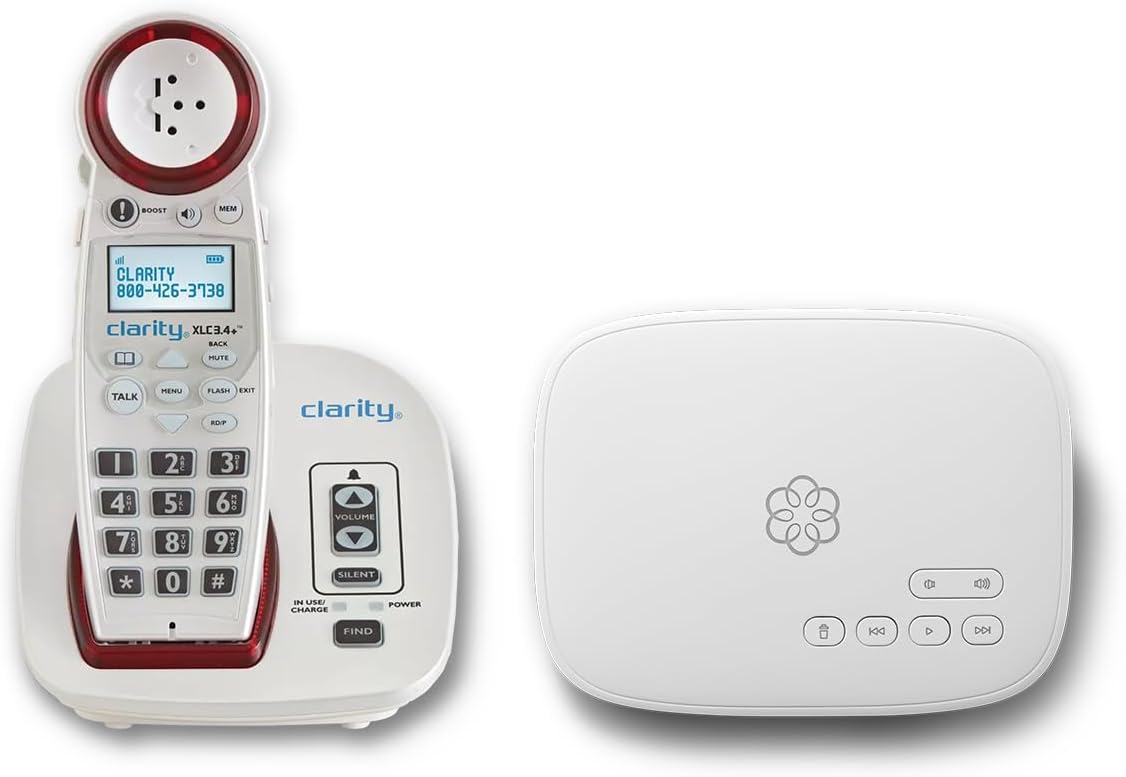
The Ooma Telo bundle offers premium service with a 24/7 concierge plan and an amplified cordless phone. It combines voice clarity with smart features like robocall blocking and visual ring indicators for users needing extra support.
We may earn a commission when you buy through this link, at no additional cost to you.
Hearing aid compatibility and talking keypad options make navigation easier for seniors. The address-based 911 service sends your registered location to dispatchers automatically for safety. Text alerts notify family when emergencies are called.
While this is a service bundle rather than a standalone captioned phone, its focus on clarity and safety justifies the premium price. You get unlimited nationwide calling with additional international rates available.
Ideal for those who want comprehensive support including call safety and concierge assistance, this option ensures peace of mind. It is best for households needing reliable, high-quality voice service with extra accessibility features.
Advanced robocall blocking and emergency address sharing keep your phone secure and help you stay safe during unexpected calls.
Talking keypad and hearing aid compatibility ensure every user can navigate menus and calls with full confidence and ease.
We may earn a commission when you buy through this link, at no additional cost to you.
This hybrid phone combines a reliable corded base with a cordless handset for mobility. It features amplified audio and visual alerts for those with hearing or vision impairments but does not offer real-time captioning on screen.
We may earn a commission when you buy through this link, at no additional cost to you.
The 50dB audio assist ensures words are heard clearly even with significant hearing loss. A 22-minute digital answering machine records messages with remote access. Caller ID announce helps users know who is calling before answering.
While captioning is limited compared to dedicated models, its versatility in base and cordless options offers flexibility. The photo speed dial slots simplify calling loved ones without memorizing numbers.
Pick this if you want both stationary and mobile phone access with strong amplification features. It suits seniors needing clear audio and simple contact access without complex captioning systems.
Use the corded base during power outages and the cordless handset for mobility around the house to stay connected anywhere.
Extra-loud ringer and 50dB audio assist make sure every word rings clearly for users with moderate to severe hearing loss.
We may earn a commission when you buy through this link, at no additional cost to you.
This unique phone uses voice commands to answer, dial, and hang up without touching any buttons. It is designed for users with mobility or vision difficulties but does not provide captioned text during calls.
We may earn a commission when you buy through this link, at no additional cost to you.
The active listening feature keeps the phone ready to receive commands at all times. Dialing is done entirely by speaking names or numbers, reducing physical strain. Quality of voice recognition is generally reliable for clear speech.
While it lacks the caption display of other models, its hands-free design offers unmatched ease for users with arthritis or weakness. It ensures accessibility through voice alone rather than touch or screen.
Choose this if voice control is a top priority and you need a fully hands-free phone. It suits seniors or individuals with limited dexterity who can speak commands clearly.
Dial and answer calls simply by speaking without pressing any buttons, which helps those with limited hand movement.
The phone stays active and listens for commands so users can make calls anytime without navigating menus or buttons.
We may earn a commission when you buy through this link, at no additional cost to you.
This corded phone focuses on visual accessibility with large buttons and picture keys for easy dialing. It provides amplified sound but does not display captioned text during conversations.
We may earn a commission when you buy through this link, at no additional cost to you.
Three replaceable picture buttons store favorite contacts so users can press an image to call. The phone mounts on walls or sits on desks using nonskid plastic pieces. Stored numbers remain even if unplugged.
The adjustable volume accommodates varying degrees of hearing impairment. While it lacks captioning, its design reduces errors and strain for those with vision issues.
Pick this for straightforward, accessible calling with visual cues. It suits users needing clear, simple access to contacts without complex screen interfaces or text displays.
Large picture buttons let seniors identify family members by face instead of numbers reducing dialing errors for low vision users.
Mounting on walls or stable desk placement with nonskid feet prevents slipping making the phone easy to reach and use.
We may earn a commission when you buy through this link, at no additional cost to you.
This VoIP phone offers customizable image keys and a dedicated HELP key for seniors. It needs a VoIP service to work and delivers excellent sound quality with visual call alerts for hearing impaired users.
We may earn a commission when you buy through this link, at no additional cost to you.
Photos can be inserted into image keys to help dementia patients remember who they call. The HELP key provides instant access to emergency contacts. Visual red light alerts indicate calls or messages.
While setup requires a SIP server or PBX system, the sound volume exceeds 110dB for speakerphone calls. This makes it useful in noisy environments where clear audio is critical.
Choose this if you have VoIP access and want image-based contacts with strong amplification. It suits nursing homes or hospitals needing advanced safety features.
Insert family photos into image keys to make dialing intuitive for users with memory loss or dementia at home or in care.
Bright red indicator lights and 110dB speakerphone volume ensure calls are noticed even in noisy or dark environments.
We may earn a commission when you buy through this link, at no additional cost to you.
Designed for performance, this phone delivers high-definition sound and amplified clarity. User feedback is limited but its focus on quality suggests it is suitable for those prioritizing audio precision over extra functions.
We may earn a commission when you buy through this link, at no additional cost to you.
The device emphasizes amplified voice clarity and performance optimization. It likely suits users who struggle with standard phone audio and need premium sound delivery.
Without detailed specifications available, users should consider this if sound quality is their main concern. It represents a niche option among amplification-focused phones.
Pick this if you want a refined calling experience with clear audio. It suits individuals seeking quality over quantity of features.
High-definition sound ensures voices come through clearly without distortion or background interference during important conversations.
The phone is engineered to maximize voice clarity and reliability for users who depend on every word being heard.
We may earn a commission when you buy through this link, at no additional cost to you.
This phone combines voice dialing with visual alerts and talking caller ID. It allows answering and dialing by voice but has a lower user rating compared to other models.
We may earn a commission when you buy through this link, at no additional cost to you.
You can store 17 programmable voice memories for quick access. The speaking caller ID announces caller names and numbers. LED indicators flash to alert incoming calls visibly.
Despite voice features, user reviews suggest recognition may be inconsistent. It includes traditional features like redial and memory backup but might require patience to configure.
Choose this if voice access is essential but be prepared to adjust to recognition quirks. It suits users needing hands-free options with visual call alerts.
Store 17 names in voice memory to call contacts by speaking their names without needing to type numbers manually.
The phone speaks incoming caller names and numbers aloud so users know who is calling without looking at a display.
We may earn a commission when you buy through this link, at no additional cost to you.
This phone features nine photo memory keys for instant dialing and a 110dB ringer. It lacks captioned text but excels in accessibility for those with memory loss or cognitive impairments.
We may earn a commission when you buy through this link, at no additional cost to you.
Photo keys make calling effortless for seniors needing visual reminders. The LED flash alert notifies you of incoming calls. It runs on phone line power without batteries for reliability.
While it lacks features like voicemail or caller ID, its straightforward design minimizes confusion. Redial and flashback buttons help correct mistakes easily.
Choose this for reliable, accessible calling without complex features. It suits caregivers and seniors wanting simple, high-volume communication tools.
Set photos for nine contacts and press them to call instantly without searching or remembering numbers which helps those with memory loss.
A bright flashing LED and loud ringer ensure every call is noticed so no important call gets missed by those with hearing issues.
We may earn a commission when you buy through this link, at no additional cost to you.
Choosing the right captioned telephone involves evaluating sound quality, accessibility features, and service requirements to fit your needs.
Look for real-time text displays on touchscreens or LED screens. This ensures words appear as you speak and hear them.
Prioritize large font and adjustable size for readability during long calls.
Select phones offering up to 40dB or higher amplification if you have moderate to severe hearing loss.
Ensure both receiver and ringer volumes are adjustable to fit your listening comfort.
Choose between corded phones powered by phone lines or cordless models requiring batteries or Wi-Fi.
Corded options stay functional during power outages making them more reliable for emergencies.
Photo or one-touch dial buttons help memory loss users call family without typing numbers manually.
Program frequently contacted people to reduce confusion and simplify daily communication tasks.
Look for speakerphone options that allow conversations without holding the handset.
Hands-free features assist those with arthritis or limited mobility in making comfortable calls.
Flash lights or LEDs indicate incoming calls so you can respond even in noisy rooms.
Visual indicators complement loud ringers ensuring you never miss an important phone call.
Captioned phones often need internet or VoIP access to deliver real-time captions during calls.
Check if your household has high-speed internet to support captioning functionality effectively.
Some models include dedicated emergency buttons that connect to pre-programmed numbers.
Look for address-based 911 registration to ensure dispatchers know your exact location quickly.
First, plug the phone into a working phone jack or connect it to a Wi-Fi router if required. Follow the manual to register with captioning services.
Adjust volume and caption settings on the screen before calling. Test a short call to confirm text appears and sound is clear.
Keep the screen clean and protect cords from damage. Update contacts periodically and ensure power sources remain secure for reliable use.
Some models like corded landline phones work without internet but lack real-time captions. Captioning services usually require high-speed internet to display text during calls.
Many captioning services are free for eligible US residents but the hardware may cost money. Check if the service requires a subscription or setup fee.
Yes, models with photo buttons and simple interfaces suit those with dementia. Avoid complex menus to keep the phone easy and stress-free to use.
Choose a phone with visual flash alerts in addition to loud ringers. This ensures you know when a call comes in even if you miss the sound.
Most phones let you store numbers via buttons or menus. Some models support photo keys to associate images with contacts for easier access.
Advanced models offer robocall blocking but basic ones may not. Look for call-blocking features if you receive unwanted calls frequently.
Most services are US only for eligibility. International calls may work but captioning features might not support foreign numbers properly.
Update contacts whenever numbers change or new family members are added. This prevents missed calls and ensures quick access to important people.
Our top picks include the Hamilton CapTel 2400iSPNBT for its large touchscreen and real-time captions, and affordable landline models with photo dialing.
Prioritize amplification and visual alerts if you have hearing loss or memory issues. Choose captioning if you need text support during every conversation.
Check current pricing and availability as details can change. The right phone keeps you connected safely and confidently with loved ones.