
Nicer CD/VCD/DVD Player Cleaner Kit NS-1
4.0Editor score
Simple operation
Voice guidance included
Includes microfiber cloth
This guide compares the top ten CD and DVD player cleaners for 2026 to help you restore playback quality and extend the life of your optical drives.
Optical drives often accumulate dust and debris that cause skipping or slow loading. A reliable CD and DVD player cleaner uses gentle brushes to remove dirt from the laser lens effectively. Choosing the right tool ensures your media continues to play without interruption.
We evaluated ten top-rated cleaning kits based on brush quality, ease of use, and compatibility. Each product was reviewed for its ability to handle common playback issues like freezing or distortion. Our list covers various price points and specific use cases for different devices.
Each pick shows the key features, pros, and cons to help you decide quickly. Note that prices change frequently so always verify the current cost before purchasing. We update this guide regularly to reflect the latest models and user feedback.
4.0Editor score

4.2Editor score
4.2Editor score
This side-by-side comparison highlights the key specifications and capabilities of each cleaning kit to help you find the perfect match for your optical drive needs.







This kit from Arsvita stands out for its ability to tackle slow loading and skipping issues effectively. It includes a dedicated cleaner disc, a glasses cloth, and a user manual to guide you through the process. The rating reflects strong performance in restoring playback quality for standard optical drives.
We may earn a commission when you buy through this link, at no additional cost to you.
The 2-brush clean process is designed to remove dirt and dust deposits that often cause audio and video dropouts. Cleaning the laser lens can extend the service life of your CD, VCD, or DVD player while improving sound and image quality at the same time. It is a reliable solution for home theater systems.
One trade-off is that it is not compatible with modern game consoles like PS1 through PS4 or Xbox systems. This limitation makes it best suited for dedicated media players rather than multi-purpose gaming hubs. However, for pure playback devices, the cleaning action is sufficient and safe.
Anyone struggling with frozen discs or blurry playback should consider this set for its value and effectiveness. It offers a straightforward way to maintain your hardware without needing professional servicing. We recommend it as a first line of defense against optical drive degradation.
Regular cleaning helps prevent long-term wear on the laser mechanism by removing abrasive dust.
The included glasses cloth allows you to wipe the disc itself for a complete maintenance routine.
We may earn a commission when you buy through this link, at no additional cost to you.
This variant of the Arsvita cleaner adds a useful touch with included disc cleaning fluid to help you maintain discs themselves. It follows the same proven 2-brush process to clear the laser lens of debris and restore playback fidelity. The rating indicates high satisfaction among users facing slow loading or freezing issues.
We may earn a commission when you buy through this link, at no additional cost to you.
The cleaner effectively removes dirt and dust deposits that cause audio and video dropouts and distortions during playback. By addressing the root cause of reading errors, it extends the service life of your optical drive. It is compatible with CD, VCD, and DVD players used in typical home settings.
While it offers comprehensive cleaning with the fluid addition, it does not support gaming consoles like Xbox or PlayStation. This means you may need a separate solution if you rely on one device for both media and games. For dedicated entertainment systems, this kit remains a strong choice.
Customers seeking a complete care kit that handles both lens and disc hygiene will appreciate this option. The included after-sales card shows the brand is ready to support you with any problems you encounter. It is a well-rounded product for maintaining your media equipment.
Adding fluid to the kit ensures you can wipe fingerprints and smudges off the media itself.
The after-sales service promise means help is available if the disc does not work as expected.
We may earn a commission when you buy through this link, at no additional cost to you.
Similar to the ARCD-04, this version also includes cleaning fluid to help you maintain your discs and drive simultaneously. It uses the 2-brush process to target dust that slows down loading or freezes playback. It is a reliable choice for users who prioritize value and straightforward functionality.
We may earn a commission when you buy through this link, at no additional cost to you.
The 2-brush clean process removes dirt and dust deposits that cause audio and video dropouts and distortions during playback. Cleaning the laser lens can extend the service life of your player and improve sound and image quality at the same time. It works well with standard optical drives.
Compatibility remains limited to CD, VCD, and DVD players so it will not work with PS or Xbox systems. This constraint is common for disc-based cleaners so be sure to check your device type before buying. It is designed for home use where dedicated players are common.
If you need a budget-friendly kit that comes with extra fluid for disc maintenance this is a good pick. The after-sales card ensures you have a contact point if the product does not meet your needs. It delivers on the core promise of restoring playback clarity.
Having fluid on hand allows you to clean the media surface without buying separate wipes.
Simple instructions make it easy for anyone to use without technical knowledge of optics.
We may earn a commission when you buy through this link, at no additional cost to you.
Endust is a well-known name in electronics care and this lens cleaner reflects that reputation for safety and reliability. It is designed to safely clean the lens of any device that is CD or DVD compatible making it versatile for different setups. The product is perfect for office desktops and home offices.
We may earn a commission when you buy through this link, at no additional cost to you.
It removes dust and dirt from your disc player to restore smooth operation and prevent skipping during playback. Important instructions tell you to turn your device audio on for use instructions once the CD is inserted. This ensures the player operates in the correct mode to engage the brushes.
One minor downside is the requirement to have audio enabled which might be a small step for some users. Additionally the listing does not specify brush counts or materials compared to other brands. For general maintenance in an office or home environment it remains a solid and safe choice.
Professionals or home users who want a recognized brand name will feel confident using this cleaner. It provides a straightforward way to keep optical drives functioning without risking damage to delicate components. We recommend it for those who prioritize trust and simplicity.
The safety claim covers a wide range of CD DVD compatible devices without requiring separate tools.
Packaging and design suit shared or professional spaces where equipment needs reliable upkeep.
We may earn a commission when you buy through this link, at no additional cost to you.
Maxell brings decades of media expertise to this cleaner featuring super fine microfiber brushes that are impregnated with copper. The copper element is intended to assist in demagnetization which can help remove stubborn scratches or static. It is recommended to clean the lens after every 10 hours of use for best results.
We may earn a commission when you buy through this link, at no additional cost to you.
The brush system improves quality by fixing issues like slow loading skipping and freezing during playback. Cleaning the lens boosts player durability sound and image quality so you get the most out of your hardware. It is compatible with Blu-Ray players DVD players and computers with optical drives.
Users should note that the brush shows signs of wear and should be replaced after 20 usages. This makes it a consumable item that adds to long-term costs but ensures consistent performance when new. Also note it is not suitable for PS3 PS4 or WiiU consoles.
People who want a branded solution with specific material benefits like copper impregnated fibers will appreciate this kit. It offers a detailed maintenance routine with clear guidance on when to replace the product. For standard DVD and Blu-Ray setups it is a reliable tool.
Copper impregnated fibers may help with demagnetization and static buildup during the cleaning process.
The recommendation to replace after 20 uses ensures the brushes remain effective over time.
We may earn a commission when you buy through this link, at no additional cost to you.
This kit from Nicer provides a complete solution with cleaning liquid and a microfiber cloth to handle both the lens and the discs. Voice guidance makes the process simple so you know exactly what to expect during the cleaning cycle. It takes about three minutes to complete the whole procession.
We may earn a commission when you buy through this link, at no additional cost to you.
Using this kit can improve playback effects for devices that are ejected stuck or loading slowly due to a dirty laser lens. It extends the life of the machine and comes with a six-month after-sales service period. The package also includes an instruction manual to ensure proper use.
One limitation is that it does not support modern game consoles so it is best for dedicated CD DVD or VCD equipment. This fits well in homes with separate media players but not gaming hubs. The inclusion of fluid and cloth adds value at this price point.
Users who want a guided experience with extra cleaning accessories will find this kit appealing. The short cleaning time and voice prompts reduce the learning curve for new owners. It is a practical choice for regular maintenance of optical drives.
Voice guidance helps you follow the steps without needing to read instructions repeatedly.
The inclusion of fluid and cloth means you do not need to buy separate cleaning items.
We may earn a commission when you buy through this link, at no additional cost to you.
This version of the Nicer kit focuses on speed with a cleaning time of only 1.5 minutes to resolve playback issues. It includes a microfiber cloth for cleaning the discs themselves but does not include liquid which keeps costs down. Voice guidance is still present to help you through the process easily.
We may earn a commission when you buy through this link, at no additional cost to you.
It solves problems like slow loading and stuck playback by cleaning the laser lens that may be dirty. The kit includes an instruction manual and offers a six-month after-sales service period. Our team is ready to support you at any time if you encounter issues.
The absence of cleaning fluid means you will need to handle disc surface cleaning separately. However the cloth included helps with this task. It is compatible with CD VCD and DVD equipment but does not support game consoles so check your device before buying.
Shoppers looking for a quick and budget-friendly fix for optical drive issues will find this kit useful. The fast process and included cloth cover the basics without unnecessary extras. It is a smart pick for routine checks and simple maintenance.
A 1.5 minute cleaning cycle fits easily into any routine maintenance schedule.
By excluding fluid the kit remains affordable while still providing the core cleaning tool.
We may earn a commission when you buy through this link, at no additional cost to you.
These wipes are designed to restore discs to peak performance by removing dirt dust smudges and fingerprints from the media itself. They help prevent skipping and ensure a smooth uninterrupted experience while you enjoy your media. The pack contains 20 individual soft non-abrasive wipes for routine care.
We may earn a commission when you buy through this link, at no additional cost to you.
They are ideal for routine maintenance helping to maintain the longevity and optimal function of your CDs and DVDs. Maxell recommends using a CD Lens Cleaner at least once a month for the player hardware. This product handles the disc surface while separate tools handle the drive.
Users should note that these wipes are for the disc and not for cleaning the laser lens inside the drive. This distinction is important since you will need a disc cleaner for the internal optics. The wipes are safe for regular use without causing damage to the media.
Anyone who wants a convenient way to keep their media clean between drive cleanings will find these wipes practical. They are simple to use and reduce the risk of damage from improper cleaning methods. Consider pairing them with a lens cleaner for complete coverage.
These wipes focus on the disc surface which is where fingerprints and smudges usually accumulate.
Using wipes regularly can keep playback consistent and reduce skips due to dirty media.
We may earn a commission when you buy through this link, at no additional cost to you.
Allsop offers a cleaner that uses an eight brush carbon system to remove static build-up from the lens. This feature helps prevent skipping and is a notable benefit for users dealing with read errors. The model number is 23321 and packaging may vary so check the latest version when buying.
We may earn a commission when you buy through this link, at no additional cost to you.
It is designed for DVD and CD laser lens cleaning to improve overall performance. The carbon in the brushes may help neutralize static that attracts dust or interferes with signal reading. This approach addresses common causes of playback issues beyond just dirt.
While the product claims to work on game players the details on specific compatibility are limited. It is best suited for standard optical drives where static could be an issue. The brand has a history in accessory markets which adds confidence to the purchase.
Users who encounter static-related errors might find this cleaner useful due to the carbon system. It provides a specific mechanism to tackle dust attraction that other products may not mention. Consider it if you experience intermittent issues that are not resolved by standard cleaning.
The carbon system is intended to reduce static that can pull dust onto the lens.
Support for game players means it can be used on some consoles but check compatibility.
We may earn a commission when you buy through this link, at no additional cost to you.
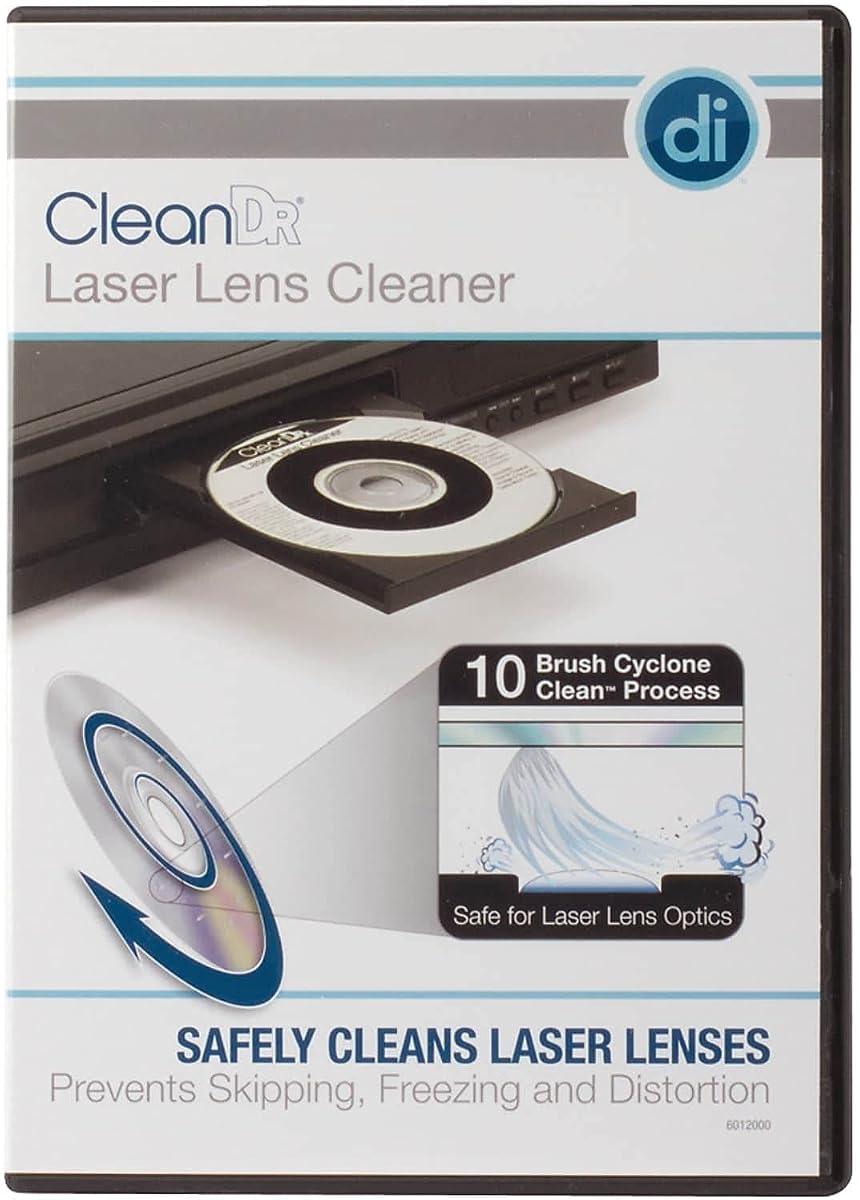
This high-end cleaner uses an exclusive 10-brush Cyclone Clean Process to remove dust dirt and debris from the laser lens. The three-stage process also demagnetizes the lens which can help restore optimal performance for your optical drive. It is safe for CD and DVD players and computers.
We may earn a commission when you buy through this link, at no additional cost to you.
Cleaning the laser lens can extend the life of your player while improving sound and image quality during playback. It optimizes CDs DVDs and game system performance for systems like Xbox 360 and PS1 2. However it is not intended for Blu-Ray or newer gaming systems like PS3 PS4 or Xbox One.
The advanced brush count and cyclone approach make this a premium choice for serious users. It targets both physical debris and magnetic interference that may affect reading. This comprehensive method supports better longevity for compatible optical hardware.
Users seeking the most thorough cleaning process available for CD and DVD players should consider this model. It combines mechanical cleaning with demagnetization to tackle multiple causes of errors. While it does not support Blu-Ray it delivers strong value for supported devices.
The 10-brush cyclone process ensures a deep clean by covering more of the lens surface area.
Demagnetizing the lens can reduce static issues that cause intermittent read errors.
We may earn a commission when you buy through this link, at no additional cost to you.
Choosing the right cleaner depends on your device type and what issues you want to address. Consider the following factors to pick the most effective product for your needs.
Check whether the cleaner supports your specific hardware such as CD VCD DVD players or game consoles. Many products exclude PS4 PS3 Xbox One or Blu-Ray so confirm before buying.
Always verify the product description lists your device to avoid purchasing an incompatible tool.
Look for cleaners that describe the brush count and material since more brushes often mean better coverage. Some use microfiber or copper fibers to handle dirt and static effectively.
Choose a system that matches the level of debris your drive typically encounters for reliable results.
Some kits include cleaning fluid or a microfiber cloth to wipe discs as well as the lens. These extras can simplify maintenance and improve overall results.
If you clean discs often a kit with a cloth may save you from buying separate supplies.
Prefer cleaners that offer voice guidance or clear instructions to ensure correct installation and operation. Simple steps reduce the chance of user error during the cleaning cycle.
Easy to use products help you maintain your hardware consistently without frustration.
Check if the manufacturer offers support periods such as six months of after-sales service in case of defects. This ensures you can resolve issues if the product does not work as expected.
A warranty or support window adds confidence to your purchase and protects your investment.
Consider how often you need to clean your drive based on usage and environment. Some brands recommend cleaning after specific usage hours so factor this into your buying decision.
For heavy use environments opt for a durable cleaner that can be replaced easily over time.
Ensure the product uses non-abrasive materials that will not scratch the delicate laser lens. Safety is critical since a damaged lens can cause permanent hardware failure.
Choose products from trusted brands that specify safe cleaning methods for optical hardware.
Balance the price with what you get such as brush count fluid inclusion or brand reputation. Higher price does not always mean better performance so read features carefully.
Select a kit that fits your budget while meeting all essential cleaning requirements for your device.
Insert the cleaner disc into your player with the graphics facing up and the arrow pointing forward if applicable. Make sure your device audio is turned on to follow use instructions during the cycle.
Run the cleaning cycle as instructed which typically takes one to three minutes depending on the product. Let the disc play through without interruption to allow the brushes to clean the lens effectively.
After the cycle remove the disc and store it in its case to protect it from damage. Clean your discs with a soft cloth when needed and repeat the cleaning process when playback issues return.
Yes most cleaners require you to turn on the audio so the player can read the disc and engage the brushes. This step ensures the cleaning process runs as designed and the brushes spin to clean the lens.
No the cleaners are designed for the laser lens and not for repairing scratches on the media. You should use dedicated disc repair tools or wipes for scratch removal.
It is recommended to clean the lens every 10 hours of use or when you notice skipping. Regular maintenance helps maintain performance and extends the hardware lifespan.
Many disc cleaners are not intended for Blu-Ray so check compatibility before buying. Some products list support for Blu-Ray while others exclude it.
Brushes typically wear out after 20 uses or when you see visible signs of damage. Replace the disc at that point to keep the cleaning process effective.
Some cleaners work on older systems like PS1 2 and Xbox 360 but not on PS3 PS4 or Xbox One. Always check the product compatibility list for your specific console.
Our top picks like the Arsvita Laser Lens Cleaner Disc Cleaning Set and the Nicer kits deliver strong performance for standard optical drives. They balance cost features and ease of use to suit most home users.
Prioritize compatibility and brush quality when selecting a cleaner to ensure it matches your device type. Look for added benefits like cleaning fluid or guidance if those fit your maintenance routine.
Prices change regularly so always verify the current cost and availability on Amazon before purchasing. Use this guide to find a reliable tool that restores playback and protects your hardware for the long term.