
GANA 2 in 1 Out HDMI Switch
4.3Editor score
4K@60Hz support
No external power needed
Bidirectional switching
This guide compares the top rated cheap HDMI switches for 2026 to help you choose the best affordable option for your gaming or home theater setup.
Finding a reliable and affordable way to connect multiple devices to one screen can be challenging. A cheap HDMI switch offers a practical solution for gamers and home theater enthusiasts who need to manage various sources without cluttering their setup with too many cables or ports.
We evaluated ten highly rated models based on their performance, compatibility, build quality, and user features. Each product was assessed for its ability to handle high resolution signals, ease of use, and value for money. This list covers options ranging from simple manual switches to advanced models with remote controls.
Each pick highlights specific strengths and potential limitations to help you make an informed decision. While our analysis focuses on consistent performance and feature sets, remember that pricing and availability can fluctuate over time. Always check the latest details before making your purchase.
4.3Editor score
4.4Editor score

4.3Editor score
The following table provides a side-by-side comparison of all ten models to help you quickly identify which switch best fits your specific connection needs and device compatibility requirements.





The UGREEN HDMI Switch 5 in 1 Out stands out as a top performer in the affordable category. With a rating of 4.3 stars, it offers robust support for modern display standards like 4K at 60Hz and Variable Refresh Rate. Its ability to handle multiple gaming consoles and media devices simultaneously makes it a versatile choice for home theaters.
We may earn a commission when you buy through this link, at no additional cost to you.
This switch supports HDMI 2.0 and HDCP2.2, ensuring compatibility with most current devices. The high bandwidth of 18Gbps allows for lossless video and audio transmission, which is crucial for maintaining image quality during intense gaming sessions. The inclusion of a remote control adds significant convenience for switching between devices from a distance.
While it does not support automatic switching, the manual options via remote or button press are straightforward. Users should note that to achieve 4K at 60Hz, HDMI cables must be kept within three meters. Additionally, the power adapter is not included, so you may need to source one separately.
This model is ideal for gamers and media enthusiasts who need to connect five different sources to a single TV. Its reliable performance and feature-rich design justify its place as a top recommendation for those seeking a cheap HDMI switch without compromising on quality.
Supports VRR and HDR for smoother and more vibrant gameplay on compatible displays.
Five input ports allow you to connect PS5, Xbox, Switch, and more without unplug.
We may earn a commission when you buy through this link, at no additional cost to you.
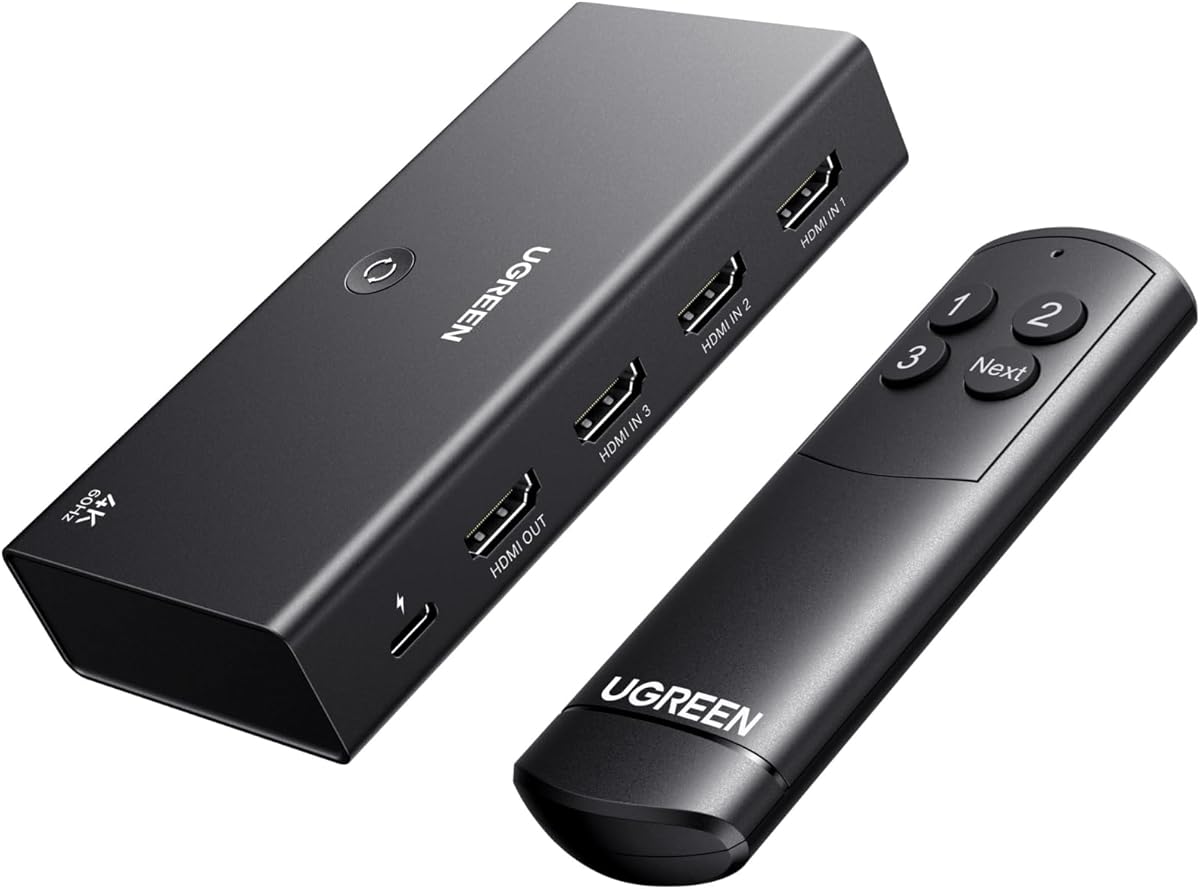
The UGREEN 3 in 1 Out switch offers a compelling balance of features and cost. With a high rating of 4.4 stars, it delivers crisp 4K video and immersive audio. Its support for HDR10+ and Dolby Atmos makes it a strong contender for home cinema setups where sound and picture quality are paramount.
We may earn a commission when you buy through this link, at no additional cost to you.
This device handles high bandwidth transmission effectively, ensuring stable video streams without dropping frames. The remote control allows for easy access, which is helpful when the switch is placed behind a TV or in a media cabinet. It supports a wide range of devices from consoles to laptops.
Users should be aware that it requires a 5V power adapter which is not included in the package. Also, the lack of automatic switching means you must manually select the active source. However, the manual buttons and remote make this task simple and quick.
For those who need to connect three devices and prioritize audio visual fidelity, this is an excellent choice. It provides a reliable solution for managing media sources without breaking the bank, making it a best budget pick for many users.
Dolby Atmos and HDR10+ support deliver cinematic sound and picture experiences.
Remote control allows for convenient switching from your couch or bed.
We may earn a commission when you buy through this link, at no additional cost to you.
The GANA 2 in 1 Out switch is designed for simplicity and portability. With a 4.3 star rating, it is a popular choice for users who need a straightforward solution without the bulk of power bricks. Its aluminum body ensures durability while maintaining a sleek look that fits well in any setup.
We may earn a commission when you buy through this link, at no additional cost to you.
One of its standout features is the bidirectional capability, allowing it to work as a switch or a splitter depending on your needs. This flexibility makes it useful for connecting a console to multiple displays or switching between a PC and a laptop on one monitor. It supports 4K at 60Hz for sharp visuals.
Since it does not require external power, setup is incredibly fast and clean. However, this also limits its bandwidth to 3.4Gbps and means it might not support the highest refresh rates on all devices. There is also no remote control, so switching is done manually via the button on the device.
This model is perfect for travelers or those with minimal setups who need reliable 4K support without extra cables. Its compact design and lack of power requirements make it a standout option for users who value convenience and efficiency.
Operates without an external power adapter, reducing cable clutter significantly.
Bidirectional design lets you choose between switching or splitting modes easily.
We may earn a commission when you buy through this link, at no additional cost to you.
Anker is known for reliable peripherals, and this HDMI switch continues that trend. With a 4.4 star rating, it provides a solid platform for switching between two sources. Its compact design makes it easy to hide behind monitors or TVs, keeping your desk or entertainment center clean.
We may earn a commission when you buy through this link, at no additional cost to you.
It supports 4K at 60Hz, ensuring you can enjoy high resolution video without issues. The manual button is responsive and easy to press. Anker also provides an 18-month warranty, which adds peace of mind to your purchase and shows confidence in the product's longevity.
However, it lacks some advanced features like remote control or CEC support. This means you will need to walk to the switch to change inputs, and you cannot use your TV remote to control it. It is best suited for simple setups where these features are not critical.
If you prioritize brand trust and build quality over extra features, this is a great option. It is ideal for office setups or home offices where you need to switch between a PC and a console efficiently without spending too much.
Solid construction ensures durability and stable performance over time.
Includes an 18-month warranty for added protection and support.
We may earn a commission when you buy through this link, at no additional cost to you.
The Acer HDMI switch is designed for users with multiple gaming consoles. With five inputs, it allows you to connect PS5, Xbox, Switch, and more without constantly unplugging cables. A 4.1 star rating indicates general satisfaction among users who need this level of connectivity.
We may earn a commission when you buy through this link, at no additional cost to you.
The device features gold-plated HDMI ports to resist corrosion and ensure a stable signal. It supports 4K at 60Hz, which is essential for next-gen gaming. A remote control is included, making it easy to switch between your different gaming systems from the comfort of your chair.
Like many models in this category, it does not support automatic switching. You must select the input manually. Additionally, the power adapter is not included, so you need to ensure you have a compatible one. Some users may experience signal issues if cable lengths are too long.
This is a strong choice for avid gamers who need to switch between different systems frequently. Its port density and feature set make it a versatile hub for any gaming setup, providing good value for the number of ports offered.
Five inputs allow for extensive device connectivity without cable clutter.
Gold-plated ports resist corrosion and ensure long-term signal integrity.
We may earn a commission when you buy through this link, at no additional cost to you.
This GANA model simplifies setup by including a pigtail HDMI cable. With a 4.2 star rating, it is a practical choice for users who do not want to buy a separate cable. It handles 3 inputs and supports 4K at 30Hz, which is sufficient for most media consumption.
We may earn a commission when you buy through this link, at no additional cost to you.
The device is USB-C powered, ensuring stable video transmission. It allows for manual switching, which is quick and efficient for basic needs. The LED indicators help you identify which input is currently active at a glance.
However, it supports 30Hz at 4K, which means it is not ideal for high refresh rate gaming. There is no remote included, so you must be close to the device to switch inputs. This makes it less suitable for living room setups where you sit far from the TV.
It is an excellent option for office use or secondary displays where 30Hz is acceptable. The included cable reduces total cost and makes it a convenient all-in-one solution for budget-conscious buyers.
Comes with a pigtail cable to reduce extra costs and simplify setup.
Uses USB-C power for stable performance and easy integration.
We may earn a commission when you buy through this link, at no additional cost to you.
The BENFEI switch is unique for its ability to support long HDMI cable runs. With a 4.1 star rating, it is designed to maintain signal quality even over long distances using adaptive equalization technology. It includes a 4ft pigtail, which simplifies the initial connection to your display.
We may earn a commission when you buy through this link, at no additional cost to you.
It supports 4K at 60Hz and up to 10 meters of transmission. This makes it ideal for home theaters where the console is far from the TV. The device also comes with an 18-month warranty, adding reliability to its technical features.
One limitation is the lack of a remote control, meaning you must switch manually. It also requires a USB-C power cable to function properly. The fixed cable length on the output side means you cannot easily adjust the connection distance to your display.
If you have a complex setup with long cables, this model offers a reliable solution. It bridges the gap between standard switches and expensive signal extenders, making it a smart choice for specialized environments.
Adaptive equalization allows signal transmission over distances up to 10 meters.
A 4ft pigtail cable is included for easy initial setup.
We may earn a commission when you buy through this link, at no additional cost to you.
The NEWCARE switch provides a quick setup solution with an included HDMI cable. With a 4.1 star rating, it is a reliable option for connecting multiple sources to one display. It supports 4K at 60Hz, ensuring high resolution video for gaming and streaming.
We may earn a commission when you buy through this link, at no additional cost to you.
It features gold-plated connectors to resist corrosion and ensure signal stability. The included cable is 2.6 feet long, which is convenient for short-distance connections. Manual switching is handled via a button on the device.
Like many budget options, it does not include a remote control, so you need to reach the switch to change inputs. It also requires an external power source for operation. This makes it less ideal for setups where the switch is hard to reach.
For users who want a simple plug-and-play experience without extra cable costs, this is a great choice. It works well for desks or small entertainment centers where the switch is easily accessible.
Comes with a 2.6ft HDMI cable to simplify your initial setup.
Gold-plated connectors ensure a stable and corrosion-resistant connection.
We may earn a commission when you buy through this link, at no additional cost to you.
This GANA model features a durable aluminum build and five input ports. With a 4.2 star rating, it is a solid option for managing multiple devices. It includes a remote control, which makes switching inputs convenient from a distance.
We may earn a commission when you buy through this link, at no additional cost to you.
It supports 4K at 60Hz and 18Gbps bandwidth for high quality video. The all ports on same side design simplifies cable management and reduces clutter behind your TV. It also supports HDR and 3D for immersive media experiences.
However, it requires a USB power connection and does not include HDMI cables. The lack of automatic switching means you must manually select your input. While it is a strong contender, these limitations should be considered before purchase.
For users who need five inputs and a durable build, this is a good choice. It is well suited for home theaters where remote control and cable management are priorities.
All ports on the same side simplify cable organization and reduce clutter.
Included remote allows for easy switching from the couch or bed.
We may earn a commission when you buy through this link, at no additional cost to you.
This generic HDMI switch offers basic functionality at an affordable price. With a 4.2 star rating, it provides a simple solution for switching three sources to one display. It includes a remote control, which is a nice touch for budget-friendly models.
We may earn a commission when you buy through this link, at no additional cost to you.
It supports 4K at 30Hz, which works well for media playback but may not suffice for high refresh rate gaming. The ABS material build is durable enough for typical use. LED indicators show you which port is currently active.
While it lacks high bandwidth support, it is sufficient for most streaming and general computing needs. It is easy to set up and does not require complex configuration. However, for gaming, users may prefer higher refresh rate models.
This model is ideal for home offices or secondary screens where cost is a primary factor. It offers essential features without extra expense, making it a practical choice for basic switching needs.
Provides essential switching functions at a low entry price point.
Includes a remote control for convenient input selection from a distance.
We may earn a commission when you buy through this link, at no additional cost to you.
Choosing the right HDMI switch depends on several technical and practical factors. This guide walks you through the key considerations to ensure you pick a model that meets your specific needs.
Determine how many devices you need to connect simultaneously. Most cheap models offer between two and five input ports. If you have multiple consoles or PCs, aim for a model with at least three or four inputs to avoid constant cable swapping.
Ensure the output matches your TV or monitor's capabilities. A single output is standard for most users, but verify the device supports your desired resolution.
Check the supported resolution and refresh rate. Many budget switches support 4K at 60Hz, which is ideal for gaming and modern media. However, some lower cost models only support 4K at 30Hz, which may cause lag in fast paced games.
Look for specs like 1080p, 1440p, or 4K to ensure the switch can handle your display's native resolution without downscaling or signal loss.
HDMI version and bandwidth determine how much data can be transmitted. Modern devices require HDMI 2.0 or higher with 18Gbps bandwidth for full 4K performance. Older models may limit your setup to lower quality signals.
Always confirm the switch supports at least HDMI 2.0 if you plan to use 4K content or high refresh rates.
Some switches draw power from the HDMI port, while others require a USB power adapter. Passive switches are simpler but may not support high bandwidth. Active switches ensure stable performance but need an outlet.
If you want to avoid extra power bricks, choose a passive model but verify it can handle your specific resolution requirements.
Manual switches require a button press or remote control to change inputs. Automatic switching detects active signals but can sometimes be slow or unreliable. Consider how much you value convenience versus control.
If you prefer to control inputs directly, look for models with clear manual buttons and responsive remotes.
Metal chassis like aluminum often dissipate heat better and last longer than plastic. Cheap switches may use plastic bodies that can overheat or crack over time. Gold-plated ports also reduce corrosion and improve connection stability.
Investing in a model with a metal body and quality connectors can extend the lifespan of your purchase.
Modern TVs and receivers support Dolby Atmos and DTS. Ensure the switch passes through uncompressed audio formats for surround sound setups. Some budget models strip audio metadata, reducing sound quality.
Check for specifications mentioning HD Audio or specific formats like Atmos to ensure your audio system performs correctly.
Verify that the switch is compatible with your specific devices like PS5, Xbox, or Mac. Some switches have issues with HDCP 2.2 which is required for streaming content. HDCP support ensures you can play protected content without errors.
Read user reviews to see if others have experienced compatibility issues with your specific setup before purchasing.
To set up your HDMI switch, connect the output to your TV using a high quality cable. Plug each of your devices into the input ports on the switch. If your model requires power, connect the USB cable to a power adapter or your TV's USB port.
Turn on the TV and your source device. Press the manual button or use the remote to cycle through inputs until the correct signal appears. If using a remote, ensure it is pointed directly at the IR receiver on the switch for proper response.
Keep the switch in a well ventilated area to prevent overheating. Avoid bending cables sharply or pulling them forcefully. If you notice signal loss, try reducing cable length or checking for secure connections. Dusting the ports regularly can also maintain signal integrity.
It depends on the model. Passive switches draw power from the HDMI port and do not need an adapter, but active switches often require a USB power source to handle high bandwidth signals. Always check the product specifications to ensure stable performance.
Yes, most modern cheap HDMI switches support 4K at 60Hz or 30Hz. However, verify the specific bandwidth rating such as 18Gbps to ensure it can handle your display's full resolution without signal loss or downscaling.
A splitter sends one input signal to multiple displays simultaneously, while a switch connects multiple sources to one display. They serve opposite purposes. Ensure you purchase a switch if you want to toggle between different devices on one screen.
Common issues include using long HDMI cables, unsupported refresh rates, or inadequate power. Ensure your cables are high speed and within the recommended length. Verify the switch supports your specific resolution and refresh rate requirements.
For 4K content at 60Hz, you need HDMI 2.0 or higher. If your TV is older, you may only need 1.4 for 1080p or lower. Check your TV manual to confirm the HDMI port version and match your switch accordingly.
Many models include an IR remote for convenient switching from a distance. However, budget models often require manual buttons instead. Always check the product features to see if a remote is included before purchasing.
We have reviewed ten affordable HDMI switches that cater to different needs from gamers to home theater users. The UGREEN 5 in 1 Out offers superior features for multi-device setups, while the GANA 2 in 1 Out provides a compact portable option.
When choosing your model, prioritize resolution support and power requirements. Ensure the switch matches your display's capabilities and offers enough inputs for your current and future devices. Reliability matters more than saving a few dollars on a cheap switch.
Prices and availability fluctuate regularly so always check the current listings before buying. We hope this guide helps you find a reliable solution that enhances your entertainment experience without stretching your budget.