
Lenovo Chromebook S330
4.2Editor score
Lightweight 3.3 lbs design
Up to 10 hours battery life
Includes 100 GB cloud storage
This guide compares the top 10 cheap laptops for everyday use, evaluating performance, battery life, display quality, and portability for students and
Finding a reliable laptop without breaking the bank is a common challenge for students and home users alike. Affordable devices have evolved significantly, offering robust performance for browsing, streaming, and productivity tasks at accessible price points.
We analyzed ten top-rated models based on processor efficiency, memory capacity, storage speed, and build quality. Each selection balances cost with essential features like Wi-Fi 6, long battery life, and durable designs suitable for daily wear.
Each pick highlights specific strengths such as screen clarity, port selection, or operating system flexibility. Prices and availability fluctuate frequently, so verify current details before purchasing to ensure you get the best value available today.
4.2Editor score

4.4Editor score

4.5Editor score
The following table provides a side-by-side comparison of all ten selected models, highlighting key specifications and core strengths to help you decide quickly.





The HP Chromebook 14 stands out as a reliable choice for everyday tasks thanks to its efficient Intel processor and solid build quality. It holds a strong 4.3-star rating from users who appreciate its portability and long-lasting battery performance for school or home use.
We may earn a commission when you buy through this link, at no additional cost to you.
This model features a 14-inch HD display with anti-glare technology, making it comfortable for extended viewing sessions. The quad-core Intel Celeron N4120 handles web browsing, video streaming, and document editing smoothly. HP Fast Charge technology ensures you can quickly get back to work if the battery runs low.
While the 64 GB eMMC storage is limited compared to traditional SSDs, the Chrome OS environment relies heavily on cloud storage which mitigates this constraint for most users. The integrated Intel UHD Graphics 600 supports 4K content streaming, adding value for entertainment purposes without requiring a high-end GPU.
This laptop is ideal for students or casual users who need a dependable device for internet access, streaming media, and light productivity. Its durable design and ENERGY STAR certification make it a responsible and practical choice for everyday computing needs.
The Chrome OS provides automatic updates and built-in virus protection, reducing maintenance concerns. The multi-touch touchpad supports gestures that enhance navigation efficiency. Overall, it offers a balanced mix of performance and portability at a budget-friendly entry point.
Battery life extends up to 14 hours, ensuring you can work or study all day without needing a charger nearby.
Chrome OS keeps the system secure and updated automatically, offering seamless access to Android apps via the Play Store.
We may earn a commission when you buy through this link, at no additional cost to you.
The Amzboy 15.6 Laptop offers a rare combination of a Full HD screen and Windows 11 at a highly competitive price point. Its 4.8-star rating reflects user satisfaction with its balance of portability and essential computing features for daily tasks.
We may earn a commission when you buy through this link, at no additional cost to you.
Equipped with a 15.6-inch 1920×1080 display, this laptop provides sharper visuals than many budget models that stick to HD resolution. The N4020 CPU handles standard office applications and web browsing effectively, while the 128GB eMMC storage ensures faster boot times than older hard drives.
A standout feature is the expandable storage slot supporting up to 1TB TF cards, allowing you to keep your media library local without complex upgrades. The Type-C PD fast charging adds modern convenience, reducing the bulk of carrying multiple adapters when traveling or commuting.
Ideal for students or home users needing a full Windows experience without spending a premium, this device covers most everyday needs. While the CPU is not suited for heavy gaming or professional rendering, it excels at document work, streaming, and video calls.
The lightweight design makes it easy to carry in backpacks, and the quiet fanless operation ensures a distraction-free environment. This model proves that affordable laptops can still offer modern connectivity and a large screen for an immersive experience.
Dual Type-C and USB 3.2 ports allow versatile connection to peripherals without needing extra docking stations.
The anti-glare FHD display reduces eye strain during long reading sessions while maintaining vivid color reproduction.
We may earn a commission when you buy through this link, at no additional cost to you.
The HP Everyday Laptop 2026 Edition brings modern computing features like Wi-Fi 6 and SSD storage to an affordable price tier. It is designed specifically for students and professionals who need reliable performance for office tasks and online classes.
We may earn a commission when you buy through this link, at no additional cost to you.
Powered by the Intel N150 processor, this laptop delivers smooth multitasking capabilities for everyday applications. The inclusion of Microsoft 365 and Copilot AI enhances productivity by assisting with research and summaries directly within the interface. A 128GB SSD provides significantly faster read/write speeds compared to eMMC alternatives.
While the 14-inch HD display is standard for this class, the anti-glare technology and decent brightness make it suitable for indoor use. The Natural Silver finish adds an aesthetic touch that appeals to users preferring a clean and professional workspace look.
This model is best suited for those who prioritize battery life and storage speed over screen resolution. Its lightweight chassis makes it easy to transport between classes or meetings. The fast charge capability ensures you remain productive even with limited time to plug in.
Connectivity options like USB-C and HDMI make it versatile for external monitors and peripherals. The combination of Windows 11 and AI tools future-proofs the device for upcoming software requirements. Overall, it offers a refined user experience at a competitive entry level.
Copilot AI helps streamline research and writing tasks, saving time on routine work activities.
Solid state drive storage ensures quick boot times and responsive application launches for efficient workflow.
We may earn a commission when you buy through this link, at no additional cost to you.
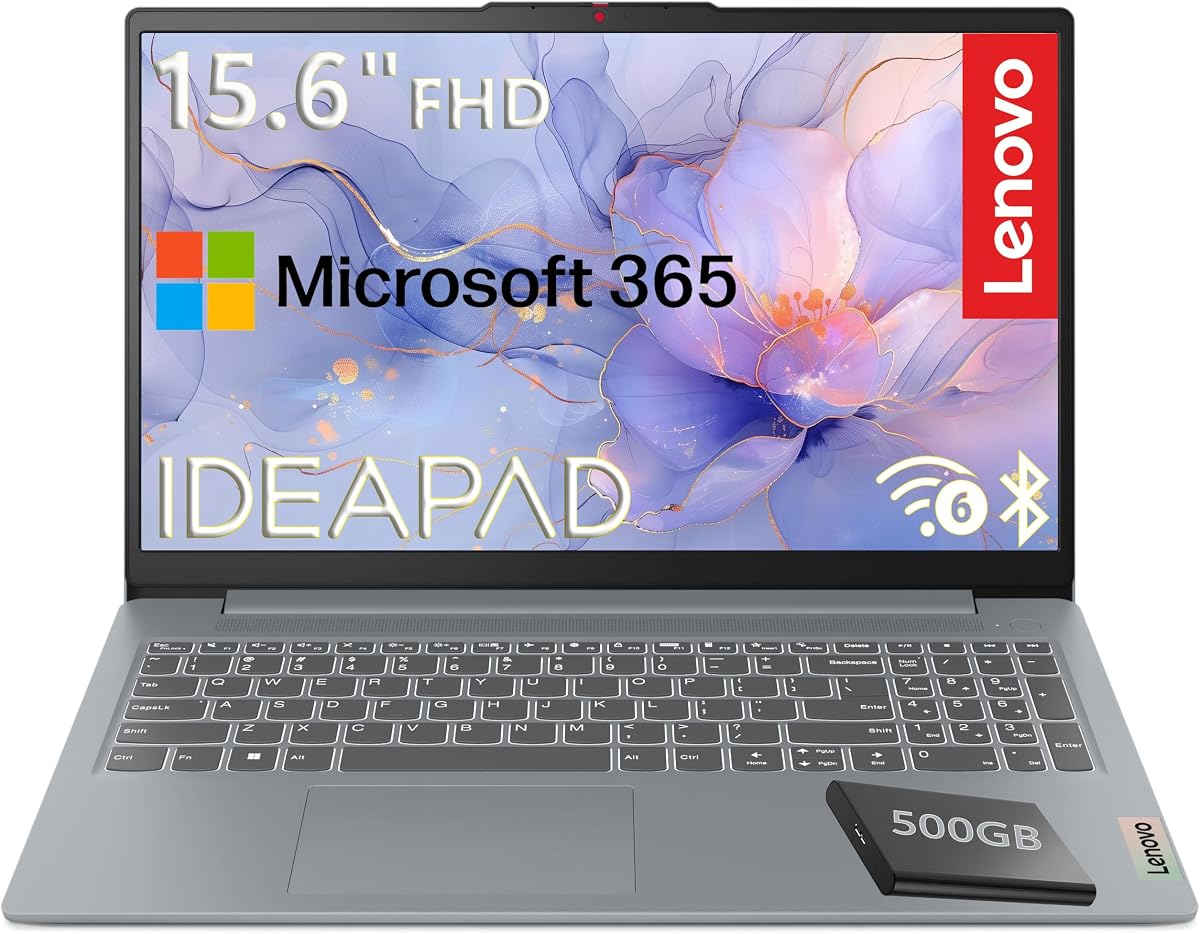
The Lenovo 15.6 FHD laptop addresses storage concerns effectively by combining internal UFS speed with a substantial external hard drive. Its robust build quality and full HD screen make it a strong contender for family use or student assignments.
We may earn a commission when you buy through this link, at no additional cost to you.
Equipped with an Intel N100 processor, this device handles web browsing and office tasks with ease. The 500GB portable external hard drive provides ample space for documents, photos, and media files that would otherwise fill up a small internal drive. This setup is unique for a budget model.
Durability is emphasized through MIL-STD-810H certification, meaning the chassis can withstand rigorous daily use and minor drops. The 15.6-inch Full HD display offers better clarity than HD models, enhancing the experience of watching videos or reviewing spreadsheets.
This laptop is particularly useful for households needing to store large files securely without cloud dependency. The included privacy shutter on the camera adds a layer of security during video calls. While Windows 11 S mode limits app installations, it ensures a streamlined and secure environment.
Connectivity includes multiple USB ports and HDMI for versatile setups. The battery life supports typical work sessions without frequent charging. Overall, it balances storage capacity with durability better than many competitors in its price range.
External storage integration allows you to keep large multimedia libraries without sacrificing system performance.
Built-in camera shutter and TPM 2.0 chip enhance privacy and data security for remote work.
We may earn a commission when you buy through this link, at no additional cost to you.
This HP Chromebook 14 improves on previous models with 8 GB of RAM and a newer Intel N100 processor. The upgrade provides significantly better multitasking performance, allowing more tabs to remain open without slowdowns during daily tasks.
We may earn a commission when you buy through this link, at no additional cost to you.
The 128 GB Universal Flash Storage delivers fast boot times and application launches. The micro-edge HD display provides a clean viewing experience with less bezel interference. Intel UHD Graphics 600 supports 4K content streaming smoothly, making it a great choice for media consumption.
Chrome OS ensures the system remains secure and lightweight, automatically updating to patch vulnerabilities. The low power consumption contributes to extended battery life, keeping you productive throughout the day. The design is compact and easy to carry in any backpack.
Best for users who live primarily in a browser, this model offers speed and simplicity. The high RAM count allows for smoother operation when running multiple web applications. It remains a top pick for education and light home use.
The anti-glare screen reduces reflections, improving readability in bright environments. Fast charging helps keep you moving when time is tight. Overall, it strikes an excellent balance between speed and usability for budget shoppers.
8 GB of RAM allows seamless switching between multiple browser tabs and applications without lag.
Integrated graphics handle high-definition video playback smoothly for a superior entertainment experience.
We may earn a commission when you buy through this link, at no additional cost to you.
The Lenovo Chromebook S330 is one of the most affordable options available, making it perfect for basic needs like web browsing and email. Despite its low cost, it maintains a stylish design and offers reliable battery performance for daily mobile use.
We may earn a commission when you buy through this link, at no additional cost to you.
Powered by a MediaTek processor and 4 GB of RAM, this laptop handles light tasks efficiently. The 32 GB eMMC SSD provides quick access to files, and the included Google Drive cloud storage offers generous space for documents. Its lightweight build makes it easy to carry around.
Chrome OS provides inherent security features, ensuring the device stays safe from viruses without extra software. The anti-glare screen is adequate for indoor reading, though the resolution is standard HD. It serves well as a secondary device for travel or students.
This model is ideal for first-time laptop buyers or those needing a simple internet device. The 10-hour battery life supports full days of classes or work sessions. It is a practical solution for minimalists who do not require heavy software.
USB-C connectivity and fast charging capabilities add modern convenience to this budget-friendly device. The overall experience is smooth for basic tasks. It remains a strong contender for those prioritizing portability and price over high-end specs.
Weighing only 3.3 lbs, this laptop is easy to slip into bags for commutes.
Automatic syncing with Google services keeps your files accessible from any device securely.
We may earn a commission when you buy through this link, at no additional cost to you.
The HP Essential Laptop 2026 stands out by integrating modern AI tools directly into the workflow via a dedicated Copilot key. It delivers responsive performance for students and professionals who need reliable access to productivity suites and cloud services.
We may earn a commission when you buy through this link, at no additional cost to you.
Equipped with the Intel N150 processor, this laptop ensures smooth multitasking for everyday applications. The 128GB UFS storage offers quick data access. Microsoft 365 inclusion adds value by providing Word, Excel, and OneDrive cloud storage out of the box.
Enhanced video call features like noise reduction and dual-array microphones ensure clear communication during remote meetings. The Natural Silver chassis with Willow Green accents provides a professional look that suits office environments. Connectivity options like USB-C and HDMI support versatile setups.
This model is best for users who rely heavily on productivity tools and modern connectivity. The battery life supports full work days without needing a charger. It balances aesthetics with functional performance effectively in the budget segment.
The Wi-Fi 6 support ensures fast internet speeds and stable connections. The sleek design is portable enough for daily commuting. Overall, it offers advanced features typically found in higher-priced models.
The dedicated Copilot key provides instant access to generative AI features for faster task completion.
Noise reduction technology filters background sounds, ensuring clear voice quality during video calls.
We may earn a commission when you buy through this link, at no additional cost to you.
The Lenovo Flagship Chromebook distinguishes itself with a 14-inch Full HD Touchscreen, offering a more interactive experience than non-touch competitors. The MediaTek Kompanio 520 processor ensures class-leading battery life and reliable connectivity for school or business use.
We may earn a commission when you buy through this link, at no additional cost to you.
This device features an IPS panel for wide viewing angles and vivid colors, making it excellent for media consumption. The 4GB RAM supports smooth multitasking within Chrome OS limits. Wi-Fi 6 support ensures stable internet performance in busy environments.
The touchscreen interface integrates seamlessly with Google services, allowing for intuitive navigation. The design is slim and lightweight, enhancing portability. It is a compelling choice for users who prefer touch input for browsing or education.
Ideal for students or professionals needing a visual interface, this model balances performance with mobility. The battery life supports long travel periods. It offers a premium look and feel at a competitive price point.
The Abyss Blue finish adds a modern aesthetic appeal. Connectivity includes USB-C and headphone jacks for versatile accessory use. It represents a high value in the touchscreen Chromebook market.
The touchscreen enables natural navigation and zooming for a more immersive digital experience.
Wi-Fi 6 ensures faster data transfer and stable connections for high-bandwidth applications.
We may earn a commission when you buy through this link, at no additional cost to you.
The HP Slim Laptop 2026 offers next-generation DDR5 memory even at a budget price point, ensuring efficient data transfer and responsiveness. It is designed for mobility, weighing just 3.24 lbs with a sleek natural silver chassis.
We may earn a commission when you buy through this link, at no additional cost to you.
Powered by the Intel N150 processor, this laptop delivers smooth performance for daily computing needs. The 128GB SSD provides rapid boot times. It features essential ports like USB-C and HDMI, making it compatible with modern accessories and displays.
This model supports AI-enhanced productivity features and noise reduction for clear video calls. The battery life supports up to 11 hours of video playback, making it a reliable travel companion. It balances modern specs with practical everyday usability.
Best for users prioritizing port speed and weight, this laptop is easy to carry everywhere. The design emphasizes durability and style. It stands out as a tech-forward option in the entry-level market.
Connectivity ensures you stay connected with reliable Wi-Fi 6 speeds. The multi-touch pad improves navigation accuracy. It is a versatile choice for students and professionals on the go.
DDR5 RAM allows for faster data access and better overall system responsiveness.
Lightweight design ensures comfort during long commutes or flights without added strain.
We may earn a commission when you buy through this link, at no additional cost to you.
This Laptop 15.6 Inch model offers a remarkable 12GB RAM capacity, outperforming many entry-level devices in multitasking scenarios. It is powered by a Pentium Gold 6500Y processor, suitable for daily productivity and media consumption without slowdowns.
We may earn a commission when you buy through this link, at no additional cost to you.
The Full HD IPS display ensures vibrant colors and wide viewing angles, a rare find at this price. With 128GB SSD storage, it delivers fast application launches. The privacy slider on the camera provides peace of mind for users concerned about webcam security.
Rich connectivity options like USB-C, HDMI, and multiple USB ports reduce the need for dongles. Its lightweight build makes it easy to carry to class or work. It is a practical choice for students needing a robust budget laptop.
Ideal for multitaskers who need to run multiple apps simultaneously, the high memory count is a standout feature. The screen quality enhances the viewing experience for videos and documents. It balances performance with usability effectively.
Fast boot times and smooth operation make it reliable for daily use. The overall design is simple but functional. It remains a solid choice for users prioritizing internal specs over brand name.
IPS technology delivers consistent colors across different viewing angles for better visual comfort.
Multiple ports allow direct connection to peripherals without needing additional adapters.
We may earn a commission when you buy through this link, at no additional cost to you.
Selecting an affordable laptop requires balancing key specifications to ensure it meets your daily workflow demands without unnecessary cost.
The processor is the brain of your laptop, determining how smoothly it runs applications and handles multiple tasks. For everyday use, processors like the Intel Celeron, N-series, or equivalent efficient chips provide sufficient speed for browsing, video streaming, and document editing. Higher core counts and newer generations generally offer better longevity and smoother multitasking experiences.
Look for quad-core processors or newer architecture to ensure the device remains responsive over time.
RAM is critical for multitasking, allowing you to keep multiple tabs and applications open simultaneously without performance drops. While 4 GB is the minimum for basic tasks, 8 GB or more is recommended for smoother operation with modern web browsers and productivity tools. Insufficient RAM can lead to lag when switching between active programs.
Prioritize 8 GB or higher for future-proofing your computing experience.
Storage type impacts boot times and file access speed, with SSDs and UFS drives significantly outperforming traditional eMMC or mechanical drives. While capacity may be lower in budget models, using cloud storage or external drives can compensate. Faster storage ensures the operating system loads quickly and applications start instantly.
Choose models with SSD or UFS technology for better overall system responsiveness.
A larger screen like 15.6 inches offers more workspace for documents and media, while 14-inch models enhance portability. Full HD (1920×1080) resolution provides sharper text and images compared to standard HD. Anti-glare coatings reduce eye strain during long work sessions in bright environments.
Select a resolution and size that balance visual clarity with your need for mobility.
For everyday use, a battery life of at least 8 to 10 hours ensures you can work or study all day without seeking an outlet. Fast charging capabilities further enhance convenience by reducing downtime. Look for ENERGY STAR certification to ensure power efficiency aligns with battery longevity.
Aim for models offering all-day power to support uninterrupted productivity.
Chrome OS offers simplicity, security, and seamless integration with Google services, ideal for browser-based users. Windows 11 provides broader software compatibility and professional tools but may require more system resources. Consider which ecosystem aligns with your typical workflows and available applications.
Choose an OS that matches your technical comfort and software needs.
Daily laptops face wear from commuting and storage, so durable chassis materials are essential. Military-grade certifications indicate resistance to drops and environmental stress. A sturdy hinge and keyboard design ensure the device withstands frequent travel and usage over years.
Opt for laptops with proven durability ratings for long-term reliability.
Versatile connectivity ensures you can attach monitors, peripherals, and storage without needing extra adapters. USB-C ports offer fast data transfer and charging capabilities, while HDMI allows external display connections. Wi-Fi 6 support provides faster internet speeds and better stability in crowded networks.
Check port selection to ensure compatibility with your current accessories.
Keep the laptop clean by wiping the screen and keyboard regularly with a microfiber cloth to prevent dust accumulation. Avoid eating or drinking near the device to prevent spills that could damage internal components.
Manage storage by regularly deleting unused files and clearing browser caches to maintain optimal speed. Utilize external drives or cloud storage to free up internal space and prevent slowdowns.
Ensure proper ventilation by using the laptop on hard surfaces rather than soft bedding. This prevents overheating and extends the lifespan of the internal hardware components.
Chrome OS is designed for users who rely primarily on web-based applications and cloud storage. It offers automatic updates and strong security features, making it ideal for browsing and streaming. It may be limited for software that requires offline installation.
Most budget laptops have soldered RAM that cannot be upgraded after purchase. Therefore, it is essential to choose a model with sufficient RAM upfront to meet your needs. Check product specifications before buying to confirm upgradeability.
SSDs are faster and more durable than eMMC storage, offering quicker boot times and better performance. While eMMC is acceptable for basic tasks, SSDs provide a more responsive experience. Look for SSD or UFS options when possible.
Yes, these laptops feature cameras, microphones, and reliable internet connectivity that support video conferencing tools effectively. They handle streaming and screen sharing well for educational purposes. Ensure the model has a webcam shutter for privacy.
Most models in this selection offer between 8 to 14 hours of battery life on a single charge depending on usage. Light browsing and video streaming consume less power than intensive tasks. Always check specific battery claims for each model.
Yes, basic photo editing is possible, but complex professional work may exceed the hardware capabilities. Dedicated GPUs are not usually included in these budget models. For simple adjustments, built-in graphics are sufficient.
Our top picks demonstrate that affordable laptops can deliver strong performance for students and home users. The HP Chromebook 14 remains a standout for its balance of speed and battery life, while the Amzboy model offers Windows functionality at a great value.
Prioritize factors like processor speed, RAM capacity, and storage type to ensure the device meets your specific workflow needs. Whether you prefer Chrome OS for simplicity or Windows for versatility, the right choice depends on your daily tasks.
Always verify current specifications and availability as models and offers change regularly. Investing time in comparing features ensures you select a reliable machine that supports your productivity goals.