
Amzboy 15.6 Laptop
4.8Editor score
Fanless silent operation
15.6 inch FHD screen
45W Type-C PD charging
Finding a cheap laptop for recording music requires balancing power with price. You need enough processing strength to handle audio tracks without breaking the bank. This guide explores options that deliver reliable performance for home studios.
We compared ten laptops based on processor speed, memory capacity, and connectivity options. These factors are critical for running digital audio workstations smoothly. Our selection focuses on value while ensuring basic recording needs are met effectively.
Each pick highlights key strengths and potential limitations for music production. You will see how each model fits different workflow demands and budgets. Please note that prices and stock can change frequently on retailer platforms.
4.8Editor score
4.3Editor score

4.4Editor score
As an Amazon Associate we earn from qualifying purchases.
This side-by-side comparison highlights the core specifications and capabilities of each laptop. It helps you identify which model offers the most relevant features for your specific music recording setup and budget constraints.


This laptop stands out for its robust performance metrics. It rates well for handling complex digital audio workstation tasks efficiently. The combination of cores and memory ensures smooth operation during recording sessions.
We may earn a commission when you buy through this link, at no additional cost to you.
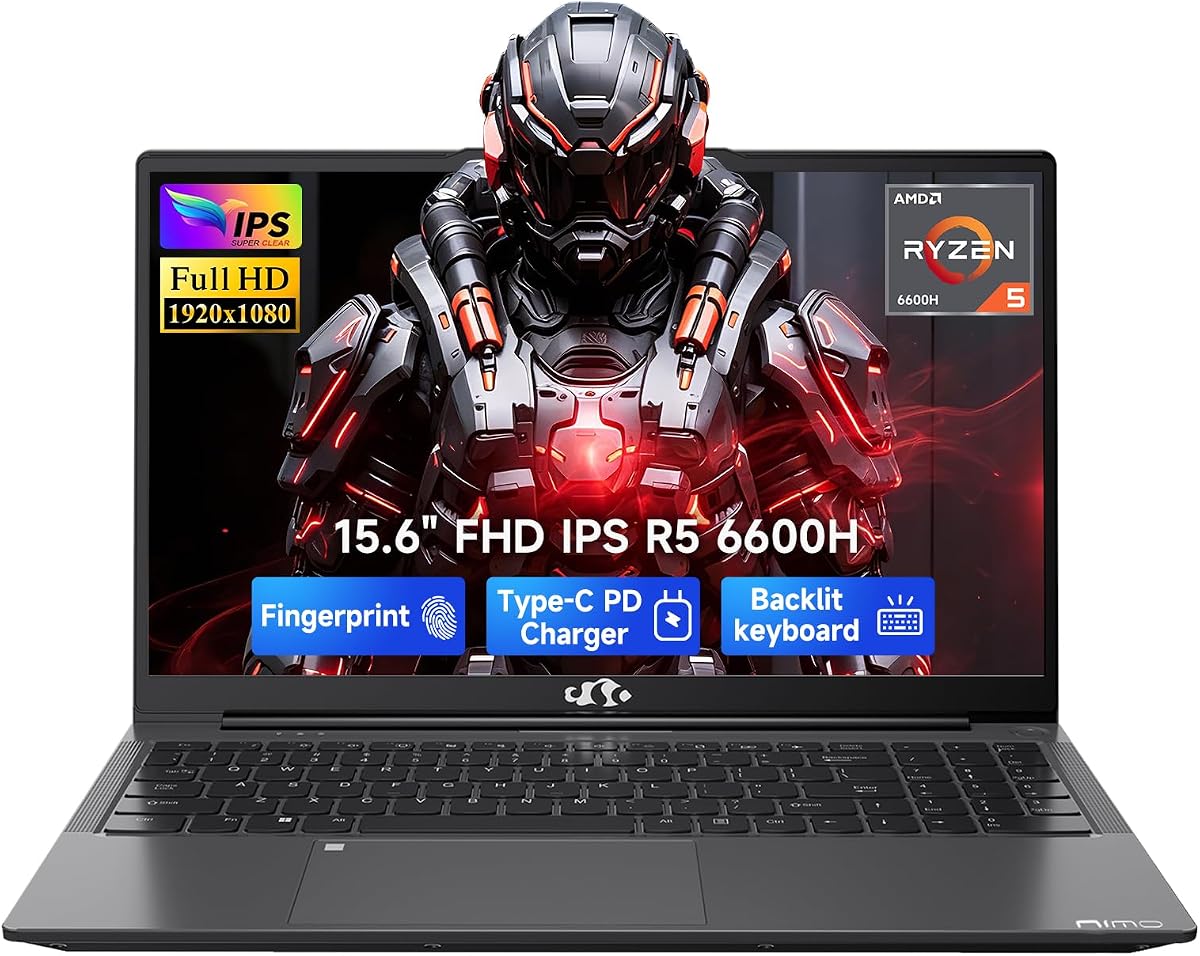
Its AMD Ryzen 5 6600H provides significant power headroom for mixing. The 16GB DDR5 RAM supports multiple plugins and tracks without slowdowns. Storage capacity allows for extensive project libraries locally.
While it costs more than basic models, the investment pays off in longevity. The trade-off is a modest increase in weight which may affect portability. However, performance gains are critical for serious home recording.
It is the top pick for those needing reliability and speed. Ideal for creators who want to grow their studio capabilities without immediate hardware changes. The warranty adds confidence for long-term daily use.
The six-core design handles multitasking with ease for audio software.
Future-proofing is possible with dual slots supporting up to 64GB RAM.
We may earn a commission when you buy through this link, at no additional cost to you.
This laptop offers an affordable entry point for basic recording needs. It holds a strong rating for reliability in daily usage tasks. The design focuses on simplicity and quiet performance which is vital for audio.
We may earn a commission when you buy through this link, at no additional cost to you.
Its fanless structure means no noise interference during recording sessions. This is a significant advantage over loud entry systems. The 15.6 inch screen provides enough visual space for mixing interfaces.
Trade-offs include limited memory and processing speed for heavy loads. You may face slowdowns with many virtual instruments open. However, for simple tracking and editing on a budget, it works well.
Best for users who prioritize silence and low cost over raw power. It suits beginners starting their first home setup. Check current availability to ensure stock levels meet your purchase timing.
Fanless design ensures zero noise contamination during microphone recordings.
Type-C port supports fast charging and data transfer efficiently.
We may earn a commission when you buy through this link, at no additional cost to you.
This model excels in portability and battery endurance. It is built for users who need to move their setup frequently. The integrated microphones add utility for quick voice or instrumental capture tasks.
We may earn a commission when you buy through this link, at no additional cost to you.
Battery life supports long sessions without needing power access constantly. Dual mics offer better audio capture than standard webcams alone. The chassis is light making it easy to transport between locations.
Storage is minimal and relies heavily on cloud or external drives. Chrome OS may limit some professional audio software compatibility. These constraints are acceptable for lightweight tasks or web-based tools.
Ideal for students or travelers needing a companion device for music. Prioritize this if mobility is your main concern. Verify software compatibility before relying on it for professional workflow needs.
Battery lasts over half a day for continuous recording on the go.
Built-in dual mics provide clear input for voice notes.
We may earn a commission when you buy through this link, at no additional cost to you.
This unit balances memory with essential connectivity options effectively. It earns high marks for providing 12GB RAM at an entry price. The ability to upgrade storage is a key feature for growing libraries.
We may earn a commission when you buy through this link, at no additional cost to you.
IPS visuals ensure color accuracy for video editing within your studio. USB ports support connecting external interfaces and controllers easily. Performance is sufficient for basic mixing without major lag issues.
The processor is entry-level which may limit complex plugin usage. You will need to manage resource usage carefully. Still, the upgrade path makes it a versatile choice for long term.
Recommended for users planning to add storage soon. It offers a stable platform for starting a home recording project. Check specific port compatibility with your audio interface hardware.
M.2 slot supports expansion up to 1TB for more projects.
Multiple USB and HDMI ports simplify peripheral connections.
We may earn a commission when you buy through this link, at no additional cost to you.
The visual experience is enhanced by the high quality IPS panel. Anti-glare coating helps during long working hours in varied lighting. This makes reviewing waveforms and interfaces more comfortable for eyes.
We may earn a commission when you buy through this link, at no additional cost to you.
Performance matches standard needs with the 12GB memory buffer. The lightweight chassis makes moving between rooms effortless. Privacy slider adds security when handling sensitive project files.
Storage remains limited for large audio samples on the drive. You might need cloud or external drives for archival. Heat is manageable but fan noise could interfere in quiet rooms.
A solid choice if screen quality is a priority. It serves well for mixing on a modest budget. Ensure your workflow fits the existing storage constraints comfortably.
Wide viewing angles reduce eye strain during sessions.
Physical slider covers webcam for added security.
We may earn a commission when you buy through this link, at no additional cost to you.
Connectivity stands out with modern wireless and charging standards. Bluetooth 5.2 ensures stable connections for audio devices. USB-C charging adds convenience for using a single power adapter.
We may earn a commission when you buy through this link, at no additional cost to you.
The layout includes full function ports for all basic needs. This simplifies setup without needing hubs or dongles. Portability makes it easy to set up in different rooms quickly.
Eight gigabytes of RAM may limit heavy multitasking slightly. You should close unused apps during recording sessions. For entry-level use it remains a functional and responsive machine.
Best for those prioritizing modern connection standards and ease of use. It fits well with Bluetooth controllers or headphones. Check port layout to match your specific interface needs.
Bluetooth 5.2 provides robust audio device pairing.
Type-C charging streamlines power management on the move.
We may earn a commission when you buy through this link, at no additional cost to you.
This version improves on storage while keeping memory high. It provides a balanced package for daily recording and editing. The 256GB capacity reduces immediate need for expansion.
We may earn a commission when you buy through this link, at no additional cost to you.
Connectivity includes both USB and Bluetooth options for flexibility. The warranty gives added peace of mind for buyers. Performance handles standard tracks well within typical constraints.
Processing power is entry-level so expect some limits. It is best suited for light to medium production work. Fan noise may appear during intense processing or rendering tasks.
Recommended for general users needing reliable mid-range specs. It avoids the extreme low cost pitfalls of very basic models. Verify software requirements match the processor capabilities.
256GB SSD offers more room than typical entry drives.
Manufacturer protection plan covers warranty issues for one year.
We may earn a commission when you buy through this link, at no additional cost to you.
Noise control is a primary strength for recording contexts. It is designed to minimize sound during operation. The 15.6 inch IPS display provides good color for visual tasks.
We may earn a commission when you buy through this link, at no additional cost to you.
Privacy features like camera covers add to its practical use. Ports allow connections to monitors and external storage easily. Battery life is decent but not industry leading for travel.
Performance matches needs for basic mixing projects smoothly. Trade-offs include a lightweight build that may feel less sturdy. Still, it remains effective for standard studio routines.
Best for users needing minimal noise during work sessions. Ideal for home setups where quiet is essential. Check battery needs if you plan to record away from outlets.
Reduced fan noise helps keep mics clean during tracks.
IPS panel delivers clear views of digital interfaces.
We may earn a commission when you buy through this link, at no additional cost to you.
Typing comfort is a focus with this model design. The keyboard supports long editing and coding sessions without strain. Visuals remain sharp with full HD resolution for clarity.
We may earn a commission when you buy through this link, at no additional cost to you.
Storage and memory offer a middle ground for most users. Ports cover most external device requirements without adapters. Build quality feels durable for everyday office or studio tasks.
RAM is adequate for light to moderate workloads. Heavier projects may benefit from external assistance. The trade-off is a lower price point for similar specs.
Recommended for users valuing typing comfort and layout. It fits home recording environments well with its design. Confirm upgradeability if you plan to expand over time.
Ergonomic layout reduces fatigue during long sessions.
Full size ports allow direct device connections easily.
We may earn a commission when you buy through this link, at no additional cost to you.
Portability is the standout feature with minimal weight. It slips into bags easily for transport or travel. The lightweight design does not sacrifice screen size for viewing.
We may earn a commission when you buy through this link, at no additional cost to you.
Windows 11 is ready out of the box for use. Security features like Kensington locks protect equipment in shared spaces. Expansion slot supports adding memory or storage as needed.
Six gigabytes of RAM limits heavy multitasking capability. This is acceptable for basic recording needs and editing. The trade-off is a very affordable price point.
Best for users needing a portable backup or entry device. Ideal for students or on-the-go recording tasks. Ensure your DAW fits within memory constraints before purchasing.
Lightweight build allows carrying to any location.
Lock slot provides physical security against theft.
We may earn a commission when you buy through this link, at no additional cost to you.
Selecting the right budget laptop involves evaluating several technical factors. These elements ensure your device can handle audio software without frequent lag.
The processor acts as the brain for your music production tasks. You need at least dual core capabilities to manage real time effects and multiple tracks. High core counts reduce dropouts during recording sessions.
RAM determines how many applications you can run simultaneously. A minimum of 8GB is recommended to avoid crashes. Higher memory allows for more complex virtual instruments.
Solid state drives provide the fast boot times required by DAWs. Aim for at least 256GB to store sample libraries. Expandability ensures you can add more data later.
Physical ports are vital for connecting audio interfaces and MIDI controllers. Ensure you have enough USB ports for your setup. HDMI helps with external monitor usage.
A clear display helps you see waveforms and mixer details. IPS panels offer wider viewing angles for better color. Anti-glare coatings reduce eye strain during editing.
Long battery life is useful if you work away from outlets. Some models offer up to ten hours of runtime. Check real world usage ratings for accuracy.
Good cooling prevents overheating during intensive processing. Quiet fans are preferred to avoid noise in recordings. Passive cooling works for light tasks but limits power.
Windows and macOS are standard for most software tools. Ensure your chosen laptop supports your preferred OS. Compatibility with plugins is crucial for workflow.
Start by optimizing your system settings for audio. Disable unnecessary background apps to free up RAM and CPU resources. This ensures smoother playback and lower latency during sessions.
Regularly update your drivers and operating system software. Compatibility updates often include performance improvements for audio devices. Keeping drivers current reduces the risk of crashes.
Store your laptop in a cool dry place when not in use. Avoid leaving it in direct sunlight or humid environments. Use a sleeve to protect it from scratches during transport.
For basic recording you need at least 8GB of RAM and a dual core processor. A solid state drive helps with boot times and loading samples quickly. USB ports are essential for connecting audio interfaces.
Yes but you may face limits with heavy plugins. Budget models work well for tracking and light mixing. Professional projects often benefit from more memory and cores.
Built-in audio is okay for listening but not recording. An external interface provides better quality inputs for microphones. It reduces latency and improves overall audio clarity significantly.
Keep vents clear and use a cooling pad if needed. Close unused applications to reduce CPU load. Ensure the laptop is on a hard flat surface for airflow.
USB 3.0 is standard for most interfaces and controllers. Thunderbolt offers faster speeds for high bandwidth devices. HDMI is useful for connecting to external displays.
Windows offers broader support for professional audio software. ChromeOS is limited to web apps and specific tools. Choose Windows for compatibility with most DAWs.
We have reviewed ten models that offer value for music creation. Each option balances performance and cost in different ways. The NIMO and Amzboy models stand out for their specific strengths.
Prioritize memory and processor speed if you plan to expand your projects. Storage capacity and port selection also play major roles in workflow. Choose a model that fits your specific recording requirements.
Prices and stock levels change frequently on online platforms. Always check current listings before making a final decision. This ensures you get the best deal available at the time.