
Cooler Master Q300L V1 Micro-ATX PC Case
4.5Editor score
Modular I/O panel positioning
Transparent side panel view
Open thermal design for cooling
This guide compares the top Compact E ATX Case options for gamers and creators seeking powerful builds in smaller footprints without sacrificing thermal
Finding the right Compact E ATX Case can transform your desktop experience by balancing power and space efficiently. Modern builders demand flexibility without compromising on airflow or component support for high-end hardware.
We evaluated ten leading models based on airflow design, motherboard compatibility, and build quality. Our analysis focuses on how each case handles heat, cable management, and ease of assembly for diverse user needs.
Each pick highlights unique strengths like portability or modular layouts to suit your specific workflow. Please note that product availability and costs vary over time so verify details before purchasing your next build.
4.5Editor score

4.4Editor score

3.9Editor score
This side-by-side comparison reviews ten top cases balancing size and performance for modern desktop builds.



The Cooler Master QUBE 540 stands out as a versatile option for users who value adaptability. It holds impressive ratings for airflow and layout customization allowing you to build in vertical or horizontal modes.
We may earn a commission when you buy through this link, at no additional cost to you.
Its ability to fit E-ATX boards up to 11 inches wide is a major advantage for workstations needing expansion. The full front mesh panel ensures components stay cool even under heavy load thanks to the pre-installed fan.
While the price is higher than basic models the flexibility it offers justifies the cost for serious builders. The reversible I/O panel means you can match your desk setup perfectly without awkward cable routing.
If you need a case that grows with your hardware needs this model is a top recommendation. It balances size and power exceptionally well ensuring your system runs efficiently.
The movable handles and reversible I/O panel let you reposition the case effortlessly to match your workspace needs.
Optimized mesh ventilation paired with a pre-installed fan maintains stable temperatures during demanding gaming sessions.
We may earn a commission when you buy through this link, at no additional cost to you.
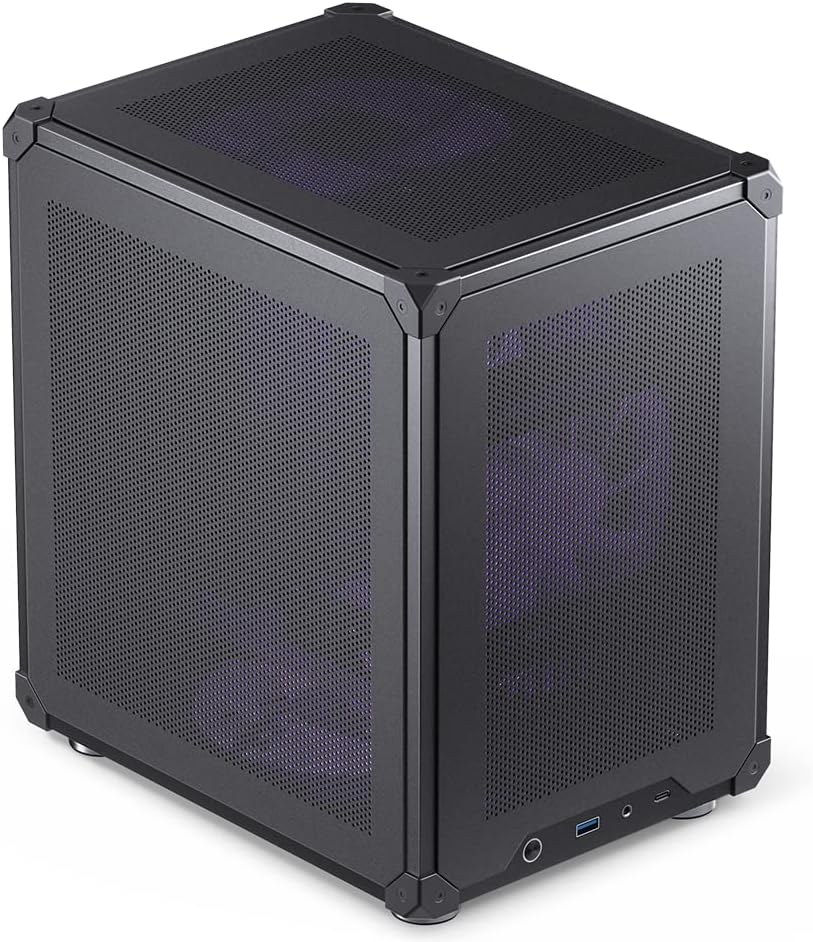
The Q300L V1 is a standout for budget-conscious builders needing decent airflow and visibility. It scores high on usability with a modular I/O panel that can move front top or bottom.
We may earn a commission when you buy through this link, at no additional cost to you.
Despite being Micro-ATX it fits GPUs up to 360mm and CPU coolers up to 159mm making it surprisingly capable for mid-range builds. The transparent panel lets you show off your components without expensive glass upgrades.
Thermal performance is strong thanks to the perforated design on all sides promoting heat dissipation. While materials are basic the design choices show thoughtfulness in usability and access.
This case is ideal for first-time builders or those on a strict budget. It offers a solid foundation for a quiet efficient system without breaking the bank.
Adjustable I/O placement allows you to route cables cleanly regardless of your desk layout or monitor setup.
Open thermal architecture supports up to five fans ensuring heat does not build up inside the chassis.
We may earn a commission when you buy through this link, at no additional cost to you.
This model targets professionals who need to transport high-performance machines regularly. It earns attention for combining portability with support for massive GPUs and liquid cooling radiators.
We may earn a commission when you buy through this link, at no additional cost to you.
The 2mm aluminum shell provides durability without excessive weight. Its dimensions allow fitting 420mm GPUs and 360mm radiators which is rare in compact cases.
Assembly is eased by cable management space and included accessories like a magnetic screwdriver kit. The handle design ensures safe movement even when the unit is fully powered.
For users needing a mobile workstation this case is unmatched in the current market. It merges build quality with practical design for on-the-go computing needs.
Integrated handles and compact dimensions make LAN moves and office relocations simple without risk to components.
Massive clearance for GPUs and radiators ensures even top tier systems fit without thermal compromise.
We may earn a commission when you buy through this link, at no additional cost to you.
The C34 brings standard ATX compatibility into a truly portable form. It scores well for those needing a compact rig that still accepts regular components.
We may earn a commission when you buy through this link, at no additional cost to you.
Its handle makes it easy to move between desks or events. Cooling support includes 240mm liquid radiators which adds to its versatility for performance builds.
Internal space is optimized to simplify installation though using an SFX power supply is recommended for cleaner cable management. The metal I/O panel adds a premium feel.
This unit is perfect for users wanting mobility without downsizing their motherboard choice. It balances form and function effectively for daily use.
Built-in handles transform a standard tower into a portable device for flexible workspace arrangements.
Metal front panels and Type-C ports ensure a modern high quality look and connectivity experience.
We may earn a commission when you buy through this link, at no additional cost to you.
Lian Li continues to lead with this sleek mid-tower designed for aesthetics and airflow. It rates highly for its innovative slanted bottom that directs cool air directly to the GPU.
We may earn a commission when you buy through this link, at no additional cost to you.
The pillar-less glass provides an unobstructed view of your build enhancing its visual appeal. Anti-sag brackets protect your motherboard from heavy graphics cards reducing long term strain.
While it does not come with fans the design supports high-end liquid cooling setups well. Its focus on cable management helps achieve a clean professional look.
If you prioritize visuals and cooling efficiency this case is a fantastic choice. It is tailored for users who want style without sacrificing thermal stability.
The slanted bottom design significantly improves GPU cooling by channeling cold air to the intake zone.
Special brackets for cables and anti-sag supports ensure internal components remain organized and secure.
We may earn a commission when you buy through this link, at no additional cost to you.
The H5 Flow delivers excellent out-of-the-box performance with pre-installed fans. It is known for its balanced airflow design that supports large radiators easily.
We may earn a commission when you buy through this link, at no additional cost to you.
Ultra-fine mesh covers multiple sides to maximize ventilation while filtering dust. This helps maintain clean internals and stable temperatures for critical components.
Cable management is simplified with wide channels and hooks that route wires neatly. The perforated PSU shroud allows air intake from multiple directions for better cooling.
This case is ideal for users seeking a reliable efficient build without extra customization. It offers a solid foundation for a quiet gaming or productivity PC.
Perforated shrouds and mesh panels allow air to flow freely from multiple directions to keep temps low.
Wide channels and hooks help conceal wires easily creating a tidy professional look inside the chassis.
We may earn a commission when you buy through this link, at no additional cost to you.
ASUS delivers a compact solution with exceptional airflow via over 57000 precision holes. This design maximizes cooling efficiency while keeping the unit relatively small.
We may earn a commission when you buy through this link, at no additional cost to you.
It supports large radiators and long GPUs despite its size. Tool-free panels make maintenance easy without needing screws. The extended tray offers ample space for clean cable routing.
Thermal performance is top tier thanks to support for up to six fans. The spatial efficiency ensures you can fit robust components in a limited space.
This is a great pick for users prioritizing cooling and ease of use. It proves small cases can handle big heat loads effectively.
Over 57000 machined holes create a high density airflow path that reduces heat retention.
Tool-free clip mechanisms let you remove panels quickly for easy cleaning or upgrades.
We may earn a commission when you buy through this link, at no additional cost to you.
The Q300L V3 combines high airflow with a premium glass side panel. It scores well for its builder-friendly design and robust hardware support.
We may earn a commission when you buy through this link, at no additional cost to you.
Support for GPUs up to 366mm is impressive for a Micro ATX case. The movable I/O panel allows flexible cable routing to match your workspace needs.
Magnetic dust filters keep the interior clean and look stylish. While glass adds weight the visibility it offers is a major selling point for enthusiasts.
This model works well for users wanting a sleek compact system. It delivers performance and style in a balanced package.
Tempered glass panels showcase your internal components clearly while protecting them from external dust.
The movable I/O panel lets you adjust port positions for easier access during use.
We may earn a commission when you buy through this link, at no additional cost to you.
The C6 offers a simple compact solution with mesh on all sides. It focuses on easy assembly and basic functionality without unnecessary features.
We may earn a commission when you buy through this link, at no additional cost to you.
Tool-free panels allow quick access for maintenance. It supports standard ATX power supplies up to 185mm ensuring compatibility with common models.
The mesh design ensures good airflow despite the small size. It includes modern ports like Type-C for convenience in daily use.
Ideal for minimalists needing a functional desktop PC. This case prioritizes simplicity and practicality over flashy aesthetics.
Tool-free side panels and covers make maintenance fast without needing tools or screws.
All mesh construction ensures airflow reaches all components even in this small footprint.
We may earn a commission when you buy through this link, at no additional cost to you.
This case is designed for small spaces where size matters most. It features a compact 17.1L volume with a sturdy steel build for protection.
We may earn a commission when you buy through this link, at no additional cost to you.
Support for standard ATX power supplies adds utility despite the small footprint. The pre-installed fan ensures basic airflow without extra purchase.
Its simple design is easy to understand and use for basic builds. Connectivity includes USB 3.0 for standard peripheral access.
Perfect for office or compact home setups needing reliability. It proves small cases can still support standard hardware components.
A small footprint allows this unit to fit easily on desks or shelves without taking much room.
Sturdy steel panels provide protection for internal components in a lightweight portable format.
We may earn a commission when you buy through this link, at no additional cost to you.
Selecting the right case requires balancing size and performance to suit your hardware needs.
Ensure the case supports your board size whether ATX or E-ATX. Some cases allow larger boards but may limit other components.
Always verify the maximum width supported before purchasing to avoid fit issues.
Check the maximum GPU length to ensure your graphics card fits without blocking airflow or ports.
Allow extra space for cables or radiators that might extend past the card end.
Look for mesh panels or pre-installed fans to maintain low temperatures inside the case.
Support for radiators adds flexibility for high performance builds needing liquid cooling.
Spacious cable management helps keep wires hidden and airflow unobstructed for better cooling.
Check for cutouts or hooks that simplify routing cables behind the motherboard tray.
Metal or aluminum construction provides durability and better heat dissipation than thin steel.
Assess the thickness of the material to ensure it withstands daily handling.
Carry handles or compact designs make it easier to move the system between locations.
If you plan to transport your PC often prioritize models with robust handles.
Modern ports like USB Type-C offer faster data transfer and charging for peripherals.
Verify the number and placement of front panel ports to match your device needs.
Choose between tempered glass or mesh sides based on whether you prefer visibility or airflow.
Color and style should match your desk setup for a cohesive look.
Place your PC in a well ventilated area to allow air to flow freely through the mesh panels.
Regularly clean dust filters using compressed air to prevent heat buildup inside the chassis.
Check cable ties periodically to ensure wires stay organized and do not block cooling paths.
Some compact cases support E-ATX boards but often with width limits. Verify the max dimensions before buying to ensure a proper fit.
Use mesh front panels and add more fans if possible. Ensure intake fans push air in and exhaust fans pull it out efficiently.
Yes space is tighter so plan cable routing early. Use compact PSUs to free up room for easier component installation.
Only if the case supports the new card length. Check clearance specs before purchasing upgrades to avoid compatibility issues.
Color does not impact cooling but light colors may show dust more. Focus on material and mesh design for thermal performance.
SFX or SFX-L power supplies are often recommended for smaller cases. They save space allowing more room for cables and cooling.
Tempered glass offers better visibility but adds weight. Steel is lighter and more durable for transport but shows less inside.
Clean filters every three months or more often in dusty areas. Regular maintenance keeps fans running smoothly and temperatures low.
We reviewed ten excellent options ranging from ultra compact to highly portable. The QUBE 540 stands out for flexibility while the Q300L offers budget value.
Prioritize cooling and compatibility to ensure your system performs well. Choose features that match your needs like portability or premium glass panels.
Remember to check current availability and verify specs before buying. Your right case will enhance both the look and function of your desktop.