
NZXT H5 Flow – Compact ATX Mid-Tower PC Case
4.6Editor score
Exceptional GPU Cooling
Ultra-fine Mesh Panels
Pre-installed Quiet Fans
Compare the best cooling computer case options for 2026. This guide reviews top mid-tower and full-tower cases optimized for airflow and thermal performance.
Choosing the right cooling computer case is essential for maintaining system stability and longevity. High airflow designs prevent overheating during intense gaming or rendering sessions, ensuring your hardware performs at its peak without throttling.
We evaluated ten top-rated models based on fan placement, ventilation design, and build quality. Each entry offers unique features like modular panels, integrated RGB, or specialized airflow chambers to meet different enthusiast needs.
Our selections highlight the best budget, premium, and overall performers available today. Prices fluctuate often, so verify current offers before purchasing to secure the best deal on your next PC build.
4.6Editor score

4.7Editor score

4.7Editor score
This side-by-side comparison highlights the key specifications and unique advantages of each selected model. Use this table to quickly identify which case aligns with your specific cooling and aesthetic requirements.


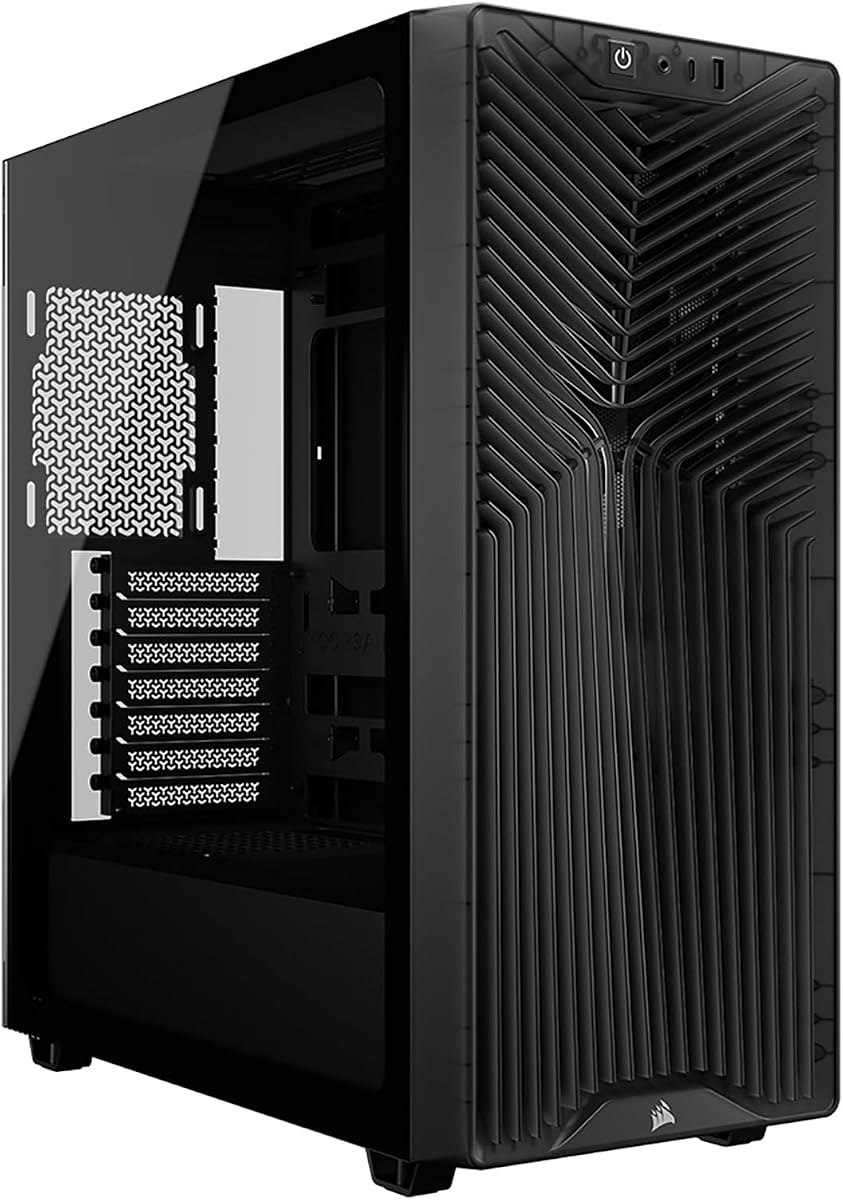


The CORSAIR 4000D RS ARGB stands out as a top contender for high-performance builds. With a 4.7 rating, it offers exceptional thermal management through its Y-pattern airflow panel and pre-installed RS fans.
We may earn a commission when you buy through this link, at no additional cost to you.
Its modular FRAME system allows users to swap out components like the motherboard tray or I/O panel to suit evolving needs. The InfiniRail mounting system ensures fans can be positioned exactly where airflow is most critical.
While it comes at a higher price point, the flexibility and cooling performance justify the investment. The clean cable management options keep internal aesthetics tidy without sacrificing thermal efficiency.
This case is ideal for enthusiasts who value airflow and future-proofing. It balances build quality with practical features that make assembly and upgrades straightforward for users of any skill level.
The 3D Y-pattern front panel ensures cool air reaches components with minimal restriction.
Upgrade parts like the motherboard tray to match your specific build requirements easily.
We may earn a commission when you buy through this link, at no additional cost to you.
The NZXT H5 Flow delivers excellent cooling performance at a budget-friendly price point. Its perforated PSU shroud and ultra-fine mesh panels create exceptional airflow specifically for GPUs and system components.
We may earn a commission when you buy through this link, at no additional cost to you.
It comes equipped with two Quiet Airflow fans that provide solid out-of-the-box performance without needing immediate upgrades. The compact design fits well in smaller spaces while maintaining high thermal efficiency.
Though it lacks some advanced features found in pricier models, it covers all essential needs for a reliable build. Cable management is seamless with wide channels and hooks for tidy routing.
Perfect for gamers looking to build a clean, efficient system without overspending. This case offers a straightforward entry into high-airflow designs with proven performance results.
Perforated sides on the PSU shroud allow direct air intake to the graphics card.
Pre-installed fans operate quietly while maintaining excellent thermal exchange rates.
We may earn a commission when you buy through this link, at no additional cost to you.
The CORSAIR AIR 5400 LX RGB redefines cooling efficiency with its unique triple-chamber design. By isolating the CPU, GPU, and PSU into separate zones, it prevents heat recirculation across critical components.
We may earn a commission when you buy through this link, at no additional cost to you.
Airflow ducts accelerate air velocity without increasing noise, providing silent yet powerful thermal management. The panoramic glass offers a stunning view of your hardware, making this a top choice for aesthetics.
Despite its larger size, the case supports high-end builds up to massive GPUs and top-mounted radiators. Cable management is simplified through dedicated pathways that hide clutter from view entirely.
For users seeking the ultimate in cooling performance and visual impact, this case is unmatched. It represents the pinnacle of modern mid-tower design for serious enthusiasts and content creators.
Separate chambers ensure CPU heat does not affect GPU or PSU components.
Innovative ducts force air through narrow channels to boost cooling power silently.
We may earn a commission when you buy through this link, at no additional cost to you.
The Antec Flux Pro is engineered for maximum cooling potential with support for up to 12 fans simultaneously. Its full-tower design accommodates E-ATX boards and large radiators effortlessly.
We may earn a commission when you buy through this link, at no additional cost to you.
A standout feature is the dual temperature display, allowing real-time monitoring of CPU and GPU heat levels. The case also features a unique iShift PSU mount and removable cooling brackets for flexibility.
The combination of wood, metal, and glass creates a sophisticated look that complements high-end setups. Six pre-installed fans ensure excellent thermal performance right out of the box.
Ideal for professionals or hardcore gamers needing immense space and cooling capacity. This case prioritizes thermal performance above all else while maintaining a stylish, premium exterior.
Integrated displays show CPU and GPU heat in real time for instant feedback.
Supports up to 12 fans for customizable airflow configurations.
We may earn a commission when you buy through this link, at no additional cost to you.
The Lian Li V100-ATX combines excellent value with modern RGB aesthetics. It includes four pre-installed ARGB PWM fans and a full LED strip, offering vibrant lighting without extra cost.
We may earn a commission when you buy through this link, at no additional cost to you.
Tool-less side panels make hardware access incredibly fast and convenient. The case supports back-connect motherboards and various form factors, making it versatile for different system configurations.
Despite its mid-tower size, it fits high-end hardware up to 420mm GPUs. Noise levels remain low thanks to hydraulic bearings that balance airflow with quiet operation.
Perfect for builders who want a complete package with built-in lighting and easy access. It delivers a premium look and feel at an accessible price point for most users.
Pre-installed fans and strip provide full RGB control via motherboard software.
Tool-less mechanisms allow quick removal of panels for upgrades or cleaning.
We may earn a commission when you buy through this link, at no additional cost to you.
The Cooler Master HAF II 500 is built for enthusiasts who demand extreme cooling performance. It features massive 220mm front intake fans and an 180mm rear exhaust to maximize airflow.
We may earn a commission when you buy through this link, at no additional cost to you.
Split-level cable management optimizes routing space and prevents airflow obstruction. The MasterRail system supports diverse fan sizes for flexible cooling configurations on the front and top.
A dual-mode GPU holder adds stability for heavy cards or supports dual GPUs. This design minimizes turbulence while maximizing heat removal efficiency across the entire chassis.
Best suited for power users running high-thermal workloads like 3D rendering. It offers robust construction and superior airflow to keep even the most demanding systems cool.
Massive fans and low resistance design drive exceptional airflow throughput.
Holder stabilizes single cards or supports two GPUs up to 72mm thick.
We may earn a commission when you buy through this link, at no additional cost to you.
The MSI MAG Forge 321R focuses heavily on RGB customization with an included LED control board and Mystic Light Sync. It offers striking lighting effects that transform your gaming rig visually.
We may earn a commission when you buy through this link, at no additional cost to you.
With support for up to 11 fans, it ensures exceptional ventilation for all system components. The magnetic dust filter on top is easily removable for quick cleaning and maintenance.
The case provides a balanced mix of thermal performance and visual appeal. Its vented front panel and tempered glass side allow both airflow and display of internal hardware.
Ideal for gamers who want total control over lighting aesthetics. It delivers strong airflow while integrating seamlessly with MSI software for unified system management.
Dedicated control board allows extensive customization of lighting zones.
Magnetic dust filters make cleaning quick and hassle-free.
We may earn a commission when you buy through this link, at no additional cost to you.
The CORSAIR 3200D RS simplifies PC assembly with thoughtful DIY features. A built-in GPU anti-sag stabilizer supports heavy graphics cards effectively. the I/O panel includes USB Type-C for modern connectivity.
We may earn a commission when you buy through this link, at no additional cost to you.
Cable management is effortless thanks to tie-down locations and a single front connector that reduces clutter. It supports reverse-connector motherboards for cleaner routing behind the tray.
With room for nine 120mm fans and top-mounted radiators, cooling options are flexible. The included RS ARGB fans enhance lighting and airflow performance out of the box.
This case is perfect for first-time builders seeking an organized build process. Its focus on usability and support for the latest hardware makes it a practical choice for modern systems.
Built-in shrouds and tie-down locations hide cables instantly for a clean look.
Supports reverse-connector boards and includes USB Type-C on the front panel.
We may earn a commission when you buy through this link, at no additional cost to you.
The CORSAIR AIR 5400 RS features an immersive panoramic view with a triple-chamber layout. This design isolates the CPU, GPU, and PSU to prevent heat crossover and optimize airflow paths.
We may earn a commission when you buy through this link, at no additional cost to you.
Independent intake and exhaust locations for the PSU ensure efficient cooling without heating other components. Airflow ducts boost velocity silently, maintaining a quiet environment while delivering powerful thermal performance.
Its build quality and layout make it a standout for high-end system visibility. The case ensures every component gets the airflow it needs to stay cool under load.
Great for enthusiasts who want both superior cooling and a stunning showcase. This model delivers on both aesthetics and functionality with an innovative internal structure.
Dedicated intake and exhaust paths for each chamber improve efficiency.
Full glass panels offer uninterrupted visibility of your custom build.
We may earn a commission when you buy through this link, at no additional cost to you.
The MONTECH XR Panoramic offers a unique aesthetic with wood-grain I/O and reverse-blade fans. These fans present their illuminated faces inward for a cleaner visual experience without frame obstruction.
We may earn a commission when you buy through this link, at no additional cost to you.
Magnetic filters at the top, side, and bottom simplify daily maintenance and cleaning. The case supports high-end GPUs up to 420mm and includes three pre-installed PWM fans for immediate cooling.
Front and side glass panels showcase your components beautifully while maintaining airflow. The design balances modern looks with functional features like USB-C connectivity and spacious storage.
Best for users who value distinctive design and ease of maintenance. This case provides a stylish, practical option for gaming setups that prioritize visual appeal.
Side-mounted fans face inward for a cleaner, more seamless RGB appearance.
Magnetic filters make removing dust quick and easy at multiple points.
We may earn a commission when you buy through this link, at no additional cost to you.
Selecting a cooling computer case involves balancing airflow, build quality, and your specific hardware needs. Consider these factors to ensure your system stays cool and performs reliably.
High airflow cases feature mesh panels and perforated designs that allow air to move freely. Look for cases with multiple mounting points for intake and exhaust fans to maintain positive air pressure and prevent dust buildup.
Prioritize cases with large open vents and minimal obstruction for smooth thermal exchange.
The number and size of fans you can install directly impact cooling performance. Ensure the case supports the fan sizes you prefer, such as 120mm, 140mm, or even 220mm for large setups.
Check the maximum fan count supported to ensure you can add enough cooling capacity for your components.
For liquid cooling enthusiasts, verify that the case can accommodate your intended radiator size. Most modern cases support 240mm to 360mm radiators on the top or front panel for AIO coolers.
Confirm the maximum radiator depth and thickness to avoid fitting issues with your hardware.
Large graphics cards and CPU coolers require sufficient physical space. Check the case specifications for maximum GPU length and CPU cooler height to ensure your parts fit inside the chassis.
Look for cases with GPU sag supports to prevent heavy cards from bending over time.
Effective cable management keeps airflow unobstructed and improves aesthetics. Choose cases with tie-down points, routing holes, and hidden compartments to organize power and data cables neatly.
Good cable routing channels help maintain consistent airflow throughout the interior.
Materials like steel, aluminum, and tempered glass affect durability and acoustic performance. Higher quality materials often reduce vibration noise while protecting your hardware from physical damage.
Select cases with sturdy panels and secure mounting mechanisms for long-term use.
Modular cases allow you to swap components like trays or panels to suit future hardware changes. This flexibility extends the case lifespan and accommodates evolving cooling or aesthetic preferences.
Look for features like tool-less access for easier maintenance and component upgrades.
Noise reduction features like rubber grommets and sound-dampening panels help keep your system quiet. However, prioritize airflow first to ensure adequate cooling for high-performance components.
Balance acoustic features with airflow needs to avoid overheating in noisy builds.
Regularly clean dust filters and fans using compressed air to maintain optimal airflow. Dust buildup restricts ventilation and increases internal temperatures, reducing cooling efficiency over time.
Ensure all fans are connected to the motherboard headers and spinning freely. Check cable routing periodically to confirm that no wires obstruct airflow paths or touch moving fan blades.
Monitor system temperatures to adjust fan curves if needed. Proper configuration of fan speeds can balance noise levels with cooling performance for your specific workload.
The best cases for high-end GPUs feature wide GPU clearance and robust airflow designs. Models like the CORSAIR 5400 LX or Cooler Master HAF II offer ample space and specialized fan support to cool large graphics cards effectively.
Pre-installed fans provide immediate out-of-the-box cooling without extra cost. However, you may want to upgrade them later based on your specific performance needs and noise preferences.
You can improve airflow by adding more intake and exhaust fans. Ensuring cables are routed neatly and dust filters are clean also helps reduce restriction inside the chassis.
Most mid-tower cases support ATX motherboards. Check the specifications to confirm compatibility with ATX and larger form factors like E-ATX if you plan on expanding your system later.
Liquid cooling provides superior thermal efficiency for high-performance CPUs. Look for cases with top or front radiator mounts to accommodate AIO coolers while maintaining excellent airflow.
Clean your filters every one to three months depending on your environment. Frequent cleaning prevents dust buildup that can choke airflow and raise system temperatures significantly.
Reverse-blade fans have blades angled to spin inward while showing the backside of the blades. This design improves aesthetics by hiding fan frames when viewed from the side.
Most cases support standard motherboard sizes like ATX and Micro-ATX for easy upgrades. Ensure your case has sufficient clearance for larger coolers if you plan on switching components.
Selecting the right cooling computer case is vital for system stability and performance. Our top picks like the CORSAIR 4000D RS and NZXT H5 Flow offer excellent airflow across various price points and design preferences.
Prioritize cases with high fan support, flexible cable management, and spacious component clearance. These features ensure your hardware stays cool even during demanding tasks like gaming or video editing.
Always check current prices and availability before purchasing to secure the best deal. Building a custom PC is an investment, and the right case ensures longevity and optimal operation.