
PS5/Slim/Pro Horizontal Stand with Cooling Fan & Charger
4.3Editor score
Scalable design for all models
Dual controller charging dock
Three-speed adjustable fans
This guide compares the top 10 Cooling Stand for PS5 Console options to help you find the best cooling and charging solution for your setup.
Keeping your console cool is essential for long gaming sessions. A quality stand prevents overheating while organizing controllers and accessories neatly on your desk.
We compared ten top-rated models based on cooling performance, charging speed, build quality, and compatibility. Our analysis covers vertical and horizontal designs with smart fan controls.
Each pick highlights key features and real-world use cases. Prices fluctuate frequently, so check the current listings before buying to ensure you get the best value available.
4.3Editor score
4.4Editor score

4.4Editor score
The following table provides a side-by-side comparison of all ten cooling stands. Review the key specifications to find the model that matches your specific console version and accessory needs.


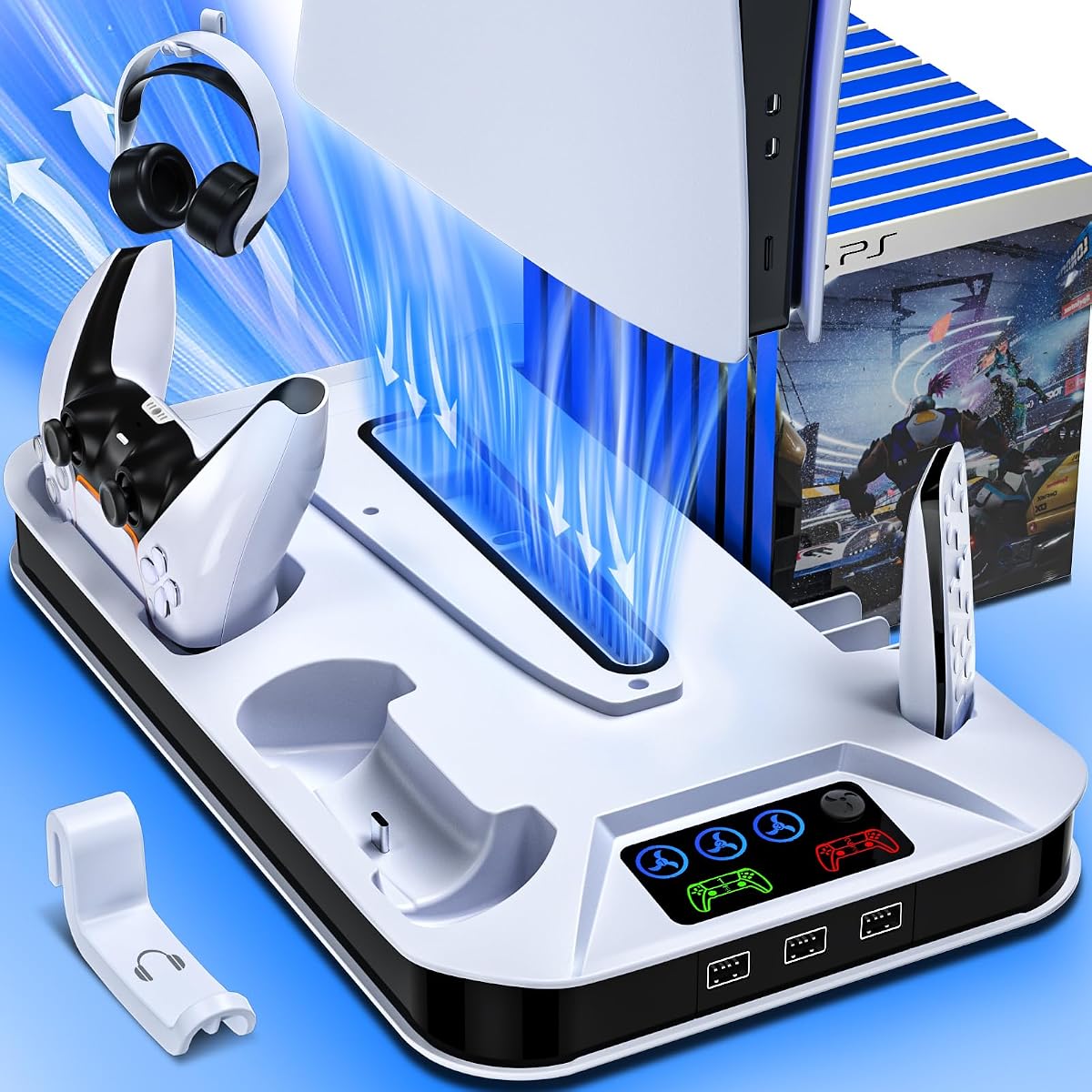
This model ranks first for its balanced performance and comprehensive features. It delivers strong cooling while managing accessories efficiently in one compact vertical unit.
We may earn a commission when you buy through this link, at no additional cost to you.
The turbo fan effectively dissipates heat with three adjustable speeds. The dual controller charger and three USB hubs keep all peripherals powered without clutter.
Users may find the panel removal needed for Slim versions slightly inconvenient. However, the secure screw lock ensures stability during active use.
This stand is ideal for gamers wanting a full setup solution. It keeps the console cool and accessories organized in a stylish vertical profile.
The high-efficiency turbo fan pulls heat away from the bottom of the console. This maintains safe operating temperatures during extended gaming sessions.
The base includes slots for headsets and remotes plus three USB ports. This centralizes power for controllers and other devices near your console.
We may earn a commission when you buy through this link, at no additional cost to you.
This horizontal stand offers excellent value with versatile compatibility. Its scalable design ensures a perfect fit for Standard Slim and Pro models alike.
We may earn a commission when you buy through this link, at no additional cost to you.
It includes a dual-controller dock that charges both units efficiently. The three-speed turbo fan helps maintain airflow without requiring manual adjustments constantly.
Installation requires no tools and uses EVA foam for stability. The footprint is wider than vertical stands so plan your desk space accordingly.
Budget-conscious buyers will appreciate its feature set. It provides reliable cooling and charging while supporting both Original and Edge controllers seamlessly.
The scalable design adapts to all PS5 generations. It fits 2020 2023 and 2024 versions with adjustable components for perfect alignment.
Users can assemble this stand in minutes without tools. Simply place the foam fix screws and connect power for immediate use.
We may earn a commission when you buy through this link, at no additional cost to you.
This model stands out with automatic temperature-based fan control. It adjusts cooling power based on real-time console heat for maximum efficiency.
We may earn a commission when you buy through this link, at no additional cost to you.
The RGB lighting adds a customizable aesthetic to your setup. Fans can toggle brightness and modes to match personal style preferences easily.
Charging completes in 2.5 hours with LED indicators. However some users may prefer to disable the lights for a simpler look.
Tech enthusiasts will love the smart features here. The automatic fan control ensures optimal performance without constant manual input.
A built-in temperature probe adjusts fan speed automatically. This maintains ideal thermal conditions without needing user intervention.
Nine RGB lighting modes create a dynamic gaming atmosphere. You can adjust modes and brightness to suit your room lighting.
We may earn a commission when you buy through this link, at no additional cost to you.
This vertical station prioritizes safety and organization with smart charging. It protects controllers from overcharging and maintains a tidy gaming area effectively.
We may earn a commission when you buy through this link, at no additional cost to you.
The turbo fan runs quietly while dissipating heat efficiently. Users can adjust speed levels manually to match their cooling preferences.
Setup requires removing panels for Slim versions which takes time. However the screw lock ensures the console stays stable during use.
Buyers valuing safety and neatness will find this ideal. It combines reliable cooling with smart protection for valuable accessories.
Intelligent circuit chips stop charging at 80 percent. This prevents overcharging and extends the overall lifespan of controller batteries.
Low-noise turbo fans circulate air without disrupting audio. This ensures effective cooling even during intense game sessions.
We may earn a commission when you buy through this link, at no additional cost to you.
The Rysker stand offers reliable vertical support with charging. Its built-in cable simplifies power connections without needing extra adapters.
We may earn a commission when you buy through this link, at no additional cost to you.
Fans can choose between console or external power sources for flexibility. The fan remembers the last speed used for consistent performance.
It lacks extra USB hub ports compared to other models. The headset slot helps however keeps one audio accessory neatly organized.
Gamers wanting straightforward charging support will like this. It delivers core cooling and charging functions without unnecessary complexity.
The base powers from the console USB hub or wall outlet. This versatility allows flexible placement options around your entertainment center.
A memory function saves your preferred fan speed setting. This reduces the need to reset speeds after every power cycle.
We may earn a commission when you buy through this link, at no additional cost to you.
This model emphasizes visual appeal with bright honeycomb RGB lights. It keeps fans cool automatically through temperature-based speed adjustments.
We may earn a commission when you buy through this link, at no additional cost to you.
The charging system handles two controllers in just 2.5 hours. LED indicators show status clearly without needing to guess.
Lighting modes are fixed and cannot be dimmed fully. Some users might find the glow distracting during focused gameplay.
If aesthetics matter most to your setup this unit excels. It delivers solid cooling plus vibrant lighting for immersive sessions.
Nine lighting modes offer varied colors and breathing patterns. This adds a modern look to your gaming desk easily.
An automatic temperature probe controls fan speed precisely. You do not need to adjust settings manually as heat rises.
We may earn a commission when you buy through this link, at no additional cost to you.
This horizontal model adapts to all PS5 generations easily. Its scalable structure ensures stability regardless of console version or weight.
We may earn a commission when you buy through this link, at no additional cost to you.
It charges Edge controllers which many others exclude. The dual dock keeps two units ready for multiplayer sessions without interruption.
Installation takes only minutes without tools or glue. But you need a wider surface to place the console sideways.
Gamers needing Edge support will find this useful. It offers practical cooling plus essential charging in a clean horizontal form.
The stand scales to fit all PS5 models. It adjusts components to match dimensions of older or newer units.
Dual docks power both original and Edge controllers simultaneously. LED indicators show real-time charging status clearly at a glance.
We may earn a commission when you buy through this link, at no additional cost to you.
This station focuses on storage and thermal safety. It holds up to 14 game discs plus media accessories neatly.
We may earn a commission when you buy through this link, at no additional cost to you.
Automatic fan control ensures the console stays cool efficiently. The smart chip stops charging at 70 percent to protect battery health.
A Type-C cable simplifies power connections for users. However you must remove panels to fit Slim versions correctly.
Disc collectors will appreciate the storage space provided. It balances cooling performance with generous physical storage for games.
The stand holds 14 game cards and media remotes. This keeps your collection tidy and accessible near the console.
Smart chips stop charging at 70 percent automatically. This practice helps extend the overall lifespan of your controllers.
We may earn a commission when you buy through this link, at no additional cost to you.
This vertical unit offers clean design with RGB accents. It delivers core cooling and charging functions in a compact vertical frame.
We may earn a commission when you buy through this link, at no additional cost to you.
The ring lighting adds color without overwhelming the space. A simple double-click interface changes speeds and modes easily.
Support includes Edge controllers which increases its appeal. The setup includes panels for both Disc and Digital versions.
Users wanting light RGB customization will find this great. It balances performance with visual flair for a modern setup.
An eight-color RGB ring enhances your gaming environment. Modes switch with a single button click to match themes.
USB ports power phones headphones or extra accessories easily. This helps reduce cable clutter on your desk.
We may earn a commission when you buy through this link, at no additional cost to you.
This model excels in connectivity with Type-C USB support. It handles multiple devices while keeping the console stable and cool.
We may earn a commission when you buy through this link, at no additional cost to you.
The built-in cables hide wiring for a neat appearance. It supports both Original and Pro models with secure screw locking.
Users might miss automatic fan control on this unit. But the three manual speeds offer enough flexibility for most gamers.
It suits setups needing strong accessory connectivity. The Type-C hub ensures all devices power on efficiently.
The stand includes Type-C hubs for flexible power. You can charge phones tablets or laptops near the console.
Concealed cables ensure a tidy setup appearance. The sturdy build keeps your console stable without shaking.
We may earn a commission when you buy through this link, at no additional cost to you.
Selecting the right cooling stand depends on your console model and setup needs. Use these factors to find a match that fits your desk and usage habits.
Ensure the stand supports your specific PS5 version. Some stands require panel removal for Slim or Pro editions while others are universally scalable.
Check product details for compatibility with Disc Digital and Pro editions before buying.
Fans vary by speed control. Some use automatic temperature sensors while others offer manual speed toggles.
Auto fans maintain ideal thermal conditions without user input.
Check if the dock charges Original Edge or both controller types. Dual docks save time by charging two units simultaneously.
Confirm charger compatibility with your existing controller set.
Some stands draw power from console USB ports while others need a wall outlet. Built-in cables simplify setup for users with limited outlets.
Choose the power source that fits your cable management needs.
Higher storage units hold games headsets and remotes. If you prefer a tidy desk select models with built-in accessory slots.
More storage means fewer accessories scattered around your desk.
Vertical stands save desk space while horizontal ones require more width. Your desk size determines which layout works best.
Measure your available surface area before choosing vertical or horizontal.
Durable materials prevent wobbling or tipping during use. Look for safety screws and non-slip pads for secure console placement.
Stable stands protect your console from accidental bumps or falls.
Extra ports USB hubs RGB lighting or memory functions add convenience. Decide which features matter most to your personal setup.
Prioritize features that align with your daily usage habits.
Place the stand on a flat stable surface away from walls. This ensures proper airflow around the console and fan intake.
Install any required panels or screws according to the manual. Secure your console firmly to prevent accidental tipping.
Clean dust from the fan and vents regularly. Use compressed air to maintain cooling performance over time.
Most stands are designed for Standard Slim and Pro models. Some require removing the bottom panel for Slim or Pro versions. Always check compatibility before purchasing to ensure a proper fit.
Some stands support Edge controllers while others only work with standard ones. Verify the product details to confirm Edge compatibility before buying.
Most models fully charge two controllers in 2.5 to 3.5 hours. Charging speed may vary slightly depending on battery level and power source.
Using third-party stands typically does not void the console warranty. However ensure the stand is stable and does not block official vents to avoid issues.
Fans are designed to be low noise even at high speeds. Most users find the sound negligible compared to standard console cooling fans.
Yes most stands allow you to turn off the fan. This works well if you already have active room cooling or quiet operation is preferred.
We recommend the first model for its balanced cooling and accessory features. It provides reliable performance for most Standard Slim and Pro console users.
Prioritize compatibility and fan type when making your final choice. Ensure the stand supports your specific console version and controller types.
Verify current prices before purchase as they may vary by seller. Check product details for any updates or new model compatibility.