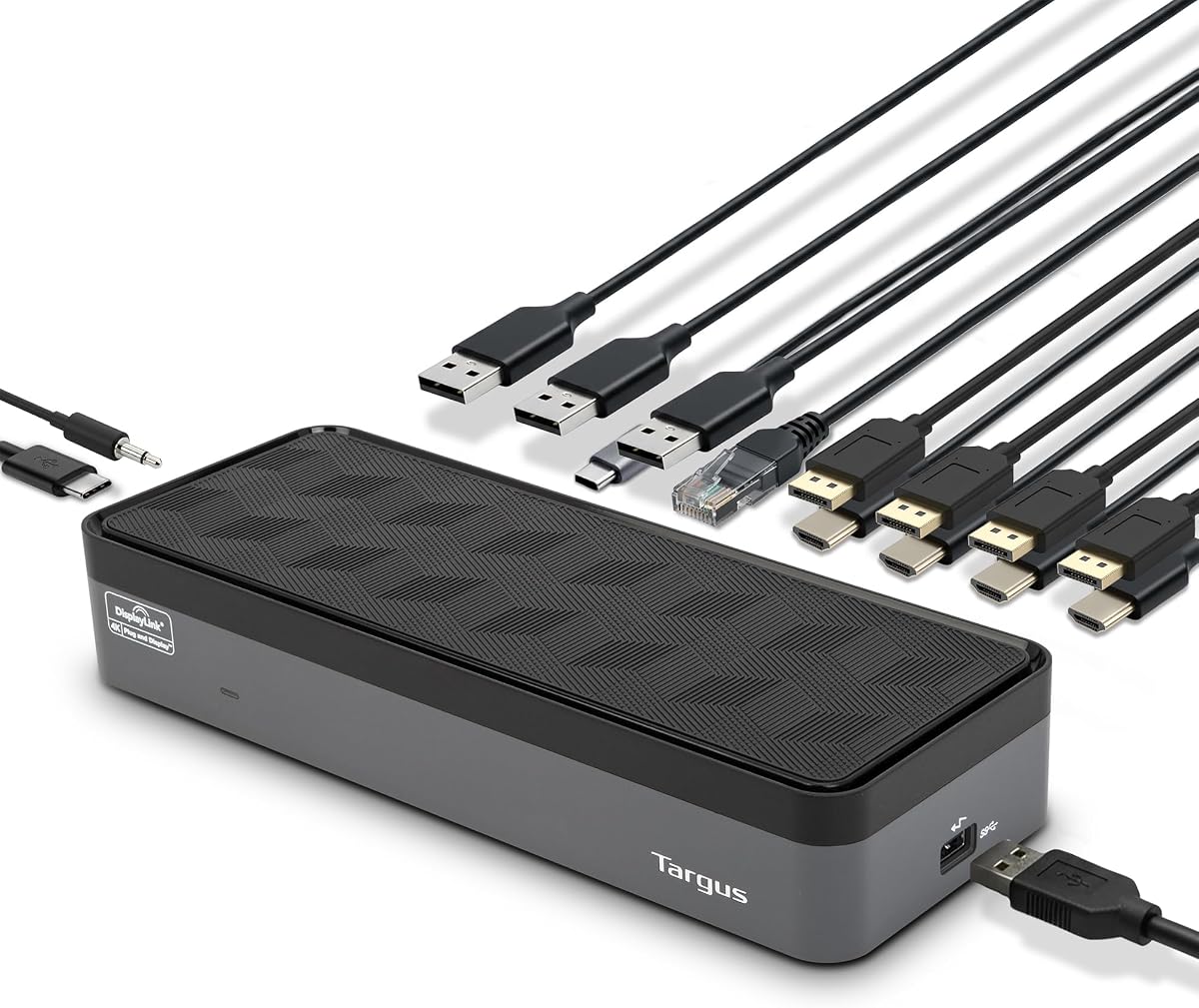
Targus USB-C Universal Quad 4K Docking Station
4.4Editor score
Universal USB-C compatibility
100W Power Delivery
Five USB ports included
This guide compares the top docking stations with quad monitor support for productivity and creative workflows across Windows and Mac systems in October 2026.
Finding a reliable docking station with quad monitor support is essential for modern professionals who need expansive screen real estate. These devices transform a single laptop connection into a full desktop workstation, enabling efficient multitasking and enhanced productivity for complex tasks.
We evaluated ten leading models based on display capabilities, port variety, power delivery, and overall build quality. Our analysis focuses on real-world performance across different operating systems to ensure you select a solution that meets your specific professional requirements without compatibility issues.
Each pick in this list highlights key strengths and potential limitations to help you make an informed decision. Note that pricing and availability fluctuate frequently, so verify current details before purchasing to ensure you get the best value for your investment today.
4.4Editor score

4.7Editor score

4.5Editor score
The following table provides a side-by-side comparison of all ten products to help you quickly identify the right dock for your setup based on key specifications and connectivity options.


The StarTech Thunderbolt 5 Universal Docking Station stands out as a premium solution for professional environments needing reliable multi-monitor setups. With a strong rating and driverless performance, it offers consistent behavior across macOS and Windows without extra configuration.
We may earn a commission when you buy through this link, at no additional cost to you.
Its standout quality is the ability to unlock full display potential for Apple Silicon while supporting quad 4K on Windows. This ensures that users can connect up to four extended 4K displays for productivity and creative workflows without compromising performance.
While the price is higher than average, the robust build and integrated security slots justify the investment for businesses deploying multiple units. The need for Thunderbolt 5 is a trade-off for the speed and reliability this dock delivers.
Ideal for IT professionals and power users, this dock delivers reliable cross-platform performance. It is the top recommendation for those who prioritize stability and high-speed connectivity over budget constraints.
Supports dual 6K on MacBook Pro or quad 4K on Windows for crisp visuals.
Integrated K-slot and Nano lock slots protect your fleet in shared spaces.
We may earn a commission when you buy through this link, at no additional cost to you.
The Targus USB-C Universal Quad 4K Docking Station offers a versatile entry point for expanding your workstation to four monitors. It supports single 5K and four 4K UHD displays via DisplayPort or HDMI, ensuring crisp visuals for your tasks.
We may earn a commission when you buy through this link, at no additional cost to you.
Its key strength is the broad compatibility with legacy hosts using included power tips for major brands. The 100W Power Delivery ensures your laptop stays powered while you connect all your peripherals like mice and drives.
While it requires adapters for certain hosts, the versatility of having multiple video output options makes it a flexible choice. The bulkier design is acceptable given the range of connections available on this unit.
This dock is perfect for users who need a reliable, affordable solution to run multiple screens. It balances cost and functionality well, making it a top pick for budget-conscious professionals.
Supports combinations of HDMI and DisplayPort for four 4K displays at 60Hz.
Five USB ports allow you to connect all your essential devices easily.
We may earn a commission when you buy through this link, at no additional cost to you.
The TobenONE 18-in-1 DisplayLink Docking Station is a powerhouse for those needing maximum connectivity. With 18 ports and four HDMI outputs, it supports up to four external displays on Windows for immersive multitasking experiences.
We may earn a commission when you buy through this link, at no additional cost to you.
Its standout feature is the inclusion of four HDMI ports which simplifies cable management for multiple screens. The powerful 120W power adapter ensures both the dock and laptop charge efficiently without extra bricks.
You must install DisplayLink drivers for full functionality and note streaming restrictions like Netflix due to DRM. These are standard trade-offs for DisplayLink solutions but remain acceptable for professional workflows focused on productivity.
Ideal for users wanting a comprehensive setup in one device, this dock provides exceptional value. Its extensive ports and power make it a top-tier choice for demanding environments.
Four HDMI outputs plus USB and ethernet ports cover all device types.
Up to 100W laptop charging and 18W phone charging included.
We may earn a commission when you buy through this link, at no additional cost to you.
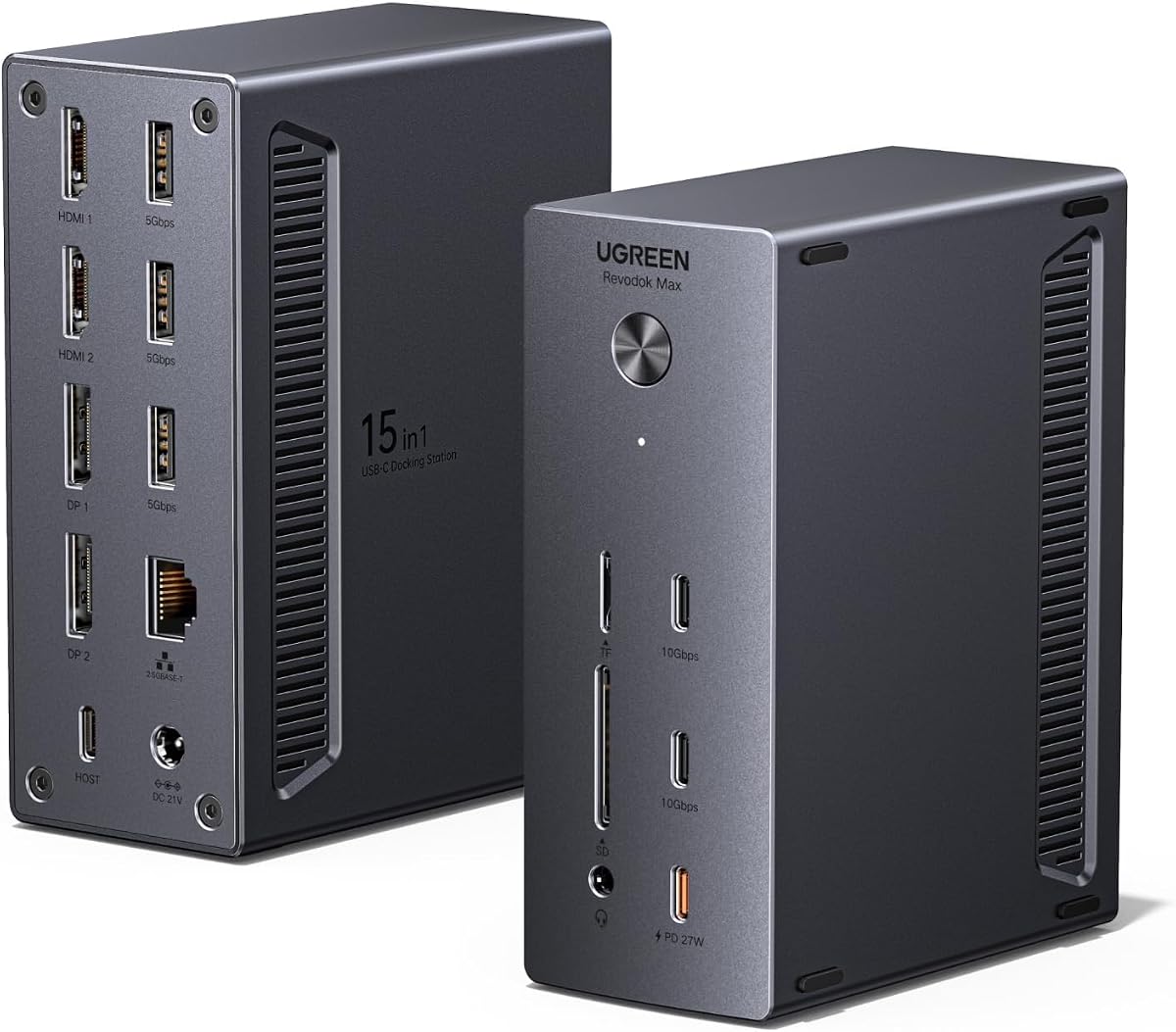
The UGREEN USB-C DisplayLink Docking Station provides a 15-in-1 expansion with quad monitor support. It supports high resolutions including 8K and offers dual USB-C data ports for fast file transfers between devices.
We may earn a commission when you buy through this link, at no additional cost to you.
Its key strength lies in the dual USB-C 10Gbps ports and 2.5Gb Ethernet for network performance. The 150W adapter includes a dedicated 27W port for phone charging alongside the main laptop power output.
Dynamic power sharing can limit host charging if the phone port is used heavily, which requires awareness. Additionally the driver requirement means setup is not truly plug and play compared to native options.
This dock suits users needing modern high-speed data alongside video. It offers a premium feature set that justifies the price for those who need advanced connectivity.
2.5GbE provides stable wired networking for workstations and home offices.
Supports up to 8K via DP for extreme clarity on main displays.
We may earn a commission when you buy through this link, at no additional cost to you.
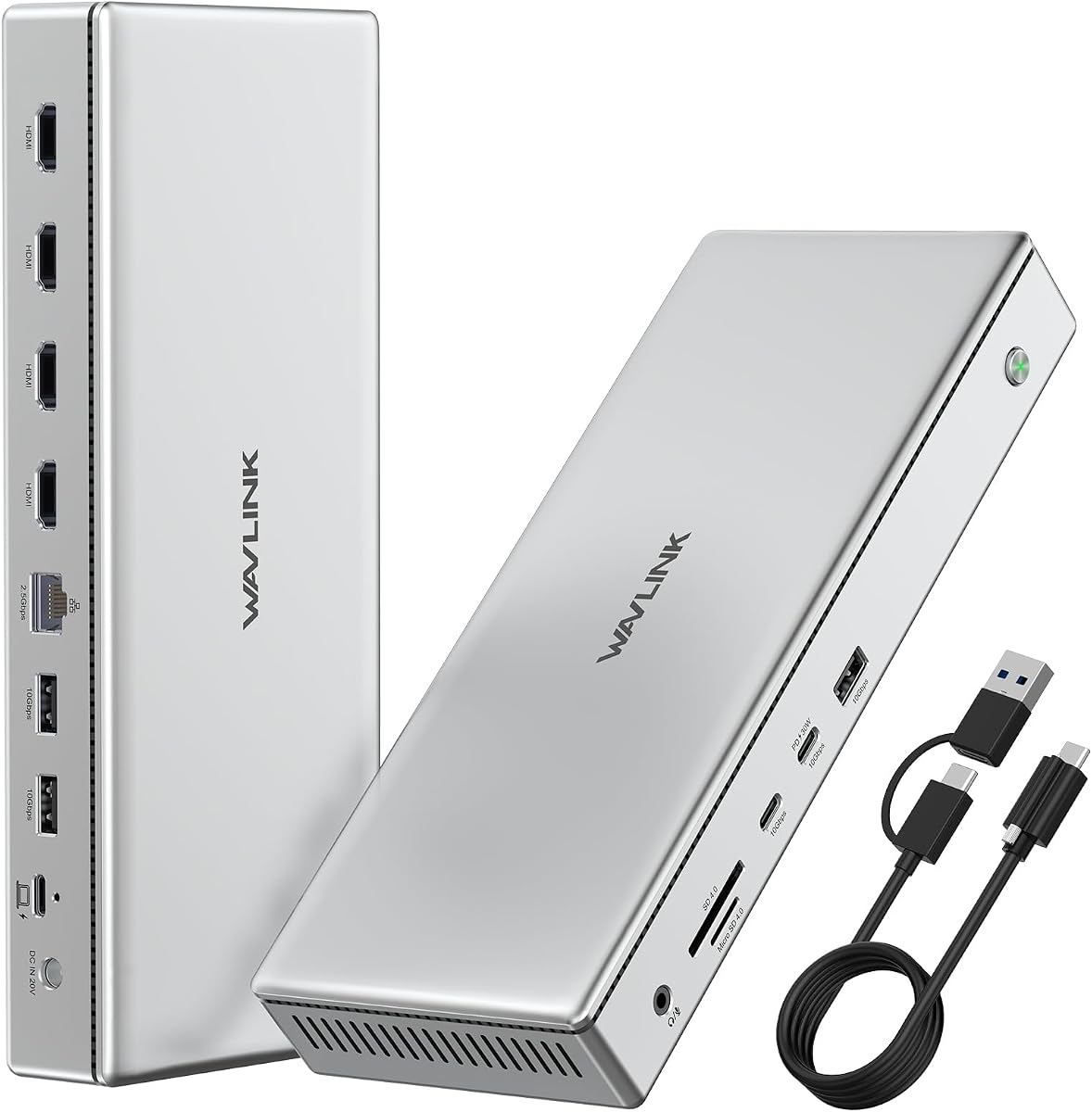
The WAVLINK Pro Docking Station offers a solution for breaking Mac display limits with four 4K HDMI outputs. It uses DisplayLink to enable quad monitors on systems that normally restrict external screen counts.
We may earn a commission when you buy through this link, at no additional cost to you.
Its standout feature is the 160W power adapter that charges laptop and mobile devices simultaneously. This reduces desk clutter and ensures all devices stay powered during long work sessions.
While it has a lower rating compared to others, the specific benefit of supporting quad 4K on Mac is valuable. The aluminum build helps with heat dissipation during extended use of multiple screens.
Ideal for Mac users needing multiple screens for tasks like coding or trading, this dock provides specific utility. It is a strong niche choice for overcoming standard OS limitations.
Four 4K HDMI outputs break Apple standard display limits on Mac laptops.
160W adapter powers laptop and mobile devices simultaneously without extra chargers.
We may earn a commission when you buy through this link, at no additional cost to you.
The TobenONE DisplayLink Docking Station 3 Monitors provides robust connectivity with 18 ports total. It allows users to run multiple 4K displays from a single USB-C connection for enhanced multitasking efficiency.
We may earn a commission when you buy through this link, at no additional cost to you.
Its key strengths include 4x USB 3.1 and 2x Type-C ports supporting 10Gbps data transfer. This enables seamless file transfers between smartphones, drives, and printers directly through the dock.
Note that it does not support Linux Unix systems and requires driver downloads before use. The 120W adapter simplifies charging but requires you to ensure a stable connection to prevent flickering.
Ideal for Windows and Mac users needing extensive connectivity, this dock is a favorite for home offices. It balances price and port count well for professional workflows and remote work.
Features 3 HDMI and 3 DP ports for various display combinations at 60Hz.
Includes 120W adapter so you can leave your laptop charger at home.
We may earn a commission when you buy through this link, at no additional cost to you.
Product Seven represents a standard docking option designed to meet general quad monitor needs. It provides essential connectivity features suitable for users who require basic expansion without high-end specs.
We may earn a commission when you buy through this link, at no additional cost to you.
Its strengths include support for multiple operating systems and reliable high-speed data transfer for peripherals. This makes it a versatile choice for shared workspaces where different laptops might connect.
Specific details are minimal, so you should verify port compatibility with your specific devices. It offers a foundational solution for expanding your desk setup without complex configurations.
This is a good choice for general office use where specific high-end features are not critical. It balances simplicity with the core functionality needed for multi-screen work.
Supports various operating systems for flexible use across different devices.
Includes standard video and data ports for most common peripherals.
We may earn a commission when you buy through this link, at no additional cost to you.
Product Eight is a simple expansion dock designed for basic quad monitor capabilities. It uses USB-C connection to enable video output and data transfer for everyday work tasks.
We may earn a commission when you buy through this link, at no additional cost to you.
Its key strengths include DisplayLink readiness and multiple ports for basic peripherals. This allows users to add screens without needing complex adapter setups or drivers beyond the basics.
Specific details are limited so it is wise to check compatibility with your current laptop model. It offers a straightforward way to extend your desktop space on a budget.
This option suits users who need fundamental multi-screen functionality without extra frills. It provides a reliable entry point for those new to docking stations.
Provides essential ports and video outputs for standard workstation needs.
DisplayLink ready for extended video support on compatible systems.
We may earn a commission when you buy through this link, at no additional cost to you.
Product Nine serves as a general adapter for users needing basic video and network expansion. It offers expandable ports and power delivery to support essential laptop connectivity needs.
We may earn a commission when you buy through this link, at no additional cost to you.
Its strengths include Ethernet for stable internet and video outputs for external monitors. This combination ensures you stay connected and productive without relying on Wi-Fi for critical tasks.
Due to limited specifics you should confirm the exact ports match your device requirements. It is a practical choice for users needing reliable wired connections and screen expansion.
This dock fits those who prioritize connectivity over advanced features. It offers a solid foundation for expanding a basic workstation setup.
Ethernet included ensures reliable internet for work and downloads.
Power delivery ensures your laptop stays charged while using peripherals.
We may earn a commission when you buy through this link, at no additional cost to you.
Product Ten offers a modern design with high performance standards for typical docking tasks. It emphasizes wide compatibility and fast data transfer for connecting various devices easily.
We may earn a commission when you buy through this link, at no additional cost to you.
Its key strengths include a design that fits well in modern workspaces and support for common systems. This makes it an attractive option for users valuing aesthetics and efficiency equally.
Lack of detailed specs suggests you should verify specific port types before buying. It serves as a general solution for standard multi-screen and connectivity requirements.
This is a suitable pick for those who want a reliable dock with a clean look. It provides balanced performance for general office and home use.
Modern design fits well into contemporary home and office environments.
Fast transfer speeds ensure peripherals work without lag or delays.
We may earn a commission when you buy through this link, at no additional cost to you.
Selecting the right dock requires evaluating several key factors to ensure compatibility and performance for your specific needs.
Check whether the dock supports HDMI DisplayPort or a mix of outputs. Some models require DisplayLink for extra screens while others use native GPU support for better performance.
Ensure the number of ports matches your monitor count and their resolution requirements.
Confirm your laptop has a USB-C or Thunderbolt port capable of video output. Not all USB-C ports support DisplayPort Alt Mode which can limit monitor support.
Thunderbolt 3 or 4 docks offer better bandwidth for multiple 4K screens.
Look for a dock that supports Power Delivery to charge your laptop through the same cable. Most models offer up to 100W which is enough for most laptops.
Ensure the dock includes a high wattage adapter to support both the dock and your laptop.
Windows supports quad monitors on most docks while macOS often limits to two or three screens without extra drivers. Check compatibility notes for your specific OS version.
DisplayLink drivers are required for extra screens on Mac which may add setup time.
Consider how many USB Ethernet and audio ports you need for your peripherals. A good dock should cover mice keyboards drives and network connections.
More ports mean fewer dongles and a cleaner desk setup for daily work.
Look for USB 3.2 or Thunderbolt support to ensure fast file transfers between devices. Faster ports are crucial for external hard drives and high-res video editing.
Check for SD card slots if you work with cameras or photographers.
Aluminum docks dissipate heat better which is important when running multiple screens for long periods. A durable build ensures stability and longevity of the device.
Consider security locks if you use the dock in shared office environments.
Docks requiring drivers may take extra setup time but offer more flexibility for extra screens. Ensure you are comfortable installing software and updates regularly.
Driverless options are easier to set up but may have fewer advanced features.
Connect the dock to your laptop using the provided USB-C or Thunderbolt cable and plug the power adapter into a wall outlet. Ensure your monitors are connected via HDMI or DisplayPort before turning on your laptop.
If the dock requires drivers download and install the latest DisplayLink software from the manufacturer before using extra monitors. This ensures the best performance and avoids display issues during your first use.
Regularly clean the ports and vents with a soft brush to prevent dust buildup that can cause overheating. Unplug the dock when not in use for long periods to extend its lifespan and maintain safety.
Not every laptop supports four 4K monitors natively. Windows systems often do while macOS typically limits external displays. Using a DisplayLink dock can help achieve four screens on compatible Macs with driver support.
Most docks include their own high wattage adapter to ensure stable power for the dock and your laptop. Using the original adapter is recommended to avoid power issues or slow charging rates.
MacOS typically supports up to two or three external displays depending on your Mac model. To use four screens you may need a DisplayLink dock with driver installation and proper port configuration.
Both output video but DisplayPort often supports higher refresh rates and daisy chaining better. HDMI is common for most monitors. Check your monitor inputs to choose the right cable for each connection.
Many docks have a dedicated USB port for charging phones or tablets alongside your laptop. Some include Power Delivery for fast phone charging while others offer standard charging speeds for mobile devices.
Check that your monitors are connected and powered on before plugging in the dock. Ensure drivers are installed and the cable is firmly seated in both the dock and laptop ports for proper detection.
Many docks support Chrome OS with specific drivers or plug and play functionality. Check the compatibility list for Chrome OS version requirements to ensure full video and port support on your Chromebook.
Some newer docks support 8K resolution on one or two displays. However quad 8K is not common. Most quad monitor docks focus on 4K resolution to ensure stable performance across all four screens.
We reviewed ten top docking stations with quad monitor support to help you find the right fit. Our top picks range from the versatile StarTech Thunderbolt 5 to the budget-friendly Targus model and the feature-rich TobenONE 18-in-1.
Prioritize your operating system and power needs when selecting a dock. Ensure the ports match your peripherals and check compatibility with your laptop model before making a final purchase decision.
Always verify current prices and availability as they can change frequently. This guide provides a solid starting point to upgrade your workstation with reliable multi-screen capabilities today.