
MINISFORUM MS-S1 MAX
4.5Editor score
128GB unified memory
Dual unit clustering support
Compact desktop footprint
This guide compares the top ten dual GPU AI setups for local model inference and training across workstation and enterprise configurations.
Finding the right dual GPU AI setup is crucial for developers and researchers running large language models locally. These systems combine powerful graphics cards to handle massive workloads efficiently without cloud dependency.
We evaluated ten distinct configurations ranging from compact mini workstations to full rackmount servers. Each entry was assessed on VRAM capacity, compute throughput, and software compatibility with modern AI frameworks.
Every pick below shows key specs and performance highlights to help you choose. Prices and availability change frequently so check current listings before purchasing any hardware for your project.
4.5Editor score

4.8Editor score

4.9Editor score
The following table provides a side-by-side view of each system core specifications and unique capabilities to help you quickly identify the best fit for your workload needs.


The WEELIAO MAXSUN card delivers massive 48GB VRAM in a single form factor. It combines two Arc Pro B60 GPUs to achieve 394 TOPS of combined compute power.
We may earn a commission when you buy through this link, at no additional cost to you.
This setup is purpose-built for high concurrency inference and complex AI workloads. It supports PyTorch and vLLM natively allowing flexible task assignment across chips.
The triple thermal design ensures stable temperatures during long uninterrupted inference tasks. You may need a motherboard that supports x16 lane bifurcation for full bandwidth.
Buy this if you need local LLM deployment without server rack costs. It stands out as the best overall solution for developers needing powerful local inference.
With 48GB of GDDR6 memory you can run 70B class quantized models entirely on one card.
Each GPU operates at 2400 MHz delivering consistent performance for multi-turn dialogues.
We may earn a commission when you buy through this link, at no additional cost to you.
The APC MES2X workstation integrates Dual RTX PRO 6000 Blackwell GPUs with a Ryzen 9 9950X processor. This pre built system comes ready to use out of the box.
We may earn a commission when you buy through this link, at no additional cost to you.
It features 256GB DDR5 RAM and 8TB NVMe storage in a RAID configuration for rapid data access. Liquid cooling keeps the CPU stable under heavy compute loads.
Custom built professional cable management ensures airflow is optimized for sustained loads. The high wattage power supply supports both GPUs running at full capacity simultaneously.
Invest in this if you need turnkey enterprise hardware without assembly hassle. It represents the premium end of the market for local AI training workstations.
This system arrives fully tested with Windows 11 Pro and the latest drivers preinstalled.
A 1600W power supply ensures stability when both GPUs are under sustained load.
We may earn a commission when you buy through this link, at no additional cost to you.
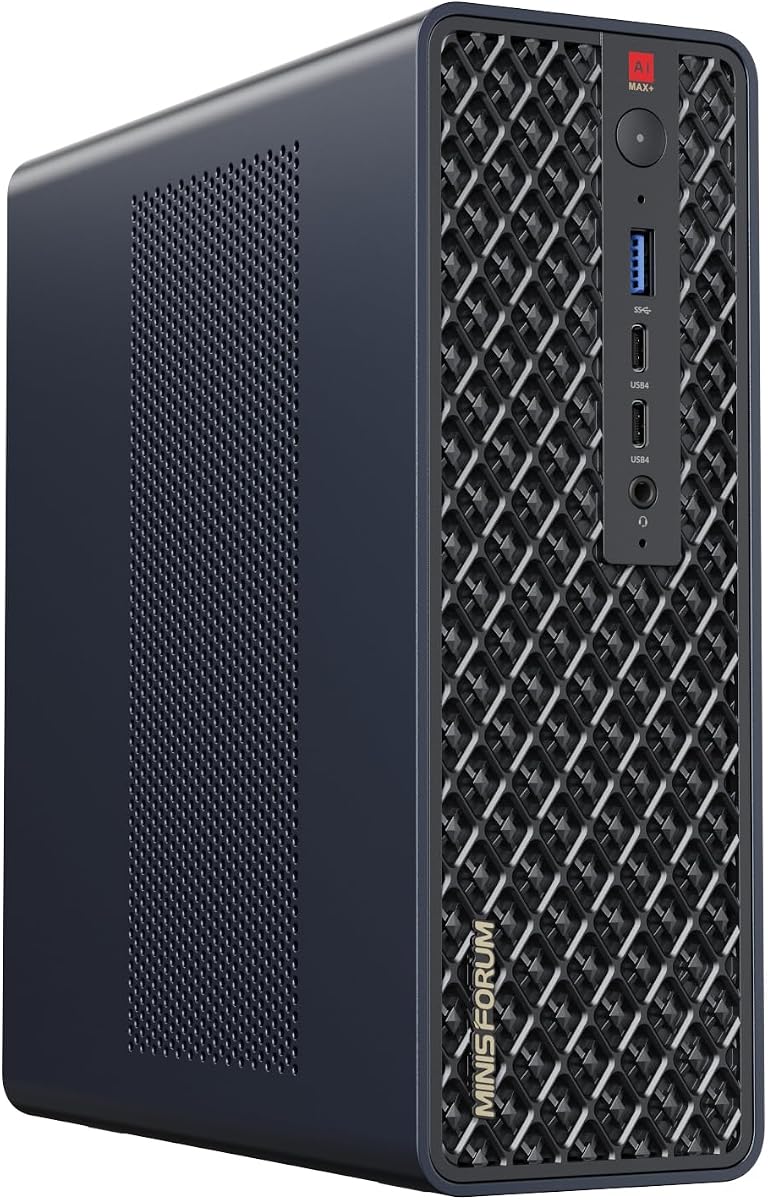
This mini workstation features the AMD Ryzen AI Max+ 395 APU with integrated RDNA 3.5 GPU. It includes 128GB of unified LPDDR5x memory accessible by both CPU and GPU.
We may earn a commission when you buy through this link, at no additional cost to you.
Two units can be clustered to run large 235B models locally with impressive output speeds. The compact design saves space compared to full tower workstations.
A PCIe x16 slot allows future expansion if you need more discrete graphics power later. Cooling is handled by a copper base plate and turbine fans.
Choose this if you need an affordable entry into local AI inference. It is ideal for prototyping and lightweight development work on a budget.
The 128GB LPDDR5x pool eliminates traditional VRAM bottlenecks for large datasets.
Multiple units can be cascaded into a distributed cluster for high efficiency computing.
We may earn a commission when you buy through this link, at no additional cost to you.
The APC ES620 workstation is built with Dual GeForce RTX 5090 GPUs providing 64GB GDDR7 memory per unit. This architecture delivers massive throughput for demanding deep learning tasks.
We may earn a commission when you buy through this link, at no additional cost to you.
It features 256GB DDR5 RAM and 8TB NVMe SSD storage in a RAID configuration for fast file access. The system includes 5Gb Ethernet and Wi-Fi 7 for connectivity.
Liquid cooling on the processor maintains stability during long training sessions. A 1600W power supply ensures both GPUs run at peak performance without throttling.
Select this if you need cutting edge consumer GPU performance in a workstation chassis. It offers strong expandability for future upgrades or memory additions.
Each RTX 5090 features PCIe 5.0 x16 interface for maximum data throughput speed.
Fifteen USB ports and 5Gb Ethernet provide robust I/O for peripherals and networks.
We may earn a commission when you buy through this link, at no additional cost to you.
The NVIDIA DGX Spark brings enterprise scale AI performance directly to your desktop. It features the GB10 Grace Blackwell Chip delivering up to 1 petaFLOP of AI performance.
We may earn a commission when you buy through this link, at no additional cost to you.
You get 128GB unified memory per unit allowing local fine-tuning of models up to 200 billion parameters at FP4. The software stack integrates seamlessly with local development tools.
This system allows you to prototype and test faster without relying on cloud resources. The compact energy efficient design fits into standard office environments easily.
Buy this if you need reliable local deployment with official NVIDIA software support. It is perfect for organizations wanting secure on-premise AI testing and deployment.
Unified memory allows CPU and GPU to access a shared pool eliminating transfer bottlenecks.
Seamless integration of the full NVIDIA AI software stack simplifies setup.
We may earn a commission when you buy through this link, at no additional cost to you.
This high-performance server is equipped with two AMD EPYC 9005 processors featuring up to 192 cores total. It supports housing eight 600W NVIDIA RTX PRO 6000 GPUs for extreme density.
We may earn a commission when you buy through this link, at no additional cost to you.
It features 24-channel DDR5 RDIMM memory supporting speeds up to 6400MHz for fast data processing. Networking includes support for up to 10 high-bandwidth 200GbE NICs to reduce latency.
The 4U chassis supports 8x Hot-Swap U.2 drives enabling maintenance without system downtime. Advanced management tools provide hardware-level security and control over resources.
Choose this if you need enterprise cluster capabilities in a compact rack unit. It is ideal for organizations requiring high density GPU capacity for shared workloads.
Supporting up to 10 PCIe 5.0 NVMe SSDs allows massive storage expansion.
Toolless design streamlines maintenance tasks for IT admins in data centers.
We may earn a commission when you buy through this link, at no additional cost to you.
The Iron Bull workstation features a Ryzen Threadripper 9970X processor with 32 cores for massive parallel processing. It comes with a GeForce RTX 5090 GPU equipped with 32GB VRAM.
We may earn a commission when you buy through this link, at no additional cost to you.
Memory includes 128GB ECC Reg DDR5 which provides error correction critical for long training runs. Storage is handled by a 4TB NVMe PCIe Gen4 SSD for fast data ingestion.
Networking includes onboard 10GbE LAN ensuring fast data transfer to NAS storage. The power supply is 80 PLUS Platinum rated for efficiency under heavy loads.
Select this if you need a balanced workstation for AI and heavy CAD work. The high core CPU is excellent for tasks needing strong single and multi-threaded performance.
Error correcting RAM ensures data integrity during critical machine learning operations.
Onboard 10GbE LAN allows for rapid transfers of large datasets to storage.
We may earn a commission when you buy through this link, at no additional cost to you.
This workstation delivers unprecedented multi-threaded processing with the 192-core AMD EPYC 9965 CPU. It houses three NVIDIA RTX PRO 6000 GPUs providing 288GB total VRAM for complex assemblies.
We may earn a commission when you buy through this link, at no additional cost to you.
It includes 768GB of DDR5 memory with error correcting security for data integrity. Storage is provided by 2x4TB Gen5 NVMe SSDs for blazing fast read and write speeds.
The system comes turnkey with Windows 11 Pro pre-installed ready for immediate deployment. Support includes a 3-year hardware warranty and lifetime technical assistance from the builder.
Invest in this if you need maximum CPU and GPU throughput locally. The turnkey nature saves setup time for teams focused purely on content creation and AI.
Triple GPUs provide 288GB total VRAM for massive datasets without swapping.
Arrives with full OS installation ready to support mission critical projects.
We may earn a commission when you buy through this link, at no additional cost to you.
This RTX PRO 6000 Max-Q Edition is engineered for agentic workflows with massive 96GB of GDDR7 ECC memory. It delivers up to 3511 TOPS of AI performance within a 300W power limit.
We may earn a commission when you buy through this link, at no additional cost to you.
The 512-bit bus width eliminates VRAM bottlenecks allowing you to host heavy open-source LLMs locally. It fits into standard desktops enabling teams to scale without cloud costs.
Built for video content and live streaming it supports 8K video pipelines with zero-lag editing. The thermal management makes multi-GPU scaling viable in research labs.
Buy this if you want to upgrade an existing chassis with enterprise-grade compute. The efficiency allows dual card setups without requiring massive power infrastructure.
Eliminate VRAM bottlenecks and host heavy open-source LLMs locally with ease.
Efficient design makes multi-GPU desktop scaling viable for demanding labs.
We may earn a commission when you buy through this link, at no additional cost to you.
This Mini Workstation comes with AMD Ryzen AI Max+ 395 processor featuring Zen 5 architecture. It includes Radeon 8060S Graphics which delivers ultra-high frame rate experiences anywhere.
We may earn a commission when you buy through this link, at no additional cost to you.
It features five video outputs supporting multiple monitors simultaneously for wider field of view. Dual 10G LAN ports allow for massive network throughput for software routers or firewalls.
There is an internal PCIe x16 slot available for expansion or adding secondary storage. Cooling is managed by a large copper substrate and dual turbine fans for quiet operation.
Select this if you need a small form factor with professional output capabilities. It is ideal for digital signage or trading setups requiring many screen outputs.
Five video outputs support multiple displays improving work efficiency.
Two 10G LAN ports greatly increase network speed and functionality.
We may earn a commission when you buy through this link, at no additional cost to you.
Choosing the right setup requires balancing VRAM capacity power consumption and physical form factor.
VRAM capacity is the single most critical factor for running large language models locally. Models with billions of parameters require tens of gigabytes of memory to load without swapping. Systems offering 48GB or more total VRAM ensure you can run 70B class models efficiently.
Prioritize setups with high aggregate VRAM if you plan to run multiple models simultaneously or work with large context windows.
Compute throughput measured in TOPS determines how fast your model generates tokens. Dual GPU configurations can significantly increase inference speed and allow for larger batch sizes during training. Look for cards with high clock speeds and efficient architectures.
Check the combined TOPS rating of the system to ensure it meets your required token generation speeds.
System RAM must be sufficient to handle data pre-processing before it enters the GPU. 256GB or more DDR5 RAM is ideal for large datasets to prevent bottlenecks during ingestion. High speed memory ensures the CPU keeps the GPUs fed with data.
Ensure your chosen setup has enough DDR5 memory to support your dataset size requirements.
Dual GPU setups require robust power delivery to prevent instability under load. A 1600W or higher power supply is often necessary for workstation grade configurations. Efficient power units help manage heat and reduce electricity costs over time.
Verify that the PSU rating supports the combined TDP of both GPUs and the CPU.
Consider the physical space available for your hardware before purchasing. Rackmount servers offer high density but require dedicated server rooms. Mini workstations save space but may have thermal limits compared to full towers.
Choose a form factor that fits your office environment and cooling infrastructure.
Networking speed impacts how fast you can transfer data from storage to the system. Look for systems with 10GbE or faster LAN ports if you use external storage. Multiple USB ports are needed for peripherals and development tools.
Ensure the system has enough high-speed ports for your specific workflow needs.
Hardware must be compatible with frameworks like PyTorch or TensorFlow to be useful. Enterprise grade cards often come with verified drivers for stability. Open source support ensures you can run the widest variety of community models.
Check that the card supports your target AI framework before committing to a purchase.
Future upgrades may be necessary as models grow larger and more complex. Systems with available PCIe slots or extra storage bays allow for easy upgrades. A modular chassis ensures you can adapt the system without buying new hardware.
Look for setups that allow storage expansion or additional card insertion later.
Install all required drivers and ensure the operating system recognizes both GPUs immediately. Verify that the PCIe lanes are allocated correctly in BIOS to prevent bandwidth issues.
Maintain stable temperatures by cleaning dust filters monthly and monitoring fan curves. Sustained loads generate significant heat so ensure airflow is not obstructed by nearby objects.
Schedule regular backups of your model checkpoints to an external drive or network storage. Power stability is crucial so use a UPS to protect against data loss during unexpected outages.
Yes provided the total VRAM capacity supports the combined memory requirements of all models. You may need to use model sharding or containerization to manage resources efficiently across the two cards.
Not necessarily but a motherboard supporting x16 lane bifurcation ensures full bandwidth for both cards. Consumer platforms may need specific BIOS settings to enable this feature for dual slots.
Consumption varies by model but expect around 1500W to 2500W under full load for high-end setups. Ensure your electrical circuit supports the total draw to avoid tripping breakers.
It is not strictly necessary but it helps maintain stable temperatures during long training runs. Air cooled systems can work well if there is sufficient case airflow and spacing between cards.
Most dual GPU workstation cases have limited space so adding a third is difficult. Look for systems with extra PCIe slots and adequate power headroom if you plan to expand later.
Linux is generally preferred for open-source framework support but Windows 11 Pro for Workstations is also viable. Many tools support both OS options so choose based on your comfort level.
ECC memory helps prevent data corruption during long training runs but is not mandatory for all tasks. For enterprise stability it is highly recommended over standard non-ECC RAM options.
The WEELIAO MAXSUN card and APC MES2X workstation stand out for balancing raw power and cost. Mini workstations offer a space-saving alternative for lighter inference tasks.
Prioritize VRAM capacity above all else if you aim to run large parameter models locally. Ensure your power supply and cooling match the demands of the specific GPUs you choose.
Always verify current availability and support policies before purchasing hardware for production use. Check the latest driver updates to ensure full compatibility with your software stack.