
GE BigEZ OneTouch Big Button Universal TV Remote
4.3Editor score
Backlit buttons for low light use
Colorblind-friendly button colors
Free US-based technical support
This guide compares the best easy to use TV remote for seniors options including big button designs, simplified layouts, and universal compatibility for
Finding the right control device is essential for elderly individuals who want to enjoy their favorite shows without frustration. A good remote should have large buttons, clear labels, and a simple layout that reduces confusion. These features help users with limited dexterity or vision operate their television independently and comfortably every day.
We evaluated ten top-rated remotes based on ease of use, button size, compatibility, and user feedback from caregivers and seniors. Our selection process focused on models that eliminate unnecessary complexity while maintaining reliable performance. Each product offers unique benefits tailored to different needs, from basic TV control to advanced customization options for specific setups.
Every pick in this list highlights key strengths and potential limitations to help you make an informed decision for your loved one. Please note that product availability and pricing may change over time so verify details before purchasing. We aim to provide accurate, up-to-date information to support your search for the perfect television control solution.
4.3Editor score
4.2Editor score

4.4Editor score
The following table provides a side-by-side comparison of all ten selected remotes to help you quickly identify the best fit for your specific needs and television setup. Each entry includes essential specifications and direct links to product pages for further review and purchase considerations.


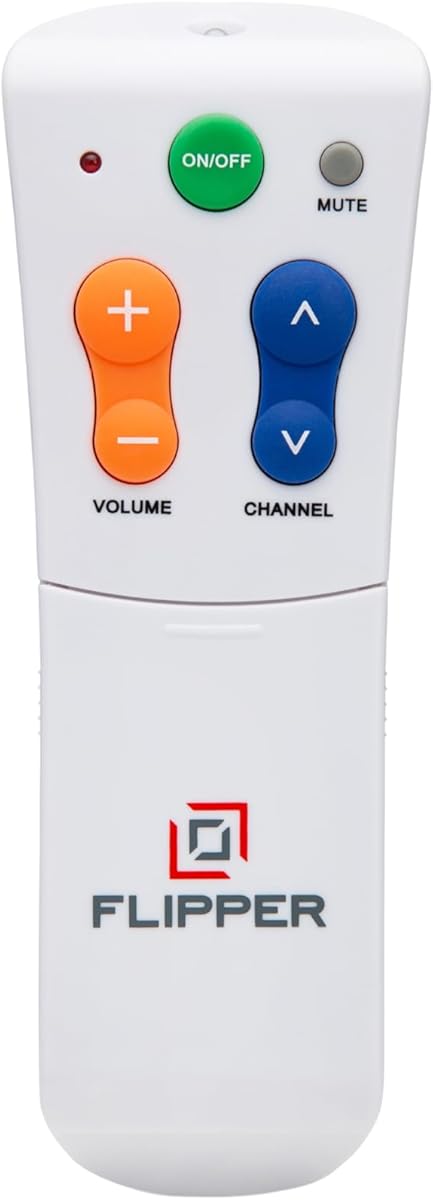
The Flipper Big Button TV Remote stands out as a top choice for seniors dealing with dementia or Alzheimer's. With a rating of 4.2 stars, it offers a uniquely simplified interface that prioritizes essential functions over complex menus. Its design focuses on restoring independence by reducing cognitive load during everyday entertainment.
We may earn a commission when you buy through this link, at no additional cost to you.
Key strengths include color-coded buttons for power, volume, channels, and mute. The remote allows customization of up to 25 favorite channels, letting users cycle through preferred content without navigating hundreds of options. This feature is especially beneficial for those who struggle with memory or attention spans.
Trade-offs exist as this remote cannot navigate streaming apps like Netflix or YouTube. It works best with traditional broadcast cable or satellite setups. Additionally, its price is higher than generic alternatives which might be a consideration for budget-conscious buyers seeking basic functionality.
Caregivers and families seeking a dedicated solution for elderly loved ones will find this remote invaluable. It provides structure and simplicity where standard remotes fail. For households focused on traditional TV viewing, this product delivers reliable performance tailored to specific accessibility needs.
The four-button layout minimizes confusion allowing users to focus on enjoying content rather than learning complex controls.
Pre-programming favorite channels ensures quick access without requiring memory or navigation skills from the user.
We may earn a commission when you buy through this link, at no additional cost to you.
The GE BigEZ OneTouch remote offers excellent value for money with a 4.3 star rating. Its white casing and fully backlit buttons make it easy to locate and use in low-light conditions. This model is designed specifically for seniors who need visibility and simplicity without a high cost.
We may earn a commission when you buy through this link, at no additional cost to you.
Strengths include colorblind-friendly button colors like blue for volume and orange for channels. The remote comes with U.S.-based technical support which adds peace of mind for users unfamiliar with setup processes. It supports five major TV brands including Samsung LG Vizio Sony and Roku out of the box.
However, users with TVs outside these brands may need to program the AUX button manually. While the setup is straightforward, it still requires following instructions which could be challenging for some. Despite this, the price point makes it an accessible choice for many households.
This remote is ideal for budget-conscious buyers who still want quality features. It balances cost with essential accessibility tools effectively. If your TV brand is supported, this option provides reliable control without unnecessary complexity or expense.
Fully backlit buttons ensure the remote remains usable even when room lighting is dim or off during viewing.
Free U.S.-based support ensures help is available if setup questions arise during initial installation or use.
We may earn a commission when you buy through this link, at no additional cost to you.
This Backlit Big Button TV Remote is tailored specifically for Samsung Smart TVs users a 4.4 star rating. Its standout feature is the backlighting that stays on for 30 seconds, making it perfect for seniors who watch TV in dim environments. The package also includes a protective cover and a wall mount hook for convenience.
We may earn a commission when you buy through this link, at no additional cost to you.
Key strengths involve the zero-setup experience for Samsung devices allowing immediate use out of the box. The ergonomic design ensures a comfortable grip which is vital for those with Parkinson's or limited dexterity. The upgraded chip provides fast response times reducing lag between button presses and screen changes.
The limitation lies in brand specificity as it only works with Samsung TVs. This may reduce flexibility for households with mixed device setups. Additionally, the price is higher than generic universal options reflecting its specialized features and included accessories.
For Samsung owners seeking a premium accessible solution this remote delivers superior quality. The combination of backlit buttons and protective accessories adds significant value. If compatibility is confirmed, it stands as a top choice for comfort and ease of use.
Buttons stay lit for 30 seconds eliminating the need for room lights when finding controls in the dark.
A soft silicone cover and wall hook protect the device and keep it within easy reach for daily use.
We may earn a commission when you buy through this link, at no additional cost to you.
The EZclicker Big Button Universal TV Remote offers a 4.2 star rating with a focus on tactile feedback. Users receive clear physical confirmation when buttons are pressed which reduces anxiety about missed inputs. Its compact size makes it easy to store and handle for those with smaller hands.
We may earn a commission when you buy through this link, at no additional cost to you.
Strengths include the extra-large enter button and universal compatibility with top TV brands. The programming process is straightforward involving holding mute and volume buttons. This simplicity appeals to users who find complex codes overwhelming. It is also marketed as a perfect gift for seniors with dementia.
Limitations include lack of support for cable boxes or streaming devices. It is strictly for TV control which might not suit all setups. Additionally, users must perform a manual programming step which requires some patience during initial setup.
This remote is best for those prioritizing physical feedback during use. It offers reliable control for standard TV setups at a reasonable price. If your needs are focused on basic TV functions, this model provides solid performance and comfort.
Physical feedback on button presses ensures users know their commands are registered without looking at the screen.
At seven inches long, it is easy to hold and store without taking up too much space on tables.
We may earn a commission when you buy through this link, at no additional cost to you.
The EZclicker Extra Simple TV Remote maintains a 4.2 star rating with an emphasis on minimalism. It reduces visual clutter by focusing on essential functions. This design philosophy helps seniors avoid overwhelming menus and options that might confuse them during daily use.
We may earn a commission when you buy through this link, at no additional cost to you.
Key strengths include a compact six-inch profile which makes it easy to handle and store. The remote features tactile feedback and universal controls suitable for top TV brands. It is ideal for users who struggle with complex setups or those who prefer a straightforward experience without extra features.
However, like other simple models it does not support streaming devices or cable boxes. The feature set is limited to basic TV operations which may not suffice for modern smart TV households. Despite this, it remains a reliable tool for traditional viewing.
This remote suits those seeking no-frills operation at a low cost. It provides the core functionality needed to watch television without distraction. For households using standard broadcast or basic TV inputs, this option delivers dependability and simplicity.
The simplified layout removes unnecessary buttons helping users focus on essential controls like power and volume.
A lighter build reduces hand strain making it comfortable for extended use by those with weak grips.
We may earn a commission when you buy through this link, at no additional cost to you.
The Big Button Universal Remote for All TV boasts a 4.4 star rating with a promise of broad compatibility. It works with many major brands including Samsung LG and Sony without requiring setup. This immediate usability appeals to seniors who want to start using the remote right away.
We may earn a commission when you buy through this link, at no additional cost to you.
Strengths include an extra-large enter button and wide brand support ensuring flexibility across different setups. The remote includes a 90-day warranty providing buyers with security against defects. Its design focuses on comfort and visibility to minimize frustration during operation.
Limitations involve potential pairing requirements for less common TV models. While advertised as no-programming some users might still need minor adjustments. Additionally, it lacks advanced features found in premium remotes like backlighting or custom channel programming.
This model is ideal for households wanting immediate control without technical hurdles. It balances flexibility with ease of use effectively. If compatibility is confirmed for your TV brand, it offers a reliable solution for daily entertainment needs.
Most users can insert batteries and start using the remote without needing to navigate setup menus or codes.
A 90-day warranty offers protection and support if the remote fails or does not meet expectations initially.
We may earn a commission when you buy through this link, at no additional cost to you.
The Large Button TV Remote Control for Seniors has a 4.4 star rating with a focus on visibility and ergonomics. Its extra-large buttons significantly reduce misclicks making adjustments easy even for those with low vision. The simple layout ensures users can find functions without confusion.
We may earn a commission when you buy through this link, at no additional cost to you.
Strengths include a comfortable grip and durable build ensuring long-term reliability. The remote works with most major TV brands providing broad utility for average households. It is designed specifically for traditional TV control avoiding complex smart features that might overwhelm users.
However, it lacks backlighting which can be a drawback for nighttime viewing. Users need sufficient light to locate buttons effectively. Additionally, it does not support streaming apps limiting its use for modern digital content platforms.
This remote is best for seniors prioritizing clear visibility and ease of use. It offers a practical solution for everyday TV watching without advanced technology. If backlighting is not a priority, this model provides solid performance at a good value.
Oversized buttons allow users to press controls accurately without accidental inputs or frustration during use.
The lightweight body and shaped design reduce hand strain ensuring comfort even during extended viewing sessions.
We may earn a commission when you buy through this link, at no additional cost to you.
The Philips BigEZ OneTouch remote carries a 3.8 star rating with a fully backlit keypad and OneTouch setup. Philips is a trusted brand offering quality build materials and reliability. This model includes directional navigation making it suitable for users who need to browse menus occasionally.
We may earn a commission when you buy through this link, at no additional cost to you.
Strengths include U.S.-based technical support and backlit keys for dark environments. The OneTouch setup simplifies initial pairing for supported brands like Samsung and LG. Users appreciate the balance of simplicity and functional navigation controls in one device.
However, the rating suggests some inconsistencies in compatibility or usability. Manual programming for the AUX button may be needed for non-standard setups. Some users find the interface less intuitive compared to dedicated senior-focused remotes.
This remote is a solid choice for users familiar with Philips products. It offers backlit convenience and reasonable simplicity. If you need navigation keys alongside basic controls, this model provides a practical middle ground for everyday use.
A fully backlit keypad ensures keys are visible and usable even in low-light viewing conditions at night.
One button press setup simplifies pairing for supported brands reducing initial configuration efforts significantly.
We may earn a commission when you buy through this link, at no additional cost to you.
The Big Button Universal TV Remote for Seniors has a 3.0 star rating but focuses on simplicity and affordability. Its layout is extremely easy to use with large buttons designed for clarity. This makes it a viable option for those seeking basic functionality without extra features.
We may earn a commission when you buy through this link, at no additional cost to you.
Strengths include a comfortable grip and compatibility with most major brands. The remote aims to provide stress-free use for elderly users with clear markings and tactile feedback. It is often marketed as a dementia product emphasizing reduced confusion.
Limitations include mixed user feedback leading to a lower rating. Some users report pairing issues or inconsistent performance. While functional for basic control, it may not match the polish of higher-rated alternatives in reliability or ease of setup.
This remote suits budget-conscious buyers needing a basic replacement. It offers essential controls without complexity. If you are testing a simple remote before investing in a premium model, this provides a low-risk entry point.
The affordable price point makes it accessible for temporary use or testing accessibility needs before committing.
Large clear button labels help users identify functions quickly reducing mental strain during operation.
We may earn a commission when you buy through this link, at no additional cost to you.
The Anderic RR1004 Big Button TV Remote Control earns a 4.0 star rating with unique glow-in-the-dark keys. It is designed for care facilities or seniors needing low-light operation. The minimalist design includes only essential controls to reduce clutter and confusion.
We may earn a commission when you buy through this link, at no additional cost to you.
Strengths include a learning function that allows copying commands from existing remotes. This flexibility can be useful for customizing inputs or adding basic functions. It is pre-programmed for LG TVs making setup immediate for those users without additional steps.
However, initial setup might require assistance for non-LG brands. Additionally, it does not support RF or Bluetooth systems which limits compatibility with newer smart devices. Users need to ensure their TV uses infrared technology for proper function.
This remote is ideal for users needing visibility in the dark or those familiar with infrared remotes. It offers a balance of simplicity and customization. If your setup supports IR and requires basic low-light functionality, it provides reliable control at a reasonable cost.
Glow-in-the-dark keys ensure visibility without lights helping users find controls quickly in dark environments.
Infrared learning allows copying functions from existing remotes adding flexibility for specific needs or setups.
We may earn a commission when you buy through this link, at no additional cost to you.
Selecting the right remote involves evaluating several key factors to ensure it meets the specific needs of elderly users. This guide explains what to look for when comparing models.
Buttons should be large enough to press easily without accidental activation. Tactile feedback helps users know when a button has been pressed without looking at the remote directly.
Look for remotes with raised or rubberized buttons that provide clear physical confirmation during use.
A simple layout reduces cognitive load for users with memory or attention issues. Avoid remotes with hundreds of buttons unless customization options allow hiding unused functions.
Prioritize models that focus on essential controls like power volume and channel navigation to minimize confusion.
Ensure the remote works with your specific TV brand and any connected devices like cable boxes or soundbars. Universal remotes vary in supported models so check lists carefully.
Verify that the remote supports your input method such as infrared or RF to guarantee it will function properly.
Backlit or glow-in-the-dark buttons are crucial for viewing in low-light conditions. These features prevent the need to turn on bright lights during nighttime viewing.
Check if the remote offers permanent backlighting or temporary illumination to suit your household lighting habits.
Simpler programming processes reduce frustration during installation. Models with one-touch setup or preset brands save time for caregivers or non-tech-savvy users.
Choose remotes with clear instructions or available online tutorials to ensure a smooth initial configuration.
A lightweight remote with a comfortable grip reduces hand strain for those with arthritis or limited dexterity. The shape should allow one-handed operation without slipping.
Look for ergonomically shaped bodies that fit naturally in smaller hands to prevent fatigue during use.
Remotes that use common battery types like AA or AAA are easier to maintain. Rechargeable options reduce waste but require charging habits that might be difficult for seniors.
Consider models with long battery life and clear indicators to avoid unexpected power loss during use.
Access to technical support can be vital if setup issues arise. A warranty provides protection against defects and ensures product longevity.
Check if the manufacturer offers phone or online support during business hours to resolve potential problems quickly.
After unboxing your new remote insert the required batteries ensuring polarity matches the diagram. Turn on your TV and point the remote directly at the infrared receiver usually located on the front panel of the television.
For universal models that require setup follow the included instructions to press the brand button and confirm signal reception. Most remotes will display a success indicator or allow immediate use of power and volume functions.
To extend the life of the remote store it in a dry place away from direct sunlight. Clean the buttons gently with a soft cloth to remove dust and ensure smooth operation over time.
Most remotes in this guide support basic smart TV functions like power volume and input selection. However advanced navigation within apps may require the original remote or a compatible device. Check specific product details for app control limitations.
Some models like Flipper and Anderic support cable and satellite box control. Others are TV-only so verify compatibility before purchasing. Programming usually involves entering a specific code or holding a set of buttons.
Most require AA or AAA batteries which are standard and easy to find. Some models include battery-saving features to extend life. Always check product specs to ensure you buy the correct type for your device.
Yes most remotes use infrared or RF signals and do not need internet connectivity. This makes them reliable even when Wi-Fi is down. However streaming app control might depend on the TV's network status.
Battery life varies by usage but typically lasts several months under normal conditions. Factors like backlighting or frequency of use can impact duration. Replace batteries promptly when performance declines to avoid interruptions.
Yes many seniors switch permanently to simplified remotes for daily control. Ensure all essential functions are available before discarding the original. Some models allow programming the original remote's features if needed.
We reviewed ten top options ranging from budget-friendly basics to premium feature-rich models. The Flipper stands out for dementia care while the GE BigEZ offers great value for standard setups.
Prioritize button size compatibility and simplicity when choosing a remote for an elderly user. These factors significantly impact daily usability and satisfaction with their entertainment experience.
Prices and availability may change so please verify current details before purchasing. We hope this guide helps you find the perfect solution for hassle-free television control.