
UGREEN USB C to Ethernet Adapter
4.7Editor score
1000Mbps Gigabit Speed
Driver Free Plug and Play
Durable Aluminum Alloy Case
This guide compares the top ten ethernet adapters for android phones to help you choose the most reliable wired network solution for your mobile device needs.
Finding the right ethernet adapter for your android phone ensures you get stable and fast internet connectivity without relying on fluctuating wifi signals. Whether you need this for gaming streaming or professional work a quality adapter can make a significant difference in your daily mobile computing experience.
We have carefully evaluated ten top rated products based on compatibility speed and build quality to bring you a comprehensive list of the best options available today. Each selection has been chosen for its ability to deliver consistent performance across a wide range of android devices and network environments.
Each pick in this list highlights key features pros and cons so you can make an informed decision that fits your specific requirements. Please note that prices and availability are subject to change so check the latest details before making your final purchase online.
4.7Editor score

4.5Editor score

4.6Editor score
The following table provides a side-by-side comparison of all ten selected ethernet adapters to help you quickly identify the model that best suits your specific connectivity requirements and budget constraints.


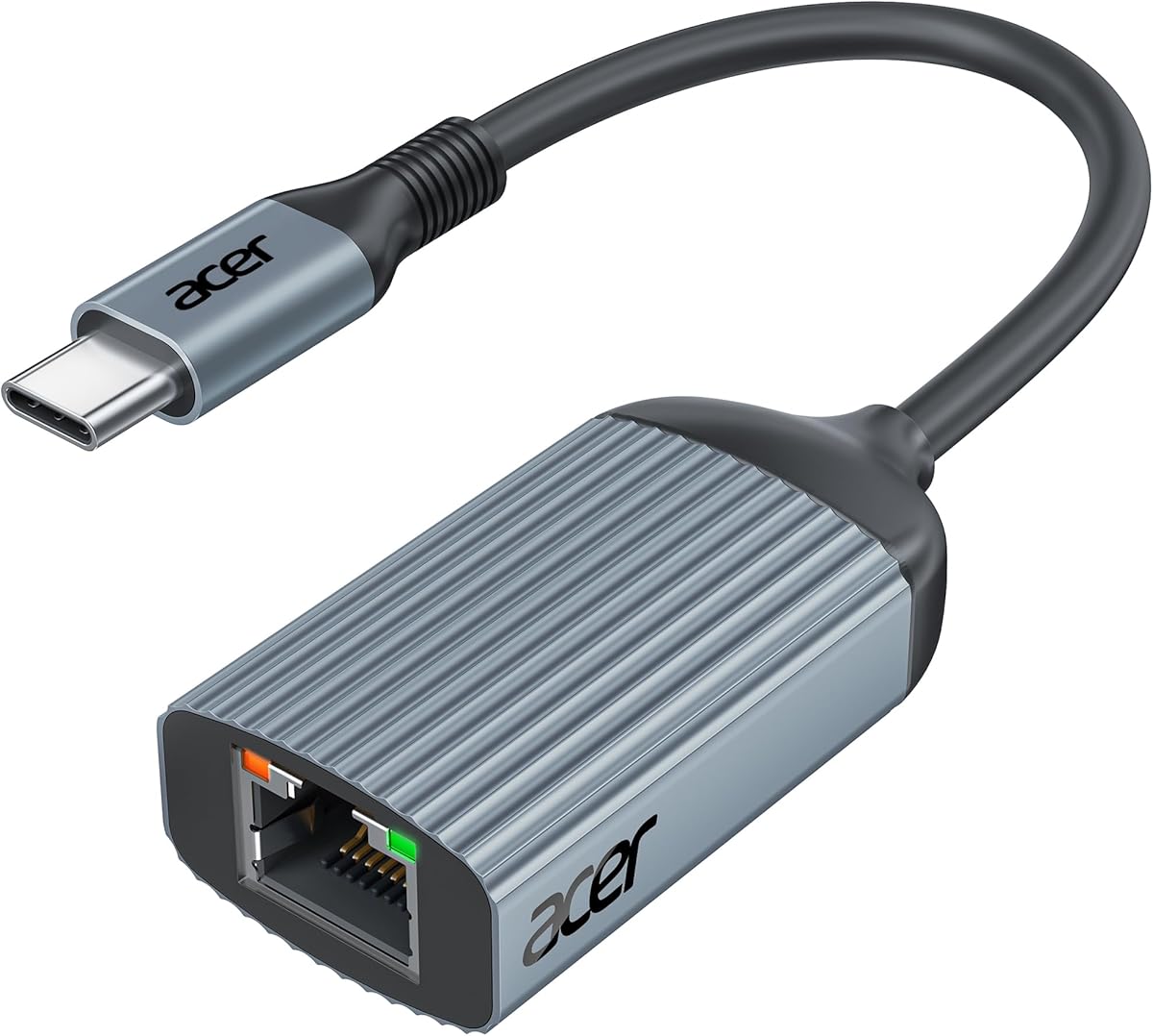


This BENFEI adapter is designed specifically for plug and play connections between USB-C devices and wired networks. It delivers stable gigabit ethernet connectivity which is crucial when wireless signals are inconsistent or unavailable in your current environment.
We may earn a commission when you buy through this link, at no additional cost to you.
It offers stable connection speeds up to 1Gbps and is downward compatible with slower networks. The braided nylon cable ensures extra durability while the premium aluminum casing helps with heat insulation during extended usage periods.
While it does not support power delivery its compact design makes it easy to carry. The non-slip design aids in easier plugging and unplugging. It is a robust choice for users who prioritize reliability over extra features.
Ideal for android users who need a dependable wired connection for work or streaming. The warranty and customer service support add significant value to this purchase ensuring long term satisfaction with the product.
The adapter provides consistent ethernet access when wireless signals fail or are too slow for your needs.
Premium materials like aluminum and braided nylon ensure the adapter withstands daily wear and tear effectively.
We may earn a commission when you buy through this link, at no additional cost to you.
The UGREEN adapter meets 1000Mbps ethernet needs in seconds and is backward compatible with slower networks. It is perfect for work gaming streaming or downloading with a stable reliable wired connection that you can trust consistently.
We may earn a commission when you buy through this link, at no additional cost to you.
Its small size and attention to detail make it stand out. The durable aluminum alloy case dissipates heat faster than plastic. The reinforced cable tail ensures long lasting durability without compromising on portability or ease of use.
Driver free setup on Android makes it very user friendly. The LED indicator shows status at a glance which helps in quick troubleshooting. It is a great budget friendly option for those who need basic ethernet access.
Suitable for anyone needing to add an ethernet port to devices without built-in ports. Whether you are on a tight budget or just want a reliable adapter this option offers excellent performance for the price.
Supports fast speeds up to 1000Mbps for efficient online work and gaming sessions without interruptions.
Plug and play functionality means no driver installation is needed for most Android systems.
We may earn a commission when you buy through this link, at no additional cost to you.
This adapter explores the new era of 2.5Gb speeds allowing your devices to run at full capacity. It enables unbelievably fast downloads with NAS and fluent 4K or 8K streaming experiences that are immersive and lag free.
We may earn a commission when you buy through this link, at no additional cost to you.
Equipped with an updated Realtek chip it ensures the network is always at peak run. When running at full speed it consumes low power and reduces heat dissipation. The aluminum housing also helps keep it cool during heavy use.
It allows flexibility to upgrade your 1Gb network immediately if you have the right switches and routers. This is a great way to give your aged devices new life and future proof your connectivity needs effectively.
Ideal for power users who need more than standard gigabit speeds. If you frequently work with large files or stream high resolution content this adapter is worth the investment for its superior performance.
Supports 2.5Gb speeds to ensure your setup remains fast even as internet plans improve.
Aluminum construction and advanced chip keep the device cool during extended high-speed sessions.
We may earn a commission when you buy through this link, at no additional cost to you.
The uni adapter offers stable connection speeds up to 1Gbps and is downward compatible with slower networks. It is designed for plug and play connection between USB-C devices and wired networks for consistent performance.
We may earn a commission when you buy through this link, at no additional cost to you.
It features a thoughtful design that is compact and lightweight. The user-friendly non-slip design makes it easier to plug and unplug. The premium aluminum casing provides better heat dissipation for stable signal transfer.
Designed to make it easy to connect USB peripherals without blocking adjacent ports this is very practical for daily use. The high-quality connector provides a snug connection with your devices ensuring reliable data transfer rates.
Great for users who need a reliable and portable ethernet solution. Its build quality and performance make it a strong contender for those who travel often or work from various locations with unstable wifi.
Non-slip grip and compact size make it easy to handle and carry anywhere easily.
Aluminum casing helps dissipate heat to ensure consistent speeds during prolonged use.
We may earn a commission when you buy through this link, at no additional cost to you.
This 2-in-1 Thunderbolt to Ethernet adapter provides a stable and ultra-fast wired connection with full gigabit speed. It is ideal for high-bandwidth tasks such as 4K streaming and large file downloads efficiently.
We may earn a commission when you buy through this link, at no additional cost to you.
You can stay charged while connected with this adapter as it supports up to 140W power delivery. This makes it perfect for charging high-performance devices through the same adapter ensuring you never run out of power.
The built aluminum housing improves durability and heat dissipation. A flexible braided pigtail cable adds strain resistance to protect the connection points. It easily transforms your devices to secure wired connections in offices or hotels.
Recommended for users who need both charging and ethernet in one cable. It is especially useful for streaming devices like Chromecast with Google TV. Ensure you need a reliable wired link that also keeps your device powered.
Supports up to 140W power delivery so you can charge your device while using ethernet.
Compatible with Chromecast with Google TV to ensure smooth lag-free streaming experiences.
We may earn a commission when you buy through this link, at no additional cost to you.
This adapter solves the problem of spotty wifi in the room or no standard ethernet port available. It can provide a stable ethernet connection to your laptop tablet or phone with a USB C port effectively.
We may earn a commission when you buy through this link, at no additional cost to you.
It is equipped with an updated RTL8153B chip ensuring the network is always at peak run. When running 1Gb at full speed it consumes low power and reduces heat dissipation for stable performance during heavy usage.
The aluminum heat-dissipating design is compact and lightweight. It fits easily into your travel bag for work or trips. Two indicators provide clear status display and quick connection diagnosis for better user experience.
True plug and play functionality means no download driver or software is needed. Just connect and enjoy full-speed internet surfing instantly. It is a reliable choice for anyone needing simple and effective wired connectivity.
Uses a low power chip to maintain stable speeds without overheating or draining battery.
Two indicators provide visual feedback on connection status to make troubleshooting easy.
We may earn a commission when you buy through this link, at no additional cost to you.
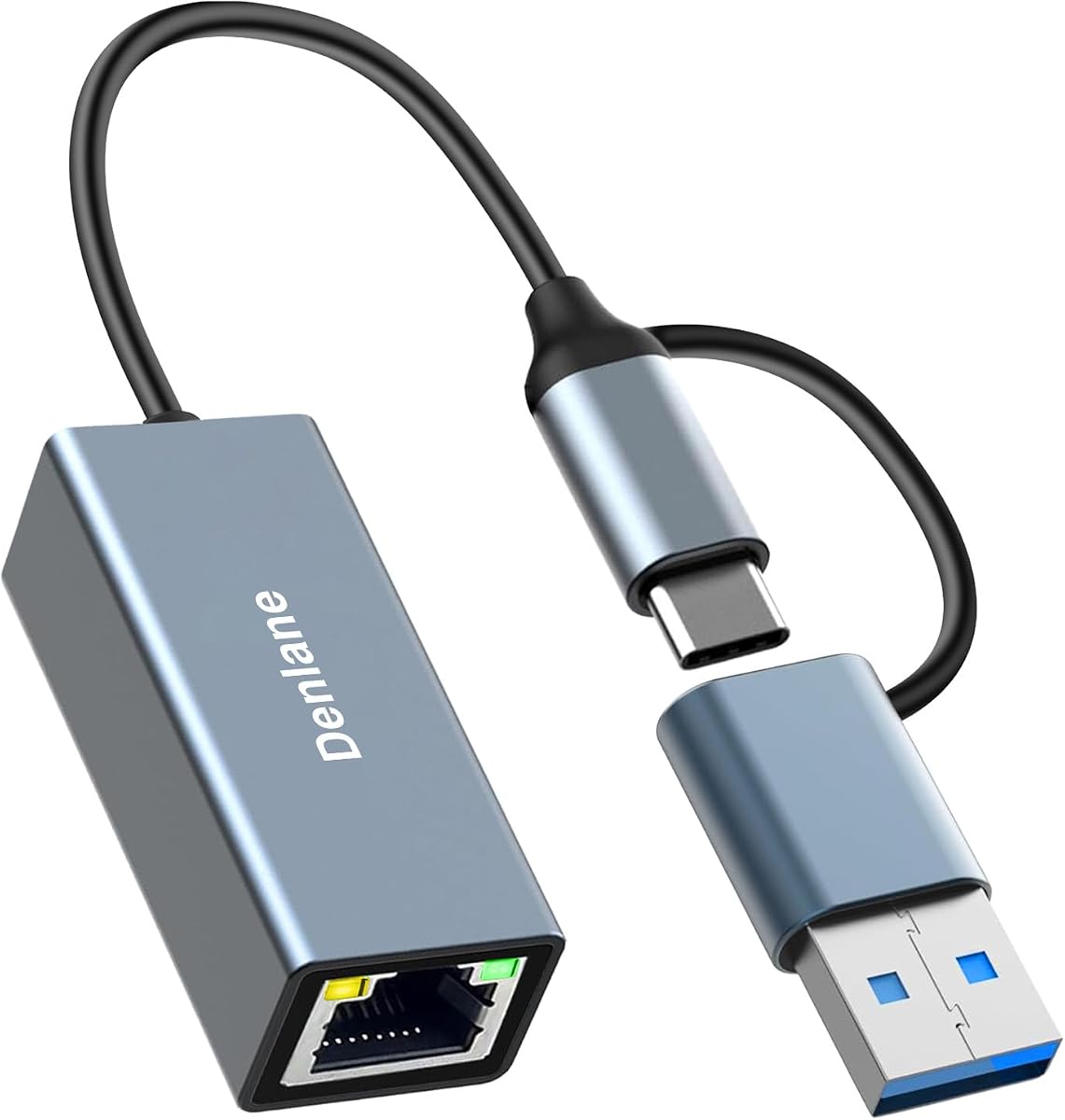
This usb 3.0 and usb c to ethernet adapter provides a wired RJ45 LAN port that can connect to gigabit networks effectively. No required power supply or driver is needed to easily connect to laptops mobile phones and tablets.
We may earn a commission when you buy through this link, at no additional cost to you.
The dual connector design meets various scenarios and different device connections. Whether using USB A or USBC interface you can enjoy excellent performance up to 1Gbps network speeds for a variety of use cases.
The laptop ethernet adapter is made from high-durability aluminum alloy which feels smooth and sturdy. The cable is designed to be soft and can be adjusted at any angle for better flexibility and ease of use.
Compatible with various systems including Windows macOS and Android it works seamlessly with many devices. It is a versatile choice for users who have devices with different USB ports and need a unified solution.
Works with both USB A and USB C ports making it compatible with older and newer devices.
Soft cable design allows for adjustment at any angle to reduce strain on connections.
We may earn a commission when you buy through this link, at no additional cost to you.
This adapter easily adds Ethernet connectivity to laptops and devices without RJ45 connections. It is compact and portable to easily slip into a laptop bag or pocket for travel. The 5 Gbps network speed ensures faster connections than Wi-Fi.
We may earn a commission when you buy through this link, at no additional cost to you.
The robust aluminum housing withstands daily wear and tear to ensure longevity. Plug-and-Play installation requires no drivers for Windows macOS Chrome OS or Android devices making it very easy to set up quickly.
Powered by the USB-C port means no extra power adapters are required for operation. It is compatible with most laptops tablets smartphones and gaming devices. This makes it a reliable choice for high-speed needs.
Best for users who need speeds faster than standard gigabit ethernet. If you have a 5G capable network setup this adapter will allow you to leverage that speed efficiently for better data transfer rates.
Delivers 5 Gbps speeds which are significantly faster than standard Wi-Fi connections for data.
Draws power directly from USB-C so you do not need an external power adapter.
We may earn a commission when you buy through this link, at no additional cost to you.
This adapter features RJ45 male plug to USB-C female port which breaks the limit of traditional dongles. No extra Ethernet cable is needed to access wired network which saves space in your travel bag.
We may earn a commission when you buy through this link, at no additional cost to you.
It supports 10/100/1000Mbps auto-negotiation for stable 1000Mbps full speed. Eliminate Wifi lag and disconnection to make it perfect for 4K streaming online gaming and large file uploads and downloads easily.
The ultra-compact aluminum shell provides efficient heat dissipation. Smooth aluminum alloy housing delivers premium texture and keeps cool even after all-day heavy use. It has built-in protection to safeguard your devices effectively.
Recommended for travelers who want to save space and avoid carrying extra cables. Just connect your daily USB-C to C data cable to this adapter and access wired network instantly without hassle.
Eliminates the need for a separate Ethernet cable by integrating the RJ45 male plug directly.
Supports up to 1000Mbps speeds for lag-free gaming and smooth 4K streaming.
We may earn a commission when you buy through this link, at no additional cost to you.
This adapter adds 10/100M speed wired network ability to compatible devices with a Micro USB port. It is designed for Android tablets and devices running Android 2.1 or up for basic connectivity needs.
We may earn a commission when you buy through this link, at no additional cost to you.
It has a driverless design for Windows and Android operating systems to make setup easier. With LINK ACT indicator light you can see the connection status at a glance. It enables sharing hard disk files and printers.
Note that it has limited Android compatibility so you should check your settings before buying. Most probably it will just work if your device shows an Ethernet menu in settings. It is great for Raspberry Pi and Win tablets.
Ideal for users with older Micro USB devices that need basic wired internet access. It provides a cost-effective solution for adding network capability to devices that lack built-in Ethernet ports.
Provides Ethernet capability specifically for Micro USB devices like older tablets and Raspberry Pi.
Driverless design for Android 4.0+ means you can plug and use it immediately.
We may earn a commission when you buy through this link, at no additional cost to you.
Choosing the right ethernet adapter requires careful consideration of several factors to ensure compatibility and performance with your specific Android device.
First determine whether your phone uses USB-C or Micro USB ports. Most modern Android phones use USB-C while older models may still rely on Micro USB OTG. Buying the wrong connector type will render the adapter useless for your device so check your ports carefully.
Ensure the adapter matches the physical port on your phone. If you have a USB-C device buy a USB-C adapter. For Micro USB devices you must look for a Micro USB OTG adapter specifically to ensure a proper fit.
Consider the network speed you need for your typical activities. Standard Gigabit adapters provide up to 1000Mbps which is sufficient for most streaming and gaming tasks. If you need faster speeds for large file transfers look for 2.5G or 5Gbps models.
Check your network plan and local internet speed before purchasing high-speed adapters. If your internet plan is slow a faster adapter may not provide additional benefits but it ensures future proofing if you upgrade your plan later.
Build quality impacts the durability and heat management of the adapter. Aluminum casings are generally better than plastic because they dissipate heat more efficiently. A braided cable also adds to the longevity of the adapter by reducing the risk of internal wire breakage.
Look for adapters with reinforced cable tails and protective housings. This ensures the adapter can withstand being plugged and unplugged frequently. Good build quality means the adapter will last longer in daily use.
Driver support is crucial for plug and play functionality on Android. Most modern adapters are driver-free for Android 6.0 and higher but older models might require manual installation. Check product details to ensure no extra drivers are needed for your Android version.
If drivers are required they can be a hassle for average users. Aim for products explicitly labeled as driver-free for Android to avoid complications. This ensures immediate connectivity without needing to install extra software on your phone.
Some adapters come with power delivery ports allowing you to charge your device while connected. This is especially useful if you use your phone for extended periods for work or streaming. It keeps your device powered without needing a separate charger.
Evaluate if you need this feature based on your usage. If you only connect for short bursts standard adapters are fine. However if you use it during long work sessions a charging adapter provides convenience and peace of mind against battery drain.
Portability matters if you travel frequently with your device. Look for compact and lightweight designs that fit easily into a pocket or bag. Larger adapters might be durable but can be cumbersome to carry around for daily use.
A smaller adapter is easier to manage and less likely to snag on other items in your bag. If you need to use it daily on the go prioritize designs that are small and lightweight for convenience.
Ensure the adapter is compatible with your specific Android model and other devices you own. Some adapters work best with certain phone brands or tablet models. Reviewing the compatibility list in the product description helps avoid issues with connectivity.
Universal compatibility is preferred if you have multiple devices. Check that the adapter supports both Windows and Android if you switch between systems. This ensures you get value for money without needing different adapters for different devices.
A warranty provides security against defects and failures. Many reputable brands offer 12 to 18-month warranties. This ensures that if the adapter fails prematurely you can get a replacement or refund without additional cost.
Always check the warranty terms before purchasing. A longer warranty period indicates the manufacturer stands by their product quality. This protection is vital for electronics that are used frequently.
To use the adapter simply plug the USB-C or Micro USB end into your Android phone. Then connect an Ethernet cable to the adapter port. Your phone should automatically recognize the wired connection and switch from Wi-Fi to Ethernet for internet access.
For best performance ensure the Ethernet cable is not damaged and supports your desired speed. If using CAT6 cables ensure your adapter supports Gigabit speeds to avoid bottlenecks. This ensures you get the fastest connection possible on your network.
Care for your adapter by avoiding sharp bends in the cable and storing it in a cool dry place. Regularly check the ports for dust or debris to ensure a clean connection. This simple maintenance helps extend the lifespan of the adapter significantly.
Not all Android phones support Ethernet adapters directly. Most modern devices with USB-C support OTG functionality which allows connection of adapters. However older Micro USB phones may require specific OTG adapters to work properly with wired Ethernet.
Most modern adapters are driver-free for Android devices running version 6.0 and higher. However older adapters or specific chipsets might require manual driver installation. Always check the product description to confirm driver support before buying.
Yes ethernet adapters are excellent for mobile gaming as they provide lower latency and more stable connections than Wi-Fi. They help reduce lag and disconnection issues ensuring a smoother gaming experience for competitive games.
Some adapters come with power delivery ports that allow you to charge your phone while using the Ethernet connection. However standard adapters without this feature will not charge your device so check the specs carefully.
To reach 1Gbps speeds you should use CAT6 or higher Ethernet cables. Using lower category cables may result in slower speeds due to cable limitations. Ensure your cable matches the adapter capabilities for full performance.
Most tablets with USB-C or Micro USB ports will work with these adapters. However compatibility can vary by tablet model so check if your tablet supports OTG and wired Ethernet in settings before purchasing.
Yes wired connections are more reliable than Wi-Fi for video calls. They reduce the risk of drops and lag which are critical for professional meetings. Ethernet adapters ensure a consistent connection for high-quality video communication.
We have reviewed ten top ethernet adapters ranging from budget-friendly options to high-performance 2.5G models. Whether you need basic connectivity or advanced features there is a pick here to suit your specific Android setup needs.
Prioritize factors like connector type speed and build quality to ensure the adapter meets your requirements. Choose an adapter that supports your specific needs without unnecessary extra features that may add cost without value.
Remember that prices and availability change frequently so verify current details before making your final purchase. We hope this guide helps you find the perfect ethernet adapter for your Android phone today.