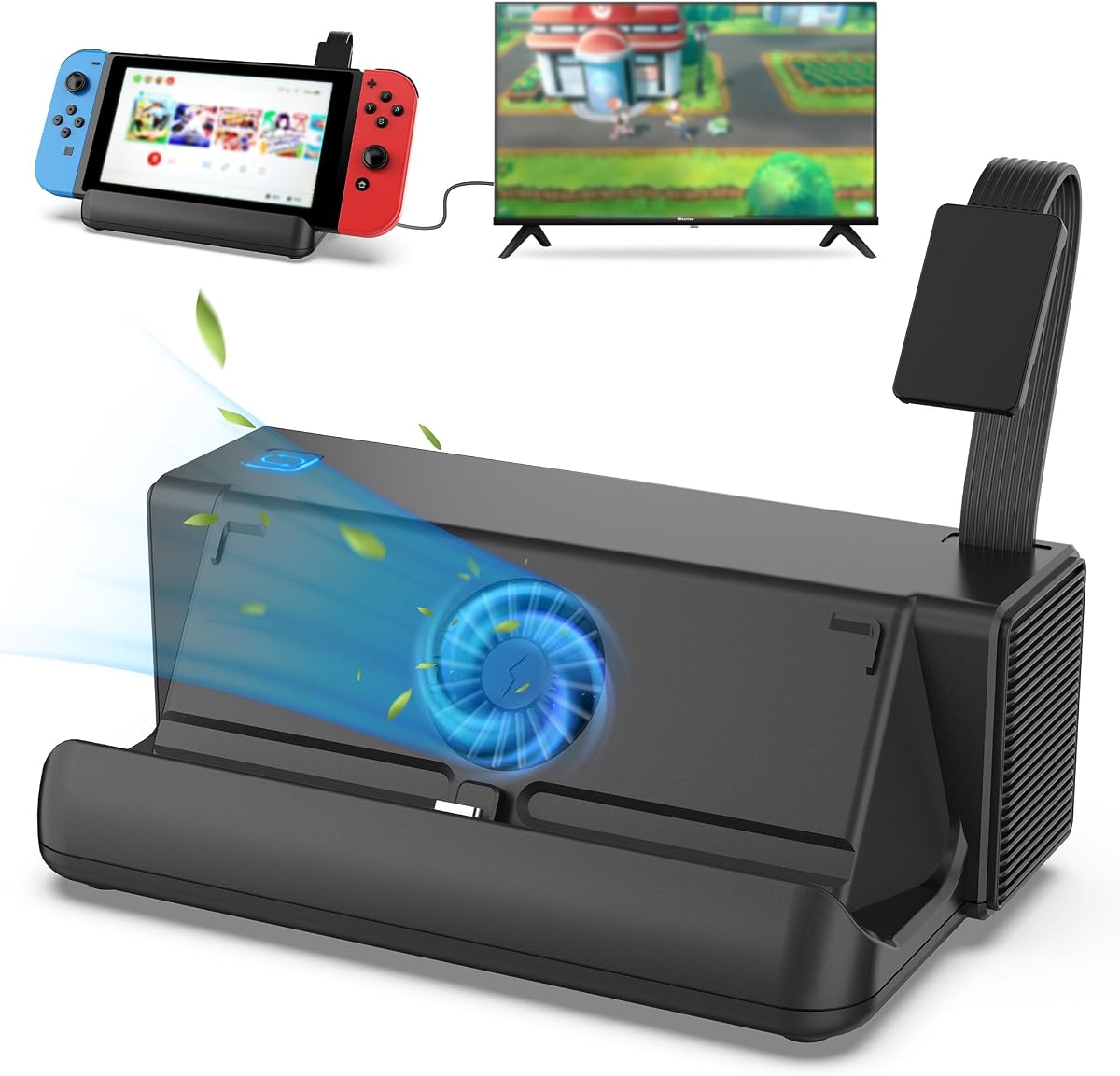
ZMBESUP Switch Dock Station
4.4Editor score
Built-in cooling fan included
Eight game card storage slots
Desktop and TV dual mode
This guide compares the top ten external cooling fans for Nintendo Switch docks to help you choose the best accessory for preventing overheating during long
External cooling fans for the Nintendo Switch dock are essential accessories that help maintain optimal operating temperatures during extended gaming sessions. These devices attach to the dock to improve airflow and prevent thermal throttling that can interrupt gameplay.
We compared ten highly rated cooling solutions based on their cooling performance, noise levels, ease of installation, and additional features like game card storage or RGB lighting. Each product was evaluated for compatibility with original and OLED models.
Each pick in this guide shows detailed specifications, pros, cons, and real user feedback to help you make an informed decision. Please note that product availability and pricing may change over time so check current listings before purchasing.
4.4Editor score

4.6Editor score

4.4Editor score
The following comparison table provides a side-by-side overview of all ten external cooling fans and dock accessories we reviewed. Each entry includes key specifications to help you quickly identify the features that matter most for your setup.


This cooling fan ranks first for its comprehensive feature set that addresses overheating directly while providing useful feedback through an LED display. With a strong 4.6 rating from users it has proven effective at maintaining cool temperatures during long gaming sessions.
We may earn a commission when you buy through this link, at no additional cost to you.
The adjustable fan speed ranging from 510 to 6000 RPM allows you to balance noise and cooling performance based on your needs. The LED display shows both fan speed and exhaust temperature giving you transparency into how well the system is performing.
While the fan is nearly silent below 2400 RPM it can produce some spinning sound at higher speeds. This is an acceptable trade-off considering the significant cooling benefits and the inclusion of useful extras like joystick caps and a fixed pad.
Anyone looking for a reliable solution to protect their Switch from thermal throttling should consider this model. It offers a great balance of performance features and ease of use making it the top choice in this category.
The LED display provides immediate feedback on exhaust temperature helping you ensure the console stays within safe operating ranges during intense gameplay.
Included joystick caps and a fixed pad add extra value by protecting your controller inputs and ensuring the fan stays securely in place on the dock.
We may earn a commission when you buy through this link, at no additional cost to you.
This option offers a budget friendly way to add active cooling to your original Switch dock. With three built-in fans it provides strong ventilation performance to lower temperatures quickly without requiring additional adapters.
We may earn a commission when you buy through this link, at no additional cost to you.
The adjustable speed settings include Turbo and Normal modes allowing you to choose the right level of cooling for your current session. Its compact design ensures it does not take up much room on your entertainment setup.
While it has a lower rating compared to other models it still delivers effective cooling for the price. The trade-off is fewer advanced features like temperature displays but for basic cooling needs it serves well.
Gamers on a tight budget who want to extend their console life should find this a solid choice. It provides essential protection against overheating without breaking the bank.
Three high speed fans work together to move air efficiently across the dock surface improving heat dissipation during extended play.
Power is drawn directly from the dock USB port eliminating the need for extra cables or separate power adapters for a clean setup.
We may earn a commission when you buy through this link, at no additional cost to you.
This premium cooling stand is tailored for the Switch 2 dock offering a complete solution with cooling storage and connectivity. It automatically starts when connected to the dock ensuring your console stays cool from the moment you start playing.
We may earn a commission when you buy through this link, at no additional cost to you.
The dual fan system provides powerful cooling while the six game card slots keep your library organized and accessible. Additionally three USB expansion ports let you connect controllers headsets or charge other devices without clutter.
While it is designed for the Switch 2 dock and comes at a higher price point the feature set justifies the cost for serious gamers. The RGB lighting adds a touch of style that enhances the visual appeal of your setup.
If you want a high-end accessory that combines cooling with utility and style this is an excellent investment. It supports stable performance and adds convenience to your gaming environment.
The fan starts automatically when the dock is connected removing the need for manual switching and ensuring protection is always active when needed.
Three USB ports allow you to expand your setup by connecting multiple peripherals without needing extra hubs or adapters.
We may earn a commission when you buy through this link, at no additional cost to you.
This cooling base stand offers a straightforward approach to improving airflow for game consoles. With three internal fans it delivers effective heat dissipation to keep the system cool during demanding games without taking up much space.
We may earn a commission when you buy through this link, at no additional cost to you.
The small compact design makes it easy to fit into tight entertainment centers while the superior material ensures durability over time. A simple side switch lets you toggle between turbo and normal speeds or turn the fan off.
While it lacks advanced features like temperature displays the core cooling function is reliable and efficient. The straightforward operation and durable build make it a practical choice for users who prioritize function over flash.
Anyone seeking a no-fuss cooling solution that gets the job done will appreciate this model. It provides solid protection against overheating in a tidy package.
Constructed from superior materials the unit resists wear and tear while maintaining a small footprint that suits any gaming space.
A single side switch provides immediate control over cooling intensity allowing you to adjust performance with minimal effort.
We may earn a commission when you buy through this link, at no additional cost to you.
This dock station replaces the original Nintendo dock while adding enhanced functionality including a built-in cooling fan. It supports seamless game card switching with eight slots and maintains optimal performance during extended play without overheating.
We may earn a commission when you buy through this link, at no additional cost to you.
The independent power switches allow you to turn off unused features to save energy and reduce noise. With desktop and TV mode support it offers flexibility for both portable and home entertainment setups.
Switching to a new dock requires a small adjustment but the added features like card storage and cooling justify the change for many users. It consolidates multiple accessories into one compact unit saving space and hassle.
Gamers who want a more versatile dock with cooling built-in will find this a worthwhile upgrade. It delivers convenience and performance in a single all-in-one package.
One button game card switching technology lets you change games without physical swapping protecting your console from wear.
Support for both desktop and TV modes gives you the freedom to play anywhere while keeping the console cool and connected.
We may earn a commission when you buy through this link, at no additional cost to you.
Designed specifically for the 2021 OLED dock this fan replacement ensures a perfect fit and maximum cooling efficiency. The high efficiency fan blows air directly onto the base surface to dissipate heat faster and avoid overheating.
We may earn a commission when you buy through this link, at no additional cost to you.
Fourteen game card slots on top provide ample storage for your favorite titles making it easy to access them without opening cases. The Type-C cable makes installation simple and the blue light effect adds a cool aesthetic touch.
While it only works with the OLED dock the specialized design ensures better compatibility and performance than generic fans. The added storage and style make it a premium accessory for OLED owners.
If you own an OLED Switch and want a cooler more organized dock this fan is an excellent choice. It combines protection with practicality in a tailored package.
The fan blows directly onto the base surface increasing air circulation and reducing heat buildup more effectively than standard fans.
Fourteen slots let you store and access a wide variety of games keeping them safe and ready to play at a moment's notice.
We may earn a commission when you buy through this link, at no additional cost to you.
This dedicated OLED fan delivers powerful cooling while maintaining a quiet operation that does not distract from gameplay. The high speed fan accelerates air circulation inside the base to achieve effective heat dissipation during long sessions.
We may earn a commission when you buy through this link, at no additional cost to you.
Installation is straightforward with a Type-C power cable that connects directly to the dock. A side switch controls the fan and the blue LED lighting synchronizes with the fan status for a clean visual cue.
While it has only one fan and no card storage the focus on quiet performance makes it ideal for users who value silence. The white design complements the OLED dock aesthetics nicely.
If you prioritize low noise cooling for your OLED setup this model is a strong contender. It provides essential protection without adding unwanted sound to your environment.
The fan is engineered for low noise levels ensuring you can enjoy immersive audio without fan interference during critical game moments.
The blue LED lights up when the fan is on giving you an immediate visual indication of cooling status.
We may earn a commission when you buy through this link, at no additional cost to you.
This fan offers three customizable wind speeds allowing precise control over cooling intensity based on your needs. The 45mm turbine fan generates ample airflow to accelerate heat removal while the optimized blade structure reduces operating noise.
We may earn a commission when you buy through this link, at no additional cost to you.
Smart auto on and off functionality means the fan starts and stops with your console hands-free. A vertical air duct aligns perfectly with the console inlet ensuring efficient airflow without needing complex adjustments.
While it is tailored for Switch 2 and may require tape for secure placement the performance features are robust. The minimalist design looks clean and keeps the focus on function.
Gamers who want fine-tuned cooling control and hands-free operation will appreciate this model. It balances performance and convenience effectively for the Switch 2 ecosystem.
The turbine fan design maximizes airflow for heat removal while cutting down on noise for a more enjoyable gaming experience.
A vertical duct aligns with the console inlet directing air exactly where it is needed to maximize cooling efficiency.
We may earn a commission when you buy through this link, at no additional cost to you.
This stand offers a silent alternative to active fans using an elevated hollow structure to boost natural airflow around the dock. It requires no power and produces zero noise making it ideal for users who prefer quiet environments.
We may earn a commission when you buy through this link, at no additional cost to you.
Constructed from sturdy black acrylic with non-slip pads it protects the dock from scratches and keeps it securely in place. Installation is effortless simply place the dock on the stand and you are ready to go.
While it does not include a fan the passive cooling design is effective at reducing overheating risks. The high rating reflects user satisfaction with its simplicity and reliability.
If you want cooling without noise or extra cables this stand is a perfect fit. It is a practical and elegant solution for your Switch 2 setup.
The elevated design encourages natural air circulation around the dock keeping temperatures down without requiring electricity.
Non-slip pads and sturdy acrylic keep your dock stable and protected from scratches or slips during daily use.
We may earn a commission when you buy through this link, at no additional cost to you.
This versatile cooler fits the original dock station and includes an LED display for real-time speed and temperature feedback. It supports adjustable speeds from 510 to 6000 RPM to match different heat dissipation needs effectively.
We may earn a commission when you buy through this link, at no additional cost to you.
The bottom cooling focus helps target the console vents directly and the Micro USB cable ensures easy power connection. While the rating is not fully listed the high-quality material and warranty suggest reliable performance.
While it may lack some advanced features the core functionality is solid for basic cooling needs. The compatibility with other devices like Steam Deck adds extra versatility to this accessory.
Anyone seeking a flexible and effective cooling solution will find this a practical choice. It provides essential protection and control at a reasonable price point.
This fan works not only with Switch docks but also with other handheld consoles like Steam Deck offering broader utility.
An LED display keeps you informed about fan speed and exhaust temperature so you can monitor cooling performance easily.
We may earn a commission when you buy through this link, at no additional cost to you.
Selecting the right cooling fan requires understanding your specific needs regarding compatibility performance and additional features. This section outlines key factors to consider.
Ensure the fan is designed for your specific dock model whether original OLED or Switch 2 to guarantee a proper fit and effective cooling. Some units are tailored to work with only one dock type while others offer broader compatibility.
Check compatibility details carefully to avoid purchasing a fan that does not match your dock's shape or connector layout.
Adjustable speed settings allow you to balance cooling power with noise levels. Fans that operate quietly at lower speeds are ideal for late night gaming while higher speeds may be needed for intensive sessions.
Prioritize models that offer a wide RPM range so you can adapt cooling to your environment and preferences.
Most fans draw power from the dock's USB port or include a dedicated cable like Micro USB or Type-C. Consider whether you prefer a cable-free solution or have available ports on your dock.
Choose a power method that keeps your setup tidy and avoids cluttering your workspace with extra adapters.
Look for extras like game card storage LED temperature displays or RGB lighting that enhance usability and aesthetics. These features can add value beyond cooling alone by helping you organize your games or monitor system health.
Decide which extras matter most to you so you do not pay for features you will not use regularly.
Materials such as ABS plastic or acrylic affect durability and stability. A sturdy build ensures the fan stays securely in place and withstands regular use over time.
Select a fan made from high quality materials that resist wear and provide a secure fit on your dock.
Ideally the fan should attach without tools and include clear instructions for quick setup. Models that offer plug and play installation save time and reduce frustration when configuring your accessories.
Prioritize fans that come with pads or clips that keep the unit stable without requiring permanent modifications.
Compare pricing across options to find a model that fits your budget without sacrificing essential performance. A good warranty and customer service support can provide peace of mind if issues arise.
Choose a product that offers a balance of affordability and reliable after-sales support to protect your investment.
The look of the fan should complement your existing setup whether through color matching or subtle design. Some fans offer light effects while others maintain a minimal profile to stay unobtrusive.
Pick a design that fits your personal style and does not distract from your overall entertainment area.
To install the fan attach it securely to the back or side of your dock using the included pads or clips. Connect the power cable to the dock USB port or your power adapter as instructed to ensure proper operation.
Monitor the LED display if available to check temperature and speed settings. Adjust fan speed as needed based on room temperature and gaming intensity to optimize cooling and minimize noise.
Keep the fan clean by occasionally wiping dust from the vents and blades. Avoid placing the unit in humid or hot environments to maintain performance and extend its lifespan.
Not all fans are compatible with both dock types. Some models are designed specifically for the original dock while others fit the OLED version. Always check the product description to confirm compatibility with your specific dock before purchasing.
Using an external cooling fan generally does not void the dock warranty since it does not modify the dock internals. However using non-official accessories may have limitations if the dock requires service. It is wise to review your warranty terms.
Most fans produce minimal noise at lower speeds but may become audible at maximum RPM. Some models offer quiet modes below 2400 RPM for discreet operation. If noise is a concern look for units designed for low sound output.
Some versatile fans are compatible with Steam Deck and other handhelds due to adjustable mounts or broad design. Check the product specifications to see if Steam Deck compatibility is explicitly mentioned before buying.
Many fans draw power directly from the dock USB port so no extra adapters are required. Others come with Micro USB or Type-C cables to connect to available power sources. Review the included accessories to ensure you have what you need.
Use a soft cloth or compressed air to remove dust from the fan blades and vents. Avoid using liquids directly on the unit and ensure it is powered off and disconnected before cleaning to prevent damage.
Dual fan systems provide stronger airflow and better heat dissipation than single fans. They help maintain lower temperatures during long play sessions reducing the risk of thermal throttling and performance drops.
Yes several models include slots on top or integrated storage for game cards. These allow you to keep your game library organized and accessible without needing additional cases or boxes.
Our top picks include the Cooling Fan for Nintendo Switch 1/2 for overall value the ZMBESUP Switch Dock Station for budget all-in-one utility and the GLDRAM fan for OLED-specific premium features.
When selecting a model prioritize compatibility with your dock type noise levels and additional features like card slots or temperature monitoring. These factors will determine how well the fan fits your gaming setup.
Please note that product prices and availability can change frequently so verify current listings before making your purchase. This guide will help you choose a cooling solution that keeps your console running smoothly.