
HDMI Media Player Black Mini 1080p Full-HD
4.1Editor score
Compact portable aluminum alloy build
Supports 1080p HDMI output
Compatible with external USB drives
This guide compares the top external hard drive media players for 4K playback and digital signage to help you choose the best device for your needs.
Finding a reliable external hard drive media player can transform your viewing experience by allowing you to play high-resolution files directly from storage devices. These devices connect to your TV or monitor and decode various video formats without requiring internet access or subscription services.
We evaluated ten distinct models based on their compatibility with different file systems, video resolution support, and ease of use. Our analysis focuses on how well each unit handles large external drives and whether they offer necessary features like resume playback and loop modes.
Each selection below highlights specific strengths for home entertainment or commercial display purposes. Keep in mind that availability and pricing fluctuate frequently so verify current stock before making your final purchasing decision today.
4.1Editor score

4.1Editor score

3.5Editor score
The following table provides a side-by-side comparison of all ten selected media players to help you quickly identify which device meets your specific storage and playback requirements.


The Micca 4K Ultra-HD player stands out as a highly capable device for users who want to play high-resolution content from local storage without complex setup. With a rating of 4.1 stars it demonstrates strong reliability for home entertainment and basic digital signage applications.
We may earn a commission when you buy through this link, at no additional cost to you.
Its standout quality is the ability to handle 4K resolution video at 30fps which ensures smooth playback for most standard content. The dual USB and Micro SD reader allows you to connect large external hard drives up to 8TB or microSD cards up to 1TB providing significant flexibility for file storage.
While it lacks internal storage and tops out at 30fps for video output these trade-offs are acceptable for users who primarily use external drives. The simple interface ensures anyone can operate it without needing technical knowledge or extensive configuration.
This device is ideal for homeowners or small business owners who need a straightforward solution to play media files on existing TVs. Its compact design and affordable price point make it a practical choice for multiple rooms or locations.
The device supports automatic video playback with endless repeat and looping features making it suitable for restaurant menu boards or lobby welcome videos.
You can connect wireless air mouse remotes for non-line-of-sight control and the player supports a wide range of video codecs including H.265 HEVC.
We may earn a commission when you buy through this link, at no additional cost to you.
This HDMI media player is designed for users who need a portable and durable solution for playing media on the go. It earns a solid 4.1 star rating for its robust aluminum alloy build that resists damage during transport.
We may earn a commission when you buy through this link, at no additional cost to you.
The key strength lies in its compact size which fits into the palm of your hand making it perfect for travel or tight spaces. It supports full HD 1080p output at 60Hz and can handle a wide variety of video decoding formats including MKV MP4 and AVI.
The lack of 4K support is a limitation for high-resolution users but the 1080p performance is sufficient for most standard displays. The included composite AV output ensures compatibility with older analog TVs which adds value for legacy setups.
Buy this device if you prioritize portability and durability over ultra-high resolution. It serves well as a travel partner or for office work where space and sockets are limited.
Its aluminum alloy material ensures it is not easy to damage during carrying while remaining small enough for travel.
The included remote control supports features like random playback loop playback and breakpoint playback for flexible media management.
We may earn a commission when you buy through this link, at no additional cost to you.
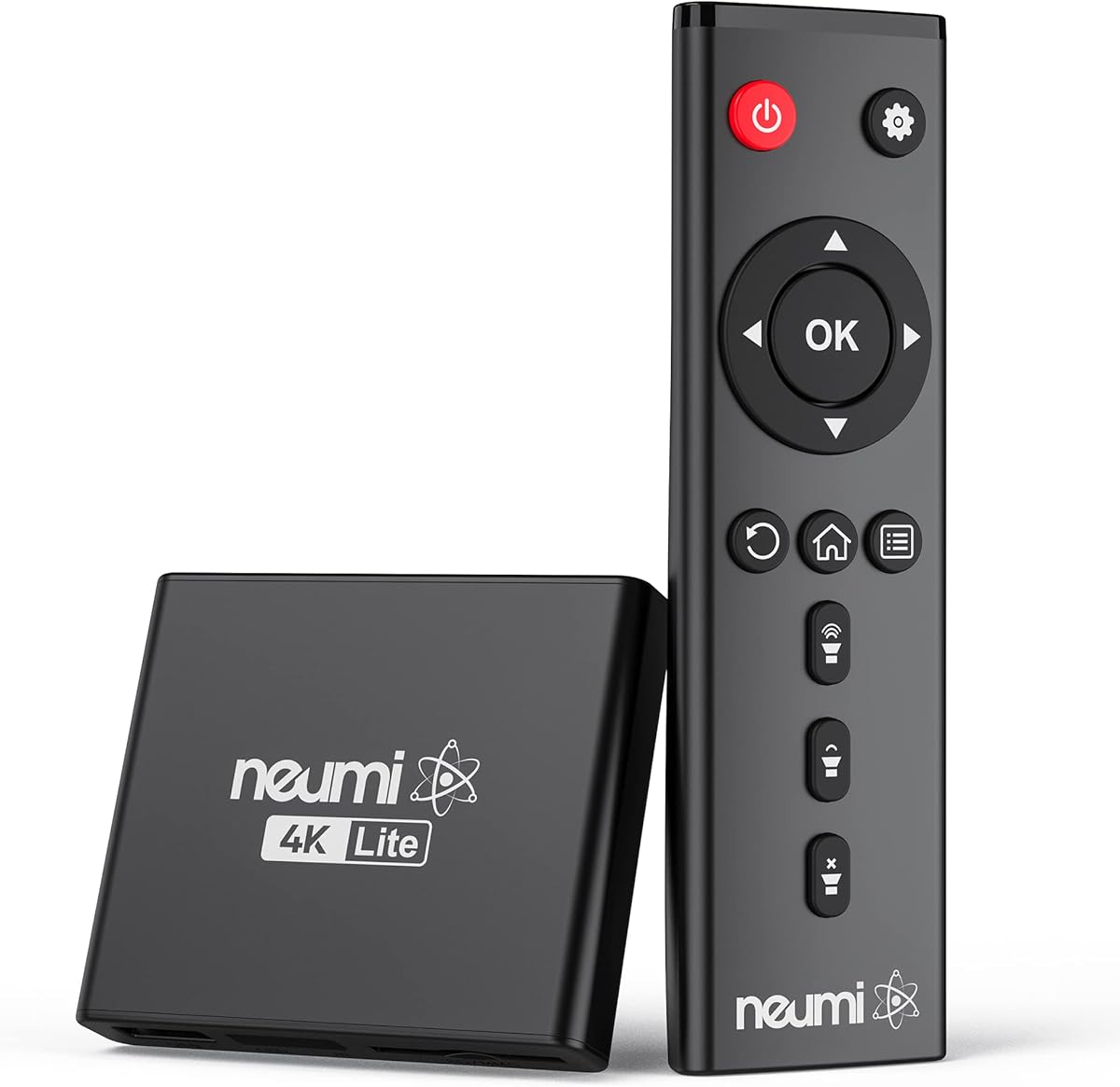
The NEUMI Atom 4K Lite is a compact powerhouse that stands out for its ability to interact with external triggers. With a 4.3 star rating it proves reliable for both home theater and specialized digital signage needs.
We may earn a commission when you buy through this link, at no additional cost to you.
Its standout quality is the trigger sensor input which allows you to play different videos when activated by a push-button or motion sensor. This feature transforms a standard player into an interactive display suitable for art galleries or museums.
While the sensors are sold separately the device handles 4K video at 60Hz and supports common file systems like FAT32 exFAT and NTFS. Its small footprint ensures it blends into any setup without drawing attention.
This player is best suited for users who need interactive capabilities or high refresh rate 4K playback. It balances power and compact design effectively for diverse applications.
Build an interactive display by connecting optional push-button or motion sensors to trigger specific video content on demand.
It feeds digital surround sound to home theater receivers and includes analog AV output for older TV compatibility.
We may earn a commission when you buy through this link, at no additional cost to you.
The ACEMAX player distinguishes itself by combining a media player with a 2.5-inch SATA HDD enclosure in one unit. This design allows you to install a hard drive internally for a self-contained offline media solution.
We may earn a commission when you buy through this link, at no additional cost to you.
Its key strength is the 4K@60Hz playback support with H.265 10bit decoding which ensures high-quality video output. The aluminum housing helps dissipate heat during extended playback sessions which is crucial for commercial signage use.
A trade-off is that a hard drive is not included meaning you must purchase and install a compatible SATA HDD separately. Additionally the user rating of 3.5 suggests some variability in performance or setup experience.
Buy this if you want a compact integrated solution for digital signage that does not rely on external cables for storage. It is ideal for retail displays where a clean setup is required.
This unit allows you to play videos music and photos from local storage without requiring Wi-Fi subscriptions or streaming apps.
Use the included infrared remote to navigate files and control playback though a clear line of sight is required.
We may earn a commission when you buy through this link, at no additional cost to you.
This 4K media player is built for home entertainment systems that demand high-quality audio and video processing. It holds a 4.0 star rating for its capability to handle 4K files at 30Hz with surround sound support.
We may earn a commission when you buy through this link, at no additional cost to you.
The device features dual USB ports that allow you to connect multiple devices although only one can be read at a time. It also supports vertical screen display which is useful for specific digital signage or portrait content needs.
While the 30Hz output limit is standard for many budget players the inclusion of optical output allows for better audio integration with external speakers. H.265 decoding ensures efficient file processing without excessive buffering.
Choose this player if you have a surround sound system and need flexible output options. It is well-suited for movie enthusiasts who want to play local files with immersive audio.
You can manage the media player to play songs to your speakers via optical or AV output to experience better audio effects.
It supports a single file up to 4GB on FAT32 or 30GB on NTFS allowing for large video files.
We may earn a commission when you buy through this link, at no additional cost to you.
Designed for both home and commercial use this player offers a broad range of video formats and output interfaces. Its 4.2 star rating reflects satisfaction with its ability to handle various media files including PPTs and videos.
We may earn a commission when you buy through this link, at no additional cost to you.
The standout feature is the support for multiple interface outputs including fiber optic VGA and AV which provides flexibility for different display setups. It supports H.265 decoding which improves playback efficiency and speed for high bitrate content.
While it offers 4K support it is capped at 30Hz and may require specific file directory placement for automatic playback on some media. This requirement adds a small step to setup but ensures smooth loop functionality.
This device is recommended for advertising or multimedia TV playback where versatility in connection types is required. It balances performance and cost effectively for small business displays.
This player is suitable for home entertainment systems and advertising media playback with support for photo and PPT loop playback.
The USB port can be connected to a HUB to add a keyboard and mouse for easier navigation and control.
We may earn a commission when you buy through this link, at no additional cost to you.
While not a media player this portable hard drive serves as an essential companion for any setup that relies on external storage. With a 4.7 star rating it is known for reliability and ease of use across Windows and Mac systems.
We may earn a commission when you buy through this link, at no additional cost to you.
Its standout quality is the high capacity within a small lightweight enclosure making it ideal for consumers on the go. The SuperSpeed USB 3.2 Gen 1 interface ensures fast data transfer speeds for large video files.
As a storage solution it does not decode or play media on its own so a separate player is required. However its plug-and-play expandability allows you to easily store and access vast amounts of photos videos and documents.
Purchase this drive to complement your media player system if you need significant storage space. It is perfect for backing up files or storing large media libraries for home or travel use.
The small lightweight design offers up to 6TB capacity making it the ideal companion for consumers on the go.
It features SuperSpeed USB 3.2 Gen 1 interfaces which provide fast data transfer for efficient file management.
We may earn a commission when you buy through this link, at no additional cost to you.
This device achieves a perfect 5.0 star rating by delivering stable 4K playback at 60Hz which is rare for budget players. It functions as both a digital media player and a 2.5-inch SATA HDD enclosure in one unit.
We may earn a commission when you buy through this link, at no additional cost to you.
Its key strength is the H.265 decoding which supports data rates up to 200Mbps ensuring smooth playback of high-quality video. The included Type-C cable allows you to transfer hard drive data to laptops easily.
While the hard drive is not included the integrated enclosure design provides a clean setup for digital signage or home theater use. It supports FAT32 exFAT NTFS and Mac formatted drives for broad compatibility.
Buy this unit if you need smooth 60Hz 4K performance and want an integrated storage solution. It is perfect for household video playback and commercial digital signage scenarios.
The media player supports stable 4K 60Hz playback and H.265 decoding for sharp ultra HD visuals via HDMI output.
It supports FAT32 exFAT NTFS and Mac formatted drives making it versatile for different operating systems.
We may earn a commission when you buy through this link, at no additional cost to you.
This 2-in-1 unit offers an integrated internal hard drive enclosure which eliminates the need for external drives if you install a SATA HDD. It holds a 3.8 star rating which indicates general satisfaction despite some minor drawbacks.
We may earn a commission when you buy through this link, at no additional cost to you.
The standout feature is the support for 4K playback at 60Hz and H.265 HEVC decoding which delivers smooth visuals for home theaters or offices. It includes a Type-C cable for transferring data between the drive and your laptop.
The main limitation is that the hard drive is not included which adds to the total cost of setup. Additionally some users may find compatibility issues with certain file systems or drive formats.
Choose this player if you need a versatile commercial signage solution that supports a wide range of file types. It is a strong value option for businesses wanting to display content without complex wiring.
The media player acts as an internal hard disk drive enclosure supporting 2.5 inch SATA HDD with expansion options.
It is perfect for restaurant menu boards lobby welcome videos and shopping malls with steady loop function support.
We may earn a commission when you buy through this link, at no additional cost to you.
This media player is designed for digital signage applications that require flexible installation orientations. It has a 3.0 star rating indicating mixed reviews but offers unique features like configurable video rotation for vertical or horizontal displays.
We may earn a commission when you buy through this link, at no additional cost to you.
Its standout quality is the ability to rotate video output by 90 180 or 270 degrees which is useful for specific signage layouts. It also supports auto playback and resume features for continuous content delivery without manual intervention.
The lower rating may stem from setup challenges or reliability issues reported by some users. Additionally remote batteries are not included which is a common inconvenience in this price range.
Buy this unit if you need a versatile solution for vertical screens or specific commercial displays. It supports a wide range of video formats and offers integrated storage capabilities.
Features include configurable video rotation of 90 180 or 270 degrees for flexible installation in various venues.
It plays a wide range of files including MKV MP4 AVI MOV and supports H.265 HEVC decoding for smooth playback.
We may earn a commission when you buy through this link, at no additional cost to you.
Selecting the right media player requires understanding key factors that impact performance and compatibility with your existing setup.
When choosing a player check whether it supports 4K resolution and the frame rate such as 30Hz or 60Hz. Higher frame rates provide smoother motion which is crucial for action content or digital signage loops.
Prioritize 4K 60Hz models if you have a modern high-refresh display to ensure seamless playback without stuttering.
Verify that the device supports the file system of your external drive such as FAT32 exFAT or NTFS. Some players may struggle with NTFS partitions if they are not fully configured.
Ensure the player can handle drives up to the capacity you plan to use whether it is 8TB or more for large video libraries.
Look for multiple output options like HDMI AV and Optical to match your TV or receiver capabilities. Older TVs may require composite AV output while modern systems rely on HDMI.
Choose a model with optical output if you want to route audio to a surround sound system for a better audio experience.
Advanced playback features such as loop resume and shuffle modes are essential for digital signage or home use. These allow the device to play content continuously without manual intervention.
Opt for a player that supports auto-play and resume if you intend to use it for unattended displays or recurring presentations.
Check which video codecs are supported including H.265 HEVC which is more efficient than H.264. Broad format support ensures you can play various file types without conversion.
Select a model that supports H.265 decoding to reduce bandwidth and ensure smooth playback of high-resolution files.
Metal housings are preferred for extended use as they help dissipate heat during long playback sessions. This is particularly important for commercial applications where devices run for hours.
Look for aluminum alloy or metal enclosures to ensure stability and longevity under continuous operating conditions.
For interactive displays look for players that support trigger sensor inputs to start videos via motion or buttons. This feature is useful for museums or exhibits where on-demand content is required.
Consider a model with trigger inputs if you need to activate specific content based on external events or user interaction.
Some devices combine a media player with a 2.5-inch SATA HDD enclosure allowing for an all-in-one storage solution. This simplifies setup for digital signage where external drives are cumbersome.
Choose a unit with an integrated enclosure if you prefer a compact design and do not need to store the drive separately.
Connect your external hard drive or USB storage to the player using the compatible USB port and ensure the drive is formatted correctly for the device. Once connected plug the player into your TV via HDMI or AV output and power it on.
Use the included remote or wireless mouse to navigate the menu and select the media file you wish to play. For digital signage set the device to auto-play or loop mode to ensure content runs continuously without manual starts.
Keep the device in a well-ventilated area to prevent overheating especially if it runs for long periods. Regularly check for firmware updates to ensure compatibility with new file formats and performance improvements.
No most external hard drive media players operate offline by reading files directly from connected USB drives or SD cards. This makes them ideal for locations without reliable internet access or for privacy-conscious users who prefer local playback.
Most modern players support FAT32 exFAT and NTFS file systems which are common for external drives. It is advisable to check the specific product details to ensure compatibility with your formatted storage device.
Yes many of the reviewed players support 4K resolution playback either at 30Hz or 60Hz. Ensure your TV and HDMI cable also support 4K to fully benefit from the higher resolution output.
To set up auto-play format your USB drive with the supported file system and place files in the root directory. Use the player's menu to enable continuous playback or loop modes for unattended displays.
Some players include composite AV output which allows connection to older analog TVs. However audio may still need to be routed through an external speaker system if the TV does not support audio output.
Not all models require a separate drive as some include an integrated 2.5-inch SATA HDD enclosure. If the unit does not have built-in storage you will need to connect an external USB drive to play content.
Many supported can read PPT files and display them on connected screens making them useful for office presentations. Check the specific compatibility list to ensure PPT support is included before purchasing.
H.265 HEVC is the preferred codec for efficient 4K playback as it offers better compression and quality. Choose a player that explicitly supports H.265 decoding to ensure smooth performance on high-resolution files.
The Micca 4K Ultra-HD player offers the best balance of simplicity and performance for most users. It handles 4K resolution smoothly and provides essential features like dual USB and Micro SD readers.
If you need specific features like 60Hz output or integrated storage the ACEMAX and NEUMI models provide strong alternatives. Choose based on whether you prioritize resolution frame rate or internal storage capabilities.
Always verify current availability and compatibility with your existing TV and storage drives before buying. These devices offer powerful offline media solutions for home entertainment and commercial displays alike.